
CFL001 - Lighting G-TECHNOLOGY - Free user manual and instructions
Find the device manual for free CFL001 G-TECHNOLOGY in PDF.


| Product Type | Work Light / Flood Light |
| Model Number | CFL001 |
| Brand | G-Technology |
| Voltage | DC 20V Max |
| Power Output | 20 Watts |
| Brightness (High) | 2000 Lumens |
| Brightness (Low) | 900 Lumens |
| Battery Type | Li-Ion, 20V Max (purchased separately) |
| Charger | Sold separately |
| Work Time (Max) | 5 hours |
| LED Type | Non-replaceable |
| Adjustable Angle | Yes, via carry handle and adjustment knobs |
| Intensity Settings | 2 (High and Low) |
| Power Switch | Top-mounted, two positions |
| Intended Use | Domestic only |
| Warranty | 2 years (registration required) |
| Maintenance | Clean lens with non-abrasive cleaner; discharge monthly |
| Safety Features | Overheat protection; do not stare at light; keep away from children |
| Battery State Indicator | 3-bar LED indicator on battery |
| Storage Temperature | Below 80°F (27°C), dry and frost-free |
| Charging Temperature | 0°C to 45°C |
| Disposal | Recycle battery and product separately |
Frequently Asked Questions - CFL001 G-TECHNOLOGY
User questions about CFL001 G-TECHNOLOGY
0 question about this device. Answer the ones you know or ask your own.
Ask a new question about this device
Download the instructions for your Lighting in PDF format for free! Find your manual CFL001 - G-TECHNOLOGY and take your electronic device back in hand. On this page are published all the documents necessary for the use of your device. CFL001 by G-TECHNOLOGY.
USER MANUAL CFL001 G-TECHNOLOGY
Model number: CFL001

OPERATING MANUAL
IMPORTANT SAFEGUARDS:

IMPORTANT: READ ALL INSTRUCTIONS BEFORE USE. RETAIN INSTRUCTIONS FOR FUTURE REFERENCE.

WARNING: Basic safety precautions should always be observed when using an electrical appliance to reduce the risk of fire, electrical shock or serious injury.
Personal Safety:
- Do not look directly at the light source or direct the light at your eyes.
- The product should not be positioned whereby it can be stared into for a prolonged period at a distance of less than 2.9m.
- Never operate the product if it is damaged.
- Keep the product and all accessories away from hot surfaces.
- Never modify the product in any way.
Electrical safety:
- Only use batteries and chargers supplied by Gtech.
- Never modify the charger in any way.
- The charger has been designed for a specific voltage. Always check that the mains voltage is the same as that stated on the rating plate.
- A charger that is suitable for one type of battery pack may create a risk of fire when used with another battery pack; never use the charger with another appliance or attempt to charge this product with another charger.
- A damaged or entangled charger cord increases the risk of fire and electric shock.
- Do not abuse the charger cord.
- Never carry the charger by the cord.
- Do not pull the cord to disconnect from a socket; grasp the plug and pull to disconnect.
- Don't wrap the cord around the charger to store.
- Keep the charger cord away from hot
surfaces and sharp edges.
- The supply cord cannot be replaced. If the cord is damaged the charger should be discarded and replaced.
- Avoid body contact with earthed or grounded surfaces, such as pipes. There is an increased risk of electric shock if your body is earthed or grounded.
- Do not handle the charger or product with wet hands.
- Do not let children use or charge the product.
- Ensure users have an understanding of how to use, maintain and charge the product.
- Do not charge the battery pack outside.
- Before charging check the power supply and charger cables for signs of damage or ageing.
Battery safety:
- Liquid ejected from the battery may cause irritation or burns.
• In an emergency situation contact professional help immediately. - Do not touch any liquid that leaks from the battery.
- Wear gloves to handle the battery and dispose of immediately in accordance with local regulations.
- Shorting the battery terminals may cause burns or fire.
- When the battery pack is not in use, keep it away from paper clips, coins, keys, nails, screws or other small metal objects that could make a connection from one terminal to another.
- When you dispose of the appliance
remove the battery and dispose of the battery safely in accordance with local regulations.
- Batteries must be recycled or disposed of properly. Do not dispose of batteries with regular waste, municipal waste stream or burn, as batteries may leak or explode. Do not open, short circuit or mutilate batteries as injury may occur.
- Do not use the appliance if any part is damaged or defective.
- Do not attempt to use the charger with any other product or to charge this product with any other charger.
- This product uses Li-Ion batteries. Do not incinerate batteries or expose to high temperatures, as they may explode.
- Do not charge the battery when the surrounding air temperature or the battery pack is below 0°C or above 45°C.
• After prolonged use or in high temperatures the battery may become warm. Allow the product to cool for 30 minutes before charging. - Use only with recommended Gtech battery.
- Leaks from battery cells can occur under extreme conditions. If the liquid gets on your skin wash immediately with soap and water. If the liquid gets into your eyes, flush them immediately with cold water for a minimum of 10 minutes and seek urgent medical attention.
- Do not store the battery outside for prolonged periods of time, especially over the winter months.
Maintenance and storage
- Use only the manufacturer's recommended replacement parts and accessories.
- When not in use, store out of the reach of children.
- The LEDs of the product are not replaceable; when they reach the end of life the product must be replaced.
Intended Use:
• This product is intended for DOMESTIC USE ONLY.
WARNING:
- Do not use solvents, or polishes to clean the outside of the appliance; wipe clean with a dry cloth.

Thank you for choosing Gtech
"Welcome to the Gtech family. I started Gtech to create sensible, easy to use products that do a great job, and hope you get many years of trouble-free performance from your new product."

Nick Grey – Inventor, owner of Gtech
Make a note of your product serial number code for future reference. You can find this on the underside of the product once the battery has been removed.


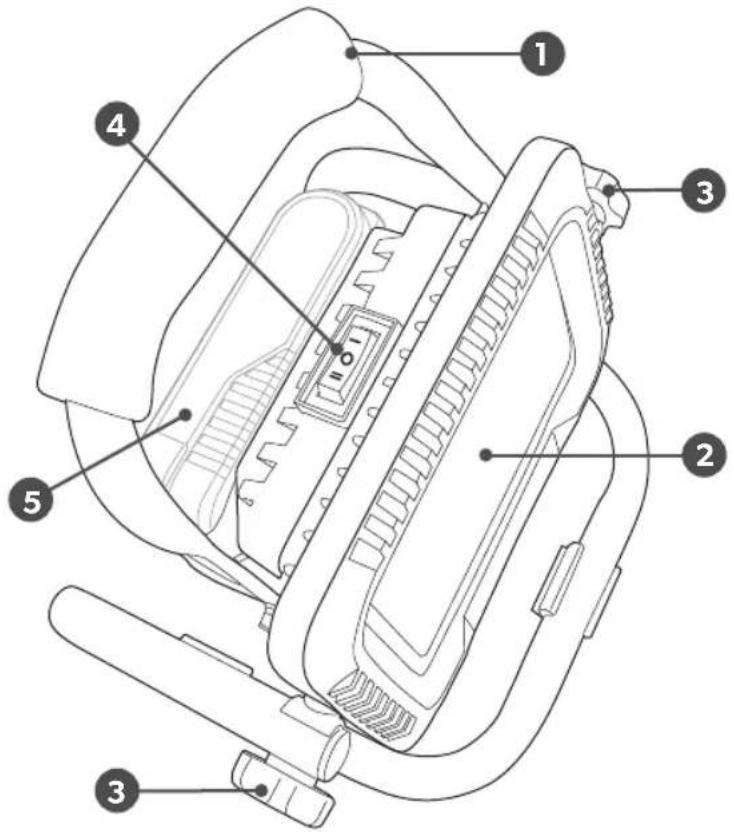
About your product
1 Carry handle
2 LEDs
3 Adjustment knobs
4 Power switch
5 Battery (purchased separately)
Installing and removing the battery

To install, simply insert the battery pack.

Make sure the latch on the battery snaps in place and battery pack is secured to the tool.

To remove, depress the latch...

...and pull out the battery pack.
Operation
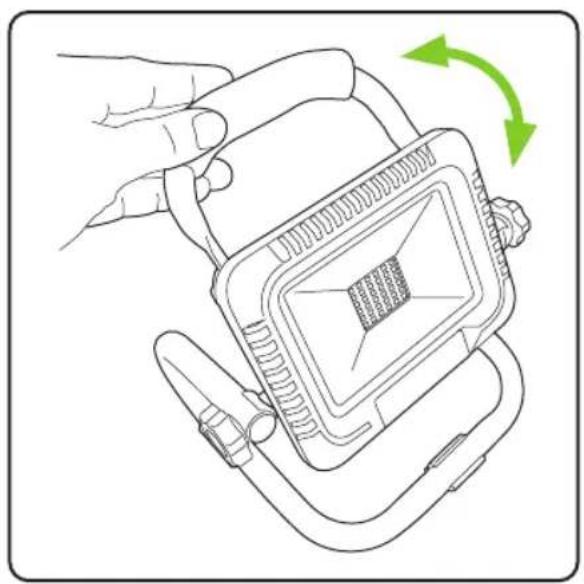
Use the carry handle to adjust the light to the desired angle.

Tighten the adjustment knobs to secure the light in the correct position.

The power switch is on the top of the light. There are two intensity settings.
Charging the battery

To charge the battery, line up the slot of the battery with the slot of the charger and slide into place. The charger is sold separately.

The battery indicator light should turn from green to red when the battery is charging. When the indicator light has turned green the battery should be fully charged.
Battery state of charge indicator
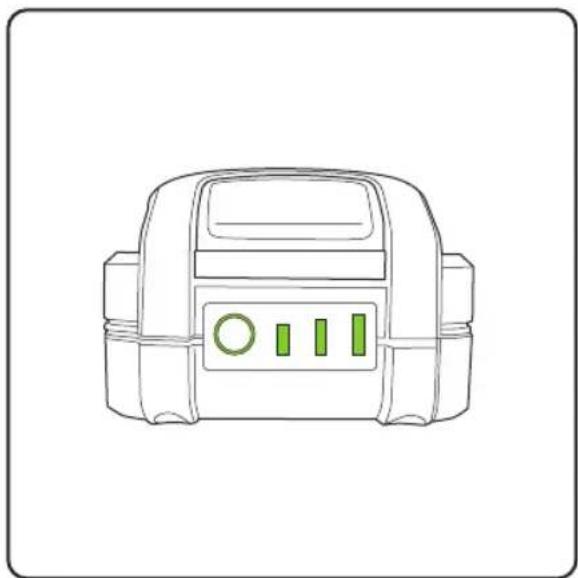
The state of charge of the battery can be tested by pressing the button. Three bars indicates a full charge, two bars a partial charge, one bar low charge.
WARNING:
Allow battery to cool down before charging if the battery is hot after continuous use.
BATTERY
All batteries wear out over time due to normal wear and tear. Do not attempt to disassemble and repair the battery, as this could cause serious burns especially when wearing rings and jewellery. For the longest possible battery life, we suggest the following:
- Remove the battery from the charger once fully charged.
- Store the battery away from moisture and at a temperature below 80°F.
- Store the battery with at least a 30% – 50% charge.
- If a battery has been stored for six months or more, charge the battery as normal.
Maintenance
Your product requires very little care and maintenance. Simply clean the lens regularly with a non-abrasive cleaner, we recommend the work light to be completely discharged every one month and fully recharged again. Only store with a fully charged battery and top-up the charge from time to time if stored for a long time (we recommend the work light to be completely discharged every three month and fully recharged again). Store in a dry and frost-free place, the ambient temperature should not exceed 40° C.
Safety warning for Flood Light
This is not a toy; children should not permit to use it. This is a DIY product, all electronic parts fixed already, any intention of opening work-light or changing work-light design is prohibitive unless a professional electrician.
Do not attempt to replace or change or the diode lights! If the protective glass is cracked or broken, it must be replaced before the work light can be used again.
Troubleshooting
| The product isn’t working The battery may have cut out due to excessive use to prevent overheating. Allow the product to cool down before re-using. |
| The battery heats up during use This is normal. Allow the battery to cool down regularly to prevent damage of the battery. |
| The battery and charger heat up during charging This is normal. It is advisable to remove the battery from the charger once it is fully charged. |
Product support
If these initial tips do not solve your problem we please visit our support area where you can find troubleshooting help including online manuals, FAQs and how-to-videos, as well as genuine spares and replacement parts compatible with your product.
Visit: www.gtech.co.uk/support




support@gtech.co.ukLive chat supportOnline How to Videos
TECHNICAL SPECIFICATION
| Voltage DC 20V Max | |
| Work Time: Max 5 hrs | |
| Output power 20 Watts | |
| Brightness 2000 Lumens High | 900 Lumens |


WARRANTY – REGISTRATION
Visit www.gtech.co.uk/warrantyregistration to register your product to ensure that we have all the information required to provide you with quick and efficient support.
You will need your product's serial code.

If you purchased directly from Gtech, your details are already registered and your 2-year warranty will start automatically.

If you purchased from an authorised Gtech retailer, please register your warranty within 3 months. You will need to provide proof of purchase to support any claim(s) against your warranty.
WARRANTY - TERMS AND CONDITIONS
If your product is within its warranty and has a fault that cannot be resolved from the troubleshooting section or online support, please do the following:
- Contact our Gtech Customer Care Helpline on UK: 08000 308 794, who will go through any troubleshooting with you to identify the fault.
- If your fault can be resolved by a replacement part, this will be sent to you free of charge.
- Following troubleshooting, if your product needs to be replaced, we will arrange collection of your faulty product for inspection, and delivery of a replacement product free of charge.
Your product is guaranteed against material or manufacturing faults for 2 years from the date of purchase (or the delivery date if this is later) subject to the following terms and conditions:
WHAT ISN'T COVEREDSUMMARY
The guarantee becomes effective at the date of purchase (or the date of delivery if this is later). If a product is repaired or replaced during the warranty period, the warranty period is not started again.
- You must provide proof of delivery/purchase before any work can be carried out on the product. Without this proof, any work carried out will be chargeable. Please keep your receipt or delivery note.
- All work will be carried out by Gtech or its authorised agents.
- Any parts which are replaced will become the property of Gtech.
• The repair or replacement of your product is under guarantee and will not extend the period of guarantee. - The guarantee provides benefits which are additional to and do not affect your statutory rights as a consumer.
Gtech does not guarantee the repair or replacement of a product as a result of:
• Normal wear and tear (e.g. batteries).
• Use of consumables
- Accidental damage, faults caused by negligent use or lack of care and maintenance, misuse, neglect, careless operation or handling of the product which is not in accordance with operating manual.
- Use of the product for anything other than the normal domestic household purposes.
- Use of parts and accessories which are not Gtech genuine components.
- Faulty installation (except where installed by Gtech)
- If it is modified in any way.
• Repairs or alterations carried out by parties other than Gtech or its authorised agents.
• Purchasing your product from an unofficial third party (i.e not from Gtech or an official Gtech retailer.
- If you are in doubt as to what is covered by your guarantee, please call the Gtech Customer Care Helpline on UK: 08000 308 794
International orders are subject to a delivery charge for both faulty and non faulty products.
The symbol indicates that this product is covered by legislation for waste electrical and electronic products (2012/19/EU)
When the product has reached the end of its life, it and the Li-Ion battery it contains should not be disposed of with general household waste. The battery should be removed from the product and both should be disposed of properly at a recognised recycling facility.
Call your local council, civic amenity site, or recycling centre for information on the disposal and recycling of electrical products. Alternatively visit www.recycle-more.co.uk for advice on recycling and to find your nearest recycling facilities.

Gtech
Grey Technology Limited
Brindley Road, Warndon, Worcester WR4 9FB
email: support@gtech.co.uk
telephone: 08000 308 794
www.gtech.co.uk
CPN4618
- IMPORTANT SAFEGUARDS
- IMPORTANT: READ ALL INSTRUCTIONS BEFORE USE. RETAIN INSTRUCTIONS FOR FUTURE REFERENCE
- PERSONAL SAFETY
- ELECTRICAL SAFETY
- BATTERY SAFETY
- MAINTENANCE AND STORAGE
- INTENDED USE
- WARNING
- THANK YOU FOR CHOOSING GTECH
- ABOUT YOUR PRODUCT
- INSTALLING AND REMOVING THE BATTERY
- CHARGING THE BATTERY
- BATTERY STATE OF CHARGE INDICATOR
- BATTERY
- MAINTENANCE
- SAFETY WARNING FOR FLOOD LIGHT
- PRODUCT SUPPORT
- WARRANTY – REGISTRATION
- WARRANTY - TERMS AND CONDITIONS
- WHAT ISN'T COVEREDSUMMARY
- GTECH
- GREY TECHNOLOGY LIMITED
Brand : G-TECHNOLOGY
Model : CFL001
Category : Lighting