
ABT-1244BR - Bluetooth speaker AIWA - Free user manual and instructions
Find the device manual for free ABT-1244BR AIWA in PDF.


| Product Type | Bluetooth Speaker |
| Brand | Aiwa |
| Model | ABT-1244BR |
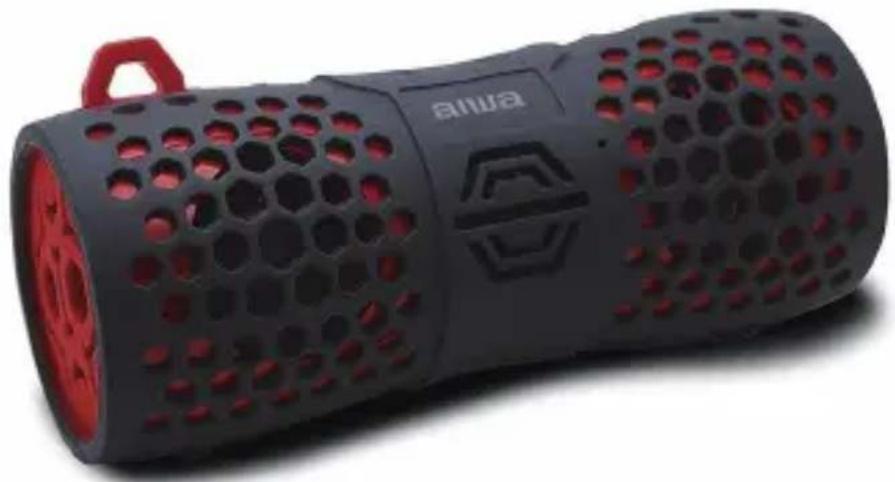
| Color | Black with Red Hexagonal Perforated Design |
| Dimensions | 180 mm x 70 mm x 68 mm |
| Battery Type | Rechargeable Lithium-ion, 1000mAh |
| Charging Input | DC 5V, 500mA via Micro USB |
| Charging Time | Approximately 5 hours |
| Playback Time | Up to 6 hours at 80% volume |
| Bluetooth Version | 5.0 |
| Bluetooth Range | Up to 10 meters (33 feet) |
| Water Resistance | IP66 (dust and water resistant, with port cover closed) |
| Microphone | Built-in for hands-free calls |
| Aux Input | 3.5mm AUX-in port |
| Controls | ON/OFF, Play/Pause/Phone, Volume +/-, Previous/Next Track |
| LED Indicators | Blue (Bluetooth), Green (AUX), Red (Charging) |
| Included Accessories | Micro USB charging cable, 3.5mm audio cable, User manual, Warranty card |
| Safety Features | Auto power-off after 10 minutes no audio in Bluetooth mode, low battery beep |
Frequently Asked Questions - ABT-1244BR AIWA
User questions about ABT-1244BR AIWA
0 question about this device. Answer the ones you know or ask your own.
Ask a new question about this device
Download the instructions for your Bluetooth speaker in PDF format for free! Find your manual ABT-1244BR - AIWA and take your electronic device back in hand. On this page are published all the documents necessary for the use of your device. ABT-1244BR by AIWA.
USER MANUAL ABT-1244BR AIWA
BLUETOOTH ADVENTURE SPEAKER
ABT-1244BR / ABT-1244BBL
natural_image
Black and red hexagonal perforated device with 'aiwa' branding, no visible text or symbols on bodyInstruction Manual
Important Safety Instructions
Warning: To avoid electrical shock, do not dismantle. Refer all servicing to qualified service personnel.
- Please read all of the instructions carefully and retain for future reference.
- When using electrical appliances, basic safety precautions should always be followed.
- This product is not a toy! Children should be supervised to ensure that they do not play with the appliance.
- There are no user-serviceable parts inside. Do not attempt to repair by yourself.
- Do not immerse the unit in water or other liquids.
- Do not insert foreign objects into any opening on the unit.
- Do not play music at excessive volume levels as this can cause hearing loss or damage the unit.
- Keep the unit away from flammable materials.
- Do not expose batteries to heat or fire as they may explode.
- Do not dispose of batteries in your household waste. Contact your local council for information on disposal or recycling.
Important note on outdoor use
This speaker is IP66 rated – dust and water resistance. This IP rating is only applicable when the silicone port cover is closed. Please make sure the cover is closed and secure before using in wet environments.
Important: DO NOT submerge the speaker in water. If the speaker gets wet, dry it thoroughly before using it again.
Description:

1.ON/OFF button
2.Play/Pause/Phone
3.MIC
4.Previous/Volume –
5.Next/Volume +
6.Red LED(Charging)
7.Green LED(AUX)
8.Blue LED(Bluetooth)
9. Micro USB Charging Port
10.AUX in Port
Included:
1.Speaker
2. Micro USB Charging Cable
3.3.5 mm Audio Cable
4.User Manual
5.Warranty Card
Specifications
Bluetooth Version : 5.0
Supported Profiles: A2DP, HFP, AVRCP
Bluetooth Range: 33ft (10m)
Playback time: 6 hours at 80% volume
Dimensions: 180 mm x 70 mm x 68 mm
Battery: 1000mAh rechargeable lithium battery
Charging: DC 5V=500mA
Operation
Power On
Press and Hold "ON/OFF" button 2 seconds to power ON, the Blue LED will start to flash.
If an Aux (3.5 mm) cable is connected to the unit, the Blue LED will turn off, and the Green LED will stay illuminated, indicating that the unit is in Aux-In mode.
Power Off
Press and Hold "ON/OFF" button 2 seconds to power OFF
Bluetooth Mode
- The unit automatically enters 'pairing mode' when it is powered on.
- Place your Bluetooth-enabled device within 10 metres of the speaker. Navigate to the Bluetooth setting menu on your device and search for new devices. The Bluetooth name for this speaker is 'Aiwa ABT-1244'.
- After the unit has paired and connected, it will reconnect automatically when the unit is powered on and the device is in range.
Note: - You can press and hold the "√" button to unpair your current device and search for new devices in Bluetooth mode.
Note: The speaker powers off automatically in 10 minutes if there is no audio in Bluetooth mode.
Begin Streaming Music
Press " √" to start playing music.
Press and Hold" + " 2 seconds to play the next track.
Press and Hold" —" 2 seconds to play previous track.
Press either " + " or " —" for volume control.
Note: You will hear an audio alert when the maximum / minimum volume level has been reached.
Making and Receiving Phone Calls
When the unit is connected and paired to a Bluetooth-enabled device like a smartphone, the unit allows you to make or receive phone calls with its built-in microphone.
Press "▽" to accept a call.
To end a call press" √".
To reject a call, press and hold "√" for 2 seconds.
Aux-In Mode
Plug in the supplied 3.5 mm cable into the unit. Connect the other end to the AUX out port on your device. The Green LED will only illuminate when in "Aux" mode.
Please note music and volume can be controlled on your device.
Charging
Attach the USB cable to the unit, and plug into any USB charger. If the unit is completely discharged, it will take approximately 5 hours to fully charge at 5V/500mA.
The Red LED will illuminate during charging. When charging is complete, the Red LED will turn off.
Note: There will be a beep when the battery is low and needs to be recharged.
LED Status
| Blue LED flashing & Blue LED solid | Bluetooth Mode |
| Green LED on solid | Aux Mode |
| Red LED Charging | |
| Red LED off | Fully charged |
Troubleshooting
| Unit doesn’t connect to device | Speaker needs to be connected/re-paired to device |
| A tone is heard every few seconds | Speaker needs to be charged |
| Unit will not power on | Speaker needs to be charged |
| Unit doesn’t control track(s)/volume | Speaker needs to be in Bluetooth mode for full control |
| Unit distorts at high volume | The device volume needs to be lowered |
aiwa
Brand : AIWA
Model : ABT-1244BR
Category : Bluetooth speaker