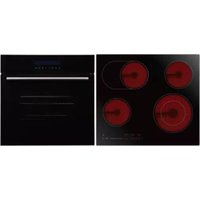
BPD270EC - Oven Bellini - Free user manual and instructions
Find the device manual for free BPD270EC Bellini in PDF.


| Product Type | Built-in Electric Oven |
| Brand | Bellini |
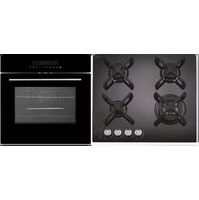
| Model (Builders Pack) | BPD270EC |
| Oven Model | BDOM609TCX |
| Dimensions (H x W x D) | 595 x 595 x 575 mm |
| Net Weight | Approx. 34.5 kg |
| Usable Capacity | 70 L |
| Electrical Connection | 220-240 V, 50/60 Hz |
| Max Power Rating | 3.0 kW |
| Number of Functions | 9 |
| Functions | Oven Light, Defrost, Bottom Element, Conventional Cooking, Convention with Fan, Radiant Grill, Combined Grill, Combined Grill with Fan, Rear Heater with Fan |
| Temperature Range | 50 - 250 °C (depending on function) |
| Control Type | Touch controls with LED display |
| Door | 3-layer glass door, removable |
| Safety Features | Child lock, auto power off, residual heat indicator |
| Accessories Included | Baking tray, grill rack, screws, rubber stoppers |
| Installation | Built-in; requires cabinet cut-out (see manual) |
| Cleaning | Do not use steam cleaners; clean with damp cloth and mild detergent |
| Warranty | 3 years in-home warranty |
Frequently Asked Questions - BPD270EC Bellini
User questions about BPD270EC Bellini
0 question about this device. Answer the ones you know or ask your own.
Ask a new question about this device
Download the instructions for your Oven in PDF format for free! Find your manual BPD270EC - Bellini and take your electronic device back in hand. On this page are published all the documents necessary for the use of your device. BPD270EC by Bellini.
USER MANUAL BPD270EC Bellini
natural_image
Interior view of a dark oven with horizontal light strips and a digital display (no visible text or symbols)60cm 9 Function Touch Oven
Model No.
BDOM609TCX FINELINE: 5103647 Aus Only
BDOM609TCX-F
INCLUDED IN BUILDERS PACKS:BPD170EG & BPD270EC
Thank you
Thank you for choosing Bellini Appliances.
Bellini prides itself on ‘affordable living’ making sure there is no compromise in your favourite room ... The Kitchen
All Bellini appliances carry a 3 year In Home warranty,
be sure to retain your installation and user manual and
receipt.
For all warranty and technical queries please contact
1300 373 199
Content
Safety instructions---- 2
Product description---- 4
Installation----7
Start Using your Oven----9
Troubleshooting----12
Maintenance and cleaning ----13
Warranty---- 15
Important Safety Instructions
This manual explains the proper installation and use of your oven, please read it carefully before using even if you are familiar with the product. The manual should be kept in a safe place for future reference. In case of failure, only the Authorised Technical Service may repair this oven. Otherwise the guarantee will be null and void. All Bellini Appliances are for domestic use only.
General Warnings
If the supply cord is damaged, the cord must be replaced by the manufacturer, its service agent or similarly qualified persons in order to avoid a hazard.
◆ This product has not been designed for any uses other than those specified in this booklet.
◆ This appliance must not be used as a space heater.
◆ In order to avoid fire, the appliance must be kept clean and vents kept unobstructed.
◆ Do not spray aerosols within the vicinity of the appliance during operation.
◆ Do not store flammable materials in or under the appliance, e.g. aerosols.
◆ Do not line the bottom of the oven with foil or cookware.
◆ Always use gloves when handling hot items inside the oven.
◆ Always turn the grill off immediately after use as fat left behind may catch fire.
Do not leave the appliance unattended when cooking. Oils and fats may catch fire due to overheating or boiling over.
◆ Do not put pans weighing over 15Kgs on the opened door of the oven.
Do not use the appliance in the event of a technical fault. Any faults must be fixed by an appropriately qualified and authorised person.
In the event of any incident caused by a technical fault, disconnect the power and report the fault to the service centre to be repaired.
◆ The rules and provisions contained in this instruction manual should be strictly observed.
Do not allow anybody who is not familiar with the contents of this instruction manual to operate the appliance.
Child Safety
This appliance is not intended for use by persons (including children) with reduced physical, sensory or mental capabilities, or lack of experience and knowledge, unless they've been given supervision or instruction concerning use of the appliance by a person responsible for their safety.
◆ Children should be supervised to ensure that they do not play with the appliance.
During use this appliance becomes hot. Care should be taken to avoid touching hot surfaces, e.g. oven door, heating elements.
◆ Accessible parts will also become hot when in use. To avoid burns and scalds children should be kept away.
Installation, Cleaning & Servicing
The appliance must be installed only by an authorised person in compliance with the instructions provided. Incorrect installation may cause harm to persons, animals or may damage property.
Before using the appliance, ensure that all packing materials are removed from the appliance.
◆ In order to avoid any potential hazard, the enclosed installation instructions must be followed.
◆ Ensure that all specified vents, openings and air spaces are not blocked.
◆ The panels adjacent to the oven must be made of heat-resistant material.
◆ Cabinet with a veneer exterior must be assembled with glues which can withstand temperature of up to 120°C.
To reduce the risk of fire, do not place or install this unit in areas where the ventilation or circulation ducts may become blocked. Make sure there are at least 10mm of space between the back of your oven and the wall. Keep some distance on each side of your oven that you can use that distance flowing installing instructions.
The unit's power cord must be connected to a properly grounded and protected, 220-240V electrical outlet. Always use ground fault protection where required by the electrical code.
When transporting or storing the unit, keep it in a dry location, free from dust, excessive vibration or other factors, which may damage the unit.
Do not operate oven with a damaged cord, plug or if the oven has malfunctioned or has been dropped or damaged in any manner. Return oven to authorised service facility for repair.
◆ Only authorised personnel should carry out servicing. (Certificate of Compliance to be retained)
◆ Always ensure the appliance is switched off before cleaning or replacing parts.
◆ Do not use steam cleaners, as this may cause moisture build-up.
◆ Always clean the appliance immediately after any food spills.
◆ THIS APPLIANCE MUST BE EARTHED.
◆ To maintain safe operation, it is recommended that the product be inspected every five years by an authorised service person.
Oven
During use the appliance becomes hot. Care should be taken to avoid touching the hot surfaces inside the oven.
◆ Switch the appliance off before removing the oven light glass for globe replacement.
◆ To avoid an accident, ensure that oven shelves and fittings are always inserted into the appliance in accordance with the instructions.
◆ Do not use the door as a shelf.
◆ Do not push down when the oven door is open.
Grill
Do not cover the grill insert with foil, as fat built up may catch on fire.
◆ Always keep the grill dish clean as any build up may catch on fire.
◆ Do not leave the grill on unattended.
◆ To avoid fire, ensure that grill trays and fittings are always inserted into the appliance in accordance with the instructions.
◆ Do not place thick portions of food under the grill. Foods may curl, catch and ignite.
◆ Accessible parts may become hot when grill is in use. Children should be kept away.
Environmental Hints
◆ Use the oven efficiently, by cooking many trays of food at the same time.
◆ Cook 2 trays of scones, small cakes or sausage rolls at the same time.
◆ Select the correct shelf location for food being cooked.
◆ Do not open the oven door more than necessary.
◆ After the oven is turned off it retains heat for some time.
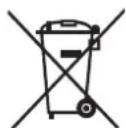
This product must not be disposed together with domestic waste. This product has to be disposed at an authorised place for recycling of electrical and electronic appliances.
By collecting and recycling waste, you help save natural resources, and make sure the product is disposed in an
environmental friendly and healthy way.

Product Description

| A/B | LED display ———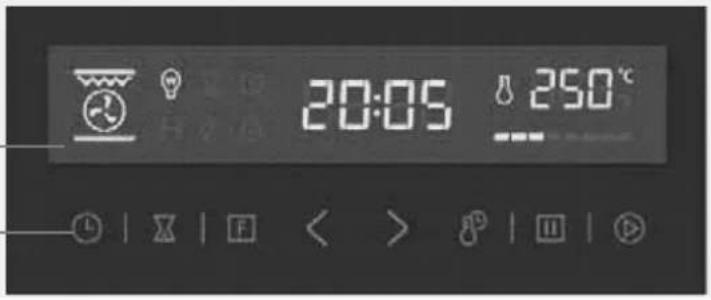 Function Pad — Function Pad — |
| Clock setting buttonAlarm Timer/Delay start setting buttonFunction setting buttonDecrease setting buttonIncrease setting buttonTemperature/Cooking Time setting buttonStop buttonStart button | |
| C | Door Handle |
| D 3 Layers Glass Door | |
| Accessory Name Picture Quantity | ||
| Baking tray 1 pair | 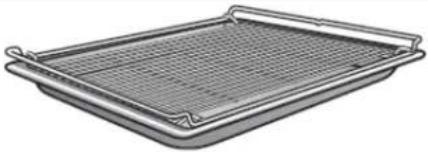 | |
| Grill rack | 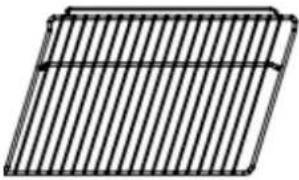 | 2 |
| Screws(ST4x30 and Distant holder |   | 2 pairs |
| Rubber stopper |  | 2 |
Technical Specifications
| product dimensions (h x w x d) mm | net weight | usable capacity | electrical connection | max. power rating |
| 595 x 595 x 575 | Approx. 34.5Kg | 70 litres | 220-240V/50Hz-60Hz | 3.0kW |
Installation
WARNING!
Please follow the points below when installing the appliance
Use An Authorized Person
◆ As stated in the local municipal building codes and other relevant statutory regulations:
◆ Wiring connections must be in accordance with AS/NZS 3000 Wiring Rules and any particular conditions of the local authority.
◆ Refer to data plate for rating information. The data plate is positioned at the side of cavity.
◆ A functional switch should be provided near the appliance in an accessible position. Refer to AS/NZS 3000 clause 4.7.1.
◆ Wiring should be protected against mechanical failure. Refer to AS/NZS 3000 clause 1.5.
◆ A means of disconnection with a contact separation of at least 3mm must be supplied in the fixed wiring.
◆ Disconnect the power plug of the appliance from the power point when conducting maintenance or repairs to the unit
This Appliance Must Be Properly Earthed
◆ Do not lift the appliance by the door handles.
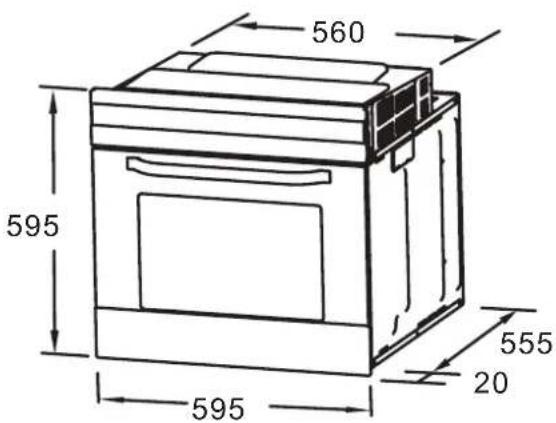
◆ Prepare the cupboard opening to match your appliance measurements. (See diagrams).
◆ Slide appliance in to cabinet cavity, ensuring supply cable is not obstructed (kinked, jammed or twisted).
◆ To prevent tipping or dislodging of the appliance, secure appliance to the cabinet with 2 screws (provided), through the dedicated holes in the appliance frame.
- Where the appliance is built into a cabinet, the cabinet material must be capable of withstanding 120°C. Installation into low temperature tolerant cabinetry (E.g. vinyl coated) may result in deterioration of the low temperature coating by discoloring or bubbling.
The cabinet panels to the oven must be heat resistant. With veneered wood units, glues must be resistant to a temperature of 120^ C.
If the appliance is to be installed adjacent to vinyl wrapped surfaces, use an installation kit
available from the vinyl-wrap supplier.
◆ GSM cannot accept responsibility for damage caused by installation into low temperature tolerant cabinets.
◆ After installation, test and ensure the appliance operates correctly before handing it over to the customer.
CAUTION!
Where the appliance is connected via power supply cable to a power point, the installed power point must remain accessible after appliance installation
A dedicated power circuit is recommended for the unit but not required. Additional electrical appliances on the same circuit may exceed the current (amperage) rating for that circuit. If after the installation of your unit the circuit breaker trips or the fuse fails on a repeated basis, then a dedicated circuit will likely be required.
WARNING!
To avoid any potential hazard, you must follow our instructions when you install your appliance. Failure to install the appliance correctly could invalidate any warranty or liability claims and lead to prosecution.
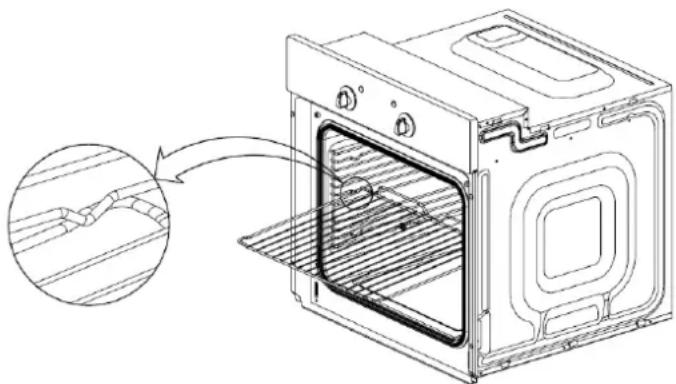
Install the shelf
natural_image
Line drawing of an oven with a close-up inset showing internal structure (no text or symbols)- Pay attention to high temperature, you may need to wear gloves if it is hot inside.
- Always slide shelves into the layer with stopper.
Hard Wired Appliances :
When making the mains supply conductor connections to the terminal block within the terminal box, please ensure that minimum clearances are being maintained between individual conductors and conductors/connectors to the adjacent metal surfaces of the terminal box itself, where possible add heat shrink sleeves to any bare conductor end/connectors prior to securing.
Cut-out dimensions

Remark:
1. Only plus deviations are admissible for all dimension.
2. The cabinet is not include the power switch or socket.
NOTE: The number of a accessories included depends on the particular appliance purchased.
Secure the oven to cabinet
◆ Fit oven into the cabinet recess.
◆ Open the oven door.
◆ Secure the oven to the kitchen cabinet with two distance holders "A" which fit the holes in the oven frame and fit the two wood screws "B".

Start Using Your Over
Notes: When using oven for the first time, you need to burn the oven in for approximately 1 Hour at 240 Degrees to remove any smells from the oven. During this time light smoke may emit from the oven (This is normal), so please ventilate kitchen by opening windows during this time. Ensure that all packaging material is removed before first starting oven.
Clock setting
The oven has 24 hours clock, only in standby mode, the clock can be set. To set the clock, please follow below steps:
- Press clock setting button " Ⓤ" once.
- Press "<" or "> " button to set hour of clock time.
- Press clock setting button "once again.
- Press "<" or "> " button to set minute of clock time.
- Press clock setting button “☐” again to confirm clock time setting. After clock setting, display shows the time, and oven resume to standby mode.
Notes:
-If you have set the clock time, when cooking, you can check the clock time by press “⑧once. The display will show clock time for 3 seconds.
-When setting clock time, if press Stop " "Button, current clock time setting would be canceled. Display would show previously clock setting, if not yet set clock time, will show "0:00".
-Long press on "<" or "> " button can fast backward or forward for clock time setting.
Alarm timer setting
The oven Alarm timer function could help to remind you in the setting time. To set alarm timer, please follows below steps:
- Press Alarm Timer/Delay start setting button “☒” once, “0:00” and alarm timer icon “☒” shows in display.
- Press Increase setting button "<" or decrease setting button "> " to set Alarm timer time.
- Press start button " ☑to confirm alarm timer setting.
Notes: The oven buzzer will sound for 10 times when reach the setting time. During Alarm timer setting, you can cancel it by press stop button “ ” once. After confirm Alarm timer setting, you can cancel it by press stop button “ ” twice.
Safety Child Lock setting
This function is to disable oven button, to avoid children altering selected programmer in unconscious.
Press start “” and stop “” together for about 4 seconds, oven child lock will efficient. Oven buzzer sounds once, and child lock icon “” illuminates in display. During this function, all press of oven button invalid.
To cancel the child lock, press start "and stop " together for about 4 seconds again. The oven
buzzerers would sounds once, and child lock icon “☐” disappears.
Notes:
-Child lock function is only in order to make no efficient practice for oven buttons; it wouldn't cancel the clock time, cooking or any other setting.
-When child rock or standby mode, if there is no efficient practice for oven in 10 minutes. Oven display will auto turn off to save electricity. The programmer still works during it and then will be resumed by press start key and stop key only.
-When standby, if press start button “*” for 3 seconds, oven display would turn off to save electricity and then will be resumed by press start key and stop key only.
| Function Description | |
| 0 Switch off function | |
Oven Light | Enables the user to observe the progress of cooking without opening the door |
Defrost | The circulation of air at room temperature enables quicker thawing of frozen food, (Without the use of any heat). It's a gentle but quick way to speed up the defrosting time and thawing of ready-made dishes and cream filled produce etc. |
Bottom Element | A concealed element in the bottom of the oven provides a more concentrative heat to the base of food without browning It's ideal for slow cooking dishes such as casseroles, stews, pastries and pizzas where a crispy base is desired. The temperature can be set within range 60-120°C. The default temperature is 60°C. |
Conventional cooking | The top and bottom work together to provide conventional cooking.The oven needs to be pre-heated to the required temperature, and is idea for single items, such as large cakes. Best results are achieved by placing food in the center of the oven. The temperature can be set within the range of 50-250°C. The default temperature is 220°C. |
Convention with fan | Combination of the fan and both heating element provides more even heat penetration, saving up to30-40% of energy. Dishes are lightly browned on the outside and still moist on the inside.Note: This function is suitable for grilling or roasting big pieces of meat at a higher temperature. The temperature can be set within the range of 50-250°C. The default temperature is 220°C. |
Radiant grill | The inner grill element switches on and off to maintain temperature.Best results can be obtained from using the top shelf for small items and lower shelves for large items. The temperature can be set within the range of 180-240°C.The default temperature is 210°C. |
Combined Grill(Grill & Top element) | The inside radiant element and top element are working.The temperature can be set within the range of 180-240°C. The default temperature is 210°C. |
Combined grill with fan | The inside radiant element and top element are working with fanThe temperature can be set within the range of 180-240°C. The default temperature is 210°C. |
Rear heater with fan | An element around the convection fan provides an additional source of heat for convection style cooking. In this mode the fan automatically comes on to improve air circulation within the oven and creates an even heat for cooking.The temperature can be set within the range of 50-240°C. The default temperature is 180°C. |
Cooking setting
Only when oven in standby mode, one can set cooking function follows below steps:
- Press function setting button “F” to set the cooking function you want. Press Function setting button “F” successively, you can switch for different function, follows sequence

- Select the functions you want, then press "<" or "> " button to adjust cooking time. After that, you can also
adjust cooking temperature setting, by press button Temperature/Cooking Time “” switch to cooking temperature setting, then press “<” or “>” button to adjust cooking temperature under this cooking function.
- Press start button " " to confirm setting and start cooking.
Note:
-If do not adjust setting for cooking time and temperature, directly press start button "you can also start cooking with default setting temperature and cooking time.
- In “and” function, can’t adjust cooking temperature.
-If the temperature of oven cavity not yet reaches the temperature setting, temperature setting icon in display will flashing. After temperature of oven cavity reach oven cooking temperature setting, oven buzzer sounds once, and temperature setting icon stop flashing, keep on illuminate.
During cooking, you can adjust cooking time and cooking temperature follows below steps:
- Press Temperature/Cooking Time setting button “ 🎨 ” once, the temperature indicator “ 🎨 ” illustrate in display. Then press “<” or “>” button to adjust cooking temperature.
- Press Temperature/Cooking Time setting button “ 📄 ” another time, the temperature indicator “ 📄 ” disappear in display. Then press “<” or “>” button to adjust cooking time.
- After above adjustment for cooking temperature or cooking time, please remember to press start button "to confirm the setting. If there is no confirmation after above adjustment in 5 seconds, programmer will resume to previously setting.
Notes:
Press for Temperature/Cooking Time setting button “ ⚫ ”, could switch between temperature setting and Cooking Time setting. During cooking, if press stop button “ ”once, cooking will be suspended. If press stop button twice, you can cancel current cooking setting.
Delay Start Function
The oven could be set to auto start under selected cooking function in the setting time. To set delay start function, first you need to set the clock time.
After clock time setting, you can use this setting follows below steps:
- Press Alarm Timer/Delay start setting button “☒” twice, the delay start function icon “☒” and “End” will show in display.
- Press "<" or "> " button to adjust the hours you want to for delay start, then press Alarm Timer/Delay start setting button "☒". After that, press "<" or "> " button to adjust the minutes you want to for delay start, to finish delay start time setting.
- Press Function setting button “☐” to select cooking function for delay start. The delay start function icon “☒” cooking function icon, cooking time and cooking temperature will illuminate in display.
-
Press "<" or "> " button to adjust cooking time. After that, you can also adjust cooking temperature setting, by press button Temperature/Cooking Time setting button " " switch to cooking.
-
Press start button “ ⬆ ” to confirm delay start function. The delay start function icon “ ✕ ” and clock time will illuminate on display.
Note:
-The time set for auto start, must be after current clock time!
-After delay start setting, you can check the setting auto start time, by press clock time button “◎”, the auto start time will illuminate for 3 seconds.
-Function can't be set together with delay start function.
-After delay start setting, if press stop button “ ” once, would pause delay start setting; When pause the delay start setting, press start button “ ” once could resume delay start function. While if the delay start setting time already passed, delay function would not work when press start button “ ”
-After delay start setting, if press stop button “” twice, would pause delay start setting;
-Delay start function and Alarm reminder function, can't not be set together.
Troubleshooting
In the event of an emergency, you should:
◆ Switch OFF all controls of the appliance
◆ Disconnect the mains plug
◆ Call the service centre
Some minor faults can be fixed by referring to the instructions given in the table below. Before calling the customer support centre or the service centre check the following points that are presented in the table.
| faults causes remedies | ||
| The upper crust is dark and the lower part too pale | Not enough heat from the bottom | - Use the natural convection position- Use deeper cake tins- Lower the temperature- Put the cake on a lower shelf |
| The lower part is dark and the upper crust too pale | Excessive heat from the bottom | - Use the natural convection position- Use lower side tins- Lower the temperature- Put the cake on a higher shelf |
| The outside is overcooked and the inside is not cooked enough | Temperature is too high | - Lower the temperature and increase the cooking time |
| The outside is too dry even though it looks cooked | Temperature is too low | - Increase the temperature and reduce the cooking time. |
| The appliance does not work | Break in power supply | Check the household fuse box, if there is a blown fuse replaces it with a new one. |
| The oven lighting does not work | Bulb is loose or damaged Tighten up or replace the blown bulb (see chapter Cleaning and Maintenance) | |
| Display show Er-1 | Sensor open circuit | Call Service center |
| Display show Er-2 | Sensor short circuit | Call Service center |
| Display show Er-3 | Meat probe short circuit | N/A for this model |
Maintenance and Cleaning
WARNING!
Before cleaning your oven, or performing maintenance, disconnect it from the power supply.
◆ Do not use steam cleaners.
Do not line the oven bottom with aluminium foil, as the consequent accumulation of heat could compromise the cooking and even damage the enamel.
◆ To protect against the risk of electrical shock, do not immerse the unit, cord or plug in water or other liquid or sprinkle water to clean the appliance!
Do not clean the appliance when it is still hot! The inside and external surface of the oven should preferably be cleaned with a damp cloth when it has cooled down.
◆ Wash all accessories in hot sudsy water or in a dishwasher, wipe dry with a paper or cloth towel.
If you use your oven for an extended period of time, condensation may form. Dry it using a soft cloth.
Stainless steel
All grades of stainless steel can stain, discolour or become greasy. You must clean these areas regularly by following the procedures below, if you want your appliance to look its best, perform well and have a long life.
◆ Care must be taken when wiping exposed stainless steel edges, they can be sharp!
◆ The front frame around the oven can be cleaned with stainless steel cleaners if it becomes soiled or discoloured.
◆ The stainless steel should only be cleaned with warm water and a mild detergent.
◆ DO NOT use abrasive cleaners or harsh solvents.
NOTE: Make sure you follow the polish or brushing lines in the stainless steel
Glass
◆ Glass surfaces on doors and control panels are best cleaned immediately after soiling.
◆ A damp cloth may help remove baked on food deposits.
◆ Oven cleaners can be used to remove stubborn marks and stains.
The glass door on this appliance is made from a tough, durable material that withstands heating and cooling without breaking.
◆ However, it must be remembered that it is GLASS, it may break. Treat it accordingly!
Do not use harsh abrasive cleaners or sharp metal scrapers to clean the oven door since they can scratch the surface, which may result in shattering of the glass.
Oven
◆ Always keep your appliance clean. Ensure fats and oils do not accumulate around elements, burners or fans.
◆ Always keep the oven dish, baking trays and grill dish inserts clean, as any fat deposits may catch fire.
◆ Always wrap your meats in foil or an oven roasting bag to minimise cleaning. Any polyunsaturated fats can leave a varnish-like residue which is very difficult to remove.
Grill
◆ Always keep the grill dish and grill insert clean, as any fat deposits may catch fire.
Replacement Of The Oven Light Bulb
WARNING!
In order to avoid the possibility of an electric shock ensure that the appliance is disconnected from the power supply before replacing the bulb.
◆ Set all control knobs to the "OFF" position (● / 0) and disconnect the mains plug.
◆ Unscrew and wash the lamp cover and then wipe it dry.
◆ Unplthe light bulb from the socket, replace the bulb with a new one-a high temperature bulb (300°C) with the following parameters:
-voltage230 V
-power 25 W
-G9
◆ Insert the bulb in, making sure it is properly inserted into the ceramic socket.
◆ Screw the lamp cover.

natural_image
Diagram showing three stages of a lamp or bulb assembly: top view, middle view, and bottom view with a circular arrow indicating rotation (no text or symbols)Door Removal
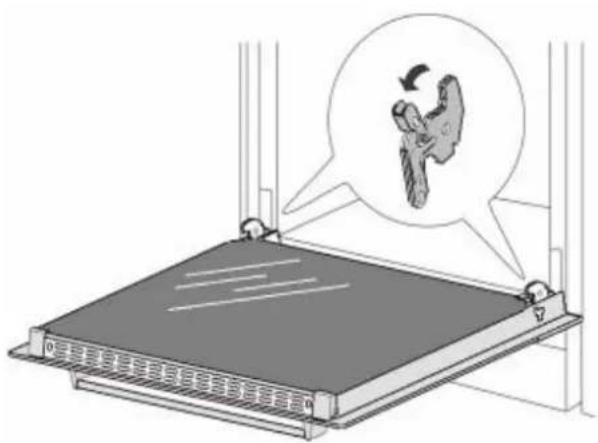
In order to obtain easier access to the oven chamber for cleaning, it is possible to remove the door. To do this, tilt the safety catch part of the hinge upwards. Close the door lightly, lift and pull it out towards you. In order to fit the door back on to the oven, do the inverse. When fitting, ensure that the notch of the hinge is correctly placed on the protrusion of the hinge holder. After the door is fitted to the oven, the safety catch should be carefully lowered down again. If the safety catch is not set it may cause damage to the hinge when closing the door.
Removal Of The Internal Glass Panel
Slide glass toward direct 1 and directly lift the glass as direction 2, then slide out glass carefully.

natural_image
Technical line drawing of a rectangular frame with two labeled arrows indicating direction (no text or symbols present)WARRANTY
1.1 In this warranty:
1.1.1 Australian Consumer Law means the law as set out in Schedule 2 of the Competition and Consumer Act 2010;
1.1.2 Company means GSM Retail Australia Pty Ltd ABN 53 007 682 475 of 142-144 Fullarton Road, Rose Park SA 5067. Telephone 1300 373 199. Email admin@gsmretailaust.com.au;
1.1.3 Consumer means a "consumer" as that term is defined in Section 3 of the Australian Consumer Law as the original purchaser of a Belliniproduct;
1.1.4 Consumer Guarantees means the guarantees under the Australian Consumer Law;
1.1.5 You means the Consumer.
1.2 Nothing in this warranty affects any person's rights under the Australian Consumer Law. The benefits to any Consumer under this warranty are in addition to the rights and remedies available under any Consumer Guarantees.
1.3 Subject to the other clauses of this warranty, the Company warrants to the Consumer that the Bellini product will be free of manufacturing defects and will perform to the Company's specifications.
1.4 The benefit of this warranty extends only to the Consumer as original purchaser of a Bellini product which is installed in a domestic household area.
*The in Home warranty does not apply to Commercial and or industrial usage. * Please See 1.7.7 for additional information
1.5 This warranty commences on the date of purchase of the Bellini product by the Consumer and continues for the benefit only of the Consumer until the expiry of three (3) year (Warranty Period).
1.6 If within the Warranty Period a manufacturing defect is discovered in the Bellini product or it fails to perform to the Company's specifications as a result of some defect in materials, components or workmanship (Defect) then the Company will, at its option, repair the Bellini product or supply a replacement Bellini product free of charge. A replacement Bellini product may differ from the original product purchased by the Consumer.
1.7 This warranty will not apply to any Bellini product:
1.7.1 Installed by any person other than a qualified tradesperson; or
1.7.2 Subjected to misuse, neglect, negligence or accidental damage; or
1.7.3 Operated in any way contrary to any operating or maintenance instructions; or
1.7.4 Improperly handled, installed or maintained; or
1.7.5 Altered or modified prior to or after installation; or
1.7.6 Damaged directly or indirectly by power surges, electrical storm damage or connection to incorrect power supply
1.7.7 Industrial and or Commercial usage is inclusive of staff areas in office/shop environments, hotel/motel or other similar accommodation or rental type properties including Bed and Breakfast establishments.
The Australian Consumer Law requires the inclusion of the following statement with this warranty:
Our goods come with guaranteed that cannot be excluded under the Australian Consumer Law. You are entitled to a replacement or refund for a major failure and for compensation for any other reasonably foreseeable loss or damage. You are also entitled to have the goods repaired or replaced if the goods fail to be of acceptable quality and the failure does not amount to a major failure.
IN ORDER TO MAKE A CLAIM UNDER THIS WARRANTY THE CONSUMER MUST CALL 1300 373 199 (AUSTRALIA) OR 0508 123 108 (NEW ZEALAND) TO CONNECT TO THE NEAREST AUTHORISED CENTRE
1.8 You must provide proof of your purchase of the Bellini product and the date of purchase in order to obtain the benefit of this warranty.
1.9 If you live outside the service area of the Company or one of its service agents, this warranty does not cover the cost of transport of the Bellini product for service nor the service agent's traveling costs to and from your home.
1.10 If you are required to transport the Bellini product to the Company or its service agent, you must ensure it is safely disconnected by a qualified tradesman and securely packed and insured. The Company does not accept any responsibility for loss or damage of the Bellini product prior to it being received by the Company or its service agent.
1.11 You will be responsible for all costs of returning a Bellini product to the Company and for redelivery of the Bellini product by the Company (whether it is the original or a repaired and/or a replacement Bellini product) and for any other expenses you incur in claiming under this warranty.
1.12 The Company or its service agent will examine any Bellini product and if the Company determines that it is defective through no fault of the Owner and is otherwise undamaged, the Company will repair or replace the Bellini product in accordance with this warranty.
DO NOT SEND IN THIS WARRANTY
Fill out the following details and file with your purchase invoice.
RETAIN & FILE WITH YOUR RECEIPT
Your Purchase Receipt/Invoice is proof of date of purchase. If you are unable to establish the date of purchase, or if the fault is not covered by this warranty, or if the product is found to be in working order, you will be required to bear all service call charges.
GSM Retail Australia Pty Ltd reserves the right to discontinue items, modify designs and change specifications without incurring obligation.
Whilst every effort is made to ensure that descriptions, specifications and other information in this publication is correct, no warranty is given in respect thereof and the company shall not be liable for any errors therein.
Purchased from:
Co. Name:
Address:
Date of Purchase:
Serial number:
NOTE: Consistent with our continuing product development policy, improvements may have been made which render the contents of this packaging slightly different to that shown.
FOR WARRANTY SERVICE CALL 1300 373 199 (AUSTRALIA) OR 0508 123 108 (NEW ZEALAND) TO CONNECT YOU TO THE NEAREST AUTHORISED SERVICE CENTRE

Gerard Sourcing & Manufacturing
GSM RETAIL AUSTRALIA PTY LTD
The GSM Retail Australia Pty Ltd Group Companies has a policy of continual improvement throughout the product range. As such the unit contained within may differ slightly from the unit illustrated on the pack.
MADE IN CHINA for the GSM Retail Australia Pty Ltd. Group Companies

Bellini
INSTALLATION & OPERATION INSTRUCTIONS

natural_image
Four circular red heat exchanger or stove burner with concentric rings, shown against a black background (no text or symbols visible)60cm Built In Ceramic Cooktop
Model No.
BDCM604T
BDCM604T-F
Only In Builders Pack BPD270EC FINELINE: 5103596 Aus only
Thank you
Thank you for choosing Bellini Appliances.
Bellini prides itself on ‘affordable living’ making sure there is no compromise in your favourite room ... The Kitchen
All Bellini appliances carry a 3 year In Home warranty,
be sure to retain your installation and user manual and
receipt.
For all warranty and technical queries please contact
1300 373 199
Content
Safety instructions---- 2
Product description---- 4
Installation----5
Start using your appliance---------8
Maintenance 13
Warranty---- 14
Safety instructions
This manual explains the proper installation and use of your appliance, please read it carefully before using even if you are familiar with the product. The manual should be kept in a safe place for future reference. In case of failure, only the Authorised Technical Service may repair this hob. Otherwise the guarantee will be null and void. All Bellini Appliances are for domestic use only.
Warning
General safety
- The appliance may only be installed and connected by trained, registered service engineers.
● Built-in appliances may only be used after they have built in to suitable built-in units and work surfaces that meet standards. - In the event of faults with the appliance or damage to the glass ceramic(cracks, scratches or splits), the appliance must be switched off and disconnected from the electrical supply, to prevent the possibility of an electric shock.
● Repairs to the appliance must only be carried out by trained registered service engineers. - The technical and identification data for the hob figure on the reference plate fixed to the appliance.
- This reference plate must be consulted before making the electrical connections.
- The electrical connections must be made by specialist aware to the legal and regulatory, requirements in each country.
- If the cable is damaged in any way it must be replaced by the manufacturer or after sale service or by authorized technical staff, to avoid hazard.
● Power line connection: The power cord should be connected in compliance with the relevant standard, to a 3×20A omni-polar circuit breaker. - If the appliance is being connected directly to the mains an Omni-polar circuit-breaker must be installed with a minimum opening of 3mm between contacts.
Correct use
- People (including children) who, because of their physical, sensory or mental capabilities or their inexperience or ignorance are not able to use the device safely, should not use this device without supervision or instruction by a responsible person.
- The appliance is not intended to be operated by means of an external timer or separate remote-control system.
- This appliance should be used only for normal domestic cooking and frying of food.
● The appliance must not be used as a work surface or as a storage surface. - Additions or modifications to the appliance are not permitted.
- Do not place or store flammable liquids, highly inflammable materials or fusible objects (e.g. plastic film, plastic, aluminum) on or near the appliance.
● After being used for a long time, the corresponding heating zone of the ceramic hotplate is still hot. Never touch the ceramic surface to avoid burning. - Do not heat an empty pan on the appliance.
Children's safety
- This appliance can be used by children aged from 8 years and above and persons with reduced physical, sensory or mental capabilities or lack of experience and knowledge if they have been given supervision or instruction concerning use of the appliance in a safe way and understand the hazards involved. Children shall not play with the appliance. Cleaning and user maintenance shall not be made by children without supervision.
- The cooking zones will become hot when you cook. Therefore, always keep small children away from the appliance.
- The appliance is not intended for use by young children or infirm persons without supervision.
● Young children should be supervised to ensure that they do not play with the appliance.
- To avoid small children and pets unintentionally switching the appliance on, we recommend activation of the child safety device.
Safety during use
- Remove stickers and film from the glass ceramic.
- There is the risk of burns from the appliance if used carelessly.
- Cables from electrical appliances must not touch the hot surface of the appliance or hot cookware.
● Overheated fats and oils can ignite very quickly. Warning! Fire hazard! - Switch the cooking zones off after each use.
- Users with implanted pacemakers should keep their upper body at least 30 cm from ceramic cooking zones that are switched on.
● Risk of burns! Do not place objects made of metal,
such as knives, forks, spoons and saucepan lids on the cooking surface, as they can get hot.

natural_image
Symbol of crossed-out food items with a crossed-out X (no text or labels)Safety when cleaning
- For cleaning, the appliance must be switched off and cooled down.
- For safety reasons, the cleaning of the appliance with steam jet or high pressure cleaning equipment is not permitted.
How to avoid damage to the appliance
● The glass ceramic can be damaged by objects falling onto it.
- The edge of the glass ceramic can be damaged by being knocked by the cookware.
- Cookware made of cast iron, cast aluminum or with damaged bottoms can scratch the glass ceramic if pushed across the surface.
- Objects that melt and things that boil over can burn onto the glass ceramic and should be removed straightaway.
- Do not use the cooking zones with empty cookware or without cookware.
- To avoid damaging cookware and glass ceramics, do not allow saucepans or frying pans to boil dry.
- The ventilation gap of 5mm between the worktop and front of the unit underneath it must not be covered.

DISPOSAL: Do not dispose this product as unsorted municipal waste. Collection of such waste separately for special treatment is necessary.
By ensuring that this appliance is disposed of correctly, you will help prevent any possible damage to the environment and to human health, which might otherwise be caused if it were disposed of in the wrong way.
The symbol indicates that it may not be treated as normal household waste. It should be taken to a collection point for the recycling of electrical and electronic goods.
This appliance requires specialist waste disposal. For further information regarding the treatment, recover and recycling of this product please contact your local council, your household waste disposal service, or the shop where you purchased it.
For more detailed information about treatment, recovery and recycling of this product, please contact your local city office, your household waste disposal service or the shop where you purchased the product.
Product description
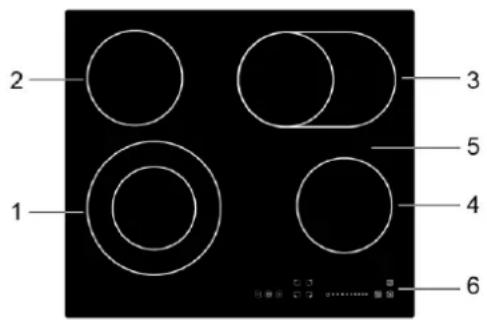
- max. 1000/2200 W zone
- max. 1200 W zone
- max. 1100/2000 W zone
- max. 1200 W zone
- Glass plate
- Control panel
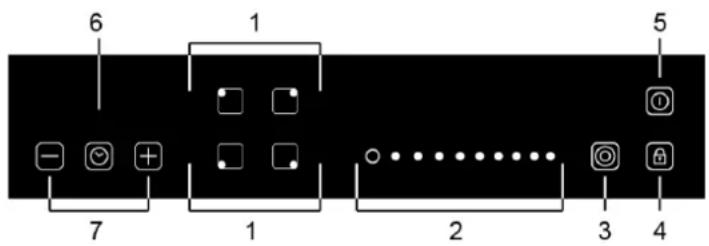
- Heating zone selection controls
- Power slider touch control
- Dual zone control
- keylock control
- ON/OFF control
- Timer control
- Timer regulating controls
| Accessory Name | Picture(for reference only, physical unit maybe different) | Quantity |
| User Manual | 1 | |
| Fixing Bracket | 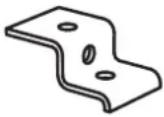 | 4 |
| Screw M 4x10 |  | 4 |
Technical Specifications
| Product Dimensions (h x w x d) mm | Approx. Net Weight | Electrical Connection | Rated Input Power | Power Level |
| 55x590x520 | 8.6Kg | 220-240V~380-415V~50Hz 60Hz | 6000-7200W | 9 |
Installation
- Selection of installation equipment
● Cut out the work surface according to the sizes shown in the drawing.
● For the purpose of installation and use, a minimum of 50mm space shall be preserved around the hole. - Be sure the thickness of the work surface is at least 30mm. Please select heat-resistant work surface material to avoid larger deformation caused by the heat radiation from the hotplate. As shown below:

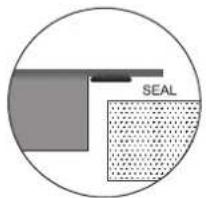
| L(mm) | W(mm) | H(mm) | D(mm) | A(mm) | B(mm) | X(mm) |
| 590 | 520 | 55 | 51 | 560+4+1 | 490 +4+1 | 50 mini |
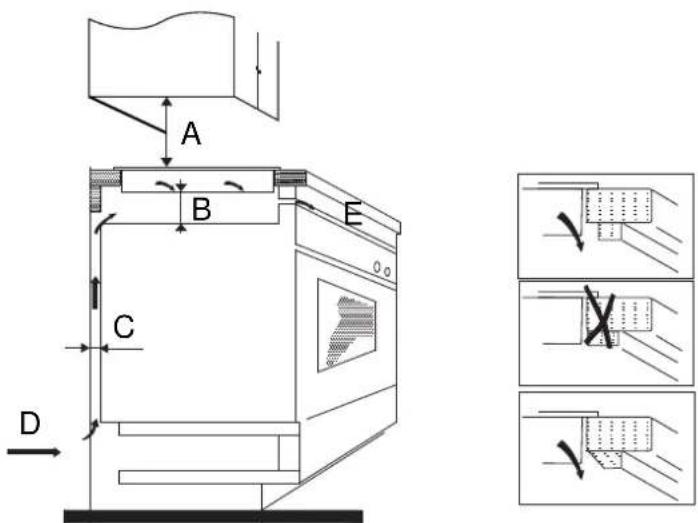
Under any circumstances, make sure the ceramic cooker hob is well ventilated and the air inlet and outlet are not blocked. Ensure the ceramic cooker hob is in good work state. As shown below

Note: The safety distance between the hotplate and the cupboard above the hotplate should be at least 760mm.
• Before locating the fixing brackets
- The unit should be placed on a stable, smooth surface (use the packaging). Do not apply force onto the controls protruding from the hob.
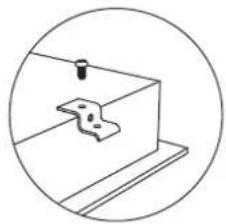
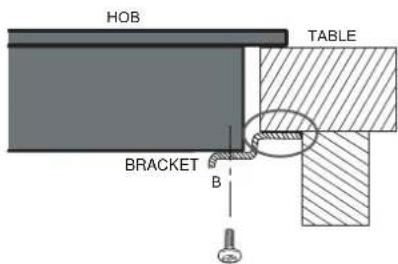
● Fix the hob on the work surface by screw four brackets on the bottom of hob (see picture) after installation.

natural_image
Simple line drawing of a mechanical clamp or bracket with a bolt, enclosed in a circle (no text or symbols)| A | B | C | D |
| screw | bracket | Screw hole | base |
Adjust the bracket position to suit for different work surface's thickness.

Cautions
- The ceramic cooker hob must be installed by qualified personnel or technicians. We have professionals at your service. Please never conduct the operation by yourself.
- The ceramic cooker hob shall not be mounted to cooling equipment, dishwashers and rotary dryers.
- The ceramic cooker hob shall be installed such that better heat radiation can be ensured to enhance its reliability.
- The wall and induced heating zone above the work surface shall withstand heat.
- To avoid any damage, the sandwich layer and adhesive must be resistant to heat.
- A steam cleaner is not to be used.
Connecting the hob to the mains power supply
The power supply should be connected in compliance with the relevant standard, or a single-pole circuit breaker. the method of connection is shown below.
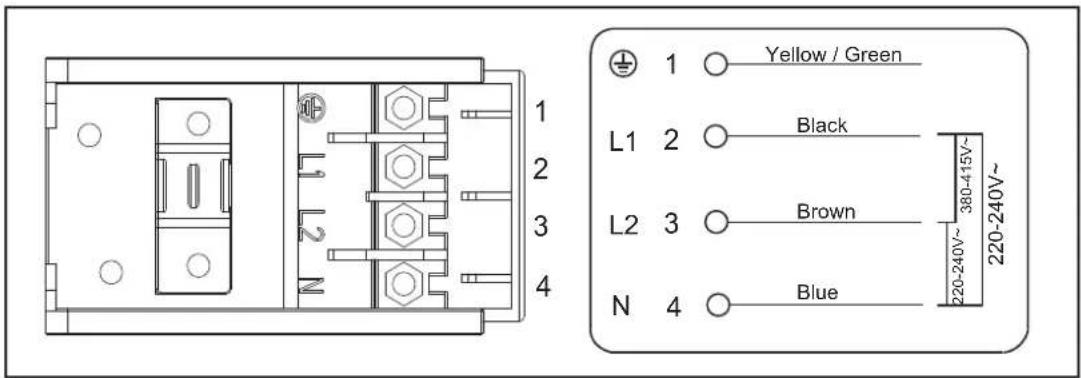

If the total number of heating unit of the appliance you choose is not less than 4, the appliance can be connected directly to the mains by single-phase electric connection, as shown below.

- If the cable is damaged or needs replacing, this should be done by an after-sales technician using the proper tools, so as to avoid any accidents.
- If the appliance is being connected directly to the mains supply, an omnipolar circuit breaker must be installed with a minimum gap of 3mm between the contacts.
- The installer must ensure that the correct electrical connection has been made and that it complies with safety regulations.
- The cable must not be bent or compressed.
- The cable must be checked regularly and only replaced by a properly qualified person.
Hard Wired Appliances :
When making the mains supply conductor connections to the terminal block within the terminal box, please ensure that minimum clearances are being maintained between individual conductors and conductors/connectors to the adjacent metal surfaces of the terminal box itself, where possible add heat shrink sleeves to any bare conductor end/connectors prior to securing.
Start using your appliance
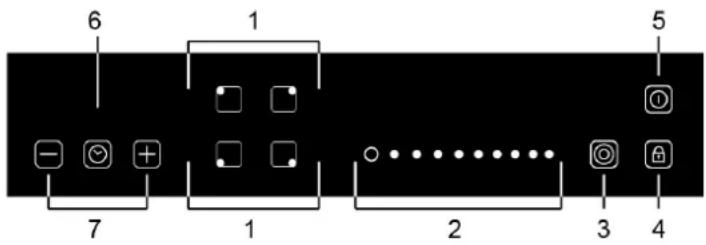
| Description | Explanation | |
 Control to Increase/decrease power Control to Increase/decrease power | Power setting of the zones, from 1 to 9, for example, this display shows power selected at level 5 | |
| 5 | ||
 | Child lock | Touch it to lock keys(display shows “Lo”) and press and hold for a while to unlock. When it is activated, none of the other buttons can be activated except for On/Off. |
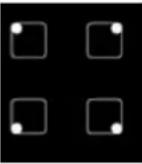 | Turn on/off the corresponding zone. You will see “-” display above power setting when turn on the appliance then you can use +/- to adjust its power level. | |
| Zone ON/OFF | ||
 Residual heat indicator Residual heat indicator | An H lights up on the power display to indicate that a particular zone is very hot and should not be touched. It may remain on up to approximately 30 minutes. Depending on the power setting selected. | |
Start cooking
- Power on the unit
After power on, the buzzer beeps once, all the indicators light up for 1 second then go out, indicating that the ceramic hob has entered the state of standby mode.
- Place a suitable pan on the cooking zone that you wish to use.
Make sure the bottom of the pan and the surface of the cooking zone are clean and dry.
-
Touching the heating zone selection control, and a indicator next to the key will flash.
-
Ajust heat setting by touching the slider control.

natural_image
Hand holding a square button with a cursor pointer (no text or symbols)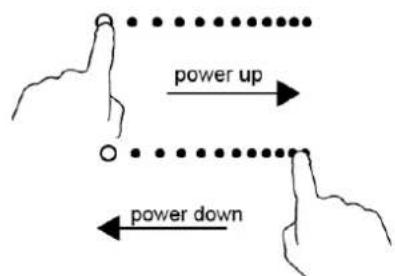
If you don't choose a heat setting within 1 minute, the ceramic hob will automatically switch off. You will need to start again at step 1.
You can modify the heat setting at any time during cooking.
When you have finished cooking
1a. Touching the heating zone selection control that you wish to switch off.
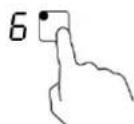
1b. Turn the cooking zone off by touching the slider to "o". Make sure the display shows "-"

1c. Turn the whole cooktop off by touching the ON/OFF control
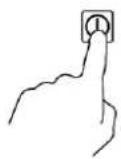
2. Beware of hot surfaces
“H” will show which cooking zone is hot to touch. It will disappear when the surface has cooled down to a safe temperature. It can also be used as an energy saving function if you want to heat further pans, use the hotplate that is still hot.

Double Zone Function
• The function only work in 1# and 3# cooking zone
- The dual cooking zone has two cooking areas that you can use a central section and an outer section. You can use the central section (A) independently or both sections (B) at once.

Zone 1#
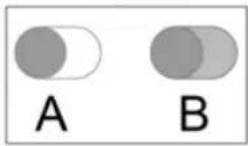
Zone 3#
Activate the double zone (e.g. power level is 6)
- Press the heating zone selection control of the double loop heating zone,
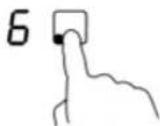
- the power level indicator flash, then press "O", after 5 seconds, the indicator stop flash, the double loop function is activate, and power level shows "6" and "=" alternately.
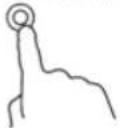

To unlock
- Make sure the ceramic hob is turned on.
- Touch and hold the child lock key 📄 for a while.
- You can now start using your ceramic hob.

When the hob is in the lock mode, all the controls are disable except for the ON/OFF, you can always turn the ceramic hob off with the ON/OFF control in an emergency, but you shall unlock the hob first in the next operation
Over-Temperature Protection
A temperature sensor equipped can monitor the temperature inside the ceramic hob. When an excessive temperature is monitored, the ceramic hob will stop operation automatically.
Residual Heat Warning
When the hob has been operating for some time, there will be some residual heat. The letter "H" appears to warn you to keep away from it.
Auto Shutdown
Another safety feature of the hob is auto shutdown. This occurs whenever you forget to switch off a cooking zone. The default shutdown times are shown in the table below:
| Power level | 1 | 2 | 3 | 4 | 5 | 6 | 7 | 8 | 9 |
| Default working timer (hour) | 8 | 8 | 8 | 4 | 4 | 4 | 2 | 2 | 2 |
Using the Timer
You can use the timer in two different ways:
- You can use it as a minute minder. In this case, the timer will not turn any cooking zone off when the set time is up.
- You can set it to turn all the cooking zone off after the set time is up.
- You can set the timer for up to 99 minutes.
Using the Timer as a Minute Minder
If you are not selecting any cooking zone
- Make sure the cooktop is turned on.
Note: you can use the minute minder even if you're not selecting any cooking zones.
-
Touch the timer control, the timer indicator show “--”
-
Adjust the timer setting by touch the “-” or “+” control. The minute minder indicator will start flashing and will show in the timer display.
Hint: Touch the “-” or “+” control of the timer once to decrease or increase by 1 minute.
Touch and hold the or control of the timer to decrease or increase by 10 minutes.
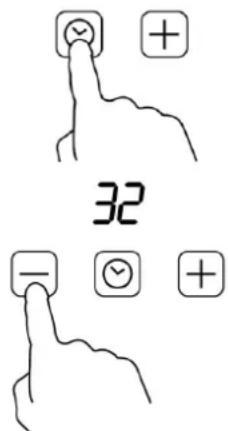
If the setting time exceeds 99 minutes, the timer will automatically return to 0 minute.
4 Touching the"- " and "+" together, the timer is cancelled, and the"--" will show in the minute display.
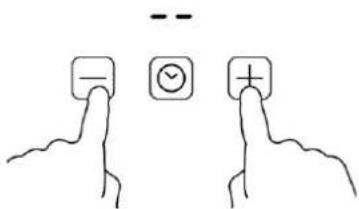
- When the time is set, it will begin to count down immediately. The display will show the remaining time and the timer indicator will flash for 5 seconds.

- Buzzer will beep for 30 seconds and the timer indicator shows “- -” when the setting time finished.

Setting the timer to turn one cooking zone off
- Touching the heating zone selection control

- Touch the timer control, the timer indicator show "10"

- Set the time by touching the control of the timer

Hint: Touch the “-” or “+” control of the timer once will decrease or increase by 1 minute.
Touch and hold the “-” or “+” control of the timer will decrease or increase by 10 minutes.
If the setting time exceeds 99 minutes, the timer will automatically return to 0 minute.
- Touching the “-” and “+” together, the timer is cancelled, and the will show “--” in the minute display.
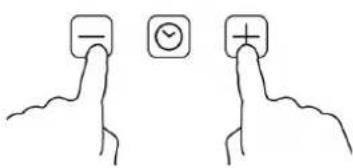
- When the time is set, it will begin to count down immediately. The display will show the remaining time and the timer indicator flash for 5 seconds.

NOTE: The red dot next to power level indicator will illuminate indicating that zone is selected.

Setting the timer to turn more than one cooking zone off
- If more than one heating zone use this function, the timer indicator will show the lowest time. (e.g. zone 1# setting time of 5 minutes, zone 2# setting time of 15 minutes, the timer indicator shows "5".)
NOTE: The red dot next to power level indicator will flash.
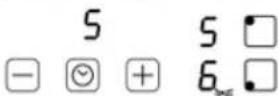
(set to 15 minutes)
(set to 5 minutes)
- Once the countdown timer expires, the corresponding zone will switch off. Then it will show the new min. timer and the dot of corresponding zone will flash.
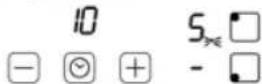
- When cooking timer expires, the corresponding cooking zone will be switch off automatically.

NOTE: If you want to change the time after the timer is set, you have to start from step 1
| Heat setting | Suitability |
| 1 - 2 | ·delicate warming for small amounts of food·melting chocolate, butter, and foods that burn quickly·gentle simmering·slow warming |
| 3 - 4 | ·reheating·rapid simmering·cooking rice |
| 5 - 6 | ·pancakes |
| 7 - 8 | ·sautéing·cooking pasta |
| 9 | ·stir-frying·searing·bringing soup to the boil·boiling water |
When food comes to the boil, reduce the temperature setting.
- Using a lid will reduce cooking times and save energy by retaining the heat.
- Minimize the amount of liquid or fat to reduce cooking times.
- Start cooking on a high setting and reduce the setting when the food has heated through.
Simmering, cooking rice
- Simmering occurs below boiling point, at around 85°C, when bubbles are just rising occasionally to the surface of the cooking liquid. It is the key to delicious soups and tender stews because the flavours develop without overcooking the food. You should also cook egg-based and flourthickened sauces below boiling point.
- Some tasks, including cooking rice by the absorption method, may require a setting higher than the lowest setting to ensure the food is cooked properly in the time recommended.
Searing steak
To cook juicy flavoursome steaks:
- Stand the meat at room temperature for about 20 minutes before cooking.
- Heat up a heavy-based frying pan.
- Brush both sides of the steak with oil. Drizzle a small amount of oil into the hot pan and then lower the meat onto the hot pan.
- Turn the steak only once during cooking. The exact cooking time will depend on the thickness of the steak and how cooked you want it. Times may vary from about 2 – 8 minutes per side. Press the steak to gauge how cooked it is – the firmer it feels the more ‘well done’ it will be.
- Leave the steak to rest on a warm plate for a few minutes to allow it to relax and become tender before serving.
For stir-frying
- Choose an ceramic compatible flat-based wok or a large frying pan.
- Have all the ingredients and equipment ready. Stir-frying should be quick. If cooking large quantities, cook the food in several smaller batches.
- Preheat the pan briefly and add two tablespoons of oil.
- Cook any meat first, put it aside and keep warm.
- Stir-fry the vegetables. When they are hot but still crisp, turn the cooking zone to a lower setting, return the meat to the pan and add your sauce.
- Stir the ingredients gently to make sure they are heated through.
- Serve immediately.
Choosing the right Cookware
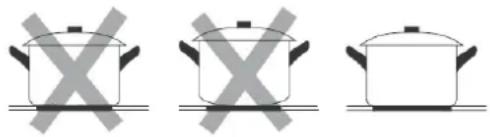
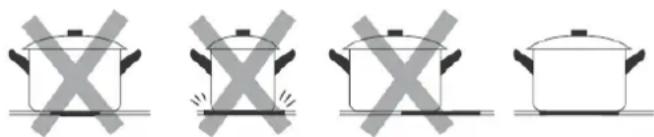
Do not use cookware with jagged edges or a curved base.
natural_image
Three identical cooking pots with crossed X marks on their bases, no text or symbols presentMake sure that the base of your pan is smooth, sits flat against the glass, and is the same size as the cooking zone. Always centre your pan on the cooking zone.
natural_image
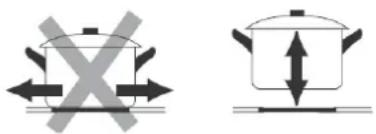
Four identical cooking pots with crossed X marks, shown in sequence (no text or symbols)Always lift pans off the ceramic hob – do not slide, or they may scratch the glass.
natural_image
Two identical diagrams showing a cooking pot with crossed arrows indicating pressure or movement, next to a flat surface (no text or symbols)Maintenance & Troubleshooting
Caution:



Before maintenance or cleaning is carried out, the cooktop should be disconnected from the main power supply. Ensure that the cooktop is switched off at the wall socket and the plug removed.
● Spills and splashes will not harden and stick to the glass, as it hardly heats up.
- Both Vitro-ceramic and zone rings should however be cleaned of any spills or splashes as quickly as possible.
● Slight stains can be removed with kitchen paper or cloth. Do not use steam clearer.
- More resistant stains will need specific product for vitro-ceramic glass. Follow each product's instructions.
- To avoid the chance of permanent damage from stains and spills, it is recommended you clean any residue off the glass by using an cleaner that is specially formulated for cleaning & polishing ceramic glass cooktops.
- Switch off the appliance from the electrical supply, wait for the glass to completely cool down and use a cleaner that is non-scratch and formulated to remove stains & spills; avoid using general household cleaners that may scratch or damage your cooktop.
| What? | How? | Important! |
| Everyday soiling on glass (fingerprints, marks, stains left by food or non-sugary spillovers on the glass) | 1. Switch the power to the cooktop off.2. Apply a cooktop cleaner while the glass is still warm (but not hot!)3. Rinse and wipe dry with a clean cloth or paper towel.4. Switch the power to the cooktop back on. | When the power to the cooktop is switched off, there will be no 'hot surface' indication but the cooking zone may still be hot! Take extreme care.Heavy-duty scourers, some nylon scourers and harsh/abrasive cleaning agents may scratch the glass. Always read the label to check if your cleaner or scourer is suitable.Never leave cleaning residue on the cooktop: the glass may become stained. |
| Boilovers, melts, and hot sugary spills on the glass | Remove these immediately with a fish slice, palette knife or razor blade scraper suitable for ceramic glass cooktop, but beware of hot cooking zone surfaces:1. Switch the power to the cooktop off at the wall.2. Hold the blade or utensil at a 30° angle and scrape the soiling or spill to a cool area of the cooktop.3. Clean the soiling or spill up with a dish cloth or paper towel.4. Follow steps 2 to 4 of 'Everyday soiling on glass' above. | Remove stains left by melts and sugary food or spillovers as soon as possible. If left to cool on the glass, they may be difficult to remove or even permanently damage the glass surface.Cut hazard: when the safety cover is retracted, the blade in a scraper is razor-sharp. Use with extreme care and always store safely and out of reach of children. |
| Spillovers on the touch controls | 1. Switch the power to the cooktop off.2. Soak up the spill3. Wipe the touch control area with a clean damp sponge or cloth.4. Wipe the area completely dry5. with a paper towel.6. Switch the power to the cooktop back on. | The cooktop may beep and turn itself off, and the touch controls may not function while there is liquid on them Make sure you wipe the touch control area dry before turning the cooktop back on. |
WARRANTY
1.1 In this warranty:
1.1.1 Australian Consumer Law means the law as set out in Schedule 2 of the Competition and Consumer Act 2010;
1.1.2 Company means GSM Retail Australia Pty Ltd ABN 53 007 682 475 of 142-144 Fullarton Road, Rose Park SA 5067. Telephone 1300 373 199. Email admin@gsmretailaust.com.au;
1.1.3 Consumer means a "consumer" as that term is defined in Section 3 of the Australian Consumer Law as the original purchaser of a Belliniproduct;
1.1.4 Consumer Guarantees means the guarantees under the Australian Consumer Law;
1.1.5 You means the Consumer.
1.2 Nothing in this warranty affects any person's rights under the Australian Consumer Law. The benefits to any Consumer under this warranty are in addition to the rights and remedies available under any Consumer Guarantees.
1.3 Subject to the other clauses of this warranty, the Company warrants to the Consumer that the Bellini product will be free of manufacturing defects and will perform to the Company's specifications.
1.4 The benefit of this warranty extends only to the Consumer as original purchaser of a Bellini product which is installed in a domestic household area.
*The in Home warranty does not apply to Commercial and or industrial usage. * Please See 1.7.7 for additional information
1.5 This warranty commences on the date of purchase of the Bellini product by the Consumer and continues for the benefit only of the Consumer until the expiry of three (3) year (Warranty Period).
1.6 If within the Warranty Period a manufacturing defect is discovered in the Bellini product or it fails to perform to the Company's specifications as a result of some defect in materials, components or workmanship (Defect) then the Company will, at its option, repair the Bellini product or supply a replacement Bellini product free of charge. A replacement Bellini product may differ from the original product purchased by the Consumer.
1.7 This warranty will not apply to any Bellini product:
1.7.1 Installed by any person other than a qualified tradesperson; or
1.7.2 Subjected to misuse, neglect, negligence or accidental damage; or
1.7.3 Operated in any way contrary to any operating or maintenance instructions; or
1.7.4 Improperly handled, installed or maintained; or
1.7.5 Altered or modified prior to or after installation; or
1.7.6 Damaged directly or indirectly by power surges, electrical storm damage or connection to incorrect power supply
1.7.7 Industrial and or Commercial usage is inclusive of staff areas in office/shop environments, hotel/motel or other similar accommodation or rental type properties including Bed and Breakfast establishments.
The Australian Consumer Law requires the inclusion of the following
statement with this warranty:
Our goods come with guaranteed that cannot be excluded under the Australian Consumer Law. You are entitled to a replacement or refund for a major failure and for compensation for any other reasonably foreseeable loss or damage.
You are also entitled to have the goods repaired or replaced if the goods fail to be of acceptable quality and the failure does not amount to a major failure.
IN ORDER TO MAKE A CLAIM UNDER THIS WARRANTY THE CONSUMER MUST CALL 1300 373 199 (AUSTRALIA) OR 0508 123 108
(NEW ZEALAND) TO CONNECT TO THE NEAREST AUTHORISED CENTRE
1.8 You must provide proof of your purchase of the Bellini product and the date of purchase in order to obtain the benefit of this warranty.
1.9 If you live outside the service area of the Company or one of its service agents, this warranty does not cover the cost of transport of the Bellini product for service nor the service agent's traveling costs to and from your home.
1.10 If you are required to transport the Bellini product to the Company or its service agent, you must ensure it is safely disconnected by a qualified tradesman and securely packed and insured. The Company does not accept any responsibility for loss or damage of the Bellini product prior to it being received by the Company or its service agent.
1.11 You will be responsible for all costs of returning a Bellini product to the Company and for redelivery of the Bellini product by the Company (whether it is the original or a repaired and/or a replacement Bellini product) and for any other expenses you incur in claiming under this warranty.
1.12 The Company or its service agent will examine any Bellini product and if the Company determines that it is defective through no fault of the Owner and is otherwise undamaged, the Company will repair or replace the Bellini product in accordance with this warranty.
DO NOT SEND IN THIS WARRANTY
Fill out the following details and file with your purchase invoice.
RETAIN & FILE WITH YOUR RECEIPT
Your Purchase Receipt/Invoice is proof of date of purchase. If you are unable to establish the date of purchase, or if the fault is not covered by this warranty, or if the product is found to be in working order, you will be required to bear all service call charges.
GSM Retail Australia Pty Ltd reserves the right to discontinue items, modify designs and change specifications without incurring obligation.
Whilst every effort is made to ensure that descriptions, specifications and other information in this publication is correct, no warranty is given in respect thereof and the company shall not be liable for any errors therein.
Purchased from:
Co. Name:
Address:
Date of Purchase:
Serial number:
NOTE: Consistent with our continuing product development policy, improvements may have been made which render the contents of this packaging slightly different to that shown.
FOR WARRANTY SERVICE CALL 1300 373 199 (AUSTRALIA) OR 0508 123 108 (NEW ZEALAND) TO CONNECT YOU TO THE NEAREST AUTHORISED SERVICE CENTRE

Gerard Sourcing & Manufacturing
GSM RETAIL AUSTRALIA PTY LTD
The GSM Retail Australia Pty Ltd Group Companies has a policy of continual improvement throughout the product range. As such the unit contained within may differ slightly from the unit illustrated on the pack.
MADE IN CHINA for the GSM Retail Australia Pty Ltd. Group Companies

- Thank you
- Content
- Important Safety Instructions
- General Warnings
- Child Safety
- Installation, Cleaning & Servicing
- Oven
- Grill
- Environmental Hints
- Installation
- WARNING!
- Use An Authorized Person
- This Appliance Must Be Properly Earthed
- CAUTION!
- Hard Wired Appliances :
- Secure the oven to cabinet
- Start Using Your Over
- Clock setting
- Notes:
- Alarm timer setting
- Safety Child Lock setting
- Cooking setting
- Note:
- Delay Start Function
- Troubleshooting
- Maintenance and Cleaning
- Stainless steel
- Glass
- Replacement Of The Oven Light Bulb
- In order to avoid the possibility of an electric shock ensure that the appliance is disconnected from the power supply before replacing the bulb.
- Door Removal
- Removal Of The Internal Glass Panel
- WARRANTY
- In this warranty:
- DO NOT SEND IN THIS WARRANTY
- RETAIN & FILE WITH YOUR RECEIPT
- FOR WARRANTY SERVICE CALL 1300 373 199 (AUSTRALIA) OR 0508 123 108 (NEW ZEALAND) TO CONNECT YOU TO THE NEAREST AUTHORISED SERVICE CENTRE
- Bellini
- INSTALLATION & OPERATION INSTRUCTIONS
- Safety instructions
- Warning
- General safety
- Correct use
- Children's safety
- Safety during use
- Safety when cleaning
- How to avoid damage to the appliance
- Product description
- Cautions
- Connecting the hob to the mains power supply
- Start using your appliance
- Start cooking
- When you have finished cooking
- Beware of hot surfaces
- Double Zone Function
- Activate the double zone (e.g. power level is 6)
- To unlock
- Over-Temperature Protection
- Residual Heat Warning
- Auto Shutdown
- Using the Timer
- Using the Timer as a Minute Minder
- If you are not selecting any cooking zone
- Setting the timer to turn one cooking zone off
- Setting the timer to turn more than one cooking zone off
- Simmering, cooking rice
- Searing steak
- For stir-frying
- Choosing the right Cookware
- Maintenance & Troubleshooting
- Caution:
Brand : Bellini
Model : BPD270EC
Category : Oven