
BP460EC - Hob Bellini - Free user manual and instructions
Find the device manual for free BP460EC Bellini in PDF.


| Product Type | Built-in ceramic cooktop |
| Model | BP460EC |
| Dimensions (H x W x D) | 46 x 590 x 520 mm |
| Weight | Approximately 10 kg |
| Electrical Connection | 220-240 V ~ 50 Hz |
| Maximum Power Rating | 6000 W |
| Number of Cooking Zones | 4 |
| Zone 1 (front left) | 1200 W, Ø 140 mm |
| Zone 2 (rear left) | 1800 W, Ø 180 mm |
| Zone 3 (front right) | 1200 W, Ø 140 mm |
| Zone 4 (rear right) | 1800 W, Ø 180 mm |
| Control Type | Touch controls with LED display |
| Timer Function | Yes (on select models) |
| Child Lock | Yes |
| Residual Heat Indicator | Yes (displays 'H') |
| Safety Auto Shut-off | Yes, after 1 hour at maximum power |
| Cleaning Method | Use specific ceramic glass cleaner; avoid abrasives and steam cleaners |
| Warranty | 2 years |
| Installation | Requires licensed electrician; cut-out dimensions in manual |
| Certifications | Complies with Australian/New Zealand standards |
Frequently Asked Questions - BP460EC Bellini
User questions about BP460EC Bellini
0 question about this device. Answer the ones you know or ask your own.
Ask a new question about this device
Download the instructions for your Hob in PDF format for free! Find your manual BP460EC - Bellini and take your electronic device back in hand. On this page are published all the documents necessary for the use of your device. BP460EC by Bellini.
USER MANUAL BP460EC Bellini
60cm Built-In Ceramic Cooktop

natural_image
Four white circles on a black background, no text or symbols presentInstallation and User manual
Content
Safety instructions----2
Features of your product----4
Installing the appliance----4
Start using your appliance----7
Maintenance and troubleshooting----9
Warranty----10
For warranty service call 1300 373 199 (Australia) or 0508 123108 (New Zealand) to connect you to the nearest authorised service centre
BC604T
BC604T-F
BDC604OT
BDC604OT-F
Safety Instructions
This manual explains the proper installation and use of your appliance, please read it carefully before using even if you are familiar with the product. The manual should be kept in a safe place for future reference. In case of failure, all electrical work/repairs must be carried out by a suitable and authorised electrician or service agent, otherwise the guarantee will be null and void.
Warning
General safety
- The appliance must only be installed and connected by licensed Electrician or Service Agent.
● Built-in appliances may only be used after they have been built in to suitable built-in cabinets and work surfaces that meet standards. - In the event of faults with the appliance or damage to the ceramic glass (cracks, scratches or splits), the appliance must be switched off and disconnected from the electrical supply, to prevent the possibility of an electric shock.
● Repairs to the appliance must only be carried out by Licensed Electrician or Service Agent. - The technical and identification data for the cooktop are displayed on the reference plate fixed to the appliance.
- This reference plate must be referred to before making the electrical connections.
- The electrical connections must be made by licensed Electrician or Service Agent familiar with the legal and regulatory requirements within each State or Territory
- This appliance is not intended to be operated by means of an external timer or separate remote control system.
- Means for disconnection must be incorporated in the fixed wiring in accordance with the wiring rules. The fixed wiring insulation must be protected, for example, by insulated sleeve with appropriate temperature rating.
Correct Use
- People (including children) who, because of their physical, sensory or mental capabilities or their inexperience or ignorance are not able to use the device safely, should not use without supervision or instruction by a responsible person.
- This appliance should be used only for normal domestic cooking and frying of food.
- The appliance must not be used as a work surface or as a storage surface.
- Additions or modifications to the appliance are not permitted.
- Do not place or store flammable liquids, highly inflammable materials or fusible objects (e.g. plastic film, plastic, aluminum) on or near the appliance.
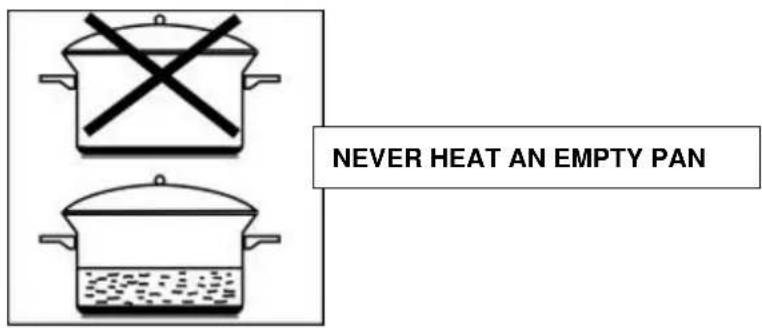
- Do not heat an empty pan on the appliance.
Children's Safety
- The cooking zones will become hot when you cook. Therefore, always keep small children away from the appliance.
- The appliance is not intended for use by young children or infirm persons without supervision.
- Young children should be supervised to ensure that they do not play with the appliance.
- To avoid small children or pets unintentionally switching the appliance on, we recommend activation of the child safety device.
Safety During Use
- Remove stickers and film from the ceramic glass.
- There is the risk of burns from the appliance if used carelessly.
- Cables from electrical appliances must not touch the hot surface of the appliance or hot cookware.
● Overheated fats and oils can ignite very quickly. Warning! Fire hazard!
- Switch the cooking zones off after each use.
- Users with implanted pacemakers should keep their upper body at least 30cm from ceramic cooking zones that are switched on.
- Do not place objects made of metal, such as knives, forks, spoons and saucepan lids on the cooking surface, as they can get hot.
Safety Instructions
Safety When Cleaning
- For cleaning, the appliance must be switched off and cooled down.
- For safety reasons, the cleaning of the appliance with steam jet or high pressure cleaning equipment is not permitted.
How To Avoid Damage To The Appliance
- The ceramic glass can be damaged by objects falling onto it.
- The edge of the glass ceramic can be damaged by being knocked by the cookware.
● Cookware made of cast iron, cast aluminum or
with damaged bottoms can scratch the glass ceramic if pushed across the surface.
- Objects that melt and things that boil over can burn onto the ceramic glass and should be removed straightaway.
- Do not use the cooking zones with empty cookware or without cookware.
- To avoid damaging cookware and glass ceramics, do not allow saucepans or frying pans to boil dry.
- The ventilation gap of 5mm between the benchtop and front of the unit underneath the cooking plate must not be covered.
Disposing Of Appliance
When disposing of this appliance, do not place in a regular municipal waste container. Instead, bring it to an electrical and electronic waste recycling and reuse centre. A relevant label has been put on the appliance, its instruction manual, or the packaging. The appliance has been manufactured with recyclable material. By taking old appliances to recycling and reuse centres, shows that you care about the environment. Ask your local environmental care authority for information on the location of such facilities.

Features Of Your Cooktop

Technical Data
| Model | Product Dimensions (h x w x d) mm | |
| BC604T, BC604T-F | 46x590x520 | |
| Electrical Connection | Max. Power Rating | |
| 220-240V a.c 50Hz | 6000 W | |
| Heating Elements | ||
| 1a 1200 W ∅ 140mm | ||
| 2a 1800 W ∅ 180mm | ||
| 3a 1200 W ∅ 140mm | ||
| 4a 1800 W ∅ 180mm | ||

Technical Data
| Model | Product Dimensions(h x w x d) mm |
| BDC604OT, BDC604OT-F | 46x590x520 |
| Electrical Connection | Max. Power Rating |
| 220-240V a.c 50Hz 6700 W | |
| Heating Elements | |
| 1a 1200 W ∅ 145mm | |
| 2a 2200 W ∅ 170 x 265mm | |
| 3a 1200 W ∅ 145mm | |
| 4a 2100 W ∅ 120/220mm | |
Installing The Appliance

Important:
● There must be a minimum distance of 65mm from rear wall of cabinet
Preparation
- Remove any dust from the benchtop directly surrounding the cut hole to ensure there is a clean surface.
- Remove the protective paper film from the adhesive strip that is secured to the bottom of the glass surface.
- Position the cooktop into the hole in the benchtop and press down firmly to ensure a secure fit to the benchtop.
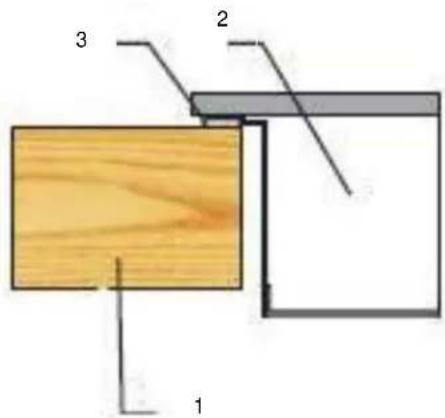
- Benchtop
- Ceramic Cooktop
- Adhesive Seal
Installing The Appliance
Electrical Connection
Caution:
● The appliance must only be installed and connected by a Licensed Electrician or Service Agent.
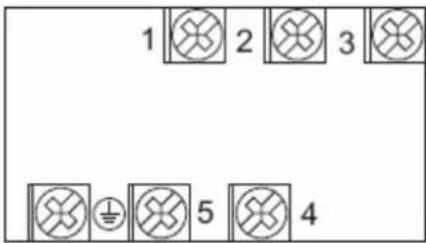
- If the mains supply where the cooktop is to be installed is different from 220...240V\~, make the connection as shown in the enclosed diagrams. (The cable must be able to withstand temperatures of 120°C).
- Open terminal board cover at rear panel of appliance and connect as per below diagram for 220V – 240V earthed single phase. Close the cover after complete electrical connection.


Start Using Your Appliance

Control Panel of BC604T and BC604T-F
| Items Description Explanation | ||
-  | Cooking zone selectors By pressing any of the 4 selector keys, the corresponding zone is selected for operation.The respective LED Display for that zone will flash for 6 Seconds on setting 9.Pressing Control Key twice will turn OFF corresponding zone quickly. | |
 | Power level adjustor In conjunction with the selector keys and within the 6 seconds LED flash period, press + or – to adjust till desired power level is displayed, cooking zone will start working when flashing stopped. | |
 | Residual heat indicator When a heating zone is turned OFF, a “H” will probably show in the LED Display to alert the zone are is still hot and must not touch. It will disappear when area has cooled down enough to touch. | |
 | Child lock indicator light(LED1) This light ON indicates that child lock is activated and all keys are locked for unintended use, this indicator light will also turn ON if no zone is operated over 5 seconds. | |
 | Child lock key Press the Child lock key for 3 Seconds to lock or unlock the operation of Control Keys. | |

Control Panel of BDC604OT and BDC604OT-F
| Items Description Explanation | ||||
 |  |  |  | From lowest level 1 to highest power level 9.LED light turns ON at left-top of each power level display is telling which zone is under timer setting. Example as left illustration is telling cooking zone 2a (Oval dual zone) is under timer setting.Key 1 Circular dual zone 4a. press continuously can let the zone function loop as “central zone - central & outer zone - off”Key 2 Zone 1aKey 3 Oval dual zone 2a, press continuously can let the zone function loop as “central zone - central & outer zone - off”Key 4 Zone 3a |
 |  |  |  | |
| 1 | 2 | 3 | 4 | |
 You can set Timer for only one cooking zone at a time.Each cooking zone has safety protective cut-off design, if a zone set at power level 9 and keep working for 1 hour without any operation then it will be turned off automatically. You can set Timer for only one cooking zone at a time.Each cooking zone has safety protective cut-off design, if a zone set at power level 9 and keep working for 1 hour without any operation then it will be turned off automatically. | Timer keyAfter cooking zone and power level chosen, immediately press Timer key can enter into timer setting, press + or - to adjust duration you would like the zone keep working. Duration you can set is 1 - 99 minutes. After all set up, leave keys for 5 seconds then timer display start countdown.To cancel Timer setting, press cooking zone selector, then press Timer key again when display is flashing. | |||
 | Timer display It | countdown when timer set to tell how many minutes working time left. | |
| Power level/Timer adjustor | Press key 1 to 4 to choose cooking zone, then press + or – when display is flashing to choose desired power level.If you want to set up timer, then press Timer key when display is flashing to enter into Timer setting.Cooking zone will start working when flashing stopped. | ||
 | Child lock indicator light | This light ON indicates that child lock is activated and all keys are locked for unintended use, this indicator light will also turn ON if no zone is operated over 5 seconds. | |
| Child lock key | Press the Child lock key for 3 Seconds to lock or unlock the operation of Control Keys. | ||
| [DOOW] | Residual heat indicator | When a heating zone is turned OFF, a “H” will probably displayed to alert the zone area is still hot and must not touch. It will disappear when area has cooled down enough to touch. | |
Start Using Your Appliance
Selecting The Correct Pan
- Choose a pan with a diameter that is at least as large as the heating zone.
- Do not use pans with a concave, convex or a rough base, ensure to select flat bottom pans.
● Always remember to put the correct lid on the pan.

Warning:
● Avoid scraping the glass of the cooktop when you move the pans. Lift them up to move.
● Never heat an empty pan.
●
Maintenance & Troubleshooting
Caution:
- Spills and splashes will not harden and stick to the glass, as it hardly heats up.
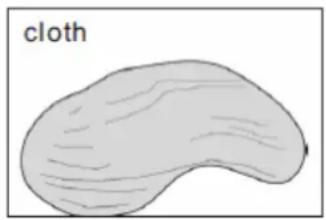
● Vitro-ceramic should however be cleaned of any spills or splashes as quickly as possible. - Slight stains can be removed with kitchen paper or cloth.
- More resistant stains will need specific product for vitro-ceramic glass. Follow each product's inductions.

natural_image
Simple line drawing of a hand pressing down on a flat surface (no text or symbols)

natural_image
Simple line drawing of a bean or pod with visible grain texture (no text or symbols)Important:
- Do not use abrasive products or cleaning powders as these could scratch the cooktop.
- Do not use a steam cleaner.
- If any cracks should appear on the surface of the glass, unplug the appliance immediately.
- Do not use any part of the cooktop until a new vitro-ceramic glass has been installed.
| Problem | Possible Causes | What Shall I do |
| Heating progress sounds halt | Internal thermostat is working to avoid over heat. | Wait for a while, it restarts automatically. |
| The cooktop continues to ventilate for several minutes after switching off. | The electronic circuits are cooling down. | This is normal. |
WARRANTY
1.1 In this warranty:
1.1.1 Australian Consumer Law means the law as set out in Schedule 2 of the Competition and Consumer Act 2010;
1.1.2 Company means GSM Sales Pty Ltd ABN 53 007 682 475 of 142-144 Fullarton Road, Rose Park SA 5067. Telephone 08 8122 2390. Email admin@gsmsales.com.au
1.1.3 Consumer means a “consumer” as that term is defined in Section 3 of the Australian Consumer Law as the original purchaser of a Bellini product;
1.1.4 Consumer Guarantees means the guarantees under the Australian Consumer Law;
1.1.5 You means the Consumer.
1.2 Nothing in this warranty affects any person's rights under the Australian Consumer Law. The benefits to any Consumer under this warranty are in addition to the rights and remedies available under any Consumer Guarantees.
1.3 Subject to the other clauses of this warranty, the Company warrants to the Consumer that the Bellini product will be free of manufacturing defects and will perform to the Company's specifications.
1.4 The benefit of this warranty extends only to the Consumer as original purchaser of a Bellini product which is installed in a residential property.
1.5 This warranty commences on the date of purchase of the Bellini product by the Consumer and continues for the benefit only of the Consumer until the expiry of two (2) years (Warranty Period).
1.6 If within the Warranty Period a manufacturing defect is discovered in the Bellini product or it fails to perform to the Company's specifications as a result of some defect in materials, components or workmanship (Defect) then the Company will, at its option, repair the Bellini product or supply a replacement Bellini product free of charge. A replacement Bellini product may differ from the original product purchased by the Consumer.
1.7 This warranty will not apply to any Bellini product:
1.7.1 Installed by any person other than a qualified tradesperson; or
1.7.2 Subjected to misuse, neglect, negligence or accidental damage; or
1.7.3 Operated in any way contrary to any operating or maintenance instructions; or
1.7.4 Improperly handled, installed or maintained; or
1.7.5 Altered or modified prior to or after installation; or
1.7.6 Damaged directly or indirectly by power surges, electrical storm damage or connection to incorrect power supply
The Australian Consumer Law requires the inclusion of the following statement
with this warranty:
Our goods come with guaranteed that cannot be excluded under the Australian Consumer Law. You are entitled to a replacement or refund for a major failure and for compensation for any other reasonably foreseeable loss or damage. You are also entitled to have the goods repaired or replaced if the goods fail to be of acceptable quality and the failure does not amount to a major failure.
IN ORDER TO MAKE A CLAIM UNDER THIS WARRANTY THE CONSUMER MUST CALL 1300 373 199 (AUSTRALIA) OR 0508 123 108 (NEW ZEALAND) TO CONNECT TO THE NEAREST AUTHORISED CENTRE
1.8 You must provide proof of your purchase of the Bellini product and the date of purchase in order to obtain the benefit of this warranty.
1.9 If you live outside the service area of the Company or one of its service agents, this warranty does not cover the cost of transport of the Bellini product for service nor the service agent's travelling costs to and from your home.
1.10 If you are required to transport the Bellini product to the Company or its service agent, you must ensure it is safely disconnected by a qualified tradesman and securely packed and insured. The Company does not accept any responsibility for loss or damage of the Bellini product prior to it being received by the Company or its service agent.
1.11 You will be responsible for all costs of returning a Bellini product to the Company and for redelivery of the Bellini product by the Company (whether it is the original or a repaired and/or a replacement Bellini product) and for any other expenses you incur in claiming under this warranty.
1.12 The Company or its service agent will examine any Bellini product and if the Company determines that it is defective through no fault of the Owner and is otherwise undamaged, the Company will repair or replace the Bellini product in accordance with this warranty.
DO NOT SEND IN THIS WARRANTY
Fill out the following details and file with your purchase invoice.
RETAIN & FILE WITH YOUR RECEIPT
Your Purchase Receipt/Invoice is proof of date of purchase. If you are unable to establish the date of purchase, or if the fault is not covered by this warranty, or if the product is found to be in working order, you will be required to bear all service call charges.
GSM Sales Pty Ltd reserves the right to discontinue items, modify designs and change specifications without incurring obligation.
Whilst every effort is made to ensure that descriptions, specifications and other information in this publication is correct, no warranty is given in respect thereof and the company shall not be liable for any errors therein.
Purchased from:
Co. Name:
Address:
Date of Purchase:
Serial number:
NOTE: Consistent with our continuing product development policy, improvements may have been made which render the contents of this packaging slightly different to that shown.
FOR WARRANTY SERVICE CALL 1300 373 199 (AUSTRALIA) OR 0508 123 108 (NEW ZEALAND) TO CONNECT YOU TO THE NEAREST AUTHORISED SERVICE CENTRE

Gerard Sourcing & Manufacturing
GSM Sales Pty Ltd.
The GSM Sales Pty Ltd. Group of Companies has a policy of continual improvement throughout the product range. As such the unit contained within may differ slightly from the unit illustrated on the pack.
MADE IN CHINA for the GSM Sales Pty Ltd. Group of Companies

N1028
- 60cm Built-In Ceramic Cooktop
- Installation and User manual
- Content
- Safety Instructions
- Warning
- General safety
- Correct Use
- Children's Safety
- Safety During Use
- Safety When Cleaning
- How To Avoid Damage To The Appliance
- Disposing Of Appliance
- Features Of Your Cooktop
- Installing The Appliance
- Important:
- Preparation
- Electrical Connection
- Caution:
- Start Using Your Appliance
- Selecting The Correct Pan
- Warning:
- Maintenance & Troubleshooting
- WARRANTY
- In this warranty:
- DO NOT SEND IN THIS WARRANTY
- RETAIN & FILE WITH YOUR RECEIPT
- FOR WARRANTY SERVICE CALL 1300 373 199 (AUSTRALIA) OR 0508 123 108 (NEW ZEALAND) TO CONNECT YOU TO THE NEAREST AUTHORISED SERVICE CENTRE
Brand : Bellini
Model : BP460EC
Category : Hob