
ZIC360NMLH - Jokofu GE - Free user manual and instructions
Find the device manual for free ZIC360NMLH GE in PDF.


| Product Type | Built-in Bottom-Freezer Refrigerator |
| Brand | GE (Monogram) |
| Model | ZIC360NMLH |
| Installation | Built-in, requires custom door panels |
| Power Supply | 115V AC, 60 Hz, 15A dedicated circuit |
| Temperature Control | Digital display, adjustable for fresh food (34°F-45°F) and freezer (-6°F to +6°F) |
| Automatic Icemaker | Produces 7 cubes per cycle, ~15 cycles per day, with on/off switch |
| Water Filtration | GE SmartWater GWF cartridge, capacity 300 gallons (approx. 12 months) |
| Door Alarm | Audible and visual alarm if door open >2 minutes |
| Lighting | 4 bulbs in fresh food (40W max), 1 bulb in freezer (40W max), with Master Light switch |
| Shelves | Tempered glass, adjustable; includes removable wine rack |
| Storage Drawers | Sealed snack pans (high humidity) and adjustable humidity pans for produce |
| Freezer Storage | Wire slide-out basket inside drawer |
| Condenser | Self-cleaning in normal conditions; annual cleaning recommended in dusty environments |
| Defrost | Automatic defrost cycle |
| Child Safety | Child entrapment warning; doors removable for disposal |
| Warranty | 2 years full, 5 years sealed system, limited additional 7 years on sealed system, lifetime on slides |
| Replacement Parts | Water filter (GWF), light bulbs (40W), icemaker components |
| Customer Support | GE Answer Center 800-626-2000, website www.monogram.com |
Frequently Asked Questions - ZIC360NMLH GE
User questions about ZIC360NMLH GE
0 question about this device. Answer the ones you know or ask your own.
Ask a new question about this device
Download the instructions for your Jokofu in PDF format for free! Find your manual ZIC360NMLH - GE and take your electronic device back in hand. On this page are published all the documents necessary for the use of your device. ZIC360NMLH by GE.
USER MANUAL ZIC360NMLH GE
Bottom-Freezer Built-In Refrigerators
Introduction
Your new Monogram refrigerator makes an eloquent statement of style, convenience and kitchen planning flexibility. Whether you chose it for its purity of design, practical storage arrangements or assiduous attention to detail—or for all of these reasons—you'll find that your Monogram refrigerator's superior blend of form and function will delight you for years to come.
The Monogram refrigerator was designed to provide the flexibility to blend in with your kitchen cabinetry. Decorative door insert panels allow it to match your kitchen cabinets or blend with your kitchen decor.
Since the Monogram refrigerator is a built-in product, custom panels are required on the front of the Monogram refrigerator. Consult your kitchen designer or cabinetmaker for your customized look.
The information on the following pages will help you operate and maintain your refrigerator properly.
If you have any other questions, visit our Website at: www.monogram.com
Contents
Consumer Services
Important Phone Numbers .....19
Model and Serial Numbers ....3
Performance Data Sheet .....17
Problem Solver .....15, 16
Product Registration ....3
Safety Instructions 4-7
State of California
Water Treatment Device Certificate .....18
Warranty ....Back Cover
Care and Cleaning
Cleaning—Outside and Inside .....13
Condenser....13
Light Bulb Replacement....14
Vacation ....14
Operating Instructions
Automatic Icemaker ....10
Master Light Switch .....9
Shelves 12
Storage Pans ....11
Temperature Controls 8
Water Filter Cartridge 9
Before using your refrigerator
Read this manual carefully. It is intended to help you operate and maintain your new refrigerator properly.
Keep it handy for answers to your questions.
If you don't understand something or need more help, there is a list of toll-free consumer service numbers included in the back section of this manual.
OR
Visit our Website at: www.monogram.com
| Write down the model & serial numbers | You'll see them on a label inside the fresh food compartment under the storage drawers on the right side.These numbers are also on the Consumer Product Ownership Registration Card included with this manual. | Before sending in this card, please write these numbers here: |
| Model Number | ||
| Serial NumberUse these numbers in any correspondence or service calls concerning your refrigerator. | ||
| If you received a damaged refrigerator | Immediately contact the dealer (or builder) that sold you the refrigerator. | |
| Save time & money | Before you request service, check the Problem Solver in the back of this manual. | It lists causes of minor operating problems that you can correct yourself. |
| If you need service | To obtain service, see the Consumer Services page in the back of this manual.We're proud of our service and want you to be pleased. If for some reason you are not happy with the service you receive, here are steps to follow for further help.For customers in the USA:FIRST, contact the people who serviced your appliance. Explain why you are not pleased.In most cases, this will solve the problem.NEXT, if you are still not pleased, write all the details—including your phone number—to:Manager, Customer RelationsGE AppliancesAppliance ParkLouisville, KY 40225 | For customers in Canada:FIRST, contact the people who serviced your appliance. Explain why you are not pleased.In most cases, this will solve the problem.NEXT, if you are still not pleased, write all the details—including your phone number to:Manager, Consumer RelationsCamco Inc.1 Factory Lane, Suite 310Moncton, N.B. E1C 9M3 |
READ AND SAVE THESE INSTRUCTIONS
WARNING: When using this appliance, always exercise basic safety precautions, including the following:
- Use this appliance only for its intended purpose as described in this Owner's Manual.
- This refrigerator must be properly installed in accordance with the Installation Instructions before it is used.
- Do not allow children to climb, stand or hang on the shelves in the refrigerator. They could damage the refrigerator and seriously injure themselves.
- Do not touch the cold surfaces in the freezer compartment when hands are damp or wet. Skin may adhere to these extremely cold surfaces.
-
Do not store or use gasoline or other flammable vapors and liquids in the vicinity of this or any other appliance.
-
In refrigerators with automatic icemakers, avoid contact with moving parts of the ejector mechanism, or with the heating element located on the bottom of the icemaker. Do not place fingers or hands on the automatic icemaking mechanism while the refrigerator is plugged in.
- Keep fingers out of the “pinch point” areas: clearances between the doors and between the doors and cabinet are necessarily small. Be careful closing doors when children are in the area.
- Unplug your refrigerator before cleaning and making repairs. NOTE: We strongly recommend that any servicing be performed by a qualified individual.
- Before replacing a burned-out light bulb, set the Master Light switch in the OFF position to turn off the lights in order to avoid contact with a live wire filament. (A burned-out light bulb may break when being replaced.) NOTE: Setting the refrigerator temperature controls to OFF does not remove power to the light circuit.
- Do not refreeze frozen foods which have thawed completely.
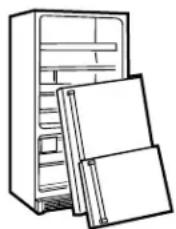
▲DANGER: RISK OF CHILD ENTRAPMENT
natural_image
Line drawing of a refrigerator with two doors placed on the side (no text or symbols)Child entrapment and suffocation are not problems of the past. Junked or abandoned refrigerators are still dangerous...even if they will sit for “just a few days.” If you are getting rid of your old refrigerator, please follow the instructions below to help prevent accidents.
Before You Throw Away Your Old Refrigerator or Freezer:
• Take off the doors.
- Leave the shelves in place so that children may not easily climb inside.
CFC DISPOSAL
Your old refrigerator may have a cooling system that used CFCs (chlorofluorocarbons). CFCs are believed to harm stratospheric ozone.
If you are throwing away your old refrigerator, make sure the CFC refrigerant is removed for proper disposal by a qualified servicer. If you intentionally release this CFC refrigerant you can be subject to fines and imprisonment under provisions of environmental legislation.
LIRE ET CONSERVER CES INSTRUCTIONS
natural_image
Line drawing of a refrigerator with two folded binders (no text or symbols)Do not, under any circumstances, cut or remove the third (ground) prong from the power cord. For personal safety, this appliance must be properly grounded.
The power cord of this appliance is equipped with a 3-prong (grounding) plug which mates with a standard 3-prong (grounding) wall outlet to minimize the possibility of electric shock hazard from this appliance.
Have the wall outlet and circuit checked by a qualified electrician to make sure the outlet is properly grounded.
Where a standard 2-prong wall outlet is encountered, it is your personal responsibility and obligation to have it replaced with a properly grounded 3-prong wall outlet.
Use of a GFI (Ground Fault Interruptor) is not recommended for the refrigerator outlet.
The refrigerator should always be plugged into its own individual electrical outlet which has a voltage rating that matches the rating plate.
This provides the best performance and also prevents overloading house wiring circuits which could cause a fire hazard from overheated wires.
DO NOT USE AN ADAPTER PLUG TO CONNECT THE REFRIGERATOR TO A 2-PRONG OUTLET.
DO NOT USE AN EXTENSION CORD WITH THIS APPLIANCE.
Never unplug your refrigerator by pulling on the power cord. Always grip plug firmly and pull straight out from the outlet.
Repair or replace immediately all power cords that have become frayed or otherwise damaged. Do not use a cord that shows cracks or abrasion damage along its length or at either end.
When moving the refrigerator away from the wall, be careful not to roll over or damage the power cord.
Refer to the Installation Instructions for particular electrical system specifications for this refrigerator.
SAVE THESE INSTRUCTIONS
RACCORDEMENT ÉLECTRIQUE
Temperature controls

Allow 24 hours to reach these preset temperatures.
The temperature display shows the actual temperature of the freezer and fresh food compartments. The actual temperature may vary slightly from the set temperature based on factors such as frequency of door opening, amount of food, defrost cycling and room temperature.
To turn off the cooling system in both the freezer and fresh food compartments, press either + pad until both displays show OFF.
To turn the cooling system on, press either – pad. The preset temperatures of 0^ F and 37^ F will appear in the display.
To check the current temperature setting for the fresh food or freezer compartment, press the + or - pad once. After 5 seconds, the display will return to the actual temperature.
To change the temperature settings, press the + or - pads. Allow 24 hours for the refrigerator to reach the temperature you have set.
Temperature Ranges
| Low High | ||
| Fresh Food | 34^1^ | 45^7^ |
| Freezer | -6^-21^ | +6^-14^ |
NOTE: Setting the controls to OFF stops cooling, but does not shut off electrical power to the refrigerator.
Changing display temperatures from °F to °C
To change the temperature display between Fahrenheit and Celsius, press the Temp Display °C/°F.

Door alarm
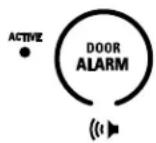
To turn the Door Alarm feature on, press the pad once. The ACTIVE light will come on. To turn it off, press the pad again.
When the DOOR ALARM is active, the alarm will flash and beep if you keep the door open for more than 2 minutes.
Water filter cartridge
The water filter cartridge is located behind the grille panel at the top of the refrigerator. Lift up the panel to access the cartridge.
When to Replace the Filter:
The filter cartridge is designed to filter 300 gallons of water (lasting approximately 12 months). It should be replaced when the status light turns red or if you notice the ice cubes getting hollow or small.

Installing the Filter Cartridge:
1 Raise the grille panel at the top of the refrigerator.
2 Remove the old cartridge by slowly turning it to the left. A small amount of water may drip down. Do not pull down on the cartridge.
3 Fill the new cartridge with water from the tap to allow for better flow immediately after installation.
4 Line up the arrow on the cartridge with the center of the holder. Do not push it up into the holder.
5 Slowly turn it to the right until the cartridge stops. It will rotate about 1/4 turn. DO NOT OVERTIGHTEN.

To Reset the Filter Status Light:
Press and hold the RESET pad for 3 seconds.
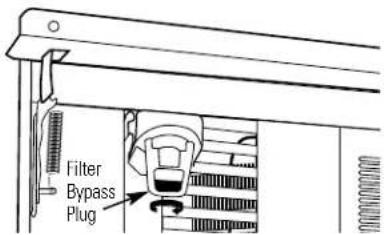
Filter Bypass Plug:
You must use the filter bypass plug:
a) if you have a household reverse osmosis water system
b) if a replacement filter is not available.
The icemaker will not operate without the filter or filter bypass plug installed.
Replacement Filters:
To order additional filters in the United States, call GE Parts and Accessories, 800.626.2002.
GWF
Suggested Retail \$34.95
Customers in Canada should consult the yellow pages for the nearest Camco Service Center.
Using the Master Light switch
This feature turns off the lights in the fresh food and freezer compartments.
The switch is located behind the grille panel at the top of the refrigerator. Lift up the panel to access the switch.

Automatic icemaker
A newly-installed refrigerator may take 12–24 hours to begin making ice.
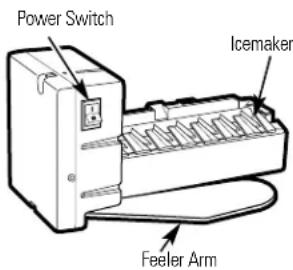
The icemaker will produce seven cubes per cycle—approximately 15 cycles in a 24-hour period.
If the refrigerator is operated before the water connection is made to the icemaker, set the power switch to O (off).
When the refrigerator has been connected to the water supply, set the power switch to I (on).
Throw away the first full bucket of ice to allow the water line to clear.
Be sure nothing interferes with the sweep of the feeler arm.
When the bin fills to the level of the feeler arm, the icemaker will stop producing ice.
It is normal for several cubes to be joined together. If ice is not used frequently, old ice cubes will become cloudy, taste stale and shrink.
If ice cubes get stuck in the icemaker, set the power switch to O (off) and remove the cubes. Set the power switch to I (on) to restart the icemaker.
After the icemaker has been turned on again, there will be a delay of about 45 minutes before the icemaker resumes operations.
NOTE: In homes with low water pressure, you may hear the icemaker water valve cycle on several times when making one batch of ice.
Storage Pans
Bottom Freezer Refrigerator
Sealed snack pans
The sealed snack pans retain high humidity for the convenient storage of lunch meats and cheese, hors d'oeuvres, spreads and snacks.
Make sure the pans are closed completely to maintain the correct humidity level.

natural_image
Two identical diagrams showing internal compartments with horizontal and vertical lines, no text or symbols present.Adjustable humidity pans
These drawers have individual, adjustable humidity controls that let you control the amount of cold air entering the drawers.
Make sure the drawers are closed completely to maintain the correct humidity level.
Slide the control all the way to the High setting and the drawer provides higher humidity levels recommended for most leafy vegetables.
Slide the control all the way to the Low setting and the drawer provides lower humidity levels recommended for most fruits.
Excess water that may accumulate in the bottom of the drawers should be emptied and the drawers wiped dry.

natural_image
Illustration of two containers filled with various vegetables (no text or symbols)Pan removal
To remove a pan, pull it out and lift the front up and out of the wire holder. Lift the back up and out.
To replace a pan, place the back of the pan in the wire holder, making sure the indentations at the back of the pan fit into the back of the wire holder. Then lower the front of the pan into the wire holder. Press firmly on the top of the pan until it snaps into place.

natural_image
Technical line drawing of a mechanical component with directional arrows indicating movement (no text or symbols)Bottom Freezer Refrigerator
Adjustable shelves in the fresh food compartment
Tempered glass shelves in the fresh food compartment enable you to make efficient shelf arrangements to fit your family's food storage needs.
To remove shelves: Tilt shelf up at front, then lift it up and out of tracks on rear wall of refrigerator.

natural_image
Diagram of a mechanical assembly with two curved arrows indicating direction (no text or symbols)To replace shelves: Select desired shelf height. With shelf front raised slightly, engage top lugs in tracks at rear of cabinet. Then lower front of shelf until it locks into position.

natural_image
Technical line drawing of a mechanical assembly with no visible text or symbolsRemovable wine rack
The wine rack is designed to hold a bottle on its side and will fit on any shelf.
To relocate the wine rack: Pull the wine rack straight out, position its lip over the right edge of the shelf you want to suspend it from and push it all the way in.

natural_image
Technical line drawing of a mechanical assembly with a cylindrical component mounted on a frame (no text or symbols)Door bins
Some door bins are adjustable and can be moved up and down to meet your storage needs. The deeper door bins must be placed at the bottom of the door.
To remove: Lift the bin up and slide it toward you.

natural_image
Technical line drawing of a mechanical component with no visible text or symbolsFreezer drawer with basket
Inside the freezer drawer is a wire slide-out freezer basket.
This basket can be pushed back so items on the bottom of the freezer drawer can be reached.
To remove the basket:
1 Open the freezer drawer.
2 Lift up the back of the basket, then slide the basket back until it clears the front hooks.

natural_image
Diagram of a supermarket interior showing a grid basket and directional arrows indicating flow or movement (no text or symbols present)To remove basket
Cleaning outside
The door handles and trim. Clean with a cloth dampened with soapy water. Dry with a soft cloth.
Keep the outside clean. Wipe with a clean cloth lightly dampened with mild liquid dish detergent. Dry with a clean, soft cloth.
Do not wipe the refrigerator with a soiled dish cloth or wet towel. These may leave a residue that can erode the paint. Do not use scouring pads, powdered cleaners, bleach or cleaners containing bleach because these products can scratch and weaken the paint finish.
The stainless steel panels and door handles (on some models) can be cleaned with a commercially available stainless steel cleaner such as Stainless Steel Magic. ^TM
Stainless Steel Magic is available at Ace, True Value, Servistar, HWI and other leading stores. It is also available through GE Parts and Accessories, 800.626.2002. Order part number WX10X15.
Do not use appliance wax or polish on the stainless steel.
Cleaning inside
To help prevent odors, leave an open box of baking soda in the refrigerator and freezer compartments.
Unplug the refrigerator before cleaning. If this is not practical, wring excess moisture out of sponge or cloth when cleaning around switches, lights or controls.
Use warm water and baking soda solution—about a tablespoon (15 ml) of baking soda to a quart (1 liter) of water. This both cleans and neutralizes odors. Thoroughly rinse and wipe dry.
Other parts of the refrigerator—including door gaskets, meat and vegetable drawers, ice storage bin and all plastic parts—can be cleaned the same way. After cleaning the door gaskets, apply a thin layer of petroleum jelly to the door gaskets at the hinge side. This helps keep the gaskets from sticking and bending out of shape.
Avoid cleaning cold glass shelves with hot water because the extreme temperature difference may cause them to break. Handle glass shelves carefully. Bumping tempered glass can cause it to shatter.
Do not wash any plastic refrigerator parts in the dishwasher.
Condenser
There is no need for routine condenser cleanings in normal home operating environments. However, in environments that may be particularly dusty or greasy, the condenser should be cleaned annually for efficient refrigerator operation.
To clean the condenser:
1 Turn off the power at the circuit breaker or fuse box. Wait about 30 minutes for the condenser area to cool.
2 Raise the grille panel at the top of the refrigerator.
3 Use a soft bristle brush to loosen dust and lint on the condenser fins. Use a vacuum hose to remove soil.
4 Lower the grille panel.
5 Reconnect power at the fuse box or circuit breaker.

Preparing for vacation
For long vacations or absences, remove food and shut off power to the refrigerator at the fuse box or circuit breaker. Clean the interior with a baking soda solution of one tablespoon (15 ml) of baking soda to one quart (1 liter) of water. Leave the doors open.
For shorter vacations, remove perishable foods and leave controls at regular settings. However, if the room temperature is expected to drop below 60^ F ( 16^ C), follow the same instructions as for long vacations.
Set the icemaker power switch to the O (off) position and shut off the water supply to the refrigerator.
Light bulb replacement in the fresh food compartment
Turning the temperature control to OFF does not remove power to the light circuit.
There are four light bulbs in the top of the fresh food compartment.
To replace the bulbs:
1 Set the Master Light switch in the OFF position to turn off the lights. See Using the Master Light switch.
2 Remove the light shield by placing your fingers in the openings at the back of the shield. Then, pull the shield toward you and swing the back of the shield down.
3 Replace with the same size bulb (40 watt max.).
4 Reinstall the shield and reset the Master Light switch to the ON position.

natural_image
Line drawing of hands installing or adjusting a ceiling-mounted device (no text or symbols)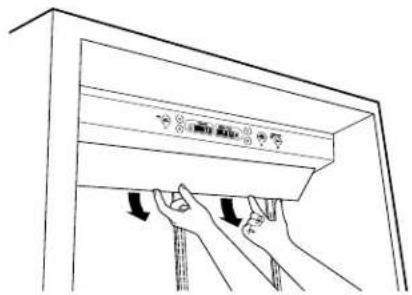
natural_image
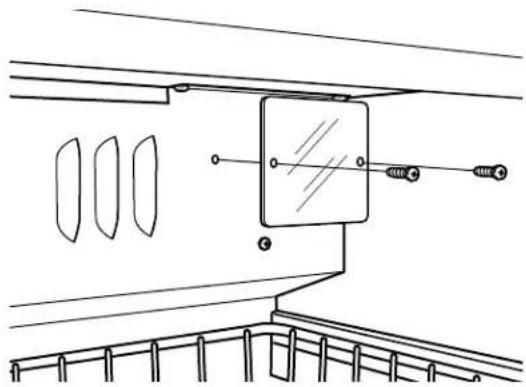
Line drawing of hands installing or adjusting a cabinet panel with arrows indicating motion (no text or symbols)Light bulb replacement in the freezer compartment
To replace a bulb:
1 Set the Master Light switch in the OFF position to turn off the lights. See Using the Master Light switch.
2 Remove the freezer light shield by removing the two screws with a Phillips screwdriver.
3 Replace with the same size bulb (40 watt max.).
4 Reinstall the shield and reset the Master Light switch to the ON position.
natural_image
Technical line drawing of a mechanical assembly with no visible text or symbolsQuestions?
Use this problem solver!
PROBLEM POSSIBLE CAUSE
| REFRIGERATOR • May DOES NOT OPERATE 30 minutes. | be in defrost cycle when compressor does not operate for about |
| • Temperature control in the OFF position. | |
| • If interior light is not on, refrigerator may not be plugged in at wall outlet. | |
| • The fuse is blown/circuit breaker is tripped. Replace fuse or reset the breaker. | |
| MOTOR OPERATES • Normal when refrigerator is first plugged in. Wait 24 hours for the refrigerator to completely cool down. | |
| FOR LONG PERIODS OR CYCLES ON AND OFF FREQUENTLY (Modern refrigerators with more storage space and a larger freezer require more operating time. They start and stop often to maintain even temperatures.) | • Often occurs when large amounts of food are placed in refrigerator. This is normal. |
| • Door left open or package holding door open. | |
| • Hot weather or frequent door openings. This is normal. | |
| • Temperature controls set at the coldest setting. See Temperature Controls. | |
| VIBRATION OR • Level the refrigerator. See Installation Instructions. | |
| RATTLING (Slight vibration is normal.) | |
| OPERATING • Normal fan air flow—one fan blows cold air through the fresh food soundings and freezer compartments—another fan cools the condenser area behind the grille panel. | |
| DOOR NOT CLOSING PROPERLY | • Refrigerator not level. See Installation Instructions. |
| • Package holding door open. | |
| FRESH FOOD • Temperature controls not set cold enough. See Temperature COMPARTMENT TOO WARM | • Warm weather or frequent door openings. |
| • Door left open for long time. | |
| • Package may be holding door open. | |
Questions?
Use this problem solver!
PROBLEM POSSIBLE CAUSE
| FROST OR ICE • Door CRYSTALS ON FROZEN FOOD (Frost within package is normal.) | left open or package holding door open.Frequent or long door openings. |
| SLOW ICE CUBE • Door FREEZING | may have been left open.Temperature of freezer compartment too warm. |
| ICE CUBES HAVE • Old ODOR/TASTE | cubes need to be discarded.Ice storage bin needs to be emptied and washed.Unsealed packages in fresh food and/or freezer compartments may be transmitting odor/taste to ice cubes.Interior of refrigerator needs cleaning. See Care and Cleaning.Poor-tasting incoming water. Replace water filter. |
| AUTOMATIC ICEMAKER DOES NOT WORK | Icemaker power switch is in the O (off) position.Water supply turned off or not connected.Water filter clogged. Replace the filter or use the filter bypass plug.Freezer compartment too warm.Piled up cubes in storage bin may cause icemaker to shut off too soon.Level cubes in bin.Ice cubes stuck in icemaker. Turn off the icemaker, remove cubes and turn the icemaker back on. |
| MOISTURE FORMS • Not unusual during periods of high humidity. Wipe surface dry.ON OUTSIDE OF REFRIGERATOR | Not unusual during periods of high humidity. Wipe surface dry.Door left open or package holding door open. |
| MOISTURE • In humid weather, air carries moisture into refrigerator when doors COLLECTS INSIDE are opened. | |
| REFRIGERATOR • Foods with strong odors should be tightly covered.HAS ODOR | with strong odors should be tightly covered.Check for spoiled food.Interior needs cleaning. See Care and Cleaning.Keep open box of baking soda in refrigerator; replace every 3 months. |
| INTERIOR LIGHT • No power at outlet.DOES NOT WORK | power at outlet.Light bulb needs replacing. See Care and Cleaning.Master Light switch is in the OFF position. |
| SMALL OR HOLLOW CUBES | Water filter clogged. Replace the filter or use the filter bypass plug. |
Performance Data Sheet GE SmartWater Filtration System GWF Cartridge
Health Claim Performance Certified by NSF/ANSI\*
(100% safety factors built in for unmetered usage)
| Standard No. 42: Aesthetic Effects | ||||||
| Parameter USE | PA Influent Effluent MCL Challenge | % Reductionge Average Maximum | ||||
| Average Minimum | ||||||
| Chlorine – 1.9 ppm | 0.02 ppm 0.05 ppm | 98.90% 97.37% | ||||
| T & O | - | - | - | - | - | - |
| Particulate** | - | 200,000 | 3,978 | 7,800 | 98.00% | 96.10% |
| Standard No. 53: Health Effects | ||||||
| Parameter | USEPA Influent MCL | Effluent % Reduction Challenge | Average | Maximum | Average | Minimum |
| Turbidity | 1 NTU*** | 24.3 NTU | 0.07 NTU | 0.1 NTU | 99.71% | 99.59% |
| Cysts | 99.95% Reduction | 105,750 | 26 | 55 | 99.97% | 99.95% |
| Lead at pH 6.5 | 15 ppb | 160 ppb | 1 ppb | 1 ppb | 99.37% | 99.37% |
| Lead at pH 8.5 | 15 ppb | 150 ppb | 1.8 ppb | 4.3 ppb | 98.80% | 97.13% |
| Lindane | 0.0002 ppm | 0.00062 ppm | 0.00005 ppm | 0.00005 ppm | 91.93% | 91.93% |
| Atrazine | 0.003 ppm | 0.0084 ppm | 0.002 ppm | 0.003 ppm | 76.19% | 64.28% |
| 2,4-D | 0.100 ppm | 0.272 ppm | 0.042 ppm | 0.090 ppm | 84.89% | 67.63% |
| Asbestos | 99% | 690 MFL/ml | 0.32 MFL/ml | 1.2 MFL/ml | 99.95% | 99.82% |
* Tested using a flow rate of 0.5 gpm; pressure of 120 psig; pH of 7.5±0.5; temp. of 20±2.5 C
** Measurement in particles/ml
*** NTU = Nephelometric Units
Operating Specifications
■ Capacity: certified for up to 300 gallons; up to one year
■ Pressure requirement: 40-120 psi (2.8-8.2 bar), non-shock
■ Temperature: 33-100 F (0.6-38 C)
■ Flow rate: 0.5 gpm (1.9 lpm)
General Installation/Operation/Maintenance Requirements
■ Flush new cartridge at full flow for 3 minutes to purge out trapped air.
- Replace cartridge when flow becomes too slow.
Special Notices
■ Installation instructions; parts and service availability; and standard warranty are included with the product when shipped.
This drinking water system must be maintained according to manufacturer's instructions, including replacement of filter cartridges.
Do not use with water that is microbiologically unsafe or of unknown quality without adequate disinfection before or after the system. Systems certified for cyst reduction may be used on disinfected water that may contain filterable cysts.
The contaminants or other substances removed or reduced by this water treatment system are not necessarily in your water.
- Check for compliance with the state and local laws and regulations.
System Tested and Certified by NSF International against ANSI/NSF
Standard 42 & 53 for the reduction of:
Standard No. 42: Aesthetic Effects
Chemical Unit
Taste and Odor Reduction
Chlorine Reduction, Class I
Mechanical Filtration Unit
Particulate Reduction, Class I
Standard No. 53: Health Effects
Chemical Reduction Unit
Lead and Atrazine Reduction
Lindane and 2,4-D Reduction
Mechanical Filtration Unit
Turbidity Reduction
Cyst and Asbestos Reduction
NSF
State of California
Department of Health Services
Water Treatment Device
Certificate Number
00 - 1434
Date Issued: May 30, 2000
Date Revised: February 9, 2001
Trademark/Model Designation
GE Smart Water Filtration Systems - GWF06 GWF06
GE Smart Water Filtration Systems - GWF GWF
Hotpoint Refrigerator Systems - HWF HWF
Manufacturer: General Electric Appliances
Replacement Elements
The water treatment device(s) listed on this certificate have met the testing requirements pursuant to Section 116830 of the Health and Safety Code for the following health related contaminants:
Microbiological Contaminants and Turbidity
Cysts (protozoan)
Turbidity
Inorganic/Radiological Contaminants
Asbestos
Lead
Organic Contaminants
Atrazine
Lindane
2.4-D
Rated Service Capacity: 300 gallons* 0.5 gpm
Rated Service Flow:
Do not use where water is microbiologically unsafe or with water of unknown quality, except that systems claiming cyst reduction may be used on water containing cysts.
* 500 gallons for models that include a replacement filter indicator light.
For Purchases Made In Iowa: This form must be signed and dated by the buyer and seller prior to the consummation of this sale. This form should be retained on file by the seller for a minimum of two years.
BUYER: SELLER:
| Name Name | ||||
| Address Address | ||||
| City | State | Zip | City | State |
| Signature | Date | Signature | Date | |
With the purchase of your new Monogram appliance, receive the assurance that if you ever need information or assistance from GE, we'll be there. All you have to do is call-toll-free!
GE Answer Center®
In the USA: 800.626.2000
Whatever your question about any Monogram major appliance, GE Answer Center® information service is available to help. Your call—and your question—will be answered promptly and courteously. And you can call any time. GE Answer Center® service is open 24 hours a day, 7 days a week.
OR
Visit our Website at: www.monogram.com
In Canada, call 1.888.880.3030.
In-Home Repair Service
In the USA: 800.444.1845
In Canada: 1.888.880.3030
A GE consumer service professional will provide expert repair service, scheduled at a time that's convenient for you. Many GE Consumer Service company-operated locations offer you service today or tomorrow, or at your convenience (7:00 a.m. to 7:00 p.m. weekdays, 9:00 a.m. to 2:00 p.m. Saturdays). Our factory-trained technicians know your appliance inside and out—so most repairs can be handled in just one visit.
For Customers With Special Needs...
In the USA: 800.626.2000

GE offers Braille controls for a variety of GE appliances, and a brochure to assist in planning a barrier-free kitchen for persons with limited mobility.
Consumers with impaired hearing or speech who have access to a TDD or a conventional teletypewriter may call 800.TDD.GEAC (800.833.4322) to request information or service.
Service Contracts
In the USA: 800.626.2224
In Canada: 1.888.880.3030
You can have the secure feeling that GE Consumer Service will still be there after your warranty expires. Purchase a GE contract while your warranty is still in effect and you'll receive a substantial discount. With a multiple-year contract, you're assured of future service at today's prices.
Parts and Accessories
In the USA: 800.626.2002
In Canada: 1.888.880.3030
Individuals qualified to service their own appliances can have parts or accessories sent directly to their home. The GE parts system provides access to over 47,000 parts...and all GE Genuine Renewal Parts are fully warranted. VISA, MasterCard and Discover cards are accepted.
User maintenance instructions contained in this manual cover procedures intended to be performed by any user. Other servicing generally should be referred to qualified service personnel. Caution must be exercised, since improper servicing may cause unsafe operation.
YOUR MONOGRAM REFRIGERATOR WARRANTY
Staple sales slip or cancelled check here. Proof of original purchase date is needed to obtain service under warranty.
WHAT IS COVERED
From the Date of the Original Purchase
FULL TWO-YEAR WARRANTY
For two years from date of original purchase, we will provide, free of charge, parts and service labor in your home to repair or replace any part of the refrigerator that fails because of a manufacturing defect.
FULL FIVE-YEAR WARRANTY
For five years from date of original purchase, we will provide, free of charge, parts and service labor in your home to repair or replace any part of the sealed refrigerating system (the compressor, condenser, evaporator and all connecting tubing) that fails because of a manufacturing defect.
LIMITED ADDITIONAL SEVEN-YEAR WARRANTY ON THE SEALED SYSTEM
For the sixth through twelfth year from the date of the original purchase, we will provide, free of charge, replacement parts for any part of the sealed refrigerating system (the compressor, condenser, evaporator and all connecting tubing) that fails because of a manufacturing defect. You pay for the service trip to your home and for service labor charges.
LIMITED LIFETIME WARRANTY ON FULL EXTENSION SLIDES
From the date of the original purchase we will provide, free of charge, replacement parts for any part of the full extension slides that fails because of a manufacturing defect. You pay for the service trip to your home and for service labor charges.
LIMITED THIRTY-DAY WARRANTY ON WATER FILTER CARTRIDGE
From the date of the original purchase we will provide, free of charge, replacement parts for any part of the water filter cartridge that fails because of a manufacturing defect. During this limited thirty-day warranty, we will also provide, free of charge, a replacement water filter cartridge.
This warranty is extended to the original purchaser and any succeeding owner for products purchased for ordinary home use in the 48 mainland states, Hawaii, Washington, D.C. or Canada. In Alaska the warranty is the same except that it is LIMITED because you must pay to ship the product to the service shop or for the service technician's travel costs to your home.
All warranty service will be provided by our Factory Service Centers or by our authorized Customer Care ^® servicers during normal working hours.
Should your appliance need service, during warranty period or beyond, in the USA call 800.444.1845. In Canada: 888.880.3030.
WHAT IS NOT COVERED
- Service trips to your home to teach you how to use the product.
- Replacement of house fuses or resetting of circuit breakers.
- Damage to the product caused by accident, fire, floods or acts of God.
- Failure of the product if it is used for other than its intended purpose or used commercially.
• Damage caused after delivery. - Improper installation, delivery or maintenance. If you have an installation problem, contact your dealer or installer. You are responsible
for providing adequate electrical, plumbing and other connecting facilities.
- Replacement of the light bulbs or water filter cartridge other than as noted above.
- Replacement of the water filter cartridge due to water pressure that is outside the specified operating range or due to excessive sediment in the water supply.
- Loss of food due to spoilage (in the USA only).
- Incidental or consequential damage caused by possible defects with this appliance.
Some states/provinces do not allow the exclusion or limitation of incidental or consequential damages, so the above limitation or exclusion may not apply to you. This warranty gives you specific legal rights, and you may also have other rights which vary from state to state/province to province. To know what your legal rights are in your state/province, consult your local or state/provincial consumer affairs office or your state's Attorney General.
Warrantor in USA: General Electric Company, Louisville, KY 40225
Warrantor in Canada: Camco Inc.

Monogram.®
162D9632P004
49-60304
15423-01 11-03 JR
Printed in the United States
GE Consumer Products
General Electric Company
Louisville, KY 40225
©2003 General Electric Company


- Introduction
- Contents
- Consumer Services
- Care and Cleaning
- Operating Instructions
- Before using your refrigerator
- OR
- READ AND SAVE THESE INSTRUCTIONS
- ▲DANGER: RISK OF CHILD ENTRAPMENT
- CFC DISPOSAL
- LIRE ET CONSERVER CES INSTRUCTIONS
- RACCORDEMENT ÉLECTRIQUE
- Temperature controls
- Changing display temperatures from °F to °C
- Door alarm
- Water filter cartridge
- When to Replace the Filter:
- Installing the Filter Cartridge:
- To Reset the Filter Status Light:
- Filter Bypass Plug:
- Replacement Filters:
- Using the Master Light switch
- Automatic icemaker
- A newly-installed refrigerator may take 12–24 hours to begin making ice.
- Sealed snack pans
- Adjustable humidity pans
- Pan removal
- Adjustable shelves in the fresh food compartment
- Removable wine rack
- Door bins
- Freezer drawer with basket
- To remove the basket:
- Cleaning outside
- Cleaning inside
- Condenser
- To clean the condenser:
- Preparing for vacation
- Light bulb replacement in the fresh food compartment
- Turning the temperature control to OFF does not remove power to the light circuit.
- To replace the bulbs:
- Light bulb replacement in the freezer compartment
- To replace a bulb:
- Questions?
- Performance Data Sheet GE SmartWater Filtration System GWF Cartridge
- Health Claim Performance Certified by NSF/ANSI\*
- Operating Specifications
- General Installation/Operation/Maintenance Requirements
- Special Notices
- Water Treatment Device
- Certificate Number
- Trademark/Model Designation
- Replacement Elements
- Microbiological Contaminants and Turbidity
- Inorganic/Radiological Contaminants
- Organic Contaminants
- With the purchase of your new Monogram appliance, receive the assurance that if you ever need information or assistance from GE, we'll be there. All you have to do is call-toll-free!
- In-Home Repair Service
- For Customers With Special Needs...
- Service Contracts
- Parts and Accessories
- YOUR MONOGRAM REFRIGERATOR WARRANTY
- Staple sales slip or cancelled check here. Proof of original purchase date is needed to obtain service under warranty.
- WHAT IS COVERED
- FULL TWO-YEAR WARRANTY
- FULL FIVE-YEAR WARRANTY
- LIMITED ADDITIONAL SEVEN-YEAR WARRANTY ON THE SEALED SYSTEM
- LIMITED LIFETIME WARRANTY ON FULL EXTENSION SLIDES
- LIMITED THIRTY-DAY WARRANTY ON WATER FILTER CARTRIDGE
- WHAT IS NOT COVERED
Brand : GE
Model : ZIC360NMLH
Category : Jokofu