
Record Sign SingleFlush 40 - Unknown Sonifex - Free user manual and instructions
Find the device manual for free Record Sign SingleFlush 40 Sonifex in PDF.


| Product Type | Single Flush Mount Illuminated Studio Sign |
| Model | LD-40F1REC (Record Sign SingleFlush 40) |
| Dimensions (W x H) | 40 cm x 8 cm |
| Depth | Approximately 11 cm (with mounting) |
| Weight (nett) | 0.75 kg |
| Power Supply | Plug-top 6V DC, 1A with international adapters (UK, EU, US, AUS) and 5m lead to bare ends |
| Power Consumption | 500 mA max at 6V DC |
| Input Connector | 4-way screw terminal block |
| Control Inputs | 2 x pull-down to 0V (signalling inputs) |
| Illumination Modes | Constant, Flashing, Pulsing, Off, Follow mode |
| Color Options | White, Red, Green, Blue, Cyan, Magenta, Yellow, Orange, Dual color mode |
| Configuration Method | DIP switches on PCB (accessible via door) |
| Mounting Type | Flush to wall (single sided) |
| Material | Aluminium centre section with plastic end mouldings, perspex front |
| Custom Text Available | Yes, signs can be made to order |
| Warranty | 12 months back to base |
| Safety Compliance | CE marked |
| Installation Requirement | Indoor use only; avoid dust, moisture, vibration; install by qualified personnel |
| Cleaning | Soft dry brush or clean cloth moistened with water or mild detergent; no solvents |
| Accessories Included | Mounting kit (wall plugs and screws), power supply with adapters |
| Package Dimensions (W x D x H) | 60 cm x 20 cm x 11 cm |
| Gross Weight | 1.1 kg |
Frequently Asked Questions - Record Sign SingleFlush 40 Sonifex
User questions about Record Sign SingleFlush 40 Sonifex
0 question about this device. Answer the ones you know or ask your own.
Ask a new question about this device
Download the instructions for your Unknown in PDF format for free! Find your manual Record Sign SingleFlush 40 - Sonifex and take your electronic device back in hand. On this page are published all the documents necessary for the use of your device. Record Sign SingleFlush 40 by Sonifex.
USER MANUAL Record Sign SingleFlush 40 Sonifex
SIGNALLED STUDIO ILLUMINATED SIGNS

SIGNALLED STUDIO ILLUMINATED SIGNS
Technical Specifications
| Physical Specification |
| Power Supply: Plug-top power supply providing 6V at 1A, with 4 international wall adapters (UK, EU, US and AUS) and 5m lead to bare ends. |
| Power Input: S-7V DC |
| 40cm Sign: 500mA max |
| Input Connector: 4 way screw terminal block |
| Control Inputs: 2 x pull-down to 0V |
| Perspex Dimensions: Single: 40cm (W) x 8cm (H) |
Equipment Type
| Single Flush Mounting Signs (20cm): | |||
| LD-20F 1REC | 20cm | 'RECORD' | Sign |
| LD-20F1ONA 20cm 'ON AIR' Sign | |||
| LD-20F1MCL 20cm 'MIC LIVE' Sign | |||
| Single Flush Mounting Signs (40cm): | |||
| LD-40F1REC | 40cm | "RECORD" | Sign |
| LD-40F1ONA 40cm 'ON AIR' Sign | |||
| LD-40F1MCL 40cm 'MIC LIVE' Sign | |||
| LD-40F1PHN | 40cm | "PHONE" Sign | |
| LD-40F1TRF | 40cm "TRAFFIC FLAG ON" Sign | ||
| LD-40F1ADB | 40cm 'AD BREAK' Sign | ||
| LD-40F1REH | 40cm | 'REHEARSAL' Sign | |
| LD-40F1DXR | 40cm 'DOOR' Sign | ||
| LD-40F1OBT | 40cm | 'OBIT' | Sign |
| LD-40F1NOE 40cm 'NO ENTRY' Sign | |||
| LD-40F1EXIT | 40cm 'EXIT' | Sign | |
| LD-40F1SIL | 40cm 'SILENCE PLEASE' Sign | ||
| LD-40F1MET | 40cm 'MEETING IN PROGRESS' Sign | ||
| LD-40F1INT | 40cm 'INTERVIEW IN PROGRESS' Sign | ||
Twin Flush Mounting Signs (2 x 20cm):
| LD-40F2TX-REH | 2 x 20cm 'TX' & 'REH' Sign | ||
| LD-40F2ONA-MCL | 2 x 20cm 'ON AIR' & 'MIC LIVE' Sign | ||
| Double Sided End Mounting Signs (40cm): | |||
| LD-40E1REC | 40cm | 'RECORD' | Sign |
| LD-40E1ONA 40cm 'ON AIR' Sign | |||
| LD-40E1MCL 40cm 'MIC LIVE' Sign | |||
Mounting Kits:
| LD-KE1 | End Mounting Kit For 40cm Or 20cm Flush Mounting Signs |
| LD-IT | LED Sign End Mounting Installation Tool |
Weights & Boxed Dimensions:
| Sign Type | Width (cm) | Depth (cm) | Height (cm) | Gross Weight (kg) | Nett Weight (kg) |
| LD-20F1 style signs | 39 | 20 | 11 | 1.0 | 0.65 |
| LD-40E1 style signs | 60 | 20 | 11 | 1.1 | 0.75 |
| LD-40E2 style signs | 60 | 20 | 11 | 1.1 | 0.75 |
| LD-40F1 style signs | 60 | 20 | 11 | 1.1 | 0.75 |
| LD-40F2 style signs | 60 | 20 | 11 | 1.1 | 0.75 |
Note : Weights are approximate and based on a sign supplied with the PSU.
SIGNALLED STUDIO ILLUMINATED SIGNS


SignalLED LD-E1, LD-E2 & LD-KE1 User Handbook
This handbook is for use with the following stock codes:
| LD-40E1MCL | SignalLED double sided end mounting 40cm MIC LIVE sign |
| LD-40E1ONA | SignalLED double sided end mounting 40cm ON AIR sign |
| LD 40E1RBC | Signal ED double sided end mounting 40cm RECORD sign |
| LD 40E2 | Signal ED twin double sided end mounting 2 x 20cm sign |
| LD IT | Signal ED end mount sign installation tool |
| LD KE1 | SignalLED conversion kit, single flush mount to end mount |
@Sonifex Ltd, 2009
All Rights Reserved Revision 1.0, March 2009
Sonifex Ltd, 61, Station Road, Irthingborough,
Northants, N99 50E. England
Tel: +44 (0)1935 650 700
Fax: +11 (0) 1933 650 728
Email: sales@son-ex.co.uk Website: http://www.wari
Information in this document is subject to change without notice and does not represent a commitment on the part of the vendor. Soniflex Ltd shall not be liable for any loss or damage whatsoever arising from the use of information or any error contained in this manual.
No part of this manual may be reproduced or transmitted in any form or by any means, electronic or mechanical, including photocopying, recording, information storage and retrieval systems, for any purpose other than the purchaser's personal use, without the express written permission of Sonifex Ltd.
Unless otherwise noted, all names of companies, products and persons contained herein are part of a completely fictitious adaptation and are designed solely to document the use of Sonifex product

SIGNALLED STUDIO ILLUMINATED SIGNS

Warranty Information
This product is supplied with a 12 month back to base warranty. For further details, please refer to the Sonifex website: http://www.sonifex.co.uk/company/terms/index.shtml
In order to register the date of purchase so that we can keep you informed of any design improvements or modifications, it is important to complete the warranty registration document that is enclosed and return it to Sonifex Ltd in the UK.
For your own records you should write down the serial number of the SignalLED sign.
Serial Number TL....
Introduction
The SignalLED Sign is a new elegant approach to illuminated displays and signage. Using the latest technology and components, the SignalLED sign can be simply configured onsite for colour and mode.
- Choose from white, green, red, blue, yellow, orange, cyan and magenta.
- Choose from a large range of different sign text.
• Four illumination modes: constant, flashing, pulsing and off.
• Two control pull-low inputs.
• Single or twin signs with separate controls.
• DC input power supply provided. - Flush to the wall or end mounted.
• Double sided end mounting available for use in corridors.
• Simple to install. - Custom signs can be made to order.
Safety Information
CE This equipment has been designed to meet the safety regulations currently advised in the country of purchase and it conforms to the safety regulations specified by use of the CE Mark. This equipment operates in a horizontal position.
Installation Notes
The SignalLED sign should be installed in an area which is not subject to excessive heat or cold. Also, you should avoid installing it in atmospheric conditions which are dusty, smoky, or dirty, or where there is moisture or vibration. The sign is for internal use only. The unit is not sealed and cannot be used outside or in very damp or humid environments.
Do not use any solvents to clean the sign. Use a soft dry brush or a clean cloth moistened with water or mild detergent.
Avoid using the SignalLED sign close to strong sources of electromagnetic radiation such as video monitors or high power electric cabling.
In all cases the SignalLED sign should be installed and serviced by qualified personnel.
SONIFEX
SignalLED User Handbook
SIGNALLED STUDIO ILLUMINATED SIGNS

2. Setting Which Side (Segment) of Your Sign Illuminates
a) Ensure all the switches are set to the Off position.
b) Set SWT 2 and 3 to modify the relevant input state:
| Function SWT2 SWT3 | ||
| Program resting state (when no signalling inputs are active) Off | Off | |
| Signalling Input 1 active state On Off | ||
| Signalling Input 2 active state Off On | ||
| Signalling Input 1 and Input 2 active state On On |
c) Set SWT 6 to 8 as follows:
| Side (Segment) SWT6 SWT7 SWT8 | |||
| Master (section of the sign nearest the connection block) | Off | Off | Off |
| Slave (section of the sign furthest from the connection block) | On | Off | Off |
| Whole Sign | Off | On | Off |
d) Set SWT 1 On, and return it to Off - this saves the side or segment.
3. Setting the Illumination Mode of Your Sign
a) Ensure all the switches are set to the Off position.
b) Set SWT 2 and 3 to modify the relevant input state:
| Function | SWT2 | SWT3 |
| Program resting state (when no signalling Inputs are active) | Off | Off |
| Signalling Input 1 active state | On | Off |
| Signalling Input 2 active state | Off | On |
| Signalling Input 1 and Input 2 active state | On | On |
c) Set SWT 5 to On to indicate that you are about to set the Mode. d) Set SWT 6 to 8 as follows:
| Illumination Mode | SWT6 | SWT7 | SWT8 |
| On constantly | Off | Off | Off |
| Flashing | On | Off | Off |
| Pulsing | Off | On | Off |
| Follow mode 22 | On | On | On |
**Note: Follow mode can be assigned when both inputs are active. It will illuminate the two halves of the sign according to the modes set for input 1 and input 2.
e) Set SWT 1 On, and return it to Off, this saves the illumination mode.
SignalLED User Handbook
SONIFEX

SIGNALLED STUDIO ILLUMINATED SIGNS

There is a 3 step procedure to configure the sign for each particular input state, e.g. if you want to set the sign to be a certain colour when signalling input 1 is used and then to change colour when signalling input 2 is used, then you'll need to go through this procedure twice.
Important Note: If you are using a twin sign with signalling input 1 to control one side of the sign and signalling input 2 to control the other side of the sign, you need to run through this procedure three times:
-
To define what happens when signalling input 1 is used.
-
To define what happens when signalling input 2 is used.
-
To define what happens when signalling inputs 1 & 2 are both used at the same time. In the Signalled, this is treated as a different programmable state and so, if you want the signs to react normally, this procedure would use the Follow Mode when configuring the illumination modes.
1. Setting the Colour of Your Sign
a) Ensure all the switches are set to the Off position.
b) Set switches 2 and 3 to select the relevant input state, e.g. if you want to use Signalling input 1 to control the sign, then set the SWT2 to On and SWT3 to Off:
| Function SWT2 SWT3 | ||
| Program resting state (when no signalling inputs are active) Off | Off | |
| Signalling Input 1 active state On Off | ||
| Signalling Input 2 active state Off On | ||
| Signalling Input 1 and Input 2 active state On On |
c) Set SWT 4 On to indicate that you are about to set the colour. d) Set SWT 5 to 8 as follows:
| Colour SWT5 SWT6 SWT7 SWT8 | ||||
| Off Off Off Off Off | ||||
| Red On Off Off Off | ||||
| Green | Off | On | Off | Off |
| Blue | On | On | Off | Off |
| Cyan | Off | Off | On | Off |
| Magenta | On | Off | On | Off |
| Yellow | Off | On | On | Off |
| White | On | On | On | Off |
| Orange | Off Off Off On | |||
| Dual colour mode* | On | On | On | On |
*Note: Dual colour mode can be assigned when both inputs are active - It will illuminate the two halves of the sign according to the colours set for input 1 and input 2 modes.
e) Set SWT 1 On, and return it to Off - this saves the colour.
SIGNALLED STUDIO ILLUMINATED SIGNS

Sign Dimensions & Mounting Positions
The Signalled sign consists of an aluminium centre section with plastic end mouldings for each of the signs. The end mounting signs are fastened to a secure surface using a slotted wall mount plate that locates into another hanger plate mounted in the Signalled assembly. The dimensions for the LED signs below include the mouldings and trim. Please note that the mounting sizes are for reference only and should be checked with your particular sign.
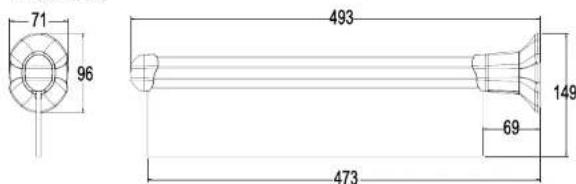
Fig 1: LD-40E1 Style Sign Dimensions (mm)
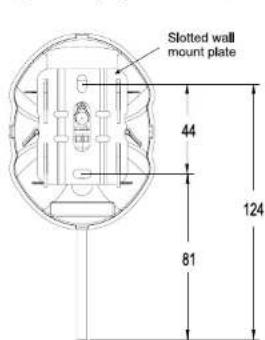
Fig 2: LD-40E1 Style Mounting Hole Positions (mm)

Fig 3: Cable Routing Cut-Outs
Mounting & Connecting The LD-40E1 Style Sign
The LED sign should be mounted on a flat and firm solid surface. To assist the correct mounting the sign is supplied with a mounting kit comprising 2 x wall plugs (for mounting into brick, concrete, breeze block or stone) and 2 x large flange screws.
Note: You'll need the following tools to mount the sign: an electric drill fitted with a 6mm diameter masonry drill bit, a No.1 Pozi-drive screwdriver and a spirit level.

SIGNALLED STUDIO ILLUMINATED SIGNS
Mounting The Wall Plate
To create an attractive invisible-fixing finish the SignalLED assembly is clipped into a wall mount plate. The wall mount plate must be securely fitted to a smooth, solid surface before attempting to fit the SignalLED assembly.
It is recommended to route the signal and power supply cables before finalising the mounting of the sign. These cables can be routed either through the central aperture in the wall mount plate, or through the cable cutouts in the back of the wall mount moulding. Use a sharp knife to remove the thinner areas of the moulding in the positions shown in Fig 3 if you need to route the cables this way.
- Drill 2 holes, 34mm deep, using a 6mm diameter masonry drill at the pitch shown on the drawing Fig 2.
- Insert the wall plugs flush with the surface.
- Position the wall mount plate vertically and fix to the wall using the large flange screws. Do not substitute other fixings because they may not fully support the sign and may invalidate the warranty.
- Use a spirit level on the wall mount plate to set the sign level and vertical before fully tightening.
The screws can also be used for fixing into wood. For correct fitting drill a small pilot hole into the wood before fitting the screw.
Connecting The Power & Signal Connections
It is recommended that the LD-IT SignalLED end mount sign installation tool is used to assist the termination of the power and signal connections. The tool is designed to hold the sign on the pre-fitted wall mount plate leaving both hands free to make the connections, as shown in Fig. 4.
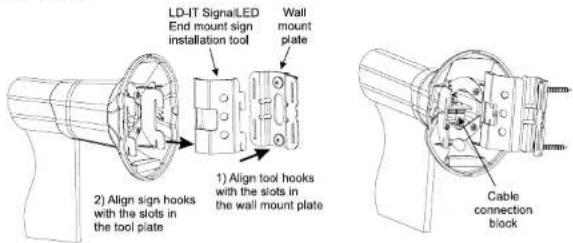
Fig 4: LD-IT End mount sign installation tool
SIGNALLED STUDIO ILLUMINATED SIGNS

9) This combination is then fixed to the left hand flush mount assembly end moulding with the 4 supplied No.4 x ¼ self tap screws. Do not substitute any other screws in these positions and do not reuse the screws removed from these positions because they will not support the sign correctly.
10) Please refer to the installation notes for the LD-40E style signs to complete the final fitting and colour/configuration set-up.

Fig 14: Left Hand Conversion Re-assembly
Setting The Colour & Display Mode(s) of The Sign
Each side of the sign can be separately controlled and can show a different colour by 2 signalling inputs if you require, or the whole sign can be controlled from one signalling input. The sign can also be configured for different states, so that with no signalling input present, the sign can illuminate and then be in a different state when 1, 2 or both signalling inputs are applied. Thus the appearance of the sign can be made extremely versatile if you wish.


SIGNALLED STUDIO ILLUMINATED SIGNS

Fig 12: Removing the Right Hand Flush Wall Moulding. Fig 13: Right Hand Conversion Re-assembly
Left Hand Side Fitting of the Conversion Kit
Note: With this conversion you will be removing the PCB from the sign so full anti-static precautions must be taken to protect the PCB from damage. Failure to do so may result in the sign not working and invalidating the warranty.
1) Open the end cover on the right hand flush mount assembly by removing the self-tapping screw with a No.1 pozi-drive screwdriver.
2) Remove the 2 small screws that hold the PCB into the right hand flush mount assembly and withdraw the PCB. Place the PCB on an antistatic surface.
3) Remove the right hand flush mount assembly by unscrewing the 4 screws that fix the end moulding to the aluminium tube. These are located inside at the bottom of the end moulding.
4) Align the 4 pins of the extrusion end cover with the screw holes in the exposed end of the aluminium tube. Note the orientation of the cut-out with the clear sign board and press fit the end cover fully onto the aluminium tube.
5) Open the end cover on the left hand flush mount assembly by removing the self-tapping screw with a No.1 pozi-drive screwdriver.
6) Remove the flush wall mount moulding from the end moulding by unscrewing the 4 screws visible under the cover.
7) Replace the PCB into the left hand end moulding aligning the PCB edge with the guide tracks in the aluminium extrusion. Refit the 2 small screws that hold the PCB, taking care not to over tighten and strip the plastic.
8) Fit the internal hanger plate into the end wall mount moulding. Align the semi-circular cut-out in the hanger plate with the raised section above the serial number label, which indicates the bottom of the assembly. Also make sure that the hanger plate fits into the slots in the wall mount moulding.
SIGNALLED STUDIO ILLUMINATED SIGNS

To get access to the cable connection block and the mode switches, which are on the PCB inside the sign, the door on the underside of the end plastic moulding must be opened.
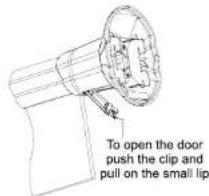
To open the door push the clip towards the sign and pull down on the small lip. See Fig 5. Do not attempt to remove the door from the end moulding. Access to the connection block and the mode switches is possible with the door fully open.
Fig 5: Opening The Access Door
The sign can be connected and powered either with the supplied DC power supply, or with a regulated DC supply rated 5V to 7V DC, 0.5mA minimum. On the supplied DC power supply, the +6V is indicated with a dashed white line on one of the cables. Before fitting the international wall adapters to the power supply the fitted connector cover must be removed.

Fig 6: Mode Settings & Connection Block
Mounting The Sign To The Wall Plate
The sign is fitted by locating the four internal hanger plate hooks into the four slots in the wall mount plate.
Once located, hold the sign around the end moulding of the SignalLED assembly (where the door is fitted) and press down into its final position. The sign retaining pins will clip into the indentations on the side of the wall mount plate and this should result in a click as the plastic pins move into their final position. See Figs. 7 & 8.
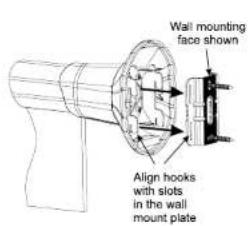

Fig 7: Align The Sign to The Wall Plate. Fig 8: Fitting The Sign to The Wall Plate

SIGNALLED STUDIO ILLUMINATED SIGNS

SIGNALLED STUDIO ILLUMINATED SIGNS
Note: a reasonable amount of force is needed to fully connect the LED sign assembly to the wall plate.
The sign can be removed from the wall mount plate by holding around the end moulding, as close to the wall as possible, and pushing up on the sign until the retaining pins unclip. This will take more force to achieve than when fitting the sign.
Note: do not clip and unclip the sign repeatedly as this can damage the retaining pins and cause the sign to be a loose fit on the wall mount plate.
LD-KE1 SignalLED Conversion Kit, Single Flush Mount to End Mount
To convert the LD-20F & LD-40F style flush mount single sided signs into single sided end mount signs you will need to fit the LD-KE1 conversion kit. Please follow these instructions carefully.
Note: You'll need the following tools to use the conversion kit:, a No. 0 and No.1 Pozi-drive screwdriver.
Take care not to damage the clear surface of the sign board. The surface will be marked by swarf or rough surfaces, so please use a clean cloth to hold the sign.
Because the sign is single sided the text will only be correctly viewable from one side. If the text must be viewed from one particular side this must be chosen initially as it will affect the disassembly and subsequent re-assembly of the sign
As standard the SignalLED PCB is fitted into the right hand end of the LD-20F & LD-40F (see Fig 9). If you would like the sign to be viewable with the right hand side of the sign mounted onto the wall please use the 'Right Hand Side' fitting instructions.
If you would like the sign to be viewable with the left hand side of the sign mounted onto the wall, please use the 'Left Hand Side' fitting instructions.

Fig 9: Sign Components to be Converted
SIGNALLED STUDIO ILLUMINATED SIGNS

Right Hand Side Fitting of the Conversion Kit
1) Open the end cover on the left hand flush mount assembly by removing the self tapping screw with a No.1 pozi-drive screwdriver.
2) Remove the left hand flush mount assembly by unscrewing the 4 screws that fix the end moulding to the aluminium tube. These are located inside at the bottom of the end moulding. See Fig 11.
3) Align the 4 pins of the extrusion end cover with the screw holes in the exposed end of the aluminium tube. Note the orientation of the cut-out with the clear sign board and press fit the end cover fully onto the aluminium tube.
4) Open the end cover on the right hand flush mount assembly by removing the self-tapping screw with a No.1 pozi-drive screwdriver.
5) Remove the flush wall mount moulding from the end moulding by unscrewing the 4 screws visible under the cover See Fig 12.
6) Fit the internal hanger plate into the end wall mount moulding. Align the semi-circular cut-out in the hanger plate with the raised section above the serial number label, which indicates the bottom of the assembly. Also make sure that the hanger plate fits into the slots in the wall mount moulding.
7) This combination is then fixed to the right hand flush mount assembly end moulding with the 4 supplied No.4 x 3/4 self tap screws. See Fig 13. Do not substitute any other screws in these positions and do not reuse the screws removed from these positions, because they will not support the sign correctly.
8) Please refer to the installation notes for the LD-40E style signs to complete the final fitting and colour/configuration set-up.

End wall mount
moulding
(1)
No 4 x 3/4 selflap
screws x 4
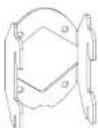
Internal Hanger plate

Extrusion end cover

Remove these
screws to take
off the left hand
lush mount assembly
Fig 10: Kit Components Used for the Conversion Fig 11: Removing the Left Hand Assembly

SIGNALLED STUDIO ILLUMINATED SIGNS


- SIGNALLED STUDIO ILLUMINATED SIGNS
- SIGNALLED LD-E1, LD-E2 & LD-KE1 USER HANDBOOK
- WARRANTY INFORMATION
- INTRODUCTION
- SAFETY INFORMATION
- INSTALLATION NOTES
- SONIFEX
- SETTING WHICH SIDE (SEGMENT) OF YOUR SIGN ILLUMINATES
- SETTING THE ILLUMINATION MODE OF YOUR SIGN
- SETTING THE COLOUR OF YOUR SIGN
- SIGN DIMENSIONS & MOUNTING POSITIONS
- MOUNTING & CONNECTING THE LD-40E1 STYLE SIGN
- MOUNTING THE WALL PLATE
- CONNECTING THE POWER & SIGNAL CONNECTIONS
- SETTING THE COLOUR & DISPLAY MODE(S) OF THE SIGN
- LEFT HAND SIDE FITTING OF THE CONVERSION KIT
- MOUNTING THE SIGN TO THE WALL PLATE
- LD-KE1 SIGNALLED CONVERSION KIT, SINGLE FLUSH MOUNT TO END MOUNT
- RIGHT HAND SIDE FITTING OF THE CONVERSION KIT
Brand : Sonifex
Model : Record Sign SingleFlush 40
Category : Unknown