
Listen Four Quarters - MIDI Keyboard 4ms - Free user manual and instructions
Find the device manual for free Listen Four Quarters 4ms in PDF.


| Product Type | MIDI Keyboard Controller |
| Model | Listen Four Quarters |
| Brand | 4ms |
| Keyboard | 49 velocity-sensitive keys (4 octaves) |
| MIDI Connectivity | USB-MIDI, MIDI Out (5-pin DIN) |
| Controls | Pitch bend, modulation wheel, assignable knobs, buttons |
| Power Supply | USB bus-powered (5V DC) |
| Dimensions | Approx. 32 x 8 x 3 inches (81 x 20 x 7.6 cm) |
| Weight | Approx. 4.5 lbs (2.0 kg) |
| Compatibility | Windows, macOS, iOS (via USB adapter) |
| Functions | Note on/off, velocity, aftertouch, control change, program change, pitch bend, modulation |
| Maintenance | Wipe with a dry cloth; do not use liquids or solvents |
| Safety | Keep away from water, heat sources, and direct sunlight |
| Spare Parts | Contact 4ms support for replacement keys or jacks |
| Repairability | Modular design; user-serviceable with basic tools |
| Included Accessories | USB cable, quick start guide |
Frequently Asked Questions - Listen Four Quarters 4ms
User questions about Listen Four Quarters 4ms
0 question about this device. Answer the ones you know or ask your own.
Ask a new question about this device
Download the instructions for your MIDI Keyboard in PDF format for free! Find your manual Listen Four Quarters - 4ms and take your electronic device back in hand. On this page are published all the documents necessary for the use of your device. Listen Four Quarters by 4ms.
USER MANUAL Listen Four Quarters 4ms
Listen Four Quarters 4ms Company
User Manual 1.0 - Dec 31, 2018
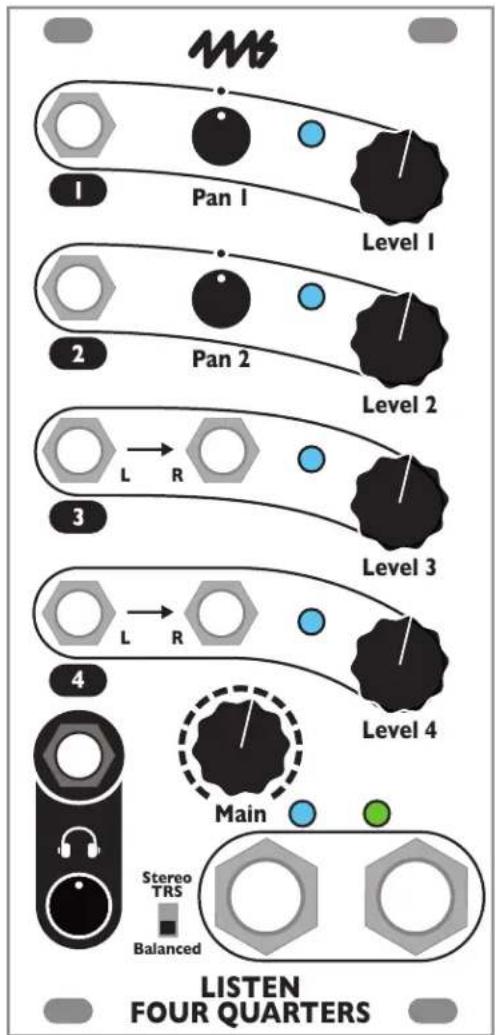
flowchart
graph TD
    A["1: Top Panel"] --> B["Pan I"]
    B --> C["Level 1"]
    D["2: Middle Panel"] --> E["Pan 2"]
    E --> F["Level 2"]
    G["3: Bottom Panel"] --> H["L R"]
    H --> I["Level 3"]
    J["4: Radio System"] --> K["Main"]
    K --> L["Level 4"]
    M[" Stereo TRS "] --> N["Balanced"]
    O[" LISTEN FOUR QUARTERS"]
The Listen Four Quarters is a four channel stereo mixer with 1/4" (6.35mm) TRS balanced outputs and 1/8" (3.5mm) headphones output. Two mono channels with Pan knobs and two stereo channels with dual inputs provide optimal compatibility with both stereo and mono signals. The Listen Four Quarters can be daisy-chained to other Listen modules to create a larger mixer with sub-mix outputs. Listen Four Quarters features include:
• Four input channels (two with stereo inputs, two with mono inputs and a Pan knob)
- Headphone and main 1/4" outputs, each with separate Level knob
• Balanced TRS outputs, switchable to stereo
• Line level output driver with zero impedance, capable of driving long cables
- Low noise, cross-talk, and bleed-through
- Anti-pop feature that silences pops and thumps when the power is turned on
- Headers in back allow for connecting to other Listen Four or Listen Four Quarters modules to create a mixer with 8, 12, 16, or more channels and multiple sub-mix outputs
- Connects via headers to WAV Recorder module for recording final mix without using patch cables
• Signal lights for each channel and output mix
Table of Contents
Setting up your Listen Four Quarters 2
Inputs....3
Main Outputs ....3
Stereo TRS/Balanced Switch 4
Headphones Output 4
INS Header ....5
OUTS Header....5
Daisy-chaining 5
Anti-pop circuitry 7
Electrical and Mechanical Specifications 7
Setting up your Listen Four Quarters
-
Power off your Eurorack system.
-
Connect the free end of the included power cable to a 16-pin Eurorack power header on your power supply distribution system. The red stripe should match the white line or -12V marking on the power distribution board. The other end of the power cable is a 10-pin connector which should already be connected to the Listen Four Quarters with the red stripe on the power cable orientated towards the bottom of the module.
Note: The Listen Four Quarters is reverse-polarity protected, but incorrectly connecting any module can damage any other on the power bus.
-
Using the included screws, securely attach the Listen Four Quarters to the rails of your case.
-
Power on your Eurorack system.

natural_image
Close-up of a white cylindrical power connector on a circuit board (no visible text or symbols)Inputs


The Listen Four Quarters has four input channels on the front. A fifth stereo channel can be accessed through a header on the back.
Level Knobs
All four channels have a Level knob. This knob sets the volume which will appear on the outputs. The Listen Four Quarters is very quiet, so turning the knob all the way down will completely mute the channel (over -100dB of attenuation, typically).
Channel Signal Lights
All four channels have a signal light which gets brighter as the signal gets louder. The color of the light indicates the stereo content: blue displays the signal on the left channel, and green displays the signal on the right channel. The signal light shows the signal post-fader (after the Level knob). These lights are useful for determining which channels are active at any given moment. However, they should not be used as precision indicators. For example, the green lights will appear dimmer than the blue lights at low audio levels and brighter than the blue lights at louder levels.

Channels 1 and 2: Panning
Channels 1 and 2 each have one input jack and a Pan knob. These channels accept a mono signal. Turning the Pan knob to the left or right will place the signal in the stereo field by fading it between the left and right outputs. The Pan knob has a small detent in the center position so you can find the center by feel.
The panning curve has been carefully designed to achieve the perception of a sound source being a consistent distance from the listener as it pans around.

Channels 3 and 4: Stereo inputs
Channels 3 and 4 each have left and right input jacks. Patching a stereo signal into these jacks will accurately maintain the stereo image as the signal is mixed into the outputs. If you patch a mono signal into the left jack and nothing into the right jack, the mono signal will appear on both left and right outputs.
Channel 5: INS header
See INS header section below
Main Outputs

Main Level Knob
The Main Level knob controls the volume of the main left and right output jacks. When knob is turned fully to the left, the outputs are muted. Turning the knob the to right increases the volume.

Left and Right Output Jacks
The main outputs of the module are the left and right output jacks. The signal level on these jacks is controlled by the Main Level knob and designed to drive line-level equipment. These jacks have a zero-impedance balanced line driver circuit capable of driving long cables. The jacks are TRS 1/4" (6.35mm) and will output a balanced signal. Using a mono cable with either jack will disable the balanced circuitry and a mono signal will be output. The switch must be set to Balanced if mono cables are used, or else the right channel will be muted (see Stereo TRS/Balanced Switch section below).
The signal will never clip because the Listen Four Quarters inputs modular-level signals and outputs line-level signals. Thus the overall gain is less than one.
Always flip the switch to Balanced when using mono (TR) cables, or else the right channel will be muted.
Output Signal Lights
The two lights near the output jacks indicate the signal level present on the main output jacks. The left light turns a brighter blue as the left channel output gets louder. The right light turns a brighter green as the right channel output gets louder.
Note: The signal lights only indicate relative dynamics. Pulsing lights often indicate beats or throbbing sounds. It's normal that the blue lights are brighter than the green lights at softer volumes.
Stereo TRS/Balanced Switch
Stereo
TRS
Balanced
This switch selects the type of output on the main 1/4" jacks.
When the switch is flipped down to Balanced, the jacks will output a balanced signal suitable for a TRS cable. The left and right jacks will output the left and right channels of the mix, respectively. On the TRS cable, the signals are as follows:
Tip = + Signal, Ring = - Signal, Shield = Ground.
If a mono cable is used instead of a TRS cable, the circuitry will automatically convert to unbalanced mode and the amplitude will be compensated so the overall volume remains the same. If possible, use balanced signals and TRS cables, as they reduce noise substantially.
When the switch is flipped up to Stereo TRS, the left jack changes functionality in such a way that both the left and right channels of the mix will be output on the left jack. On a TRS cable in the left jack, the signals are as follows:
Tip = Left channel, Ring = Right channel, Shield = Ground.
If a mono cable is patched into the left jack while the switch is flipped to Stereo TRS, the right channel will be grounded and muted. This means the right jack will no longer output properly. Therefore, flip the switch to Balanced if you are using mono cables.
Besides this potential grounding of the right signal via a mono cable in the left jack, no change to the right jack happens when the switch is flipped to either position: the right jack always outputs a balanced signal.
| Type of 1/4” Cable | Switch Setting | Jacks to Use |
| Balanced (TRS) | Balanced | Both jacks |
| Mono | Balanced | Both jacks |
| Stereo L/R (TRS) | Stereo TRS | Left jack only(L/R stereo signal) |
Headphones Output

Headphones Jack
The headphones jack is a stereo 1/8" jack (3.5mm) designed for outputting to headphones. Any headphones can be used, though 8 to 32 ohms is recommended. The jack can also be used as an additional output to connect to an external device that requires a TRS stereo signal. However, use the main outputs if possible because the frequency response and noise specifications of the headphones output are not as good as the main output jacks, and this output does not have the anti-pop circuitry.
Headphones Level Knob
This knob sets the headphones volume. It's independent of the Main Level knob.
INS Header

A three-pin header labeled INS on the back of the Listen Four Quarters allows you to connect another module as an auxiliary stereo input. Whatever signal is fed into the header will appear on the outputs without any attenuation. The INS header has pins for the left channel (bottom pin), right channel (top pin), and ground (center pin). The input impedance is 47k.
A typical use would be to daisy-chain multiple Listen modules to create a mixer with eight or more channels. To do this, the OUTS header on one module is connected to the INS header on the other module. See the Daisy-chaining section for details.
OUTS Header
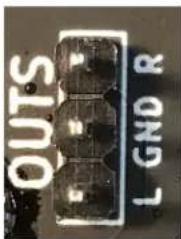
A three-pin header labeled OUTS on the back of the module allows you to send the main output mix to another module with a compatible header. The pin order and pin dimensions of this header are the same as the INS header (see previous section). The output impedance is 1k. It will not damage the circuitry if the pins are shorted to ground.
The Main Level knob controls the level on the OUTS header. The main outputs and headphones outputs are unaffected by the use of the OUTS header.
Daisy-chaining

natural_image
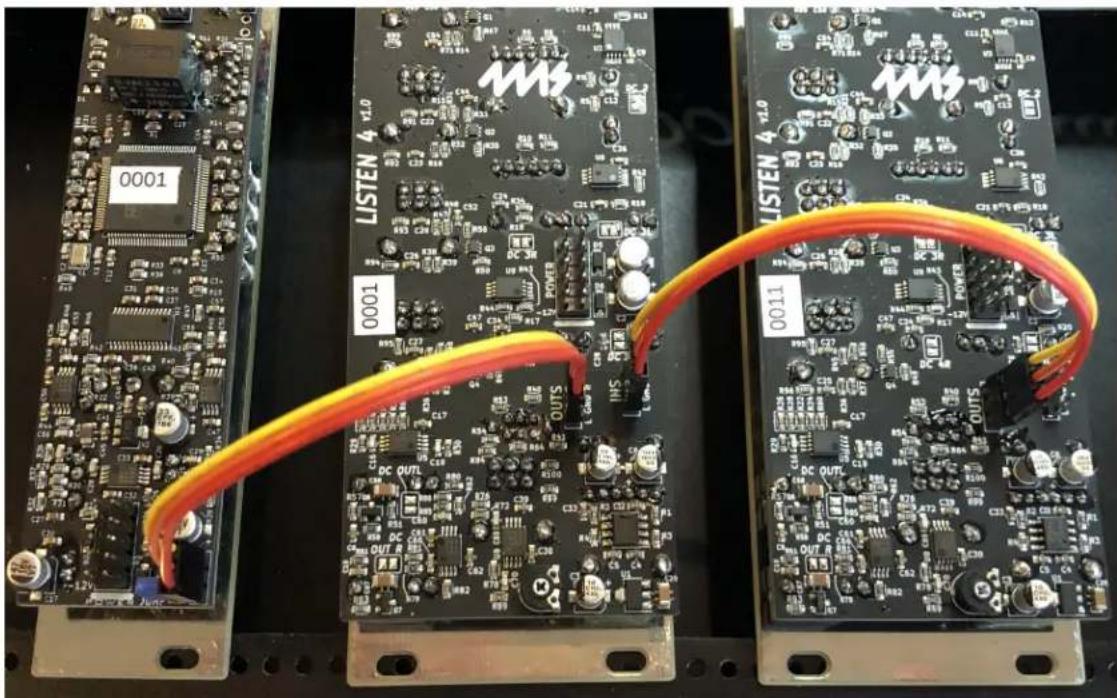
Close-up of two electronic circuit boards with visible components and orange wires (no readable text or symbols)Multiple Listen modules can be connected to form a large mixer. For example, connecting two Listen Four modules creates an eight channel stereo mixer: the four inputs of the first Listen Four are added to the four inputs of the second Listen Four (see photo on the left).
You can daisy-chain as many modules as you want. Connecting a Listen Four Quarters after the two Listen Fours in the example above will create a 12 channel mixer with 1/4" balanced outputs, and two sub-mix outputs.
You can also connect a WAV Recorder module to the end of a chain of Listen modules, allowing you to record the main outputs without using patch cables.
How to Daisy-chain
To daisy-chain two modules, use a 3-pin cable to connect the OUTS header of one module to the INS header of another. You can continue to connect more modules in the same way, OUTS to INS.
A suitable connecting cable can be purchased from 4ms Company or many of our dealers. You also can find or create your own cable. The cable must fit a single row of three pins with a pin spacing of 0.1" (2.54mm). The pins are 0.2" tall (5mm), which is the same spacing, size and length as the pins on standard Eurorack power headers. Make sure the same color wire is on top on both sides of the connecting cable. If one side is reversed, the left and right channels will be reversed (though no damage or malfunction will occur).
Main Mixes and Sub-mixes
The Main Level knob controls the level that's passed to the next Listen module via the OUTS header. By patching related signals into the same Listen module, you can create sub-mixes with a single knob for level control.
For example, see the photo above. Two Listen Four modules are connected such that one module's OUTS header connects to the other module's INS header. Let's say you patch some polyrhythmic drum sounds into the first Listen Four, and patch some processed field recordings into the second Listen Four. The output jacks on the second Listen Four will be a mix of everything (the drums and field recordings), and the Main Level knob will
control the overall level. The output jacks on the first Listen Four will be a sub-mix of just the drums, and its Main Level knob will control just the level of the drums in both the sub-mix and the overall mix.
Connecting to the WAV Recorder
The WAV Recorder just has an INS header, and so it can only be connected at the end of a daisy-chain. This is useful for making a recording of the main mix. Since the WAV Recorder can accept line or modular level signals, the Listen Four's switch can be set to either Line or Mod. The Input Gain knob on the WAV Recorder can be adjusted to the maximum recording level without clipping. Adjusting this knob will not effect the output level of the Listen modules.
natural_image
Three electronic circuit boards labeled 0001, 00014, and 0011 connected by orange cables (no readable text or symbols beyond labels)In the photo above, two Listen Fours and a WAV Recorder are daisy-chained by connecting the OUTS to INS headers. This creates an eight channel mixer with a stereo recording of the main mix.
The photo on the right shows a twelve channel mixer with stereo recording of the main mix. Patching into any of the twelve channels will pass the signal to the 1/4" outputs, as well as the WAV Recorder. No cables need to be patched between modules. Each Listen module's Main Level knob controls the sub-mix level of its four channels plus the module to the left of it. The sub-mix can be taken simply by patching into the Left and Right output jacks on the Listen Four modules. The headphone jack on these modules can also be used to cue or monitor the sub-mix.

Twelve channel mixer with two four-channel sub-mixes, 1/4" balanced stereo outputs and stereo recording directly from the main mix. Each sub-mix has a headphone jack with independent level for cueing.
Anti-pop circuitry
The Listen Four Quarters has a special feature that prevents the main outputs from popping or thumping when the power is turned on. This avoids a common problem that happens when the power is accidentally turned off and back on again while connected to a PA or powered speaker system, or the power is turned on after the speakers are turned on. When using most mixers, the result is a loud pop that can damage the speakers (and frighten anyone nearby!). The Listen Four Quarters automatically mutes the outputs during power-on, thus avoiding any pops.
Electrical and Mechanical Specifications
• 12HP Eurorack format module
- 1.13" (28.7mm) maximum depth (includes power cable)
• 10-pin Eurorack power header
• Power consumption
• Maximum values without using headphones jack: Main outputs shorted to ground, headphones jack not used, maximum signal levels on all channels
• +12V: 107mA
-12V: 101mA
- Maximum values in worst-case conditions: All outputs including headphone jack shorted to ground, maximum signal levels on all channels
• +12V: 290mA
-12V: 101mA
- Main outputs
• Output type: balanced zero-impedance, compensated for electrolytic capacitor distortion
• Frequency Response: +/-0.2dB max deviation, 10Hz - 20kHz
• Maximum output level: 17.1V peak-to-peak (+17.8dBu)
• Maximum gain of channels 1 and 2: -4.4dB (hard-panned), -9.1dB (center-panned)
• Maximum gain of channels 3 and 4, and INS header: -7.5dB
• Channel bleed-through (Main Level attenuation):
Test conditions: Test signal input into each channel with Level knob at 100%. Frequencies from 20Hz to 20kHz tested. Result given as a ratio of the signal measured on main output jacks with Main Level knob at 0%, to the signal measured with Main Level knob at 100%. Worst-case results for any channel and frequency reported.
• Output jack tip: <-110dB
• Channel bleed-through (channel attenuation):
Test conditions: Test signal input into each channel with Level knob at 0% and Main Level knob at 100%. Frequencies from 20Hz to 20kHz tested. Result given as a ratio of the signal measured on main output jacks with channel Level knob at 0%, to the signal measured with channel Level knob at 100%. Worst-case results for any channel and frequency reported.
• Output jack tip: -106dB
• Channel cross-talk:
Test conditions: Test signal input into each channel. Level knob at 0%, and other channel Level knobs at 100%. Main Level knob at 100%. Frequencies from 20Hz to 20kHz tested. Measured signal subtracted from signal with all Level knobs at 0%, and result given in dB as a ratio to output signal with test channels' Level knob at 100%. Worst-case results for any channel and frequency reported.
• Output jack tip: <-110dB
- Headphones jack
- Frequency response: -0.2dB at 20Hz; 0dB at 100Hz to 20kHz (driving 32Ω headphones)
• Maximum voltage (peak-to-peak): 5Vpp
- Listen Four Quarters 4ms Company
- Table of Contents
- Setting up your Listen Four Quarters
- Inputs
- Level Knobs
- Channel Signal Lights
- Channels 1 and 2: Panning
- Channels 3 and 4: Stereo inputs
- Channel 5: INS header
- Main Outputs
- Main Level Knob
- Left and Right Output Jacks
- Output Signal Lights
- Stereo TRS/Balanced Switch
- Headphones Output
- Headphones Jack
- Headphones Level Knob
- INS Header
- OUTS Header
- Daisy-chaining
- How to Daisy-chain
- Main Mixes and Sub-mixes
- Connecting to the WAV Recorder
- Anti-pop circuitry
- Electrical and Mechanical Specifications
- • Power consumption
- - Main outputs
- - Headphones jack
Brand : 4ms
Model : Listen Four Quarters
Category : MIDI Keyboard