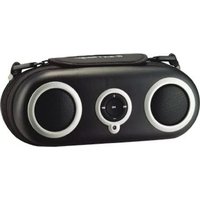
iH19 - Loudspeaker SDI Technologies - Free user manual and instructions
Find the device manual for free iH19 SDI Technologies in PDF.


| Product Type | Portable iPod Speaker Dock |
| Brand | SDI Technologies |
| Model | iH19 |
| Compatible Devices | iPod (except 3G iPod), other audio devices via line-in |
| Power Source | AC adaptor (120V) or 4 AA batteries |
| Battery Type | 4 AA alkaline (recommended) |
| Auto Power Off | After 2 hours of inactivity on battery power |
| iPod Charging | Only when connected to AC power; does not charge with batteries only |
| Audio Output | Built-in speakers |
| Headphone Jack | Yes, 3.5mm for private listening |
| Line-In Jack | Yes, 3.5mm for external audio devices |
| Controls | Play/Pause, Volume +/-, Forward/Reverse, Hold Switch |
| Hold Switch | Locks buttons to prevent accidental operation |
| Accessories Included | AC adaptor, audio patch cord |
| Warranty | 90-day limited warranty |
| Cleaning | Soft cloth with mild soap and water; avoid solvents |
| Safety Precautions | Avoid water, heat, and overload; unplug during storms |
| Customer Support | www.ihomeaudio.com or 1-800-288-2792 |
| Country of Origin | Printed in China |
Frequently Asked Questions - iH19 SDI Technologies
User questions about iH19 SDI Technologies
0 question about this device. Answer the ones you know or ask your own.
Ask a new question about this device
Download the instructions for your Loudspeaker in PDF format for free! Find your manual iH19 - SDI Technologies and take your electronic device back in hand. On this page are published all the documents necessary for the use of your device. iH19 by SDI Technologies.
USER MANUAL iH19 SDI Technologies
natural_image
Line drawing of a iPhone brand portable electronic device with two circular speakers and a central control panel (no text or symbols)THIS UNIT WILL NOT CONTROL OR CHARGE 3G iPod
Questions? Visit www.ihomeaudio.com
Table of Contents
Quick Start 1
Controls and Indicators 2
Using the iH19 3
Installing/Replacing iH19 Batteries 4
A Consumer Guide to Product Safety 5
Trouble Shooting 6
Warranty Information 8
A Consumer Guide to Product Safety
IMPORTANT SAFETY INFORMATION: IT IS THE USER'S RESPONSIBILITY TO USE THIS PRODUCT PRUDENTLY, RESPONSIBLY AND IN A SAFE, NON-DISTRACTED MANNER AT ALL TIMES. FAILURE BY THE USER TO PAY FULL ATTENTION TO THE PROPER OPERATION OF ANY EQUIPMENT BEING USED ALONG WITH THIS PRODUCT COULD RESULT IN AN ACCIDENT AND/OR PERSONAL INJURY.
Maintenance
- Place the unit on a level surface away from sources of direct sunlight or excessive heat.
- Protect your furniture when placing your unit on a natural wood and lacquered finish. A cloth or other protective material should be placed between it and the furniture.
- Clean your unit with a soft cloth moistened only with mild soap and water. Stronger cleaning agents, such as Benzine, thinner or similar materials can damage the surface of the unit.
iH19 Quick Start
1:batteries

natural_image
Diagram of an electronic device with battery pack and wiring (no text or symbols)Open battery compartment and insert 4 "AA" batteries as indicated on diagram. Unit can now play iPod. Batteries will not charge iPod.
2:power

natural_image
Line drawing of a medical device with an attached power outlet connected to a box containing internal components (no text or symbols)Attach AC adaptor cable to jack on top of the iH19 and plug the other end into a working wall socket to charge and play iPod. Does not charge batteries.
3:iPod

natural_image
Diagram of a mechanical device with attached wires and components (no text or symbols)Gently insert connector plug into iPod and place iPod in iH19 docking pocket. Press both sides of connector plug to release iPod.
Top Panel

Front Panel
Using the iH19
Connecting iH19 to Power Source
a) Plug the AC adaptor cable into the ① AC Adaptor Jack and the other end into a standard 120 VAC wall socket. If an iPod is properly connected, it will begin charging, indicated by a flashing blue ⑩ LED. The iH19 also operates on 4 "AA" batteries (see page 4 for information on installing/replacing batteries) for portable playing. The AC adaptor charges the iPod with or without batteries installed. The unit will not charge your iPod while operating just on batteries.

natural_image
Line drawing of a medical kit with an electrical outlet connected to a box (no text or symbols)NOTE: To save battery life, when running off Batteries, unit will automatically power
OFF after 2 hours of NON-use (no button activation). Press any button to re-activate the unit.
iPod
Playing and charging your iPod
a) Gently place iPod in iPod docking pocket behind retaining band.
b) Gently insert connector plug into bottom of your iPod. Make sure there is a power source, either batteries or AC power. Close zipper on case. The LED on the front panel will blink if unit is off and iPod is charging. iH19 won't overcharge your iPod. NOTE: If you dock an iPod with a drained battery, it may take up to 6 minutes of charging before the iPod will respond.
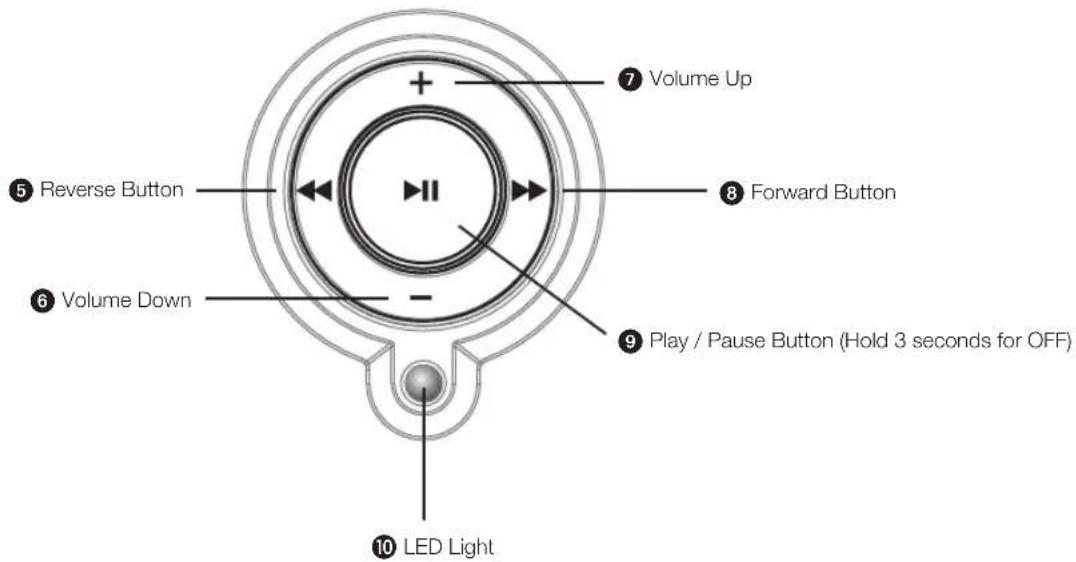
c) Press the ⑨ iPod Play/Pause Button to play iPod, and again to pause.
d) Press 6 7 + or - bottom to increase or decrease volume.
e) Press ⑧ Forward or ⑤ Reverse buttons to go to the next or previous track. Hold ⑧ Forward or ⑤ Reverse while track is playing to scan to a given music passage. ⑧ Forward and ⑤ Reverse do not affect components connected to the ③ line-in jack.
f) Press and HOLD the ⑨ iPod Play/Pause button for 3 seconds to turn off the iPod and the unit.
Hold Switch
The iH19 has a ② Hold Switch to disable button functions while on the go to prevent accidental playing of the iPod and loss of battery power. Move ② Hold Switch to ON position to lock up button functions. Move the ② Hold Switch to OFF for normal button function.
Using the Line-in and Headphone Jacks
a) An audio patch cord comes with the iH19. Use it to play nondocking iPod models or other audio devices through the iH19 ③ Line-in Jack (one end in the device's line out or headphones jack, the other in the iH19 line in jack). Make sure there is no iPod connected to the iH19 when using the ③ line-in jack. Press the ⑨ PLAY button to mute or unmute
line-in source.
b) Use the ④ Headphone Jack on the iH19 to disable the speakers and listen to your iPod privately.

flowchart
graph LR
    A["Start"] --> B["Line In"]
    B --> C["Hold"]
    C --> D["Button Symbol"]
    D --> E["End"]
Batteries Installation
Install/Replace Batteries
The iH19 uses 4 "AA" batteries for portable playing. The iH19 will not charge your iPod while operating on batteries.
If sound becomes weak or distorted, it is time to replace the batteries.
- Open the battery compartment cover located below the jacks on the unit.
- Insert 4 "AA" batteries as indicated.
- We recommend the use of alkaline batteries for longer life.
NOTE: AC adaptor does not charge batteries

natural_image
Line drawing of a device with labeled components and arrows indicating connections (no text or symbols present)Batteries information:
- Do not mix old and new batteries.
- Do not mix alkaline, standard (carbon -zinc) or rechargeable (nickel-cadmium) batteries.
A Consumer Guide to Product Safety
IMPORTANT SAFETY INSTRUCTIONS
When used in the directed manner, this unit has been designed and manufactured to ensure your personal safety. However, improper use can result in potential electrical shock or fire hazards. Please read all safety and operating instructions carefully before installation and use, and keep these instructions handy for future reference. Take special note of all warnings listed in these instructions and on the unit.
- Water and Moisture – The unit should not be used near water. For example: near a bathtub, washbowl, kitchen sink, laundry tub, swimming pool or in a wet basement.
- Ventilation – The unit should be situated so that its location or position does not interfere with its proper ventilation. For example, it should not be situated on a bed, sofa, rug or similar surface that may block ventilation openings. Also, it should not be placed in a built-in installation, such as a bookcase or cabinet, which may impede the flow of air through the ventilation openings.
- Heat - The unit should be situated away from heat sources such as radiators, heat registers, stoves or other appliances (including amplifiers) that produce heat.
- Power Sources – The unit should be connected to a power supply only of the type described in the operating instructions or as marked on the appliance.
- Power-Cable Protection – Power supply cables should be routed so that they are not likely to be walked on or pinched by items placed upon or against them. It is always best to have a clear area from where the cable exits the unit to where it is plugged into an AC socket.
- Cleaning – The unit should be cleaned only as recommended. See the Maintenance section of this manual for cleaning instructions.
- Objects and Liquid Entry – Care should be taken so that objects do not fall and liquids are not spilled into any openings or vents located on the product.
- Attachments – Do not use attachments not recommended by the product manufacturer.
- Lightning and Power Surge Protection – Unplug the unit from the wall socket and disconnect the antenna or cable system during a lightning storm or when it is left unattended and unused for long periods of time. This will prevent damage to the product due to lightning and power-line surges.
- Overloading – Do not overload wall sockets, extension cords, or integral convenience receptacles as this can result in a risk of fire or electric shock.
- Damage Requiring Service – The unit should be serviced by qualified service personnel when:
A. the power supply cable or plug has been damaged.
B. objects have fallen into or liquid has been spilled into the enclosure.
C. the unit has been exposed to rain.
D. the unit has been dropped or the enclosure damaged.
E. the unit exhibits a marked change in performance or does not operate normally.
-
Periods of Nonuse – If the unit is to be left unused for an extended period of time, such as a month or longer, the power cable should be unplugged from the unit to prevent damage or corrosion.
-
Servicing – The user should not attempt to service the unit beyond those methods described in the user's operating instructions. Service methods not covered in the operating instructions should be referred to qualified service personnel.
Questions? Visit www.ihomeaudio.com
| Symptom | Possible Problem | Solution |
| iH19 does not turn on | no batteries are installed | Install fresh batteries |
| iH19 does not turn off | improper shut down/ button not held long enough | HOLD the Play/Pause button for 3 seconds to turn unit off |
| iH19 doesn't respond | Hold switch is in on position, locking controls | Slide hold switch to off position |
| No sound from iH19 | Volume is set too low on iH19 | Make sure volume is turned up |
| headphones in headphone jack | Make sure nothing is connected to the headphone jack | |
| iPod is not installed properly | Make sure iPod is properly and securely connected (see below) | |
| iPod didn't charge up | iPod is not installed properly | Remove your iPod from the connector and check for obstruction on the connector and on your iPod. Then reconnect iPod. |
| iPod battery has problem | Please make sure your iPod is working properly before docking into the unit. Please refer to your iPod manual for details. | |
| iPod is locked up/ frozen | ||
| AC adaptor is not plugged into unit and wall socket | The iH19 only charges your iPod while plugged into an AC outlet . Make sure the AC adaptor is plugged into the power jack on the iH19 and into a working wall socket to charge your iPod. You cannot overchage your iPod. | |
| Sound is distorted | Volume level is set too high | Decrease the volume |
| Sound source is distorted | If the iPod original sound source (MP3) is old or of poor quality, distortion and noise are easily noticed with high-power speakers. Try a different audio source such as a music CD. | |
| If you are using an external sound source like older generation of iPod or iPod Shuffle, try reducing the output volume on the device itself. Also try setting iPod EQ to flat. | ||
| Batteries are weak | Install fresh batteries | |
| Unit/adaptor gets warm after extended play at high volume | This is normal | Turn unit off for awhile or lower volume |
NOTE: When AC adaptor is plugged in, your iPod will charge (with or without batteries installed). Does not charge with batteries ONLY.
NOTE: Unit does not control or charge 3G iPod
Limited 90-Day Warranty Information
iHome Products, a division of SDI Technologies Inc. (hereafter referred to as SDI Technologies), warrants this product to be free from defects in workmanship and materials, under normal use and conditions, for a period of 90 days from the date of original purchase.
Should this product fail to function in a satisfactory manner, it is best to first return it to the store where it was originally purchased. Should this fail to resolve the matter and service still be required by reason of any defect or malfunction during the warranty period, SDI Technologies will repair or, at its discretion, replace this product without charge (except for a \10.00 charge for handling, packing, return UPS/postage, and insurance). This decision is subject to verification of the defect or malfunction upon delivery of this product to the Factory Service Center listed below. The product must include proof of purchase, including date of purchase. The fee for service without proof of purchase is \30.00.
Before returning this product for service, please first replace the batteries (if applicable) with fresh ones, as exhausted or defective batteries are the most common cause of problems encountered.
If service is still required:
- Remove the batteries (if applicable) and pack the unit in a well padded, heavy corrugated box.
- Enclose a photocopy of your sales receipt, credit card statement, or other proof of the date of purchase, if within the warranty period.
- Enclose a check or money order payable to the order of SDI Technologies, for the sum of \10.00 (\30.00 without proof of purchase).
- Send the unit prepaid and insured, to the Factory Service Center listed below.
Consumer Repair Department
SDI Technologies Inc.
1330 Goodyear Drive
El Paso, TX 79936-6420
Disclaimer of Warranty
NOTE: This warranty is valid only if the product is used for the purpose for which it was designed. It does not cover (i) products which have been damaged by negligence or willful actions, misuse or accident, or which have been modified or repaired by unauthorized persons; (ii) cracked or broken cabinets, or units damaged by excessive heat; (iii) damage to digital media players, CD's or tape cassettes (if applicable); (iv) the cost of shipping this product to the Factory Service Center and its return to the owner.
This warranty is valid only in the United States of America and does not extend to owners of the product other than to the original purchaser. In no event will SDI Technologies or any of its affiliates, contractors, resellers, their officers, directors, shareholders, members or agents be liable to you or any third party for any consequential or incidental damages, any lost profits, actual, exemplary or punitive damages. (Some states do not allow limitations on implied warranties or exclusion of consequential damages, so these restrictions may not apply to you.) This warranty gives you specific legal rights, and you may also have other rights which vary from state to state.
Your acknowledgement and agreement to fully and completely abide by the above mentioned disclaimer of warranty is contractually binding to you upon your transfer of currency (money order, cashier's check, or credit card) for purchase of your SDI Technologies product.
© 2007 SDI Technologies, Inc. All rights reserved
Questions? Visit www.ihomeaudio.com
or call 1-800-288-2792 Toll Free
IH19-011507-C (USB)
Printed in China

- Table of Contents
- A Consumer Guide to Product Safety
- Maintenance
- iH19 Quick Start
- Using the iH19
- Connecting iH19 to Power Source
- iPod
- Playing and charging your iPod
- Hold Switch
- Using the Line-in and Headphone Jacks
- Batteries Installation
- Install/Replace Batteries
- IMPORTANT SAFETY INSTRUCTIONS
- Limited 90-Day Warranty Information
- Consumer Repair Department
Brand : SDI Technologies
Model : iH19
Category : Loudspeaker