
IBA2AC-W - Wall mount Peerless-AV - Free user manual and instructions
Find the device manual for free IBA2AC-W Peerless-AV in PDF.


| Product Type | Wall mount |
| Brand | Peerless-AV |
| Model | IBA2AC-W |
| Compatible Screen Size | 32" - 65" |
| Maximum Weight Capacity | 125 lbs (56.7 kg) |
| VESA Compatibility | Up to 600 x 400 mm |
| Material | Heavy-duty steel |
| Finish | Black powder coat |
| Mounting Type | Fixed or tilt (low profile) |
| Distance from Wall | 1.5" - 2.5" (38 - 64 mm) |
| Tilt Range | 0° to 5° (forward tilt) |
| Wall Stud Spacing | Up to 24" (610 mm) on center |
| Includes Hardware | Yes (screws, spacers, washers) |
| Includes Level | Yes (built-in bubble level) |
| Certifications | UL listed |
| Warranty | 5 years |
| Installation Required | Professional installation recommended |
| Additional Features | Security screws included; cable management |
| Cleaning Instructions | Wipe with a dry cloth; do not use harsh chemicals |
| Spare Parts Availability | Contact Peerless-AV for replacement hardware |
Frequently Asked Questions - IBA2AC-W Peerless-AV
User questions about IBA2AC-W Peerless-AV
0 question about this device. Answer the ones you know or ask your own.
Ask a new question about this device
Download the instructions for your Wall mount in PDF format for free! Find your manual IBA2AC-W - Peerless-AV and take your electronic device back in hand. On this page are published all the documents necessary for the use of your device. IBA2AC-W by Peerless-AV.
USER MANUAL IBA2AC-W Peerless-AV
Installation and Assembly:
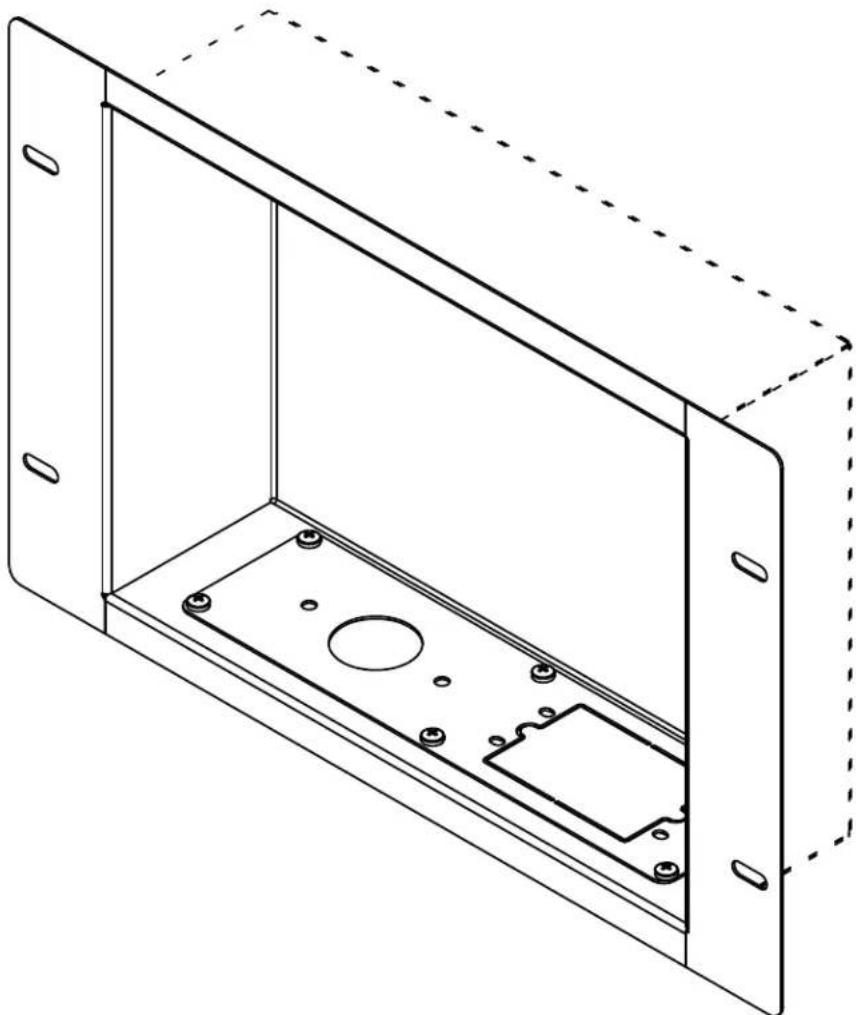
Recessed Cable Management and Power Storage Accessory Box
Models: IBA2AC, IBA2AC-W
natural_image
Technical line drawing of a 3D enclosure with internal components and mounting holes (no text or symbols)WARNING
- Do not begin to install your Peerless product until you have read and understood the instructions and warnings contained in this Installation Sheet. If you have any questions regarding any of the instructions or warnings, for US customers please call Peerless customer care at 1-800-865-2112, for all international customers, please contact your local distributor.
- This product should only be installed by someone of good mechanical aptitude, has experience with basic building construction, and fully understands these instructions.
- Make sure that the supporting surface will safely support the combined load of the equipment and all attached hardware and components.
- If mounting to wood wall studs, make sure that mounting screws are anchored into the center of the studs. Use of an "edge to edge" stud fi nder is highly recommended.
- Tighten screws firmly, but do not overtighten. Overtightening can damage the items, greatly reducing their holding power.
- This product is intended for indoor use only. Use of this product outdoors could lead to product failure and personal injury.
WALL CONSTRUCTION HARDWARE REQUIRED
- Wood
Stud
Included
- Metal Stud
Do not attach except with Peerless accessory kit ACC415;
Contact Customer Service for Peerless accessory kit ACC415
- Brick
Contact
Qualifi
ed
Professional
- Drywall
Do not attach except with Peerless accessory kit ACC415;
Contact Customer Service for Peerless accessory kit ACC415
- Other or unsure?
Contact Qualifi ed Professional
Tools Needed for Assembly
- stud fi nder ("edge to edge" stud fi nder is recommended)
- phillips screwdriver
- drill
• 3/16" (5mm) drill bit for wood studs - level
Table of Contents
Parts List....3
Installation to Wood Wall 4
Electrical Outlet Installation 5
Cable Management....6
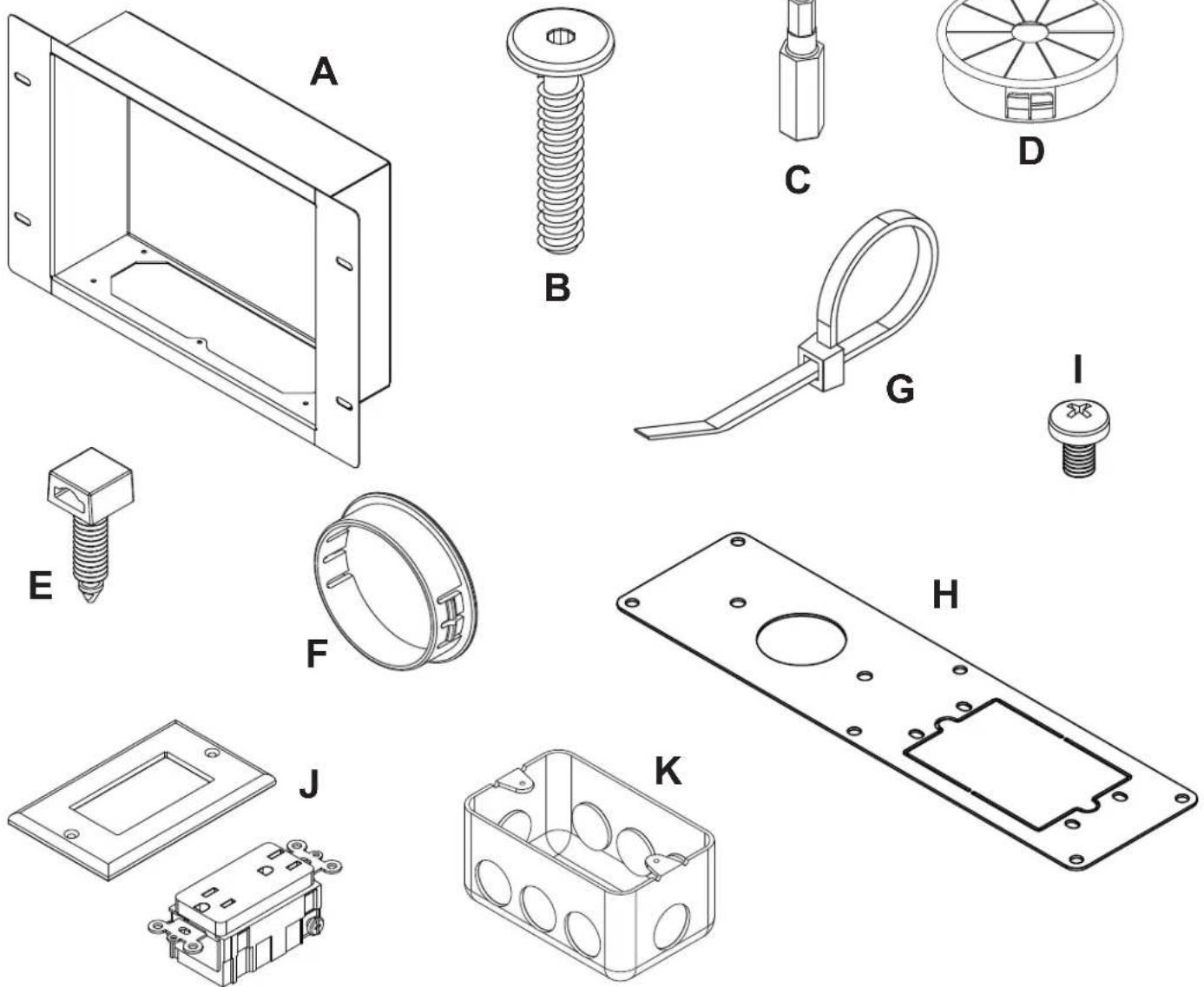
Before you begin, make sure all parts shown are included with your product.
| Parts List | IBA2AC | IBA2AC-W | |
| Description Qty. Part # Part # | |||
| A in-wall box 1 120-P1185 120-2185 | |||
| B 1-1/2" wood screw 4 500-1090 500-4090 | |||
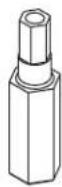
| C 4mm security driver 1 560-1133 560-1133 | |||
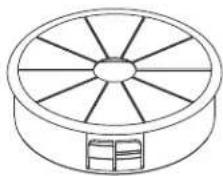
| D cable bushing 1 590-1295 590-2295 | |||
| E cable management clips 2 590-1166 590-1166 | |||
| F plastic finishing cap 1 590-1123 590-2123 | |||
| G cable tie | 2 590-1168 590-1168 | ||
| H access plate | 1 120-P1187 120-2187 | ||
| I M5 x 6mm phillips screw | 5 520-1023 520-2214 | ||
| J surge suppressor | 1 600-0190 | 600-2190 | |
| K outlet box | 1 600-0191 | 600-0191 | |
Parts may appear slightly different than illustrated.
natural_image
Line drawing of a wheel with spokes and a small inset box (no text or symbols)Installation to Wood Stud Wall
WARNING
• Installer must verify that the supporting surface will safely support the combined load of the equipment and all attached hardware and components.
- Tighten wood screws so that in-wall box is firmly attached, but do not overtighten. Overtightening can damage the screws, greatly reducing their holding power.
- Never tighten in excess of 80 in. • Ib (9 N.M.).
- Make sure that mounting screws are anchored into the center of the stud. The use of an "edge to edge" stud finder is highly recommended.
- Hardware provided is for attachment of mount through standard thickness drywall or plaster into wood studs. Installers are responsible to provide hardware for other types of mounting situations.

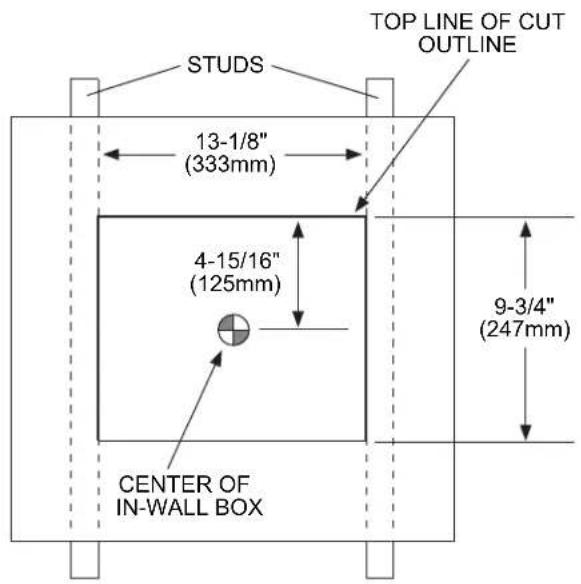
In-wall box (A) can be installed between two studs 16" off center. Use a stud fi nder to locate the edges of the studs. Use of an edge-to-edge stud fi nder is highly recommended. Based on its edges, draw two vertical lines down the inside edges of the studs. Mark desired center of in-wall box. Draw a horizontal line 4-15/16" (125mm) above desired center of in-wall box. Draw a second horizontal line 9-3/4" (247mm) below this line to outline wall opening between inside edges of studs. Remove drywall inside cut outline.
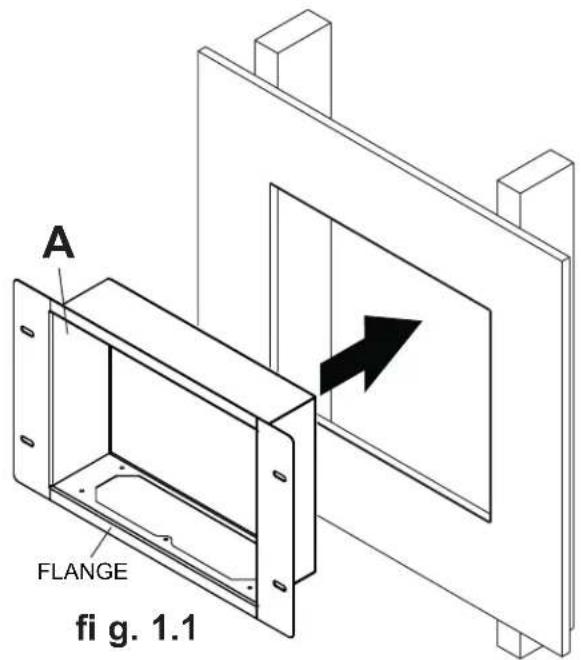
Insert in-wall box (A) into wall until fl ange is fl ush with drywall as shown in fig. 1.1.
Level in-wall box, and mark center of the four mounting holes. Make sure that the mounting holes are on stud centerlines. Drill four 3/16" (5mm) dia. holes 1-1/2" (38mm) deep. Make sure in-wall box is level, and secure it using four wood screws (B) as shown in fig. 1.2.

Electrical Outlet Installation

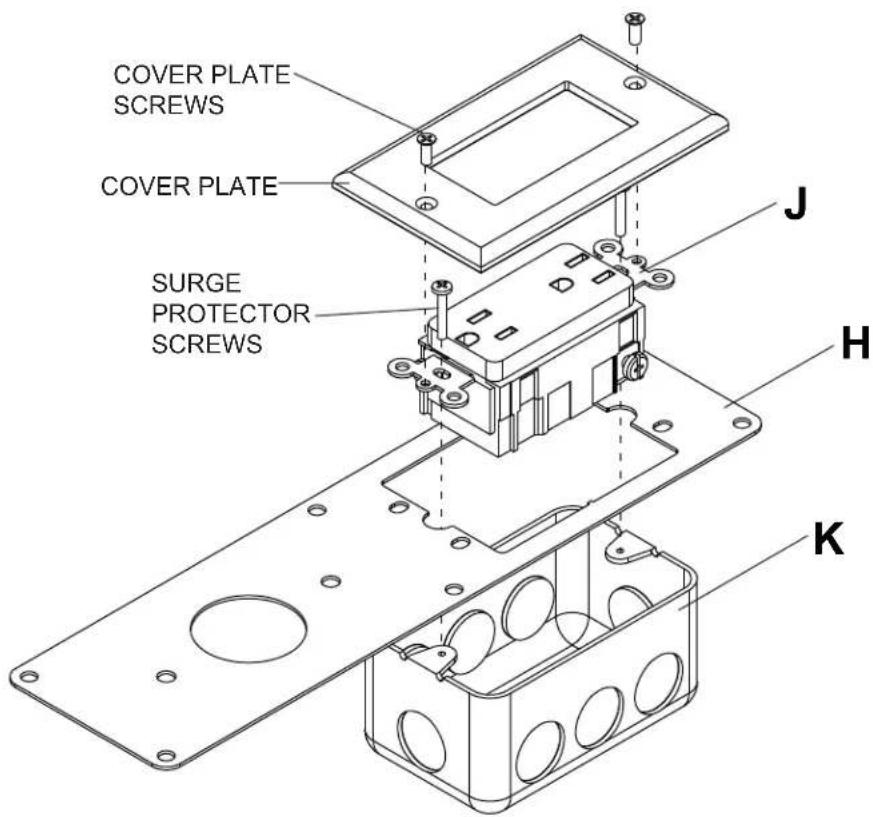
Remove knockout from access plate (H).
Attach surge protector (J) to outlet box (K) with access plate (H) in between using two surge protector screws. Attach cover plate to surge protector using two cover plate screws.
NOTE: Service of an electrical gang box and wiring shall be performed by a qualified service personnel in accordance with the NEC.

Cable Management

Attach access plate (H) to in-wall box (A) with five M5 x 8mm phillips screws (I) as shown in figure 3.1.
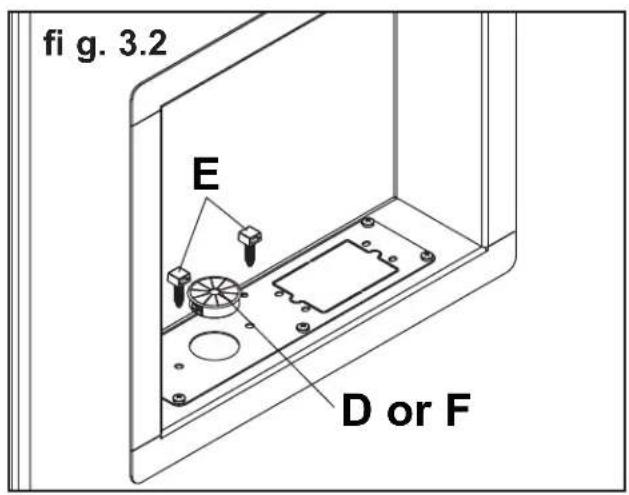
Insert up to two cable management clips (E) into the desired positions in the in-wall box as shown in figure 3.2 for routing cables.
Insert cable bushing (D) into in-wall box for routing cables through in-wall box. Plastic finishing cap (F) may also be used if cable management is unnecessary.
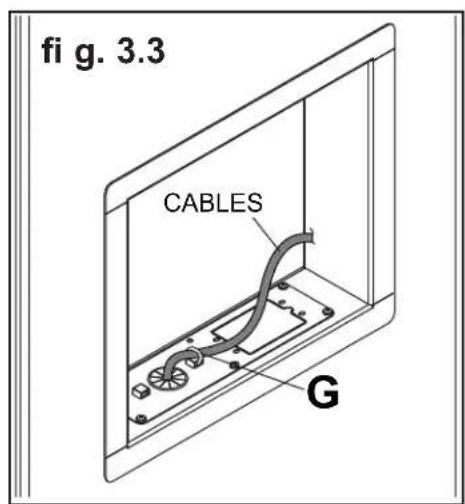
Use cable ties (G) to secure cables to cable management clips as shown in figure 3.3.

LIMITED FIVE-YEAR WARRANTY
Peerless Industries, Inc. ("Peerless") warrants to original end-users of Peerless® products will be free from defects in material and workmanship, under normal use, for a period of five years from the date of purchase by the original end-user (but in no case longer than six years after the date of the product's manufacture). At its option, Peerless will repair or replace, or refund the purchase price of, any product which fails to conform with this warranty.
In no event shall the duration of any implied warranty of merchantability or fitness for a particular purpose be longer than the period of the applicable express warranty set forth above. Some states do not allow limitations on how long an implied warranty lasts, so the above limitation may not apply to you.
This warranty does not cover damage caused by (a) service or repairs by the customer or a person who is not authorized for such service or repairs by Peerless, (b) the failure to utilize proper packing when returning the product, (c) incorrect installation or the failure to follow Peerless' instructions or warnings when installing, using or storing the product, or (d) misuse or accident, in transit or otherwise, including in cases of third party actions and force majeure.
In no event shall Peerless be liable for incidental or consequential damages or damages arising from the theft of any product, whether or not secured by a security device which may be included with the Peerless® product. Some states do not allow the exclusion or limitation of incidental or consequential damages, so the above limitation or exclusion may not apply to you.
This warranty is in lieu of all other warranties, expressed or implied, and is the sole remedy with respect to product defects. No dealer, distributor, installer or other person is authorized to modify or extend this Limited Warranty or impose any obligation on Peerless in connection with the sale of any Peerless® product.
This warranty gives specific legal rights, and you may also have other rights which vary from state to state.

© 2011 Peerless Industries, Inc.
Brand : Peerless-AV
Model : IBA2AC-W
Category : Wall mount