
eServer BladeCenter HS22V - Server LENOVO - Free user manual and instructions
Find the device manual for free eServer BladeCenter HS22V LENOVO in PDF.


| Product Type | Blade Server |
| Brand | Lenovo (formerly IBM) |
| Model | eServer BladeCenter HS22V |
| Form Factor | 30mm blade |
| Dimensions (H x W x D) | 9.7" x 1.14" x 17.6" (245mm x 29mm x 446mm) |
| Weight (maximum) | 12 lb (5.44 kg) |
| Processor Support | Up to two Intel Xeon 5600/5500 series (6/4/2 cores) |
| Maximum Memory | 288 GB registered DDR3 ECC (18 DIMM slots) |
| Internal Storage | Up to two 1.8" SATA SSDs (max 100 GB) |
| Network Connectivity | Dual-port Gigabit Ethernet (Broadcom BCM5709S) standard; up to 12 ports with expansion |
| Expansion Slots | 2 PCIe slots (1 CIOv, 1 CFFh); up to 10 with optional expansion units |
| Power Supply | Supplied by BladeCenter chassis; redundant hot-swap modules available |
| Management | Integrated Management Module (IMM) with IPMI 2.0, cKVM, remote presence |
| Operating Systems Supported | Windows Server 2008/R2, RHEL, SLES, VMware ESX/ESXi, Solaris 10 |
| Virtualization | Supports embedded VMware vSphere Hypervisor on USB flash drive |
| Warranty | 3-year limited onsite (parts and labor) |
| Maintenance Features | Hot-swap drives/power/fans; light path diagnostics; Predictive Failure Analysis |
| Safety Features | Power capping; automatic processor throttling under thermal stress; secure remote power control |
| Spare Parts & Repairability | Hot-swappable modular components; redundant management modules; optional battery-backed cache |
Frequently Asked Questions - eServer BladeCenter HS22V LENOVO
User questions about eServer BladeCenter HS22V LENOVO
0 question about this device. Answer the ones you know or ask your own.
Ask a new question about this device
Download the instructions for your Server in PDF format for free! Find your manual eServer BladeCenter HS22V - LENOVO and take your electronic device back in hand. On this page are published all the documents necessary for the use of your device. eServer BladeCenter HS22V by LENOVO.
USER MANUAL eServer BladeCenter HS22V LENOVO
IBM BladeCenter HS22V
Product Overview
CONTENTS
Product Overview 1
Selling Features 2
Key Features 4
Key Options 1 4
HS22V Images 16
HS22V Specifications 16
The Bottom Line 19
Server Comparison 20
For More Information 21
Legal Information 21
High density, high performance 2-socket blade server optimized for virtualization
Suggested uses: Mainstream virtualization and memory-intensive HPC applications requiring high memory density, outstanding performance, and enhanced power efficiency.
Today's data center environment is tougher than ever. You're looking to reduce IT cost, complexity, space requirements, energy consumption and heat output, while increasing flexibility, utilization and manageability through virtualization. Incorporating IBM X-Architecture ™ features, the IBM ® BladeCenter ® HS22V blade server, combined with the various BladeCenter chassis, can help you accomplish all of these goals.
Reducing an entire server into as little as .5U of rack space (i.e., up to 14 servers in 7U) does not mean trading away features and capabilities for smaller size. Each HS22V blade server offers features comparable to many 1U rack-optimized full-featured servers: The HS22V supports up to two of the latest high-performance 6-core/4-core/2-core Intel® Xeon® 5600 series and 5500 series processors. The Xeon processors are designed with up to 12MB of shared cache and leading-edge memory performance (up to 1333MHz, depending on processor model) to help provide the computing power you require to match your business needs and growth. The HS22V supports up to 288GB1 of registered double data rate III (DDR3) ECC (Error Checking and Correcting) memory in 18 DIMM slots, with optional Chipkill protection 2 , for high performance and reliability. Selected models are planned for NEBS-3/ETSI-compliance.
The HS22V supports VMware vSphere Hypervisor (formerly ESXi) preloaded on a standard USB flash drive. It operates in a diskless configuration, offers a smaller memory footprint, extremely high performance, and stronger security, making getting a system up and running in a virtualized environment faster and easier than ever before. The HS22V supports approximately 50% more average virtual machines (VMs) than the HS22. With up to 288GB of memory, the HS22V is an outstanding choice for virtualization, in-memory databases, and memory-intensive enterprise applications.
An integrated dual-port Gigabit Ethernet 3 controller is standard, providing high-speed data transfers and offering TOE (TCP Offload Engine) support, load-balancing and failover capabilities. Via optional expansion cards, each blade can also connect to additional Ethernet, 10Gb Ethernet, Converged Network Adapter (CNA), SAS, Fibre Channel, iSCSI, InfiniBand ™ , and other high-speed communication switches housed in the chassis. This blade is designed with power management capability to provide the maximum uptime possible for your systems. In extended thermal conditions or power brownouts, rather than shut down completely, or fail, the HS22V automatically reduces the processor frequency to maintain acceptable thermal and power levels.
All HS22V models offer impressive features at an equally impressive price, including up to two 1.8-inch fixed solid-state drives (SSDs) with RAID-0/1 support, and one internal USB flash drive (for embedded hypervisor). Additional direct-attach storage is available via the BladeCenter S chassis. Moreover, the HS22V is optimized for diskless operation, offering each blade server access to essentially unlimited external storage capacity via Fibre Channel, SAS, or iSCSI.
A single BladeCenter E or BladeCenter H chassis supports up to 14 hot-swappable 30mm-wide HS22V blades in only 7U (BladeCenter E) or 9U (BladeCenter H) of rack space or up to 12 in the 12U BladeCenter HT high-speed telecommunications chassis. In addition to the blade servers, these chassis also hold up to 4 switches (BladeCenter E) or up to 10 (BladeCenter H) or 8 switches/bridges (BladeCenter HT) internally. The BladeCenter S, designed for SMB and mid-market customers, takes integration and affordability to a new level, combining up to 12 hot-swap SAS/SATA HDDs (with optional SAS card) and up to 6 blade servers and 4 switches. Not only can this save significant data center space (and therefore the cost of floor space and rack
| hardware) compared to 1U servers, it also consolidates switches/bridges and cables for reduced complexity and lower cabling costs, and it allows clients to manage everything in the solution as one. Using a BladeCenter E chassis, up to84HS22V servers (168processors) can be installed in oneindustry-standard42U rack; but the value of BladeCenter extends far beyond high density data center environments.The various BladeCenter chassis are designed to monitor environmental conditions in the chassis and each blade and send alerts to the administrator. Advanced standard features, such asActive MemoryTM, Predictive Failure Analysis, light path diagnostics, hot-swap redundant hard disk drives, power supplies and blower modules with Calibrated Vectored CoolingTM; IPMI 2.0 support, includinghighly secure remote power control; text-console redirect over LAN, next-generation BIOS (UEFI), anAdvanced Management Module(upgradeable with a redundant AMM),IBM Systems Director management software including IBM Systems Director Active Energy ManagerTM. Remote Deployment Manager and IBM ServerGuideTM help maintain system availability with increased uptime.If you need highly manageable, high-performance virtualization in a space- or power-constrained environment, the HS22V is the ideal system. | |
| Selling Features | Price/PerformanceThere is an HS22V model to fit all budgets. The HS22V offers a choice of high-performance6-core/4-core/2-coreXeonprocessors with integrated memory controllers, clock rates from 1.86GHz to 3.46GHz, and up to12MBshared cache (processor-specific) of integrated Level 3 cache. Xeon 5600 series processors offer up to60% better performance than the previous-generation 5500 series processors and up to1,500% better performance than the single-core processors of a few years ago that you may still be using.Low-voltage processorsdraw less energy and produce less waste heat than higher-voltage processors, thus helping to reduce datacenterenergy costs. On a per-core basis, the standard80Wprocessors are extremely economical, consuming as little as13.33Wper core. Some low-voltage Xeon processors consume only40W(10Wper core).Up to288GB of registered DDR3 ECC memory operates at800MHz to 1333MHz (depending on the system configuration), for high performance and wide memory bandwidth.RuntwodIMMs per memory channel(2DPC) at 1333MHz in 5600 series processor configurationsEmbedded virtualization(optional on all models) offers extremely high performance, enhanced security, and a zero-gigabyte HDD footprint. (In other words, no mechanical HDD to fail.)Solid state drives(SDDs) use only 2W of energy per drive, vs.9-10Wfor 2.5-inch HDDs. This is as much as80% less energy than a HDD would use (with a corresponding reduction in heat output).Low power 1.35 volt memorydraws up to 15% less power than current shipping memory DIMMs.Selected HS22V blade servers are planned forNEBS3/ETSI-complianceand feature long-life availability. These blades are ideal for telecom or Next Generation Network (NGN) applications such as IPTV, IP Multimedia Subsystem (IMS) and security.Theextremely high degree of integrationin the various BladeCenter chassis reduces the need for server components, replacing numerous fans, KVM and Ethernet cables, power supplies, external switches and other components with fewersharedhot-swap/redundant components in the BladeCenter chassis itself. This integration also can greatlyreducethe amount ofpower consumed andheat produced, relative to an equivalent number of 1U servers. This can significantly reduce a data center power bill. Thereduced data center footprintcan also save on infrastructure cost.The midplanes used in all chassis providehigh-speed blade-to-blade, blade-to-switch-module and module-to-module communicationsinternally as well as externally. The midplanes used in the BladeCenter H and BladeCenter HT chassis providefour10Gbdata channels to each blade, and supports high-speed switch modules, including4X InfiniBandand 10Gb Ethernet.The various BladeCenter chassis useultrahigh efficiency power supplies. Most industry-standard servers use power supplies that are between70-75%efficientat converting power from AC wall current to the DC power used inside servers. BladeCenter power modules are up to92%efficient. This helps save even more money, as more of the power input you are paying for is used for processing, rather than released into the data center as waste heat that requires even more energy to cool.BladeCenter alsoreduces the number of parts requiredto run the system. Sharing fans, systems management, floppy devices and media means fewer parts to buy and maintain, and fewer items that can fail and bring the overall solution down. |
| FlexibilityThe HS22V has the ability to grow with your application requirements, thanks to: |
- Up to two multi-core Xeon processors (up to twelve cores per server).
- A choice of processor speeds from 1.86 to 3.46GHz, up to 12MB of shared cache, and a choice of power draw from 40W to 130W.
• A choice of memory speeds from 800MHz to 1066MHz or 1333MHz. - Up to 288GB of system memory in 18 DIMM slots.
- Up to two internal hot-swap 1.8-inch solid state drives, and access to terabytes of external storage via the BladeCenter S chassis or IBM System Storage ™ SAN and NAS storage devices. SSDs consume only 10-20% of the energy required by 2.5-inch HDDs.
- Two Gigabit Ethernet ports standard, plus optional 2-port or 4-port expansion cards or a BladeCenter PCI Express I/O Expansion Unit 3. In addition, the various BladeCenter chassis offer a high degree of flexibility:
- A 30mm HS22V blade server can be upgraded, via the PCI Express I/O Expansion Unit 3. This expandability allows configurations that are 30mm or 60mm wide, with a variety of I/O options, depending on need.
- When installed in a BladeCenter H high-speed switch bay, the optional Multi-Switch Interconnect Module doubles the number of Gigabit Ethernet and Fibre Channel connections to every blade in the chassis (up to 8 or 12 ports, depending on the blade server).
- Xeon processor-based HS22V blades can be used in the same chassis as Intel processor-based HC10, HS12, HS20, HS21, HS21 XM, HS22, HS40, and HX5 blades; AMD Opteron processor-based LS20, LS21, LS22, LS41 and LS42 blades; IBM PowerPC® processor-based JS20, JS21, and JS22 blades; POWER6® processor-based JS12, JS23, and JS43 Express blades; POWER7® processor-based PS700, PS701, and PS702 blades; Cell Broadband Engine™ processor-based QS21; and IBM PowerXCell™ processor-based QS22 blades. Depending on the blade servers used, the various BladeCenter chassis support Microsoft Windows®, Linux®, Novell Netware, IBM AIX® and Sun Solaris 10 operating systems in the same chassis.
- Most HS/LS/JS/QS blade servers ever released by IBM are supported in every BladeCenter chassis ever released, going back to 2002 5 . Every switch module released by IBM is equally compatible. (Ask HP and Dell how far back their compatibility goes.)
- A blade server has access to as many as 10 communication switches/bridges in a BladeCenter H or 8 in a BladeCenter HT chassis. (Up to 4 switches in a BladeCenter E, S, or T chassis.) And the switches can be Ethernet, iSCSI, SAS, InfiniBand, Fibre Channel, or anything else designed and ServerProven® for BladeCenter use. Switches, bridges and interface cards are currently available from such vendors as Brocade, Cisco, Intel, McData, Nortel, QLogic, Cisco Topspin and others, in addition to IBM.
Manageability
- The HS22V blade server includes an Integrated Management Module (IMM) to monitor server availability, perform Predictive Failure Analysis, etc., and trigger IBM Systems Director alerts. The IMM performs the functions of both the Baseboard Management Controller (BMC) of earlier systems, and the Remote Supervisor Adapter II, as well as remote presence/cKVM.
- Each BladeCenter chassis includes an Advanced Management Module to provide additional systems management capabilities, including Web-based out-of-band control; virtual floppy and CD-ROM support; latest OS failure screen capture; LDAP and SSL support; and remote redirection of video, text, keyboard and mouse.
- Integrated industry-standard Unified Extensible Firmware Interface (UEFI) next-generation BIOS. New capabilities include:
☐ Human readable event logs; no more beep codes
☐ Complete setup solution by allowing adapter configuration function to be moved into UEFI
☐ Complete out-of-band coverage by the Advance Settings Utility to simplify remote setup
- Integrated industry-standard IPMI 2.0 support works with the IMM to alert IBM Systems Director to anomalous environmental factors, such as voltage and thermal conditions. It also supports highly secure remote power control.
• Integrated Trusted Platform Module (TPM) 1.2 support.
- IBM Systems Director Active Energy Manager, an IBM-exclusive, is designed to take advantage of new system power management features, by monitoring actual power usage and providing power consumption capping features. More accurate power usage data helps with data center construction planning and the sizing of power and cooling needs, as well as allowing you to use available power more efficiently.
• The HS22V supports remote presence/concurrent KVM (cKVM) and concurrent media (cMedia)
access by multiple administrators at once, via the IMM.
- IBM Systems Director is included for proactive systems management and works with both the blade's internal IMM and the chassis' management module. It comes with a portfolio of tools, including IBM Systems Director Active Energy Manager, Service and Support Manager, and others. In addition, IBM Systems Director offers extended systems management tools for additional server management and increased availability. When a problem is encountered, IBM Systems Director can issue administrator alerts via e-mail, pager, and other methods.
Availability and Serviceability
- BladeCenter chassis are designed for operation with greatly reduced potential for single points of failure. Most aspects of operation, from blade servers to communication modules, to management modules, to power and blower modules, are hot-swappable. The midplane connections are redundant and the other features can be made so, when used in pairs.
- HS22V blade servers support the use of Chipkill-enabled ECC (error checking and correcting) memory. Chipkill memory can be up to 16X better than standard ECC memory at correcting some types of memory errors. This can help reduce downtime caused by memory errors. Optional memory mirroring and memory sparing offer additional redundancies.
- Solid-state drives offer up to triple the reliability (MTBF rates) of conventional SAS HDDs. This can lessen the need for redundant drives.
- IPMI 2.0 supports highly secure remote system power on/off using data encryption. This allows an administrator to restart a server without having to visit it in person, saving travel time and getting the server back up and running quickly and securely.
- Environmentally tuned blower modules in the chassis adjust to compensate for changing thermal characteristics. At the lower speeds they draw less power and suffer less wear. Equally important in a crowded data center, temperature-controlled blowers produce less ambient noise in the data center than if they were constantly running at full speed.
- Text and graphics console redirection support allows the administrator to remotely view HS22V text and graphic messages over serial or LAN connections.
- A standard three-year (parts and labor) limited onsite warranty 6 affords you peace of mind and greater potential investment protection.
Right, Open, Easy, Green
You need to make IT decisions that will drive business success. You face management challenges and technological complexity such as space constraints, power and cooling limitations, heterogeneous environments and I/O connectivity issues. IBM brings together the widest choice of compatible chassis, blade servers, storage and networking offerings and solution providers in the industry to help you build an open and flexible IT environment. And regardless of the size of your business, you want to be up and running 24/7. With built-in redundancy, innovative power and cooling and the latest I/O and management tools, IBM BladeCenter is easy to own—so you can focus on your business demands and stay ahead of the competition.
The RIGHT choice, tailored to fit your diverse needs:
- It's flexible and modular. As needs evolve, a one-size-fits-all solution doesn't work.
- Meet your needs with BladeCenter: everything from a high-performance data center to a small office with limited IT skills—IBM has you covered
- Get flexibility with 5 compatible chassis and 5 blade types supporting multiple I/O fabrics, all managed from a common point
- It's robust and reliable, providing redundancy throughout and the information you need to keep your business up and running.
- Provide redundancy for no single point of failure with IBM BladeCenter
- Preserve application uptime with IBM Predictive Failure Analysis ® and light path diagnostics
- Make decisions based on accurate data for quick problem diagnosis with First Failure Data Capture
OPEN and innovative, for a flexible business foundation:
- It's comprehensive, providing broad, fast, and reliable networking and storage I/O with BladeCenter Open Fabric.
- Match your data center needs and the appropriate interconnect using a common management point, and 5 l/O fabrics to choose from
– Extract the most from your third-party management solutions by utilizing the BladeCenter Open
Fabric Manager
- It's collaborative, enabling you to harness the power of the industry to deliver innovation that matters. - Get flexibility from a myriad of solutions created by Blade.org members and industry leaders that have downloaded our open specification
EASY to deploy, integrate and manage:
- It enables efficient integrated management, which allows you to minimize costs with the tools you need for effective management.
– Automate OS installation and BIOS updates remotely with IBM Systems Director tools
– Administer your blades at the chassis or rack level with the Advanced Management Module
– Plug into your enterprise management software
- It enable deployment simplicity without tradeoffs by speeding the deployment of new hardware in minutes rather than days, using BladeCenter Open Fabric Manager
- Get significantly faster deployment of servers and I/O than from rack solutions
- Reduce costly downtime with integrated failover capability
– Manage from a single point of control via the Advanced Management Module
- Use with virtually all IBM switches, blades and chassis
GREEN today for a better tomorrow:
- It offers control via powerful tools that help you optimize your data center infrastructure so you can be responsive.
- Understand your power requirements with IBM Power Configurator
– Monitor, control and virtualize your power with IBM Systems Director Active Energy Manager - Reduce data center hot spots with the IBM Rear Door Heat eXchanger
- Optimize and future-proof your data center with IBM Data Center Energy Efficiency services
- Our eco-friendly servers and services can help you be environmentally responsible.
- Become more energy efficient with IBM expertise
Key Features

Multicore Intel Xeon Processors
The HS22V supports up to two identical Xeon 5600 series or 5500 series processors (that is, the same clock rate and cache size and the same number of cores). Each processor contains a memory controller (meaning two in a two-processor system) for superior performance. (Some processor models are available only via CTO or special bid.) The choice of processors includes:
- 130W 6-core Xeon 5600 series model X5680 running at 3.33GHz, with impressive performance/watt (21.67W per core; 6.4GTps QPI speed), 12MB of L3 processor cache, 1333MHz memory access, 2 threads per core, and Intel Turbo Boost technology; supported in all BladeCenter chassis, except BladeCenter E and BladeCenter T
- 130W 4-core Xeon 5600 series model X5677 running at 3.46GHz, with impressive performance (32.5W per core; 6.4GTps QPI speed), 12MB of L3 processor cache, 1333MHz memory access, 2 threads per core, and Intel Turbo Boost technology; supported in all BladeCenter chassis, except BladeCenter E and BladeCenter T
- 95W 6-core Xeon 5600 series model X5670 running at 2.93GHz, with impressive performance/watt (15.84W per core; 6.4GTps QPI speed), 12MB of shared L3 cache, 1333MHz memory access, 2 threads per core, and Intel Turbo Boost technology; supported in all BladeCenter chassis, except BladeCenter T
- 95W 4-core Xeon 5600 series model X5667 running at 3.06GHz, with impressive performance/watt (15.84W per core; 6.4GTps QPI speed), 12MB of shared L3 cache, 1333MHz memory access, 2 threads per core, and Intel Turbo Boost technology; supported in all BladeCenter chassis, except BladeCenter T
- 80W 4-core Xeon processor models E5640 at 2.66GHz, with reduced power draw and impressive performance/watt (only 20W per core; 5.86GTps QPI speed), 12MB of shared L3 cache, 1066MHz memory access, and Intel Turbo Boost technology; supported in all BladeCenter chassis, except BladeCenter T.
- 80W 4-core Xeon processor models E5507 at 2.26GHz, with reduced power draw and impressive performance/watt (only 20W per core; 4.8GTps QPI speed), 4MB of shared L3 cache, and 800MHz memory access; supported in all BladeCenter chassis, except BladeCenter T.
- 60W 6-core Xeon 5600 series models L5640 at 2.26GHz, with low power draw and impressive performance/watt (only 10W per core; 5.86GTps QPI speed), 12MB of shared L3 cache, 1333MHz memory access, 2 threads per core, and Intel Turbo Boost technology; supported in all BladeCenter chassis, except BladeCenter T
- 80W 4-core Xeon 5600 series models E5620 and E5640 at 2.4 and 2.66GHz (respectively), with
reduced power draw and impressive performance/watt (only 20W per core; 5.86GTps QPI speed), 12MB of shared L3 cache, 1066MHz memory access, 2 threads per core, and Intel Turbo Boost technology; supported in all BladeCenter chassis, except BladeCenter T
- 80W 4-core Xeon 5500 series model E5507 at 2.26GHz, with reduced power draw and impressive performance/watt (only 20W per core; 4.8GTps QPI speed), 4MB of shared L3 cache, and 800MHz memory access; supported in all BladeCenter chassis, except BladeCenter T
- 80W 2-core Xeon 5500 series model E5503 at 2.0GHz, with reduced power draw and impressive performance/watt (only 20W per core; 4.8GTps QPI speed), 4MB of shared L3 cache, and 800MHz memory access; supported in all BladeCenter chassis, except BladeCenter T
Also available, via configure-to-order (CTO):
- 60W 6-core Xeon 5600 series low-voltage model L5638 running at 2.0GHz, with low power draw and amazing performance/watt (only 10W per core; 6.4GTps QPI speed), 12MB of L3 processor cache, and 1333MHz memory access; supported in all BladeCenter chassis, except BladeCenter T
- 80W 6-core Xeon 5600 series models E5645 at 2.4GHz, with reduced power draw and impressive performance/watt (only 13.33W per core; 6.4GTps QPI speed), 12MB of shared L3 cache, 1333MHz memory access, 2 threads per core, and Intel Turbo Boost technology; supported in all BladeCenter chassis, except BladeCenter T
- 40W 4-core Xeon 5600 series low-voltage model L5609 running at 1.86GHz, with extremely low power draw and amazing performance/watt (only 10W per core; 4.8GTps QPI speed), 12MB of L3 processor cache, and 1066MHz memory access; supported in all BladeCenter chassis, except BladeCenter T
Also available, via special bid:
- 40W 4-core Xeon 5600 series low-voltage model L5618 running at 1.86GHz, with extremely low power draw and amazing performance/watt (only 10W per core; 5.86GTps QPI speed), 12MB of L3 processor cache, and 1066MHz memory access, 2 threads per core, and Intel Turbo Boost technology; supported in all BladeCenter chassis, except BladeCenter T
Note: Because of the integrated memory controllers the former front-side bus (FSB) no longer exists.
With the Xeon 5600 series and 5500 series processors, Intel has diverged from its traditional Symmetric Multiprocessing (SMP) architecture to a Non-Uniform Memory Access (NUMA) architecture. The Xeon 5500 processors are connected through a serial coherency link called QuickPath Interconnect (QPI). QPI is capable of 6.4, 5.6 or 4.8 GTps (gigatransfers per second), depending on the processor model. Put another way, the 5600 series and 5500 series processors offer 3.6 times the bandwidth of the previous 5400 series processors.
The six-core Xeon processors contain six complete processor cores. The processors also contain one shared cache. The shared cache is dynamically allocated among cores as needed. The six cores appear to software as six physical processors. Six-core processors offer considerably higher performance than a same-speed Xeon processor with four cores.
Turbo Boost Technology dynamically turns off unused processor cores and increases the clock speed of the cores in use, by up to two model frequencies. For example, a 2.93GHz 6-core X5670 processor with 3-6 cores active can run the cores at 3.2GHz. With only one or two cores active, the same processor can run those cores at 3.33GHz. Similarly, a 3.46GHz 4-core X5677 processor can run at 3.6GHz or even 3.73GHz. When the cores are needed again, they are dynamically turned back on and the processor frequency is adjusted accordingly.
Intelligent Power Capability powers individual processor elements on and off as needed, to reduce power draw.
Execute Disable Bit functionality can help prevent certain classes of malicious buffer overflow attacks when combined with a supporting operating system.
Intel's Virtualization Technology (VT) integrates hardware-level virtualization hooks that allow operating system vendors to better utilize the hardware for virtualization workloads.
DDR3 Registered Memory with Active Memory Protection
The HS22V uses registered double data rate III (DDR3) VLP (very-low-profile) DIMMs and provides Active Memory features, including advanced Chipkill memory protection, for up to 16X better error correction than standard ECC memory. In addition to offering triple the memory bandwidth of registered or fully-buffered DDR2 memory, DDR3 memory also uses less energy. 1.8V DDR2 memory already offered up to 37% lower energy use than fully buffered memory. Now, a generation later, 1.5V DDR3 memory is even more efficient, using 10-15% less energy than DDR2 memory. For even greater efficiency, the HS22 also supports 1.35V DDR3 memory, which uses up to 18% less energy than 1.5V DDR3 DIMMs.
The HS22V supports up to 288GB of memory in eighteen DIMM slots. Redesign in the architecture of the 5500 series and 5600 series processors bring radical changes in the way
integrate the memory controller inside the processor, resulting in two memory controllers in a two-socket system. Each memory controller has three memory channels. Depending on the type of memory, population of memory, and processor model, the memory may be clocked at 1333MHz, 1066MHz or 800MHz.

flowchart
graph TD
    subgraph_Processor_0["Chon 5500 / 5600 Processor 0"]
        CH0_7["CH0"] --> D1_D1
        CH1_8["CH1"] --> D4_D4
        CH2_9["CH2"] --> D7_D7
        CH0_7 --> D2_D2
        CH1_8 --> D5_D5
        CH2_9 --> D8_D8
        CH0_7 --> D3_D3
        CH1_8 --> D6_D6
        CH2_9 --> D9_D9
    end

    subgraph_Processor_1["Chon 5500 / 5600 Processor 1"]
        CH0_16["CH0"] --> D10_D10
        CH1_17["CH1"] --> D13_D13
        CH2_18["CH2"] --> D16_D16
        CH0_16 --> D11_D11
        CH1_17 --> D14_D14
        CH2_18 --> D17_D17
        CH0_16 --> D12_D12
        CH1_17 --> D15_D15
        CH2_18 --> D18_D18
    end

    QPI["QPI"] <--> Processor 1
1-16: DIMM population sequence : D1-D16: DIMM slot assignments
Note: If only one processor is installed, only the first nine DIMM slots can be used. Adding a second processor not only doubles the amount of memory available for use, but also doubles the number of memory controllers, thus doubling the system memory bandwidth. If you add a second processor, but no additional memory for the second processor, the second processor has to access the memory from the first processor "remotely," resulting in longer latencies and lower performance. The latency to access remote memory is almost 75% higher than local memory access. So, the goal should be to always populate both processors with an equal number of DIMMs, with matching pairs spanning the processors.
The L5640 and X56xx processor models support memory running at up to 1333MHz, while E56xx-and-up models support memory at up to 1066MHz, and the E550x models support memory at 800MHz only. Running memory at 1333MHz (where supported) versus 1066MHz offers up to 9% better performance, while running memory at 1066MHz produces up to 28% better performance than memory running at 800MHz.
Xeon 5600 series and 5500 series processors access memory with almost 50% lower latency than the previous generation 5400 Series processors. That can result in faster processing of latency-sensitive workloads.
This new processor design comes with some trade-offs in memory capacity, performance, and cost: For example, more lower-cost/lower-capacity DIMMs mean lower memory speed. Alternatively, fewer higher-capacity DIMMs cost more but offer higher performance.
Regardless of memory speed, the Xeon 5600 series and 5500 series platform represents a significant improvement in memory bandwidth over the previous Xeon 5400 platform. At 1333MHz, the improvement is almost 500% over the previous generation. This huge improvement is mainly due to the dual integrated memory controllers and faster DDR3 1333MHz memory. Throughput at 800MHz is 25 gigabytes per second (GBps); at 1066MHz it's 32GBps; and at 1333MHz it's 35GBps. This improvement translates into improved application performance and scalability.
Memory interleaving refers to how physical memory is interleaved across the physical DIMMs. A balanced system provides the best interleaving. A Xeon 5600 processor-based system is balanced when all memory channels for a socket have the same amount of memory.
In the case of HS22V, which has a balanced DIMM layout, it is easy to balance the system for all three memory frequencies. The recommended DIMM population is shown below, assuming DIMMs with identical capacities.
| Desired Memory Speed DIMMs per Channel DIMM Slots to Populate | ||
| 1333MHz 1 3, 6, 9, 1 | 2, 15, and 18 | |
| 1066MHz 2 2, 3, 5, 6, 8, 9, 11, 12, 14, 15, 17, and 18 | ||
| 800MHz | 3 | All |
A memory rank is simply a segment of memory that is addressed by a specific address bit. DIMMs typically have 1, 2 or 4 memory ranks, as indicated by their size designation.
A typical memory DIMM description is 2GB 4Rx8 DIMM
- The 4R designator is the rank count for this particular DIMM (R for rank = 4)
- The x8 designator is the data width of the rank
It is important to ensure that DIMMs with appropriate number of ranks are populated in each channel for optimal performance. Whenever possible, it is recommended to use dual-rank DIMMs in the system. Dual-rank DIMMs offer better interleaving and hence better performance than single-rank DIMMs. For instance, a system populated with six 2GB dual-rank DIMMs outperforms a system populated with six 2GB single-rank DIMMs by 7% for SPECjbb2005. Dual-rank DIMMs are also better than quad-rank DIMMs because quad-rank DIMMs will cause the memory speed to be down-clocked.
Another important guideline is to populate equivalent ranks per channel. For instance, mixing one single-rank DIMM and one dual-rank DIMM in a channel should be avoided.
Note: It is important to ensure that all three memory channels in each processor are populated. The relative memory bandwidth decreases as the number of channels populated decreases. This is because the bandwidth of all the memory channels is utilized to support the capability of the processor. So, as the channels are decreased, the burden to support the requisite bandwidth is increased on the remaining channels, causing them to become a bottleneck.
For peak performance:
- Always populate both processors with equal amounts of memory to ensure a balanced NUMA system.
■ Always populate all 3 memory channels on each processor with equal memory capacity. - Populate an even number of ranks per channel.
- Use dual-rank DIMMs whenever appropriate.
- For optimal 1333MHz performance, populate with 6 dual-rank DIMMs (3 per processor, 1 per channel).
- For optimal 1066MHz performance, populate with 12 dual-rank DIMMs (6 per processor, 2 per channel).
- For optimal 800MHz performance with high DIMM counts, populate with 18 dual-rank or quad-rank DIMMs (9 per processor) and clock memory down to 800MHz in BIOS.
- With the above rules, it is not possible to have a performance-optimized system with 4GB, 8GB, 16GB, or 128GB. With 3 memory channels and interleaving rules, configure systems with 6GB, 12GB, 18GB, 24GB, 48GB, 72GB, 96GB, etc., for optimized performance.
Power guidelines:
- Fewer larger DIMMs (for example 6 x 4GB DIMMs vs. 12 x 2GB DIMMs will generally have lower power requirements
- x8 DIMMs (x8 data width of rank) will generally draw less power than equivalently sized x4 DIMMs
Reliability guidelines:
- Using fewer, larger DIMMs (for example 6 x 4 GB DIMMs vs. 12 x 2GB DIMMs) is generally more reliable
- Xeon 5600 series and 5500 series memory controllers support IBM Chipkill memory protection technology with x4 DIMMs (x4 data width of rank), but not with x8 DIMMs
For increased availability, the HS22V offers two additional levels of IBM Active Memory protection: memory mirroring and memory sparing.
Memory mirroring works much like disk mirroring. The total memory is divided into two channels. Data is written concurrently to both channels. (The third channel is unused.) If a DIMM fails in one of the DIMMs in the primary channel, it is instantly disabled and the mirrored (backup) memory in the other channel becomes active (primary) until the failing DIMM is replaced. With mirroring enabled, one-third of total memory (6 DIMMs) is available for use. (Note: Due to the double writes to memory, performance is affected.) Mirroring is handled at the hardware level; no operating system support is required.
In memory sparing, one of the three memory channels (Ch2) for each processor is reserved as a spare for the other two channels (Ch0 and Ch1). This means that unlike mirroring (where one third of the memory is reserved for redundancy and one-third is unused), with sparing only one-third is reserved, leaving two-thirds (12 DIMMs) available as usable memory. Note: Although DIMMs within a channel do not have to be identical, the DIMMs in each of the three channels must be identical to the other channels regarding capacity and organization. (In other words, if the DIMMs in Ch0 are 2GB 2Rx4, 8GB 1Rx8, and 4GB 2Rx4, respectively (all 1.35V), then the
DIMMs in Ch1 and CH2 must also be 2GB 2Rx4, 8GB 1Rx8, and 4GB 2Rx4 (all 1.35V), in that order.)
DDR3 memory is available in 1GB, 2GB, 4GB, 8GB, and 16GB DIMMs. DIMMs are installed individually by processor. In other words, individually in a 1-processor system, or in pairs for a 2-processor system.
High Performance/High-Availability Internal Storage
The HS22V supports up to two fixed 1.8-inch solid-state drives (SSDs) internally:
- SATA-based solid-state — 50GB capacity (100GB maximum)
□ High I/O Performance
- Offers up to 8X more IOPS than HDDs (67/33% read/write OLTP transaction base mix);
- Optimized for heavy mix of read and write operations, such as transaction processing, media streaming, surveillance, file copy, logging, backup / recovery, and business Intelligence
☐ Lower-Cost IOPS Performance
- Yields better \$/IOPS: lower capacity (GB) required to achieve higher IOPS
- Consumes less energy and produces less heat than a conventional disk drive
□ Superior Uptime
- 3X the reliability of mechanical disk drives 7
- No moving parts to fail
– Enterprise wear-leveling to extend life even further
□ Full OS Support
– Supports all ServerProven OSes
Due to the statistically higher failure rates for traditional spinning media, IBM recommends the use of the solid state drives (SSDs) as an alternative. They store data on flash memory chips, rather than on magnetic media. Like HDDs, SSDs can be used as boot media and for random access storage. However, SSDs offer higher thresholds of shock and vibration, and a higher operating temperature range (between 0 and 70 degrees C). This yields a failure rate only one-third that of HDDs (approximately 3,000,000 hours MTBF vs. 1,000,000 hours). In addition, the IBM 50GB 1.8" Solid State Drive requires only 2W. This reduces the storage power requirement and heat output by as much as 80%, compared to 2.5-inch HDDs. If used as a boot device, no special device drivers are required. Additional storage is available via the BladeCenter S chassis.
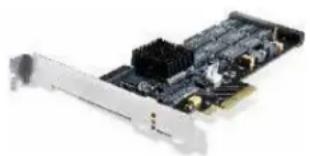
High IOPS SSD PCIe Adapters
☐ IBM 160GB High IOPS SS Class SSD PCIe Adapter (x4 Gen 1—100K IOPS, 750MBps)
☐ IBM 320GB High IOPS SS Class SSD PCIe Adapter (x4 Gen 1—100K IOPS, 750MBps)
☐ IBM 320GB High IOPS MS Class SSD PCIe Adapter (x4 Gen 1—100K IOPS, 750MBps)
☐ IBM 320GB High IOPS SD Class SSD PCIe Adapter (x8 Gen 2—200K IOPS, 1.5GBps)
☐ IBM 640GB High IOPS MLC Duo Adapter (x8 Gen 2—200K IOPS, 1.5GBps)
For read-intensive transactional workloads requiring extreme IOPS performance, such as database, video-on-demand, and caching, IBM offers High IOPS SSD PCIe Adapters, equivalent to the IOPS output of approximately 500 8 3.5-inch 600GB 15K SAS HDDs, with 99% lower latency (30 μs), and 7.7x the bandwidth of a HDD. On a performance-per-watt basis, these adapters outperform HDDs by up to 445x 9 .
Because these adapters go in PCIe slots, rather than drive bays, they can be used in addition to standard HDDs and SSDs. This makes them ideal for virtualized servers running multiple tasks, requiring both write- and read-intensive storage media. As flash media they also offer a predictable lifetime, compared to the sporadic failure rate of HDDs, using N+1 chip-level redundancy and 11-bit ECC protection.
Note: The High IOPS Adapters require a BPE4 expansion unit.
If you need more storage space, terabyte capacities are possible with optional external direct-attach, NAS, and SAN storage solutions.
natural_image
Close-up of a black PCI expansion card with a silver connector (no visible text or symbols)Disk Controllers
All HS22V models include an integrated LSI 1064E SAS/SATA controller. This controller supports up to two internal SAS or SATA HDDs or two internal solid-state drives and offers hardware RAID-0/1/1E support. (RAID-1E requires 3 or more drives.) 256MB of optional battery-backed cache memory is available.
An optional ServeRAID-MR10ie controller (CIOv form-factor) adds RAID-5/50/6/60 support for direct-attach BladeCenter S storage or external IBM System Storage EXP700, EXP710, or EXP3000, along with 256MB of cache memory and battery backup.
These controllers provide data transfer speeds of up to 3Gb per second 10 in each direction (full-duplex) across the SAS bus, for an aggregate speed of 6Gbps (600MBps). The serial design of the SAS bus allows maximum performance to be maintained as additional drives are added.
Integrated Virtualization
All models of the HS22V support a USB 2.0 Flash Key installed preloaded with VMware vSphere Hypervisor (formerly ESXi). Rather than management through a Service Console based on a Linux operating system, vSphere Hypervisor relies on aggregate management tools, including VirtualCenter, the Remote Command Line interface and the introduction of CIM for standards-based and agentless hardware monitoring.
vSphere Hypervisor includes all the performance, scalability and compatibility features of a hypervisor installed on disk, including full VMFS support across FC SAN, iSCSI SAN, and NAS, and 4-way VSMP. Because it runs from flash memory, it's extremely fast and ideal for diskless configurations. It also offers enhanced security, because it runs without an operating system-based console and is updated/patched much like firmware.
External Tape Storage
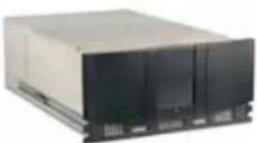
The HS22V supports various external rack-mounted SAN-attached tape drives. Supported tape technologies include:
• IBM System Storage TS2230 Express Tape Drive
• IBM System Storage TS2240 Tape Drive Model S4E
• IBM System Storage TS2900 Tape Autoloader
• IBM System Storage TS3100 Tape Library
• IBM System Storage TS3200 Tape Library
• IBM System Storage TS3310 Modular Tape Library
• IBM System Storage TS3500 Tape Library
Light Path Diagnostics
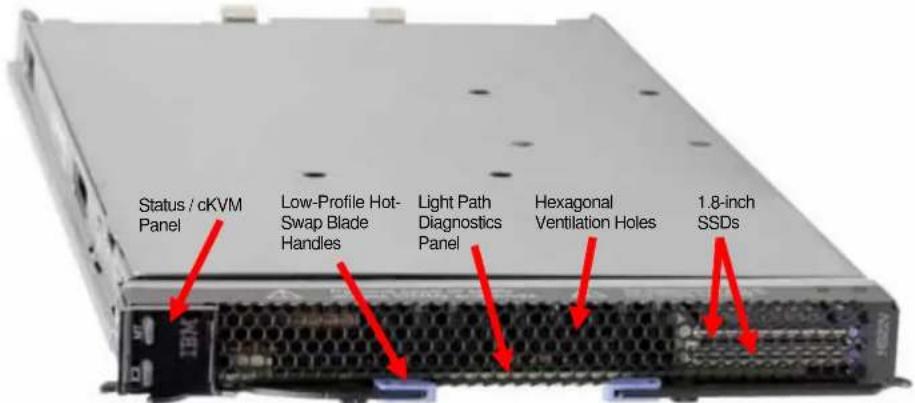
Light path diagnostics enables a technician to quickly identify and locate a failed or failing system component, such as a specific blower module or memory DIMM. This enables quick replacement of the component, which helps increase server uptime and lower servicing costs.
The front of each blade server—and the chassis itself—has an LED indicator light to show possible component failures. This lets the servicer identify the failing component without the need to or remove the blade server from the chassis. The light path diagnostics panel tells the servicer which component of the affected server requires attention.
In addition, many components have their own identifying LEDs. For example, each of the memory modules has an LED next to the socket, as do both processors. This allows the servicer to easily identify exactly which component needs servicing. By following the "light path," the component can be replaced quickly, and without guesswork. (Note: In the event of a failed DIMM, the system will restart and mark the DIMM as bad while offline, thus allowing the system to continue running, with reduced memory capacity, until serviced.)

High-Performance Adapter Slots
The HS22V blade server includes two PCIe adapter slots. They support CFF (compact form factor) cards: one standard-speed CIOv and one high-speed CFFh.
The BladeCenter PCI Express I/O Expansion Unit 3 (BPE3) adds 2 standard full-height/full-length x16 physical/x8 electrical (4GBps) PCIe Gen 1 expansion card slots, supporting adapters of up to 25W apiece to an HS22. One BPE3 can be connected per HS22V blade, for a total of 3 available slots (1 in the blade and 2 in the expansion unit). Note: The BPE3 reserves the high-
speed CFFh expansion connector in the HS22V, leaving only the CIOv slot available.
Similarly, the optional BladeCenter PCI Express Gen 2 Expansion Blade 4 (BPE4) adds 2 standard full-height/two-third-length x16 physical/x16 electrical (16GBps) PCIe Gen 2 expansion card slots. These slots are capable of supporting two high-performance graphics processing units (GPUs) of up to 75W apiece, for tremendous graphics processing performance. Up to 4 of these expansion units can be attached to a single blade server (creating a 150mm 5-wide server), for a total of 10 available slots (2 in the blade and 2 each in the expansion units; maximum 2 GPUs). Note: The BPE4 does not reserve the high-speed CFFh expansion connector in the HS22V, leaving both slots available in the server.
If I/O slots are a greater need than processors or memory, attaching multiple BPE4 I/O expansion units to one blade server is much more cost-effective than installing multiple blade servers for the same number of adapter slots.
In addition to GPUs, other adapters up to 75W can be used to connect to BladeCenter switch modules, including Fibre Channel, additional Gigabit Ethernet modules, 10Gb Ethernet, Converged Network Adapters (CNAs), InfiniBand, SAS, etc.

Gigabit Ethernet Controller
The HS22V includes a dual-port integrated Broadcom BCM5709S Gigabit Ethernet controller for up to 10X higher maximum throughput than a 10/100 Ethernet controller. The controller offers TOE (TCP Offload Engine) support, as well as failover and load balancing for better throughput and system availability. It also supports highly secure remote power management using IPMI 2.0, plus Wake on LAN ® and PXE (Preboot Execution Environment) Flash interface.
If 2 ports aren't enough, optional 2-port or 4-port Ethernet expansion cards can be used for additional ports. For example, the CIOv slot can hold a 2-port card and the CFFh slot supports a 4-port card, for a total of 8 Gigabit Ethernet ports per HS22V blade. Using BladeCenter Virtual Fabric increases the number of available ports to 12.
BladeCenter Chassis
IBM's blade architecture offers five choices of compatible and interoperable chassis in which to use various blade servers. Each chassis serves different customer needs. The new BladeCenter S is a small, entry-level chassis designed for office environments. The original BladeCenter E chassis (refreshed with the latest Advanced Management Modules and power supply modules) offers maximum density, great flexibility and a wide variety of expansion options at an entry-level price. The next-generation BladeCenter H chassis offers all of BladeCenter's capabilities, and adds high-performance features, including 10Gb fabric support. If you need a ruggedized chassis (for example, government/military or telecom), BladeCenter T offers special features optimized for those environments. (HS22V is not supported in the BladeCenter T.) The next-generation BladeCenter HT is a high-performance ruggedized telecommunications platform, also supporting 10Gb fabrics. There is a high degree of interchangeability and compatibility of features among the chassis. All of these chassis can be installed in a rack along with other rack-optimized equipment. See the separate BladeCenter Chassis Sales Guide for details.
Hot-Swap/Redundant Components
System availability is maximized through the extensive use of hot-swap and redundant components, both in the blade server and in the various BladeCenter chassis, including:
- Redundant memory protection (with Chipkill error correction and memory mirroring or memory sparing enabled)
- Hot-swap, redundant hard disk drives (in BladeCenter S) and solid-state drives (with RAID protection)
• Hot-swap, redundant power supply modules
• Hot-swap, redundant cooling fan/blower modules
• Hot-swap, redundant switch modules - Redundant midplane connectors between blades and modules
Energy-Smart Features
IBM servers work hard to keep your energy bills low—from high-efficiency power supplies and fans to lower-draw processors and memory. Technologies such as these, along with the Xeon 5500/5600 Series processors that intelligently adjust their voltage and frequency, help take costs out of IT:
- 40W 4-core processors use 50% less energy than 80W processors.
- 60W 6-core processors use 37% less energy than 95W processors.
• 1.5V DDR3 DIMMs consume 10-15% less energy than 1.8V DDR2 DIMMs used in older servers.
• 1.35V DDR3 DIMMs consume up to 20% less energy than 1.5V DDR3 DIMMs.
- Solid-State Drives consume up to 80% less energy than 2.5-inch HDDs and up to 88% less than 3.5-inch HDDs.
- Operating at as much as 94% efficiency, high efficiency power supplies use less energy than competitive power supplies that average only 70-80% efficiency, and produce less waste heat that needs to be cooled.
- Dynamic fan speeds — In the event of a fan failure, the other fans will run faster to compensate until the failing fan is replaced. Competitive fans must run faster at all times, just in case, wasting power.
Advanced Systems Management Capabilities
Each BladeCenter chassis offers a high level of systems management capabilities that are well-suited to remote locations as well as to stand-alone environments. Features include the Advanced Management Module (AMM), Integrated Management Module (IMM)IBM ToolsCenter, Automatic Server Restart, Systems Director Active Energy Manager, Wake on LAN ® support, PXE 2.0 support, text and graphics console redirect, Predictive Failure Analysis, Embedded Dynamic System Analysis, and IBM Systems Director.
The chassis-based AMM, in combination with the HS22V blade server's IMM, provides industry-standard Intelligent Platform Management Interface (IPMI) 2.0-compliant systems management. The AMM provides a number of important system functions, including:
- Monitoring of system and battery voltage, system temperature, fans, power supplies, processor and DIMM status
- Fan speed control
• Product ID and Family ID detection
• Highly secure remote power on/off - System reset control
• NMI/SMI detection and generation - System diagnostic LED control (power, HDD, activity, alerts, heartbeat)
- IPMI over LAN
- Serial Over LAN
- Proxy server support
• LAN messaging and alerting
- VLAN support
- Enhanced authentication and encryption algorithms (RMCP+, AES)
- Local update of IMM firmware
- Firmware firewall
- Support for IPMI v2.0 compliant management software (e.g., xCAT)
- Other mandatory and optional IPMI functions in the blade's IMM
The IMM, via the management module, alerts IBM Systems Director to anomalous environmental factors, such as voltage and thermal conditions—even if the server has failed.
Other systems management features offered for the combination of blade server and chassis include:
- Predictive Failure Analysis for system processors, memory and HDDs, as well as chassis switch modules, blower modules and power modules
• Web-based out-of-band control - Latest OS failure screen capture
- Remote virtual media
• High-speed remote redirection of PCI video, keyboard and mouse - SSL (Secure Socket Layer) and LDAP (Lightweight Directory Access Protocol) support
In order to put control of processor power-saving features at the fingertips of administrators, IBM developed IBM Systems Director Active Energy Manager. Active Energy Manager is designed to take advantage of new processor features, such as balancing the performance of the system according to available power input. It provides the ability to plan and predict power consumption based on your BladeCenter hardware configuration. It also helps you reduce the infrastructure required for redundancy, by using fewer servers on smaller power feeds and potentially lowering your overall data center support costs. It does this by inventorying all components at the blade level, then adding up the power draw for each blade and tracking that usage. In failure mode,
Active Energy Manager (through the BladeCenter Management Module) might request that certain blades in each domain throttle down to reduce power consumption.
IBM ToolsCenter consolidates 42 needed tools for managing servers individually into an integrated suite of 8 tools. They are organized by function: deployment, updates, configuration and diagnostics. Tools are now simpler to access and use with a single webpage for access, a common look and feel and a common command line interface for the scripting tools. The ToolsCenter Bootable Media Creator offers significantly more functionality than past tools with the ability to add more tools to the bootable image and to automatically download the bootable environment if needed. Bootable Media Creator allows you to create bootable CDs, DVD, and USB keys for updates customized to your systems.
Automatic Server Restart (ASR) helps reduce downtime by restarting the server automatically in the event of a system lockup. ASR technology is a combination of hardware circuitry tied into the server's system reset function and a device driver. As long as the server continues running, the ASR watchdog timer will keep being reset, but if the operating system crashes or the hardware freezes somehow the ASR software will be unable to reset the hardware timer. If the timer is not reset within five minutes, it automatically triggers the ASR hardware, which immediately restarts the server (and logs an ASR event with IBM Systems Director). These features are designed so that no more than five minutes can pass before the server is restarted.
Text and Graphics Console Redirect support allows the administrator to remotely view HS22V text and graphics messages over serial or LAN.
Wake on LAN permits the server to be remotely powered on if it has been shut off. Once powered up, the server can be controlled across the network, using the Preboot Execution Environment (PXE).
Like Wake on LAN, PXE is system firmware. It allows software such as the IBM Remote Deployment Manager to take control of a system before the BIOS, operating system or applications are loaded (using Wake on LAN/PXE) and lets an administrator perform many low-level tasks remotely that would otherwise require a visit to each system. These tasks may include such things as formatting a hard disk drive, updating system firmware, or deploying a Windows or Linux operating system.
Predictive Failure Analysis (PFA) enables the AMM and the IMM to detect impending failure of supported components (processors; memory; expansion cards; switch, blower and power supplies; and hard disk drives) before actual failure, and alert the administrator through IBM Systems Director. This gives you the ability to replace the failing component before it fails, resulting in increased uptime.
Embedded Dynamic System Analysis (DSA) feature collects and analyzes system information to aid in diagnosing problems. The diagnostic programs collect the following information:
- System configuration
• Network interfaces and settings
• Installed hardware
• Service processor status and configuration
• Vital product data, firmware, and BIOS configuration
• Hard disk drive health
• RAID controller configuration
• Event logs for ServeRAID controllers and service processors
The diagnostic programs create a merged log that includes events from all collected logs. The information is collected into a file that you can send to IBM service and support. Additionally, you can view the information locally through a generated text report file, or you can copy the log to removable media and view the log from a Web browser.
IBM Systems Director software for advanced workgroup management is included with the server. IBM Systems Director comes with a portfolio of tools, including Active Energy Manager, Service and Support Manager, and other tools. System Availability (a no-charge download) and Capacity Manager (sold separately) are available as add-ons for additional server management and increased availability. IBM Systems Director provides a single uniform graphical interface for all of these systems management functions.
IBM Systems Director enables you to customize thresholds and monitor system components (for things like temperature, voltage regulation, etc.) to help maximize uptime.
Extensive System Support Features
The IBM services and technical support portfolio provides world-class, consistent, high-quality service and support. From the start, IBM programs make it easier for you to plan for, configure and purchase BladeCenter servers, get them running and keep them running long-term. These features include IBM ServerProven, IBM Standalone Solutions Configuration Tool, IBM System x and BladeCenter Power Configurator, IBM ServerGuide, IBM Systems Director Service and Support Manager, Product Customization er-Services and extensive technical support offerings.

The IBM ServerProven program provides the confidence that specific options and operating systems have been tested on the blade servers and chassis and are officially supported to work together. It is updated frequently to keep the latest compatibility information at your fingertips.
The IBM Standalone Solutions Configuration Tool (SSCT) is a downloadable tool that simplifies the often complex chore of configuring a full rack of servers (including blade servers) and confirming that you have all the cables, power distribution units, KVM (keyboard, video and mouse) switch boxes and other components you need, as well as the proper airflow clearances, electrical circuits and other environmental conditions.
IBM System x and BladeCenter Power Configurator helps IT managers plan for data center power needs, by providing the following information for specific configurations of System x and BladeCenter systems: power input (watts), PDU sizing (amps), heat output (BTUs), airflow requirements through chassis (CFM), VA rating, leakage current (mA), and peak inrush current (amps).
IBM ServerGuide (installed from CD) simplifies the process of installing and configuring System x servers. ServerGuide goes beyond mere hardware configuration by assisting with the automated installation of the Microsoft ircledR Windows ircledR Server 2008 operating system, device drivers and other system components, with minimal user intervention. (Drivers are also included for support of Novell NetWare, Red Hat Linux and SUSE LINUX.) This focus on deployment helps to reduce both your total cost of ownership and the complexity that administrators and technical personnel face.
IBM Systems Director Service and Support Manager (previously called IBM Electronic Service Agent 16 ) is an innovative “call home” feature that allows System x and BladeCenter servers to automatically report hardware problems to IBM support, which can even dispatch onsite service if necessary to those customers entitled to onsite support under the terms of their warranty or an IBM Maintenance Agreement. Service and Support Manager resides on a server and provides electronic support and problem management capabilities through a highly secure electronic dialogue between your systems and IBM. It monitors networked servers for hardware errors and it can perform hardware and software inventories and report inventory changes to IBM. All information sent to IBM is stored in a highly secure database and used for improved problem determination.
Additional services include hardware warranty upgrades and factory-installed Product Customization Services (PCS), such as asset tagging, hardware integration, software imaging and operating systems personalization.
IBM offers extensive technical support by phone and via the Web. Support options include links to forums/newsgroups, problem submission, online shopping support, service offerings, device drivers for all IBM product lines, software downloads and even upcoming technical seminar worldwide schedules and registration. Also available are remote installation, configuration and usage support for both System x hardware and software, as well as onsite custom services to provide the level of expertise you require.
IBM Maintenance and Technical Support solutions can help you get the most out of your IT investment by reducing support costs, increasing availability and simplifying management with integrated support for your multiproduct, multivendor hardware and software environment. For more information on hardware maintenance, software support, solution support and managed support, visit http://ibm.com/services/maintenance
Key Options
IBM options for System x servers let you take your servers to a higher level
You rely on System x and blade options to supply a comprehensive solution for your business needs. Options help create an optimized server system to meet your data protection, storage and availability needs. Every IBM option is designed and tested for peak performance and flexibility, helping to maximize your return on investment. The combination of System x servers and options lets you keep your fingers on the pulse of your e-business.
Processors — The Intel Xeon processor provides high clock rates, 64-bit extensions, a large cache, Hyper Threading Technology, Turbo Boost Technology, energy-saving features, and advanced features for availability and manageability. Large cache size and multiple cores, combined with an 800MHz, 1066MHz or 1333MHz memory access speed, reduce memory latency and facilitate the movement of data through the processor and I/O devices. (Note: System performance depends not only on the number of processors in the server but also on the power and functionality of each processor, as well as the number, capacity, and arrangement of the DIMMs.) Adding a second processor may be a cost-effective way to achieve significant performance improvements.
Memory — Memory is a significant factor in systems application performance. Adding more memory to a BladeCenter server is one of the most effective ways to increase application
performance. For best performance in a server with a four-core processor, there should be twice as much memory available as for a two-core processor. Note: Fewer large-capacity DIMMs may provide better performance and use less energy than more lower-capacity DIMMs. On the other hand, more lower-capacity DIMMs can be less expensive to buy than fewer high-capacity DIMMs.
I/O Expansion Units — A choice of BladeCenter PCI Express Expansion Unit 3 (BPE3) or BladeCenter PCI Express Gen 2 Expansion Blade 4 (BPE4) offers from 3 to 10 total adapter slots, to support additional fabrics (including Ethernet, 10Gb Ethernet, Fibre Channel, SAS, and Converged network Adapters), and high-performance graphics processing units (GPUs).
Solid-State Drives — IBM offers a 50.0GB 1.8inch solid-state drive as a higher reliability, lower-energy-use alternative to HDDs. They can be used as a highly available boot drive, for storing disk images, or for other uses that stress read performance. Additional direct-attach storage is available via the BladeCenter S chassis.
High IOPS SSD PCIe Adapters — For storage media offering up to 500 times the I/O operations per second (IOPS) and up to 7.7 times the bandwidth of 15,000-RPM HDDs, IBM offers the 160GB High IOPS SS Class SSD PCIe Adapter, the 320GB High IOPS SS Class SSD PCIe Adapter, the 320GB High IOPS MS Class SSD PCIe Adapter, and the 320GB High IOPS SD Class SSD PCIe Adapter, as well as the 640GB High IOPS MLC Duo Adapter. These adapters offer near-DRAM performance, with extremely high data retention (up to 25 years) and RAID-grade data protection, with 160GB or 320GB capacities.
ServeRAID Controllers — System x servers using ServeRAID technology allow organizations to build a reliable foundation for business-critical computing. IBM ServeRAID technology allows an array consisting of multiple physical hard disk drives to be treated as one logical drive. ServeRAID technology also allows data to be stored redundantly, across multiple hard disk drives—enhancing both the integrity and the availability of the data. SAS and SATA ServeRAID controllers offer enhanced performance due to onboard processors and cache. Because IBM ServeRAID controllers can help significantly improve data transfer rates, this technology is extremely effective when implementing demanding, transaction-oriented applications. By employing the advanced fault tolerance of IBM ServeRAID technology, companies can effectively implement networked business systems that require large amounts of storage space for data and applications that must be available for their businesses to continue operating.
The optional ServeRAID-MR10ie controller (CIOv form-factor), with up to 6Gbps throughput per SAS port, adds RAID-5/50/6/60 support and 256MB of cache memory and battery backup, as well as support for direct-attach BladeCenter S storage or external System Storage expansion units.
I/O Slots — The HS22V supports the addition of a PCIe I/O Expansion Unit 3, which provides 3 additional PCIe slots.
External Storage — The IBM System Storage DS3000, DS4000, DS5000, and DS8000 series, as well as the System Storage N3000, N5000, N6000, and N7000 series, comprise a powerful and broad shared storage family with integrated management software designed to meet midrange and enterprise needs. For lower-end needs, IBM offers the System Storage EXP810 and EXP3000 storage expansion units.
Additionally, external LAN-attached tape storage is available.
Communication Modules — The various BladeCenter chassis support integrated communication and I/O switches and/or bridges for Gigabit and 10Gb Ethernet, Myricom, 4Gb and 8Gb Fibre Channel, 1X and 4X InfiniBand, iSCSI, 3Gb SAS, and others. Expansion adapters for individual HS22V blades are available to interface with these modules. The BladeCenter H and BladeCenter HT also support the Multi-Switch Interconnect Module, which doubles the number of Gigabit Ethernet and Fibre Channel connections available to all blades in the chassis.
Rear Door Heat eXchanger — The unit attaches to the back of an IBM S2 42U Enterprise Rack. It is capable of removing up to 50,000 BTUs (14KVa) from the data center using water lines under the raised floor. The door swings open for servicing.
Redundant features — Optional hot-swap drives, power supply modules, blower modules, management modules, switches and bridges provide redundancy for the various BladeCenter chassis.
HS22V Images
Front View
Interior View

BladeCenter HS22V Specifications
| Machine type | 7871- Axx, Dxx, Fxx, Gxx, Hxx, Nxx (plus CTO and special bid) | ||
| Form factor | 30mm | ||
| Processor type | Six-core Xeon(E56xx/L56xx, X56xx)2.0GHz L5638 (CTO),2.26GHz L5640 (N2x),2.4GHz E5645 (CTO),2.66GHz X5650 (H2x/HAx),2.93GHz X5670 (H4x), | Four-core Xeon(E56xx/L56xx/X56xx)1.86GHz L5609 (CTO),1.86GHz L5618 (spec bid),2.40GHz E5620 (G2x),2.66GHz E5640 (G4x,GDx), 3.06GHz X5667 | Two-core Xeon(E55xx)2.00GHz E5503 (D3x) |
| Four-core Xeon(E55xx)2.26GHz E5507 (A4x) | |||
| BladeCenter HS22V Specifications | ||||||
| 3.33GHz X5680 (F2x), 3.46GHz X5677 (F3x) | (H5x) | |||||
| Processor power draw | 130W(F2x/F3x) | 95W (H2x/H4x/ H5x/HAx) | 80W (A4x, D3x, G2x/ G4x/GCx, E5645) | 60W (N2x, L5638) | 40W (L5609. L5618) | |
| Internal L3 cache | 12MB shared cache (F2x/F3x, G2x/G4x/GCx, H2x/H4x/H5x/HAx, N2x, L5609, L5618, L5638, E5645) | 4MB shared cache (A4x, D3x) | ||||
| QuickPath Interconnect (QPI) speed (gigatransfers per second) | 6.4 Gbps (F2x/F3x, H2x/H4x/H5x/HAx) | 5.86 GTps (G2x/G4x/GDx, N2x) | 4.8 GTps (A4x, D3x) | |||
| Maximum memory access speed | 1333MHz (F2x/F3x, H2x/H4x/H5x/HAx, N2x, E5645, L5638) | 1066MHz (G2x/G4x/GCx, L5609, L5618) | 800MHz (A4x, D3x) | |||
| # of processors standard / maximum | 1 / 2 | |||||
| NEBS/ETSI Compliance | Select blades are NEBS3/ETSI-compliant. (Contact IBM sales for details.) | |||||
| Chipset Intel 5520 | ||||||
| Standard / maximum memory 12 | 6GB (3 x 2GB) / 288GB (F2x/F3x, G2x/G4x/GDx, H2x/4x/H5x/HAx, N2x) | 3GB (3 x 1GB) / 288GB (A4x, D3x) | ||||
| Standard memory type | Registered PC3-10600 DDR3 ECC (operating at 1333MHz, 1066MHz or 800MHz, depending on processor and memory configuration) | |||||
| Memory interleaving | Yes | |||||
| DIMM capacities supported 1GB, 2GB, 4GB, 8GB | ||||||
| Chipkill protection supported Yes (using x4 DIMMs) | ||||||
| # of DIMM sockets total / available | 18 | / | ||||
| # of 1.8-inch drive bays total / available | 2 / 2 | |||||
| # of 2.5-inch drive bays total / available | None | |||||
| Maximum internal SSD capacity | 100GB (2 x 50GB) fixed | |||||
| SSD capacities supported 50.0GB | ||||||
| # of SSDs standard | None | |||||
| Additional Internal SSD storage via PCIe adapter | 160GB High IOPS SS Class SSD PCIe Adapter320GB High IOPS SS Class SSD PCIe Adapter320GB High IOPS SD Class SSD PCIe Adapter320GB High IOPS MS Class SSD PCIe Adapter640GB High IOPS MLC Duo Adapter | |||||
| Modular Flash Drives supported | 1 | |||||
| Internal USB Flash Drive (optional) | 1 (preloaded with hypervisor) | |||||
| # of optical drives standard None (one in BladeCenter chassis) | ||||||
| # of floppy drives standard | None (one standard in BladeCenter E or BladeCenter H chassis) | |||||
| Internal tape drives supported | None (SAN-att | |||||
| SSD drive interface | SATA | |||||
| Integrated disk controller LSI Logic 53 | C1046E | |||||
| Optional RAID controller ServeRAID-MR10ie | ||||||
| RAID levels supported RAID-0/1 (standard) | ||||||
| External disk drive support | NAS/SAN-attach | |||||
| # of PCIe slots | 2 x16 mechanical/x8 electrical slots included (up to 3 total using 1 BladeCenter PCI Express I/O Expansion Unit 3 (BPE3) blade) | 2 x16 mechanical/x16 electrical slots included (up to 10 total using 4 BladeCenter PCI Express Gen 2 Expansion Blade 4 (BPE4) blades) | ||||
| # of PCI-X slots | None | |||||
| # of legacy PCI slots | None | |||||
| # of video ports | None | |||||
| Video controller Matrox G200eV (in IMM) | ||||||
| Video memory | 16MB | |||||
| Maximum video resolution at 32-bit color | 1024x768 resolution (analog), with a color depth of 32 bits at 85Hz; 1440x90 resolution (digital), with a color depth of 32 bits at 60Hz | |||||
| Gigabit Ethernet controllers std | Dual-port Broadcom BCM5709S—TOE-enabled | |||||
| # of Gigabit Ethernet ports | 2 (standard) / 8 (maximum); 12 with BladeCenter Virtual Fabric Adapter | |||||
| # of RS485 ports | None | |||||
| # of serial ports | None (1 direct via BladeCenter H chassis, or Serial over LAN in BladeCenter E and BladeCenter H) | |||||
| # of parallel ports | None | |||||
| # of mouse ports None (1 via chassis) | ||||||
| # of keyboard ports None (1 via chassis) | ||||||
| # of USB ports 1 (plus 2 via chassis) | ||||||
| Systems management controller Integrated Management Module | ||||||
| Diagnostic LEDs (front panel) | Power good, blade location, over temperature, information, general fault | |||||
| Predictive Failure Analysis support | Processor, memory, HDDs, expansion cards | |||||
| BIOS type | UEFI 2.1 | |||||
| Power supply size | Contained in chassis | |||||
| # of power supplies standard / maximum | Contained in chassis | |||||
| # of fans/blowers standard / maximum | Contained in chassis | |||||
| Dimensions (HWD) / weight | 9.7" (245mm) H1.14" (29mm) W17.6" (446mm) D | 12 lbs (maximum)5.44 kg (maximum) | ||||
| Operating systems supported | Microsoft Windows Server 2008 and R2 (Standard/Web/Enterprise/HPC Editions) 32/64-bit, Windows Essential Business Server 2008 (Standard/Premium Editions), Windows Small Business Server 2008 (Standard/Premium Editions), RHEL 5.3 32-bit with Xen or 64-bit—with or without Xen, RHEL AS/ES/WS/HPC 4.7 64-bit, RHEL MRG 1.0 Realtime 64-bit, SLES 11 32-bit without Xen or 64-bit with or without Xen, SLES 10 32-bit with Xe and 64-bit with or without Xen, SUSE Enterprise Real Time 10 64-bit, Sun Solaris 10, VMware ESX/ ESXi/vSphere Hypervisor 3.5/4.0 | |||||
(chassis-attac
SD
| BladeCenter HS22V Specifications | |
| Extended/long life support | Select blades are supported for long life. (Contact IBM sales for details.) |
| Length of limited warranty 3 years (parts and labor) onsite | |
The Bottom Line
The HS22V offers maximum bang for the buck by incorporating powerful features in a tiny package:
Price/Performance
- Multi-core processors — Up to two 2.0 to 3.33GHz six-core or 1.86 to 3.46GHz four-core Xeon 5600 series processors; or 2.26GHz four-core or 2.0GHz two-core Xeon 5500 series processors
- Low-voltage processors — Up to two 60-watt six-core or 40-watt four-core Xeon 5600 series processors
• Large cache — Up to 12MB of L3 processor cache (processor-specific) - Embedded virtualization via optional internal flash drive
- Fast memory access — 1333MHz, 1066MHz, or 800MHz access (depending on the processor model and DIMMs used)
- Fast graphics — Up to 2 graphics processing units (GPUs) per server (using the optional BPE4 expansion unit)
• High-IOPS technology — Optional High IOPS SSD adapters - Fast I/O — 10Gb Ethernet, 10Gb CNA, 4X InfiniBand, 6Gb SAS, or 8Gb Fibre Channel connectivity via an optional expansion card, as well as Virtual Fabric for IBM BladeCenter
- Fast storage technology — SSDs offer up to 8X more IOPS than HDDs
- Fast communications — Integrated dual Gigabit Ethernet, with the option for two or four additional Gigabit Ethernet ports via expansion cards and expansion unit (total 12 ports per blade); support for 10Gb Ethernet
Flexibility
- Single- to five-wide configurations (blade server and up to 4 I/O expansion units)
• Large memory capacity — Up to 288GB using 8GB DIMMs - Up to two internal 1.8-inch non-hot-swap SSDs; more with the BladeCenter S chassis or external storage
- 50.0GB solid-state drives are an energy-saving, higher-reliability alternative to HDD storage
- Optional IBM 160GB, 320GB, or 640GB High IOPS SSD Adapters for extremely high IOPS and bandwidth storage (requires BPE4 expansion unit)
- Integrated RAID — RAID-1 mirrored arrays standard; enhanced RAID-1E arrays are available using a BladeCenter S chassis; RAID-5 arrays are also available using an optional ServeRAID controller
- Two available adapter slots standard :
☐ Two CFF (compact form factor) slots: one high-speed CFFh and one standard-speed CIOv
• Additional optional adapter slots 13 —
☐ Up to 3 total, using 1 BladeCenter PCI Express I/O Expansion Unit 3 (BPE3) blade
☐ Up to 10 total, using 4 BladeCenter PCI Express Gen 2 Expansion Blade 4 (BPE4) blades
Manageability and Availability
• IBM Systems Director systems management software, including:
☐ IBM Systems Director Active Energy Manager
☐ IBM Service and Support Manager
- Integrated Management Module:
☐ IPMI 2.0 compliance, including highly secure remote power control
□ cKVM
□ Advanced management capabilities
- Interface to one or two Advanced Management Modules in the chassis for advanced systems management capability
□ Supports LDAP and SSL industry standards
☐ Text and graphics console redirection systems management
Serial over LAN
• Active Memory protection:
□ Advanced Chipkill ECC memory protection support
□ Memory mirroring
- Optional solid-state drives as a high-reliability alternative to internal storage (with up to three times the MTBF of spinning disk drives)
• Numerous hot-swap/redundant capabilities provided via the chassis
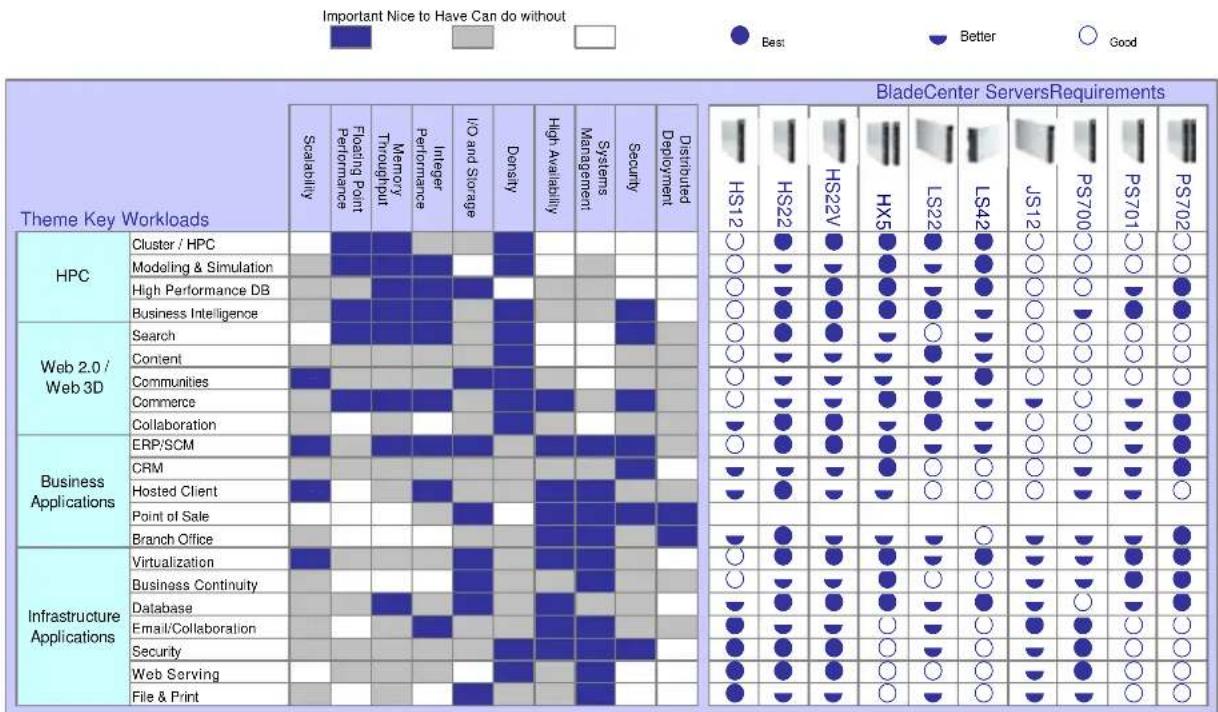
Server Comparison Chart
The following table shows the suggested uses for the respective IBM BladeCenter blade servers, including comparisons of the uses for which each server is best suited:
For More Information
| IBM BladeCenter Servers and OptionsIBM Systems Director Service and Support ManagerIBM System x and BladeCenter Power ConfiguratorIBM Standalone Solutions Configuration ToolIBM Configuration and Options GuideIBM ServerProven ProgramTechnical SupportOther Technical Support Resources | http://ibm.com/systems/Bladecenterhttp://ibm.com/support/electronichttp://ibm.com/systems/Bladecenter/resources/powerconfig.htmlhttp://ibm.com/systems/x/hardware/configtools.htmlhttp://ibm.com/systems/x/hardware/configtools.htmlhttp://ibm.com/systems/info/x86servers/serverproven/compat/ushttp://ibm.com/server/supporthttp://ibm.com/systems/support |
| Legal Information© IBM Corporation 2010IBM Systems and Technology GroupDept. U2SA3039 Cornwallis RoadResearch Triangle Park, NC 27709Produced in the USAOctober 2010All rights reservedFor a copy of applicable product warranties, write to: Warranty Information, P.O. Box 12195, RTP, NC 27709, Attn: Dept.JDJA/B203. IBM makes no representation or warranty regarding third-party products or services including those designated as ServerProven or ClusterProven®. Telephone support may be subject to additional charges. For onsite labor, IBM will attempt to diagnose and resolve the problem remotely before sending a technician.IBM, the IBM logo, ibm.com, Active Energy Manager, AIX, BladeCenter, Calibrated Vectored Cooling, POWER6, POWER7, PowerPC, PowerXCell, ServeRAID, System Storage, System x, Wake on LAN, and X-Architecture are trademarks of IBM Corporation in the United States, other countries, or both. If these and other IBM trademarked terms are marked on their first occurrence in this information with a trademark symbol (® or ""), these symbols indicate U.S. registered or common law trademarks owned by IBM at the time this information was published. Such trademarks may also be registered or common law trademarks in other countries. A current list of IBM trademarks is available on the Web athttp://ibm.com/legal/copytrade.shtml.Cell Broadband Engine is a trademark of Sony Computer Entertainment, Inc. in the United States, other countries, or both and is used under license therefrom.InfiniBand is a trademark of the InfiniBand Trade Association.Intel and Xeon are trademarks or registered trademarks of Intel Corporation or its subsidiaries in the United States and other countries.Linux is a registered trademark of Linus Torvalds.Microsoft, Windows and the Windows logo are trademarks or registered trademarks of Microsoft Corporation.Other company, product and service names may be trademarks or service marks of others.IBM reserves the right to change specifications or other product information without notice. References in this publication to IBM products or services do not imply that IBM | intends to make them available in all countries in which IBM operates. IBM PROVIDES THIS PUBLICATION "AS IS" WITHOUT WARRANTY OF ANY KIND, EITHER EXPRESS OR IMPLIED, INCLUDING THE IMPLIED WARRANTIES OF MERCHANTABILITY AND FITNESS FOR A PARTICULAR PURPOSE. Some jurisdictions do not allow disclaimer of express or implied warranties in certain transactions; therefore, this statement may not apply to you.This publication may contain links to third party sites that are not under the control of or maintained by IBM. Access to any such third party site is at the user's own risk and IBM is not responsible for the accuracy or reliability of any information, data, opinions, advice or statements made on these sites. IBM provides these links merely as a convenience and the inclusion of such links does not imply an endorsement.Information in this presentation concerning non-IBM products was obtained from the suppliers of these products, published announcement material or other publicly available sources. IBM has not tested these products and cannot confirm the accuracy of performance, compatibility or any other claims related to non-IBM products. Questions on the capabilities of non-IBM products should be addressed to the suppliers of those products.Some machines are designed with a power management capability to provide customers with the maximum uptime possible for their systems. In extended thermal conditions, rather than shutdown completely, or fail, these machines automatically reduce the processor frequency to maintain acceptable thermal levels.MB, GB and TB = 1,000,000, 1,000,000,000 and 1,000,000,000,000 bytes, respectively, when referring to storage capacity. Accessible capacity is less; up to 3GB is used in service partition. Actual storage capacity will vary based upon many factors and may be less than stated.Performance is in Internal Throughput Rate (ITR) ratio based on measurements and projections using standard IBM benchmarks in a controlled environment. The actual throughput that any user will experience will depend on considerations such as the amount of multiprogramming in the user's job stream, the I/O configuration, the storage configuration and the workload processed. Therefore, no assurance can be given that an individual user will achieve throughput improvements equivalent to the performance ratios stated here.Maximum internal hard disk and memory capacities may require the replacement of any standard hard drives and/or memory and the population of all hard disk bays and memory slots with the largest currently supported drives available. When referring to variable speed CD-ROMs, CD-Rs, CD-RWs and DVDs, actual playback speed will vary and is often less than the maximum possible. |
BLO03034-USEN-04
- IBM BladeCenter HS22V
- Product Overview
- CONTENTS
- High density, high performance 2-socket blade server optimized for virtualization
- Manageability
- Availability and Serviceability
- Right, Open, Easy, Green
- Fabric Manager
- Key Features
- Multicore Intel Xeon Processors
- DDR3 Registered Memory with Active Memory Protection
- For peak performance:
- Power guidelines:
- Reliability guidelines:
- High Performance/High-Availability Internal Storage
- High IOPS SSD PCIe Adapters
- Disk Controllers
- Integrated Virtualization
- External Tape Storage
- Light Path Diagnostics
- High-Performance Adapter Slots
- Gigabit Ethernet Controller
- BladeCenter Chassis
- Hot-Swap/Redundant Components
- Energy-Smart Features
- Advanced Systems Management Capabilities
- Extensive System Support Features
- Key Options
- IBM options for System x servers let you take your servers to a higher level
- HS22V Images
- The Bottom Line
- Price/Performance
- Flexibility
- Manageability and Availability
- Server Comparison Chart
Brand : LENOVO
Model : eServer BladeCenter HS22V
Category : Server