
U209-006-2 - Cables and Computer Accessories Tripp Lite - Free user manual and instructions
Find the device manual for free U209-006-2 Tripp Lite in PDF.


| Product Type | USB to RS-232 Serial Adapter Cable |
| Model | U209-006-2 |
| Brand | Tripp Lite |
| Interface | USB 2.0 to RS-232 Serial (DB9) |
| Cable Length | 6 ft (1.8 m) |
| Connector Type | USB Type-A Male to DB9 Male |
| Data Transfer Rate | Up to 115.2 Kbps |
| Operating Systems Support | Windows, macOS, Linux |
| Power Supply | Bus-powered via USB, no external adapter required |
| Power Consumption | Typical < 100 mA |
| Dimensions (Cable Diameter) | Approximately 5 mm (0.2 in) |
| Weight | Approximately 0.1 kg (0.22 lbs) |
| Color | Black |
| LED Indicators | Power and data activity |
| Compliance | RoHS, CE, FCC |
| Operating Temperature | 32°F to 104°F (0°C to 40°C) |
| Storage Temperature | -4°F to 158°F (-20°C to 70°C) |
| Maintenance | Clean with dry cloth; avoid liquids |
| Safety | Use with shielded cables to avoid interference |
| Spare Parts Availability | Not applicable; cable is integral |
| Warranty | Lifetime limited warranty |
Frequently Asked Questions - U209-006-2 Tripp Lite
User questions about U209-006-2 Tripp Lite
0 question about this device. Answer the ones you know or ask your own.
Ask a new question about this device
Download the instructions for your Cables and Computer Accessories in PDF format for free! Find your manual U209-006-2 - Tripp Lite and take your electronic device back in hand. On this page are published all the documents necessary for the use of your device. U209-006-2 by Tripp Lite.
USER MANUAL U209-006-2 Tripp Lite
2-Port USB to Serial Adapter Cable
Model: U209-006-2
PROTECT YOUR INVESTMENT!
Register your product for quicker service and ultimate peace of mind.
You could also win an ISOBAR6ULTRA surge protector—a \$100 value!
www.tripplite.com/warranty


Manufacturing Excellence.
1111 W. 35th Street, Chicago, IL 60609 USA www.tripplite.com/support
Copyright © 2016 Tripp Lite. All rights reserved.
Product Features
- Add two RS232 Serial ports via the USB port on your laptop, tablet or computer
- COM Retention allows the same COM port values to be reassigned to each port in case a cable is disconnected or the system is rebooted
- FTDI chipset supports advanced features and compatibility
• Supports data transfer rates up to 225 Kbps - Premium double-shielded cable eliminates cross-talk and reduces EMI/RFI interference
- Provides overcurrent protection
- Compatible with Windows , Mac and Linux
- Hot-swappable
• External power not required
Package Includes
- U209-006-2
- Driver CD
- Owner's Manual
System Requirements
• Computer with an available USB port
- Compatible with Windows, Mac and Linux operating systems
Installation
Note: The following instructions show how to install the driver on a Windows 7 computer. The installation steps are similar for other Windows operating systems. For non-Windows operating systems, refer to the installation files on the driver CD or on www.tripplite.com/support.
1 Without connecting the U209-006-2, power on your computer and insert the driver CD that came with the product into your computer's CD ROM drive.
2 Click on the CD icon to access its file contents, then run the driver file appropriate for your OS.
3 Before the driver installation program launches, an FTDI CDM Drivers window will appear. Click the Extract button.

Installation
4 After extracting the FTDI CDM Drivers, the driver installer program will launch. Click the Next button to start the installation.

Installation
5 The driver installation begins.

Installation
6 Once the installation process is complete, click the Finish button to close out of the program.
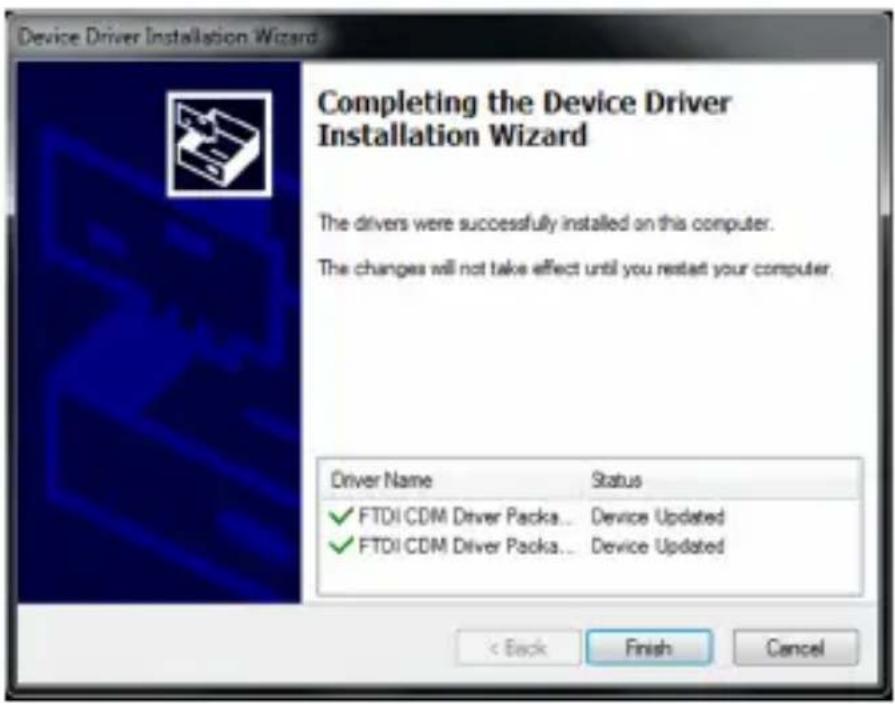
7 Connect the U209-006-2 to an available USB port on your computer. Windows will detect the adapter and assign it a COM port upon completing the installation.
Installation
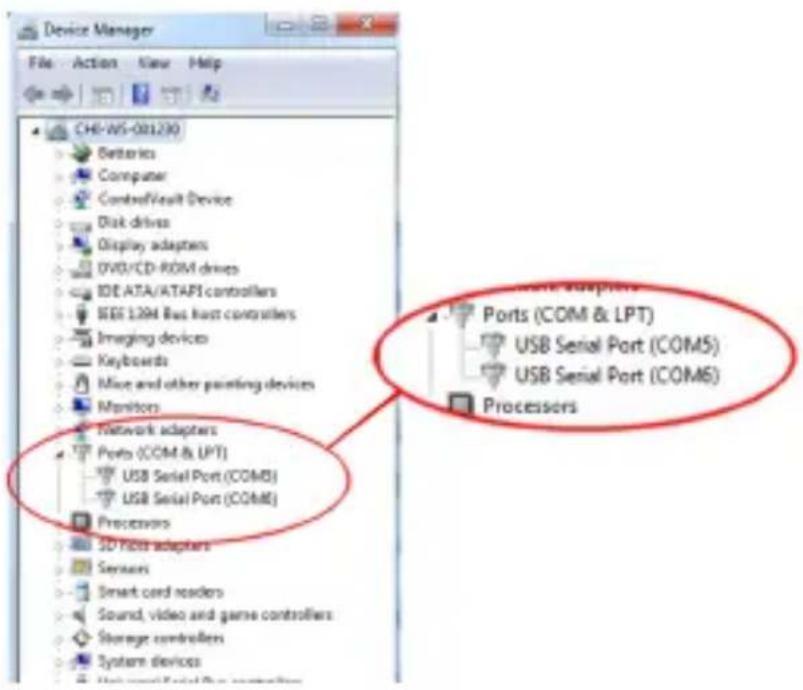
8 To verify your adapter has been successfully installed, navigate to your computer's Control Panel and open the Device Manager screen. The adapter will appear in the Ports section with its assigned COM port next to it.
Pinout
7
Warranty and Product Registration
2-Year Limited Warranty
TRIPP LITE warrants its products to be free from defects in materials and workmanship for a period of two (2) years from the date of initial purchase. TRIPP LITE's obligation under this warranty is limited to repairing or replacing (at its sole option) any such defective products. To obtain service under this warranty, you must obtain a Returned Material Authorization (RMA) number from TRIPP LITE or an authorized TRIPP LITE service center. Products must be returned to TRIPP LITE or an authorized TRIPP LITE service center with transportation charges prepaid and must be accompanied by a brief description of the problem encountered and proof of date and place of purchase. This warranty does not apply to equipment, which has been damaged by accident, negligence or misapplication or has been altered or modified in any way.
EXCEPT AS PROVIDED HEREIN, TRIPP LITE MAKES NO WARRANTIES, EXPRESS OR IMPLIED, INCLUDING WARRANTIES OF MERCHANTABILITY AND FITNESS FOR A PARTICULAR PURPOSE.
Some states do not permit limitation or exclusion of implied warranties; therefore, the aforesaid limitation(s) or exclusion(s) may not apply to the purchaser.
EXCEPT AS PROVIDED ABOVE, IN NO EVENT WILL TRIPP LITE BE LIABLE FOR DIRECT, INDIRECT, SPECIAL, INCIDENTAL OR CONSEQUENTIAL DAMAGES ARISING OUT OF THE USE OF THIS
PRODUCT, EVEN IF ADVISED OF THE POSSIBILITY OF SUCH DAMAGE. Specifically, TRIPP LITE is not liable for any costs, such as lost profits or revenue, loss of equipment, loss of use of equipment, loss of software, loss of data, costs of substitutes, claims by third parties, or otherwise.
Warranty and Product Registration
PRODUCT REGISTRATION
Visit www.tripplite.com/warranty today to register your new Tripp Lite product. You'll be automatically entered into a drawing for a chance to win a FREE Tripp Lite product!*
* No purchase necessary. Void where prohibited. Some restrictions apply. See website for details.
FCC Notice, Class B
This device complies with part 15 of the FCC Rules. Operation is subject to the following two conditions: (1) This device may not cause harmful interference, and (2) this device must accept any interference received, including interference that may cause undesired operation.
Note: This equipment has been tested and found to comply with the limits for a Class B digital device, pursuant to part 15 of the FCC Rules. These limits are designed to provide reasonable protection against harmful interference in a residential installation. This equipment generates, uses and can radiate radio frequency energy and, if not installed and used in accordance with the instructions, may cause harmful interference to radio communications. However, there is no guarantee that interference will not occur in a particular installation. If this equipment does cause harmful interference to radio or television reception, which can be determined by turning the equipment off and on, the user is encouraged to try to correct the interference by one or more of the following measures:
- Reorient or relocate the receiving antenna.
- Increase the separation between the equipment and receiver.
- Connect the equipment into an outlet on a circuit different from that to which the receiver is connected.
- Consult the dealer or an experienced radio/TV technician for help.
Warranty and Product Registration
Any changes or modifications to this equipment not expressly approved by Tripp Lite could void the user's authority to operate this equipment.
WEEE Compliance Information for Tripp Lite Customers and Recyclers (European Union)
Under the Waste Electrical and Electronic Equipment (WEEE) Directive and implementing regulations, when customers buy new electrical and electronic equipment from Tripp Lite they are entitled to:
- Send old equipment for recycling on a one-for-one, like-for-like basis (this varies depending on the country)
- Send the new equipment back for recycling when this ultimately becomes waste
Tripp Lite has a policy of continuous improvement. Specifications are subject to change without notice.


1111 W. 35th Street, Chicago, IL 60609 USA www.tripplite.com/support
12
16-10-052 93-3604_revB
- 2-PORT USB TO SERIAL ADAPTER CABLE
- PROTECT YOUR INVESTMENT
- PRODUCT FEATURES
- PACKAGE INCLUDES
- SYSTEM REQUIREMENTS
- INSTALLATION
- 5 THE DRIVER INSTALLATION BEGINS
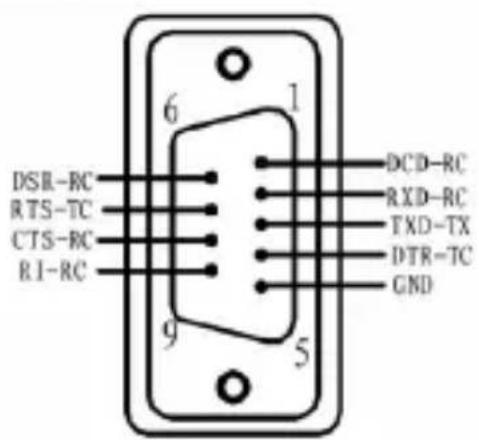
- PINOUT
- WARRANTY AND PRODUCT REGISTRATION
- 2-YEAR LIMITED WARRANTY
- PRODUCT REGISTRATION
- FCC NOTICE, CLASS B
- WEEE COMPLIANCE INFORMATION FOR TRIPP LITE CUSTOMERS AND RECYCLERS (EUROPEAN UNION)
Brand : Tripp Lite
Model : U209-006-2
Category : Cables and Computer Accessories