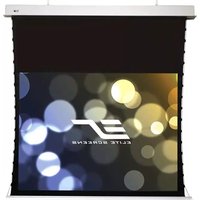
Evanesce Tension ITE94XW2-E30 - Projection screen Elite Screens - Free user manual and instructions
Find the device manual for free Evanesce Tension ITE94XW2-E30 Elite Screens in PDF.


| Product Type | In-Ceiling Electric Motorized Front Projection Screen |
| Brand | Elite Screens |
| Model | Evanesce Tension ITE94XW2-E30 |
| Screen Technology | Tensioned fabric for a flat, wrinkle-free viewing surface |
| Aspect Ratio | 16:10 (Wide) |
| Diagonal Size | 94 inches |
| Motor Type | Electric motor with quiet operation |
| Power Requirements | 110-220V AC, 50/60Hz (includes 3-prong power cord, hardwire optional) |
| Control Options | IR remote (30 ft range), RF remote (150 ft range), 3-way wall switch, 5-12V trigger input, RJ-45 in-wall module |
| 5-12V Trigger | Built-in trigger input for automatic synchronization with projector power |
| Installation | In-ceiling recessed; includes hanging brackets, suspension bars, and optional J-hooks |
| Included Accessories | IR remote, RF remote, 3-way wall switch, IR eye receiver, in-wall RJ-45 module, AAA batteries, bubble level, hardware kit |
| Warranty | 2 years limited (3 years for educational/non-profit organizations) |
| Safety Compliance | FCC Class B, RoHS compliant |
| Material | High-quality projection screen vinyl with black backing |
| Viewing Surface | Matte white, gain 1.0 (typical) |
| Maintenance | Gently clean with a dry, soft cloth; avoid liquids and abrasive cleaners |
| Safety Precautions | Do not modify unit; use only authorized accessories; disconnect power during maintenance |
| Spare Parts & Repairability | Not end-user serviceable; contact Elite Screens for authorized service |
| General Information | Designed for permanent installation in home theaters or conference rooms |
Frequently Asked Questions - Evanesce Tension ITE94XW2-E30 Elite Screens
User questions about Evanesce Tension ITE94XW2-E30 Elite Screens
0 question about this device. Answer the ones you know or ask your own.
Ask a new question about this device
Download the instructions for your Projection screen in PDF format for free! Find your manual Evanesce Tension ITE94XW2-E30 - Elite Screens and take your electronic device back in hand. On this page are published all the documents necessary for the use of your device. Evanesce Tension ITE94XW2-E30 by Elite Screens.
USER MANUAL Evanesce Tension ITE94XW2-E30 Elite Screens
ELITE SCREENS
In-Ceiling Electric Motorized Front Projection Screen
Evanesce Tension Series
User's Guide
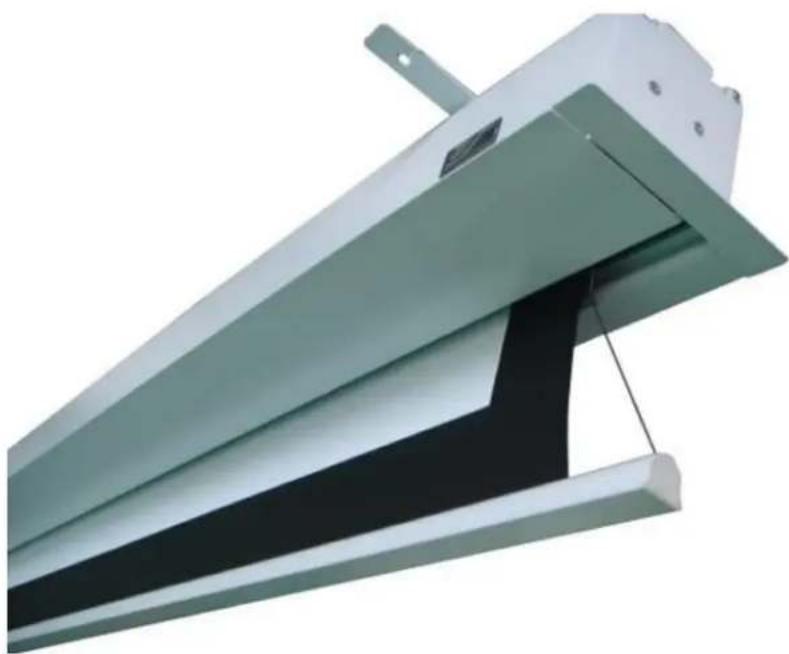
Important Safety & Warning Precautions
Make sure to read this user's guide and follow the procedure below.
Cauon: The screen's Black Top Drop is already set to its maximum drop distance. There is NO extra Black Top Drop in the roller. Please be aware of this as it will void your warranty with Elite Screens. Unapproved changes or modicaons (except for cung the power cord for hardwire installaons) to this unit are prohibited and will void your warranty. For more informaon, please contact our Technical Support Department at (877) 511-1211 Ext. 604.
- Please retain this user's guide for future reference.
- To avoid damaging the unit, do not use with any unauthorized accessories not recommended by the manufacturer.
- Handle the unit carefully during transportaon to avoid any damages.
- To ensure safe and reliable operaon, direct conneccon to a properly grounded power source is advised.
- The power outlet supplying power to the unit should be close to the unit and easily accessible.
- Do not install the unit on uneven or inclined surfaces.
- Do not place any heavy objects over the power cord.
- Posion the power cord properly to avoid creang a trip obstacle.
- To avoid an electrical shock or re, due to a loose contact or short circuit, do not overload the power cord.
- The internal & external parts of this unit are not end user serviceable. Do not aempt to disassemble this unit by yourself. No one except authorized technicians can open and make repairs to this unit.
• Make sure the power source that this unit is connected to has a connuous power ow. - If there is need to use an extension cord, make sure the cord has an equal rang as the appliance to avoid over heat.
- Do not handle the power plug when your hands are wet or your feet are in contact with water.
Do not use this unit under the following circumstances.
- Disconnect the power cord under the conditions of heavy rain, wind thunder or lightning.
- Avoid direct sun light, rain shower and moisture.
- Keep away from re sources and high temperature to prevent this device from overheang.
- Cut o the power supply rst before transportaon or maintenance.
- To avoid possible injury and/or an electric shock, do not aempt to use this screen if there is obvious damage or if there are any evident broken parts.
•
Installation Warning
Due to various installaon environments, the instrucons provided in this user's guide are for reference only. Please consult a professional installaon company for further installaon and safety advice. The installer must insure that proper mounng hardware is used to provide adequate strength suitable for the installaon. Elite Screens is not liable for any faulty installaons. For limit adjustment instrucons, please contact our Technical Support Department at (877) 511-1211 Ext. 604
The Screen's Top Black Drop is already set to its maximum drop distance. There is NO extra top black drop in the roller. Please be aware of this as it will void the limitaon of your warranty.
Individual modicaons to this product are prohibited and will void the warranty with the manufacturer. Please contact Elite Screens Customer Service for any quesons.
NOTE:
This equipment has been tested and found to comply with the limits for a Class B digital device, pursuant to Part 15 of the FCC Rules.
These limits are designed to provide reasonable protecon against harmful interference in a residential installaon. This equipment generates and can radiate radio frequency energy and, if not installed and used in accordance with the instrucons, may cause harmful interference to radio communicaons.
However, there is no guarantee that the interference will not occur on a particular installaon. If this equipment causes harmful interference to radio or television recepon, which can be determined by turning the equipment o and on, the user is encouraged to try to correct the interference by one or more of the following measures.
√ Reorient or relocate the receiving antenna of the device which may be casing the interference.
√ Increase the separaon between the screen and the device's receiver.
√ Connect the equipment into a dierent power outlet other than the device.
Pre-Installation
- Carefully unpack the screen.
- Always handle the screen in a leveled posion on a clean surface.
- In order to protect the screen from exposure to stains, keep the screen out of contact with foreign parcles such as dust, sawdust, and/or liquids.
NOTE
Regardless of the moung method, the screen should be securely supported so that the vibraon or pulling on the viewing surface will not cause the casing to become loose or fall. The installer must insure that the fasteners used are of adequate strength and suitable for the installaon locaon.
Accessories for Evanesce Tension Series
Please make sure all accessories listed below are included before proceeding.
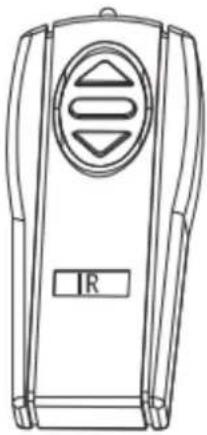
A. IR Remote
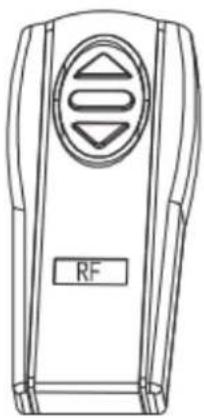
B. RF Remote

C. 3 Way Wall Switch

D. IR Eye Receiver
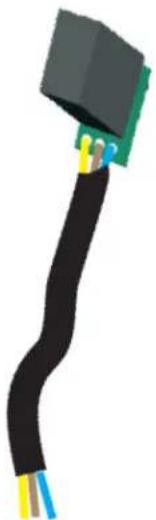
F. In-Wall RJ-45 Module

AAA Baeries
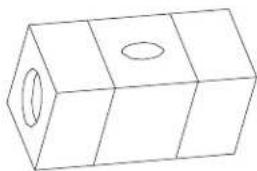
H. Bubble Level
Control System for Evanesce Tension Series
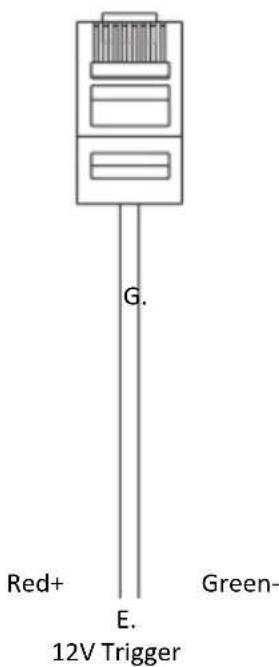
- 5-12V Trigger: The built-in 5-12V trigger input allows your screen to synchronize its drop & rise with the projector's power cycle. The screen deploys when the projector powers up and will retract when the projector powers down. The 5-12 volt adaptor connects to your projector's trigger output via a separate cable that may or may not be provided by the manufacturer of the projector. The trigger feature will not work without an output cable from the projector, but it can be tested by connecng the Red (+) and Green (-) cable to a 9-volt baery.
5-12 VOLT TRIGGER CABLE
- 3-Way Wall Switch: The 3-way wall switch is a wall mount control box with an up/stop/down buon and plugs directly into the screen's RJ-45 input.

- IR "Eye" Receiver: plugs directly into the screen's RJ-45 input to present a low prole line-of-sight control on for your IR remote control even in a recessed ceiling installaon.

- IR Remote Control: The Infrared funcons by direct line of sight contact with a beam range of 30 feet.
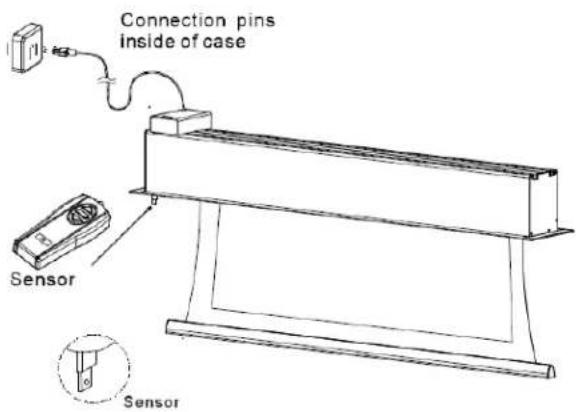
- RF Remote Control: The radio waves eliminate the need for a direct line of sight with a range of 150 feet.
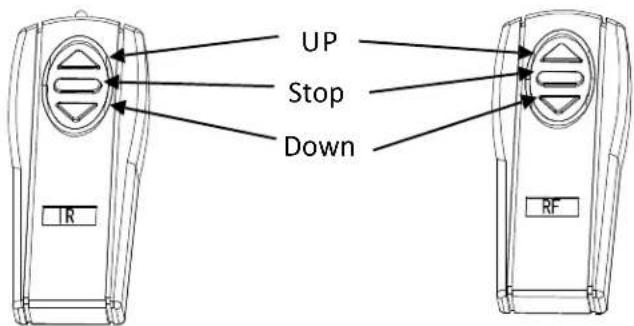
- In-Wall RJ-45 Module: The RJ-45 Module connects to a local wall switch for UP/Down control of your screen. Please follow the picture diagram below for instrucons on how to connect the accessory.
Elite Screens In-Wall Switch Module ( ZIW-Module )

Local Wall Switch
In-Wall UP/DOWN Switch Module (ZIW-Module)
Elite Electric Motorized Screen
Steps to each Elite Screens Motorized Screen to your local wall switch
-
Aach Elite Screens ZIW-Module (in-wall switch module) to your local wall switch as shown in diagram above.
-
Aach an RJ-45 Ethernet cable (not included) to the ZIW-Module and the other end to the RJ-45 input on your Elite electric screen.
-
Aer tesng the conncon, place the in-wall switch module in or on the wall and wire the Ethernet cable to complete the set up.
NOTE: Please be aware that Ethernet cables have length limitaons so please make test before concealing the cable into the wall.
Hardware Parts List for Evanesce Series
Please make sure all parts listed below are included before proceeding with the installaon.

A

E

B

F

C

G
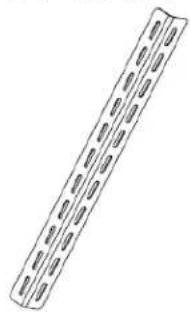
D
| Hardware Parts List | QTY |
| A. Case Rail Nut | 4-6 |
| B. Hex Screw | 4-6 |
| C. Hanging Bracket | 2-3 |
| D. Suspension Bar | 4 |
| E. Washer | 8-10 |
| F. Hex Nut | 4-6 |
| G. Suspension Bar J- Hook | 4 |
Installation Instructions
Please consult a professional installer. Elite Screens is not liable for faulty installaons.
Power
- The Evanesce Series includes a 3-Prong Power Cord for use in a non-concealed power outlet. If your installaon will be enrely concealed (including power outlet), Elite Screens strongly recommends a hardwire conncon. Please refer to the image below for both 110v & 220v
wiring informaon.

Assembly
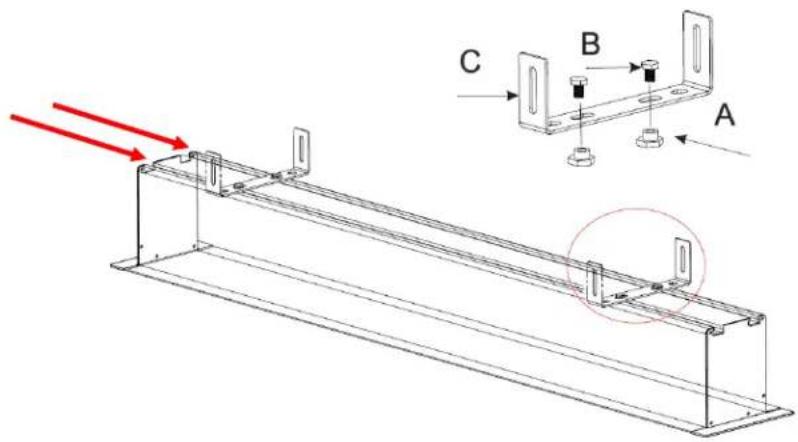
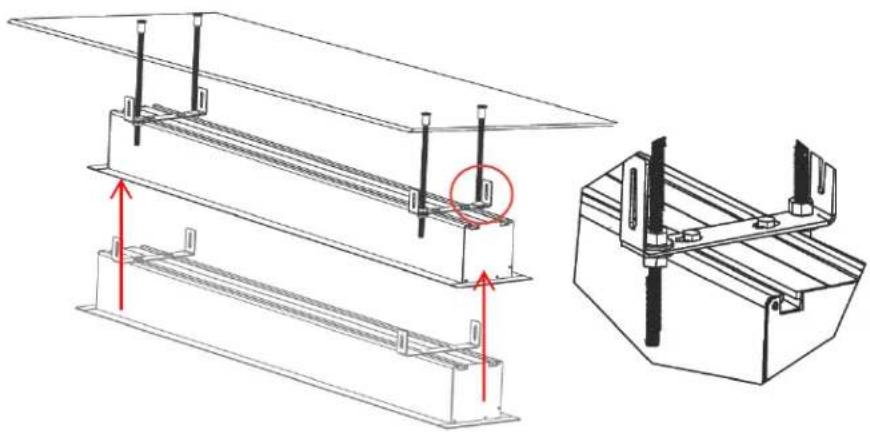
- Insert the Hex Screw (B) through the Hanging Bracket's (C) screw hole and secure with the Case Rail Nut (A). Slide the Hanging Bracket (C) through the railing on top of the case.
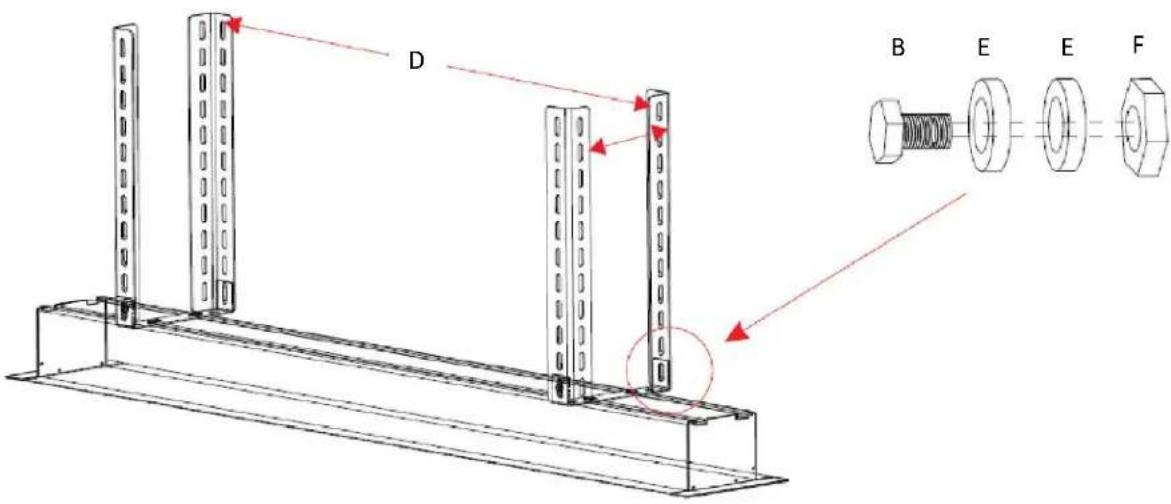
- Place the Suspension Bar (D) on the Hanging Bracket (C) and align with the hole as shown below. Secure the Suspension Bar (D) with the Hex Screw (B), Washer (E) and the Hex Nut (F). Install the Suspension Bars (D) to your ceiling according to their distance.
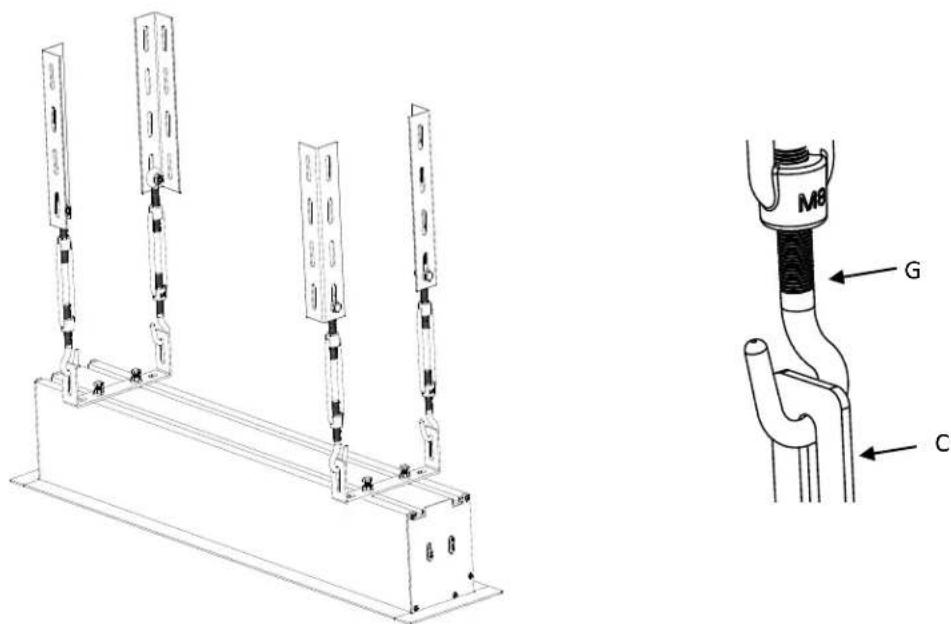
Oponal Suspension Bar J-Hook (G)
- Aach the Suspension Bar J- Hook (G) to the boom of the Suspension Bar (D) and secure with the Hex Screw (B), Washer (E) and Hex Nut (F).

- Aach the Suspension Bar J-Hook (G) to the Hanging Bracket (C) as shown in gure below. Install the Suspension Bars (D) to your ceiling according to their distance.
Oponal Installaon (parts & hardware not included)
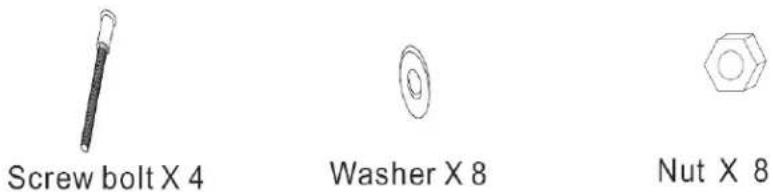
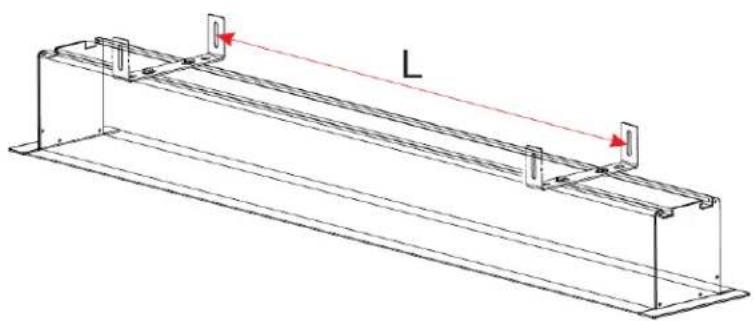
- Place the Hanging Bracket (C) in the desired locaon on the screen's housing and measure the distance as shown below. (L = Distance)
- Mark the locaon of where the screen will be installed according to the distance (L) and then secure the bolt to the ceiling.
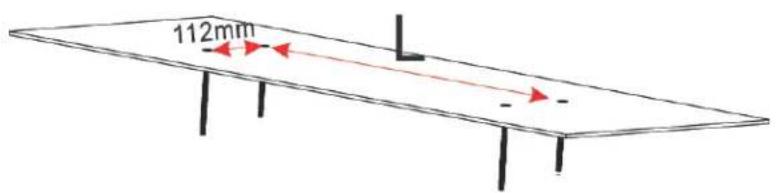
- Install the screen to the screw bolt as shown in the gure below.
Evanesce Tension Series Dimensions Table
| Unit: mm | ||||||||||||||||||||
| Model | Nominal Diagonal | View Width (A) | (A1) | Case Length (A2) | (A3) | (A4) | (A5) | View Height (B) | Top Border (B1) | (B2) | Case H (B3) | Overall Height (B4) | (B5) | Case Width (C) | C1 C2 | C3 C4 | C5 C6 | |||
| ITE100VW2-E8 | 100"(4:3) | 2032 | 95 | 2347 | 2407 | 1947 | 2342 | 1524 | 203 | 1827 | 118 | 1945 | 100 | 98 | 50 | 925 | 145 | 180 | 1145-1205 | 148 |
| ITE120VW2-E8 | 120"(4:3) | 2438 | 95 | 2770 | 2830 | 2370 | 2765 | 1828 | 203 | 2131 | 118 | 2249 | 100 | 98 | 50 | 925 | 145 | 180 | 1145-1205 | 148 |
| ITE100HW2-E8 | 100"(16:9) | 2214 | 95 | 2530 | 2590 | 2130 | 2525 | 1245 | 203 | 1548 | 118 | 1666 | 100 | 98 | 50 | 925 | 145 | 180 | 1145-1205 | 148 |
| ITE106HW2-E8 | 106"(16:9) | 2347 | 95 | 2660 | 2720 | 2260 | 2655 | 1320 | 203 | 1623 | 118 | 1741 | 100 | 98 | 50 | 925 | 145 | 180 | 1145-1205 | 148 |
| ITE120HW2-E8 | 120"(16:9) | 2657 | 95 | 2972 | 3032 | 2572 | 2967 | 1494 | 203 | 1797 | 118 | 1915 | 100 | 98 | 50 | 925 | 145 | 180 | 1145-1205 | 148 |
| ITE135HW2-E8 | 135"(16:9) | 2989 | 95 | 3310 | 3370 | 2910 | 3305 | 1681 | 203 | 1984 | 118 | 2102 | 100 | 98 | 50 | 925 | 145 | 180 | 1145-1205 | 148 |
| ITE114XW2-E8 | 114"(16:10) | 2455 | 95 | 2770 | 2830 | 2370 | 2765 | 1534 | 203 | 1837 | 118 | 1955 | 100 | 98 | 50 | 925 | 145 | 180 | 1145-1205 | 148 |
| ITE126XW2-E8 | 126"(16:10) | 2714 | 95 | 3030 | 3090 | 2630 | 3025 | 1696 | 203 | 1999 | 118 | 2117 | 100 | 98 | 50 | 925 | 145 | 180 | 1145-1205 | 148 |
Unit: inch
| Model | Nominal Diagonal | View Width (A) | (A1) | Case Length (A2) | (A3) | (A4) | (A5) | View Height (B) | Top Border (B1) | (B2) | Case H (B3) | Overall Height (B4) | (B5) | Case Width (C) | C1 C2 | C3 C4 | C5 C6 | |||
| ITE100VW2-E8 | 100"(4:3) | 80.0 | 3.7 | 92.4 | 94.8 | 76.7 | 92.2 | 60.0 | 8.0 | 71.9 | 4.6 | 76.6 | 3.9 | 3.9 | 2.0 | 36.4 | 5.7 | 7.1 | 45.1-47.4 | 5.8 |
| ITE120VW2-E8 | 120"(4:3) | 96.0 | 3.7 | 109.1 | 111.4 | 93.3 | 108.9 | 72.0 | 8.0 | 83.9 | 4.6 | 88.5 | 3.9 | 3.9 | 2.0 | 36.4 | 5.7 | 7.1 | 45.1-47.4 | 5.8 |
| ITE100HW2-E8 | 100"(16:9) | 87.2 | 3.7 | 99.6 | 102.0 | 83.9 | 99.4 | 49.0 | 8.0 | 60.9 | 4.6 | 65.6 | 3.9 | 3.9 | 2.0 | 36.4 | 5.7 | 7.1 | 45.1-47.4 | 5.8 |
| ITE106HW2-E8 | 106"(16:9) | 92.4 | 3.7 | 104.7 | 107.1 | 89.0 | 104.5 | 52.0 | 8.0 | 63.9 | 4.6 | 68.5 | 3.9 | 3.9 | 2.0 | 36.4 | 5.7 | 7.1 | 45.1-47.4 | 5.8 |
| ITE120HW2-E8 | 120"(16:9) | 104.6 | 3.7 | 117.0 | 119.4 | 101.3 | 116.8 | 58.8 | 8.0 | 70.7 | 4.6 | 75.4 | 3.9 | 3.9 | 2.0 | 36.4 | 5.7 | 7.1 | 45.1-47.4 | 5.8 |
| ITE135HW2-E8 | 135"(16:9) | 117.7 | 3.7 | 130.3 | 132.7 | 114.6 | 130.1 | 66.2 | 8.0 | 78.1 | 4.6 | 82.8 | 3.9 | 3.9 | 2.0 | 36.4 | 5.7 | 7.1 | 45.1-47.4 | 5.8 |
| ITE114XW2-E8 | 114"(16:10) | 96.7 | 3.7 | 109.1 | 111.4 | 93.3 | 108.9 | 60.4 | 8.0 | 72.3 | 4.6 | 77.0 | 3.9 | 3.9 | 2.0 | 36.4 | 5.7 | 7.1 | 45.1-47.4 | 5.8 |
The listed measurements are for general reference only. Please contact Elite Screens to verify product design and dimensions before aempng to integrate its products with any structural or furniture modicaon. Although a manufacturer may oer product advice, it may be taken or disregarded at the integrator's discreon. Elite Screens will not be held responsible or be otherwise liable for faulty installaons. Note Data error +/- 1"

Limited Warranty Policy
What is Covered: Elite Screens, Inc. ("Elite Screens") warrants its products to the first retail purchaser, if purchased new and operated in the United States or Canada, to be free from defects in workmanship and materials (except as provided below) for a period of (2) years from the date of original purchase, and (3) years for products purchased directly by educational, non-proit, religious or government organizations.
Refurbished products purchased directly from Elite Screens are warranted for a period of (90) days from the date of original purchase.
For warranty service, you must provide proof of purchase and the serial number of your product.
How to Get Service: Should this product prove defective during the warranty period, please visit www.elitescreens.com/rmaform and submit a warranty claim form. You must provide your proof of purchase, the serial number of your product, and describe the problem you are experiencing with your screen. An Elite Screens representative will determine whether the product requires service, and provide you with further instructions on how to proceed with your warranty claim.
Missing Parts: If your product is missing parts, Elite Screens will, at its option, replace the part without any charge, including shipping and handling, provided that you report your claim within (7) days of receipt. If you report your claim after (7) days of receipt, but within (30) days of receipt, Elite Screens will, at its option, replace the part without charge, but you will bear the cost of shipping and handling. If you report your claim after (30) days of receipt, you will bear all costs to replace the part.
Returns and Exchanges: If a return is needed, Elite Screens will issue you a Return Merchandise Authorization ("RMA") Number. This number is valid for (45) days from the date of issue, and is required to process any returns. A returned item sent to Elite Screens without a visible or valid RMA Number is subject to refusal by Elite Screens. You are responsible for the cost of returning the item and ensuring the product is properly packaged to prevent damage in transit.
Once a returned product is received, Elite Screens will, at its option, replace the product or part without charge, including ground service freight. The replacement product or part may be new or refurbished to the Elite Screens standard of quality, and is subject to stock availability. Elite Screens' liability for replacement of the covered product will not exceed the original retail selling price of the covered product. Exchange products and parts assume the remaining warranty period of the original product covered by this limited warranty.
What is Not Covered: This warranty is not transferable and does not cover product purchased by another end user. This warranty does not cover incidental damages, such as loss of time, loss of use, or installation costs of defective, repaired or replaced product. This warranty does not cover product that has been damaged or rendered defective as a result of (a) neglect, abuse or misuse; (b) modification of the original product; (c) improper use or installation of products not manufactured by Elite Screens; (d) service provided by anybody other than Elite Screens; (e) abnormal mechanical or environmental conditions; (f) unusual physical or electrical stress -including failure or luctuation of electrical power, lighting, static electricity, ire, tornadoes, or other natural disasters.
Elite Screens does not warrant against freight damage, concealed or otherwise, unless product is shipped directly from an Elite Screens facility. You must contact the vendor and the delivering carrier to report freight damage within (7) days of receipt. Failure to report freight damages within the carrier's guidelines may result in you bearing all costs.
THIS LIMITED WARRANTY AND REMEDY PROVIDED ABOVE ARE EXCLUSIVE AND IN LIEU OF ALL OTHER WARRANTIES. ELITE SCREENS, INC. DISCLAIMS ALL OTHER WARRANTIES, WHETHER EXPRESS, IMPLIED OR STATUTORY, INCLUDING ANY WARRANTY OF MERCHANTABILITY, ANY WARRANTY OF FITNESS FOR A PARTICULAR PURPOSE AND ANY IMPLIED WARRANTIES ARISING FROM A COURSE OF DEALING OR USAGE OF TRADE. THIS LIMITED WARRANTY GIVES THE END USER SPECIFIC LEGAL RIGHTS, AND THE END USER MAY HAVE OTHER RIGHTS WHICH VARY FROM STATE TO STATE.
EXCEPT AS PROVIDED IN THIS WRITTEN WARRANTY, ELITE SCREENS, INC. SHALL NOT BE LIABLE FOR ANY LOSS, INCONVENIENCE, OR DAMAGE, INCLUDING DIRECT, SPECIAL, INCIDENTAL OR CONSEQUENTIAL DAMAGES, RESULTING FROM THE USE OR INABILITY TO USE THE ELITE SCREENS PRODUCT, OR FOR LOST DATA OR LOST SOFTWARE WHETHER RESULTING FROM BREACH OF WARRANTY OR ANY OTHER LEGAL THEORY. SOME STATES DO NOT ALLOW THE EXCLUSION OR LIMITATION OF INCIDENTAL AND CONSEQUENTIAL DAMAGES, SO THE ABOVE LIMITATION MAY NOT APPLY.
In Canada, warranties include both warranties and conditions. Some jurisdictions do not allow limitations on how long an implied warranty lasts and some jurisdictions do not allow the exclusion or limitation of incidental or consequential damages, so the above limitations and exclusions may not apply to you. This warranty gives you specific legal rights, and you may also have other rights which vary from jurisdiction to jurisdiction.
International Warranty: Elite Screens, Inc. does not provide warranty coverage outside of the United States or Canada. For more information on the warranty coverage, terms and conditions in your region, contact your Elite Screens International Distributor directly.
- IN-CEILING ELECTRIC MOTORIZED FRONT PROJECTION SCREEN
- EVANESCE TENSION SERIES
- IMPORTANT SAFETY & WARNING PRECAUTIONS
- DO NOT USE THIS UNIT UNDER THE FOLLOWING CIRCUMSTANCES
- INSTALLATION WARNING
- NOTE
- PRE-INSTALLATION
- ACCESSORIES FOR EVANESCE TENSION SERIES
- CONTROL SYSTEM FOR EVANESCE TENSION SERIES
- STEPS TO EACH ELITE SCREENS MOTORIZED SCREEN TO YOUR LOCAL WALL SWITCH
- HARDWARE PARTS LIST FOR EVANESCE SERIES
- INSTALLATION INSTRUCTIONS
- POWER
- ASSEMBLY
- OPONAL SUSPENSION BAR J-HOOK (G)
- OPONAL INSTALLAON (PARTS & HARDWARE NOT INCLUDED)
- LIMITED WARRANTY POLICY
Brand : Elite Screens
Model : Evanesce Tension ITE94XW2-E30
Category : Projection screen