
GTx 1662 CTY - Car radio BLAUPUNKT - Free user manual and instructions
Find the device manual for free GTx 1662 CTY BLAUPUNKT in PDF.


| Type of product | Car Stereo (1-DIN) |
| Brand | Blaupunkt |
| Model | GTx 1662 CTY |
| Dimensions (W x H x D) | 180 mm x 50 mm x 160 mm |
| Weight | 0.8 kg |
| Power supply voltage | 12 V DC (car battery) |
| Maximum power output | 4 x 50 W |
| RMS power output | 4 x 25 W |
| Radio tuner | FM / AM with RDS |
| Media playback | CD, CD-R/RW, MP3, WMA |
| Inputs | USB (front), AUX (3.5 mm) |
| Additional features | Bluetooth for hands-free and audio streaming |
| Remote control | Included (wired or wireless) |
| Display | LCD with white illumination |
| Steering wheel control support | Yes (requires adapter) |
| Equalizer | Preset EQ modes (Rock, Pop, Classic, etc.) |
| Memory presets | 30 FM + 10 AM |
| Clock | Yes, with RDS time sync |
| Fuse rating | 10 A (mini blade) |
| Maintenance | Clean with dry, soft cloth; avoid solvents |
| Safety instructions | Disconnect battery before installation; use correct fuse |
| Repairability | Spare parts available: fuse, remote, mounting sleeve |
Frequently Asked Questions - GTx 1662 CTY BLAUPUNKT
User questions about GTx 1662 CTY BLAUPUNKT
0 question about this device. Answer the ones you know or ask your own.
Ask a new question about this device
Download the instructions for your Car radio in PDF format for free! Find your manual GTx 1662 CTY - BLAUPUNKT and take your electronic device back in hand. On this page are published all the documents necessary for the use of your device. GTx 1662 CTY by BLAUPUNKT.
USER MANUAL GTx 1662 CTY BLAUPUNKT
GTx 1662 TY
Enjoy it.
INTRODUCTION
Proper system planning is vital in order to maximize the device's performance and road safety. Plan your installation carefully to avoid compromising performance reliability of the system. Consult an authorized Blaupunkt delaler for installation or reparation. Read the manual carefult before operating the device for the first time.
Safety Notes
Ensure to follow below safety notes during installation and wiring connection: -
- Disconnect the negative terminal of the battery. Refer to the safety notes of the vehicle manufacturer.
- Ensure positions of the holes are nowhere near the vehicle component to avoid any damage during drilling.
- Ensure cross section of the cable is no less than 2.5mm2 if the positive and negative cables are too long.
- Incorrect installation may result in malfunction of the device or the car sound system.
Installation and Connection Instructions
- Select a dry and well-ventilated location to install the device.
- The device must not be installed in overly exposed location such on therear shelf, rear seat etc.
- The installation location must be suitable for screw holes and have stable ground support.
Disclaimer
In no event shall Blaupunkt be liable for any direct, indirect, punitive, incidental, special consequential damages to property or life and whatsoever arising out of or connected with the use or misuse of our products.
USA & CANADA: This product is not intended for sale in the United States and Canada. If purchased in the U.S. or Canada, this product is purchased on as-is basis. No warranty, whether expressed or implied is provided in the U.S. or Canada.
Voltage Supply
- Use the supplied power extension cable to connect to the positive battery terminal.
- Firmly and carefully connect the ground lead to a bare metal point on the vehicle chassis.
- The control of the device should be a two-channel control, either via the preamplifier output of the car sound system.
- A control solely via the right or left channel is also possible since the low-frequency portion of the music is generally identical on both channels.
Recycling and Disposal
Do not dispose of your old unit in the household trash!
Use the return and collection systems available to dispose of the old device.
This manual may be updated from time to time without any notice.
SPECIFICATION
GTx 1662 CTY
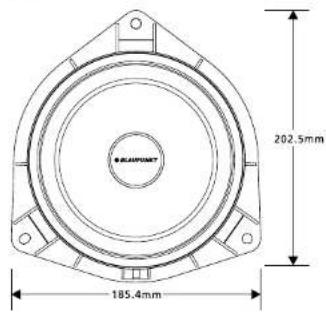
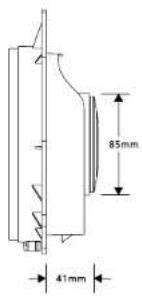
Woofer
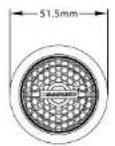
Tweeter

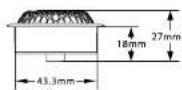
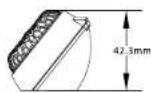
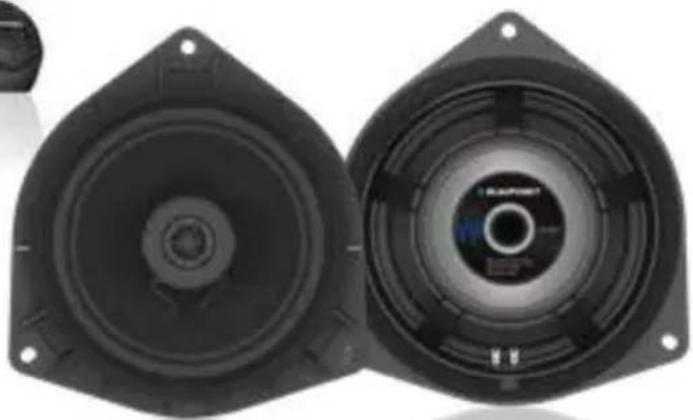
Pair of 6.5" Toyota plug & play 2-way component speaker to upgrade OE speaker for selected models with Synthetic Fiberglass Cone including mounting hardware
• Max. Power Handling : 60W
- Normal Output Power (RMS) : 40W
• Voice Coil: 25.5mm
- Tweeter Size: 25.4mm
• Impedence : 4ohms
• Frequency Response : 61Hz - 22,000Hz
- Sensitivity: 88dB
Mounting Depth: 41mm
Mounting Hole Diameter: 202.5mm
SPECIFICATION
GTx 1662 TY
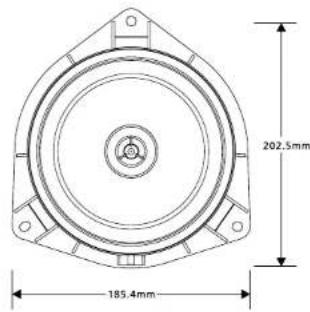
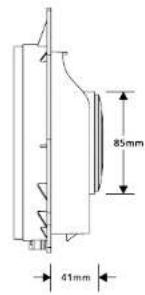
Pair of 6.5" Toyota plug & play 2-way coaxial speaker to upgrade OE speaker for selected models with Synthetic Fiberglass Cone including mounting hardware
• Max. Power Handling : 80W
• Normal Output Power (RMS) : 40W
• Voice Coll: 25.5mm
- Tweeter Size: 13.28mm
• Impedence : 4ohms
• Frequency Response : 61Hz - 20,000Hz
- Sensitivity: 88dB
• Mounting Depth: 41mm
• Mounting Hole Diameter: 202.5mm
INSTALLATION COMPATIBILITY LIST

TROUBLESHOOTING
If any of the following problem occur, please resort to Troubleshooting for the possible solutions. Consult Blaupunkt authorized dealer if problem persist.
| Problems | Possible Causes | Solutions |
| Speaker does not work | Incorrect or loose wiring connection. | Ensure proper wiring connections of speaker. |
| Fraying or broken cables. | Repair or replace if the cables are damaged. | |
| Speaker is damaged. | Replace with a new speaker. | |
| Distorted and hissing sound | Voice coil or speaker cone is damaged. | Replace with a new speaker. |
GTX 1662 CTY & GTX 1662 TY can be installed in the following list of car models:
Designed and engineered by Blaupunkt Competence Centre
GTx 1662 CTY
1 111 20 023 02 01
GTx 1662 TY
1 111 20 025 02 01


Brand : BLAUPUNKT
Model : GTx 1662 CTY
Category : Car radio