
SPP4072A - Unknown PHILIPS - Free user manual and instructions
Find the device manual for free SPP4072A PHILIPS in PDF.


| Product Type | Portable Bluetooth Speaker |
| Model | SPP4072A |
| Brand | Philips |
| Dimensions (W x H x D) | 180 x 70 x 70 mm |
| Weight | 0.5 kg |
| Power Supply | Built-in rechargeable lithium-ion battery, DC 5V via USB-C |
| Battery Capacity | 2000 mAh |
| Playback Time | Up to 10 hours at moderate volume |
| Charging Time | Approximately 3 hours |
| Wireless Connectivity | Bluetooth 5.0 |
| Wireless Range | Up to 10 meters (30 ft) |
| Speaker Output | 10W (RMS) |
| Frequency Response | 80 Hz – 20 kHz |
| Water Resistance | IPX5 (splash-proof) |
| Controls | Power, Volume +/-, Play/Pause, Bluetooth pairing button |
| Indicators | LED for power, Bluetooth pairing, battery status |
| Materials | ABS plastic with fabric grille |
| Included Accessories | USB-C charging cable, user manual |
| Compatibility | Smartphones, tablets, laptops with Bluetooth |
| Cleaning | Wipe with a dry, soft cloth; avoid liquids |
Frequently Asked Questions - SPP4072A PHILIPS
User questions about SPP4072A PHILIPS
0 question about this device. Answer the ones you know or ask your own.
Ask a new question about this device
Download the instructions for your Unknown in PDF format for free! Find your manual SPP4072A - PHILIPS and take your electronic device back in hand. On this page are published all the documents necessary for the use of your device. SPP4072A by PHILIPS.
USER MANUAL SPP4072A PHILIPS
Register your product and get support at
www.philips.com/welcome
EN Surge protector
Contents
1 Important safety instructions 2
Recycling the product 2
2 Your surge protector 2
Feature highlights 2
3 Get started 3
Connect the surge protector 3
Connect the surge protector to a phone/fax/modem 3
Conditions for damage claims 4
Connect the surge protector to a TV/VCR/DVD/satellite/cable box 4
Conditions for damage claims 4
4 Limited warranty 5
One year product limited warranty 5
Connected equipment warranty 5
1 Important safety instructions
This manual contains important information about the Philips power surge protectors. Read it carefully before you start the installation and setup.

Warning
Do not operate your surge protector near the rain or wet areas.
Do not operate your surge protector if liquid • of any kind is spilled onto or inside the unit.
Do not disassemble or repair. •
Do not expose your surge protector to direct sunlight or place it near wall heaters, space heaters, or enclosed space prone to temperature increase.
The Philips surge protector requires a properly grounded outlet for safety and to protect the connected equipment. If you are not sure whether your home's electrical wiring has proper grounding, consult a qualified electrician.
Recycling the product
Your product is designed and manufactured with high quality materials and components, which can be recycled and reused. When you see the crossed-out wheel bin symbol attached to a product, it means the product is covered by the European Directive 2002/96/EC:


Never dispose of your product with other household waste. Please inform yourself about the local rules on the separate collection of electrical and electronic products. The correct disposal of your old product helps prevent potentially negative consequences on the environment and human health.
2 Your surge protector
Congratulations on your purchase and welcome to Philips!
To fully benefit from the support that Philips offers, register your product at www.philips.com/welcome.
For online help, go to www.philips.com/support.
Feature highlights
Your surge protection is equipped with any of the following features. Check the availability of these features on the package.
| ○ | Protection indicator: alerts you on the operating status of the surge protector. |
| ∅ | Power blocker protection: cuts off all power to AC outlets in the event of an electrical or power surge that overwhelms its protection. |
| —□ | Phone/fax/modem protection: provides maximum protection against surges present on standard two-wire dial-up phone service. |
| —□□ | Network/data protection: provides maximum protection against surges present on the network or phone lines. |
| —□□ | Coaxial cable protection: provides maximum protection against surges present on standard coaxial and broadband lines. |
3 Get started
This surge protector is designed to guard the connected equipment against electrical damage. Philips offers an entire line of surge protectors to safeguard your home electronics and computer systems.
Connect the surge protector
1 Plug the power cord into a properly grounded outlet.
2 Plug the component power cord into the surge protector.

Caution
Do not use any extension cords, adapters, • other grounding wire or electrical connections with your surge protector. Doing so will void all Philips warranties.
Connect the surge protector to a phone/fax/modem
Some Philips surge protector models come with phone/fax/modem surge protection, Instead of running a connection directly from your phone/fax/modem to the wall jack, pass the connection through the protected jacks on your surge protector.
IN/OUT phone protection
1 Connect your phone/fax/modem line from your wall outlet to the input jack on the surge protector.
2 Connect one end of a phone cord into the output jack on the surge protector, and the other end to the phone/fax/modem jack of the device.
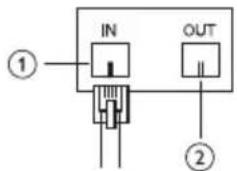
Splitter phone line protection
If you have one telephone number for both your modem and telephone, you can split the incoming phone line into two outs:
1 Connect your phone/fax/modem line from your wall outlet to the input jack on the surge protector.
2 Connect one end of a phone cord into the output jack on the surge protector, and the other end to the phone/fax/modem jack of the device.


Note
You cannot use the modem or phone at the same time.
Device phone line protection
This is an advanced two-line phone/modem/fax protection which two devices can be used simultaneously.
Conditions for damage claims
To claim damage under the connected • equipment warranty as a result of telephone service line transients, ensure the equipment is properly connected to a Philips surge protector which offers telephone line protection. Also, ensure the telephone service equipment has included a properly installed and operating primary protection device at the service entrance (such devices are normally added during telephone line installation).
If you fail to connect the phone/fax/• modem protection, your connected equipment will not be covered by the connected equipment warranty. Most modem damage can be prevented • if you connect the phone/fax/modem protection carefully and properly. Surge protector models with telephone • protection are designed to provide maximum protection from surges present on standard two wire dial-up telephone service. Other communication networks which use modular jacks are not necessarily benefit from this protection.

Caution
The telephone feature of this product could be rendered inoperable if improperly installed.
Connect the surge protector to a TV/VCR/DVD/satellite/cable box
Some Philips surge protector models come with coaxial cable surge protection. Instead of running a connection directly from your TV/VCR/DVD/satellite/cable box to the wall jack, pass the connection through the protected coaxial connections on your surge protector.
1 Connect your incoming cable/broadband line to the input coaxial connector on the surge protector.
2 Connect one end of a coaxial cable to the output coaxial connector on the surge protector, and the other end of to the input coaxial connector of the device.

Conditions for damage claims
To claim damage under the connected • equipment warranty as a result of coaxial line transients, ensure the equipment is properly connected to a Philips surge protector which offers coaxial line protection.
If you fail to connect the coaxial cable • protection, your connected equipment will not be covered by the connected equipment warranty. Most TV/VCR/DVD/satellite/cable box damage can be prevented if you connect coaxial cable protection carefully and properly.

Caution
The coaxial feature of this product could be rendered inoperable if improperly installed.
4 Limited warranty
Philips, Inc. ("Philips") provides one or both of the following warranties (Surge Protector Limited Warranty and Connected Equipment Limited Warranty) to the original consumer of surge protectors sold under the Philips brand names. Provisions applicable to each warranty: These warranties apply only to natural purchasers of surge protectors for personal, family or household use, not to commercial, institutional or industrial purchasers. These warranties are valid only in Europe. THESE WARRANTIES ARE IN LIEU OF ALL OTHER EXPRESS WARRANTIES; AND ANY IMPLIED WARRANTIES, INCLUDING BUT NOT LIMITED TO THE IMPLIED WARRANTIES OF MERCHANTABILITY AND FITNESS FOR A ARTICULAR PURPOSE, ARE LIMITED TO THE DURATION OF THIS WARRANTY. EXCEPT AS PROVIDED IN THE CONNECTED EQUIPMENT LIMITED WARRANTY (IF APPLICABLE), IN NO EVENT SHALL PHILIPS BE LIABLE FOR ANY DIRECT, INDIRECT, INCIDENTAL, SPECIAL, CONSEQUENTIAL OR MULTIPLE DAMAGES* ARISING OUT OF THE USE OF THE PHILIPS SURGE PROTECTOR. Philips warrants that this product shall be free from defects in material, workmanship and assembly, under normal use, in accordance with the specifications and warnings for the lesser of (i) one year from the date of your purchase of this product, or (ii) the date upon which this product has exceeded its capacity to protect against surges and spikes. The "Protection Working" indicator light will no longer be lit when this capacity is exceeded.
One year product limited warranty
This warranty does not cover damages (a) as a result of an accident; (b) resulting from the use of parts not manufactured or sold by Philips;
(c) or resulting from modification of the surge protector. After any repair or modification of the surge protector by a facility not authorized by Philips, any problems that arise will not be remedied under this warranty. These warranties extend only to the original purchaser of the product, and are not transferable. To exercise your rights under this warranty, you must provide proof of purchase in the form of an original sales receipt that shows the product name and the date of purchase. To make a warranty claim, consumer must contact the Philips customer service department at: USA and Canada surge protection call center: 1-800-233-8413
Connected equipment warranty
Philips warrants to the original consumer that it will, at its sole option, repair or replace any equipment properly connected through a Philips surge protector to a properly wired AC power line with protective ground and telephone/coax lines, which is damaged by impulses from lightning, or other power transients, or by momentary (less than 1ms) voltage surges or spikes (an “Occurrence”) if (a) the surge protector did not protect the equipment (b) the surge protector shows clear signs of damage; and (c) the damage resulted from the Occurrence. This warranty does not cover (a) damages caused by acts of God, including flood, erosion, or earthquake, but excluding lightning on products with Power Blocker™ technology; (b) damages caused by a sustained low voltage situation, or a low voltage disturbance, including brownouts, sags, or power outages; (c) damages caused by war, vandalism, theft, normal use wear-and-tear, depletion, obsolescence, abnormal care or uses, or abuse; (d) damage due to non-authorized program or system equipment modification or alteration; or (e) damage to equipment that was not directly connected to the surge protector at the time of the Occurrence.
This warranty extends through the lifetime of the surge protector, which means until the surge protector has exceeded its capacity to protect against surges and spikes. The “Protection Working” indicator light will no longer be lit when this capacity is exceeded. The capacity of the surge protector will be exceeded after an occurrence.
This warranty is limited to losses that are not covered by a warranty from the manufacturer of the connected equipment, or by the consumer's homeowners insurance or renter's insurance policy. Consumer agrees to first seek coverage under any such warranty or policy, and not seek duplicate coverage from Philips. Consumer agrees to provide insurance information to Philips, at its request; and after a claims settlement, if applicable, Philips reserves the right to be subrogated under any existing warranty from the manufacturer of the connected equipment or under any existing insurance policies the claimant may have. This warranty is limited to surge protectors which indicate on the packaging an accompanying connected equipment warranty. After any repair or modification of the surge protector by a facility not authorized by Philips, any problems that arise will not be remedied under this warranty.
Your Philips surge protector must be plugged into a properly grounded outlet. All connected equipment must be plugged directly into your surge protector. Using any extension cord, adapters, other grounding wires or electrical connections in conjunction with a Philips surge protector will void all Philips warranties. All wires leading into the equipment, including telephone and coaxial lines, must pass through an appropriate Philips surge protector.
To claim damage as a result of telephone service line transients, equipment must be properly connected to a Philips surge protector which offers telephone line protection (see the user manual for installation instructions), and your telephone service equipment must include a properly installed and operating “primary protection” device at the service entrance. (Such devices are normally added during telephone line installation.) If you fail to connect the telephone line protection properly, your connected equipment will not be covered by the Connected Equipment Warranty. To claim damage as a result of coaxial line transients, equipment must be properly connected to a Philips surge protector which offers coaxial line protection (see the user manual for installation instructions). If you fail to connect the coaxial cable protection properly, your connected equipment will not be covered by the Connected Equipment Warranty. The customer service department will provide the consumer with a Return Authorization number (RA#). Philips will determine, at its sole discretion, whether consumer should send the damaged equipment and the surge protector to Philips, or to an independent repair facility. If Philips so requests, the consumer must, at his/her own expense, send the damaged equipment and the surge protector, along with a copy of the sales receipt, to the specified location, in secure packaging (to prevent further damage) with the RA# clearly displayed on the outside of the package, and with a full written description of the problem, including the consumer's name, address, and daytime phone enclosed. Philips also reserves the right to examine the site where the damage occurred. If Philips determines that the Connected Equipment Limited Warranty covers the damaged equipment, and that the equipment was damaged as a result of the surge protector which is covered under the Surge Protector Limited Warranty, Philips will either (a) authorize repair of the connected equipment, at a cost up to the maximum amount set forth on the packaging of the surge protector involved; (b) provide the consumer with an equivalent equipment replacement; or (c) reimburse the consumer for the present fair market value of the damaged connected equipment. If, applicable, the equipment will be returned from Philips to the consumer at Philips expense. To make a warranty claim, consumer must contact the Philips customer service department at: USA and Canada surge protection call center: 1-800-233-8413

- Contents
- Important safety instructions 2
- Your surge protector 2
- Get started 3
- Limited warranty 5
- Important safety instructions
- Warning
- Recycling the product
- Your surge protector
- Feature highlights
- Get started
- Connect the surge protector
- Caution
- Connect the surge protector to a phone/fax/modem
- IN/OUT phone protection
- Splitter phone line protection
- Note
- Device phone line protection
- Conditions for damage claims
- Connect the surge protector to a TV/VCR/DVD/satellite/cable box
- Limited warranty
- One year product limited warranty
- Connected equipment warranty
Brand : PHILIPS
Model : SPP4072A
Category : Unknown