
H680 - Earphones ZEBRA - Free user manual and instructions
Find the device manual for free H680 ZEBRA in PDF.


| Product Type | Bluetooth Handsfree Headset |
| Brand | Zebra |
| Model | H680 |
| Dimensions | Approx. 2.5 x 1.5 x 1.0 inches (without charger case) |
| Weight | Approx. 15 grams (headset only) |
| Battery Type | Rechargeable Lithium-Ion |
| Charging Time | Approx. 2.5 hours |
| Charging Method | Charger case with contacts |
| Bluetooth Version | 2.0 (typical for 2007 device) |
| Wireless Range | Up to 33 feet (10 meters) |
| Supported Profiles | Handsfree, Headset |
| Call Functions | Answer, end, reject, mute, redial, voice dial, volume control |
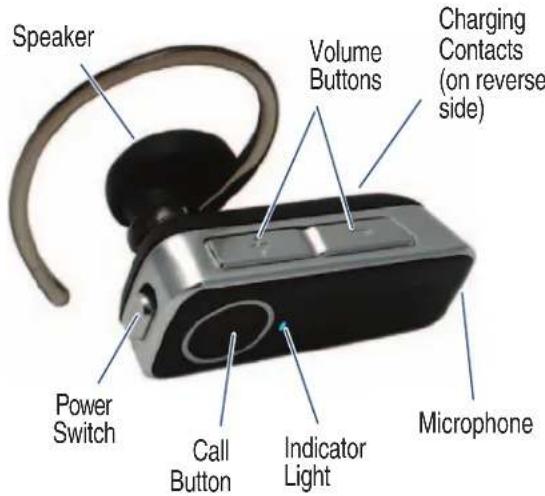
| Indicator Lights | Red (charging), purple (power on), blue (pairing/connected/flashing states) |
| Audio Tones | Ring tone, connection tones, battery low warning, volume feedback |
| Wearing Options | Left or right ear with adjustable earhook |
| Included Accessories | Charger case, multiple earbuds, AC charger |
| Care and Cleaning | Wipe gently with dry cloth; keep away from liquids |
| Safety Information | Read manual; comply with local regulations; do not use while driving where prohibited |
| Repairability | Contact Motorola support for service; no user-serviceable parts |
| Spare Parts | Earbuds are replaceable; contact support for replacements |
| Certification | Complies with EU Directive 1999/5/EC |
Frequently Asked Questions - H680 ZEBRA
User questions about H680 ZEBRA
0 question about this device. Answer the ones you know or ask your own.
Ask a new question about this device
Download the instructions for your Earphones in PDF format for free! Find your manual H680 - ZEBRA and take your electronic device back in hand. On this page are published all the documents necessary for the use of your device. H680 by ZEBRA.
USER MANUAL H680 ZEBRA
Before using this product, read the Important Safety and
Take a moment before you get started to far Bluetooth Handsfree Headset. Along with yc both charging and storage.
OU BEGIN
Legal Information pamphlet and follow its instructions.
niliarize yourself with your new H680
our headset, a charger case is provided for

START HERE >

CHARGE
Your Headset's Battery
Important: Your headset must be turned off when charging. If you turned the headset on, see "Turning Headset On and Off" on reverse side for details on turning headset off.
1 Plug the Motorola charger into the port on the charger case.
2 Place headset into charger case ensuring that charging contacts on the headset and charging case connect.
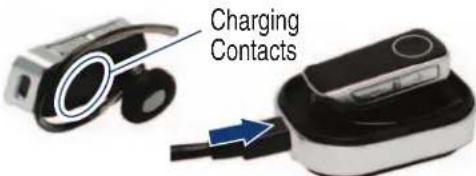
The indicator light turns red when the battery is charging. It may take up to 1 minute for the indicator light to turn on. When the headset's battery is fully charged (about 2.5 hours), the indicator light turns off.
3 Disconnect the charger.
Note: Headset is not functional while charging

START BLUETOOTH FEATURE
Your Phone
Your phone's Bluetooth feature is off by default. To use your headset, you must turn on the Bluetooth feature in your phone.
For most Motorola phones (at the main menu):
1 Press ☐ (Menu) > Settings > Connection > Bluetooth Link > Setup.
2 Scroll to Power.
3 Select Change.
4 Scroll to On.
5 Press Select to turn on the Bluetooth feature. The Bluetooth feature remains on until you turn the feature off.
Note: These steps are for most Motorola phones. For other phones, see your phone's user's guide.
PAIR
Your Headset
Before you can use your headset, you must pair (link) it with your phone.
Step A - ENSURE HEADSET IS IN PAIRING MODE
Remove headset from charging base and power on by sliding Power switch to the On position (towards Power symbol on headset). The indicator light flashes to initiate easy pairing. After a few moments, the indicator light will be steadily lit in blue to indicate headset is in pairing mode.

If the headset does not enter pairing mode, see TROUBLESHOOTING for help.
Motorola, Inc. Consumer Advocacy Office 1307 East Algonquin Road Schaumburg, IL 60196
www.hellomoto.com 1-877-MOTOBLU 1-888-390-6456 (TTY/TDD United States for hearing impaired)
Guide Number: 6809510A87-O
Bluetooth ID: B012842
MOTOROLA and the Stylized M Logo are registered in the US Patent & Trademark Office. The use of wireless devices and their accessories may be prohibited or restricted in certain areas. Always obey the laws and regulations on the use of these products. The Bluetooth trademarks are owned by their proprietor and used by Motorola, Inc. under license. All other product or service names are the property of their respective owners.
© Motorola, Inc. 2007.

PAIR CONTINUED
Your Phone
Step B - SET YOUR PHONE TO LOOK FOR YOUR HEADSET
For most Motorola phones:
1 On your Motorola phone, press ☐ (Menu) > Settings > Connection > Bluetooth Link > Handsfree > Look for Devices.
The phone lists Bluetooth devices it finds.
2 Select Motorola H680.
3 Select OK or Yes to pair your headset with your phone.
4 Enter the passkey: 0000
5 Select OK.
When your headset successfully pairs and connects with your phone, the indicator light changes from steadily lit to flashing blue.
Note: These steps are for most Motorola phones. For other phones, see your phone's user's guide.

TEST AND USE
Your phone and headset are now paired and ready to make and receive calls.
To make a call:
1 Place the headset over your ear. See "Wearing the Headset" on the reverse side of this guide.
2 On the phone, dial the number you want to call and press SEND key on your phone.
If your phone and headset are successfully paired, you will hear ringing on the headset.
After you have successfully paired your phone and headset, you don't need to repeat these steps. For daily use, ensure that your headset is turned ON and that your phone's Bluetooth feature is ON.
USING YOUR H680
See
Features and Functions Guide
on the reverse side for information on using your H680

natural_image
Abstract graphic of a blue arrow pointing upward over a white curved shape (no text or symbols)TROUBLES
My headset will not charge.
Make sure your headset is turned off when charging. Your headset will not charge in the charger case while powered on.
My headset will not enter pairing mode.
Make sure that any devices previously paired with the headset are turned off. If the indicator light is not steadily lit in blue, turn off both the other device and headset, wait 10 seconds, then turn headset back on. Wait for the indicator light to become steadily lit in blue, indicating the headset is now in pairing mode.
My phone doesn't find my headset.
Make sure the indicator light on your headset is on (lit in blue) and steady when your phone is searching for devices (see step 3).
\$HOOTING
My headset worked before but now it's not working.
Make sure your phone is on and the Bluetooth feature is turned on in your phone (see step 2). If the Bluetooth feature was turned off or was turned on only temporarily, you may need to restart the Bluetooth feature (see step 2) and pair your phone and headset again (see step 3).
Support.
If you need more help, contact us at 1-877-MOTOBLU or visit us at www.hellomoto.com/Bluetoothsupport
Features and Functions Guide
IMPORTANT: Be sure to first follow the Quick Start Guide on the reverse side of this guide to complete initial setup of your H680.
EARBUDS AND YOUR HEADSET
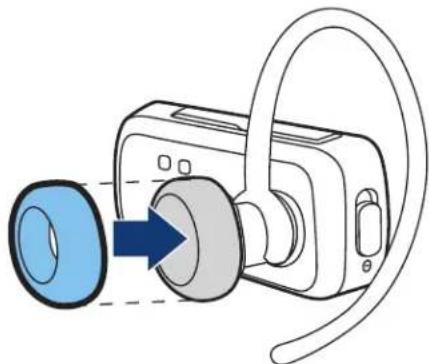
Your H680 headset is supplied with multiple earbuds. The earbud is fitted onto the end of your headset's earpiece speaker, and placed onto your ear when using your headset.
natural_image
Diagram of a digital camera with a blue lens and gray headband, showing internal components (no text or symbols)Your headset's performance is greatly dependent upon achieving a good fit on your ear. Therefore, we recommend trying all the supplied earbuds with your headset.
TURNING HEADSET ON AND OFF
To turn your headset on, slide the Power switch on (towards Power symbol on headset). The indicator light is steadily purple for several seconds, then flashes blue (if paired and connected with another device) or is steadily blue (if ready to be paired).
To turn your headset off, slide the Power switch off. The indicator light will turn off.
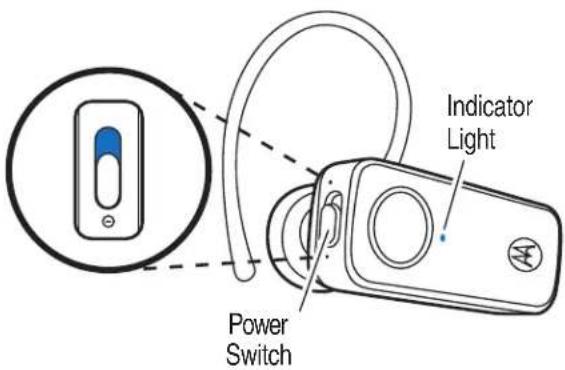
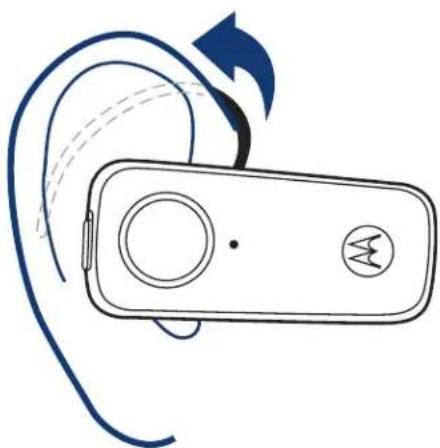
WEARING THE HEADSET
To wear your headset, flex the earhook and loop it over your ear as shown.
natural_image
Line drawing of a wireless ear with a device and antenna, showing ear rotation and signal waveform (no text or symbols)Be sure to position the ear bud into your ear canal for optimal audio performance and comfort.
CHANGING FOR USE ON OTHER EAR
You can wear your H680 headset on your left or right ear. The headset comes ready for the right ear. To change the headset for the left ear:
1 Gently lift and pull the top of the earhook up and off speaker stem as shown.

natural_image
Illustration of a digital camera with an upward arrow indicating motion (no text or symbols)2 Flip the headset over.
3 Attach the earhook to the speaker stem as shown.

natural_image
Illustration of a camera with a blue arrow indicating direction (no text or symbols)STORING YOUR HEADSET
The charger case provided is used to charge and store your headset. When not using your headset, you should place it in the charger base. Be sure to turn the headset off before placing it into the charger case.
As shown, the charger cover can be placed on top of the charger case, or underneath it to provide support for desktop placement.

natural_image
Close-up of a black and silver mobile phone with a circular button (no visible text or symbols)
natural_image
Close-up of a black and white electronic device with a circular button on top (no visible text or symbols)European Union Directives Conformance Statement

Hereby, Motorola declares that this product is in compliance with:
- The essential requirements and other relevant provisions of Directive 1999/5/EC.
• All other relevant EU Directives.

The above gives an example of a typical Product Approval Number.
You can view your product's Declaration of Conformity (DoC) to Directive 1999/5/EC (to R&TTE Directive) at www.motorola.com/rtte. To find your DoC, enter the product Approval Number from your product's label in the "Search" bar on the web site.
MAKING CALLS
Function
Action
Receive a call Tap the Call button
Mute or unmute a call Tap both Volume buttons
Reject a call Press and hold a
Volume
button
you
hear
descending
tones
End a call Tap the Call button
Redial last call Press and hold the
Call
button
hear
two
tones
Make a voice dial call Tap the Call button
and
speak
name
after
Note: Your H680 supports both Handsfree and Headset Profiles. Accessing call functions depends upon which profile your phone supports. See your phone's user's guide for more information.
MAKING CALLS CONTINUED
Function
Action
Answer a second Tap the Call button incoming call
Disable the First slide the switch indicator light toward charging plug (to turn headset off),
| then | press |
| both | Volume |
| buttons | AND |
| the | switch |
| the | microphone |
| turn | headset |
Note: Some features are phone/network dependent.
INDICATOR LIGHTS
With the Charger Plugged In
Headset Indicator Headset Status
Steady red Charging
Off Charging complete
With No Charger Plugged In
Headset Indicator Headset Status
| and | Off hold | Power | off |
| Steady purple | Powering up | ||
| slide towards | Steady blue | Pairing/connection mode | |
| (to 10 rapid purple flashes | Connection successful | ||
| on) | Slow blue flash | Standby (not on call) | |
| Quick blue flash | Incoming call | ||
| Slow blue pulse | Connected (on a call) | ||
| Slow purple pulse | Connected (on a | mute | |
| Red flash | Idle (not connected) | ||
| Quick red flash | Low battery |
Note: After 30 minutes of inactivity, the light stops flashing to conserve power, but the headset remains in standby mode.
AUDIO TONES
Audio Tone
Headset Status
Ring tone
Incoming call
Single high tone
Phone network not available
High to low tone
End call
Single high tone when
Volume at minimum
pressing volume button
or maximum
Two ascending tones
Mute enabled
Two descending tones
Mute disabled
Low to high tone
Connection
confirmation/voice activation
No audio indications; deteriorating quality
Out of range
Two tones
Low battery
repeated every 30 sec.

- OU BEGIN
- CHARGE
- START BLUETOOTH FEATURE
- Your Phone
- PAIR
- Your Headset
- Step A - ENSURE HEADSET IS IN PAIRING MODE
- PAIR CONTINUED
- Step B - SET YOUR PHONE TO LOOK FOR YOUR HEADSET
- TEST AND USE
- USING YOUR H680
- TROUBLES
- My headset will not charge.
- My headset will not enter pairing mode.
- My phone doesn't find my headset.
- \$HOOTING
- My headset worked before but now it's not working.
- Support.
- Features and Functions Guide
- EARBUDS AND YOUR HEADSET
- TURNING HEADSET ON AND OFF
- WEARING THE HEADSET
- CHANGING FOR USE ON OTHER EAR
- STORING YOUR HEADSET
- European Union Directives Conformance Statement
- MAKING CALLS
- Function
- Action
- MAKING CALLS CONTINUED
- INDICATOR LIGHTS
- With the Charger Plugged In
- Headset Indicator Headset Status
- With No Charger Plugged In
- AUDIO TONES
- Audio Tone
- Headset Status
Brand : ZEBRA
Model : H680
Category : Earphones