
PBM-FS - Keyboard Auray - Free user manual and instructions
Find the device manual for free PBM-FS Auray in PDF.


| Product Type | Keyboard |
| Brand | Auray |
| Model | PBM-FS |
| Connectivity | USB wired (Type-A) |
| Key Count | 104 keys (full-size) |
| Layout | QWERTY (US/International) |
| Backlight | No |
| Multimedia Keys | Yes (volume, media control) |
| Dimensions (L x W x H) | 440 x 140 x 25 mm (approx.) |
| Weight | 600 g (approx.) |
| Power Supply | USB bus power (5V, 100mA) |
| Compatible Operating Systems | Windows, macOS, Linux |
| Cable Length | 1.5 m (approx.) |
| Wrist Rest | No |
| Keyboard Material | ABS plastic |
| Maintenance | Clean with soft, dry cloth; avoid liquids |
| Safety Precautions | Do not expose to moisture or extreme temperatures |
| Repairability | Keycaps replaceable; internal parts not user-serviceable |
| Spare Parts Availability | Contact Auray support for spare keycaps |
Frequently Asked Questions - PBM-FS Auray
User questions about PBM-FS Auray
0 question about this device. Answer the ones you know or ask your own.
Ask a new question about this device
Download the instructions for your Keyboard in PDF format for free! Find your manual PBM-FS - Auray and take your electronic device back in hand. On this page are published all the documents necessary for the use of your device. PBM-FS by Auray.
USER MANUAL PBM-FS Auray
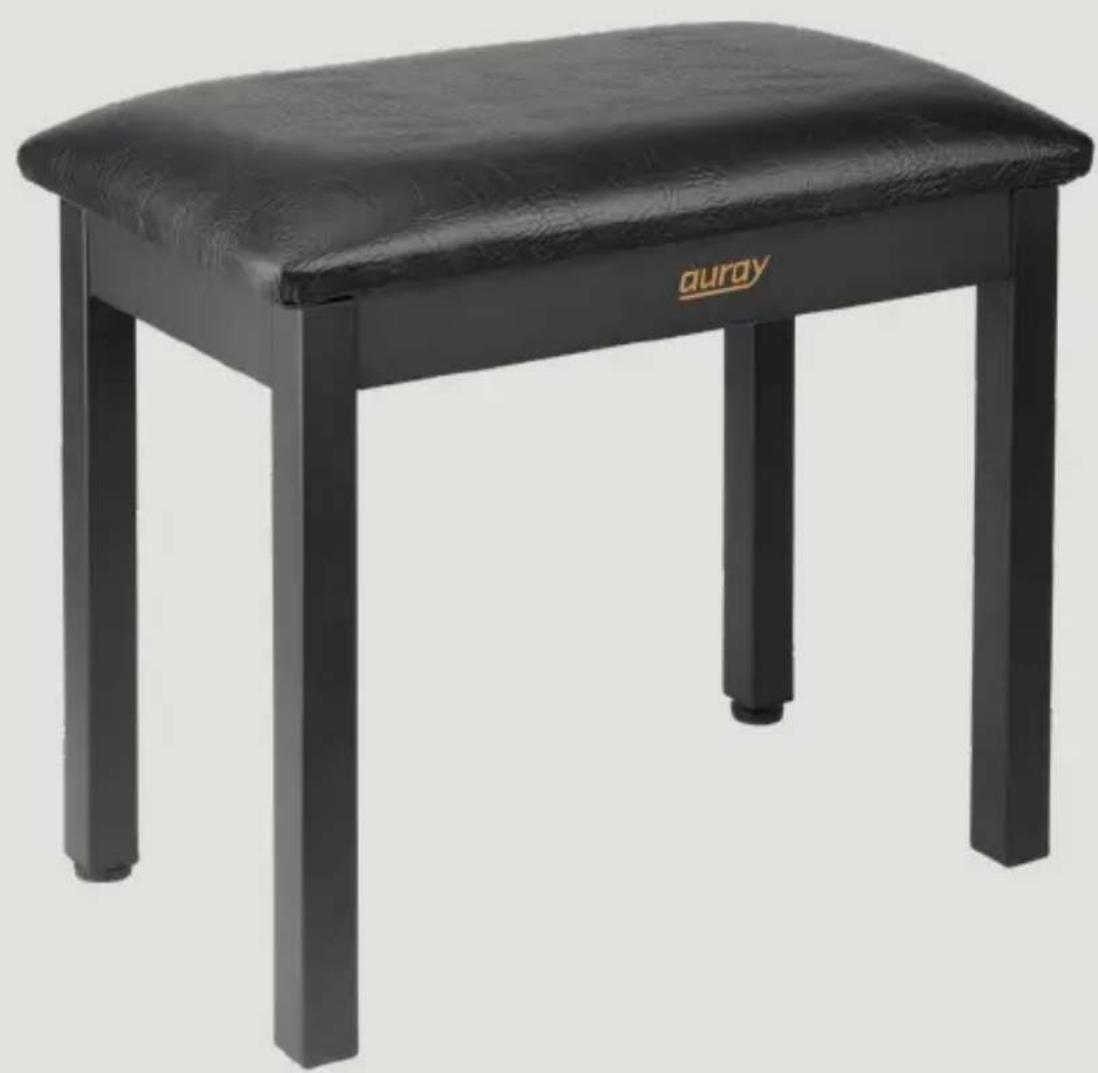
Metal Frame Piano Bench with Storage
Owner's Manual
natural_image
Black leather stool with a textured cushion and 'auray' logo on the side (no other text or symbols visible)Thank you for choosing Auray.
Auray's PBM-FS piano bench is perfect for the studio, stage, or home. Its sturdy construction will support up to 300 pounds, and the padded leatherette seat provides comfort through many hours at the keyboard. A storage compartment for sheet music and other accessories is located inside the bench. In case of wobbling, two feet are height adjustable to steady the bench on an uneven floor or stage.
Warnings

- Please read and follow these instructions, and keep this manual in a safe place.
- Make sure that this product is intact and that there are no missing parts.
- Make sure all parts are secure before using.
- All images are for illustrative purposes only.
Overview
Seat 1
Corner brackets 2
Leg (2) 3
Attachment bolts 4
Adjustable leg (2) 5
Nut (4) 6
Wrench 7
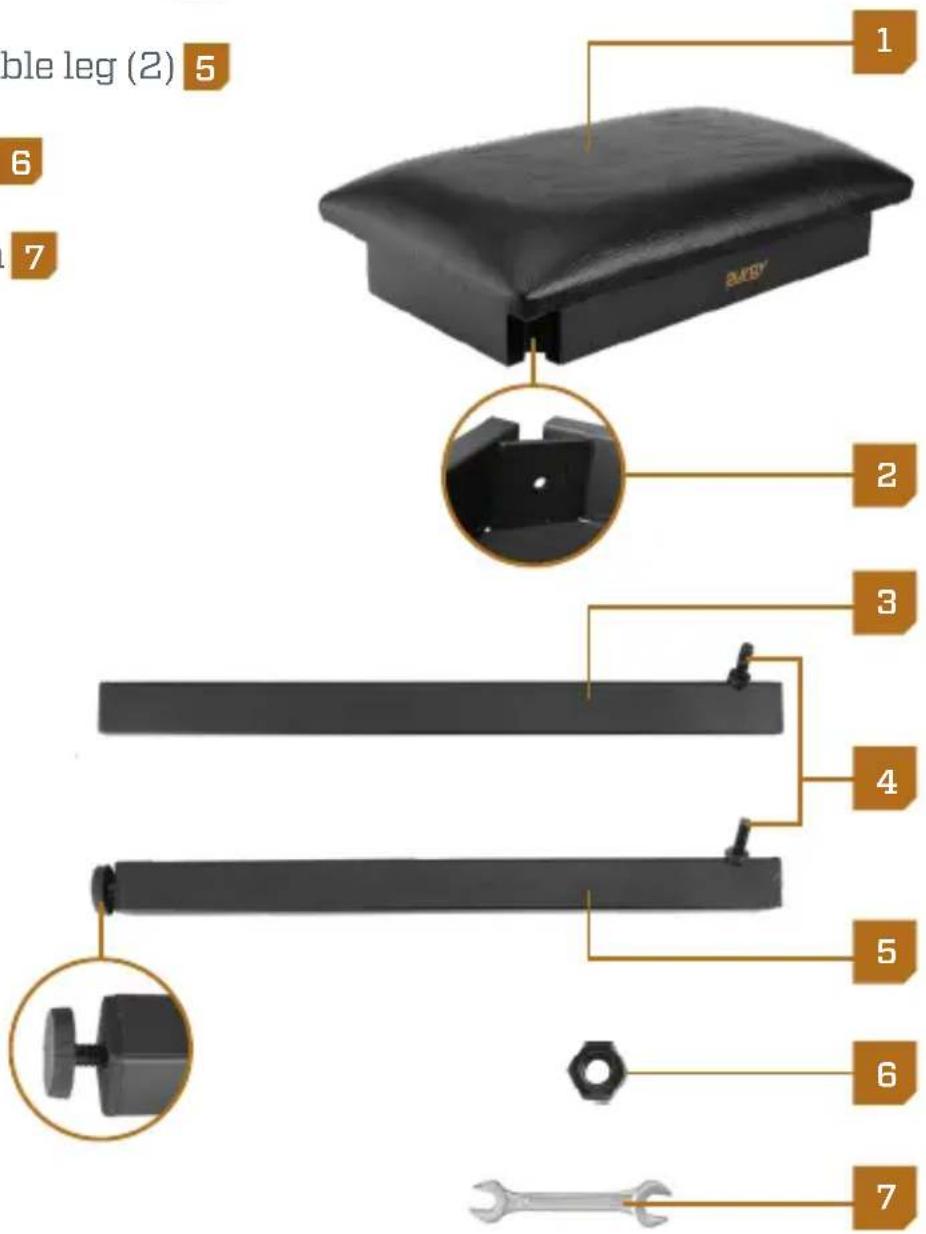
Assembling the PBM-FS
- Make sure the nuts on the attachment bolts are snug. If they seem loose, use the wrench to tighten them until secure.
- Place the bench on a small, flat surface or on your lap, and open the bench so you can access the corner brackets.
- Attach each leg to the corner brackets by inserting the bolts through the holes. Make sure both adjustable legs are attached to either the front or back.
- Screw the nuts onto the bolts, and use the wrench to tighten until secure.
- Once the legs are attached, place the bench upright to see if it wobbles.
- If the bench sits on an uneven surface, determine which of the two adjustable legs needs to be lengthened. Turn the leg's height adjuster clockwise until all the legs sit evenly on the floor.
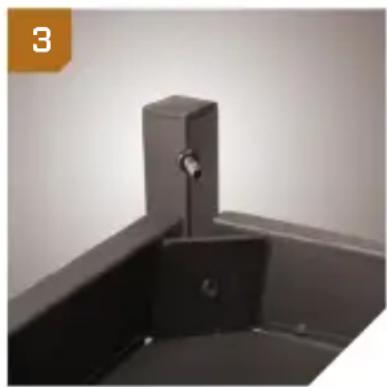
natural_image
Close-up of a black metal sink with a vertical handle and a small square outlet (no text or symbols visible)
natural_image
Hand using a wrench to adjust or install a component into a black tray (no text or symbols visible)
natural_image
Hand holding a black cylindrical object with a small protrusion, no visible text or symbolsSpecifications
Dimensions (W × D × H): 22.5 × 13 × 20 in.
(57.1 × 33 × 50.8 cm)
Weight Capacity: 300 lb. (136.1 kg)
Weight: 19.6 lb. (8.9 kg)
One-Year Limited Warranty
This AURAY product is warranted to the original purchaser to be free from defects in materials and workmanship under normal consumer use for a period of one (1) year from the original purchase date or thirty (30) days after replacement, whichever occurs later. The warranty provider's responsibility with respect to this limited warranty shall be limited solely to repair or replacement, at the provider's discretion, of any product that fails during normal use of this product in its intended manner and in its intended environment. Inoperability of the product or part(s) shall be determined by the warranty provider. If the product has been discontinued, the warranty provider reserves the right to replace it with a model of equivalent quality and function.
This warranty does not cover damage or defect caused by misuse, neglect, accident, alteration, abuse, improper installation or maintenance. EXCEPT AS PROVIDED HEREIN, THE WARRANTY PROVIDER MAKES NEITHER ANY EXPRESS WARRANTIES NOR ANY IMPLIED WARRANTIES, INCLUDING BUT NOT LIMITED TO ANY IMPLIED WARRANTY OF MERCHANTABILITY OR FITNESS FOR A PARTICULAR PURPOSE. This warranty provides you with specific legal rights, and you may also have additional rights that vary from state to state.
To obtain warranty coverage, contact the Auray Customer Service Department to obtain a return merchandise authorization (“RMA”) number, and return the defective product to Auray along with the RMA number and proof of purchase. Shipment of the defective product is at the purchaser’s own risk and expense.
For more information or to arrange service, visit aurayaudio.com or call Customer Service at 212-594-2353.
Product warranty provided by the Gradus Group.
www.gradusgroup.com
AURAY is a registered trademark of the Gradus Group.
© 2018 Gradus Group LLC. All Rights Reserved.

AURAY®
A Gradus Group Brand
GG1


Brand : Auray
Model : PBM-FS
Category : Keyboard