A-Line EMW410A-B - Loudspeaker Atlas Sound - Free user manual and instructions
Find the device manual for free A-Line EMW410A-B Atlas Sound in PDF.


| Brand | Atlas Sound |
| Model | A-Line EMW410A-B |
| Product Type | Powered Subwoofer |
| Dimensions (H x W x D) | 48.8 x 13.1 x 19.0 in (123.95 x 33.27 x 48.26 cm) |
| Weight | 97 lbs (44.0 kg) |
| RMS Power | 1000 Watts |
| Maximum SPL | 128 dB |
| Driver | 4 x 10" |
| Frequency Response | 40 Hz - 125 Hz |
| Crossover Frequency | 90 Hz or 125 Hz (selectable via DSP) |
| Horizontal Dispersion | Omnidirectional |
| Audio Input | XLR (balanced) |
| Looping Output | XLR (balanced) |
| Power Input | PowerCON (blue Neutrik) |
| Power Output (Daisy Chain) | PowerCON (grey) |
| Amplification | Built-in with DSP |
| DSP Presets | 2 (90 Hz LP or 125 Hz LP) |
| Mute Switch | CH1 mute (active when pressed, mute when pressed again) |
| LED Indicators | PWR (green), CLIP (yellow), PROT (red), SIGNAL (green) |
| Volume Control | 0 to -36 dB |
| Construction | Baltic Birch plywood with Duratex™ paint |
| Recommended Use | Professional audio for speech and music in medium venues |
| Warranty | 3 years (electronics: 1 year) |
Frequently Asked Questions - A-Line EMW410A-B Atlas Sound
User questions about A-Line EMW410A-B Atlas Sound
0 question about this device. Answer the ones you know or ask your own.
Ask a new question about this device
Download the instructions for your Loudspeaker in PDF format for free! Find your manual A-Line EMW410A-B - Atlas Sound and take your electronic device back in hand. On this page are published all the documents necessary for the use of your device. A-Line EMW410A-B by Atlas Sound.
USER MANUAL A-Line EMW410A-B Atlas Sound
natural_image
Abstract black-and-white logo design featuring a stylized letter 'A' within a circle, with no readable text or symbols.A-Line Acoustics
www.AL4.me
EMMA2K-B Small Format Line Array System
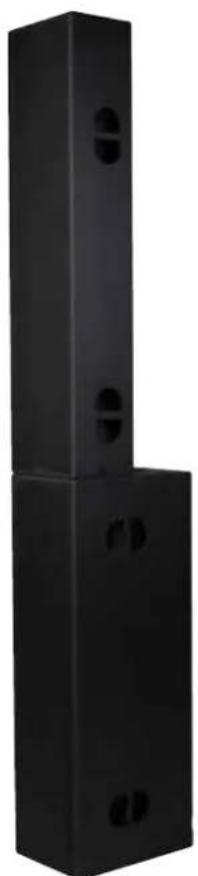
natural_image
Black rectangular metal enclosure with two circular cutouts, no visible text or symbols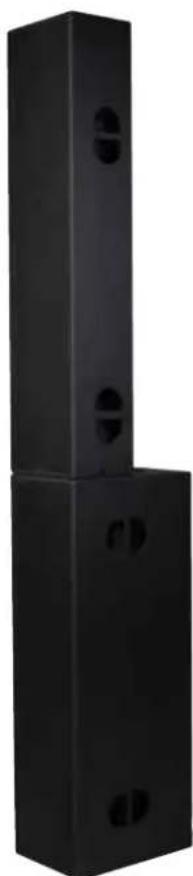
natural_image
Black rectangular metal frame with two circular cutouts, no visible text or symbolsDetailed Product Information


A-Line Acoustics www.AL4.me
1601 Jack McKay Blvd. • Ennis, Texas 75119 U.S.A. Telephone: 800.876.3333 • Fax: 800.765.3435
- 1 - AtlasSound.com
Table of Contents
Important Safety Instructions .... 3
Applications....5
Key Features 5
EM806A-B Rear Panel 6
EMW410A-B Rear Panel 7
Installation 8
Troubleshooting....9
Specifications 10
Warranty 12
Important Safety Instructions
ATTENTION
RISQUE DE CHOC ÉLECTRIQUE
- NE PAS OUVRIR.

CAUTION
WARNING
TO REDUCE THE RISK OF FIRE OR ELECTRIC SHOCK DO NOT EXPOSE THIS APPLIANCE TO RAIN OR MOISTURE.
The lightning flash with arrowhead symbol within an equilateral triangle, is intended to alert the user to the presence of uninsulated "dangerous voltage" within the product's enclosure that may be of sufficient magnitude to constitute a risk of electric shock to persons.

The exclamation point within an equilateral triangle is intended to alert the user to the presence of important operating and maintenance (servicing) instructions in the literature accompanying the product.
- Read these instructions.
- Keep these instructions.
- Heed all warnings.
- Follow all instructions.
- Do not use this device near water.
- Clean only with dry cloth.
- Do not install near any heat sources such as radiators, heat registers, stoves, or other device that produce heat.
- Do not defeat the safety purpose of the polarized or grounding-type plug. A polarized plug has two blades with one wider than the other. A grounding type plug has two blades and a third grounding prong. The wide blade or the third prong are provided for your safety. If the provided plug does not fit into your outlet, consult an electrician for replacement of the obsolete outlet.
- Protect the power cord from being walked on or pinched particularly at plugs, convenience receptacles, and the point where they exit from the device.
- Only use attachments/accessories specified by the manufacturer.
11 This product is equipped with a three-wire grounding-type plug, a plug having a third (grounding) pin. This plug will only fit into a grounding-type power outlet. This is a safety feature. If you are unable to insert the plug into the outlet, contact your electrician to replace your obsolete outlet. Do not defeat the safety purpose of the grounding-type plug. - Unplug this device during lightning storms or when unused for long periods of time.
- Refer all servicing to qualified service personnel. Servicing is required when the device has been damaged in any way, such as power-supply cord or plug is damaged, liquid has been spilled, or objects have fallen into the device, the device has been exposed to rain or moisture, does not operate normally, or has been dropped.
- WARNING: To reduce the risk of fire or electric shock, this device should not be exposed to rain or moisture and objects filled with liquids, such as a vase, should not be placed on this device.
TWARNce Is In Use
- To prevent electric shock, do not remove the product cover as there are high voltage components inside. Refer all servicing to Atlas Sound.
- Should any of the following irregularities occur during use, immediately switch off the power, disconnect the power cord from the AC outlet and contact Atlas Sound. Do not to attempt to continue operation with the product as this may cause fire or electric shock:
- Smoke or strange smell coming from the unit.
- If the product falls or the case is damaged.
- If water or any metallic objects falls into the product.
• If the power supply cord is damaged in any way. - If the unit is malfunctioning.
- Do not insert or drop metallic objects or flammable materials into the ventilation holes of the product's cover, as this may result in electric shock or fire.
- Never operate this product or touch the power supply cord during an electrical storm, electric shock may result.
- Never exceed the power rating on the product when connecting equipment. Fire and/or property damage may result.
- Operate the product only with the voltage specified on the unit. Fire and/or electric shock may result if a higher voltage is used.
- Do not modify, kink, or cut the power cord. Do not place the power cord in close proximity to heaters and do not place heavy objects on the power cord, including the product itself, doing so may result in fire or electrical shock.
- Ensure that the safety ground terminal is connected to a proper ground. Never connect the ground to a gas pipe as a catastrophic disaster may result.
- Be sure the installation of the product is stable, avoid slanted surfaces as the product may fall and cause injury or property damage.

en Installing The
Product

• Always make sure your system is set up on a level surface and will not fall over.
• Always assure power is Off to amplifiers before making any connections. Assure that all electrical equipment is properly grounded.
- Suspension or "flying" speaker systems requires training and expertise. Improper rigging of a flying speaker may result in injury, death, equipment damage, and legal liability. Installation must be carried out by fully qualified installers, in accordance with all required safety codes and standards at the place of installation.
A 5:1 design factor is a generally accepted minimum standard. However, legal requirements for overhead suspension vary by municipality, please consult your local safety standards office before installing any product. We also recommend that you thoroughly check any laws and bylaws prior to installation.
Loudspeakers flown in theaters, nightclubs, conference centers, or other places of work and entertainment must be provided with an independent, correctly rated and securely attached secondary safety, in addition to the principle suspension point(s).
If you lack the skills, training, and proper ancillary equipment to fly a speaker system, do not attempt to do so.
For additional information regarding the suspension of loudspeakers or to purchase rigging materials, please contact our friends at
Adaptive Technologies Group, 1635 E. Burnett St. Signal Hills, CA 90755 • www.adapttechgroup.com • Telephone (562) 424-1100

CAUTION
When The Product Is In Use
- Never place heavy objects on the product, causing it to fall and/or break, resulting in personal injury and property damage. In addition, the product itself may fall and cause injury and property damage.
- All professional loudspeaker systems are capable of generating very high sound pressure levels. Use care with placement and operation to avoid exposure to excessive levels that can cause permanent hearing damage.
- Ensure that the power supply plug is securely plugged into the wall outlet. Never allow dust to accumulate on the power plug or inside the wall outlet.
- When cleaning the unit or the unit is not to be operated for an extended period, unplug the power cord from the wall.

A-Line Acoustics www.AL4.me
1601 Jack McKay Blvd. • Ennis, Texas 75119 U.S.A.
Telephone: 800.876.3333 • Fax: 800.765.3435
Applications
The EMMA modular Line Array system is designed for professional audio where clarity of speech and music is most important. This system is designed for quick and easy set up from truck to stage and back again. It has a very small footprint that can be ready to go within approximately 10 minutes. The system will provide audio sound coverage for a space approximately 70' x 150'. Common uses include:
• Corporate Speaking Events
- Band Performances
• DJ Pre-Recorded Music
• Medium Indoor or Outdoor Gatherings
• Ballrooms, Auditoriums, Worship Space, Schools, Boardrooms
Key Features
- Onboard Internal Amplification Modules with On Board DSP
• Integrated Cabinet Locking System
•RibbonSpeakerTechnology
• Baltic Birch Plywood Construction with Duratex™ Painted Cabinet - Two DSP Program Settings
EMMA2K-B Kit Includes
Qty 2 EM806A-B Full Range Powered Cabinets with Necessary Wiring
Qty 2 EMW410A-B Powered Subwoofer Cabinet and Necessary Wiring
Qty 2 Stabilizer Bars
Qty 1 EMMA Wrench
Each Atlas A-Line Acoustics speaker system has been built to the highest standard and thoroughly inspected before leaving our factories. Carefully inspect the shipping carton, then examine and test your new speaker system. If you find any damage, immediately notify the shipping company. Only the consignee may institute a claim procedure.
EM806A-B Rear Panel
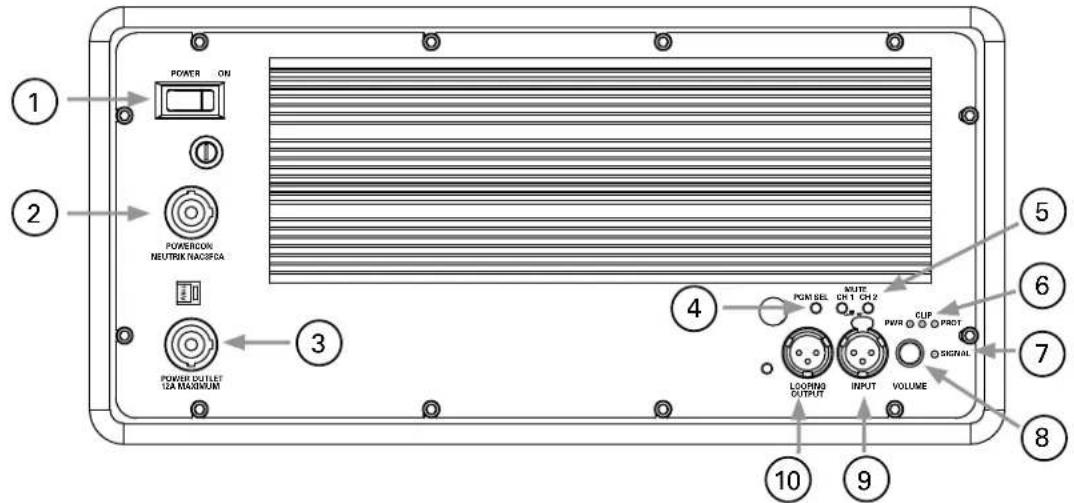
- Power Switch – Turns unit power ON or OFF
Note: There are two programs loaded into the DSP at the factory: When switching between the two programs the power on the amplifier must be in the OFF position. - Powercon Input - Connect included Powercon to 3 prong plug to this port in order to deliver electrical power to the amplifier.
- Powercon Output - Daisy chain multiple amplified speaker systems using this output reducing number of wall plugs required.
- PGM SEL – There are two programs loaded into the DSP at the factory. When switching between programs, follow these steps:
• The amplifier power switch must be in the OFF position
• Using the PGM SEL button, press it to the IN or OUT position to make selection.
- Turn the power button switch to the ON position and the new program selection will now be stored.
- When switching between the two programs, repeat the previous steps. If trying to change program with the power ON, the program will not change.
Program Button IN - 90Hz HP filter
Program Button OUT- 125 Hz HP filter
- MUTE CH1 & CH2 - There are two mute switches on the unit. When depressed, the channel is active and will play sound. CH1 controls the midrange speakers and CH2 controls the high frequency drivers. Press either button a second time to activate the mute function.
- LED Indicators
PWR - Green LED indicates unit is receiving power from wall outlet.
CLIP - Yellow LED indicates that the unit is operating outside its normal range. Reduce output of source unit to avoid damaging speakers or other components. NOTE: This unit can flash occasionally during normal use.
PROT - Red LED indicates the amplifier is in Protect mode. Do not operate the unit when the red LED is illuminated.
- SIGNAL LED - Green LED indicates the unit is receiving signal from the source unit.
- Volume Control - Adjusts volume of the speaker unit in reference to the master volume set at the source/mixer, 0 to -36dB.
- Input - XLR connection delivers signal from source unit.
- Looping Output - XLR connection delivers signal from source unit.
EMW410A-B Rear Panel
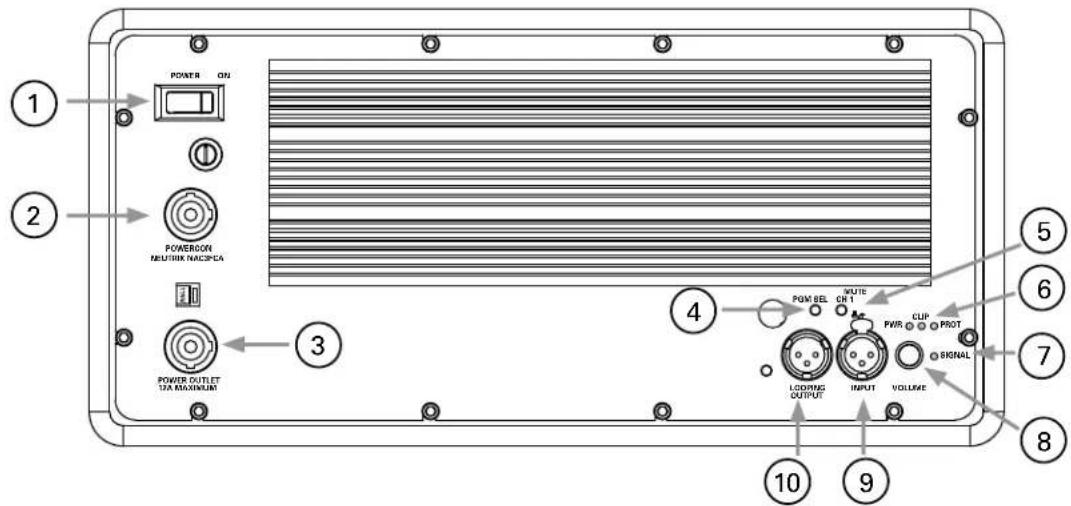
- Power Switch – Turns unit power ON or OFF
Note: There are two programs loaded into the DSP at the factory: When switching between the two programs the power on the amplifier must be in the OFF position. - Powercon Input - Connect included Powercon to 3 prong plug to this port in order to deliver electrical power to the amplifier.
- Powercon Output - Daisy chain multiple amplified speaker systems using this output reducing number of wall plugs required.
-
PGM SEL – There are two programs loaded into the DSP at the factory. When switching between programs, follow these steps:
-
The amplifier power switch must be in the OFF position
• Using the PGM SEL button, press it to the IN or OUT position to make selection. - Turn the power button switch to the ON position and the new program selection will now be stored.
- When switching between the two programs, repeat the previous steps. If trying to change program with the power ON, the program will not change.
Program Button IN-90Hz 24dB/oct LP
Program Button OUT- 125Hz 24dB/oct LP
- MUTE CH1 - When depressed, the channel is active and will play sound. Press either button a second time to activate the mute function.
- LED Indicators
PWR - Green LED indicates unit is receiving power from wall outlet.
CLIP - Yellow LED indicates that the unit is operating outside its normal range. Reduce output of source unit to avoid damaging speakers or other components. NOTE: This unit can flash occasionally during normal use.
PROT - Red LED indicates the amplifier is in Protect mode. Do not operate the unit when the red LED is illuminated.
- SIGNAL LED - Green LED indicates the unit is receiving signal from the source unit.
- Volume Control - Adjusts volume of the speaker unit in reference to the master volume set at the source/mixer, 0 to -36dB.
- Input - XLR connection delivers signal from source unit.
- Looping Output - XLR connection delivers signal from source unit.

A-Line Acoustics www.AL4.me
1601 Jack McKay Blvd. • Ennis, Texas 75119 U.S.A. Telephone: 800.876.3333 • Fax: 800.765.3435
- 7 - AtlasSound.com
Installation Instructions - Two People Recommended
- Stand the EMW410A upright and locate it's position in the venue. Install the stabilizer bar in the bottom rear of the cabinet. Attach the bar with the thumbscrews and stabilize the cabinet with the outriggers.
- Set the EM806A-B cabinet in front of the EMW410A-B. With two people standing facing each other with the EM806A-B cabinet between them, grab the lower handle and lean the top forward keeping one other hand on the face of the cabinet. Lift cabinet in a horizontal fashion and then stand it vertical as you lift into position and insert the feet of the EM806A into the recesses on the top of the EMW410A cabinet and stand it up vertical.
- Insert the EMMA wrench into the lower side of the EM806A-B and rotate the wrench forward and lock the cam arms into the receivers of the EMW410A. Note: to ensure cam is in the correct position, rotate wrench opposite way to set it and then making sure the cam arm is fully extended and latches into the EMW410A cabinet. Turn until completely locked in place.
- Once the EM806A-B cabinet is securely attached to the EMW410A-B, readjust the stabilizer outriggers to ensure stability. Note: The vertical coverage of the EM806A is +/- 5° off the top and bottom of the cabinet. The stabilizing bar may need to be adjusted to tilt the unit forward, but no more than 2 degrees, to keep the array energy off of back walls or to cover audience.
- System Wiring
Audio Signal - Use a balanced XLR cable for main signal and plug it into the amplifier on the EMW410A-B labeled, "Input", and then using the XLR cable provided, connect it to the EM806A-B input using the "Looping Output".
A/C Power - Connect the main power cable, Eddison to Powercon, to the blue Neutrik connector on the amplifier panel of the EMW410A-B. Using the A/C cable provided, jump from the A/C out grey "Power Output" connector on the EMW410A-B cabinet to the blue connector on the EM806A-B amplifier. - Turn on the amplifiers and adjust volume as needed.
- The system can be dismantled following the previous steps in reverse order to ensure proper disconnection and future functionality.
Troubleshooting
Issue 1 - Green Signal light on but there is no sound
Possible Cause - Mute switch is engaged
Action Needed - Disengage the Mute switch.
Issue 2 - Low sound or audio output.
Possible Cause - Input cable may have a short or the cable may be bad.
Action Needed - Cable must be balanced, 3 pin connection.
Possible Cause - Check input cable to be sure it is a balanced 3 pin XLR.
Action Needed - Replace cable as needed making sure there is continuity on all 3 pins.
Possible Cause - Check input in is connect to the input not loop out.
Action Needed - Reconnect cable to correct input.
Issue 3 - Sound is intermittent
Possible Cause - Check cable integrity.
Action Needed - Replace damaged or crimped cables as needed.
Possible Cause - Amplifier operating outside normal performance range.
Action Needed - Decrease source output level.
Issue 4 - No low end in system, EMW410A-B not working.
Possible Cause - Mute switch for Channel #1 is engaged on EMW410A-B.
Action Needed - Disengage mute switch.
Issue 5 - No top end to system, EM806A-B not working.
Possible Cause - Mute switch for Channels #1 and #2 are engaged.
Action Needed - Disengage mute switch.
Issue 6 - No mids from EM806A-B.
Possible Cause - Mute switch for Channel #1 is engaged.
Action Needed - Disengage mute switch.
Issue 7 - No high end from EM806A-B.
Possible Cause - Mute switch for Channel #2 is engaged.
Action Needed - Disengage mute switch.
Issue 8 - No power to EM806A-B.
Possible Cause - Powercon jumper cable loose.
Action Needed - Connect powercon cable ¼ turn clockwise to lock.
Issue 9 - No sound from EM806A-B.
Possible Cause - XLR jumper cable loose or not working.
Action Needed - Replace XLR cable as needed making sure there is continuity on all 3 pins.

A-Line Acoustics www.AL4.me
1601 Jack McKay Blvd. • Ennis, Texas 75119 U.S.A.
Telephone: 800.876.3333 • Fax: 800.765.3435
Specifications
Line Array EM806A-B
RMS Power (Watts) 1000 Low/Midrange / 500 High Frequency
MAX SPL 130dB
Drivers Eight (8) 6.5' Low/Midrange
Eight (8) 6.5" Ribbon High Frequency
Frequency Response 90Hz - 19kHz
Crossover Frequency 90Hz/125Hz up to 2kHz
Horizontal Dispersion 120°
Connectors M&F XLR
I/O Powercon
Height 54.6" (138.68cm)
Width 13.1" (33.27cm)
Depth 9.4" (23.88cm)
Weight 105 lbs. (47.63kg)
Subwoofer EMW410A-B
RMS Power (Watts) 1000
MAX SPL 128dB
Driver 4 x 10"
Frequency Response 40Hz - 125Hz
Crossover Frequency 90Hz/125Hz
Horizontal Dispersion Omnidirectional
Connectors I/O Powercon
M&F XLR
Height 48.8" (123.95cm)
Width 13.1" (33.27cm)
Depth 19.0" (48.26cm)
Weight 97 lbs. (44.0kg)
Notes:
Limited Warranty
All products manufactured by Atlas A-Line Acoustics are warranted to the original dealer/installer, industrial or commercial purchaser to be free from defects in material and workmanship and to be in compliance with our published specifications, if any. This warranty shall extend from the date of purchase for a period of three years on all Atlas Sound products, including SOUNDOLIER brand, and ATLAS SOUND brand products except as follows: one year on electronics and control systems; one year on replacement parts; and one year on Musician Series stands and related accessories. Additionally, fuses and lamps carry no warranty. Atlas Sound will solely at its discretion, replace at no charge or repair free of charge defective parts or products when the product has been applied and used in accordance with our published operation and installation instructions. We will not be responsible for defects caused by improper storage, misuse (including failure to provide reasonable and necessary maintenance), accident, abnormal atmospheres, water immersion, lightning discharge, or malfunctions when products have been modified or operated in excess of rated power, altered, serviced or installed in other than a workman like manner. The original sales invoice should be retained as evidence of purchase under the terms of this warranty. All warranty returns must comply with our returns policy set forth below. When products returned to Atlas Sound do not qualify for repair or replacement under our warranty, repairs may be performed at prevailing costs for material and labor unless there is included with the returned product(s) a written request for an estimate of repair costs before any nonwarranty work is performed. In the event of replacement or upon completion of repairs, return shipment will be made with the transportation charges collect.
EXCEPT TO THE EXTENT THAT APPLICABLE LAW PREVENTS THE LIMITATION OF CONSEQUENTIAL DAMAGES FOR PERSONAL INJURY, ATLAS SOUND SHALL NOT BE LIABLE IN TORT OR CONTRACT FOR ANY DIRECT, CONSEQUENTIAL OR INCIDENTAL LOSS OR DAMAGE ARISING OUT OF THE INSTALLATION, USE OR INABILITY TO USE THE PRODUCTS. THE ABOVE WARRANTY IS IN LIEU OF ALL OTHER WARRANTIES INCLUDING BUT NOT LIMITED TO WARRANTIES OF MERCHANTABILITY AND FITNESS FOR A PARTICULAR PURPOSE.
Atlas Sound does not assume, or does it authorize any other person to assume or extend on its behalf, any other warranty, obligation, or liability. This warranty gives you specific legal rights and you may have other rights which vary from state to state.
Service
Should your EMMA2K-B require service, please contact the Atlas A-Line Acoustics warranty department at 1-877-689-8055, ext. 277 to obtain an RA number.
Atlas A-Line Acoustics Tech Support can be reached at 1-800-876-3333.
Visit our website at www.atlassound.com to see other Atlas A-Line Acoustics products.
©2012 Atlas Sound L.P. All rights reserved. Atlas Sound and Atlas A-Line Acoustics are trademarks of Atlas Sound L.P. All other trademarks are the property of their respective owners. ALA004558 RevA 12/12
- A-Line Acoustics
- EMMA2K-B Small Format Line Array System
- Table of Contents
- Important Safety Instructions
- WARNING
- TWARNce Is In Use
- en Installing The
- Product
- CAUTION
- When The Product Is In Use
- A-Line Acoustics www.AL4.me
- Applications
- Key Features
- EMMA2K-B Kit Includes
- EM806A-B Rear Panel
- EMW410A-B Rear Panel
- - 7 - AtlasSound.com
- Installation Instructions - Two People Recommended
- Troubleshooting
- Specifications
- Notes:
- Limited Warranty
- Service
Brand : Atlas Sound
Model : A-Line EMW410A-B
Category : Loudspeaker