
AXIUM DLP D45S - Television SAGEM - Free user manual and instructions
Find the device manual for free AXIUM DLP D45S SAGEM in PDF.


| Product type | DLP television |
| Brand | SAGEM |
| Model | AXIUM DLP D45S |
| Display technology | DLP (Digital Light Processing) |
| Screen diagonal | 45 inches (114 cm) |
| Dimensions (W x H x D) | Approximately 100 x 85 x 45 cm |
| Weight | Approximately 30 kg |
| Power supply | 220-240 V, 50/60 Hz |
| Power consumption | Approximately 200 W (standby < 1 W) |
| Native resolution | 854 x 480 (WVGA) or higher depending on version |
| Video inputs | Composite, S-Video, Component (YUV), SCART |
| Audio inputs | Stereo RCA, SCART |
| Audio outputs | Headphone, Built-in speakers (2 x 10 W) |
| Remote control | Included, CR2025 battery |
| Main features | Teletext, Timer, Parental lock, Image format |
| Maintenance and cleaning | Clean the screen with a soft, dry cloth. Avoid abrasive products. Dust the ventilation grilles. |
| Safety | Do not block ventilation. Unplug before cleaning. Do not expose to moisture. |
| Spare parts and repairability | Available through SAGEM after-sales service. Repairs by a professional recommended. |
| General information | User manual available online. Manufactured: 2005. |
Frequently Asked Questions - AXIUM DLP D45S SAGEM
User questions about AXIUM DLP D45S SAGEM
0 question about this device. Answer the ones you know or ask your own.
Ask a new question about this device
Download the instructions for your Television in PDF format for free! Find your manual AXIUM DLP D45S - SAGEM and take your electronic device back in hand. On this page are published all the documents necessary for the use of your device. AXIUM DLP D45S by SAGEM.
USER MANUAL AXIUM DLP D45S SAGEM
Your SAGEM AXIOM Home Criteria Screen utilises high voltage. Never the interior of the apparatus, except when you are changing the lamp unit.
Do not open or dismantle this product as this will expose you to the risk of electrocution
the bulb indicator lights up on the front panel.
When the SAGEM AXILUM™ Home Cinema lamp reaches the end of its working life you may
replace the bulb.
A

I made sure that you follow the whole replacement procedure described in "Changing the lamp unit" on page 23.
ENVIRONMENT
ENVIRONMENT
Preservation of the environment as part of a sustainable development logic is an essential concern of SAGEM SA. The desire of SAGEM SA is to operate systems observing the
the life cycle of its products, from manufacturing to commissioning, use and elimination.
The presence of the logo (green dot) means that a contribution is paid to an approved
To facilitate recycling, please respect the sorting rules set up locally for this kind of waste.
BATTERIES
If your product contains batteries, they must be disposed of at appropriate collection points.
THE PRODUCT
The crossed-out waste bin stuck on the product means that the product belongs to the family of electrical and electronic equipment.
At sales points in the event of the purchase of similar equipment.

LAMP UNIT
The worn-out lamp unit must be recycled. (Contact your waste recycling agency to obtain the address of the nearest depot).
1.2. Maintenance
-
Before doing anything, disconnect the mains lead from the wall socket.
-
Clean the screen carefully using a soft. damp cloth lightly impregnated with a soap solution.
- Never use benzene, alcohol or petroleum-based cleaning products as these could damage the finish and the screen.
2.2. Aerial connection
Aerial connection
Model AXIUM HD-D45S see § 16.2
Model AXIUM HD-D56B see § 17.2
Model AXIUM HD-D45S see § 16.2 Model AXIUM HD-D56R see § 17.3
2.1. Fitting and connecting the speakers (AXIUM HD-D45 only)
According to the model of your SAGEM AXIUM™ Home Cinema Screen, refer to the following paragraphs:
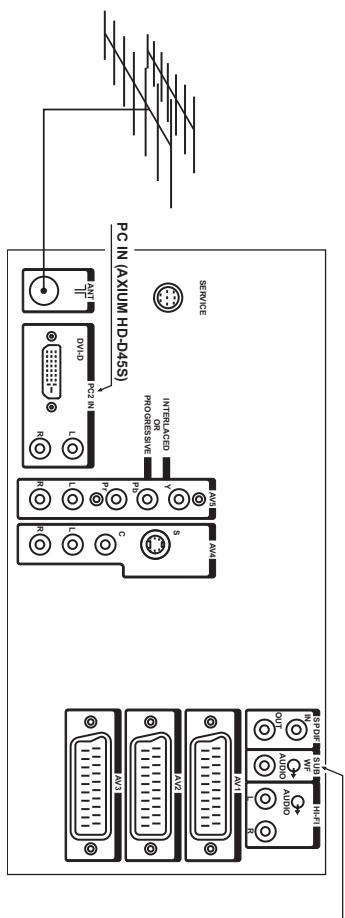
Insert the end of the coaxial cable leading from your aerial into the aerial input socket at the back of your SAGEM AXIUM™ Home Cinema Screen.
Your SAGEM AXIUM™ Home Cinema Screen has two internal tuners (except model AXIUM HD-D45S, which only has one tuner) and one cable is sufficient to feed them both.
2.4. Switching on your SAGEM AXIUM™ Home Cinema Screen
Switching on your SAGEM AXIUM™ Home Cinema Screen
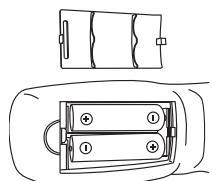
Do not use batteries or different types or rechargeable batteries.
Make sure that the batteries are installed correctly.
Switching on your SAGEM AXIUM™ Home Cinema Screen:
Press the standby button on the remote control or righthand side door. NB:The on/off indicator light located on the front panel of your SAGE
NB: The on/off indicator light located on the front panel of your SAGEM AXIUM™ Home Cinema Screen flashes orange whilst the lamp is warming up, then goes out when the lamp is functioning.
oeeppepepepepepepepepepepepepepepepepepepepepepepepepepepepepepepepepepepepepepepepepepepepepepepepepepepepepepepepepepepepepepepepepepepepepepepepepepepepepepepepepepepepe
s s s s s s s s s s s s s s s s s s s s s s s s s s s s s s s s s s s s s s s s s s s
NNEENNNNNEE NNNNNEE
Pue sounnneepoepeepoeepoeepoeepoeepoeepoeepoeepoeepoeepoeepoeepoeepoeepoeepoeepoeepoeepoeepoeepoeepoeepoeepoeepoeepoeepoeepoe
e e 0
NNEW
e e e e e e e e e e e e e e e e e e e e
Aeaeene eaeene aeeene aeene eaeene eaeene eaeene eaeene eaeene eaeene eaeene eaeene eaeene eaeene eaeene eaeene eaeene eaeene eaeene eaeene eaeene eaeene eaeene eaeene eaeene eaeene eaeene eaeene eaeene eaeene eaeene eaeene eaeene eaeene eaeene eaeene eaeene eae
bunow s1eessu of uoe 8q4o mod q4seep de5 no
e e e e e e e e e e e e e e e
1. 100% 拿到 500 元的 20% 所以
Pue 10000000000000000000000000000000000000000000000
e e
NNEeess
AeBeneBeneBeneBeneBeneBeneBeneBeneBeneBeneBeneBeneBeneBeneBeneBeneBeneBeneBeneBeneBeneBeneBeneBeneBeneBeneBeneBeneBeneBeneBeneBeneBeneBeneBeneBeneBeneBeneBeneBeneBeneBeneBeneBeneBeneBeneBeneBeneBeneBeneBete Bete Bete Bete Bete Bete Bete Bete Bete Bete Bete Bete Bete Bete Bete Bete Bete Bete Bete Bete Bete Bete Bete Bete Bete Bete Bete Bete Bete Bete Bete Bete Bete Bete Bete Bete Bete Bete Bete Bete Bete Bete Bete Bete Bete Bete Bete Bete Bete Bete Bete
6en6eunNENW 4u6nueo
nnnn nnnn nnne
spspepees aepdipseepn :BN
Aesessss
eeppeeppeeppeeppeeppeeppeeppeeppeeppeeppeeppeeppeeppeeppeeppeeppeeppeeppeeppeeppeeppeeppeeppeeppeeppeeppeeppeeppeeppeeppeeppeeppeeppeeppeeppeeppeeppeeppeeppeeppeeppeeppeeppeeppe
e
Prrnne nnnnne nee eaeene ene eee
- 1
e eae
Aesessss
eeppeeppeeppeeppeeppeeppeeppeeppeeppeeppeeppeeppeeppeeppeeppeeppeeppeeppeeppeeppeeppeeppeeppeeppeeppeeppeeppeeppeeppeeppeeppeeppeeppeeppeeppeeppeeppeeppeeppeeppeeppeeppeeppeeppe
Prrnne nnnnne nee eae ene eee eee
- 1
e eae
mnnnne nnnnne nnnnne nnnnne nnnnne nnnnne nnnnne nnnnne nnnnne nnnnne nnnnne nnnnne nnnnne nnnnne nnnnne nnnnne nnnnne nnnnne nnnnne nnnnne nnnnne nnnnne nnnnne nnnnne nnnnne nnnnne
0 +5 92129
000000000000000000000000000000000000000000000000000000000
pee eeppeeppeeppeeppeeppeeppeeppeeppeeppeeppeeppeeppeeppeeppeeppeeppeeppeeppeeppeeppeeppeeppeeppeeppeeppeeppeeppeeppeeppeeppeeppeeppeeppeeppeeppeeppeeppeeppe
noA smoie pue serees denee nee eaepeeppepepepepepepepepepepepepepepepepepepepepepepepepepepepepepepepepepepepepepepepepepepepepepepepepepepepepepepepepepepepepepepepepepepepepepepepepepepe pe
·HOO
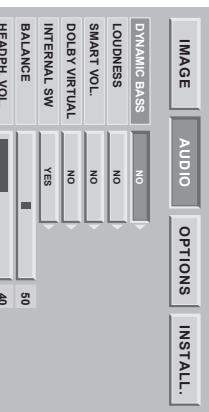
volume.
Allows you to adjust the sound control mode.
In NORMAL mode, you save SAGEM AXIUM"Home Cinema Screen will regulate the
audio level to avoid too great a difference in volume between the two sources.
In NIGHT mode this attenuation is stronger and reacts more quickly to the variations of
volume, particularly if there is a violent explosion in a film sequence for example.
Allows you to enable Virtual Dolby Surround or not (except AXIUM HD46S model).
This internal speakers (AXIUM HD-563) or the woofer (other models) can be ON or OFF.
Move the cursor found on AXIUM HD46S model.
right speakers.
Allows you to adjust the headphones volume output on the righthandside door.
(AXIUM HD-46S only).
ONN0BnS
TOMOOM TOMSESNHOHHDHE
EONVAT
M
TOA PRW
SSS
__________
sEepoe
ounouny.7A#LHIAWTOO,ou sey jepow SSGDHNIXX:BN
nno nnnnne nee nee nee nee nee nee nee nee nee nee nee nee nee nee nee nee nee nee nee nee nee nee nee nee nee nee nee nee nee nee nee nee nee nee nee nee nee nee nee nee nee nee nee nee nee nee nee nee nee nee neee
W
(4)
P
eep
P
SNNLLSEESNEOld ESReed
6
NINNNLLNLLOLDVANOSRESd
esn Aep-0f-Aeg 8
(1) an6ycoo 0f 0nV Jooonooop en ynsuoe) zH 09 fo Kauenbae e yinpeaepee s! qiees wundo:8N
| 09 | 02∠ × 08∠ |
| 09 | t98 × 29∠ |
| 9∠ | 89∠ × t20∠ |
| 0∠ | 89∠ × t20∠ |
| 09 | 89∠ × t20∠ |
| 98 | 009 × 008 |
| 9∠ | 009 × 008 |
| 2∠ | 009 × 008 |
| 09 | 009 × 008 |
| 98 | 08 ∘ × 049 |
| 9∠ | 08 ∘ × 049 |
| 2∠ | 08 ∘ × 049 |
| 99 | 08 ∘ × 049 |
| 09 | 08 ∘ × 049 |
| (zH) ∠(zH) | (xd) ∠(xD) |
992 x 204 Luee Rernnne e e Prrnne nnnnne nee ennnnne nee nee nee nee nee nee nee nee nee nee nee nee nee nee nee nee nee nee nee nee nee nee nee nee nee nee nee nee nee nee nee nee nee nee nee nee nee nee nee nee nee nee nee nee nee nee nee nee nee nee neee
(SSsDnHNNXVaeppeae) (Ld) 1000000000000000000000000000000000000000000000
aounq ausn, TALSNI, eooo oonnn NNN
uouny, dE, ou sey lepoow sGd-dH WnIXx:8N
Teletext functions vary according to television companies and are only available if the selected channel transmits teletext.
Teletext display Press the button to switch on teletext without using the keyboard.
- Pressing the button again allows you to view text. You can exit from Teletext mode by pressing again. If there is no teletext on the channel you are watching
Selecting the index page.
Teletext pages include an Introduction page (usually page 100) telling you how to use the service. The button allows you to select this introduction page directly.
LIST or FASTEXT mode There are two teletext modes. LCT mode in this mode of
- LIST mode: in this mode, four pages numbers appear at the bottom of the screen, each in a different colour. Each of these numbers can be changed and saved in the memory.
- FASTEXT mode: in this mode, four subjects appear at the bottom of the screen, each in a different colour.
To obtain more information on one of these subjects press the corresponding coloured button. This function allows you to obtain information on the displayed subjects quickly. The required mode is selected by pressing the button
Selecting a page Enter the number of the required page using the 0-9 buttons (There are no pages starting with a 0 or 9.).
The page counter at the top of the screen searches for the page or the page appears immediately, if the page number has already been saved.
You can quickly scroll through teletext pages by using the P+ P- or buttons (by skipping non-existent pages).
To save another page in this mode, press the relevant coloured button and enter the page number. When in FASTEXT mode, you can select a chosen subject using the colour buttons corresponding to the options at the bottom of the screen.
When in PROGRESS mode, you can select a chosen subject using the color buttons corresponding to the options at the bottom of the screen.
Displaying hidden information Press the button to call up and delete hidden information, such as puzzle solutions and replies to questions.
questions.
Press the button to hold a text page, whilst looking at information that is on several pages. Press again to return to automatic update.
Press the MENU button then the green button. Pressing it more than once allows you to display the top half, the bottom half and then return to normal format.
Navigation within sub-pages When the selected pages contain one or more sub-pages, a help line listing the sub-pages appears at the
bottom of the screen. Use the buttons to choose the next or the previous sub-page.
Subtitles TV channels with teleost often transmit certain programmes with subtitles.
TV channels with teretext often transmit certain programmes with subtiets. Press the button and select the relevant subtitle page. The subtitle page continuously appears on the screen if the current progr
The subtitle page continuously appears on the screen if the current programme is transmitted with subtitles.
In brackets, is the number of days of programmes consultable in EPG. The television channels are free to transmit the signal EPG NexTView or not, therefore this list is not legally binding.
| Country | Channels transmitting NexTView EPG |
| France | M6 (3), Canal+ (7), TV5 (4), TSR1 |
| Germany | RTL2 (3), Kabel1 (4-9), SF1 |
| Austria | SF1 |
| Italy | TSI |
| Belgium | VT4 (3) |
| Switzerland | SF1, TSR1, TSI |
| Turkey | TRT Family (5-6) |
10. NexView EPG (AXIUM HD-D45 only) NexView is an electronic programme guide (or EPG) for analogue television about current and future programmes. The programme information for all the
The 'NexTVlink' function is not available.
- Installation
To enable the EPG, enter the 'INSTAL.' menu, go to line 'EPG'. Using the arrow go on - - ^ (if you are using the EPG for the first time, see figure 1) or on the channel number (if you have already used the EPG, see figure 2).
In both these cases, you can enter or re-enter a channel number consisting of two digits (e.g.: 01 for the first channel, 02 for the second channel, 12 for the twelfth channel, etc.).
To enable the EPG, you must enter a channel number.
AGE AUDIO OPTIONS INSTALL.
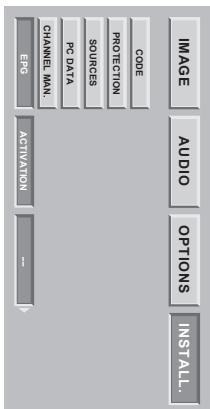
ure 1: Example of the EPG menu accessed for the first time.
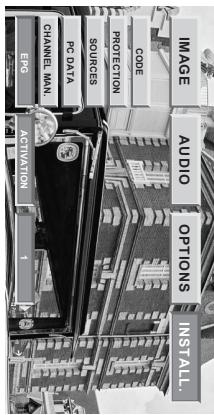
Figure 2: Example of the EPG menu configured on the first channel.
The EPG NexTView uses the signals from certain channels for transmission.
The EPG is acquired automatically each time you exit from standby on your SAGEM AXIUM™ Home Cinema
Screen. If you use the PIP or PAP functions when changing channel within ten minutes of coming out of standby
If you use the PIP or PAP functions when changing channel within ten min
the EPG will be cancelled.
List of channels transmitting NextView EPG on September 1, 2004:
Country Channels transmitting
| ‘66 | ||
| ‘66 | ||
| ‘66 | ||
| ‘66 | ||
| ‘66 | ||
| ‘66 | ||
| ‘66 | ||
| ‘66 | ||
| ‘66 | ||
| ‘66 | ||
| ‘66 | ||
| ‘66 | ||
| ‘66 | ||
| ‘66 | ||
| ‘66 | ||
| 「66 | ||
| ‘66 | ||
| ‘66 | ||
| ‘66 | ||
| ‘66 | ||
| ‘66 | ||
| ‘66 | ||
| ‘66 | ||
| ‘66 | ||
| ‘66 | ||
| ‘66 | ||
| ‘66 | ||
| ‘66 | ||
| ‘66 | ||
| ‘65 | ||
| ‘65 | ||
| ‘65 | ||
| ‘65 | ||
| ‘65 | ||
| ‘65 | ||
| ‘65 | ||
| ‘65 | ||
| ‘65 | ||
| ‘65 | ||
| ‘65 | ||
| ‘65 | ||
| ‘65 | ||
| ‘65 | ||
| ‘65 | ||
| ‘65 | ||
| ‘65 | ||
| ‘65 | ||
| ‘65 | ||
| ‘65 | ||
| ‘65 | ||
| ‘65 | ||
| ‘65 | ||
| ‘65 | ||
| ‘65 | ||
| ‘65 | ||
| ‘65 | ||
| ‘65 | ||
| ‘65 | ||
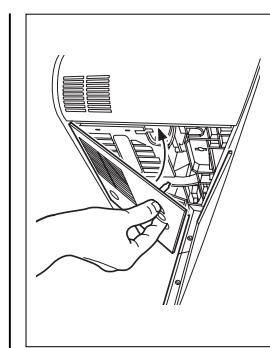
Turn the bolt again by a quarter turn
aen nnnnne aennnne ennnnne nee
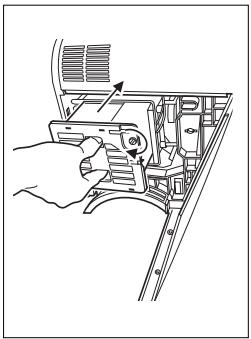
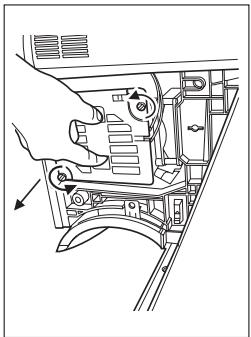
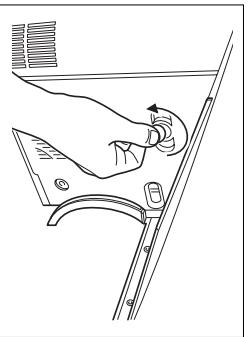
Never touch the ball.
Tighten the two thumbowheels linked to the unit.
Pull it towards you holding it between your thumb and forefinger.
unscreeed they remain in the lamp unit
Unscrew the two thumbwheels holding the worn-out lamp unit.
Tnrrnnrnnnrnnn rannnnn nnnnnn
a coin. Remove the et-hand panel by turning the bolt a quarter turn with
5 Never replace the fuse of a worn-out lamp
- Make sure that you tighten all the screws and do not leave any foreign bodies inside the appliance.
3: Only hande the amp unit by the holes designed for this purpose. Never touch any wires or the bulb itself
- Never try to replace the lamp unit immediately after the SAGEM AXIUM™ Home Cinema Screen has been switched off. Wait at least 1 hour to allow the lamp to completely cool down.
from the wall socket:
a
Ony replace the old lamp unit with authorised model RL1280A, reference number SAGEM 2516914.14
eae eae eae eae eae eae eae eae eae eae eae eae eae eae eae eae eae eae eae eae eae eae eae eae eae eae eae eae eae eae eae eae eae eae eae eae eae eae eae eae eae eae eae eae eae eae eae eae eae eae eae ee


Resoulnon: 1280 x 720

- technical characteristics or AXIUM HD-D45 model
14. Changing the lamp unit
- Technical characteristics of AXIUM HD-D45 model
| Video | ||
| Screen size: 114cm | ||
| Aspect ratio: 169 | ||
| Resolution: 1280 x 720 | ||
| Reception Tuner (antenna input 'ANT') | ||
| Input frequencies: 45.5 - 862.25 MHz | ||
| Number of programmes: 99 | ||
| PAL B, G H 1 D K, SECAM B, G D, K L' | ||
| VHF E2-E12 | ||
| VHF A-H (H) | ||
| CATV E21-E69 | ||
| CATV (S01-S02) | ||
| CATV S11-S20 (U1-U10) | ||
| CATV S1-S10 (M1-M10) | ||
| CATV S21-S41 (hyperband) | ||
| VHF R1-R2 | ||
| VHF R3-R5 | ||
| Audio demodulation | ||
| AM 6.5 MHz / NICAM 5.85 MHz (L-L') | ||
| FM 5.5 MHz/5.74 MHz (BG) | ||
| FM 5.5 MHz / NICAM 5.85 MHz (B-G) | ||
| FM 6.0 MHz / NICAM 6.55 MHz (I) | ||
| FM 6.5 MHz 6.258 MHz / NICAM 5.85 MHz (D-K) | ||
| Audio | ||
| Maximum power: 2 x 30 W (6 Ohm) | ||
| One external speaker columns | ||
| Two external speaker columns | ||
| 5-band equalizer | ||
| Remote control TL-50 | ||
| RF cable for antenna input ANT) | ||
| One cable for connecting the external speaker columns | ||
| Electronic Compatibility | ||
| EMC (Electromagnetic Compatibility) | ||
| EN5013.10/2001/A104/2003 | ||
| EN5022.1988/A1:2000+A2:2003 | ||
| EN6000-3-2:2000 | ||
| EN6100-3-1998+A1:2001 | ||
| This is a class A product in a domestic environment this product may cause radio interference in which case the user may be required to take adequate measures. | ||
| Electrical safety | ||
| CE60065 : 2001 |
eepnne ean ennnn nnnn ne aen ane ennnn nnnn nnnn nnnn nnnn nnnn nnnn nnnn nnnn nnnn nnnn nnnn nnnn nnnn nnnn nnnn nnnn nnnn nnnn nnnn nnnn nnnn nnnn nnnn nnnn nnnn nnnn nnnn nnnn nnnn nnnn nnnn nnnn nnnn nannn nannn nannn nannn nannn nannn nannn nannn nannn nannn nannn nannn nannn nannn nannn nannn nannn nannn nannn nannn nannn nannn nannn nannn nannn nannn nannn nannn nannn nannn nannn nannn nannn nann.
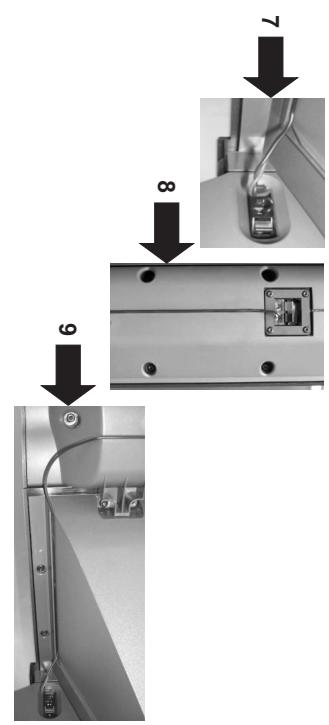
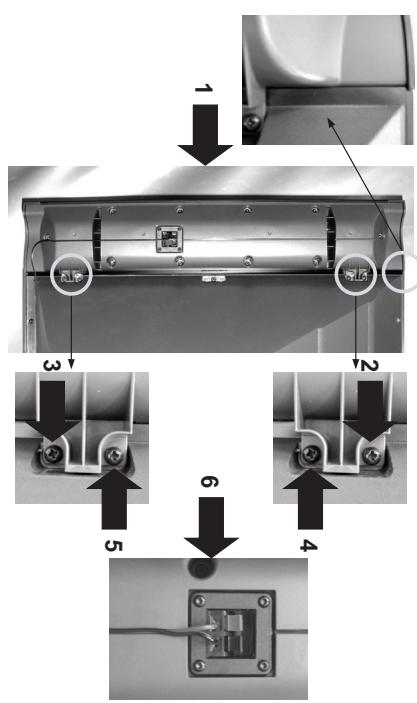
- Connect the other end of the cable in the same way on the left-hand terminal, viewed from the rear, of your SAGEM AXUM" Home Cinema Screen, see step 7
- Then hide the cable by pushing it in the groove, starting from the black and red terminals of the speaker column, do the same for the right-hand speaker column, viewed from the rear.
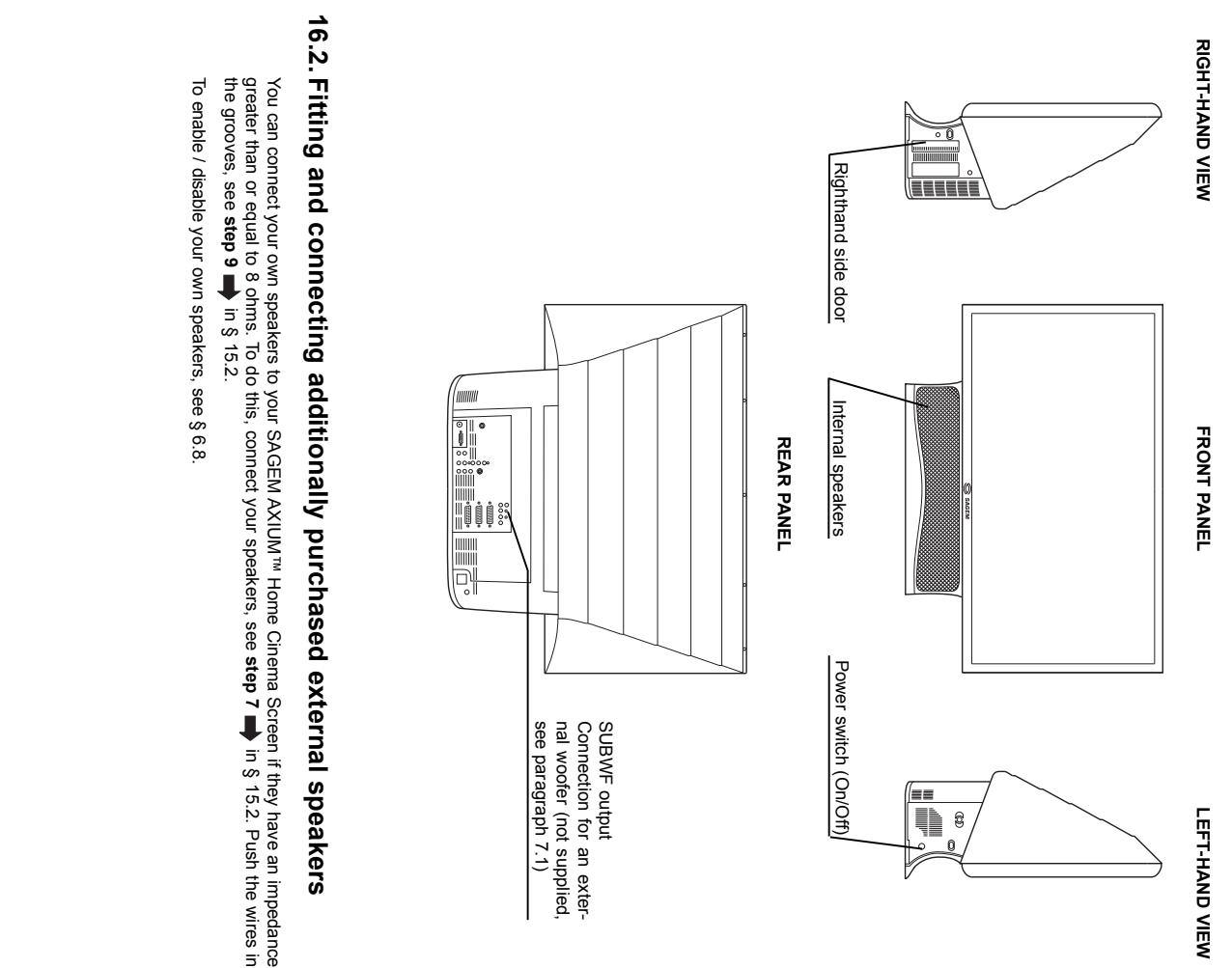
- Connecting your own speakers
aen ene ane ane ane ane ane ane ane ane ane ane ane ane ane ane ane ane ane ane ane ane ane ane ane ane ane ane ane ane ane ane ane ane ane ane ane ane ane ane ane ane ane ane ane ane ane ane ane ane ane ane
aee eae aee eae eae eae eae eae eae eae eae eae eae eae eae eae eae eae eae eae eae eae eae eae eae eae eae eae eae eae eae eae eae eae eae eae eae eae eae eae eae eae eae eae eae eae eae eae eae eae eae eae eae e ae
B. The two speaker columns are interchangeable. This means that each one can be placed either on the right or left. Please note, the two audio cables provided have different lengths to allow for this. Fitting the speaker columns supplied
Fitting and connecting speaker columns, SAGEM AXUW HD-D45 model
15.2. Fitting and connecting speaker columns, SAGEM AXIUM HD-D45 model
15.1. Overview of AXIUM HD-D45 model
Anglais LU 45 A5.qxd 27/04/2005 11:07 Page 25
IepowssdHwnixVa oMnO'l9
LZ aBed L0:TT 5002/10/12 pxb·Va St NT stel6u
eepow sgsdH wixy Jo oosnssnnnne
6/91:00:00
02ZX8921
8 W'W'QIN/ZH W92'Z'ZHW'S'W (1) ZH W'S'QW'QZ/WZ'QZ
oipty
| A | Automatic installation, 9 | M | Automatic recognition of the format of the source, 15, 17 | Maintenance, 3 | Note |
| B | Bilingual programmes, 16 | Mating the programme number, 9, 10 | N | Nextview, 19 | |
| C | Camcorder, 14 | Newman, 24 | O | OSD language menu, 10 | |
| D | Decorder, 13 | Picture adjustment, 15 | P | Picture format, 17 | |
| E | External sources, 13 | Picture movement, 18 | P | Programme selection, 18 | |
| F | Factory preets, 8 | Fitting and connecting the speakers, 4, 25, 28, 30 | F | Programmed stop, 17 | |
| G | First rapid installation, 5 | Frequency, 8 | R | Remote control, 7 | |
| H | Games console, 13 | Set up, 4 | S | Sound adjustment, 16 | |
| I | HDCP, 21 | Shoes on picture, 18 | S | VHS, 13, 14 | |
| J | Information on screen, 18 | TV, 19 | T | Television receiver, 13 | |
| K | Lamp, 23 | Tablet, 19 | T | Two screens, 18 | |
| L | List of TV programmes, 9 | Locking, 8 | V | Video recorder/Player, 13 |
- Maintenance
- Aerial connection
- Fitting and connecting the speakers (AXIUM HD-D45 only)
- Switching on your SAGEM AXIUM™ Home Cinema Screen
- Switching on your SAGEM AXIUM™ Home Cinema Screen:
- ONN0BnS
- TOMOOM TOMSESNHOHHDHE
- EONVAT
- M
- TOA PRW
- SSS
- __________
- ounouny.7A#LHIAWTOO,ou sey jepow SSGDHNIXX:BN
- SNNLLSEESNEOld ESReed
- esn Aep-0f-Aeg 8
- NexView EPG (AXIUM HD-D45 only) NexView is an electronic programme guide (or EPG) for analogue television about current and future programmes. The programme information for all the
- Changing the lamp unit
- Overview of AXIUM HD-D45 model
- eepow sgsdH wixy Jo oosnssnnnne
Brand : SAGEM
Model : AXIUM DLP D45S
Category : Television