
DiNET DAN-TX - Audio Interface Radial Engineering - Free user manual and instructions
Find the device manual for free DiNET DAN-TX Radial Engineering in PDF.


| Product Type | Audio Interface / Stereo Direct Box for Dante Network |
| Model | DiNET DAN-TX |
| Brand | Radial Engineering |
| Audio Circuit Type | High current balanced active input device |
| Number of Channels | 2 (stereo) |
| Sample Rate | 44.1, 48, 88.2, 96 kHz |
| Bit Depth | 24 bit |
| Frequency Response | 20 Hz - 20 kHz |
| Dynamic Range | 103 dB |
| THD+N | 0.008% @ -6 dBfs |
| IMD | 0.0017% @ -10 dBfs |
| Equivalent Input Noise | -98 dB |
| Input Impedance (Instrument Mode) | 240 kOhm (unbalanced) |
| Input Impedance (Line Mode Balanced) | 40 kOhm |
| Input Impedance (Line Mode Unbalanced) | 20 kOhm |
| Input Connectors | 2x 1/4" TS/TRS, 1x 3.5mm TRS, 2x RCA |
| Output Connector | RJ45 Ethernet |
| Pad | -18 dB |
| High Pass Filter | -12 dB/octave @ 80 Hz |
| Trim Control Range | -10 dB to +10 dB |
| LINE/INST Switch | Selects line or instrument level; in INST mode, left input becomes mono instrument with thru output on right |
| LED Indicators | SYNC, SYS, +15V, PoE, SIG/CLIP (left & right) |
| Power Supply | 15VDC 400mA (included) or PoE (IEEE 802.3af Class 1) |
| Power Consumption | 1.25 W |
| Construction | 14-gauge steel |
| Finish | Durable powder coat |
| Dimensions (L x W x D) | 5 x 3.31 x 1.99 in (127 x 84 x 50.5 mm) |
| Weight | Not specified |
| Warranty | 3-year transferable limited warranty |
| Made In | Canada |
| Cleaning | Wipe with a dry cloth. Do not use solvents or abrasives. |
| Safety Compliance | FCC Part 15 Class A, EN55022; use only with provided power supply or PoE |
Frequently Asked Questions - DiNET DAN-TX Radial Engineering
User questions about DiNET DAN-TX Radial Engineering
0 question about this device. Answer the ones you know or ask your own.
Ask a new question about this device
Download the instructions for your Audio Interface in PDF format for free! Find your manual DiNET DAN-TX - Radial Engineering and take your electronic device back in hand. On this page are published all the documents necessary for the use of your device. DiNET DAN-TX by Radial Engineering.
USER MANUAL DiNET DAN-TX Radial Engineering
Radial Engineering Ltd.
1845 Kingsway Ave., Port Coquitlam, BC V3C 1S9, Canada
Tel: 604-942-1001 • Fax: 604-942-1010
Email: info@radialeng.com

Note: This device has been tested and found to comply with the limits for a Class A digital device, according to Part 15 of the FCC Rules and EN55022. These limits are designed to provide reasonable protection against harmful interference when the device is operated in a commercial environment. This device generates, uses, and can radiate radio frequency energy and, if not installed and used in accordance with the user manual, may cause harmful interference to radio communications. Operation of this device in a residential area is likely to cause harmful interference, in which case the user will be required to correct the interference at their own expense.
Radial® DAN-TX™ User Guide
Table of Contents Page
Overview.... 1-2
Features 3-4
Getting Started 5
Using as an Instrument D.I. Box 6-7
Using with Unbalanced Signals....8
Using with Professional Line Level....9
Block Diagram....10
Specifications 11
Warranty ....Back cover
Congratulations on purchasing the Radial DiNET DAN-TX™! The DAN-TX is a high-resolution stereo direct box designed to connect to a Dante™ enabled Ethernet network and seamlessly convert analog audio to a digital format compatible with Dante. This makes it ideal for connecting mono instruments such as a bass or guitar, consumer line-level devices such as laptops, tablets or CD players, or professional balanced +4dBu equipment directly to a Dante network for easy routing and distribution to other devices.
This manual covers the setup and operation of the DAN-TX in various applications. Please take a few minutes to read through and familiarize yourself with the DAN-TX features and functions. If you have any questions that are not covered in this manual, please consult the FAQ section on our website. This is where we post the latest updates. If you still do not find what you are looking for, feel free to send us an email at info@radialeng.com and we will do our best to reply in short order.
OVERVIEW
The DiNET DAN-TX is an analog to digital converter that is designed to take the signal from instruments or line level audio sources and transmit them over an existing Dante-enabled network.
A typical direct box is a device that converts an unbalanced high-impedance instrument or consumer line level audio output to a balanced low-impedance signal that can easily interface with a professional audio system. The Radial DiNet DAN-TX provides the same input options of a multi-media direct box, but converts the audio to a digital stream that is suitable for direct connection to a Dante network over Ethernet.
The DAN-TX is equipped with a variety of connection options to make it easy to connect with any type of audio equipment. The included stereo 3.5mm, RCA and 14 " connectors are wired in parallel to allow for immediate hookup of instruments, tablets, smartphones, consumer audio devices, broadcast and professional audio equipment without the need for adapter cables. When additional signal handling is required, the switching 14 " jacks adapt to both unbalanced (TS) and balanced (TRS) connectors to accommodate +4dBu sources, with a maximum input of up to +28dBu.
The inputs of the DAN-TX are processed using high quality 24 bit/96kHz analog-to-digital converters, providing two channels of Dante digital outputs over a single Ethernet connector, and allowing easy integration of analog audio devices with an existing Dante network.
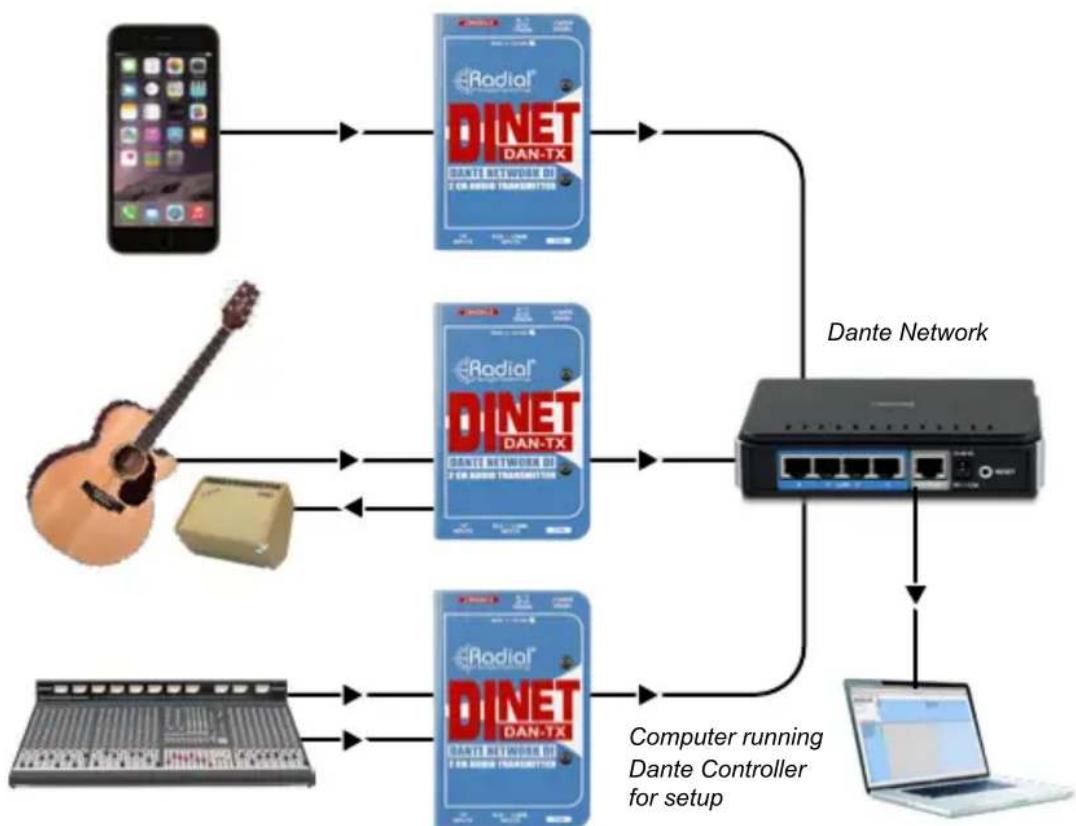
flowchart
graph TD
    A["Smartphone"] --> B["DINET DAN-TX"]
    C["Guitar"] --> D["DINET DAN-TX"]
    E["Laptop"] --> F["Computer running Dante Controller for setup"]
    B --> G["Dante Network"]
    D --> G
    F --> G
    G --> H["Laptop"]
The DAN-TX is easy to use, with no setup required at the box itself. It is completely configured by Dante Controller, which manages digital audio routing across the Dante network. Dante Controller is a software application by Audinate™ that allows the user to manage all Dante-enabled devices across a network. Use Dante Controller to route audio from the DAN-TX to any number of destinations on the network. Simply plug the DAN-TX into the network and it will automatically appear as an available transmit device within Dante Controller. The DAN-TX will initially have the name “DiNET-TX-xxxxx”, where the last 6 digits will be the unique media access control address (MAC address) of your DAN-TX. As this can be changed to a user-generated name using Dante Controller, we recommend writing down the MAC address of your unit in the space provided below for future reference.
Record your DAN-TX MAC address here:
DiNET-TX-
Dante Controller can be downloaded for free at www.audinate.com. For the latest firmware for your DiNET DAN-TX, visit www.radialeng.com.

natural_image
Two electronic devices connected by a cable: a laptop displaying a colorful laser screen and a blue device with an Ethernet port (no visible text or symbols on the devices themselves)FEATURES
-
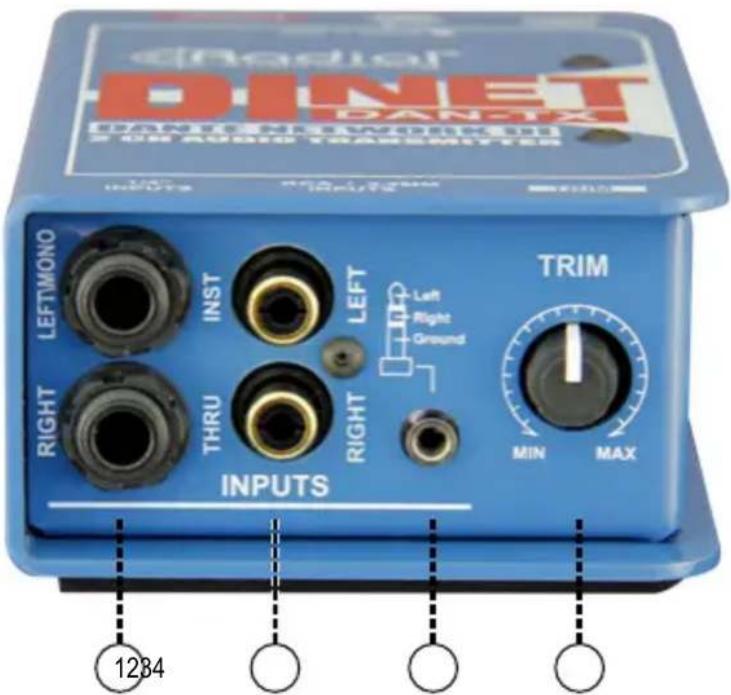
14 ” INPUTS: Stereo inputs accommodate both balanced (TRS) and unbalanced (TS) connectors for use with instruments or professional +4dBu sources. When LINE/INST switch is set to INST, LEFT becomes a mono input and RIGHT becomes a thru-put for connection to an amplifier.
-
RCA INPUTS: Provided for connection to CD/DVD players and other consumer level playback devices. Wired in parallel with the 14 " and 3.5mm inputs.
-
3.5mm INPUT: Stereo TRS input for use with laptops, tablets and phones. Wired in parallel with the 14 " and RCA inputs.
-
TRIM: Adjustable trim control to set input levels. Provides -10dB of cut or +10db of gain at the min/max settings.

-
LINE/INST: Used to select between line level or instrument level inputs. When set to INST the 14 " stereo inputs are reconfigured as a mono instrument input with a thru output.
-
PAD: Enables a -18dB input pad for high output line level sources.
-
HPF: Enables a high pass filter to roll off frequencies below 80Hz.

-
+15V LED: Will illuminate when the DAN-TX is connected to the included DC power adapter. A cable lock is provided to prevent accidental power loss.
-
POWER: 15VDC connection for use with included Radial power adapter when PoE is not available.
-
PoE LED: Will illuminate when the DAN-TX is receiving power over Ethernet (PoE).
-
SIG/CLIP LEDs: Will illuminate when input signal is detected. LED color will change to red at -6dBfs.
-
SYNC LED: Red LED is illuminated when unit is powered. Green LED will illuminate once connected to an Ethernet network. Flashing green LED indicates that the DAN-TX is in master clock mode, solid green LED indicates that it is in slave mode.
-
SYS LED: Red LED illuminates when power is first applied. Switches to green LED once Dante processor becomes active.
-
ETHERNET: Used to connect to the Dante enabled network via CAT5e or CAT6 cable.
GETTING STARTED
Power for the DAN-TX can be provided via Power over Ethernet (PoE) from a PoE-capable network switch or a separate PoE injector. Once power is available, the side panel PoE LED indicator will illuminate and the DAN-TX will be ready to use.
The included 15VDC power supply is provided for use when PoE is not available. Once you have connected the DAN-TX to the Ethernet Network, plug in the power supply. The +15VDC LED will illuminate and the DAN-TX will be ready to use.
As a backup option, the DAN-TX is designed to be able to have both PoE and a 15VDC adaptor connected at the same time. If one fails, the other will maintain power without switch-over noise.


natural_image
Black electronic device with red cord and cable, no visible text or symbolsETHERNET CONNECTION
The DAN-TX connects to the Ethernet Network using a standard CAT5e or CAT6 cable. Once the Ethernet switch is connected to a computer running the Dante controller software, the DAN-TX will appear as an available transmit device.
USING THE DAN-TX AS AN INSTRUMENT D.I. BOX
The DAN-TX allows you to plug in an instrument such as a guitar or bass and have it directly feed a Dante network, allowing it to be routed to a distant mixing console, recording interface, or any other endpoint on the network.
Set the LINE/INST switch to the INST setting to accept instrument level signals. This configures the 14 " inputs so that the LEFT/MONO will be your instrument input, while the RIGHT connector changes to a THRU output that is wired in parallel with the left input. You can use this connection to simultaneously feed an amplifier on stage, just like you would with an analog direct box.
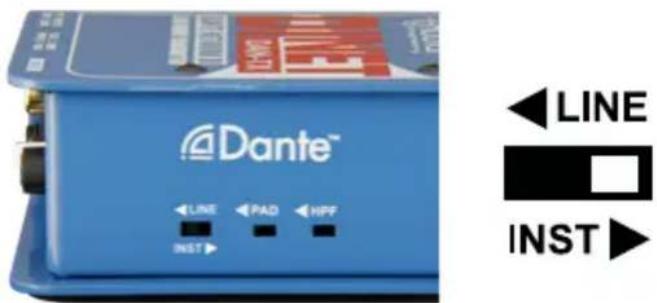
Start with the TRIM control at 12 o'clock and adjust the level as needed, turning up if you require more signal, or down if the Left SIG/CLIP LED indicator turns red. The TRIM control will not affect the signal level from the THRU output. The PAD will also not affect the 14 " connections when the DAN-TX is set to INST mode. To clean up excessive low frequency content, engage the HPF on the side of the DAN-TX to roll off frequencies below 80Hz.
When using the DAN-TX with a mono instrument, only the left channel of the Dante output will be used. You still have access to the right channel of the Dante output via the Right RCA connector or the ring of the 3.5mm TRS input. This allows you to connect a mono line level source and a mono instrument to the Dante network simultaneously. Note that the level control will affect both inputs.

flowchart
graph TD
    A["Computer running Dante Controller for setup"] --> B["Dante network"]
    B --> C["Console"]
    B --> D["Mono output"]
    D --> E["DNTM Device"]
    E --> F["Output Device"]
    G["Handheld Piano"] --> E
    H["Laptop"] --> B
    I["Guitar"] --> E
    J["Radio Station"] --> E
Note: When using the DAN-TX with an instrument and a stage amp, there is the possibility of encountering hum or buzz from a ground loop when using shielded Ethernet cables, due to the Dante network and the stage amplifier receiving power from different sources. There are two solutions to help alleviate the problem: 1. Use a CAT5e unshielded cable from the DAN-TX to the Dante Network. Or 2. Insert an isolator between the DAN-TX and the stage amp, such as the StageBug SB-6™.
DAN-TX WITH UNBALANCED CONSUMER AUDIO
When using the DAN-TX with consumer audio devices, typically either the RCA connectors or the mini 3.5mm connector will be used, however, the 1/4" inputs can also be employed. With the LINE/INST switch set to LINE, the DAN-TX will accept consumer line level signals such as those from a CD player, laptop, tablet, or smartphone. Stereo keyboards can also be connected to the DAN-TX in this mode. The TRIM control can be used to fine tune the level, and the PAD can be engaged should further attenuation be required. Only one set of inputs should be used at a time, as they will all sum together to the left and right Dante outputs over Ethernet. To connect more than one device at a time to the Dante network, use multiple DAN-TX units.

flowchart
graph TD
    A["Instrument"] --> B["Dante Network"]
    C["Device"] --> B
    D["Computer"] --> B
    B --> E["Dante Controller for setup"]
    style A fill:#f9f,stroke:#333
    style C fill:#ccf,stroke:#333
    style D fill:#cfc,stroke:#333
    style B fill:#cff,stroke:#333
    style E fill:#ffc,stroke:#333
DAN-TX WITH PROFESSIONAL LINE-LEVEL EQUIPMENT
The DAN-TX can also be used with professional audio and broadcast equipment such as mixing consoles and recording interfaces, with the ability to handle extremely hot signal levels of up to +28dBu. The 14 " connectors accept balanced TRS inputs, with +/-10dB of gain available on the TRIM control, along with a -18dB pad to accommodate a wide range of input levels. When the TRIM control is set to 12 o'clock and the PAD is engaged, +18dBu = 0dBFS. Without the PAD engaged, or when the DAN-TX is set to Instrument mode, 0dBu = 0dBFS. Ensure the LINE/INST switch is set to LINE when connecting pro audio equipment to the inputs of the DAN-TX.
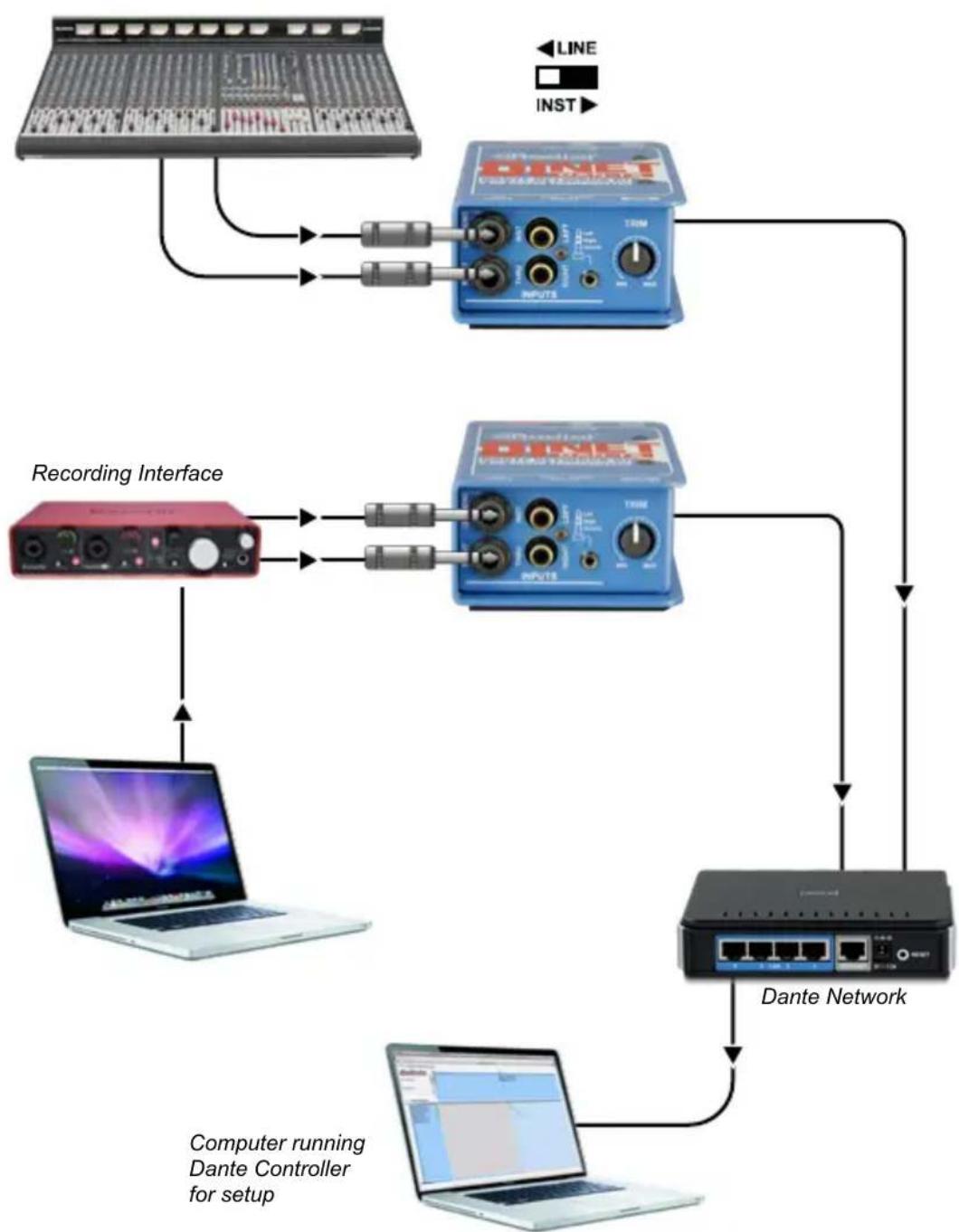
flowchart
graph TD
    A["Audio System"] --> B["Recording Interface"]
    B --> C["Laptop"]
    C --> D["Dante Network"]
    D --> E["Computer running Dante Controller for setup"]
    A --> F["INVOICE"]
    F --> G["TDM"]
    G --> H["INVOICE"]
    H --> I["Dante Network"]
    I --> J["Computer running Dante Controller for setup"]
    style A fill:#f9f,stroke:#333
    style B fill:#ccf,stroke:#333
    style C fill:#cfc,stroke:#333
    style D fill:#fcc,stroke:#333
    style E fill:#ffc,stroke:#333
    style F fill:#cff,stroke:#333
    style G fill:#ffc,stroke:#333
    style H fill:#ffc,stroke:#333
    style I fill:#cfc,stroke:#333
    style J fill:#ffc,stroke:#333
BLOCK DIAGRAM*
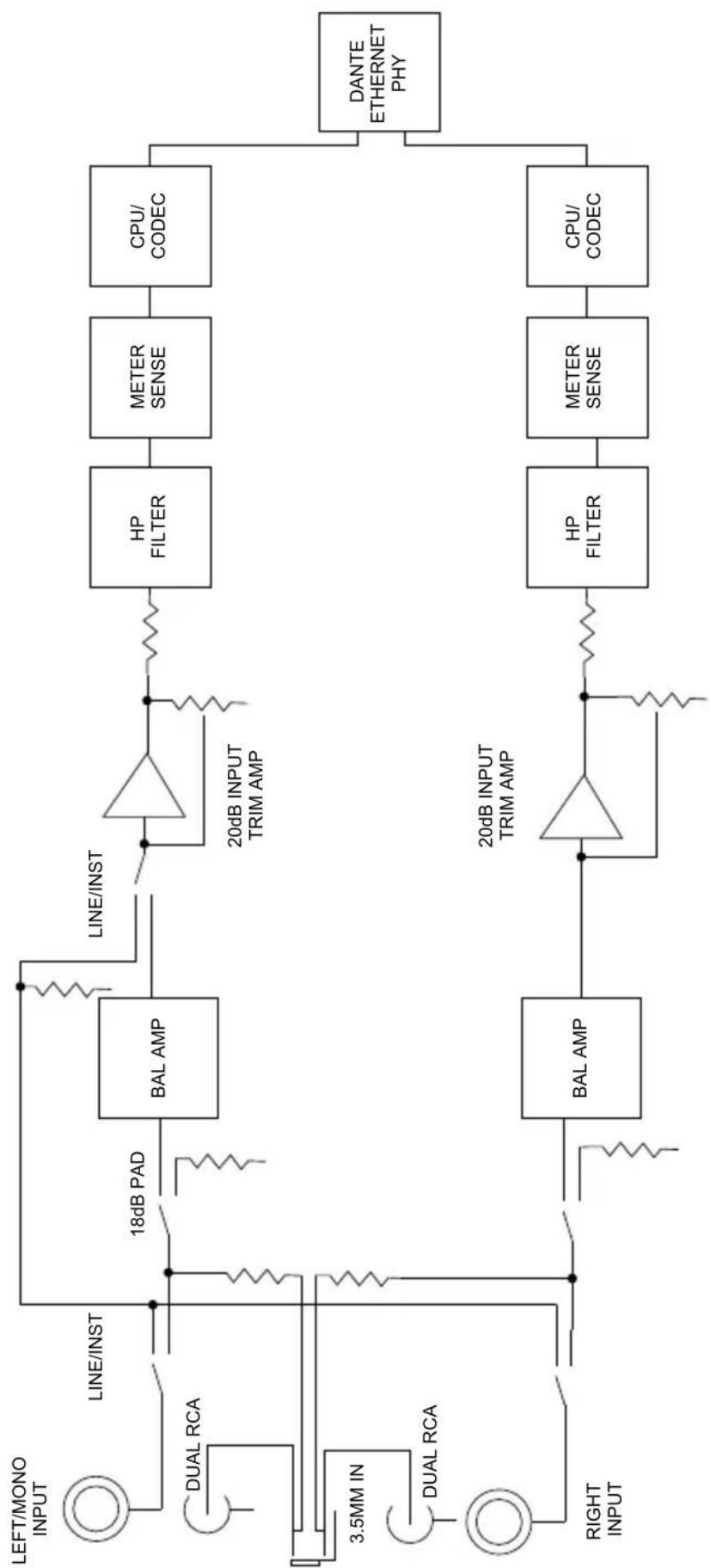
flowchart
graph LR
    A["LEFT/MONO INPUT"] --> B["LINE/INST"]
    C["DUAL RCA"] --> D["18dB PAD"]
    E["3.5MM IN"] --> F["BAL AMP"]
    G["DUAL RCA"] --> H["BAL AMP"]
    I["RIGHT INPUT"] --> J["BAL AMP"]
    K["20dB INPUT TRIM AMP"] --> L["HP FILTER"]
    M["20dB INPUT TRIM AMP"] --> N["HP FILTER"]
    O["20dB INPUT TRIM AMP"] --> P["METER SENSE"]
    Q["CPU/CODEC"] --> R["METER SENSE"]
    S["DANTE ETHERNET PHY"] --> T["CPU/CODEC"]
    U["LINE/INST"] --> V["BAL AMP"]
    W["LINE/INST"] --> X["BAL AMP"]
    Y["LINE/INST"] --> Z["BAL AMP"]
    AA["LINE/INST"] --> AB["BAL AMP"]
    AC["LINE/INST"] --> AD["BAL AMP"]
    AE["LINE/INST"] --> AF["BAL AMP"]
    AG["LINE/INST"] --> AH["BAL AMP"]
    AI["LINE/INST"] --> AJ["BAL AMP"]
    AK["LINE/INST"] --> AL["BAL AMP"]
    AM["LINE/INST"] --> AN["BAL AMP"]
    AO["LINE/INST"] --> AP["BAL AMP"]
    AQ["LINE/INST"] --> AR["BAL AMP"]
    AS["LINE/INST"] --> AT["BAL AMP"]
    AU["LINE/INST"] --> AV["BAL AMP"]
    AW["LINE/INST"] --> AX["BAL AMP"]
    AY["LINE/INST"] --> AZ["BAL AMP"]
    BA["3.5MM IN"] --> BB["BAL AMP"]
    BC["3.5MM IN"] --> BD["BAL AMP"]
    BE["3.5MM IN"] --> BF["BAL AMP"]
    BG["3.5MM IN"] --> BH["BAL AMP"]
    BI["3.5MM IN"] --> BJ["BAL AMP"]
    BK["3.5MM IN"] --> BL["BAL AMP"]
    BM["3.5MM IN"] --> BN["BAL AMP"]
    BO["3.5MM IN"] --> BP["BAL AMP"]
    BQ["3.5MM IN"] --> BR["BAL AMP"]
    BS["DANTE ETHERNET PHY"] --> BT["DANTE ETHERNET PHY"]
* Subject to change without notice.
SPECIFICATIONS\*
Audio Circuit Type: ...... High current balanced active input device
Number of Channels: 2
Sample Rate: 44.1kHz, 48kHz, 88.2kHz, and 96kHz
Bit Depth: 24 bit
Frequency Response: 20Hz-20kHz
Idle Channel Noise: -108dB
Dynamic Range: 103dB
Channel Separation:....>85dB
Equivalent Input Noise: -98dB
Total Harmonic Distortion + Noise: 0.008% @ -6dBfs
IMD: 0.0017% -10dBfs
Unbalanced Input Impedance - Instrument mode: 240kOhm
Balanced Input Impedance - Line Mode: 40kOhm
Unbalanced Input Impedance - Line Mode:....20kOhm
Power Consumption: 1.25W
Features
Input Connectors: 2x 1/4" TS/TRS, 3.5mm TRS, 2x RCA
Output Connectors: RJ45 Ethernet
LED Indicators: SYNC, SYS, +15V, and PoE
Pad: -18dB
HPF: -12dB/octave @ 80Hz
General
Power: 15VDC 400mA (included) or PoE
Power Over Ethernet (PoE)....Class 1 IEEE 802.3af
Construction: 14-gauge steel
Finish: Durable powder coat
Size (L x W x D): 5"x3.31"x1.99"
Warranty: Radial 3-year, transferable
NOTES
NOTES
THREE YEAR TRANSFERABLE LIMITED WARRANTY
RADIAL ENGINEERING LTD. ("Radial") warrants this product to be free from defects in material and workmanship and will remedy any such defects free of charge according to the terms of this warranty. Radial will repair or replace (at its option) any defective component(s) of this product (excluding finish and wear and tear on components under normal use) for a period of three (3) years from the original date of purchase. In the event that a particular product is no longer available, Radial reserves the right to replace the product with a similar product of equal or greater value. In the unlikely event that a defect is uncovered, please call 604-942-1001 or email service@radialeng.com to obtain an RA number (Return Authorization number) before the 3 year warranty period expires. The product must be returned prepaid in the original shipping container (or equivalent) to Radial or to an authorized Radial repair centre and you must assume the risk of loss or damage. A copy of the original invoice showing date of purchase and the dealer name must accompany any request for work to be performed under this limited and transferable warranty. This warranty shall not apply if the product has been damaged due to abuse, misuse, misapplication, accident or as a result of service or modification by any other than an authorized Radial repair center.
THERE ARE NO EXPRESSED WARRANTIES OTHER THAN THOSE ON THE FACE HEREOF AND DESCRIBED ABOVE. NO WARRANTIES WHETHER EXPRESSED OR IMPLIED, INCLUDING BUT NOT LIMITED TO, ANY IMPLIED WARRANTIES OF MERCHANTABILITY OR FITNESS FOR A PARTICULAR PURPOSE SHALL EXTEND BEYOND THE RESPECTIVE WARRANTY PERIOD DESCRIBED ABOVE OF THREE YEARS. RADIAL SHALL NOT BE RESPONSIBLE OR LIABLE FOR ANY SPECIAL, INCIDENTAL OR CONSEQUENTIAL DAMAGES OR LOSS ARISING FROM THE USE OF THIS PRODUCT. THIS WARRANTY GIVES YOU SPECIFIC LEGAL RIGHTS, AND YOU MAY ALSO HAVE OTHER RIGHTS, WHICH MAY VARY DEPENDING ON WHERE YOU LIVE AND WHERE THE PRODUCT WAS PURCHASED.
To meet the requirements of California Proposition 65, it is our responsibility to inform you of the following:
WARNING: This product contains chemicals known to the State of California to cause cancer, birth defects or other reproductive harm.
Please take proper care when handling and consult local government regulations before discarding.

Made in Canada

www.radialeng.com
Radial Engineering Ltd.
1845 Kingsway Ave., Port Coquitlam, BC V3C 1S9, Canada
Tel: 604-942-1001 • Fax: 604-942-1010 • Email: info@radialeng.com
- Radial® DAN-TX™ User Guide
- Table of Contents Page
- OVERVIEW
- Record your DAN-TX MAC address here:
- DiNET-TX-
- FEATURES
- GETTING STARTED
- ETHERNET CONNECTION
- USING THE DAN-TX AS AN INSTRUMENT D.I. BOX
- DAN-TX WITH UNBALANCED CONSUMER AUDIO
- DAN-TX WITH PROFESSIONAL LINE-LEVEL EQUIPMENT
- SPECIFICATIONS\*
- General
- NOTES
- THREE YEAR TRANSFERABLE LIMITED WARRANTY
Brand : Radial Engineering
Model : DiNET DAN-TX
Category : Audio Interface