
Redbox RB-DDA6S - Audio transmitter Sonifex - Free user manual and instructions
Find the device manual for free Redbox RB-DDA6S Sonifex in PDF.


| Product Type | Audio Transmitter |
| Brand | Sonifex |
| Model | Redbox RB-DDA6S |
| Dimensions (W x D x H) | 483 x 250 x 44 mm (1U) |
| Weight | 2.5 kg |
| Power Supply | 100-240V AC, 50/60Hz, 12W |
| Input | 1 x AES/EBU digital audio (BNC) |
| Outputs | 6 x AES/EBU digital audio (BNC) |
| Sample Rates | Up to 192 kHz |
| Bit Depth | 24-bit |
| Operating Temperature | 0°C to 40°C |
| Storage Temperature | -20°C to 60°C |
| Humidity | Up to 80% non-condensing |
| Chassis Material | Steel, black finish |
| Mounting | 19" rackmount, 1U |
| Connectors | BNC (digital audio), IEC (power) |
| Indicators | Power and signal presence LEDs |
| Cooling | Convection, no fans |
| Compliance | CE, RoHS |
| Cleaning | Use dry cloth, no solvents |
| Spare Parts | Contact Sonifex support |
Frequently Asked Questions - Redbox RB-DDA6S Sonifex
User questions about Redbox RB-DDA6S Sonifex
0 question about this device. Answer the ones you know or ask your own.
Ask a new question about this device
Download the instructions for your Audio transmitter in PDF format for free! Find your manual Redbox RB-DDA6S - Sonifex and take your electronic device back in hand. On this page are published all the documents necessary for the use of your device. Redbox RB-DDA6S by Sonifex.
USER MANUAL Redbox RB-DDA6S Sonifex
Digital Redbox User Handbook
RB-DDA6A 6 Way Stereo AES/EBU Digital Distribution Amplifier
RB-DDA6S 6 Way S/PDIF Digital Distribution Amplifier
RB-DDA6W 6 Way Word Clock Distribution Amplifier
RB-ADDA Combined A/D and D/A Converter
RB-DAC1 Digital to Analogue Converter
RB-SC1 Sample Rate Converter
RB-DHD6 Digital 6 Way Stereo Headphone Distribution Amplifier
RB-DMA2 Dual Digital Microphone Amplifier
RB-SP1 Digital Splitter & Combiner
RB-DSS10 10 Way Stereo Digital Source Selector
Revision 1.8 November, 2003
©Sonifex Ltd, 2000-3
All Rights Reserved
Sonifex Ltd, 61, Station Road, Irthlingborough, Northants, NN9 5QE, England.
Tel : +44 (0)1933 650 700
Fax : +44 (0)1933 650 726
Email : sales@sonifex.co.uk or technical.support@sonifex.co.uk
Web : http://www.sonifex.co.uk
Information in this document is subject to change without notice and does not represent a commitment on the part of Sonifex Ltd. Sonifex Ltd shall not be liable for any loss or damage whatsoever arising from the use of information or any error contained in this manual.
No part of this manual may be reproduced or transmitted in any form or by any means, electronic or mechanical, including photocopying, recording, or information storage and retrieval systems, for any purpose other than the purchaser's personal use, without the express written permission of Sonifex Ltd.
Unless otherwise noted, all names of companies, products and persons contained herein are part of a completely fictitious adaptation and are designed solely to document the use of Sonifex products.
Contents
Warranty, Safety & Installation Information...... i
Warranty Information ....i
Returning the Warranty Card ...... ii
Safety of Mains Operated Redbox Equipment .... iii
Preparing the Machine for Use .... iii
Equipment Safety .... iii
Voltage Setting Checks.... iii
Fuse Rating .... iii
Power Cable and Connection .... iii
Ordering the Correct Mains Lead...... iv
Installation Information...... iv
Atmosphere iv
Fitting Redboxes....v
- RB-DDA6A 6 Way Stereo AES/EBU Digital Distribution
Amplifier 1-1
1.1. Introduction.... 1-1
1.2. System Block Diagram....1-2
1.3. Rear Panel Connections and Operation....1-3
1.3.1. AES/EBU Input....1-3
1.3.2. AES/EBU Outputs 1-3
1.4. Technical Specifications .... 1-4
1.4.1. Audio Specifications....1-4
1.4.2. Connections....1-4
1.4.3. Equipment Type 1-4
1.4.4. Physical Specifications....1-4
- RB-DDA6S 6 Way Stereo S/PDIF Digital Distribution
Amplifier 2-1
2.1. Introduction....2-1
2.2. System Block Diagram....2-2
2.3. Rear Panel Connections and Operation 2-3
2.3.1. S/PDIF Input 2-3
2.3.2. S/PDIF Outputs....2-3
2.4. Technical Specifications 2-4
2.4.1. Audio Specifications....2-4
2.4.2. Connections....2-4
2.4.3. Equipment Type 2-4
2.4.4. Physical Specifications 2-4
3. RB-DDA6W 6 Way Word Clock Distribution Amplifier ..3-1
3.1. Introduction....3-1
3.2. System Block Diagram 3-2
3.3. Rear Panel Connections and Operation 3-3
3.3.1. Word Clock Input 3-3
3.3.2. Word Clock Outputs....3-3
3.4. Technical Specifications 3-4
3.4.1. Signal Specifications 3-4
3.4.2. Connections ......3-4
3.4.3. Equipment Type....3-4
3.4.4. Physical Specifications 3-4
4. RB-ADDA Combined A/D and D/A Converter......4-1
4.1. Introduction....4-1
4.2. System Block Diagram 4-2
4.3. Front Panel Indicators 4-2
4.4. Rear Panel Connections and Operation....4-3
4.4.1.RB-ADDA Inputs 4-3
4.4.2.RB-ADDA Outputs 4-4
4.4.3. Rear Panel Controls 4-5
4.5. Technical Specifications 4-7
4.5.1. A/D Connections 4-7
4.5.2. A/D Audio Specification 4-7
4.5.3. D/A Connections 4-7
4.5.4. D/A Audio Specification 4-7
4.5.5. Other Connections....4-8
4.5.6. Operational Controls 4-8
4.5.7. Equipment Type....4-8
4.5.8. Physical Specifications 4-8
5. RB-DAC1 Digital to Analogue Converter 5-1
5.1. Introduction....5-1
5.2. System Block Diagram 5-2
5.3. Front Panel Indicators & Controls 5-2
5.3.1. Sync & Power Indicator 5-2
5.3.2. Headphone Output 5-2
5.3.3. Volume Control....5-2
5.4. Rear Panel Connections and Operation....5-3
5.4.1.RB-DAC1 Inputs 5-3
5.4.2.RB-DAC1 Outputs....5-3
5.4.3. Rear Panel Controls 5-4
5.5. Technical Specifications .... 5-5
5.5.1. Connections....5-5
5.5.2. Audio Specification .... 5-5
5.5.3. Operational Controls 5-5
5.5.4. Equipment Type 5-5
5.5.5. Physical Specifications....5-5
6. RB-SC1 Sample Rate Converter 6-1
6.1. Introduction....6-1
6.2. System Block Diagram....6-2
6.3. Front Panel Indicators 6-2
6.3.1. Front Panel LED 6-2
6.4. Rear Panel Connections and Operation....6-3
6.4.1. Inputs and Outputs 6-3
6.4.2. Rear Panel Controls 6-4
6.5. Technical Specifications 6-6
6.5.1. Audio Specification 6-6
6.5.2. Connections and Controls 6-6
6.5.3. Equipment Type 6-6
6.5.4. Physical Specifications....6-6
7. RB-DHD6 Digital 6 Way Headphone Distribution Amplifier 7-1
7.1. Introduction....7-1
7.2. System Block Diagram....7-2
7.3. Front Panel Indicators & Controls 7-2
7.3.1. Sync & Power Indicator 7-2
7.3.2. Headphone Outputs....7-2
7.3.3. Volume Control 7-2
7.4. Rear Panel Connections and Operation....7-3
7.4.1.RB-DHD6 Inputs 7-3
7.4.2. Rear Panel Controls 7-3
7.5. Technical Specifications 7-4
7.5.1. Connections....7-4
7.5.2. Audio Specification 7-4
7.5.3. Operational Controls 7-4
7.5.4. Equipment Type 7-4
7.5.5. Physical Specifications....7-4
8. RB-DMA2 Dual Digital Microphone Amplifier ....8-1
8.1. Introduction....8-1
8.2. System Block Diagram 8-2
8.3. Front Panel Indicators & Controls 8-3
8.3.1. Sync & Power Indicator 8-3
8.3.2. Input Level Adjustment....8-3
8.3.3. Disabling the Fine Gain Control Knob 8-3
8.3.4. Input Level Indicators 8-4
8.4. Rear Panel Connections and Operation....8-4
8.4.1.RB-DMA2 Inputs 8-4
8.4.2.RB-DMA2 Outputs 8-5
8.4.3. Rear Panel Controls 8-5
8.5. Technical Specifications 8-7
8.5.1. Connections 8-7
8.5.2. Audio Specification 8-8
8.5.3. Operational Controls & Indicators 8-8
8.5.4. Equipment Type....8-8
8.5.5. Physical Specifications 8-8
9. RB-SP1 Digital Splitter & Combiner 9-1
9.1. Introduction....9-1
9.2. System Block Diagram 9-2
9.3. Front Panel Indicators & Controls 9-2
9.3.1. Front Panel LED's 9-2
9.3.2. Type & Mode Switches 9-3
9.4. Rear Panel Connections and Operation....9-5
9.4.1. Inputs and Outputs 9-5
9.4.2. Rear Panel Controls 9-6
9.5. Technical Specifications 9-7
9.5.1. Audio Specifications....9-7
9.5.2. Connections 9-7
9.5.3. Equipment Type....9-7
9.5.4. Physical Specifications 9-7
10. RB-DSS10 10 Way Stereo Digital Source Selector ... 10-1
10.1. Introduction.... 10-1
10.2. System Block Diagram.... 10-2
10.3. Front Panel Indicators & Controls 10-3
10.3.1. Power Indicator.... 10-3
10.3.2. Illuminated Push Buttons....10-3
10.3.3. Headphone Output.... 10-3
10.3.4. Volume Control 10-3
10.4. Rear Panel Connections and Operation 10-4
10.4.1.RB-DSS10 Inputs 10-4
10.4.2.RB-DSS10 Outputs 10-4
10.4.3. RB-DSS10 D-Type Connectors....10-5
10.5. Technical Specifications 10-9
10.5.1. Audio Specifications .... 10-9
10.5.2. Audio Connections 10-9
10.5.3. Other Connections 10-9
10.5.4. Equipment Type 10-9
10.5.5. Physical Specifications.... 10-9
11. Glossary .... 11-1
12. Connectors And Cabling....12-1
12.1. XLR 3 Pin Connectors ...... 12-1
12.2. RCA Phono Connectors 12-1
12.3. ¼" Jack Connector 12-2
12.4. BNC TTL Connectors....12-2
12.5. 25 Way D-Type Connector.... 12-3
12.6. 16 Way D-Type Connector.... 12-3
Index I-1
Figures
Fig W-1: Mains lead table.... iv
Fig W-2: RB-RK1 (B) Small Redbox Front Rack-mount Kit......v
Fig W-3: RB-RK2 Small Redbox Rear Rack-mount Kit ...... v
Fig W-4: RB-RK3 Large Redbox Rear Rack-mount Kit ...... v
Fig 1-1: RB-DDA6A Front Panel....1-1
Fig 1-2: RB-DDA6A System Block Diagram .....1-2
Fig 1-3: RB-DDA6A Rear Panel....1-3
Fig 2-1: RB-DDA6S Front Panel....2-1
Fig 2-2: RB-DDA6S System Block Diagram ......2-2
Fig 2-3: RB-DDA6S Rear Panel....2-3
Fig 3-1: RB-DDA6W Front Panel 3-1
Fig 3-2: RB-DDA6W System Block Diagram ......3-2
Fig 3-3: RB-DDA6W Rear Panel....3-3
Fig 4-1: RB-ADDA Front Panel....4-1
Fig 4-2: RB-ADDA System Block Diagram....4-2
Fig 4-3: RB-ADDA Rear Panel 4-3
Fig 4-4: RB-ADDA Full Scale dB Settings ....4-5
Fig 4-5: RB-ADDA Status Select Switches....4-5
Fig 4-6: RB-ADDA Frequency and Sync Rotary Switch Selections 4-6
Fig 5-1: RB-DAC1 Front Panel....5-1
Fig 5-2: RB-DAC1 System Block Diagram ....5-2
Fig 5-3: RB-DAC1 Front Panel....5-2
Fig 5-4: RB-DAC1 Rear Panel....5-3
Fig 5-5: RB-DAC1 Status & Output Select Switches...... 5-4
Fig 6-1: RB-SC1 Front Panel 6-1
Fig 6-2: RB-SC1 System Block Diagram ......6-2
Fig 6-3: RB-SC1 Rear Panel....6-3
Fig 6-4: RB-SC1 Status Switches....6-4
Fig 6-5: RB-SC1 Frequency and Sync Rotary Switch......6-5
Fig 7-1: RB-DHD6 Front Panel....7-1
Fig 7-2: RB-DHD6 System Block Diagram....7-2
Fig 7-3: RB-DHD6 System Block Diagram....7-2
Fig 7-4: RB-DHD6 Rear Panel 7-3
Fig 7-5: RB-DHD6 Status Select Switches....7-3
Fig 8-1: RB-DMA2 Front Panel....8-1
Fig 8-2: RB-DMA2 System Block Diagram....8-2
Fig 8-3: RB-DMA2 Front Panel....8-3
Fig 8-4: Jumpers to Disable Fine Gain Control ....8-3
Fig 8-5: RB-DMA2 Rear Panel....8-4
Fig 8-6: RB-DMA2 Status Select Switches....8-5
Fig 8-7: RB-DMA2 Frequency and Sync Rotary Switch Selections 8-7
Fig 9-1: RB-SP1 Front Panel 9-1
Fig 9-2: RB-SP1 System Block Diagram....9-2
Fig 9-3: RB-SP1 Front Panel 9-2
Fig 9-4: RB-SP1 Type and Mode Flow Diagrams......9-4
Fig 9-5: RB-SP1 Rear Panel 9-5
Fig 9-6: RB-SP1 Mode Select Dip Switch....9-6
Fig 10-1: RB-DSS10 Front Panel....10-1
Fig 10-2: RB-DSS10 System Block Diagram....10-2
Fig 10-3: RB-DSS10 Front Panel....10-3
Fig 10-4: RB-DSS10 Rear Panel 10-4
Fig 10-5: Digital Audio Inputs and S/PDIF Output Pin Connections 10-5
Fig 10-6: Remote Start Pin Connections ...... 10-6
Fig 10-7: Connection Example ...... 10-6
Fig 10-8: Remote Select/Switch Input Connections ..... 10-7
Fig 10-9: Connection Example ...... 10-7
Fig 10-10: Status Output Pin Connections.... 10-8
Fig 10-11: Connection Example....10-8
Fig 12-1: XLR Connectors....12-1
Fig 12-2: RCA Phono Connector ..... 12-1
Fig 12-3: 1/4'' Jack Connector....12-2
Fig 12-4: BNC TTL Connector....12-2
Fig 12-5: 25 Way D-Type Connectors....12-3
Fig 12-6: 15 Way D-Type Connectors....12-3
Warranty, Safety & Installation Information
Warranty Information
Warranty and Liability - important the purchaser is advised to read this clause.
(a) The Company agrees to repair or (at its discretion) replace Goods which are found to be defective (fair wear and tear excepted) and which are returned to the Company within 12 months of the date of despatch provided that each of the following are satisfied:
(i) Notification of any defect is given to the Company immediately upon its becoming apparent to the Purchaser;
(ii) The Goods have only been operated under normal operating conditions and have only been subject to normal use (and in particular the Goods must have been correctly connected and must not have been subject to high voltage or to ionising radiation and must not have been used contrary to the Company's technical recommendations);
(iii) The Goods are returned to the Company's premises at the Purchaser's expense; (iv) Any Goods or parts of Goods replaced shall become the property of the Company; (v) No work whatsoever (other than normal and proper maintenance) has been carried out to the Goods or any part of the Goods without the Company's prior written consent;
(vi) The defect has not arisen from a design made, furnished or specified by the Purchaser;
(vii) The Goods have been assembled or incorporated into other goods only in accordance with any instructions issued by the Company;
(viii) The defect has not arisen from a design modified by the Purchaser; (ix) The defect has not arisen from an item manufactured by a person other than the Company. In respect of any item manufactured by a person other than the Company, the Purchaser shall only be entitled to the benefit of any warranty or guarantee provided by such manufacturer to the Company.
(b) In respect of computer software supplied by the Company the Company does not warrant that the use of the software will be uninterrupted or error free.
(c) The Company accepts liability:
(i) For death or personal injury to the extent that it results from the negligence of the Company, it's employees (whilst in the course of their employment) or its agents (in the course of the agency);
(ii) For any breach by the Company of any statutory undertaking as to title, quiet possession and freedom from encumbrance.
(d) Subject to conditions (a) and (c) from the time of despatch of the Goods from the Company's premises the Purchaser shall be responsible for any defect in the Goods or loss, damage, nuisance or interference whatsoever consequential economic or otherwise or wastage of material resulting from or caused by or to the Goods. In particular the Company shall not be liable for any loss of profits or other economic losses. The Company accordingly excludes all liability for the same.
(e) At the request and expense of the Purchaser the Company will test the Goods to ascertain performance levels and provide a report of the results of that test.
The report will be accurate at the time of the test, to the best of the belief and Knowledge of the Company, and the Company accepts no liability in respect of its accuracy beyond that set out in Condition (a).
(f) Subject to Condition (e) no representation, condition, warranty or other term, express or implied (by statute or otherwise) is given by the Company that the Goods are of any particular quality or standard or will enable the Purchaser to attain any particular performance or result, or will be suitable for any particular purpose or use under specific conditions or will provide any particular capacity, notwithstanding that the requirement for such performance, result or capacity or that such particular purpose or conditions may have been known (or ought to have been known) to the Company, its employees or agents.
(G)(i) To the extent that the Company is held legally liable to the Purchaser for any single breach of contract, tort, representation or other act or default, the Company's liability for the same shall not exceed the Price of the Goods.
(ii) The restriction of liability in Condition (g)(i) shall not apply to any liability accepted by the Seller in Condition (c).
(h) Where the Goods are sold under a consumer transaction (as defined by the Consumer Transactions (Restrictions on Statements) Order 1976) the statutory rights of the Purchaser are not affected by these Conditions of Sale.
Returning the Warranty Card
In order to register the date of purchase so that we can keep you informed of any design improvements or modifications, it is important to complete the warranty registration document that is enclosed and return it to Sonifex Ltd in the UK.
For your own records you should write down the type of machine and the serial number (which can be found on the rear panel of the Redbox).
| Redbox Type | RB- |
| Serial Number | RB |
Safety of Mains Operated Redbox Equipment
Preparing the Machine for Use
Each Redbox is shipped in protective packaging and should be inspected for damage before use. Where an item is found to have transit damage, notify your supplier immediately with all the relevant details of the shipment. Packing materials should be kept for inspection.
Equipment Safety
This equipment has been designed to meet the safety regulations currently advised in the country of purchase.
The power cable supplied carries an EARTH conductor, which is connected internally to the equipment chassis ground. This connection through a properly wired power connector is essential for safe operation. Disconnection of this earth connection may render the equipment unsafe, with a consequential possible electrical shock hazard from exposed metallic parts.

This equipment will operate in a horizontal position and conforms to the safety regulations specified by use of the CE Mark.
Warning: There are no user serviceably parts inside the machine. If you should ever need to look inside the unit, always disconnect the mains supply before removing the equipment covers.
Voltage Setting Checks
Ensure that the machine operating voltage is correct for your mains power supply by checking the box in which your Redbox was supplied. The voltage is shown on the box label. The available voltage settings are 115V, or 230V. Please note that the majority of the Redboxes are switch able between 115V and 230V.
Fuse Rating
The Redboxes are supplied with a single fuse in the live conducting path of the power infeed at the power supply. For reasons of safety it is important that the correct rating and type of fuse is used. Incorrectly rated fuses could present a possible fire hazard, under equipment fault conditions. The fuse ratings for the Redboxes are: -
| Voltage | Fuse |
| 115 V 200mA, 5 x 20mm SB | |
| 230 V 100mA, 5 x 20mm SB | |
Power Cable and Connection
An IEC power connector is supplied with the Redbox which has a moulded plug attached – this is a legal requirement. If no moulded plug has been supplied with Your Redbox, please contact your supplier, because an IEC connector is always supplied from the Sonifex factory. If for any reason, you need to use the Redbox with a different power cable, you should use the following wiring guidelines:
| Wire Colour Connection | |
| Green, or green and yellow Earth (E) | |
| Blue, or Black Neutral (N) | |
| Brown, or Red Live (L) | |
Ordering the Correct Mains Lead
When ordering a Redbox from Sonifex, it is helpful if you can specify your required operating voltage and mains lead. After the product code add:
| UK, for 230V, UK 3 pin to IEC lead |  | ||
| EC, for 230V, European Schuko 2 pin to IEC lead |  | ||
| US, for 115V, 3 pin to IEC lead |  | ||
| AU for 230V, Australasian 3 pin to IEC lead |  |
Fig W-1: Mains lead table
E.g. order RB-BL2 UK for a UK IEC lead to be supplied.
Installation Information
Atmosphere
The units should be installed in an area that is not subject to excessive temperature variation ( <0°C, >50°C ), moisture, dust or vibration.
Fitting Redboxes
Redboxes can be fixed to the underside of a mixing desk, or other surfaces using 2 off No. 6 countersink screws.
They can also be rack-mounted, with either the front, or rear of the Redbox positioned at the front of the rack:
Front Mounting Redboxes: For rack mounting smaller (28cm) units the optional RB-RK1 (Red) or RB-RK1B (Black) kit can be used (which include 4 off M6 panel fixing screws).

Fig W-2: RB-RK1 (B) Small Redbox Front Rack-mount Kit
Rear Mounting Redboxes: For rear panel mounting you can use either the RB-RK2, or RB-RK3, depending on the size of your Redbox.
RB-RK2 1U rear panel rack kit for small Redbox range, e.g., RB-DDA6A

Fig W-3: RB-RK2 Small Redbox Rear Rack-mount Kit

E.g. for fitting an RB-BL2:
RB-RK3 1U rear panel rack kit for large Redbox range, e.g., RB-ADDA

Fig W-4: RB-RK3 Large Redbox Rear Rack-mount Kit
E.g. for fitting an RB-DA6:

Wherever you see this symbol an RB-RK1 front panel rack kit can be used for the following
RB-UL1, RB-UL2, RB-BL2, RB-MA1, RB-MA2, RB-SM1, RB-SM2, RB-DDA6A, RB-DDA6S, RB-DDA6W, RB-SC1, RB-SL2, RB-LC3, RB-LI2
Wherever you see this symbol an RB-RK2 back panel 19" rack ears kit can be used for the following
RB-UL1, RB-UL2, RB-BL2, RB-MA1, RB-MA2, RB-SM1, RB-SM2, RB-DDA6A, RB-DDA6S, RB-DDA6W, RB-SC1, RB-SL2, RB-LC3, RB-LI2

Wherever you see this symbol an RB-RK3 back panel 19" rack ears kit can be used for the following
RB-ADDA, RB-UL4, RB-UL2, RB-PLI6, RB-DA6, RB-SS10, RB-DSS10, RB-PMX4, RB-HD6, RB-DHD6, RB-DMA2, RB-SD1
Note: When fitting the rear-mounting rack-kits, a notch has been left on the inside of the right-hand rack-piece for the mains cable to pass through. Make sure that the mains cable has been put through the notch before attaching the right hand rack-piece.
1. RB-DDA6A 6 Way Stereo AES/ EBU Digital Distribution Amplifier

Fig 1-1: RB-DDA6A Front Panel
1.1. Introduction
The RB-DDA6A 6 Way AES/EBU Digital Distribution Amplifier is used for distributing digital audio data in AES/EBU format. It has a single AES/EBU audio input, which is distributed to 6 outputs at the same level and condition as the input signal and can accept 24 bit, 96kHz signals.
1.2. System Block Diagram
![graph TD A["Input XLR-3 Female"] --> B["AES/EBU Receiver"] B --> C1["AES/EBU Transmitter"] B --> C2["AES/EBU Transmitter"] B --> C3["AES/EBU Transmitter"] B --> C4["AES/EBU Transmitter"] C1 --> D1["Output XLR-3 Male"] C2 --> D2["Output XLR-3 Male"] C3 --> D3["Output XLR-3 Male"] C4 --> D4["Output XL…](/content/2026/06/1196668/images/4883938926a077f5416f9787eff9c1e882ab2d04e8e26488f2373e2b044027de.jpg)
Fig 1-2: RB-DDA6A System Block Diagram
1.3. Rear Panel Connections and Operation
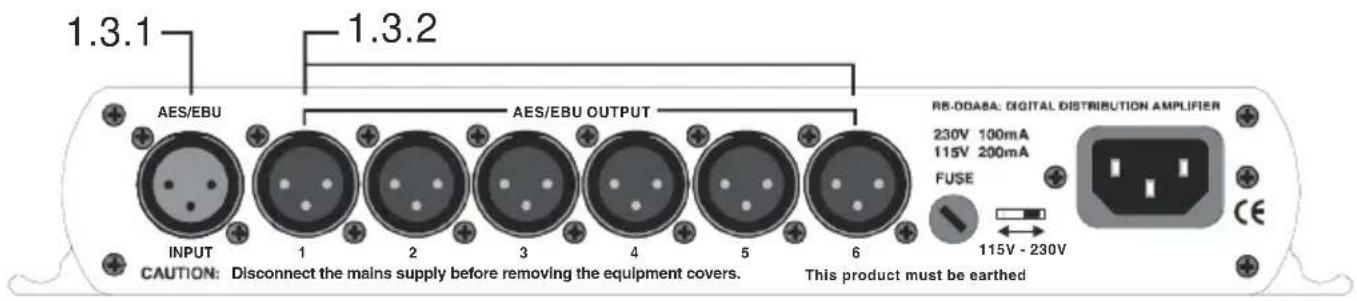
Fig 1-3: RB-DDA6A Rear Panel
1.3.1. AES/ EBU Input
The XLR 3 pin socket has an impedance of 110 ohms. It has the following connections:
Pin 1: Screen
Pin 2: Phase
Pin 3: Non-phase
1.3.2. AES/ EBU Outputs
The XLR 3 pin sockets have an impedance of 110 ohms. They have the following connections:
Pin 1: Screen
Pin 2: Phase
Pin 3: Non-phase
1.4. Technical Specifications
1.4.1. Audio Specifications
Input Impedance: 110Ω ± 20% balanced
Output Impedance: 110Ω ± 20% balanced
Sample Freq Range: 30-100kHz (i.e. including 32kHz, 44.1kHz, 48kHz, 64kHz, 88.2kHz and 96kHz)
Signal Level 3V/10V peak to peak min/max
1.4.2. Connections
Input 1 x AES/EBU XLR 3 pin female (balanced)
Outputs 6 x AES/EBU XLR 3 pin male (balanced)
Mains Input Filtered IEC, 110-120V, or 220-240V switchable, fused
1.4.3. Equipment Type
RB-DDA6A AES/EBU 6 way stereo digital distribution amplifier
1.4.4. Physical Specifications
Dimensions (Raw) 28cm (W) x 10.8cm (D) x 4.2cm (H) (1U)
Dimensions (Boxed) 36cm (W) x 20.5cm (D) x 6cm (H)
Weight Nett: 0.95kg Gross: 1.4kg
2. RB-DDA6S 6 Way Stereo S/PDIF Digital Distribution Amplifier

Fig 2-1: RB-DDA6S Front Panel
2.1. Introduction
The RB-DDA6S Digital Distribution Amplifier is used for distributing digital audio data in S/PDIF format. It has a single S/PDIF audio input, which is distributed to 6 outputs at the same level and condition as the input signal and can accept 24 bit, 96kHz signals.
2.2. System Block Diagram
![graph TD A["Input RCA Phono"] --> B["S/PDIF Receiver"] B --> C1["S/PDIF Transmitter"] B --> C2["S/PDIF Transmitter"] B --> C3["S/PDIF Transmitter"] B --> C4["S/PDIF Transmitter"] C1 --> D1["Output RCA Phono"] C2 --> D2["Output RCA Phono"] C3 --> D3["Output RCA Phono"] C4 --> D4["Output RCA Phono"] B…](/content/2026/06/1196668/images/2cdd2b5fc3c903df7f87884d3c56516c4732da7c1aedec7eda6d10d6c4d36a87.jpg)
Fig 2-2: RB-DDA6S System Block Diagram
2.3. Rear Panel Connections and Operation
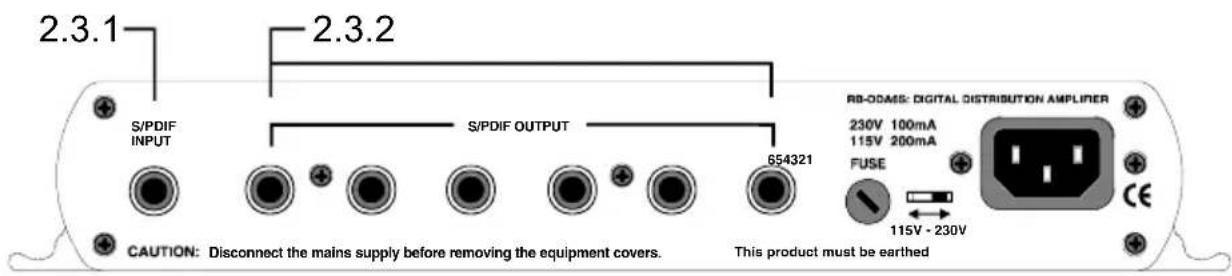
Fig 2-3: RB-DDA6S Rear Panel
2.3.1. S/PDIF Input
The S/PDIF phono input has an impedance of 75 ohms.
2.3.2. S/PDIF Outputs
The S/PDIF phono outputs have an impedance of 75 ohms.
2.4. Technical Specifications
2.4.1. Audio Specifications
Input Impedance: 75Ω ± 5% unbalanced
Output Impedance: 75Ω ±5% unbalanced
Sample Freq Range: 30-100kHz (i.e. including 32kHz, 44.1kHz, 48kHz, 64kHz, 88.2kHz and 96kHz)
Signal Level 0.5V ±20% peak to peak
2.4.2. Connections
Input 1 x S/PDIF RCA phono female (unbalanced)
Outputs 6 x S/PDIF RCA phono female (unbalanced)
Mains Input Filtered IEC, 110-120V, or 220-240V switchable, fused
2.4.3. Equipment Type
RB-DDA6S 6 Way Stereo S/PDIF digital distribution amplifier

2.4.4. Physical Specifications
Dimensions (Raw) 28cm (W) x 10.8cm (D) x 4.2cm (H) (1U)
Dimensions (Boxed) 36cm (W) x 20.5cm (D) x 6cm (H)
Weight Nett: 0.9kg Gross: 1.9kg
3. RB-DDA6W 6 Way Word Clock Distribution Amplifier

Fig 3-1: RB-DDA6W Front Panel
3.1. Introduction
The RB-DDA6W 6 Way Word Clock Distribution Amplifier distributes a word clock BNC input signal to 6 word clock BNC outputs re-conditioned. It is used in distributing reference clocks for digital audio systems.
It has a single female BNC input which is distributed to 6 female BNC outputs.
The unit's primary application is to distribute a master TTL word clock source to multiple pieces of equipment that need to be synchronised from the master.
3.2. System Block Diagram
![graph TD A["BNC Input"] --> B["TTL Receiver"] B --> C1["TTL Transmitter"] B --> C2["TTL Transmitter"] B --> C3["TTL Transmitter"] B --> C4["TTL Transmitter"] C1 --> D1["BNC Output"] C2 --> D2["BNC Output"] C3 --> D3["BNC Output"] C4 --> D4["BNC Output"] C1 --> D5["BNC Output"] C2 --> D6["BNC Output"…](/content/2026/06/1196668/images/14f9ef961d321c99577f362e6bc20963f114accc781c84089fe31ff00a7a9171.jpg)
Fig 3-2: RB-DDA6W System Block Diagram
3.3. Rear Panel Connections and Operation

Fig 3-3: RB-DDA6W Rear Panel
3.3.1. Word Clock Input
The Word Clock BNC input has an impedance of 75 ohms.
3.3.2. Word Clock Outputs
The Word Clock BNC outputs have an impedance of <50 ohms.
3.4. Technical Specifications
3.4.1. Signal Specifications
Input Impedance 75Ω
Output Impedance <50Ω
3.4.2. Connections
Input 1 x BNC female
Outputs 6 x BNC female
Mains Input Filtered IEC, 110-120V, or 220-240V switchable, fused
3.4.3. Equipment Type
RB-DDA6W 6 Way word clock distribution amplifier


3.4.4. Physical Specifications
Dimensions (Raw) 28cm (W) x 10.8cm (D) x 4.2cm (H) (1U)
Dimensions (Boxed) 36cm (W) x 20.5cm (D) x 6cm (H)
Weight Nett: 0.95kg Gross: 1.35kg
4. RB-ADDA Combined A/D and D/A Converter
4.1. Introduction
RB-ADDA SONIFEX COMBINED AIR AND DIA CONVERTER
Fig 4-1: RB-ADDA Front Panel
Using 24 bit, 96kHz capable devices, the RB-ADDA A/D and D/A Converter is a 1U rack-mount which produces an AES/EBU or S/PDIF level digital audio output from a balanced XLR or unbalanced phono stereo audio input. The unit also produces a stereo balanced XLR or unbalanced phono output from an incoming AES/EBU or S/PDIF digital input signal.
The unit operates in four modes:
Master Mode - In this mode the unit receives an analogue audio signal, which is digitised and formatted for digital serial transmission (IEC958). The necessary clock signals are generated internally from an on board master clock at a selectable rate (32kHz, 44.1kHz, 48kHz, 88.2kHz or 96kHz).

Slave Mode - In this mode the unit automatically detects the presence of a digital audio sync signal, if present at the digital input, and synchronises the digital output to it. If no sync is present, no output will be generated.
Auto Mode - Here the unit synchronises to the digital audio sync signal if present at the digital input and uses the internal master clock only if no sync input signal is detected. In this case, the internal master clock is used at the selected sample rate.
Auto Lock Mode - This operates like the auto mode except that if no sync input signal is detected, it will use the internal master clock to sync to the sample rate, which was last clocked to.
When operating in sync modes, the front panel power LED flashes whenever the unit is not synchronised to the incoming digital signal, or when the unit is being calibrated. The RB-ADDA should be calibrated once it has been powered up for more than 10 minutes.
The analogue inputs have left and right level controls using pre-set potentiometers and DIP switches allowing a signal range from +9dBu to +27dBu. The analogue outputs have an output level control, allowing full-scale settings selectable from +12dBu, +18dBu or +24dBu. There are factory-set internal level controls for the analogue outputs allowing gain adjustment of ±1dB.
There are buttons to select either the AES/EBU or S/PDIF input or output for the D/A and A/D sections respectively. The output bit depth can be selected from 16, 20 or 24 bits. Inputs of a different bit depth to the output are dithered using a psychoacoustic noise filter.
For the digital output, there is a switch available to define the content of the channel status bits embedded within the digital audio stream. The channel status bits will be forced to Professional Mode for sample rates above 48kHz as they are not supported by the Consumer Mode. For sample rates of 32kHz, 44.1kHz and 48kHz, the status bits can be either set to Professional or Consumer Mode.
4.2. System Block Diagram
![graph TD A["Digital Input"] --> B["Digital Source Select"] B --> C["AES Receiver"] C --> D["DAC"] D --> E["Analog Output"] E --> F["Master Clock Generator"] F --> G["ADC"] G --> H["AES Transmitter"] H --> I["Digital Send Select"] I --> J["Analog Input Select"] J --> K["Gain"] K --> L["Gain"] L --> M…](/content/2026/06/1196668/images/3d38963a0950f8028b0bc0113e25c539b446d75a9bdaaf29f93ffe8780824b27.jpg)
Fig 4-2: RB-ADDA System Block Diagram
4.3. Front Panel Indicators
The LED on the front panel is normally red to indicate that power is present on the unit. However, it also has a secondary role to indicate the status of the digital inputs
- Fast flashing between red and amber – indicates a loss of digital input signal or that the unit is being calibrated.
4.4. Rear Panel Connections and Operation

Fig 4-3: RB-ADDA Rear Panel
4.4.1. RB-ADDA Inputs
4.4.1.1. XLR Analogue Inputs (Left and Right)
The XLR 3 pin sockets used for the left and right channel inputs are electronically balanced and have an impedance of greater than 10kΩ bridging. Each XLR has the following connections:
Pin 1: Screen.
Pin 2: Phase.
Pin 3: Non-phase.
4.4.1.2. RCA Phono Inputs (Left and Right)
The two left and right RCA inputs are unbalanced and have an impedance of greater than 20kΩ .
4.4.1.3. Input Level Adjustment
The input gain can be individually adjusted for left and right channels by dipswitches and through pre-set potentiometers accessible on the rear panel. For full scale dB settings refer to 4.4.3.1.
Individual preset pots give a further ± 3dBu to give a total gain range of +9dBu to +27dBu for full-scale digits. The consumer input on the phono connector
Has a further 10dbU gain incorporated to give a total gain range of -1dBu to +17dBu for full-scale digits.
4.4.1.4. AES/EBU Inputs
The digital input XLR 3 pin socket has an impedance of 110Ω . It has the following connections:
Pin 1: Screen
Pin 2: Phase
Pin 3: Non-phase
The signals on this connector should meet the IEC 60968 specification
4.4.1.5. S/PDIF Inputs
The S/PDIF digital phono inputs have an impedance of 75 Ω.
4.4.2. RB-ADDA Outputs
4.4.2.1. Analogue Outputs (Left and Right)
The XLR 3 pin output plug connectors are electronically balanced with an output impedance of less than 50 Ω. They have the following connections:
Pin 1: Screen.
Pin 2: Phase.
Pin 3: Non-phase.
4.4.2.2. RCA Phono Outputs (Left and Right)
These RCA (phono) outputs are unbalanced and have an output impedance of less than 75Ω .
4.4.2.3. Output Level Adjustment
The output gain can be individually adjusted for left and right channels through the rear panel by dipswitches. Each output gain can be set for a signal of full-scale digits in the digital domain to give +12, +18 or +24dBu output on the XLR connectors (see Fig 4-4). The consumer output on the phono connector has a further 10dbU attenuation incorporated.
4.4.2.4. AES/EBU Output
The digital output XLR 3 pin socket has an impedance of 110Ω . It has the following connections:
Pin 1: Screen
Pin 2: Phase
Pin 3: Non-phase
The signals on this connector will comply with the IEC 60968 specification
4.4.2.5. S/PDIF Output
The digital output S/PDIF phono output has an impedance of 75Ω.
4.4.3. Rear Panel Controls
4.4.3.1. Full Scale dB Settings
The full-scale dB settings can be set for signals of +12, +18, +24 dBu to give full-scale digits in the digital domain.
| FULL SCALE dB SETTINGS | ||||
| IN | OUT | +12 | +18 | +24 |
| 1 | 3 | OFF | ON | ON |
| 2 | 4 | OFF | OFF | ON |
Fig 4-4: RB-ADDA Full Scale dB Settings
4.4.3.2. Status Select Switches
These switches are used to determine the status or content of the digital signals. The type of information encoded in the channel status bits of a digital audio signal can be professional or consumer and is determined by switch 1. However at bit rates higher than 48kHz, consumer mode is not available, so professional mode is used and this switch will be ignored.
If de-emphasis is selected (switch 2) the RB-ADDA will decode 50 / 15µs emphasis when indicated by certain channel status bits in the incoming digital audio data.
The sample size for the analog to digital conversion can be set to 24, 20 or 16 bits (switch 3 & 4). When the signal is truncated from 24 bits, a psycho-acoustic filter is applied to maintain optimum signal quality. These settings are summarised by the table in Fig 4-5, which is also shown on the top panel of the unit.
| STATUS | |||
| 1 | ON | PROFESSIONAL | |
| 1 | OFF | CONSUMER | |
| 2 | ON | DE-EMPHASIS ON | |
| 2 | OFF | DE-EMPHASIS OFF | |
| BITS | |||
| 16 | 20 | 24 | |
| 3 | OFF | OFF | ON |
| 4 | OFF | ON | ON |
Fig 4-5: RB-ADDA Status Select Switches
4.4.3.3. Digital Select Buttons
These buttons are used to switch the digital connection between the AES/EBU XLR connector (button out) and the S/PDIF phono connector (button in) for the digital input and the digital output.
4.4.3.4. Analogue Select Button
This button is used to switch the Analogue input between the balanced XLR connector (button out) and the unbalanced phono connector (button in).
4.4.3.5. Frequency and Sync Mode Rotary Switch
This rotary switch is used to select the Synchronisation Mode and to select the frequency of the digital output when using the on-board clock generator. There are 4 modes of operation: - Master Mode, Auto Sync Mode, Auto Lock Sync Mode & Slave Mode.
- In Master Sync Mode, switch positions 0 – 5, the digital output sample rate is simply set by, and locked to, the internal on-board clock generator. No sync signal is used or required.
- In Auto Sync Mode, switch positions 6–B, the digital output sample rate follows the digital input. When the digital input signal is not present the output sample rate will be set by, and locked to, the internal on-board clock generator at a frequency determined by the switch position.
- In Auto-Lock Sync Mode, switch position C, No output will be generated until lock is achieved with a digital input signal. The digital output sample rate now follows the digital input. If the digital input signal is removed then the output sample rate will be set by, and locked to, the internal on-board clock generator at the closest frequency available to the previous digital input.
- In Slave Sync Mode, switch position D, the digital output sample rate follows the digital input. When the digital input signal is not present the digital output is turned off.
The following table, also printed on the top of the unit, summarises the above settings and shows the sample rate generated by the internal clock generator in master and auto sync modes.
| FREQUENCIES AND SYNC MODES | ||||||
| kHz | 32 4 | 4.1 48 | 64 88.2 | 96 | ||
| MASTER 0 | 1 2 3 4 5 | |||||
| AUTO 6 7 | 8 9 A B | |||||
| AUTO LOCK = C | SLAVE MODE = D | |||||
Fig 4-6: RB-ADDA Frequency and Sync Rotary Switch Selections
4.4.3.6. Test/Calibration Mode
For optimum performance of the RB-ADDA, the unit should be calibrated when it has been powered up for approximately 10-15 minutes. The circuitry and chipsets contained in the unit will warm up during this time and the performance will deteriorate unless calibrated (the noise floor and dynamic range will be 1-2dB down on their best). The calibration cycle calibrates the gain and the zero reference of the A/D converter.
To calibrate the RB-ADDA, set the rotary FREQUENCIES AND SYNC MODES switch to position "F". The power LED on the front panel will flash quickly for 2 – 3 seconds and will illuminate fully when the unit is calibrated. Once calibration is complete, reset the rotary switch to the position that you require.
4.5. Technical Specifications
4.5.1. A/D Connections
Analogue Inputs: 2 x XLR 3 pin (balanced) (L & R)
2 x RCA phono (unbalanced) (L & R)
Digital Outputs: 1 x AES/EBU XLR 3 pin plug
1 x S/PDIF RCA phono socket
4.5.2. A/D Audio Specification
Maximum Input Level: +27dBu (balanced inputs)
Maximum Input Level: +17dBu (unbalanced inputs)
Input Impedance: >10kΩ bridging (balanced inputs)
Input Impedance: >20kΩ (unbalanced inputs)
Input Levels: Switchable +24dBu/+18dBu/+12dBu for FSD
Gain Range: Adjustable 3dB loss to 3dB gain (L and R adjust)
Signal to Noise: Better than -109dbFS (RMS A-weighted at 24bit)
Dynamic Range: >110dB
Distortion and Noise: >96dB THD + N at 1kHz
4.5.3. D/A Connections
Digital Inputs: 1 x AES/EBU XLR 3 pin female
1 x S/PDIF RCA phono
Analogue Outputs: 2 x XLR 3 pin male (balanced) (L & R)
2 x RCA phono (unbalanced) (L & R)
4.5.4. D/A Audio Specification
Max Output Level: +24dBu (balanced outputs)
Max Output Level: +14dBu (unbalanced outputs)
Output Impedance: <50Ω (balanced outputs)
Output Impedance: <75Ω (unbalanced outputs)
Dynamic Range: >100dB
Gain Range: Selectable 12dBu, 18dBu or 24dBu output level, ref FSD
4.5.5. Other Connections
Mains Input: Filtered IEC, 110-120V, or 220-240V switchable, fused 10W max
4.5.6. Operational Controls
Analogue Input Select: XLR or phono, via push-switch
Bit Depth: 16, 20 or 24 bits via DIP switch
Digital Output Select: AES/EBU or S/PDIF, via push-switch
Modes & Frequencies: 16 way rotary DIP switch
Digital Input Select: AES/EBU or S/PDIF, via push-switch
Channel Status Bits: Set to consumer or professional mode via DIP switch
4.5.7. Equipment Type
RB-ADDA Combined A/D and D/A converter

4.5.8. Physical Specifications
Dimensions (Raw) 48cm (W) x 10.8cm (D) x 4.2cm (H) (1U)
Dimensions (Boxed) 53cm (W) x 20.5cm (D) x 6cm (H)
Weight Nett: 1.6kg Gross: 2.2kg
5. RB-DAC1 Digital to Analogue Converter

Fig 5-1: RB-DAC1 Front Panel
5.1. Introduction
Using 24 bit, 96kHz capable devices, the RB-DAC1 Digital to Analogue Converter is a 1U rack-mount which produces a stereo balanced XLR or unbalanced phono output from an incoming AES/EBU or S/PDIF digital input signal. There is also a headphone output for monitoring purposes.

The analogue outputs have an output level control, allowing full-scale settings selectable from +12dBu, +18dBu or +24dBu. De-emphasis on the output can be enabled via dipswitch.
There is a button to select either the AES/EBU or S/PDIF input for the D/A converter, which is located on the rear panel.
When operating, the front panel power LED flashes whenever the unit is not synchronised to the incoming digital signal.
5.2. System Block Diagram
![graph LR A["Digital Input"] --> B["Digital Source Selector"] B --> C["AES Receiver"] C --> D["DAC"] D --> E["Volume Control"] D --> F["Stereo Headphone Output"] D --> G["XLR Professional Balanced Output"] D --> H["Phono Consumer Unbalanced Output"] E --> I["Analogue Outputs"] F --> I G --> I H --> I…](/content/2026/06/1196668/images/bc7c1ad4e678d648b957199e73b278cd83678eff5654c26df0d6ccc0dce7aed3.jpg)
Fig 5-2: RB-DAC1 System Block Diagram
5.3. Front Panel Indicators & Controls

Fig 5-3: RB-DAC1 Front Panel
5.3.1. Sync & Power Indicator
The LED on the front panel is normally red to indicate that power is present on the unit. However, it also has a secondary role to indicate the status of the digital inputs:
Flashing between red and amber – indicates a loss of a valid digital input signal.
5.3.2. Headphone Output
The output available on the front panel through a 1/4 " stereo jack socket, is designed to drive 150 mW into 32Ω to 600Ω professional headphones.
5.3.3. Volume Control
The headphone output has its own volume control, which is independent of the level adjustment for the main outputs, and has a maximum output level of +12dBu.
5.4. Rear Panel Connections and Operation

Fig 5-4: RB-DAC1 Rear Panel
5.4.1. RB-DAC1 Inputs
5.4.1.1. AES/ EBU Input
The digital input XLR 3 pin socket has an impedance of 110 Ω. It has the following connections:
Pin 1: Screen
Pin 2: Phase
Pin 3: Non-phase
The signals on this connector should meet the IEC 60968 specification
5.4.1.2. S/ PDIF Input
The S/PDIF digital phono input has an impedance of 75 Ω.
5.4.2. RB-DAC1 Outputs
5.4.2.1. Analogue Outputs (Left and Right)
The XLR 3 pin output plug connectors are electronically balanced with an output impedance of less than 50 Ω. They have the following connections:
Pin 1: Screen.
Pin 2: Phase.
Pin 3: Non-phase.
5.4.2.2. RCA Phono Outputs (Left and Right)
These RCA (phono) outputs are unbalanced and have an output impedance of less than 75Ω.
5.4.3. Rear Panel Controls
| FULL SCALE dB SETTINGS | |||
| +12 +18 | +24 | ||
| 1 | O | F | F |
| 2 | O | F | F |
| STATUS | |||
| 3 | ON | DE-EMPHASIS ON | |
| 3 | OFF | DE-EMPHASIS OFF | |
| 4 | RESERVED | ||
N O N F F O
Fig 5-5: RB-DAC1 Status & Output Select Switches
5.4.3.1. Output Level Adjustment
The output gain can be adjusted by dipswitches on the rear panel. The output gain can be set for a signal of full-scale digits in the digital domain to give +12, +18 or +24dBu output on the XLR connectors. The consumer output on the phono connector has a further 81/2 dbU attenuation incorporated.
5.4.3.2. De-emphasis Switch
If de-emphasis is selected (switch 3) the RB-DAC1 will decode 50/15 µ s emphasis when indicated by certain channel status bits in the incoming digital audio data.
5.4.3.3. Digital Select Button
This button is used to switch the digital input from the AES/EBU XLR connector (button out) to the S/PDIF phono connector (button in).
5.5. Technical Specifications
5.5.1. Connections
Digital Inputs: 1 x AES/EBU XLR 3 pin female
1 x S/PDIF RCA phono
Analogue Outputs: 2 x XLR 3 pin male (balanced) (L & R)
2 x RCA phono (unbalanced) (L & R)
Headphone Output: 1 x 1/4 " (6.35mm) A/B gauge 3-pole stereo jack socket
Mains Input: Filtered IEC, 110-120V, or 220-240V switchable, fused 10W max
5.5.2. Audio Specification
Max Output Level: +24dBu (balanced outputs)
+ 14dBu (unbalanced outputs)
+ 12dBu (headphone outputs)
Output Impedance: <50Ω (balanced outputs)
< 7 5 Ω (unbalanced outputs)
Dynamic Range: >100dB
Noise & Distortion: <0.01% THD + N @1kHz
Sample Freq Range: 30kHz - 100kHz
Gain Range: Selectable 12dBu, 18dBu or 24dBu output level, ref. FSD
Headphones: Drives 150 mW into 32Ω to 600Ω headphones
Max Output Level: +12dBu
5.5.3. Operational Controls
Digital Input Select: AES/EBU or S/PDIF, via push-switch
Gain Select: Selectable 12dBu, 18dBu or 24dBu output level, ref. FSD
De-emphasis
On/Off: Dipswitch
5.5.4. Equipment Type
RB-DAC1
Digital to Analogue Converter

5.5.5. Physical Specifications
Dimensions (Raw) 48cm (W) x 10.8cm (D) x 4.2cm (H) (1U)
Dimensions (Boxed) 53cm (W) x 20.5cm (D) x 6cm (H)
Weight Nett: 1.4kg Gross: 2.0kg
6. RB-SC1 Sample Rate Converter

Fig 6-1: RB-SC1 Front Panel
6.1. Introduction
The RB-SC1 Sample Rate Converter standardises the sample rate of a digital audio signal to one of 32kHz, 44.1kHz, 48kHz, 64kHz, 88.2kHz, or 96kHz, or to a synchronising input, selectable from AES/EBU, S/PDIF or TTL Word Clock. Both inputs and outputs can be selected as either AES/EBU or S/PDIF with the resultant digital level following the switch selection.
If synchronising to an external signal there are several modes causing different actions in case of loss of the synchronising signal.
There are also switches available to define the content of the channel status bits embedded within the digital audio stream.
6.2. System Block Diagram
![graph LR A["Digital Input<br>AES/EBU"] --> B["Digital Source Select"] C["SPDIF"] --> B B --> D["AES Receiver"] D --> E["Sample Rate Converter"] E --> F["AES Transmitter"] F --> G["Digital Send Select"] H["Digital Output<br>AES/EBU"] --> I["Digital Sync Select"] J["Word Clock"] --> K["Clock<br>AES Re…](/content/2026/06/1196668/images/7385bb86ec00b4a48ef0afed9c3e430291bd50fac89687d4d4e2a730a28443ee.jpg)
Fig 6-2: RB-SC1 System Block Diagram
6.3. Front Panel Indicators
6.3.1. Front Panel LED
The LED on the front panel is normally red to indicate that power is present on the unit. However, it also has a secondary role to indicate the status of the digital inputs
Fast flashing between red and amber – indicates a loss of digital input signal. Slow flashing between red and amber - when not in master mode this indicates the absence of a synchronising input.
6.4. Rear Panel Connections and Operation
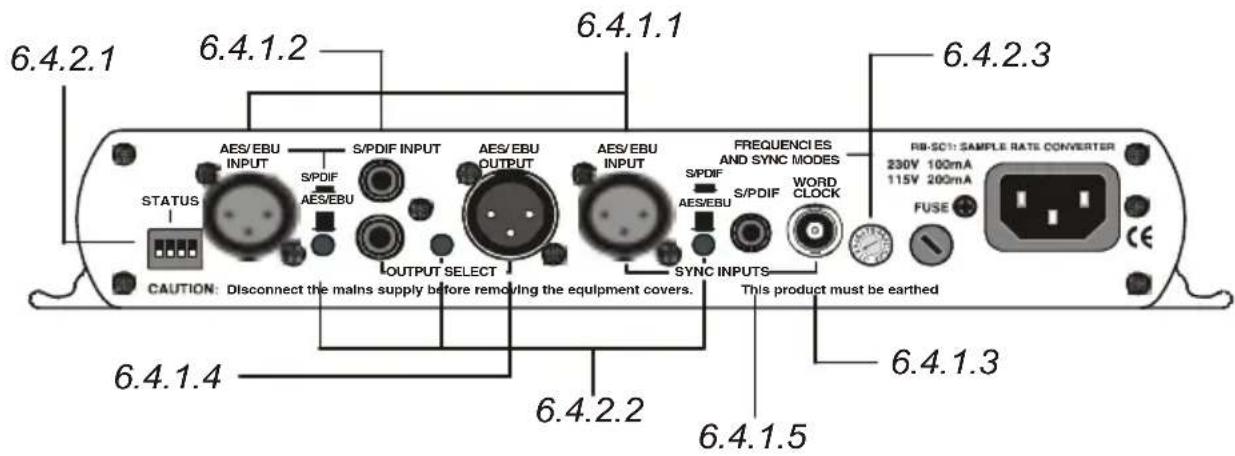
Fig 6-3: RB-SC1 Rear Panel
6.4.1. Inputs and Outputs
6.4.1.1. AES/EBU Inputs
The digital source and digital sync XLR 3 pin sockets both have an impedance of 110 ohms. They have the following connections:
Pin 1: Screen
Pin 2: Phase
Pin 3: Non-phase
The signals on these connectors should meet the IEC 60968 specification
6.4.1.2. S/PDIF Inputs
The digital source and digital sync S/PDIF phono inputs both have an impedance of 75 ohms.
6.4.1.3. Word Clock Input
The BNC TTL word clock input has an impedance of 50 ohms.
6.4.1.4. AES/EBU Output
The digital output XLR 3 pin socket has an impedance of 110 ohms. It has the following connections:
Pin 1: Screen
Pin 2: Phase
Pin 3: Non-phase
The signals on this connector will comply with the IEC 60968 specification
6.4.1.5. S/PDIF Output
The digital output S/PDIF phono output has an impedance of 75 ohms.
6.4.2. Rear Panel Controls
6.4.2.1. Status Select Switches
These switches are used to determine the content of the channel status bits embedded within the digital audio stream (switches 1 and 2) and to select the source for the digital sync signal from either digital audio input or TTL word clock (switch3).
The channel status bits will be forced to Professional Mode for the highest 3 sample
| STATUS | ||
| 1 | ON | FORCE CHANNEL STATUS TYPE |
| 1 | OFF | FOLLOW INPUT |
| 2 | ON | PROFESSIONAL OUTPUT |
| 2 | OFF | CONSUMER OUTPUT |
| 3 | ON | DIGIT AL SYNC |
| 3 | OFF | WORD CLOCK SYNC |
rates as they are not supported by consumer mode. For the lowest three rate these status bits can be either set to follow the input signal type (switch 1 off) or can be forced to either professional or consumer mode (switch 1 on and switch 2 either off or on). These settings are summarised in Fig 3-4 and are also on top of the unit.
Fig 6-4: RB-SC1 Status Switches
6.4.2.2. Digital Input Select Buttons
These buttons are used to switch the digital connection between the AES/EBU XLR connector (button out) and the S/PDIF phono connector (button in) for the digital source, the digital sync input and the digital output
6.4.2.3. Frequency and Sync Mode Rotary Switch
This rotary switch is used to select the synchronisation mode and to select the frequency of the digital output when using the on-board clock generator. There are 4 modes of operation :- Master mode, Auto Sync Mode, Auto Lock Sync Mode & Slave Mode.
In Master sync mode, switch positions 0 - 5, the digital output sample rate is simply set by, and locked to, the internal on-board clock generator. No sync signal is used or required.
In Auto sync mode, switch positions 6–B, the digital output sample rate follows the sync input. When the sync signal is not present the output sample rate will be set by, and locked to, the internal on-board clock generator at a frequency determined by the switch position.
In Auto-Lock sync mode, switch position C, no output will be generated until lock is achieved with a sync signal. The digital output sample rate now follows the sync input.
If the sync signal is removed then the output sample rate will be set by, and locked to, the internal on-board clock generator at the closest frequency available to the previous sync input.
In Slave sync mode, switch position D, the digital output sample rate follows the sync input. When the sync signal is not present the digital output is turned off.
| FREQUENCIES AND SYNC MODES | ||||||
| kHz | 32 44 | 4.1 48 | 64 88.2 | 96 | ||
| M A | S | T | E | R | 0 | 1 |
| A U | T | O | 6 | 7 | 8 | |
| AUTO LOCK = C | SL AV E M O D E = D | |||||
Fig 3-5, also printed on the top of the unit, summarises the rotary switch settings and shows the sample rate generated by the internal clock generator in master and auto sync modes.
Fig 6-5: RB-SC1 Frequency and Sync Rotary Switch
6.5. Technical Specifications
6.5.1. Audio Specification
Dynamic Range: 120dB
Distortion & Noise: -114dB THD + N at 1kHz, ref 0dB FS
Sample Freq Range: 30kHz - 100kHz
Bit Depth: Up to and including 24 bits.
6.5.2. Connections and Controls
Audio Inputs: 1 x AES/EBU XLR 3 pin female
1 x S/PDIF RCA phono female
(Input button select between AES/EBU and S/PDIF)
Sync Inputs: 1 x AES/EBU XLR 3 pin female
1 x S/PDIF RCA phono female
1 x T T L B N C f e m a
(Input button select between AES/EBU and S/PDIF, and DIP switch select between TTL and either of the other two)
Outputs: 1 x AES/EBU XLR 3 pin male
1 x S/PDIF RCA phono female
(Output button select between AES/EBU and S/PDIF);
Mains Input: Filtered IEC, continuously rated 85-264VAC @ 47-63Hz, max 10W
Operational Modes: Master mode, auto sync mode, Auto lock mode and slave mode, set via rotary switch
Status bits: Forced to consumer mode, professional mode, or set to follow input
6.5.3. Equipment Type
RB- SC1 Sample rate converter


6.5.4. Physical Specifications
Dimensions (Raw) 28cm (W) x 10.8cm (D) x 4.2cm (H) (1U)
Dimensions (Boxed) 36cm (W) x 20.5cm (D) x 6cm (H)
Weight Nett: 1.0kg Gross: 1.4kg
7. RB-DHD6 Digital 6 Way Headphone Distribution Amplifier

Fig 7-1: RB-DHD6 Front Panel
7.1. Introduction
The RB-DHD6 digital 6 way headphone distribution amplifier is a 1U rack-mount which receives a digital input signal, as either AES/EBU or S/PDIF and converts it to 6 individually buffered, jack-plug, headphone outputs, each with their own volume control. The input connectors consist of a single balanced XLR-3 for the AES/EBU input and a single unbalanced phono connector for the S/PDIF input.

A button located on the rear panel is used to select either the AES/EBU, or S/PDIF, input and de-emphasis on the output can be controlled via dipswitch.
When operating, the front panel power LED flashes whenever the unit is not synchronised to the incoming digital signal.
7.2. System Block Diagram
![graph LR A["Digital Input"] --> B["AES/EBU"] C["S/PDIF"] --> B B --> D["AES Receiver"] D --> E["DAC"] E --> F["Audio Output Amp"] F --> G["Volume Control"] F --> H["Stereo Jack Output"] I["X6"] -.-> F](/content/2026/06/1196668/images/45ab13fc3dbdb256d297d240dc458d72f3340c3ec7efbd93a1e3d9d4b237c4b0.jpg)
Fig 7-2: RB-DHD6 System Block Diagram
7.3. Front Panel Indicators & Controls

Fig 7-3: RB-DHD6 System Block Diagram
7.3.1. Sync & Power Indicator
The LED on the front panel is normally red to indicate that power is present on the unit. However, it also has a secondary role to indicate the status of the digital inputs
- Flashing between red and amber – indicates a loss of a valid digital input signal.
7.3.2. Headphone Outputs
The headphone outputs on the front panel consist of six 1/4 " stereo jack sockets, designed to drive 150 mW into 32Ω to 600Ω professional headphones.
7.3.3. Volume Control
The headphone outputs each have their own volume control and have a maximum output level of +12dBu.
7.4. Rear Panel Connections and Operation

Fig 7-4: RB-DHD6 Rear Panel
7.4.1. RB-DHD6 Inputs
7.4.1.1. AES/EBU Input
The digital input XLR 3 pin socket has an impedance of 110 Ω. It has the following connections:
Pin 1: Screen
Pin 2: Phase
Pin 3: Non-phase
The signals on this connector should meet the IEC 60968 specification
7.4.1.2. S/PDIF Input
The S/PDIF digital phono input has an impedance of 75 Ω.
7.4.2. Rear Panel Controls
| STATUS | ||
| 1 | ON | DE-EMPHASIS ON |
| 1 | OFF | DE-EMPHASIS OFF |
| 2 | RESERVED | |
| 3 | RESERVED | |
| 4 | RESERVED | |
Fig 7-5: RB-DHD6 Status Select Switches
7.4.2.1. Status Select Switches
If de-emphasis is on (switch 1) the RB-DHD6 will decode 50/15 µ s emphasis when indicated by certain channel status bits in the incoming digital audio data. When off, no de-emphasis is applied.
7.4.2.2. Digital Select Button
This button is used to switch the digital input between the AES/EBU XLR connector (button out) and the S/PDIF phono connector (button in).
7.5. Technical Specifications
7.5.1. Connections
Digital Inputs: 1 x AES/EBU XLR 3 pin female
1 x S/PDIF RCA phono
Headphone Outputs: 6 x 1/4" (6.35mm) A/B gauge 3-pole stereo jack sockets
Mains Input: Filtered IEC, 110-120V, or 220-240V, fused 10W max
7.5.2. Audio Specification
Input Impedance: 110Ω ± 20% / 75Ω ± 5% - (AES/EBU) / (S/PDIF)
Sample Freq. Range: 30kHz - 100kHz
Dynamic Range: >100dB
Headphones: Drives 150 mW into 32Ω to 600Ω headphones
Max Output Level: +12dBu
7.5.3. Operational Controls
Digital Input Select: AES/EBU or S/PDIF, via push-switch
De-emphasis: DIPswitch
7.5.4. Equipment Type
RB-DHD6 Digital 6 Way Stereo Headphone Distribution Amplifier

7.5.5. Physical Specifications
Dimensions (Raw) 48cm (W) × 10.8cm (D) × 4.2cm (H) (1U)
Dimensions (Boxed) 53cm (W) x 20.5cm (D) x 6cm (H)
Weight Nett: 1.6kg Gross: 2.2kg
8. RB-DMA2 Dual Digital Microphone Amplifier

Fig 8-1: RB-DMA2 Front Panel
8.1. Introduction
The RB-DMA2 consists of two independent low-noise microphone pre-amplifiers for converting microphone level signals to digital AES/EBU, or S/PDIF, and analogue line level outputs. The RB-DMA2 can be used as a front end for digital mixing desks or routers, which do not have microphone inputs. The analogue outputs can be used for routing to talkback systems.
The microphone inputs are XLR-3 type and are electronically balanced. The input gain for each input can be adjusted individually by coarse and fine gain controls on the front panel and each input has a level indicator. Additionally the fine gain control knob can be disabled by internal jumpers. A switch on the rear panel allows input 1 to be routed to both left and right digital outputs, or as input 1 to left output and input 2 to right output respectively.
For each channel there are independent switches to control a high pass filter (low frequency roll-off at 125Hz) and to provide phantom power at +48V to the connected microphones. It also has AES/EBU, S/PDIF and Word Clock sync inputs.
The unit operates in four modes:
Master Mode - In this mode the unit receives a microphone-input signal, which is digitised and formatted for digital serial transmission (IEC958). The necessary clock signals are generated internally from an on board master clock at a selectable rate (32kHz, 44.1kHz, 48kHz, 64kHz, 88.2kHz or 96kHz).
Slave Mode - In this mode the unit automatically detects the presence of a digital audio sync signal, if present at the digital input or word clock input, and synchronises the digital output to it. If no sync is present, no output will be generated.
Auto Mode - Here the unit synchronises to the digital audio sync signal if present at the digital input and uses the internal master clock only if no sync input signal is detected. In this case, the internal master clock is used at the selected sample rate.
Auto Lock Mode - This operates like the auto mode except that if no sync-input signal is detected, it will use the internal master clock to sync to the sample rate which was last clocked to. When operating in sync modes, the front panel power LED flashes whenever the unit is not synchronised to the incoming digital signal, or when the unit is being calibrated. The unit should be calibrated once it has been powered up for more than 10 minutes.
For the digital output, there is a switch available to define the content of the channel status bits embedded within the digital audio stream. The channel status bits will be forced to Professional Mode for sample rates above 48kHz, as they are not supported by the Consumer Mode. For sample rates of 32kHz, 44.1kHz and 48kHz, the status bits can be either set to Professional or Consumer Mode.
The bit depth of the digital output can be set to 16, 20 or 24 bits, with a psychoacoustic noise filter used to dither signals below 24 bit.
8.2. System Block Diagram
![graph TD A["1 Balanced Mic Inputs"] --> B["LF Filter"] B --> C["Gain Control"] D["2 Balanced Mic Inputs"] --> E["LF Filter"] E --> F["Gain Control"] G["48V Phantom Power"] --> H["ADC"] I["XLR Balanced Line Outputs"] --> H H --> J["AES Transmitter"] J --> K["Digital Send Select"] K --> L["AES/EBU S/P…](/content/2026/06/1196668/images/39b7ade654f59a0cb098c9cd3ef9caf37ee547391380dc824a6a9322469653e7.jpg)
Fig 8-2: RB-DMA2 System Block Diagram
8.3. Front Panel Indicators & Controls

Fig 8-3: RB-DMA2 Front Panel
8.3.1. Sync & Power Indicator
The LED on the front panel is normally red to indicate that power is present on the unit. However, it also has a secondary role to indicate the status of the digital inputs: Fast flashing between red and amber indicates a loss of digital input signal, or that the unit is being calibrated.
8.3.2. Input Level Adjustment
Front panel potentiometers, coarse and fine, allow for adjustment of the gain of each microphone input. The recessed screw-head potentiometer coarse control provides a total gain range of 44dB, with the level knob fine control providing a ±12dB adjustment.
Connect the mic input and adjust the gain until the line output is at the level that you need. The wide gain range allows the use of both dynamic and powered microphones.
8.3.3. Disabling the Fine Gain Control Knob
Each fine control also has the ability to be disabled via a jumper (JP1 for MIC1 and JP2 for MIC2) situated on the PCB. When the jumper is fitted the control is enabled.

Fig 8-4: Jumpers to Disable Fine Gain Control
8.3.4. Input Level Indicators
For each input there is a tri-colour LED to give an indication of the level of the incoming mic signals. Green indicates -18dBFS, orange indicates -12dBFS and red indicates -6dBFS.
8.4. Rear Panel Connections and Operation

Fig 8-5: RB-DMA2 Rear Panel
8.4.1. RB-DMA2 Inputs
8.4.1.1. Mic Inputs
The XLR 3 pin sockets used for the microphone inputs are electronically balanced. They have the following connections:
Pin 1: Screen
Pin 2: Phase
Pin 3: Non-phase
8.4.1.2. AES/EBU Sync Input
The digital AES/EBU synchronisation input XLR 3 pin socket has an impedance of 110 Ω and the signals meet the IEC 60968 specification. It has the following connections:
Pin 1: Screen
Pin 2: Phase
Pin 3: Non-phase
8.4.1.3. Word Clock Sync Input
The BNC TTL word clock input has an impedance of 50 Ω.
8.4.1.4. S/PDIF Sync Input
The S/PDIF digital phono input has an impedance of 75 Ω.
8.4.2. RB-DMA2 Outputs
8.4.2.1. AES/EBU Output
The digital output XLR 3 pin socket has an impedance of 110Ω and the signals on this connector comply with the IEC 60968 specification. It has the following connections :
Pin 1: Screen
Pin 2: Phase
Pin 3: Non-phase
8.4.2.2. S/PDIF Output
The digital output S/PDIF phono output has an impedance of 75Ω.
8.4.2.3. Analogue Line Outputs
There is an analogue output on XLR 3 pin plug for each microphone input. The plug has the following connections:
Pin 1: Screen
Pin 2: Phase
Pin 3: Non-phase
8.4.3. Rear Panel Controls
8.4.3.1. Status Select Switches
These switches are used to determine the status or content of the digital output signals. The type of information encoded in the channel status bits of a digital audio signal can be professional or consumer and is determined by switch 1. However at frame rates higher than 48kHz, consumer mode is not available, so professional mode is used and this switch will be ignored.
The sample size for the analogue to digital conversion can be set to 24, 20 or 16 bits (switches 3 & 4). When the signal is truncated from 24 bits, a psycho-acoustic filter is applied to maintain optimum signal quality. These settings are summarised below and also on the top panel of the unit.
| STATUS | |||
| 1 | ON | PROFESSIONAL | |
| 1 | OFF | CONSUMER | |
| 2 | ON | DUAL MONO | |
| 2 | OFF | MONO | |
| BITS | |||
| 16 20 | 24 | ||
| 3 OFF ON ON | |||
| 4 | O | F F | O |
F F O N
Fig 8-6: RB-DMA2 Status Select Switches
8.4.3.2. Output Routing
This uses switch 2 of the STATUS dipswitch block. When switch 2 is "ON", the audio signal from Mic input 1 is copied to both channels of the digital output signal (channel B = channel A) and Mic input 2 is ignored (Dual mono mode). When "OFF", the Mic input 1 signal is on channel A only of the digital output signal and channel B contains the Mic input 2 signal (Mono mode).
Note: This does not affect the routing of the analogue outputs.
8.4.3.3. Phantom Power & LF Filter
For each channel there are independent switches to provide phantom power at +48V to the connected microphones. With phantom power selected, a voltage of +48V is applied to pins 2 and 3 of the XLR connector to power the microphone, supplied through 6k8 resistors giving a current of 14mA. Phantom power is used when the switches are towards the arrows.
The LF filter switches provide control for a high pass filter with low frequency roll off at 125Hz. The roll-off filters are switched "in" when the switches are in the down position (towards the arrows).
8.4.3.4. Digital Sync & Output Select Buttons
These buttons are used to switch the digital connection between the AES/EBU XLR connector (button out) and the S/PDIF phono connector (button in) independently for the digital sync input and the digital output.
Note: There is no switch to select the Word Clock as a sync input. The unit automatically searches for a sync signal on the Word Clock, or the selected digital input, and automatically locks to a valid sync clock.
8.4.3.5. Frequency and Sync Mode Rotary Switch
This rotary switch is used to select the Synchronisation Mode and to select the frequency of the digital output when using the on-board clock generator. There are 4 modes of operation: - Master Mode, Auto Sync Mode, Auto Lock Sync Mode & Slave Mode.
- In Master Sync Mode, switch positions 0 – 5, the digital output sample rate is simply set by, and locked to, the internal on-board clock generator. No sync signal is used or required.
- In Auto Sync Mode, switch positions 6–B, the digital output sample rate follows the digital input. When the digital input signal is not present the output sample rate will be set by, and locked to, the internal on-board clock generator at a frequency determined by the switch position.
- In Auto-Lock Sync Mode, switch position C, No output will be generated until lock is achieved with a digital input signal. The digital output sample rate now follows the digital input. If the digital input signal is removed then the output sample rate will be set by, and locked to, the internal on-board clock generator at the closest frequency available to the previous digital input.
- In Slave Sync Mode, switch position D, the digital output sample rate follows the digital input. When the digital input signal is not present the digital output is turned off.
The following table, also printed on the top of the unit, summarises the above settings and shows the sample rate generated by the internal clock generator in master and auto sync modes.
| FREQUENCIES AND SYNC MODES | ||||||
| kHz 32 | 44.1 48 64 | 38.2 96 | ||||
| M | A | S | T | E | R 0 | 1 |
| A | U | T | O | 6 | 7 A | 8 B |
| AUTO LOCK = C | SLAVE MODE = D | CALIBRATION MODE = F | ||||
9 2
Fig 8-7: RB-DMA2 Frequency and Sync Rotary Switch Selections
8.4.3.6. Test/Calibration Mode
For optimum performance of the RB-DMA2, the unit should be calibrated when it has been powered up for approximately 10-15 minutes. The circuitry and chipsets contained in the unit will warm up during this time and the performance will deteriorate unless calibrated (the noise floor and dynamic range will be 1-2dB lower than the best possible performance). The calibration cycle calibrates the gain and the zero reference of the A/D converter.
To calibrate the RB-DMA2, set the rotary FREQUENCIES AND SYNC MODES switch to position "F". The power LED on the front panel will flash quickly for 2 - 3 seconds and will illuminate fully when the unit is calibrated. Once calibration is complete, reset the rotary switch to the position that you require.
8.5. Technical Specifications
8.5.1. Connections
Analogue Mic Inputs: 2 x XLR 3 pin (balanced)
Analogue Line Outputs: 2 x XLR 3 pin (balanced)
Digital Sync Inputs: 1 x AES/EBU XLR 3 pin female
1 x S / P
1 x TTL BNC female (sync) 50 ohm impedance
Digital Outputs: 1 x AES/EBU XLR 3 pin plug
1 x S / P D I F R C
Mains Input: Filtered IEC, 110-120V, or 220-240V switchable, fused 10W max
8.5.2. Audio Specification
Min/Max Input Level: -63dBu / 5dBu to give FSD
Input Impedance: 2kΩ nominal balanced
Gain Range: 68dB
Signal to Noise: 128dB EIN
Dynamic Range: >110dB
Distortion and Noise: < 0.01% THD + N absolute @ 1kHz
Phantom Power: +48V
Low Frequency Roll-off: 125Hz @ 6dB/octave
Analogue Output Level: +18dBu Ref. FSD
8.5.3. Operational Controls & Indicators
Bit Depth: 16, 20 or 24 bits via DIP switch
Digital Output Select: AES/EBU or S/PDIF, via push-switch
Sample Frequencies: 32kHz - 96kHz, via rotary switch
Sync Modes: Master, Slave, Auto, Auto-Lock via rotary switch
Digital Input Select: AES/EBU or S/PDIF, via push-switch
Channel Status Bits: Set to consumer or professional mode via DIP switch
Output Routing: Set dual mono output via dipswitch
Led Level: Green ind. -18dBFS, Orange ind. -12dBFS, Red ind. -6dBFS
8.5.4. Equipment Type
RB-DMA2 Dual Digital Microphone Amplifier

8.5.5. Physical Specifications
Dimensions (Raw): 48cm (W) x 10.8cm (D) x 4.2cm (H)(1U)
Dimensions (Boxed): 53cm (W) x 20.5cm (D) x 6cm (H)
Weight: Nett: 1.6kg Gross: 2.2kg
9. RB-SP1 Digital Splitter & Combiner
9.1. Introduction

Fig 9-1: RB-SP1 Front Panel
The RB-SP1 Digital Splitter & Combiner is used to interface various double sampling pieces of equipment. Some older equipment uses 2 AES/EBU connectors for double sampling with each connector carrying an audio signal at a normal frame rate, whilst other equipment has a single connector using twice the frame rate. The RB-SP1 can interface between them, either combining the signals from 2 XLR's into 1, or splitting the signal from 1 XLR into 2.
The RB-SP1 can also be used for interfacing stereo and mono signals to digital mixing desks by splitting the left and right signals of a stereo XLR to two separate XLR's, and vice versa by combining them.
Additionally, a sample rate converter on the second digital input can be used to convert the sample rate of the secondary input to that of the primary input. The RB-SP1 can handle sample rates up to 96kHz and sample sizes of 16, 20 and 24 bit.
There are two types of operation : Split 96, and Stereo/Mono. These each have three different switch modes : Split, Bypass and Combine.
Both inputs and outputs can be selected as either AES/EBU or S/PDIF with the resultant digital level following the switch selection.
9.2. System Block Diagram
![graph LR subgraph "Combine & Bypass Mode Only" A1["Digital Input 1"] --> B1["Digital Input Select"] A2["Digital Input 2"] --> B2["Digital Input Select"] A3["AES/EBU"] --> B3["Receiver"] A4["SPDIF"] --> B4["Receiver & SRC"] end subgraph "Split & Bypass Mode Only" B1 --> C1["Router"] B2 --> C1 B3 -->…](/content/2026/06/1196668/images/11a824fb53a9aef0970e5f076642d44f64db23feb2907dec51404a226608a66b.jpg)
Fig 9-2: RB-SP1 System Block Diagram
9.3. Front Panel Indicators & Controls

Fig 9-3: RB-SP1 Front Panel
9.3.1. Front Panel LED's
There are four LED indicators situated on the front of the unit. The red LED on the far left of the front panel is to indicate that power is present on the unit.
The three LED's grouped together on the right hand side have two roles, see Fig 5-3. The first is to indicate the synchronisation frequencies of the incoming digital signals, and the second is to flash when a signal has been lost. These indicators are labelled individually to show the current sync frequencies.
9.3.2. Type & Mode Switches
The Type and Mode switches are on the front panel – see Fig 5-3. The Type switch sets the unit into either the Split 96 or Stereo/Mono style of operation. The Mode switch sets the unit into Split, Bypass or Combine mode.
See Figure 5-4 for diagrammatic explanations of the different types and modes available.
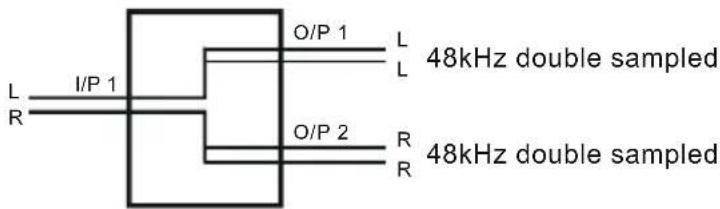
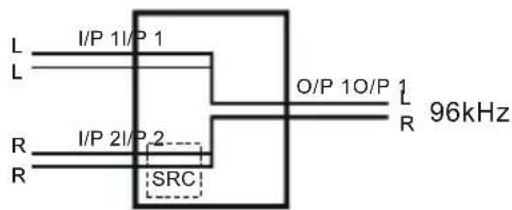
Split 96 – This is a method that allows older equipment to handle 48kHz double sampled (96kHz) digital signals. To do this, Split 96 uses two digital signals running at 48kHz, where both sub-frames of a single 48kHz stream are used to carry information about a mono signal, with the resultant signal of both 48kHz streams being equivalent to a stereo 96kHz signal. The unit will also perform the same function for 88.2kHz stereo and 44.1kHz double sampled signals.
- In Split Mode a single stereo 96kHz signal is received into input 1 which is then output as two separate 48kHz signals. Output 1 will contain just left channel data and output 2 will contain just right channel data. If the signal from the input disappears then both Outputs will be muted.
- In Combine Mode two 48kHz double sampled input signals are combined to create a single 96kHz signal on output one. If either input 1 or 2 are lost then the output will be muted. In this mode output 2 will always be muted.
Stereo/Mono - This allows a digital stereo signal to be separated into two mono digital signals and vice-versa.
- In Split Mode a single stereo digital signal is routed to two digital outputs. Output 1 will contain the original left channel data on its left output and a muted signal on its right output. Output 2 will contain the original right data on its left output and a muted signal on its right output. This mode can be altered by the dipswitch settings, to a channel swap mode or a dual mono mode. These are described in more detail in the Rear Panel Controls section below.
- In Combine Mode two mono signals are combined to create a single stereo signal. Output 1 will contain the input 1 left channel data on its left channel and input 2 left channel data on its right channel. This mode can be altered by a dipswitch setting, as with the split mode. Where either the left or right channel data of input 2 is output on the right channel data of the output. If the two signals are of different sample rates, a sample rate converter can be switched in place to convert the sample rate of input channel 2 to that of input channel 1. In the Stereo/Mono Combine mode, output 2 is always muted.
Bypass Mode – In Bypass mode, input 1 is routed to output 1 and input 2 is routed to output 2. Input 1 is used as the master clock input. If input 2 is at a different sample rate to input 1 then input 2 is sample rate converted to match input 1. If the signal from input 2 is lost then output 2 will be muted. However, if the signal from input 1 is lost then both outputs will be muted and will only return once a signal is present on input 1.
Note that when the unit is operating in Bypass Mode the Type switch is ignored.
Split 96
Split
96kHz
Combine
48kHz double sampled
48kHz double sampled
Stereo/Mono
Split
Any Sample Rate
![graph TD A["I/P 1"] --> B["Switch"] B --> C["Dipswitch 3 Off"] B --> D["Dipswitch 3 On"] B --> E["Dipswitch 3 On"] B --> F["Dipswitch 3 On"] B --> G["Dipswitch 3 On"] H["L"] --> I["Mute"] J["R"] --> K["Mute"] L["I/P 1"] --> M["Switch"] N["O/P 1"] --> O["Mute"] P["O/P 2"] --> Q["Mute"] R["R"] --> S["…](/content/2026/06/1196668/images/416e89584642fdd8346e2d54aa02e830198e1070169f3f80904cea46e30624f0.jpg)
Combine
![graph TD A["Sample Rate 1"] --> B["I/P 1"] A --> C["R"] A --> D["X"] E["Sample Rate 2"] --> F["I/P 2"] E --> G["R"] E --> H["X"] E --> I["Dipswitch 1 On"] E --> J["Dipswitch 1 Off"] K["O/P 1"] --> L["L"] K --> M["R"] N["X = Input Ignored"] --> O["X = Input Ignored"]](/content/2026/06/1196668/images/dd9874a7cb09158cdcc8bba3b982a6ec7b3c8c7681be1663d84396060e38e00f.jpg)
Bypass
Sample Rate 1
Sample Rate 2

Fig 9-4: RB-SP1 Type and Mode Flow Diagrams
9.4. Rear Panel Connections and Operation

Fig 9-5: RB-SP1 Rear Panel
9.4.1. Inputs and Outputs
9.4.1.1. AES/EBU Inputs
The digital source XLR 3 pin sockets have an impedance of 110Ω . They have the following connections and meet the IEC 60968 specification:
Pin 1: Screen
Pin 2: Phase
Pin 3: Non-phase
9.4.1.2. S/PDIF Inputs
The digital source RCA phono inputs both have an impedance of 75Ω.
9.4.1.3. AES/EBU Outputs
The digital output XLR 3 pin plugs have an impedance of 110Ω. They have the following connections and meet the IEC 60968 specification:
Pin 1: Screen
Pin 2: Phase
Pin 3: Non-phase
9.4.1.4. S/PDIF Outputs
The digital output S/PDIF phono outputs have an impedance of 75Ω.
9.4.2. Rear Panel Controls
9.4.2.1. Digital Input & Output Select Buttons
These buttons are used to switch the digital connection between the AES/EBU XLR connector (button out) and the S/PDIF phono connector (button in) for the digital source and digital output.
9.4.2.2. Mode Select Dip Switch
| RB-SP1 MODE SELECT | ||
| 1 | ON | INPUT 1 CHANNEL B = OUTPUT 2 CHANNEL B IN STEREO / MONO SPLIT MODE |
| 1 | OFF | INPUT 1 CHANNEL B = OUTPUT 2 CHANNEL A IN STEREO / MONO SPLIT MODE |
| 2 | ON | SRC ENABLED |
| 2 | OFF | SRC DISABLED |
| 3 | ON | DUAL MONO IN STEREO / MONO SPLIT MODE |
| 3 | OFF | SINGLE MONO IN STEREO / MONO SPLIT MODE |
| 4 | RESERVED | |
Fig 9-6: RB-SP1 Mode Select Dip Switch
Altering the Stereo/Mono Split/Combine Mode – In Split mode With switch 1 off, channel A (Left) and B (Right) on the input are transferred to channel A (Left) of outputs 1 and 2 respectively. With switch 1 on, channel A (Left) on the input is transferred to channel A (Left) on output 1 and channel B (Right) on the input is transferred to channel B (Right) of output 2. With switch 3 on (switch 1 is ignored), channel A (Left) is transferred to both channels on output 1 and channel B (Right) on the input is transferred to both channels on output 2.
In Combine mode with switch 1 off, channel A (Left) on input 1 is transferred to channel A (Left) of output 1, and channel A (Left) on input 2 is transferred to channel B (Right) of output 1. With switch 1 on channel A (Left) on input 1 is transferred to channel A (Left) of output 1, and channel B (Right) on input 2 is transferred to channel B (Right) of output 1.
Switching on the Sample Rate Converter - Switch 2 is used to turn the sample rate converter on, or off and can be used in all modes. When there are two inputs connected to the unit which are at different sample rates or which need to be synchronised, then the sample rate converter should be switched on. If it is not, then you may suffer from missed samples and bit errors affecting the signal output. If the sample rates of the incoming signals are always going to be the same and are synchronised, then switch the sample rate converter off, as leaving it on will worsen the output signal (signal jitter will increase).
9.5. Technical Specifications
9.5.1. Audio Specifications
Input Impedance: 110Ω ± 20% balanced (AES/EBU)
Input Impedance: 75Ω ± 5% unbalanced (S/PDIF)
Output Impedance: 110Ω ± 20% balanced (AES/EBU)
Output Impedance: 75Ω ±5% unbalanced (S/PDIF)
Signal Level 3V/10V peak to peak min/max (AES/EBU)
0.5V ±20% peak to peak (S/PDIF)
Sample Freq Range: 30-100kHz (i.e. including 32kHz, 44.1kHz, 48kHz, 64kHz, 88.2kHz and 96kHz)
9.5.2. Connections
Audio Inputs: 2 x AES/EBU XLR 3 pin female
2 x S/PDIF RCA phono female
(Input button select between AES/EBU and S/PDIF)
Audio Outputs: 2 x AES/EBU XLR 3 pin male
2 x S/PDIF RCA phono female
(Output button selects between AES/EBU and S/PDIF)
Mains Input: Filtered IEC, Filtered IEC, continuously rated 85-264VAC @ 47-63Hz max 10W
9.5.3. Equipment Type
RB-SP1 Digital splitter & combiner

9.5.4. Physical Specifications
Dimensions (Raw) 48cm (W) × 10.8cm (D) × 4.2cm (H) (1U)
Dimensions (Boxed) 53cm (W) x 20.5cm (D) x 6cm (H)
Weight Nett: 1.6kg Gross: 2.2kg
10. RB-DSS10 10 Way Stereo Digital Source Selector
10.1. Introduction

Fig 10-1: RB-DSS10 Front Panel
The RB-SS10 10 Way stereo Digital Source Selector is a 1U rack-mount which produces an AES/EBU and S/PDIF level digital audio output from 10 selectable AES/EBU or S/PDIF digital input signals. There are 10 illuminated front panel push buttons, which select and indicate the current channel selection. The selection and indication is also available through a remote connector on the rear panel. To stop accidental front panel selection there is a remote input to inhibit the front panel buttons.
The digital receivers in this unit are fully 24 bit, 96kHz capable. When an input is selected from the front panel, or remotely, the unit will attempt to capture the incoming signal on either the AES/EBU or the S/PDIF signal inputs, with priority given to the AES/EBU input. If the AES/EBU signal becomes locked while the S/PDIF signal is routed, the unit will automatically switch to the incoming AES/EBU signal.
Once the receiver has successfully locked to a digital input, the LED illuminates, the tally is made, and the audio is routed simultaneously to both the digital audio outputs and converted to analogue audio for monitoring on the front panel headphone socket. If the incoming audio signal is not present, the push button LED and remote tally flash to indicate that the incoming digital signal is missing.
The headphone output has its own volume control, which is independent of the level adjustment for the main outputs, and has a maximum output level of +12dBu.
As well as routing the selected audio signal, the unit will also route a remote signal input through the remote connector to the selected input source, for starting external audio equipment, such as a CD player.
There is a designation strip on the front panel, useful for giving the buttons a meaningful description.
The LED on the front panel is used to indicate that power is present on the unit. However, it also has a secondary role to indicate whether the selected channel is routing the AES/EBU (red LED) or S/PDIF input (amber LED).
10.2. System Block Diagram
![graph TD A["Remote Start I/O"] --> B["Data Selector"] C["Remote Select/Switch Inputs"] --> D["MCU"] E["Push Button Switches"] --> D D --> F["Data Selector"] F --> G["Status Outputs"] H["AES/EBU"] --> I["AES Receiver"] I --> J["Data Selector"] J --> K["DAC"] K --> L["Volume Control"] M["S/PDIF"] -->…](/content/2026/06/1196668/images/d2acf412342b17405f8e3d93ff72d9b4353512c263158718b3c1ac1d6b0b5e08.jpg)
Fig 10-2: RB-DSS10 System Block Diagram
10.3. Front Panel Indicators & Controls

Fig 10-3: RB-DSS10 Front Panel
10.3.1. Power Indicator
The LED on the front panel is used to indicate that power is present on the unit. However, it also has a secondary role to indicate whether the selected channel is routing the AES/EBU or S/PDIF input:
Red indicates AES/EBU input. Amber indicates S/PDIF input.
The LED and remote tally flash, if the incoming audio signal is not present, to indicate that the incoming digital signal is missing.
10.3.2. Illuminated Push Buttons
The front panel contains 10 illuminated push buttons, used for selecting a digital source. The push button illuminates when the input is selected and flashes when the selected input loses lock.
There is also a remote input to inhibit the front panel switches. When the front panel inhibit is active, pressing the front panel switches has no effect on the current channel selection.
10.3.3. Headphone Output
The output available on the front panel through a 1/4 " stereo jack socket, is designed to drive 150 mW into 32Ω to 600Ω professional headphones.
10.3.4. Volume Control
The headphone output has its own volume control and has a maximum output level of +12dBu.
10.4. Rear Panel Connections and Operation

Fig 10-4: RB-DSS10 Rear Panel
10.4.1. RB-DSS10 Inputs
10.4.1.1. AES/EBU Inputs
The 8 digital input XLR 3 pin sockets have an impedance of 110 Ω. They have the following connections:
Pin 1: Screen
Pin 2: Phase
Pin 3: Non-phase
The signals on this connector should meet the IEC 60968 specification
10.4.2. RB-DSS10 Outputs
10.4.2.1. AES/EBU Outputs
The digital output XLR 3 pin sockets have an impedance of 110Ω . They have the following connections:
Pin 1: Screen
Pin 2: Phase
Pin 3: Non-phase
The signals on these connectors will comply with the IEC 60968 specification
10.4.3. RB-DSS10 D-Type Connectors
10.4.3.1. Digital Audio Inputs & S/PDIF Output
This connector contains the other two remaining professional AES/EBU input connections, and the 10 S/PDIF input connections. It also has the S/PDIF digital output. The S/PDIF digital inputs and the output have an impedance of 75 Ω .
| Pin No. I/O Description | |
| Pin 1 I AES/EBU input 9 signal phase | |
| Pin 2 - Signal ground | |
| Pin 3 I AES/EBU input 10 signal non-phase | |
| Pin 4 I S/PDIF input 1 signal | |
| Pin 5 I S/PDIF input 2 signal | |
| Pin 6 I S/PDIF input 3 signal | |
| Pin 7 I S/PDIF input 4 signal | |
| Pin 8 I S/PDIF input 5 signal | |
| Pin 9 I S/PDIF input 6 signal | |
| Pin 10 I S/PDIF input 7 signal | |
| Pin 11 I S/PDIF input 8 signal | |
| Pin 12 I S/PDIF input 9 signal | |
| Pin 13 I S/PDIF input 10 signal | |
| Pin 14 I AES/EBU input 9 signal non-phase | |
| Pin 15 I AES/EBU input 10 signal phase | |
| Pins 16 to 23 - Signal ground | |
| Pin 24 O S/PDIF output signal | |
| Pin 25 - Signal ground | |
Fig 10-5: Digital Audio Inputs and S/PDIF Output Pin Connections
Note: The actual phase of the AES/EBU signals is not relevant.
10.4.3.2. Remote Start I/O
This 25 way D-type plug (male) connector contains the remote start input connection and the corresponding 10 opto-isolated remote start outputs.
| Pin No. I/O Description | |
| Pin 1 O Start output 1 collector | |
| Pin 2 O Start output 2 collector | |
| Pin 3 O Start output 3 collector | |
| Pin 4 O Start output 4 collector | |
| Pin 5 O Start output 5 collector | |
| Pin 6 O Start output 6 collector | |
| Pin 7 O Start output 7 collector | |
| Pin 8 O Start output 8 collector | |
| Pin 9 O Start output 9 collector | |
| Pin 10 O Start output 10 collector | |
| Pin 11 - No internal connection | |
| Pin 12 - No internal connection | |
| Pin 13 I Remote start input signal | |
| Pin 14 O Start output 1 emitter | |
| Pin 15 O Start output 2 emitter | |
| Pin 16 O Start output 3 emitter | |
| Pin 17 O Start output 4 emitter | |
| Pin 18 O Start output 5 emitter | |
| Pin 19 O Start output 6 emitter | |
| Pin 20 O Start output 7 emitter | |
| Pin 21 O Start output 8 emitter | |
| Pin 22 O Start output 9 emitter | |
| Pin 23 O Start output 10 emitter | |
| Pin 24 - No internal connection | |
| Pin 25 - Signal ground | |
Fig 10-6: Remote Start Pin Connections
These signals should be connected to external equipment, such as a CD player (as shown below). The collector connects to the start pin of the equipment, and the emitter connects to the common pin of the equipment.
![graph LR A["Start Output\nCollector 1 to 10\n(Pins 1 to 10)"] --> B["Play\nCommand"] C["Start Output\nEmitter 1 to 10\n(Pins 14 to 23)"] --> D["Command\nCommon"]](/content/2026/06/1196668/images/c2f19e10f19d154a40e3e045365de742b7dc0e5f6002ed8c2468582087c95f59.jpg)
Fig 10-7: Connection Example
10.4.3.3. Remote Select/Switch Inputs
This 25 way D-type socket (female) connector contains the front panel inhibit input connection and the remote switch inputs to control the channel selection.
| Pin No. I/O Description | ||
| Pin 1 I Remote input 1 - | active low | |
| Pin 2 I Remote input 2 - | active low | |
| Pin 3 I Remote input 3 - | active low | |
| Pin 4 I Remote input 4 - | active low | |
| Pin 5 I Remote input 5 - | active low | |
| Pin 6 I Remote input 6 - | active low | |
| Pin 7 I Remote input 7 - | active low | |
| Pin 8 I Remote input 8 - | active low | |
| Pin 9 I Remote input 9 - | active low | |
| Pin 10 I Remote input 10 - | active low | |
| Pin 11 I Front panel inhibit signal - active low | ||
| Pin 12 - No internal connection | ||
| Pin 13 - No internal connection | ||
| Pins14 to 24 | - | Signal ground |
| Pin 25 - No internal connection | ||
Fig 10-8: Remote Select/Switch Input Connections
All of the active low signals have internal pull-ups.
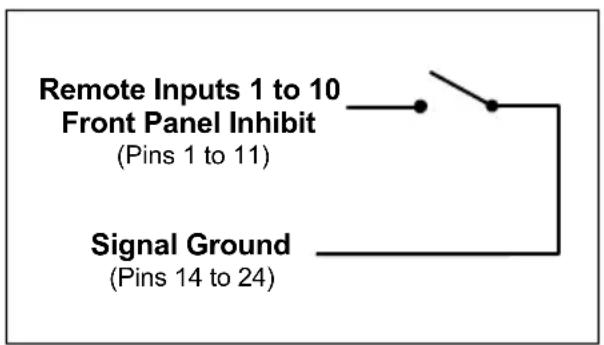
Fig 10-9: Connection Example
10.4.3.4. Status Outputs
This 25 way D-type socket (female) connector contains the remote status tallies.
| Pin No. | Signal Name | I/O | Description |
| Pin 1 | REMTALLY1 | O Internal open collector to ground for output 1 | |
| Pin 2 | REMTALLY2 | O Internal open collector to ground for output 2 | |
| Pin 3 | REMTALLY3 | O Internal open collector to ground for output 3 | |
| Pin 4 | REMTALLY4 | O Internal open collector to ground for output 4 | |
| Pin 5 | REMTALLY5 | O Internal open collector to ground for output 5 | |
| Pin 6 | REMTALLY6 | O Internal open collector to ground for output 6 | |
| Pin 7 | REMTALLY7 | O Internal open collector to ground for output 7 | |
| Pin 8 | REMTALLY8 | O Internal open collector to ground for output 8 | |
| Pin 9 | REMTALLY9 | O Internal open collector to ground for output 9 | |
| Pin 10 | REMTALLY10 | O Internal open collector to ground for output 10 | |
| Pin 11 | N/C - No internal connection | ||
| Pin 12 | N/C - No internal connection | ||
| Pin 13 | GND - Signal ground | ||
| Pins14 to23 | +5V O To supply up to a maximum of 100mA | ||
| Pin 24 | N/C - No internal connection | ||
| Pin 25 | N/C - No internal connection | ||
Fig 10-10: Status Output Pin Connections
Pins 1 to 10 are to replicate the front panel push button indicators. An example of how to connect the signals is shown below.
Pins 11, 12, 24 and 25 have no connection inside the unit.

Fig 10-11: Connection Example
10.5. Technical Specifications
10.5.1. Audio Specifications
Input Impedance: 110Ω ±20% balanced (AES/EBU)
Input Impedance: 75Ω ± 5% unbalanced (S/PDIF)
Output Impedance: 110Ω ±20% balanced (AES/EBU)
Output Impedance: 75Ω ±5% unbalanced (S/PDIF)
Signal Level 3V/10V peak to peak min/max (AES/EBU)
0.5V ±20% peak to peak (S/PDIF)
Sample Freq Range: 30-100kHz (i.e. including 32kHz, 44.1kHz, 48kHz, 64kHz, 88.2kHz and 96kHz), following input signal
Bit Depth: 16 - 24 bits, following input signal
Max Headphone
Output Level: +12dBu
10.5.2. Audio Connections
Audio Inputs: 8 x AES/EBU XLR 3 pin female
2 x AES/EBU (part of 1 x 25 way D-type plug)
10 x S/PDIF (part of 1 x 25 way D-type plug)
Audio Outputs: 1 x AES/EBU XLR 3 pin male
1 x S/PDIF (part of 1 x 25 way D-type plug)
10.5.3. Other Connections
Remote Start I/O: 1 x 25 way D-type plug (male)
Remote Input Select
& Switch Inputs: 1 x 25 way D-type socket (female)
Status Outputs: 1 x 25 way D-type socket (female)
Mains Input: Filtered IEC, continuously rated 85-264VAC @ 47-63Hz, max 10W
10.5.4. Equipment Type
RB-DSS10
10 Way Stereo Digital Source Selector

10.5.5. Physical Specifications
Dimensions (Raw) 48cm (W) × 10.8cm (D) × 4.2cm (H) (1U)
Dimensions (Boxed) 53cm (W) x 20.5cm (D) x 6cm (H)
Weight Nett: 1.6kg Gross: 2.2kg
11. Glossary
1kHz 1000Hz or 1 kilohertz Tone of 1kHz is often used for line-up and testing.
ADSL Asynchronous Digital Subscriber Link - a broadband delivery system over standard telephone lines (between the exchange and the user).
AES Audio Engineering Society.
AES/EBU Professional digital audio standard covering frame format, connections and interfaces. Interface is usually on XLR sockets and plugs.
AM Amplitude Modulation - older analogue modulation standard used on long, medium and short wave.
APT-X Data reduction process for reducing the amount of storage or bit-rate need for audio.
ATRAC Adaptive Transform Acoustic Coding - the data reduction of compression scheme used in Mini-disk machines.
Attenuation The reduction of a signal level. Attenuation is usually measured in dB.
B-Channel Bearer Channel - the main carrier channels used in ISDN.
Balance The relative levels of the left and right channels of a stereo signal.
Balanced Audio A way of sending audio over cable that protects it from induced interference.
CAR See racks room.
CAT 5 Category 5 - type of cabling/connectivity standards used in computer networking.
CD Compact Disc.
Cleanfeed A cleanfeed is a signal produced by a telco module on a mixer which is used as the output to be fed back to a caller on a telephone line. The cleanfeed is a sum of all the other signals which constitute the programme output, except for the caller's audio. A cleanfeed signal will generally be of a better quality than a mix-minus signal.
Clipping The onset of severe distortion in the signal path, usually caused by the peak signal voltage being limited.
CMRR Common Mode Rejection Ratio. This is the ratio of the extent to which a differential amplifier will cancel noise, which is present on both inputs, compared to its ability to amplify the signal.
CODEC COder-DECoder - used to change a signal from one format to anther and back again.
Codecs Using digital circuits being offered by telecom providers, usually ISDN (Integrated Services Data Networks) or other data transfer methods, audio can be transferred with good to excellent quality over what almost amount to dial-up telephone lines. The units operate by Coding the audio into a digital data stream that can be transferred over the digital circuit which is Decoded at the receiving end (Thus CoDec). By using single or multiple circuits, very high quality audio can be transferred from one place to another, even internationally.
Cross-talk This is the amount of a signal from a bus which appears, or is induced, on a different signal. The problem is usually most prevalent with adjacent channels.
DA Distribution Amplifier.
DAB Digital Audio Broadcasting = now called Digital Radio.
DAT Digital Audio Tape.
dB (decibel) A ratio of two voltages or signal levels, expressed by the equation dB=20LOG(V1/V2) Adding the suffix "u" denotes that the signal is relative to 0.775V RMS. Adding the suffix "v" denotes that the signal is relative to 1V RMS.
DCF This is radio code signal sourced from Mainflingen, near Frankfurt in Germany, which can be used to automatically synchronize the Sentinel+ audio logger and PC time to an accurate atomic clock, European Time.
DDS & DDS-2 DDS and DDS-2 are world-wide standards established by Sony and Hewlett-Packard which introduce many levels of error checking as data is written to a DAT tape. DDS(-2) drives and tapes are used in security products all over the world. 120m DDS-2 DAT tapes are more accurate and reliable than DDS tapes and are able to store twice as much audio data.
DI Direct Inject - a means of driving audio, usually from an instrument such as a guitar, to allow the audio signal to be fed directly into a sound desk input.
DLS Dynamic Label segment - a text message scheme used in digital radio, usually to carry information about the programme. Like the radio-text scheme used in RDS.
DSP Digital Signal Processing.
EBU European Broadcasting Union.
EIN Equivalent input noise. It is the ratio of output noise to the gain. It describes the level of noise which would need to be fed into an ideal amplifier to produce the measured output noise.
ENG (Electronic news gathering). Machines that can record audio and video information digitally.
EON (RDS) Enhance Other Networks - a scheme for switching a listener's radio to another Effective Radiated Power.
EQ (Equalisation). This is a method of cutting or boosting selected bands of frequencies in a signal.
FM Frequency Modulation - a way of sending audio or data over a radio carrier, the 88 - 108 Broadcast Band is often known as the FM Band.
G3 Third generation mobile telephone system that may allow broadband transmission of Global Positioning System.
Gain The degree of amplification, or attenuation, applied to a signal.
GRAM Gramophone Reproducer - a turntable with a 'pick-up' amplifier and remote start interface.
HDLC High Speed Data Link.
Hybrid See T.B.U.
IEC International Elecrotechnical Commission - often used to refer to a mains onnectivity standard, i.e. A type of plug/socket similar to that of a kettle, used on most pro-audio equipment.
ISDN Integrated Services Digital Network - a system for sending high bandwidth material over standard telephone lines.
Kbps Kilo-bits per second - the number os 1s or 0s transmitted or transferred in one second.
kHz Kilo Hertz (samples per second).
LAN Local Area Network - scheme where several computers on the same premises are connected together so that they can exchange data.
LCD Liquid Crystal Display (grey displays e.g. on calculators).
LED Light Emitting Diode (small lights e.g. on computers).
LNB Low Noise Block - the RF amplifier attached to a satellite dish.
MCR See racks room.
MDU Mains Distribution Unit - a panel of mains outlets for power distribution.
MF Medium Frequency - another name for Medium Wave - roughly frequencies between 300kHz and 3MHz.
MHz Mega-hertz - One million cycles per second.
Mix-minus A mix-minus is similar to a cleanfeed except that the caller's voice is removed from the signal electronically. Due to phasing problems at the signal band edges, the mix-minus method often produces a lower grade signal.
Mono Monophonic sound (system of broadcasting, recording or reproducing sound) using only one channel between source and loudspeaker.
MP3 MPEG 1 Layer 3 - see MPEG.
MPEG (ISO MPEG) Motion Picture Experts Group. For audio, this is used to refer to a framing format standard. There are several layers and variants. Most common ones are listed below.
MPEG 1 Layer 1 Used for Digital Compact Cassette.
MPEG 1 Layer 2 (Musicam) used in digital radio, digital terrestrial television, ISDN and many hard-disk storage systems.
MPEG 1 Layer 3 Known as MP3. A more elaborate version of MPEG 1 Layer 2 that allows for audio storage using low bit-rates.
MSF This is radio code signal sourced from Rugby in England, which can be used to automatically synchronize the Sentinel+ audio logger and PC time to an accurate atomic clock, UK Time.
Musicam Masking Pattern Universal Sub-Band Encoding.
MUX Short for Multiplex - a 'package' of digital radio services.
Pan This controls the levels sent to the left and right outputs and is an abbreviation of 'panorama'.
PFL (Pre Fade Listen, or Cue). This is a method of auditioning audio material independently of the programme output, without routing the signal to air. The PFL button on each channel routes the signal to the PFL bus, where it can be monitored.
PI Code (RDS) Programme Information Code used to identify an FM RDS station.
PPM Peak Performance Meter (BBC Specification).
Promo Something used to promote a product.
PS Name (RDS) Programme Service Name - 8 characters used for naming an FM RDS station.
PSU Power Supply Unit.
PTY (RDS and DAB) Programme Type. A code transmitted to describe the overall programme content of a radio station (Static PTY) and/or the moment by moment content (Dynamic PTY). RDS has 32 codes although 3 are used in special circumstances only.
Racks Room Often called the Master Control Room (MCR) or Central Apparatus Room (CAR), the racks room is an engineering area containing studio routing to transmitter equipment. Outside sources, phone-in equipment, off-air
and transmitter status monitoring and logging equipment (or the transmitter itself!) are stored here with limited access.
RDS Radio Data System.
Reverb An echo (in very basic terms).
RF Radio Frequency.
RJ-45 A connection standard used in computer networking.
S/PDIF Sony/Phillips Digital Interface. Domestic digital audio interface standard using phono connectors or optically using fibre-optic connectors.
SPL Sound Pressure Level.
TA Traffic Announcement (flag) - a means of signalling to a radio with FM RDS indicating that traffic/travel news is being broadcast.
T/B Talk-back (and reverse talk-back). This is the ability for two or more studios to communicate with each other off-air.
TBU See Telephone Balance Unit
TCP/IP Transmission Control Protocol / Internet Protocol. Computer interconnection methodology used on the internet and LANs.
Telephone Balance Unit (TBU) or Hybrid Telephone hybrids provide the interface between professional audio equipment and the public telephone network. They provide protection for your equipment and the public telephone lines, allowing for varying line signals and line conditions. Automatically cancelling out the unwanted signal they also facilitate two-way communication down a single telephone line. In most European countries, including the UK, the TBU must be approved for connection to telephone company lines. Sonifex TBU's carry British Telecom and pan European approval.
THD The Total Harmonic Distortion is the percentage presence of signals outside the measured reference frequency.
TMC (RDS) Traffic Message Channel.
TP Traffic Programme (flag) - a means of indicating to an RDS radio that a station will carry traffic announcements.
U A height measurement for rack-mount equipment:
1U = 1.75 inches
2U = 3.5 inches
3U = 5.25 inches
4U = 7 inches
UPS Uninterruptible Power Supply. A device which maintains power to equipment when the electricity supply fails.
VHF Very High Frequency - frequencies between 30MHz and 300MHz.
VP Vertical Polarisation i.e. of FM radio transmission.
VSWR Voltage Standing Wave Radio
VU Voltage units
WAP Wireless Application Protocol - a system for delivering mini-web pages to mobile phones from the Internet.
X21 A data communications protocol used in synchronous connections.
XLR Professional, robust lockable audio connector - sometimes known as a 'Cannon' after one of the earlier manufacturers.
12. Connectors And Cabling
Many of the problems associated with installing and maintaining studio equipment are due to the use of poor cables or faulty connections. It is recommended that, wherever possible, pre-wired cables are purchased from recommended manufacturers. If you need bespoke cables making, please ensure that the work is carried out by a qualified engineer.
The type of connectors used with the Redboxes are the following:
12.1. XLR 3 Pin Connectors
The following diagram shows the pin details for the 3 pin XLR sockets and plugs:

Fig 12-1: XLR Connectors
12.2. RCA Phono Connectors
The following diagram shows the connection details for the RCA phono connectors:
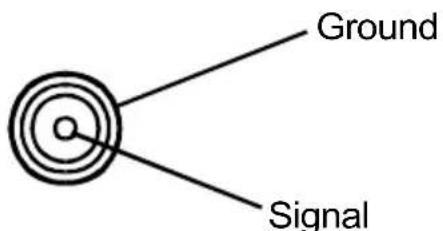
Fig 12-2: RCA Phono Connector
12.3. 1/4 " Jack Connector
The following diagram shows the connection details for the jack connector :
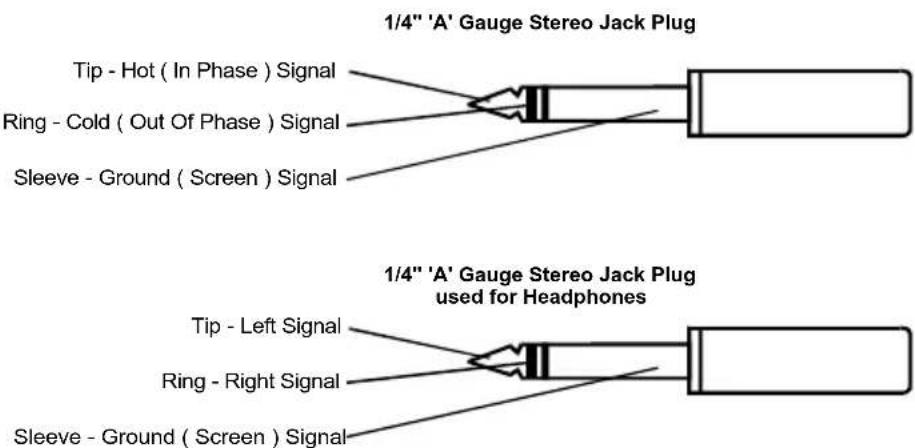
Fig 12-3: 1/4'' Jack Connector
12.4. BNC TTL Connectors
The following diagram shows the connection details for the BNC TTL connectors:
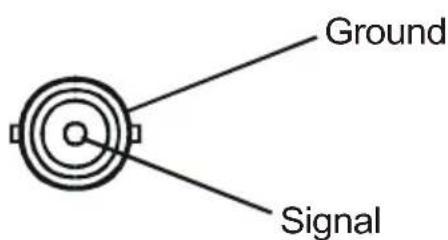
Fig 12-4: BNC TTL Connector
12.5. D-Type Connector
The following diagram shows the connection details for the D-type connectors as viewed from the rear of a Redbox:
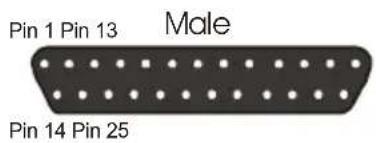
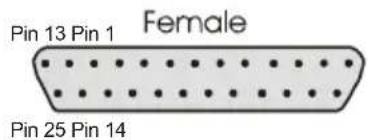
Fig 12-5: 25 Way D-Type Connectors
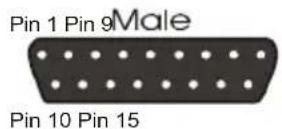
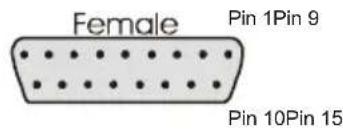
Fig 12-6: 15 Way D-Type Connectors
Index
A
AES/EBU Inputs
RB-ADDA, 4-3
RB-DAC1, 5-3
RB-DDA6A, 1-3
RB-DDA6S, 2-3
RB-DHD6, 7-3
RB-DMA2, 8-4
RB-SC1, 6-3
RB-SP1, 9-5
AES/EBU Outputs
RB-ADDA, 4-4
RB-DDA6A, 1-3
RB-DDA6S, 2-3
RB-DMA2, 8-5
RB-DSS10, 10-4
RB-SC1, 6-3
RB-SP1, 9-5
Analogue Outputs
RB-ADDA, 4-4
RB-DAC1, 5-3
RB-DMA2, 8-5
Analogue Select
RB-ADDA, 4-6
Audio Specification
RB-SC1, 6-6
Auto sync mode
RB-ADDA, 4-6
RB-DMA2, 8-7
RB-SC1, 6-4
Auto-Lock sync mode
RB-ADDA, 4-6
RB-DMA2, 8-7
RB-SC1, 6-5
B
Bit Rate Select
RB-ADDA, 4-5
RB-DMA2, 8-5
BNC TTL Connectors, 12-2
Bypass Mode
RB-SP1, 9-3
C
Cabling, 12-1
Calibrating
RB-ADDA, 4-7
RB-DMA2, 8-7
Channel status bits
RB-SC1, 6-4
Combine Mode
RB-SP1, 9-3
Connectors, 12-1
Consumer status bits
RB-SC1, 6-4
D
Digital I/O Select
RB-SP1, 9-6
Digital Select
RB-ADDA, 4-6
RB-DAC1, 5-4
RB-DHD6, 7-4
RB-DMA2, 8-6
RB-SC1, 6-4
Disabling the Fine Gain Control
RB-DMA2, 8-3
D-Type Connectors, 12-3
E
Earthing, iii
Emphasis
RB-ADDA, 4-5
RB-DAC1, 5-4
RB-DHD6, 7-4
F
Freq & Sync Modes
RB-SC1, 6-4
Freq & Sync Modes
RB-ADDA, 4-6
RB-DMA2, 8-7
Front Panel Indicators & Controls
RB-DAC1, 5-2
RB-DHD6, 7-2
RB-DMA2, 8-3
RB-DSS10, 10-3
RB-SP1, 9-2
Front Panel LED
RB-ADDA, 4-2
RB-SC1, 6-2
G
Gain
RB-ADDA, 4-3, 4-4
RB-DAC1, 5-4
|
Impedances
RB-DDA6A, 1-4
RB-DDA6S, 2-4
RB-DDA6W, 3-4
RB-DHD6, 7-4
RB-DSS10, 10-9
RB-SP1, 9-7
Input Gain
RB-ADDA, 4-3
Input Level Adjustment
RB-ADDA, 4-3
Input Level Indicators
RB-DMA2, 8-4
Inputs
RB-ADDA, 4-3
RB-DMA2, 8-4
RB-DSS10, 10-4
Introduction
RB-ADDA, 4-1
RB-DAC1, 5-1
RB-DDA6A, 1-1
RB-DDA6S, 2-1
RB-DDA6W, 3-1
RB-DHD6, 7-1
RB-DMA2, 8-1
RB-DSS10, 10-1
RB-SC1, 6-1
RB-SP1, 9-1
J
Jack Connectors 1/4 Inch, 12-2
L
LED flashing
RB-DAC1, 5-2
RB-DHD6, 7-2
RB-DMA2, 8-3
RB-DSS10, 10-3
RB-SC1, 6-2
Loss of sync indicator
RB-ADDA, 4-2
RB-DAC1, 5-2
RB-DHD6, 7-2
RB-DMA2, 8-3
RB-DSS10, 10-3
RB-SC1, 6-2
Loss of synchronisation
RB-SP1, 9-2
M
Master sync mode
RB-ADDA, 4-6
RB-DMA2, 8-7
RB-SC1, 6-4
Mode Select Dip Switch Settings
RB-SP1, 9-6
Mode Switch
RB-SP1, 9-3
0
Output Gain
RB-ADDA, 4-4
RB-DAC1, 5-4
Output Level Adjustment
RB-ADDA, 4-4
Output Routing
RB-DMA2, 8-6
P
Phantom Power
RB-DMA2, 8-6
Phantom Power Mic Operating
RB-DMA2, 8-6
Physical Specifications
RB-ADDA, 4-8
RB-DAC, 5-5
RB-DDA6A, 1-4
RB-DDA6S, 2-4
RB-DDA6W, 3-4
RB-DHD6, 7-4
RB-DMA2, 8-9
RB-DSS10, 10-9
RB-SC1, 6-6
RB-SP1, 9-7
Power Connection, iii
Professional status bits
RB-SC1, 6-4
R
RCA Phono Connectors, 12-1
RCA Phono Inputs
RB-ADDA, 4-3
RCA Phono Output
RB-ADDA, 4-4
Rear Panel Connections and
Operation
RB-ADDA, 4-3
RB-DAC1, 5-3
RB-DDA6A, 1-3
RB-DDA6S, 2-3
RB-DDA6W, 3-3
RB-DHD6, 7-3
RB-DMA2, 8-4
RB-DSS10, 10-4
RB-SC1, 6-3
RB-SP1, 9-5
Roll-Off Filters
RB-DMA2, 8-6
S
S/PDIF Inputs
RB-ADDA, 4-4
RB-DAC1, 5-3
RB-DHD6, 7-3
RB-DMA2, 8-5
RB-SC1, 6-3
RB-SP1, 9-5
S/PDIF Output
RB-ADDA, 4-4
RB-DMA2, 8-5
RB-SC1, 6-4
RB-SP1, 9-5
Sample conversion of secondary input
RB-SP1, 9-6
Slave sync mode
RB-ADDA, 4-6
RB-DMA2, 8-7
RB-SC1, 6-5
Split 96 Type
RB-SP1, 9-3
Split Mode
RB-SP1, 9-3
Status Select
RB-ADDA, 4-5
RB-DAC1, 5-4
RB-DHD6, 7-4
RB-DMA2, 8-5
RB-SC1, 6-4
Stereo/Mono Split Mode
RB-SP1, 9-6
Stereo/Mono Type
RB-SP1, 9-3
Sync indicator
RB-ADDA, 4-2
RB-DAC1, 5-2
RB-DHD6, 7-2
RB-DMA2, 8-3
RB-DSS10, 10-3
RB-SC1, 6-2
RB-SP1, 9-2
System Block Diagram
RB-ADDA, 4-2
RB-DAC1, 5-2
RB-DDA6A, 1-2
RB-DDA6S, 2-2
RB-DDA6W, 3-2
RB-DHD6, 7-2
RB-DMA2, 8-2
RB-DSS10, 10-2
RB-SC1, 6-2
RB-SP1, 9-2
T
TTL Input
RB-SC1, 6-3
Type Switch
RB-SP1, 9-3
W
Wiring Connectors, 12-1
Word Clock Input
RB-DDA6W, 3-3
RB-DMA2, 8-5
RB-SC1, 6-3
Word Clock Outputs
RB-DDA6W, 3-3
X
XLR Connectors
Wiring, 12-1
- Digital redbox user handbook
- Contents
- RB-DDA6W 6 Way word clock distribution amplifier ..3-1
- Rb-adda combined a/d and d/a Converter......4-1
- RB-DAC1 digital to analogue converter 5-1
- RB-SC1 sample rate converter 6-1
- RB-DHD6 digital 6 Way headphone distribution amplifier 7-1
- RB-DMA2 dual digital microphone amplifier ....8-1
- RB-SP1 digital splitter & combiner 9-1
- RB-DSS10 10 Way stereo digital source selector ... 10-1
- Glossary .... 11-1
- Connectors and Cabling....12-1
- Index I-1
- Figures
- Warranty, safety & installation information
- Warranty information
- Warranty and liability - important the purchaser is advised to read this clause
- Returning the warranty card
- Safety of mains operated redbox equipment
- Preparing the machine for use
- Equipment safety
- Voltage setting checks
- Fuse rating
- Power cable and connection
- Ordering the correct mains lead
- Installation information
- Atmosphere
- Fitting redboxes
- RB-DDA6A 6 Way stereo aes/ ebu digital distribution amplifier
- Introduction
- System block diagram
- Rear panel connections and operation
- Aes/ ebu input
- Aes/ ebu outputs
- Technical specifications
- Audio specifications
- Connections
- Equipment type
- Physical specifications
- RB-DDA6S 6 Way stereo s/pdif digital distribution amplifier
- Introduction
- Rear panel connections and operation
- S/pdif input
- S/pdif outputs
- Technical specifications
- Audio specifications
- Connections
- Equipment type
- Physical specifications
- RB-DDA6W 6 Way word clock distribution amplifier
- Introduction
- Rear panel connections and operation
- Word clock input
- Word clock outputs
- Technical specifications
- Signal specifications
- Connections
- Equipment type
- Physical specifications
- Rb-adda combined a/d and d/a converter
- Introduction
- System block diagram
- Front panel indicators
- Rear panel connections and operation
- Rb-adda inputs
- Xlr analogue inputs (left and right)
- Rca phono inputs (left and right)
- Input level adjustment
- Aes/ebu inputs
- S/pdif inputs
- Rb-adda outputs
- Analogue outputs (left and right)
- Rca phono outputs (left and right)
- Output level adjustment
- Aes/ebu output
- S/pdif output
- Rear panel controls
- Full scale db settings
- Status select switches
- Digital select buttons
- Analogue select button
- Frequency and sync mode rotary switch
- Test/calibration mode
- Technical specifications
- A/d connections
- A/d audio specification
- D/a connections
- D/a audio specification
- Other connections
- Operational controls
- Equipment type
- Physical specifications
- RB-DAC1 digital to analogue converter
- Introduction
- System block diagram
- Front panel indicators & controls
- Sync & power indicator
- Headphone output
- Volume control
- Rear panel connections and operation
- RB-DAC1 inputs
- Aes/ ebu input
- S/ pdif input
- RB-DAC1 outputs
- Analogue outputs (left and right)
- Rca phono outputs (left and right)
- Rear panel controls
- Output level adjustment
- De-emphasis switch
- Digital select button
- Technical specifications
- Connections
- Audio specification
- Operational controls
- Equipment type
- Physical specifications
- RB-SC1 sample rate converter
- Introduction
- System block diagram
- Front panel indicators
- Front panel led
- Rear panel connections and operation
- Inputs and outputs
- Aes/ebu inputs
- S/pdif inputs
- Word clock input
- Aes/ebu output
- S/pdif output
- Rear panel controls
- Status select switches
- Digital input select buttons
- Frequency and sync mode rotary switch
- Technical specifications
- Audio specification
- Connections and controls
- Equipment type
- Physical specifications
- RB-DHD6 digital 6 Way headphone distribution amplifier
- Introduction
- System block diagram
- Front panel indicators & controls
- Sync & power indicator
- Headphone outputs
- Volume control
- Rear panel connections and operation
- RB-DHD6 inputs
- Aes/ebu input
- S/pdif input
- Rear panel controls
- Status select switches
- Digital select button
- Technical specifications
- Connections
- Audio specification
- Operational controls
- Equipment type
- Physical specifications
- RB-DMA2 dual digital microphone amplifier
- Introduction
- Front panel indicators & controls
- Sync & power indicator
- Input level adjustment
- Disabling the fine gain control knob
- Input level indicators
- Rear panel connections and operation
- RB-DMA2 inputs
- Mic inputs
- Aes/ebu sync input
- Word clock sync input
- S/pdif sync input
- RB-DMA2 outputs
- Aes/ebu output
- S/pdif output
- Analogue line outputs
- Rear panel controls
- Status select switches
- Output routing
- Phantom power & lf filter
- Digital sync & output select buttons
- Frequency and sync mode rotary switch
- Test/calibration mode
- Technical specifications
- Connections
- Audio specification
- Operational controls & indicators
- Equipment type
- Physical specifications
- RB-SP1 digital splitter & combiner
- Introduction
- System block diagram
- Front panel indicators & controls
- Front panel led's
- Type & mode switches
- Split 96
- Stereo/mono
- Bypass
- Inputs and outputs
- Aes/ebu inputs
- S/pdif inputs
- Aes/ebu outputs
- S/pdif outputs
- Rear panel controls
- Digital input & output select buttons
- Mode select dip switch
- Technical specifications
- Audio specifications
- Connections
- Equipment type
- Physical specifications
- RB-DSS10 10 Way stereo digital source selector
- Introduction
- System block diagram
- Front panel indicators & controls
- Power indicator
- Illuminated push buttons
- Headphone output
- Volume control
- Rear panel connections and operation
- RB-DSS10 inputs
- Aes/ebu inputs
- RB-DSS10 outputs
- Aes/ebu outputs
- RB-DSS10 d-type connectors
- Digital audio inputs & s/pdif output
- Remote start i/o
- Remote select/switch inputs
- Status outputs
- Technical specifications
- Audio specifications
- Audio connections
- Other connections
- Equipment type
- Physical specifications
- Glossary
- Connectors and cabling
- Xlr 3 Pin connectors
- Rca phono connectors
- 1/4 " Jack connector
- Bnc ttl connectors
- D-type connector
- Index
- A
- Aes/ebu inputs
- Aes/ebu outputs
- Analogue outputs
- Analogue select
- Audio specification
- Auto sync mode
- Auto-lock sync mode
- B
- Bit rate select
- Bnc ttl connectors, 12-2
- Bypass mode
- C
- Cabling, 12-1
- Calibrating
- Channel status bits
- Combine mode
- Connectors, 12-1
- Consumer status bits
- D
- Digital i/o select
- Digital select
- Disabling the fine gain control
- D-type connectors, 12-3
- E
- Earthing, iii
- Emphasis
- F
- Freq & sync modes
- Front panel indicators & controls
- Front panel led
- G
- Gain
- Impedances
- Input gain
- Input level adjustment
- Input level indicators
- Inputs
- Introduction
- J
- Jack connectors 1/4 inch, 12-2
- L
- Led flashing
- Loss of sync indicator
- Loss of synchronisation
- M
- Master sync mode
- Mode select dip switch settings
- Mode switch
- 0
- Output gain
- Output level adjustment
- Output routing
- P
- Phantom power
- Phantom power mic operating
- Physical specifications
- Power connection, iii
- Professional status bits
- R
- Rca phono connectors, 12-1
- Rca phono inputs
- Rca phono output
- Rear panel connections and
- Operation
- Roll-off filters
- S
- S/pdif inputs
- S/pdif output
- Sample conversion of secondary input
- Slave sync mode
- Split 96 type
- Split mode
- Status select
- Stereo/mono split mode
- Stereo/mono type
- Sync indicator
- System block diagram
- T
- Ttl input
Brand : Sonifex
Model : Redbox RB-DDA6S
Category : Audio transmitter