
CS-HDM4X1ASW4 - Switch Metra - Free user manual and instructions
Find the device manual for free CS-HDM4X1ASW4 Metra in PDF.


| Product Type | HDMI 4x1 Switcher |
| Brand | Metra |
| Model | CS-HDM4X1ASW4 |
| Input Ports | 4 x HDMI (Type A female) |
| Output Ports | 1 x HDMI (Type A female), 1 x Toslink, 1 x Coaxial, 1 x Stereo (3.5mm) |
| Max Resolution | 4K@60Hz (3840x2160) |
| Video Bandwidth | 18 Gbps (6 Gbps per channel) |
| Deep Color | Up to 36-bit (12-bit per channel) |
| HDCP | HDCP 2.2 |
| Audio Formats | LPCM 7.1, DTS-HD Master Audio, Dolby TrueHD, Dolby Digital |
| Audio Output | HDMI, Toslink, Coaxial, Stereo |
| Audio Return Channel (ARC) | Supported |
| Control Methods | Manual (buttons), Remote control, Auto-switching |
| Auto-Switching | Yes, detects latest active input |
| Power Supply | 5V DC, 1A (included) |
| Power Consumption | Max 5W |
| Dimensions (W x H x D) | Approx. 100 x 25 x 70 mm |
| Weight | Approx. 0.2 kg |
| Operating Temperature | 0°C to 70°C (32°F to 158°F) |
| Certifications | FCC, CE, RoHS |
| Warranty | 1 Year Parts and Labor |
| Package Contents | Main unit, 5V DC power supply, Remote control, User manual |
| Maintenance | Wipe with dry cloth; do not use liquids or solvents |
Frequently Asked Questions - CS-HDM4X1ASW4 Metra
User questions about CS-HDM4X1ASW4 Metra
0 question about this device. Answer the ones you know or ask your own.
Ask a new question about this device
Download the instructions for your Switch in PDF format for free! Find your manual CS-HDM4X1ASW4 - Metra and take your electronic device back in hand. On this page are published all the documents necessary for the use of your device. CS-HDM4X1ASW4 by Metra.
USER MANUAL CS-HDM4X1ASW4 Metra
USER MANUAL Table of Contents
1.0 Introduction....01
2.0 Feature....02
3.0 Specification....02
4.0 Package Content....03
5.0 Panel Description....03
6.0 Connection and Operation....03
HDMI™ 4x1 Switcher Support 4K@60Hz with Extract Audio and Audio Return Channel
Dear customer
Thank you for purchasing this product. For optimum performance and safety, please read these instructions carefully before connecting, operating or adjusting this product. Please keep this manual for future reference.
1.0 Introduction
The 4 port HDMI™ 4K switch lets you share a display with four HDMI™-enabled A/V devices. The switch features four independent inputs that each support 4K resolution and 7.1 surround sound audio. You'll be amazed at how this video switch maintains Ultra HD picture quality. 4K is supported by the latest A/V devices and delivers four times the resolution of 1080p. Plus, because the switch is backward compatible with high-definition 1080p, you can assure any video source will look great in your digital signage application.
Also, the audio embedded in HDMI ™ can be extracted via Toslink or Coaxial and the switch can return the audio to AV receivers with audio return channel (ARC) function.
2.0 Feature
* Support manual control and remote control
* Enables the most recently activated video source to be displayed automatically
* Support digital audio output simultaneously: Stereo, Toslink and Coaxial
* Support resolution up to 4K@60Hz
* Support 600MHz/6Gbps per channel (18Gbps all channels) bandwidth
* Support 12bit per channel (36bit all channels) deep color
* Support HDCP2.2
* Support uncompressed audio such as LPCM 7.1
* Support compressed audio such as DTS, Dolby Digital (including DTS-HD Master Audio™ and Dolby TrueHD)
* Support Audio Return Channel
Note: Dolby is a trademark of Dolby Laboratories.
3.0 Specification
| Input DDC Signal 5 volts p-p (TTL) | |
| Output Video HDMI Signal | |
| Output S/PDIF Signal | Toslink and Coaxial |
| Video Amplifier Bandwidth | 6Gbps/600MHz |
| Vertical Frequency Range | 50/60Hz |
| Interlaced(50&60Hz) | 480i,576i,1080i |
| Progressive(50&60Hz) | 480p,576p,720p,1080p,4K@60Hz |
| Limited Warranty | 1 Year Parts and Labor |
| Operating Temperature | 0°C to 70°C / 32°F to 158°F |
| Operating Humidity 10% to 85 % RH (no condensation) | |
| Storage Humidity | 5% to 90 % RH (no condensation) |
| Extend Power Supply 5V DC | |
| Power Consumption (Max) 5W | |
| Switch Unit Cert FCC.CE, RoHS | |
| Power Supply Cert CE,FCC, RoHS | |
| User Manual | English Version |
Note: Specification is subject to change without notice.
4.0 Package Content
1) Main Unit
2) 5V DC Power Supply
3) User Manual
4) Remote Control
5.0 Panel Description
*Switch Panel:

flowchart
graph LR
    A["OCL"] --> B["Torgusky"]
    B --> C["Output"]
    C --> D["Output 1"]
    C --> E["Output 2"]
    C --> F["Output 3"]
    C --> G["Output 4"]
    C --> H["Output 5"]


*Remote Control

- 1, 2, 3, 4: Press the number 1, 2, 3, 4 buttons to select the wanted input channel
- 2CH: 2 channel stereo audio mode
-
5.1CH: 5.1 channel mode
-
PASS: Advanced Audio mode
-
ARC: Press the button to turn on/off ARC function
6.MUTE: Press the button to turn on/off Stereo, Toslink and Coaxial audio
6.0 Connection and Operation
1) Connect the HDMI sources to the unit
2) Insert the DC connector of 5V power supply into the unit and then connect the AC connector of the power supply into the wall outlet
3) Connect the output port of the switcher to HDMI-enabled display
4) Connect Coaxial/Toslink to any A/V receivers using coaxial cable or optical fiber or connect Stereo audio with earphone
Attention: Insert / Extract cable gently
6.1 Connection Diagram
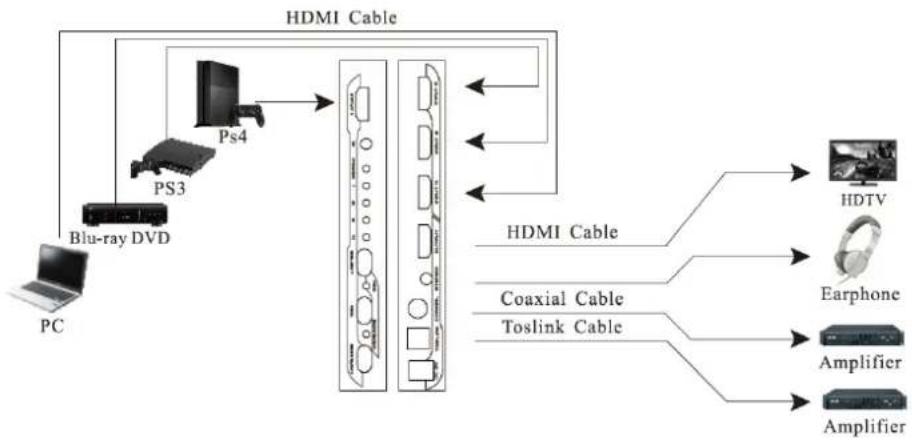
flowchart
graph LR
    PC["PC"] -->|Blu-ray DVD| PS3["PS3"]
    PS3 --> PS4["PS4"]
    PS4 --> HDMI_Cable["HDMI Cable"]
    PS4 --> Coaxial_Cable["Coaxial Cable"]
    PS4 --> Toslink_Cable["Toslink Cable"]
    Coaxial Cable --> HDMI Cable
    Coaxial Cable --> Earphone["Earphone"]
    Cosksink["Coaxial Cable"] --> HDMI Cable
    Cosksink --> Amplifier1["Amplifier"]
    Cosksink --> Amplifier2["Amplifier"]
    HDMI Cable --> HDTV["HDTV"]
    Coaxial Cable --> Earphone
    Toslink Cable --> Amplifier1
    Amplifier1 --> Ampifier1
    Amplifier2 --> Ampifier2

866.839.9187
460 Walker Street, Holly Hill, FL 32117
www.MetraHomeTheater.com
Brand : Metra
Model : CS-HDM4X1ASW4
Category : Switch