
KKT04 - Smartphone LAVA - Free user manual and instructions
Find the device manual for free KKT04 LAVA in PDF.


| Product Type | Smartphone |
| Brand | LAVA |
| Model | KKT04 |
| Network | Dual SIM (GSM/2G) |
| Memory Card | Supports T-Flash (microSD) card |
| Display | Keypad phone with numeric keypad |
| Camera | Yes, with settings for image quality |
| FM Radio | Yes |
| Bluetooth | Yes, with device discovery and audio path selection |
| Torch | Yes, can be turned on/off by holding OK key in idle mode |
| Alarm | 5 alarm times with customizable frequency |
| Calculator | Continuous four mixed arithmetic operations |
| Games | 1 pre-installed game |
| Battery | Removable (standard battery) |
| Charger | Standard charger (use approved chargers only) |
| SAR Value | <1.6 W/kg (1g tissue) |
| Warranty | 1 year for transceiver, 6 months for battery and charger |
| Languages | English (manual available) |
| Box Contents | Phone, battery, charger, headset, user manual, warranty card |
Frequently Asked Questions - KKT04 LAVA
User questions about KKT04 LAVA
0 question about this device. Answer the ones you know or ask your own.
Ask a new question about this device
Download the instructions for your Smartphone in PDF format for free! Find your manual KKT04 - LAVA and take your electronic device back in hand. On this page are published all the documents necessary for the use of your device. KKT04 by LAVA.
USER MANUAL KKT04 LAVA
LAVA KKT04 User Manual
1. Preface
◆ Thank you for purchasing this mobile. For the best performance, we recommend that you read the manual carefully.
◆ To guarantee that your cellular phone works properly, please follow the instrucons in this manual to prevent any possible incidents or malfuncons.
Introduction
◆ Phone Display
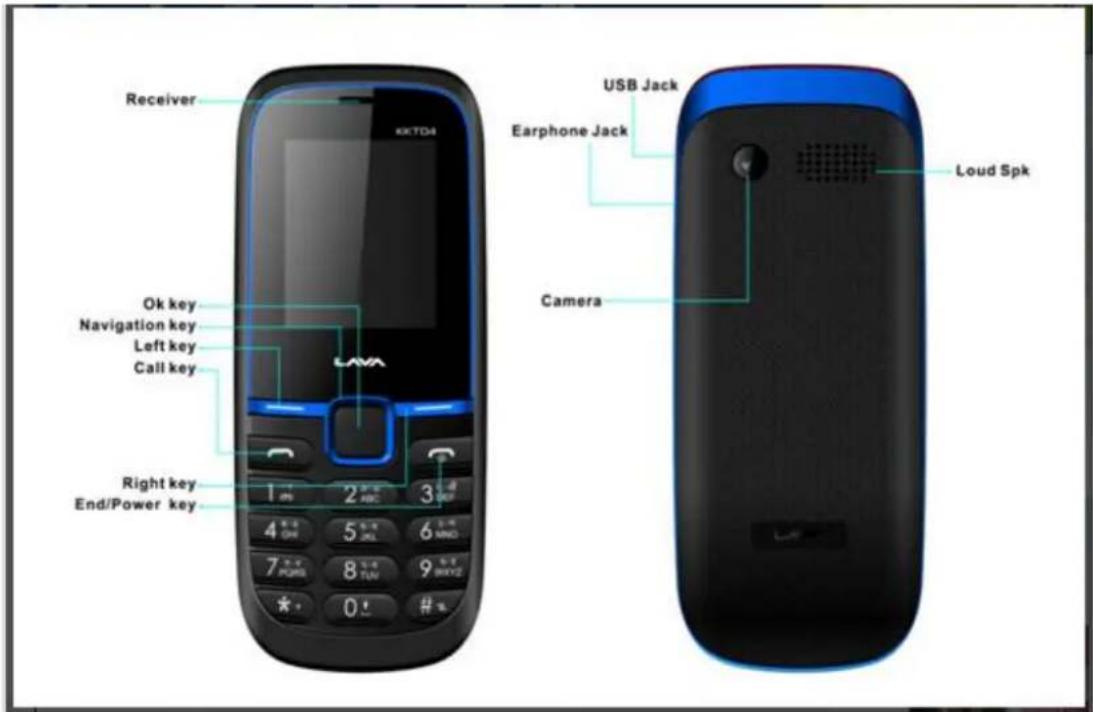
Key
| Key | Function |
| Call Key | Make or answer a call to Sim1 & Sim2.View Calls Logs in standby mode. |
| End/Power Key | Pressing and holding to turn the phone on/off. End a call or reject an incoming call.Return to the idle mode. |
| Left Soft Key | Menu key and OK key for functions |
| Right Soft Key | Access the Name list in idle mode.Return to the previous menu. |
| OK Key | Press to enter main menu in idle mode. |
KKT04 User Manual
LAVA
| After inputting numbers, press this key to do options. | |
| Numeric key | Enter numbers, letters or characters.Select a submenu item labeled with the corresponding number.In idle mode, press and hold OK key to turn on/off torch light. |
| * | Press to toggle between *, +, (pause character) P, and (wait character) W.Press to enter symbol when editing text. |
| # | Press to switch input modes when entering text.Press and hold to change sound profiles to Silent Mode and General mode. |
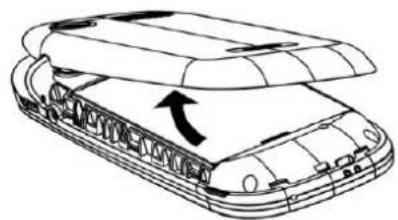
- Removing baery cover, showed as picture.
natural_image
Line drawing of a vehicle chassis with an open lid and internal components, showing no text or symbols.2.Baery disassembly & Baery assembly
natural_image
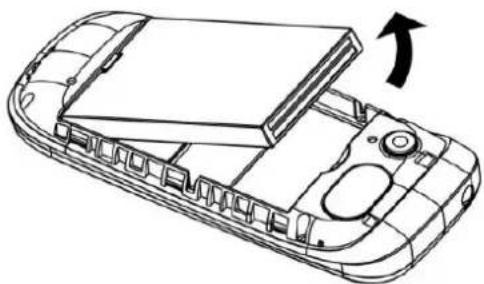
Line drawing of a mobile phone casing with an open lid and internal compartments, showing a right-hand rule for change (no text or symbols present)While removing baery, please boom up the phones, remove the baery cover and pull the baery.
3.SIM card inseron
natural_image
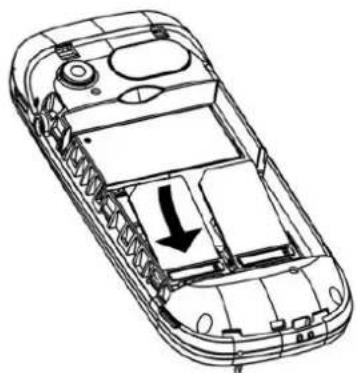
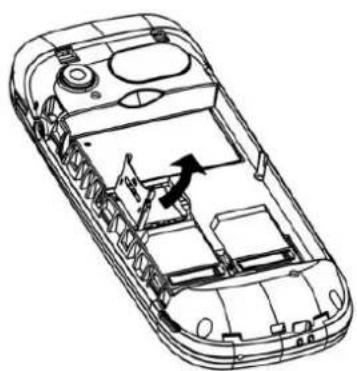
Technical line drawing of a mobile phone casing showing internal components and an arrow indicating a downward motion (no text or symbols present)Put the SIM card into the card slot with copper sheet downward. When pull out the sim card, please power o the phone and connectors rstly.
4.T flash card insertion, showed as picture.
natural_image
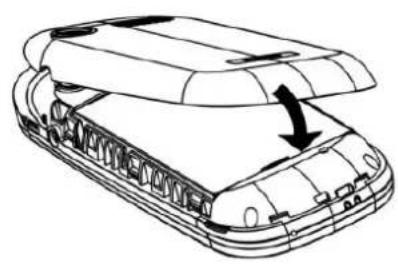
Technical line drawing of a car interior showing internal compartments and structural elements (no text or symbols)5.Baery cover xing, showed as picture.
natural_image
Line drawing of a tank with an open lid and internal structure, showing no text or symbols2.Menu
Call logs
All Calls: Check call logs for missed, dial, received calls and perform functions like save, delete view etc
Missed calls: Display the missed calls about the latest time and date, caller's number and calling times.
[Dialled calls] Display the dialed calls about the latest time and date, caller's number and calling times.
[Received Calls] Display the answered calls about the latest time and date, caller's number and calling times.
Press the right so key to enter the opons menu can be more than the number of call records in the following:
Delete: choose to delete the current record
Save to Phonebook: Save the record to phonebook
➢ Call: Call the current number.
Send text message: send text messages to the current record
➢ Edit: on the current record for eding
Add to blacklist: Add the current number to blacklist, aer success, open the black list funcon.
Contacts
You have 2 phonebooks in this mobile phone: SIM card and the mobile.
View: View the informaon of current record
Add contact: To add New Contact
▶ Call: To dial the contact directly.
➢ Send text message: send text messages to the current record
➢ Add to blacklist: Add the current number to blacklist, aer success, open the black list funcon.
▶ View: To view contact info
Edit: Edit contact message
➢ Delete: To delete the selected phonebook entry.
➢ Copy: Provide two ways of copying: from SIM1/SIM2 card to mobile, and from mobile to SIM1/SIM2.
Move: Move current mobile number (from a phone to SIM, from SIM to phone)
➢ Send contact: To send contact via MMS/BT/to save in memory card
➢ Call groups: Choose an contact number and add to contact group
◆ [Preferred storage]: Choose the storage posion for the
◆ [Memory status]: Check the storage capacity of the SIM card and phonebook.
Mulmedia
Video recorder: you can be Switch to video record
➢ Music: To play the music
➢ Video Player: To play the recorded movie.
➢ Image viewer: To view the saved image.
FM radio: To receive the FM broadcast.
➢ Sound recorder: To record the sound.
Camera
Using this user can take photos and can also do camera sengs to enhance quality of captured image.
Messages
Write message: Create new SMS
➢ Inbox: To view message received
▶ Sent: To view the sent messages.
➢ Outbox: To view the messages in sending or sent unsuccessfully.
➢ Dras: To save the messages that are not ready to send out in order to further edit, and then send.
Templates: To Templates
➢ SMS Sengs: To perform the setng related to SMS
➢ Memory status: To check the memory status of SMS.
➢ Preferred Storage: Sengs Phone/SIM
Fun & Games
Inside this 1 games are provided for user.
Tools
[Bluetooth
[Power] Acve the Bluetooth funcon.
[Visibility] Acvity /Deacvate this funcon
[My devices]: Display the connected Bluetooth
[inquiry audio device]: Display the Bluetooth earphone and other device, and search the
equipment
[My name] View the Bluetooth name and can be edit the Bluetooth name.
[Advanced]
◆Audio path: to "Leave in phone" or "Forward to Bluetooth." Note: Due to this Bluetooth headset has the voice channel switching funcon, so when set to "remain in the mobile phone", click the mul-funcon Bluetooth headset button can also be connected to telephones, voice, but remain in the mobile phone side. Please refer to the specific operational guidelines of the Bluetooth headset, and recommended that users use standard headphones
◆Storage: to preserve choice in the mobile phone or memory card to receive the document uMy address: Can be view the Bluetooth address.
Alarm
You can set5alarm mes with this mobile. For each of them, you can set the alarm status to be open or not, set the alarm me and alarm frequency (once, daily or on several self-dened dates).
Calendar
To access the Calendar, press the le so key. The rst row displays year and month; the second row displays week; the middle part displays dates for a specic month; and the last row displays the two so keys. In the calendar mode, view the previous week by pressing the up navigaon key and the next week by pressing the down navigaon key; View the previous day by pressing the left navigaon key and the next day by pressing the right navigaon key. The selected date is displayed in deep color.
Calculator
The cell phone support connuous four mixed arithmec operaon and the operaon is simple, praccal and convenient.
Torch: Turn on/o the Torch
Sengs
User proles
To perform the seng related, ringtone setngs General, Silent, Outdoor, Headset, Bluetooth
▶ Call sengs
To sengs call waing, call divert, call barring, Call time reminder, Call me display, Auto Redial, Answer mode, Black list
Phone sengs
To perform the seng related to mobile phone such as Time and date, Schedule power on/o, Language, Pref. input method, greeng text on/o, Shortcuts, Dedicated key, Backlight
▶ Display sengs
To perform the sengs like Wallpaper, Screen saver, Show date & me, Show operator name, LCD backlight
Flight mode
To switch to Flight Mode from Normal mode & Normal mode to Flight mode
Dual SIM sengs
Only SIM 1 open, Only SIM 2 open, Dual SIM open.
Network sengs
Using this user can do network related sengs like New search, Select Network or selecon mode
▶ Security sengs
To perform the seng related to security Including PIN, PIN2, Phone protecon, Mobile Tracker, Privacy protecon.
Restore sengs
Restore all default factory sengs. Default password: 4321
File manager
To manage the space of memory card, perform the corresponding operaon on the selected le and folder
3. Safety Informaon and Noces
Before using the phone, please read the safety precautions carefully and let your children know these, so that you can use your phone correctly and safely. Do not switch on your phone when phone use is prohibited or when phone use may cause interference or danger.
Do not use your phone while driving.
Follow the rules or regulaons in hospitals and health care facilities. Switch o your phone near medical equipment.
Switch o your phone in an aircra. The phone may cause interference to control signals of the aircra.
Switch o your phone near high-precision electronic devices. The phone may act the performance of these devices.
Do not attempt to disassemble your phone or its accessories. Only qualified personnel are allowed to service or repair the phone.
Do not place your phone or its accessories in containers with strong electromagnec eld.
Do not place magnec storage media near your phone. Radiaon from the phone may delete the informaon stored on them.
Do not put your phone in a high-temperature place or use it in a place with ammable gas such as a gas staon.
Keep your phone and its accessories away from children. Do not allow children to use your phone without guidance.
Use approved baeries and chargers only to avoid explosion.
4. Frequently Asked Quesons and Troubleshoong
◆ Frequently Asked Quesons
Cause and Soluon
◆ Fail to turn on
Press the power on key for over 1 second.
Check if the battery is properly connected. Please remove and install it again, retry to turn on;
Check if baery is appropriately charged
◆ Fail to connect network
Weak signal. Please Try and move to a locaon with strong signal and try connecng to the network again;
Please ensure that you are not beyond the network coverage of service providers;
Please ensure you have a valid SIM card. Please contact your network provider for further informaon;
◆ SIM Card Error
Dirt on the metal surface of an SIM card. Use clean cloth to wipe the metal touch point on an SIM card.
The SIM card is not installed.
The SIM card is damaged. Please contact your network service provider.
◆ Fail to charge
Poor contact. Please check if the plug is connected well.
Charge in the environment below 40^ C or above 55^ C. Please change your charging environment.
The baery or charger is damaged. You need to replace it.
SAR (Specific Absorpon Rate) Informaon
The highest SAR value for this mobile phone is <1.6 W/Kg, in accordance with the requirements of the ICNIRP, which recommended that the limit for exposure to radio waves is 1.6 was/kilogram(W/kg) averaged
over 1 gram of ssue. For more informaon, please visit our website (www.lavamobiles.com) to query.
Safety precautions:
• Use a wireless hands-free system (Headphone, headset) with a low power Bluetooth emier
• Make sure the cell phone has a low SAR
- Keep your calls short or send a text message (SMS) instead. This advice applies especially to children, adolescents and pregnant women
- Use cell phone when the signal quality is good
- People having acve medical implants should preferably keep the cell phone at least 15cm away from the implant
E-waste Disposal Mechanism
'E-waste' means waste electrical and electronic equipment (WEEE). In other words E-waste is a popular, informal name for electronic products nearing the end of their "useful life". For more details about e-waste please refer e-waste rules, 2011 www.moef.nic.in
Do's and Don'ts for disposal e-waste
Do's:
- Ensure that an Authorised Person repairs your Lava products
• Call Our Local Authorised Collecon Centers to Dispose Lava products - Always drop your used electronic products, baeries or any accessories thereof aer the end of their life at nearest Authorised Collecon Point or Collecon Center.
- Separate the packaging material according to responsible waste disposal opons and sorng for recycling.
- Always remove the baery from the product, when you do not intend to use the product anymore it in future.
Don'ts:
- Do not Dismantle your Lava Product on your own
- Do not give your e-waste to Kabbadi Wala / Scrap Dealer/ Rag Pickers.
- Do not dispose-o the e-waste in landlls
- Never dump E-waste in garbage bins.
- Do not dispose of your product at municipal waste bins or rooms.
- Do not throw used baeries into household waste.
•
Consequences of improper handling and disposal of E-Waste
- Improper disposal of waste prevents natural resources from being re-used.
- Some waste contains hazardous chemicals and if not disposed of properly may release toxins into the soil and water, and also releases greenhouse gases into the environment
- If e-waste is not properly disposed of, it can threat to the health and well-being of humans and animals and it also has adverse effect on the environment.
- Placing of baeries or devices on or in heang devices, such as microwave, ovens, stoves, or radiators and improper disposal of baeries may lead to explosion.
- If the baery terminals are in contact with metal objects, it may cause a re.
For more details on how to dispose of your Lava products at the end of life, Please refer the list of our Services Centers on Pan India basis on our website www.lavamobiles.com or please view this link for the details of Service Centers hp://www.lavamobiles.com/support-services.
Troubleshoong
Service Center number
No.:+919560394002
Kindly note please send area code of place through SMS to this No. and in return you will get address of service center nearest to you by SMS
Lava warranty certificate
Limited warranty:
LAVA international Ltd. (LAVA) provides limited warranty for your mobile phone and original accessories delivered with your mobile phone (hereinafter referred to as “product”)
The warranty period for the transceiver is one (1) year and for battery, charger and headset is six (6) months from the date of purchase.
LAVA Warranty
Subject to the conditions of this Limited Warranty, LAVA warrants a product to be free from defects in design, material and workmanship at the time of its original purchase by you, and for a subsequent period of one (1) year for transceiver and six (6) months for battery & charger.
You shall have to coverage or benefits under this warranty in the event that any of the following conditions are applicable:
- The product has been subjected to abnormal use or conditions, improper storage, exposure to 1.excessive moisture or dampness, exposure to excessive temperature, unauthorized modification, unauthorized repair (including but not limited to use of unauthorized spare parts in repairs), abuse, accidents, Acts of God, spills of food or liquids, improper installation
- You have not notified Lava of the defect in the product during the applicable warranty period.
- The product serial no. code or the accessories date code has been removed, defaced or altered.
- The product has been used with or connected to an accessory (i) Not supplied by Lava or its affiliates, (ii) Not it for use with the product or (iii) Used otherwise than in manner intended.
- The seals of the product's battery enclosure have been broken or shown evidence of tempering or the product's battery has been used in equipment other than that for which it has been specified usable by LAVA.
- All plastic surfaces and all other externally exposed part that is scratched or damaged due to normal use.
To get maximum of your new product, we recommend you to:
Read the guidelines for safe and efficient use as mentioned in the manual.
Read the terms and conditions of your Lava warranty in the manual.
Keep your original receipt; you will need it for warranty services if asked to produce.
Present this Lava Warranty Certificate along with original proof of purchase whenever you require any warranty services.
In case Lava product needs service, please visit the nearest Lava service centers given in the service guide. Please visit our Website www.lavamobiles.com for updated list of Authorized Service Centers near to your location.
Important note: for your warranty to be valid, all information on the warranty certificate has to be completed including the stamp from the authorized distributor/retailer.
All warranty information, product features and specifications are subject to change without notice.
KKT04 User Manual
LAVA
IMEI No.
Dealers Stamp ....
Date of purchase
Model No.
- LAVA KKT04 User Manual
- Preface
- Introduction
- ◆ Phone Display
- Key
- KKT04 User Manual
- LAVA
- 3.SIM card inseron
- 4.T flash card insertion, showed as picture.
- 2.Menu
- Call logs
- Contacts
- Mulmedia
- Camera
- Messages
- Fun & Games
- Tools
- [Bluetooth
- equipment
- [Advanced]
- Alarm
- Calendar
- Calculator
- Torch: Turn on/o the Torch
- Sengs
- User proles
- ▶ Call sengs
- Phone sengs
- ▶ Display sengs
- Flight mode
- Dual SIM sengs
- Network sengs
- ▶ Security sengs
- Restore sengs
- File manager
- Safety Informaon and Noces
- Frequently Asked Quesons and Troubleshoong
- ◆ Frequently Asked Quesons
- ◆ Fail to turn on
- ◆ Fail to connect network
- ◆ SIM Card Error
- ◆ Fail to charge
- SAR (Specific Absorpon Rate) Informaon
- Safety precautions:
- E-waste Disposal Mechanism
- Do's and Don'ts for disposal e-waste
- Do's:
- Don'ts:
- Consequences of improper handling and disposal of E-Waste
- Troubleshoong
- Service Center number
- No.:+919560394002
- Lava warranty certificate
- Limited warranty:
- LAVA Warranty
Brand : LAVA
Model : KKT04
Category : Smartphone