
KKT 21i - Smartphone LAVA - Free user manual and instructions
Find the device manual for free KKT 21i LAVA in PDF.


| Product Type | Smartphone |
| Brand | LAVA |
| Model | KKT 21i |
| SIM Support | Dual SIM (both standby) |
| Memory Card Support | MicroSD (T-Flash) up to 16GB |
| Camera | Yes (rear camera, VGA or similar) |
| Audio Player | MP3 player with background play, repeat, shuffle |
| Video Player | Yes, supports common formats |
| FM Radio | Yes, with recording capability |
| Bluetooth | Yes, file transfer and audio devices |
| USB Connectivity | Micro USB for charging and data transfer |
| Battery | Rechargeable Li-ion battery (charger included) |
| Special Features | Auto call recording, mobile tracker, LED torch, alarm, calculator, world clock, currency converter |
| Display | Color TFT display (size not specified) |
| Operating System | Proprietary (feature phone OS) |
| Warranty | 1 year for phone, 6 months for accessories |
| SAR Value | < 1.6 W/kg (head) |
| Languages | Multiple languages supported (e.g., English, Hindi, etc.) |
| E-waste Disposal | Follow local regulations; return to authorized centers |
| Weight | Approx. 100g (typical for feature phone) |
Frequently Asked Questions - KKT 21i LAVA
User questions about KKT 21i LAVA
0 question about this device. Answer the ones you know or ask your own.
Ask a new question about this device
Download the instructions for your Smartphone in PDF format for free! Find your manual KKT 21i - LAVA and take your electronic device back in hand. On this page are published all the documents necessary for the use of your device. KKT 21i by LAVA.
USER MANUAL KKT 21i LAVA
All rights are reserved. No part of this document may be reproduced without permission.
While all efforts have been made to ensure the accuracy of all the contents in this manual, we assume no liability for errors or omissions or statements of any kind in this manual, whether such errors or omissions or statements resulting from negligence, accidents, or any other cause. The contents of this manual are subject to change without notice.
Protect our environment! We strive to produce products in compliance with global environmental standards. Please consult your local authorities for proper disposal.
Note: User Manual is just to guide the user about the functionality of the phone. This does not seem any certificate of technology. Some functions may vary due to modifications and upgrade of software, or due to print mistake.
Welcome
Congratulations on your purchase of the LAVA mobile phone. Your phone provides many functions which are practical for daily use, such as a hands-free loudspeaker, camera, MP3 player, video recorder, LED Torch, Super Loud Speaker, Display and more. Your phone can also connect to a PC, laptop, or other device using a USB data cable.
Please use the original accessories in order to achieve best results. Use of non-original components may cause damage to machinery, for which the company shall not be held responsible.
LAVA support and contact Information
Visit www.Lavamobiles.com for additional information, downloads and services related to your LAVA product.
To check for the nearest LAVA service center location for maintenance services, please visit www.lavamobiles.com/support-services
Service Center number
No.:+919560394002
Kindly note: Please send area code of your location through SMS to this No. and in return you will get address of service center nearest to you by SMS
Table of Contents
- Innovative functions .... 5
1.1. Advanced Auto Call Recording ....5
1.2. Mobile Tracker....6
Precautions....6
Please read carefully and observe the terms above....7
1.3. Exciting Features....7
1.4. Phone Layout....8
- Getting Started 8
2.1. Insert SIM and Memory Card....8
2.2. Charge the Battery....10
- Main Menu 11
3.1.Phonebook....11
3.2. Messaging....12
Write message 12
Inbox 12
Drafts 13
Outbox 13
Sent Messages 13
Broadcast Messages 14
SMS settings 14
SMS schedule....14
3.3. Call history 14
3.4. Audio Player 15
3.5. Proiles....15
3.6. Multimedia 16
Camera 16
Photos 16
Video recorder....16
Video player 17
Sound Recorder 17
FM radio 17
3.7. Game 18
3.8. Settings....18
Dual SIM settings 18
Phone settings 18
Network settings....18
Security settings 18
Call settings....19
Restore factory settings 19
3.9. File Manager 20
3.10. Organizer....20
Torch 20
Bluetooth 20
Alarm 20
Calendar 20
Calculator 20
Currency converter 20
World clock....20
3.11. Services....20
LAVA Space 21
Pandit Ji 21
STK 21
3.12. Shortcuts 21
SAR (Specific Absorption Rate) Information.... 21
Safety precautions: 21
E-waste Disposal Mechanism 21
Do's and Don'ts for disposal e-waste 21
Consequences of improper handling and disposal of E-Waste...... 22
Troubleshooting....22
Lava warranty certificate 24
1. INNOVATIVE FUNCTIONS
1.1. Advanced Auto Call Recording
You can record all your conversations by activating Auto call recorder, under Settings>Call settings>Advanced settings>Auto call recorder. This Model has advanced auto call recording which stores all the conversations for a particular contact into a folder whose name is same as contact's name.
1.2. Mobile Tracker
If your mobile is lost or stolen, you can get your mobile report by the tracking function.
First you need set a password and a notify number, and then enable it. If an illegal user is using your mobile, a SMS will be sent to the notify number so that you can obtain the number and location of the illegal user.
For Your Safety
Read this simple guideline. Not following them may be dangerous or illegal. Read the complete user manual for further information.
Precautions

Safe power on
Do not use your mobile phone where it is forbidden to use or it might cause disturbance or danger.

Safe transportation irst
Please observe all local laws and regulations.
Do not use your mobile phone while driving.
Safe transportation should be considered irst when driving.

Disturbance
All mobile phone performances might be reduced or lactuate during a disturbance.

Turn off when in the hospital
Please follow related limitations.
Please switch your mobile phone off when near a medical instrument.

Turn off on an airplane
Please follow related limitations.
Do not try to use your mobile phone on an airplane.

Turn off when at a gasoline station
Do not use your mobile phone at a illing station or around fuels or chemicals.

Turn off around exposure Area
Please observe related limitations
Do not use your mobile phone near an area where explosions can occur.

Proper use

As described in this manual, your mobile phone can be used only in the correct locations.
Please do not touch the antenna area of your phone.
Use qualified after sales service

Only a qualified technician can install or repair your mobile phone. Please contact LAVA authorized service center in case of phone failure.

Accessories and batteries

Only use the authorized accessories and batteries and do not connect to incompatible manufacturers or products.

Waterproof

Your mobile phone is not waterproof. Please keep it away from water.

Backup

Remember to make a backup or keep a written record of all important information saved in your mobile phone.

Connect to other devices

Please read the user manual of the device to get more detailed security instructions before connecting to other devices and do not connect to an incompatible product.

SOS emergency calls
Make sure your mobile phone is switched on and in a service area. In idle mode, input the SOS number; then press the Dial Key. Advise where you are and do not hang up without permission.

Please read carefully and observe the terms above.
Improper use will invalidate the warranty! These safety instructions also apply to original accessories
1.3. Exciting Features
- Dual SIM Support
· T-Flash card support (up to 16GB)
• Music Player, Video Player
• Game:F1 Race
· FM Radio with Recording
- Mobile Tracker
1.4. Phone Layout
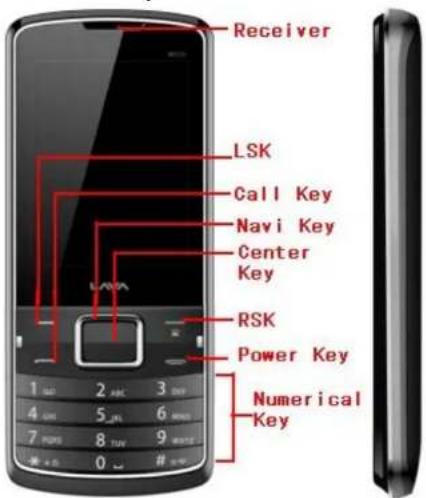
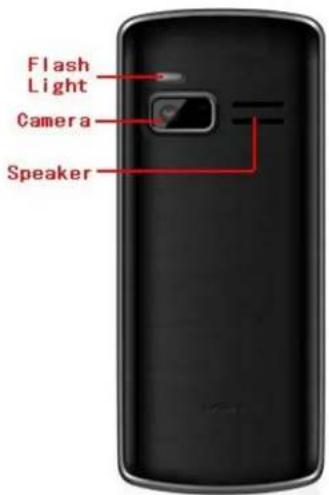
2. Getting Started
2.1. Insert SIM and Memory Card
- Open the battery cover and remove the battery as shown below.
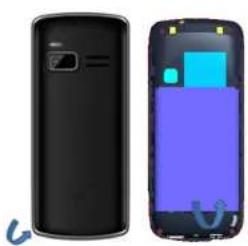
natural_image
Two views of a black smartphone showing front and side views with visible internal components (no text or symbols)- Insert the SIM card correctly in the card slot(s) as shown below.
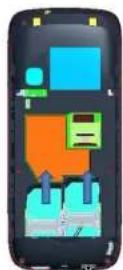
- Open the memory card slot, and insert the memory card into the slot with the gold colored contacts facing down.
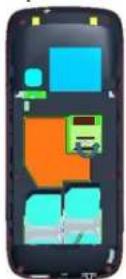
The Memory Card gives you extra storage capacity for content such as pictures, music and video clips.
Do not remove the memory card while reading or writing to the card. Doing so may cause data corruption on the card or on the
phone.
Use only compatible memory cards approved by LAVA. Incompatible cards may damage the slot or corrupt the data stored in the card.
2.2. Charge the Battery
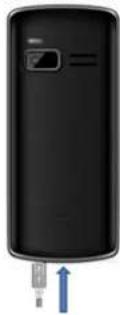
You can charge your battery by using the charger or the USB cable supplied with this phone.
Charging via power socket
-
Connect the charger to the charger jack on the phone.
-
Connect the charger to the power socket. While charging, the charge indicators will scroll. When all the scroll bars are steady, the battery is fully charged.
Now you can disconnect the charger and the AC power socket from the phone.
Charging via USB cable
-
Connect the USB cable to the USB socket on the phone.
-
Connect the USB jack of the cable with the pc or laptop.
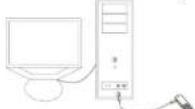
- Disconnect the USB cable from the PC/Laptop and the phone.
Note: Slight heating during charging is normal. It indicates that the battery is full, when the charging icon becomes static.
3. Main Menu
3.1. Phonebook
You can save a phone number in the SIM cards or phone.
Press RSK Key under the standby mode and then select Phonebook if you desire to enter in the function.
Select a contact in the contact list window and press OK Key to perform:
➢ View: Display the current number.
➢ Send text message: Directly input the SMS and send it to the searched phone number.
➢ Call: Call the current contact.
➢ Edit: Edit the current contact.
➢ Delete: Delete the current contact.
▶ Copy: Copy the current contact.
➢ Move: move the current contact.
Mark several: Mark the contact, and then send SMS or delete marked.
➢ Caller groups: In order to facilitate the address book managements, your contact will be added to the different groups respectively.
➢ Phonebook settings: You can manage the phonebook with this function.
Preferred storage: You can select preferred storage as SIM1, SIM2, Phone or all.
Speed dial: You can assign the quick dial numbers (2-9) to the 8 frequently-used phone numbers.
Extra number: You can choose the Fixed、Barred dial and service numbers、SOS number。
Memory status: View the number of phone numbers saved in the SIM cards or in the phone memory
Copy Contacts: Copy contacts between phone and SIM card.
Move Contacts: Move contacts between phone and SIM card.
Delete All Contacts: Delete all the contact from the handset.
Backup contacts: You can take the back-up of phonebook numbers by this function;
3.2. Messaging
You can send and receive the SMS.
Write message
➢ Send to: Input number and then send SMS to the input number.
➢ Input method: Change the input method.
- Advanced: Insert pictures, melody, phone number and bookmark.
- Insert Number: Insert the number of the contacts.
- Insert Name: Insert the phone book name.
➢ Save to Draft: Save the SMS in the Draft box.
Select [send to] to enter into the sending window after completing the SMS. Select [Enter number] or [Add from phonebook] to search a phone number of the receiver and inally press Left Soft Key:
Send: Send the SMS to sender
Edit Recipient: Edit the recipient number.
Remove Recipient: Delete the selected recipient.
Remove All Recipients: Delete all recipients.
Save to Draft: Save the SMS in the Draft box.
Press OK Key to send the SMS.
Inbox
The Inbox contain all the received SMS.
You can view the received SMS from this function. Select an entry of SMS and press
View: View the selected message.
Reply: Reply the SMS to the sender;
Call sender: Call the sender of the selected message.
Forward: Forward the SMS to other via SIM card;
Delete: Delete the selected entry of the message;
Delete all: Delete all messages
Sort by: Sort the SMS by sender, subject, unread/read, message size.
Filter by: ilter the SMS by SIM1、SIM2、all messages.
Mark Several: Delete the marked messages at the same time.
Advanced: Press OK Key under this window to perform:
Copy to phone: current information copy to the phone.
Copy to SIM1/2: current information copy to the SIM1/2.
Move to phone: current information to move to the phone.
Move to SIM1/2: current information to move to the SIM1/2.
Copy All: Between the phone and SIM card copy.
Move All: Between the phone and SIM card move.
Drafts
Saved messages and unsent message are saved here.
Press OK Key to enter SIM1 drafts. And press Left Soft Key under the Drafts list window to perform:
View: View the selected message.
Send: Send the selected message.
Edit: Edit the selected message.
Delete: Delete the selected entry of the message;
Delete All: Delete all messages
Sort by: Sort the recipient, subject, message size
Mark several: Mark several messages to delete at the same time.
Advanced: Press [OK] under this window to perform:
• Copy to phone: current information copy to the phone.
• Copy to SIM1/2: current information copy to the SIM1/2.
- Move to phone: current information to move to the phone.
- Move to SIM1/2: current information to move to the SIM1/2.
• Copy All: Between the phone and SIM card copy.
- Move All: Between the phone and SIM card move.
Outbox
The out-going messages are listed here.
Sent Messages
Sent messages are saved here. Your options include:
View: View the selected message.
Forward: Forward the SMS to other via SIM card
Delete: Delete the selected entry of the message;
Delete all: Delete all messages
Sort by: Sort the recipient, subject, message size
Mark several: Mark several messages to delete at the same time.
Advanced:
• Copy to phone: current information copy to the phone.
• Copy to SIM1/2: current information copy to the SIM1/2.
- Move to phone: current information to move to the phone.
- Move to SIM1/2: current information to move to the SIM1/2.
• Copy All: Between the phone and SIM card copy.
- Move All: Between the phone and SIM card move.
Broadcast Messages
Look at the broadcast messages. Your options include:
Receive Mode: Turn on or turn off cell broadcasting.
Channels settings: You can add, edit channels and can delete the current channels.
Languages: set the cell broadcast language.
Read Messages: Save read cell broadcast information.
SMS settings
• Memory status: View the quantity of SMS saved in the phone memories.
• Save sent message: Select to keep sending SMS on/off.
• Preferred storage: Select to save the SMS in phone or memory card.
SMS schedule
Select status to switch on off this function, you can send SMS according your schedule you set here instead of timely.
3.3. Call history
In the call history, it includes missed call, dialed call, received call, you can carry out the following operations for them: view the call history, edit the call history, save the call history to phonebook, add the call history to the blacklist, delete the call history, you can also view the call time and call cost.
Select any call log, Press Left Soft Key to enter the Option list:
View: View the detail of the current call.
Call: Call the current number.
Send text message: Directly input the SMS and send it to the current number.
Save To Phonebook: save to phonebook.
Add To Blacklist: Add the number to black list and block the same number to call you.
Edit Before Call: Call to edit the number before the call record contacts.
Delete: Delete the current logs.
Call Timers: Record all the talk time.
Text Msg. Counter: Record the NO of message sent and received for both the SIM.
3.4. Audio Player
You can enjoy the music with this function. You can use the following keys during the play.
| Key | Function | |
| Left Key | Press to switch to a previous song. Press and hold: rewind | |
| Right Key | Press to switch to a next song. Press and hold: go forwards | |
| UP Key | press to increase the volume | |
| Down Key | press to lower the volume | |
Press Left Soft Key to view Play list, your options include:
Play: Play the currently-selected song.
Details: View the detailed information of the currently-selected song.
Refresh list: Refresh the current list
Settings: Set up the music player.
List auto gen.: set up to on/off the function.
Repeat: Set up to open/close the function. If you open the function, you can select repeat Once or repeat All.
Shufle: Set up to open/close the function.
Background play: Set up to open/close the function.
3.5. Proiles
It includes General, Silent, Meeting, Outdoor and Earphone proile.
Select one mode (Silent mode cannot be modified) and enter the option menu:
Activate: Activate the proile mode.
Customize: Customize the proile mode as following:
Alert Type: Set the alert type such as Ring only, Vib only, Vib. And ring, Vib. Then ring.
Ring Type: Set the ring type such as Repeat、Ascending、Beep once.
SIM1/2 Incoming Call: Set the ringtone for the SIM1/2 incoming call. You can also select ringtone from T card.
Ringtone Volume: Set the ringtone volume of the incoming call.
SIM1/2 message: Select the ringtone for the SIM1/2 message. You can also select the ringtone from T card.
Message Volume: Set the volume for message ringtone.
Keypad: Select the ringtone for keypad.
Keytone Volume: Set the volume for the keypad.
Power On: Select the ringtone for the power on.
Power Off: Select the ringtone for the power on.
System Alert: On /off the system alert.
Reset: Reset the setting to the default.
3.6. Multimedia
Camera
With this function, you can take pictures.
Enter Camera Option, Your options include:
- Switch to video recorder: Switch to video interface.
• Photos: Enter in the album folder. - Camera Settings: Set up the camera.
• Image Settings: Set up the photo parameters.
• White Balance: Adjust the color balance of the photo. - Scene Mode: Set up the scene mode.
- Restore Default: Recover all settings into the initial values.
Photos
You can view the photos taken from the camera through this function.
Select a photo ile and press
View: View the selected image.
Details: Show some information of image.
Browse Style: You can select list style or matrix style.
Send: Send the selected image to Bluetooth.
Use as: Send the selected image ile to the wallpaper, to screen saver or to phonebook.
Rename: Change the name of the image.
Delete: Delete the selected image.
Storage: Select the photos storage.
Video recorder
Switch to camera: Switch to the camera interface.
Camcorder Settings: Set up the video recorder.
Video Settings: Set up the video parameters.
Video player
You can play the video with this function. Select a video and press [OK] Key under the video list window and begin to play. You can use the following keys during the play.
| Key | Function |
| Left key | Press to go backwards. Press and hold to continuously go backwards. |
| Right key | Press to go forwards. Press and hold to continuously go forwards. |
| OK Key | Press to play/pause the video. |
| Left soft key | Press to go to Options. |
| Right soft key | Press to stop the video and go back |
| UP key | Press to increase the volume |
| Down key | Press to lower the volume |
Sound Recorder
You can record voice through this function.
After record, access Options:
New record: Select this option to record the sound.
Play: Play the selected sound.
Append: Continuously record after the previous record ile and append it after the record ile.
Rename: Rename the selected sound.
Delete: Delete the selected sound.
List: View the currently-selected sound iles.
Settings: Entering this option you can set audio quality.
Use as: Set as SIM1/SIM2 user proiles.
Send: Send sound ile to Bluetooth.
FM radio
Channel List: Play, edit or delete the saved channels.
Manual Input: Manually input the channel to search.
Auto Search: Automatically search the channel.
Settings: Set up to receive the FM broadcast at the backstage or receive the FM broadcast with the speaker as well as set up the record format and voice quality.
Record: Record the songs, show etc through this function
File List: List all recorded iles.
3.7. Game
There's one game F1 Race embedded in this model.
3.8. Settings
You can set up various functions of the phone through this function.
Dual SIM settings
SIM setting : You can set up two SIM cards with this function.
Flight mode: you can deactivate the SIM by this function, Usage of phone in plane will interfere with the light operation and bring dangers. In that case keep phone in light mode
Phone settings
You can customize your favorite phone functions based on your interest.
Time and Date: You can set home city, set time and date and set time format for your phone.
Schedule power on/off: you can set time to power on or off by schedule
Language: Set the current system language.
Pref. input method: Select the default input method.
Display
- Wallpaper: Select your favorite picture as the wallpaper of the standby window.
- Auto Keypad Lock
Set to lock the keypad.
• Show date and time: On or off display time.
Dalicated key: You can add shortcuts to applications, or assign shortcuts to the navigation key.
LCD Backlight: You can set LCD brightness and time.
Network settings
You can set up the phone network with this function.
SIM1/SIM2 network settings
Network selection: You can search the network through this function, including Auto and Manual modes.
Security settings
You can manage your phone safely with this function.
SIM security
- PIN lock
- Change PIN
Phone security
- Phone lock
Open or close the phone lock function. When the phone lock is on, you have to input the phone lock password upon each power-on.
- Change password
You can change the phone password.
Mobile tracker
You can track your phone when the phone is lost;
Privacy protection
Input the correct password into the interface of Data security.
Setting: Set the modules of the privacy protection. These modules include Contacts, Messages, Call history, Image viewer, Video player, File manager, Keypad lock, etc.
If you select this modules for Data security, you must input the correct password when you want to view this modules.
Call settings
SIM Call settings
➢ Call waiting: The network will inform you for a newly incoming call during the call.
➢ Call divert: Divert an incoming call to a designated phone number under the presetting condition. This function can be launched or closed.
➢ Call barring: Set up the right of calling and answering. This function requires the network support. You can launch or close the function.
Advance settings
Blacklist: Phone numbers that you will put in Blacklist will not be able to call you.
➢ Auto redial: Phone will redial the phone number if the call fails in connection.
➢ Call time reminder: Select to release prompt tone during the call in each integral minute time.
➢ Auto Call Record: Record all your conversation.
Reject by SMS: Turn on or turn off this feature.
Vibrate on call: Turn on or turn off this feature.
Answer mode: You can select any key or Auto answer when phone is in headset mode.
Restore factory settings
You can recover the phone into the initial setting with this function.
3.9. File Manager
The File Manager lists the all the iles stored in your memory card.
3.10. Organizer
Torch
Turn on or turn off the torch.
Bluetooth
Your options include:
Power: Open or close the Bluetooth
Visibility: Open or close the visibility.
My device: Show the device which is connected
Search audio device: Search for the audio device.
My name: Show the name of Bluetooth.
Advanced: set up Audio path, Sharing permission and view the address of Bluetooth.
My address: View Bluetooth address.
Alarm
Enter the main menu and select [Alarm]. Select
Calendar
Enter the main menu, and select [Calendar] to enter the Calendar screen.
Calculator
You can conduct the basic arithmetic operations with this function.
Currency converter
Use this function for conversion of currency
World clock
You can view the current local time of various countries.
3.11. Services
With this function, you can perform the network-based service.
LAVA Space
Pandit Ji
STK
SIM Card support is required in this service.
3.12. Shortcuts
You can go to some menu directly from here with click the default shortcut here, also you could add shortcut yourself
SAR (SPECIFIC ABSORPTION RATE) INFORMATION
The highest SAR value for this mobile phone is <1.6 W/Kg, in accordance with the requirements of the ICNIRP, which recommended that the limit for exposure to radio waves is 1.6 watts/kilogram(W/kg) averaged over 1 gram of tissue. For more information, please visit our website (www.lavamobiles.com) to query.
Safety precautions:
- Use a wireless hands-free system (Headphone, headset) with a low power Bluetooth emitter
• Make sure the cell phone has a low SAR - Keep your calls short or send a text message (SMS) instead. This advice applies especially to children, adolescents and pregnant women
- Use cell phone when the signal quality is good
• People having active medical implants should preferably keep the cell phone at least 15cm away from the implant
E-WASTE DISPOSAL MECHANISM
'E-waste' means waste electrical and electronic equipment (WEEE). In other words E-waste is a popular, informal name for electronic products nearing the end of their "useful life". For more details about e-waste please refer e-waste rules, 2011 www.moef.nic.in
DO'S AND DON'TS FOR DISPOSAL E-WASTE
Do's:
- Ensure that an Authorized Person repairs your Lava products
• Call Our Local Authorized Collection Centers to Dispose Lava products - Always drop your used electronic products, batteries or any accessories thereof after the end of their life at nearest Authorized Collection Point or Collection Center.
- Separate the packaging material according to responsible waste disposal options and sorting for recycling.
• Always remove the battery from the product, when you do not intend to use the product anymore it in future.
Don'ts:
- Do not Dismantle your Lava Product on your own
- Do not give your e-waste to Kabbadi Wala / Scrap Dealer/ Rag Pickers.
- Do not dispose-off the e-waste in landills
- Never dump E-waste in garbage bins.
- Do not dispose of your product at municipal waste bins or rooms.
- Do not throw used batteries into household waste.
CONSEQUENCES OF IMPROPER HANDLING AND DISPOSAL OF E-WASTE
- Improper disposal of waste prevents natural resources from being re-used.
- Some waste contains hazardous chemicals and if not disposed of properly may release toxins into the soil and water, and also releases greenhouse gases into the environment
- If e-waste is not properly disposed of, it can threat to the health and well-being of humans and animals and it also has adverse effect on the environment.
- Placing of batteries or devices on or in heating devices, such as microwave, ovens, stoves, or radiators and improper disposal of batteries may lead to explosion.
- If the battery terminals are in contact with metal objects, it may cause a ire.
For more details on how to dispose of your Lava products at the end of life, Please refer the list of our Services Centers on Pan India basis on our website www.lavamobiles.com or please view this link for the details of Service Centers
http://www.lavamobiles.com/support-services.
TROUBLESHOOTING
Service Center number
No.:+919560394002
Kindly note please send area code of place through SMS to this No. and in return you will get address of service center nearest to you by SMS
Frequently Asked Questions and Troubleshooting
| Frequently Asked Questions | Cause and Solution |
| Fail to switch on | Press the power key for over 1 second.Check if the battery is properly connected. Please remove and install it again and retry;Check if battery is appropriately charged. |
| Fail to connect to network | In case of Weak signal, please try and move to a location with strong signal and try connecting to the network again;Please ensure that you are not beyond the network coverage of service providers;Please ensure you have a valid SIM card. Please contact your network provider for further information. |
| Display information while turning on | Check if the SIM card is installed correctlyHandset lock password: If the handset lock is activated, you have to input handset password.Input PIN: if Inputting PIN while turning the phone on each time is activated, you have to input the PIN code.Input PUK code: When you've input wrong PIN code for 3 times will lock the SIM card. You need to input the PUK code provided by your network provider. |
| Poor quality of calling | Please check if the sound volume is tuned properlyIn an area with poor network conditions, example: basement, the signal might be weak. Try searching a location with stronger signal reception and call again.While using the mobile phone in the peak period of communication, like commute time, you may not be able to call because of line congestion. |
| Standby duration shortened | The standby duration is relative to the network systems. While the mobile phone is in an area with poor signal strength and cannot receive the signal, the handset will continuously search for a base station. This will significantly reduce battery charge. It is recommended that you turn off your mobile in area with no signal reception to save battery.Need replacing the battery: Please change to a new battery as battery performance may decrease after prolonged usage. |
| SIM Card Error | Dirt on the metal surface of an SIM card: Use clean cloth to wipe the metal touch point on an SIM card.The SIM card is not installed.The SIM card is damaged. Please contact your network service provider. |
| Fail to dial out | Please check if you press the dial key after typing the number.Please check if calling is forbidden because of default settings.Please check if the SIM is valid.Please check if the call barring is set.Please check if the fixed dial function is set. |
| Callers cannot contact you | Please check if the mobile phone is on and connected with the network.Please check if the Call barring or call divert is activated.Please check if the SIM card is valid. |
| Fail to charge | May be due to poor contact. Please check if the plug is connected well.Please conirm if the environment temperature is within the range of 0^ 40^ while charging.If the battery or charger is damaged in that case you need to replace it. |
LAVA WARRANTY CERTIFICATE
Limited warranty:
LAVA international Ltd. (LAVA) provides limited warranty for your mobile phone and original accessories delivered with your mobile phone (hereinafter referred to as "product")
The warranty period for the transceiver is one (1) year and for battery, charger and headset is six (6) months from the date of purchase.
LAVA Warranty
Subject to the conditions of this Limited Warranty, LAVA warrants a product to be free from defects in design, material and workmanship at the time of its original purchase by you, and for a subsequent period of one (1) year for transceiver and six (6) months for battery & charger.
You shall have no coverage or benefits under this warranty in the event that any of the following conditions are applicable:
- The product has been subjected to abnormal use or conditions, improper storage, exposure to 1.excessive moisture or dampness, exposure to excessive temperature, unauthorized modification, unauthorized repair (including but not limited to use of unauthorized spare parts in repairs),abuse, accidents, Acts of God, spills of food or liquids, improper installation
- You have not notified Lava of the defect in the product during the applicable warranty period.
- The product serial no. code or the accessories date code has been removed, defaced or altered.
-
The product has been used with or connected to an accessory (i) Not supplied by Lava or its affiliates, (ii) Not it for use with the product or (iii) Used otherwise than in manner intended.
-
The seals of the product's battery enclosure have been broken or shown evidence of tempering or the product's battery has been used in equipment other than that for which it has been speciied usable by LAVA.
- All plastic surfaces and all other externally exposed part that is scratched or damaged due to normal use.
To get maximum of your new product, we recommend you to:
Read the guidelines for safe and efficient use as mentioned in the manual.
Read the terms and conditions of your Lava warranty in the manual.
Keep your original receipt; you will need it for warranty services if asked to produce.
Present this Lava Warranty Certificate along with original proof of purchase whenever you require any warranty services.
In case Lava product needs service, please visit the nearest Lava service centers given in the service guide. Please visit our Website www.lavamobiles.com for updated list of Authorized Service Centers near to your location.
Important note: for your warranty to be valid, all information on the warranty certificate has to be completed including the stamp from the authorized distributor/retailer.
All warranty information, product features and specifications are subject to change without notice.
IMEI No.
Dealers Stamp
Date of purchase
Model No.
- Welcome
- LAVA support and contact Information
- Service Center number
- Table of Contents
- INNOVATIVE FUNCTIONS
- Advanced Auto Call Recording
- Mobile Tracker
- For Your Safety
- Precautions
- Safe power on
- Safe transportation irst
- Disturbance
- Turn off when in the hospital
- Turn off on an airplane
- Turn off when at a gasoline station
- Turn off around exposure Area
- Proper use
- Accessories and batteries
- Waterproof
- Backup
- Connect to other devices
- SOS emergency calls
- Please read carefully and observe the terms above.
- Exciting Features
- Getting Started
- Insert SIM and Memory Card
- Charge the Battery
- Main Menu
- Phonebook
- Messaging
- Write message
- Inbox
- Drafts
- Outbox
- Sent Messages
- Advanced:
- Broadcast Messages
- SMS settings
- SMS schedule
- Call history
- Audio Player
- Proiles
- Multimedia
- Camera
- Photos
- Video recorder
- Video player
- Sound Recorder
- FM radio
- Game
- Settings
- Dual SIM settings
- Phone settings
- Display
- Network settings
- Security settings
- SIM security
- Call settings
- SIM Call settings
- Advance settings
- Restore factory settings
- File Manager
- Organizer
- Torch
- Bluetooth
- Alarm
- Calendar
- Calculator
- Currency converter
- World clock
- Services
- Shortcuts
- SAR (SPECIFIC ABSORPTION RATE) INFORMATION
- Safety precautions:
- E-WASTE DISPOSAL MECHANISM
- DO'S AND DON'TS FOR DISPOSAL E-WASTE
- Do's:
- Don'ts:
- CONSEQUENCES OF IMPROPER HANDLING AND DISPOSAL OF E-WASTE
- TROUBLESHOOTING
- LAVA WARRANTY CERTIFICATE
- Limited warranty:
- LAVA Warranty
- To get maximum of your new product, we recommend you to:
Brand : LAVA
Model : KKT 21i
Category : Smartphone