
KKT Uno+ - Smartphone LAVA - Free user manual and instructions
Find the device manual for free KKT Uno+ LAVA in PDF.


| Product Type | Smartphone (Feature Phone) |
| Brand | Lava |
| Model | KKT Uno+ |
| Display | 2.4-inch TFT (Estimated) |
| Camera | Yes (VGA, typical for basic phone) |
| Video Recording | Yes (Video recorder) |
| Audio Player | Yes (Supports audio files) |
| FM Radio | Yes (Requires headphones) |
| Sound Recorder | Yes (WAV and AMR formats) |
| Battery | Li-ion 1000 mAh (Estimated, removable) |
| Storage | Micro SD card support (up to 32GB, class not specified) |
| Connectivity | Bluetooth, GPRS |
| SIM | Dual SIM (Dual Standby) |
| Torch (Flashlight) | Yes (Activate via long press right soft key) |
| Games | Pack the Man, K Racer |
| Organizer Functions | Calendar, Alarm (3), Calculator, World Clock, Stopwatch, Unit Conversion |
| Profiles | General, Silent, Meeting, Indoor, Outdoor |
| Security | Phone lock code (default: 4321), SIM STK |
| SAR Value | < 1.6 W/kg (head, per ICNIRP) |
| Warranty | 1 year for phone, 6 months for battery and charger |
| Dimensions (Estimated) | 124 x 52 x 12 mm |
| Weight (Estimated) | 120 g |
Frequently Asked Questions - KKT Uno+ LAVA
User questions about KKT Uno+ LAVA
0 question about this device. Answer the ones you know or ask your own.
Ask a new question about this device
Download the instructions for your Smartphone in PDF format for free! Find your manual KKT Uno+ - LAVA and take your electronic device back in hand. On this page are published all the documents necessary for the use of your device. KKT Uno+ by LAVA.
USER MANUAL KKT Uno+ LAVA
2 Using the Menus....3
2.1 Call logs 3
2.2 Contacts....3
2.3 Audio Player 3
2.4 Camera 3
2.5 Messages....3
2.6 Multimedia....3
2.7 File manager....4
2.8 Fun&Games 4
2.9 Organizer....4
2.10Tools....4
2.11 Settings 5
2.12Internet....6
3 SAR (Specific Absorption Rate) Information......6
4 E-waste Disposal Mechanism 6
5 Do's and Don'ts for disposal e-waste 7
6 Consequences of improper handling and disposal of E-Waste 8
7 Lava warranty certificate....9
1 Phone overview
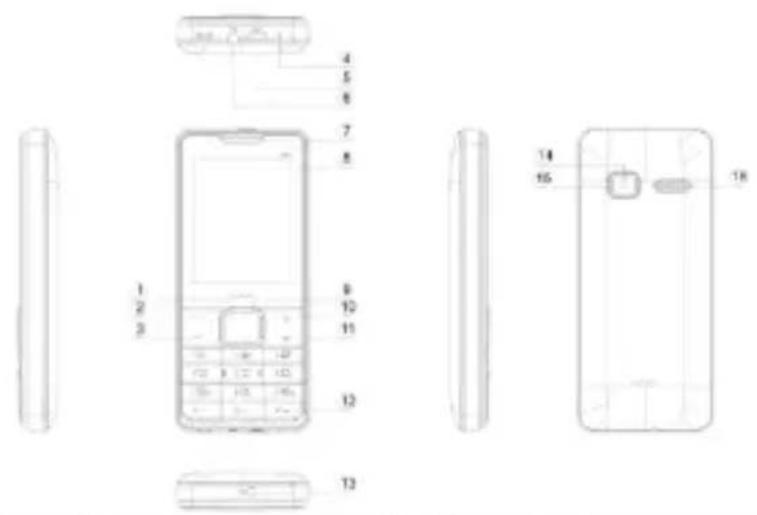
| 1 | Center Key | 9 | Navigation key |
| 2 | Left soft Key | 10 | Right soft Key |
| 3 | Dial/Answer Key | 11 | Ending/Power key |
| 4 | Microphone | 12 | keypad |
| 5 | Charging port | 13 | Torch |
| 6 | Headset port | 14 | Camera Decorative |
| 7 | Earpiece | 15 | Camera |
| 8 | Display | 16 | Speaker |
2 Using the Menus
2.1 Call logs
Through this function, you can view a list of missed calls, dialed calls and received calls etc.
2.2 Contacts
The mobile phone can store up to 500 phone numbers.
2.3 Audio Player
Use this function to play audio files. In music player interface, you can press up or down direction key to tune volume.
2.4 Camera
Use this function to capture pictures.
2.5 Messages
You are able to create, read, send and delete messages through this function.
Note: If message memory gets full, a blinking message icon appears on the top of the screen. To receive messages, you need to delete some of the existing messages.
2.6 Multimedia
3.4.1 Video recorder
This function enables to record dynamic pictures. You can press OK key to capture video clips; left soft key to access Options; right soft key to exit capture interface.
Audio player
Use this function to play audio files. In music player interface, you can press up or down direction key to tune volume.
Video player
Use this function to play video files. In video player interface, you can press up or down direction key to tune volume.
FM radio
You can use FM radio with automatic tuning and saved channels. Before using this function, please insert earphone into its corresponding slot.
Sound recorder
Use this function to record audio files. The phone supports WAV and AMR format.
Image
You can view the pictures or images through this function.
2.7 File manager
The phone provides a certain space for users to manage files and supports the Micro SD card. You can use the file manager to conveniently manage various directories and files on the phone and the Micro SD card. information;
2.8 Fun&Games
You can play Pack the man and K Racer games, and browse Lava Zone in this menu
2.9 Organizer
Calendar
Once you enter this menu, there is a monthly-view calendar for you to view the date; you can go to any day you want. Clock
Three alarm clocks are set but deactivated by default. You can activate one, multiple or all of them as needed. For each alarm clock, the ringing date and the ringing time can be set.
2.10 Tools
Calculator
The calculator can add, subtract, multiply and divide.
World clock
You can add other city and check world clock
StopWatch
you can count and reset stopped
SIM services
STK service is the tool kit of SIM card. This phone supports the service function .The specific items are depended by SIM card and network. Service menu will be auto added to the phone menu when supported by network and SIM card.
Unit conversion
You can convert weight and length by unit conversion
Bluetooth
You can transfer data, such as music to other device using Bluetooth. Search the device and accept/transfer data. The received data is automatically stored in the directory.
Torch
Select on or off as you per needed.
Note: In idle screen, long press right soft key can turn on/off the torch.
2.11 Settings
Dual-SIM:
◆ Access this item to perform following operations: Standby mode, Reply by master SIM, Set SIM name
Call settings
◆ Call divert: this network function enables you to forward incoming calls to another number you have previously specified.
◆ Call waiting: Network dependent
◆ Call barring: The call barring function enables you to bar calls as needed. When setting this function, you need to use a network barring code, which can be obtained from the network operator.
◆ Others: Vibration on call connection, reply via SMS, blacklist and auto call recording.
Phone Settings
◆ Date & time: Set time, date, time format and date display type.
◆ Language settings: Select the display language for the mobile phone.
◆ Dedicated Keys: Customize the shortcut functions of the Up, Down, Left, and Right direction keys. In the standby interface, you can press a direction key to directly enter the function menu corresponding to that direction key.
◆ Scheduled power on/off: Set the time when the mobile phone will be automatically powered on or off.
◆ Power management: You can view remaining battery through this function.
Display
Users can access this item to set wallpaper, idle display, brightness, backlight, keypad backlight time etc.
Security settings
This function provides you with related settings about safety use. The initial phone lock code is set to 4321 by the manufacturer.
Profiles
The mobile phone provides multiple user profiles, including General, Silent, Meeting, Indoor and Outdoor.
Connections
Through this function, you can set network account, GPRS Service, data connection settings and network selection through this function.
Restore factorysettings
Use this function to restore factory settings. Note: The initial phone lock code is 4321.
2.12 Internet
This function enables you to use the internet.
3 SAR (Specific Absorption Rate) Information
The highest SAR value for this mobile phone is <1.6 W/Kg, in accordance with the requirements of the ICNIRP, which recommended that the limit for exposure to radio waves is 1.6 watts/kilogram(W/kg) averaged over 1 gram of tissue.
For more information, please visit our website (www.lavamobiles.com) to query.
Safety precautions:
- Use a wireless hands-free system (Headphone, headset) with a low power Bluetooth emitter
● Make sure the cell phone has a low SAR - Keep your calls short or send a text message (SMS) instead. This advice applies especially to children, adolescents and pregnant women
- Use cell phone when the signal quality is good
● People having active medical implants should preferably keep the cell phone at least 15cm away from the implant
4 E-waste Disposal Mechanism
'E-waste' means waste electrical and electronic equipment (WEEE). In other words E-waste is a popular, informal name for electronic products nearing the end of their "useful life". For more details about e-waste please refer e-waste
rules, 2011 www.moef.nic.in
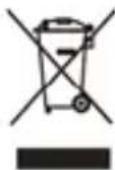
The WEEE logo (shown at the left) appears on the product (battery, handset, and charger) to indicate that this product must not be disposed of or dumped with your other household wastes. You are liable to dispose of all your electronic or electrical waste equipment by relocating over to the specified collection point for recycling of such hazardous waste.
Specified collection points for recycling of such hazardous waste. Collection and proper recovery of your electronic waste equipment at the time of disposal will allow us to help preserve the environment. Recycling of the electronic waste equipment will ensure safety of human health and environment. For more information on best practices for disposal of electronic and electrical waste, please visit to our web site: www.Lavamobiles.com
5 Do's and Don'ts for disposal e-waste
Do's:
● Ensure that an Authorized Person repairs your Lava products
- Call Our Local Authorized Collection Centers to Dispose Lava products
● Always drop your used electronic products, batteries or any accessories thereof after the end of their life at nearest Authorized Collection Point or Collection Center.
- Separate the packaging material according to responsible waste disposal options and sorting for recycling.
● Always remove the battery from the product, when you do not intend to use the product anymore it in future.
- Don'ts:
- Do not Dismantle your Lava Product on your own
- Do not give your e-waste to Kabbadi Wala / Scrap Dealer/ Rag Pickers.
- Do not dispose-off the e-waste in landfills
● Never dump E-waste in garbage bins.
- Do not dispose of your product at municipal waste bins or rooms.
- Do not throw used batteries into household waste.
6 Consequences of improper handling and disposal of E-Waste
- Improper disposal of waste prevents natural resources from being re-used.
- Some waste contains hazardous chemicals and if not disposed of properly may release toxins into the soil and water, and also releases greenhouse gases into the environment
- If e-waste is not properly disposed of, it can threat to the health and well-being of humans and animals and it also has adverse effect on the environment.
- Placing of batteries or devices on or in heating devices, such as microwave, ovens, stoves, or radiators and improper disposal of batteries may lead to explosion.
- If the battery terminals are in contact with metal objects, it may cause a fire.
7 Lava warranty certificate
Limited warranty:
LAVA international Ltd. (LAVA) provides limited warranty for your mobile phone and original accessories delivered with your mobile phone (hereinafter referred to as “product”)
The warranty period for the transceiver is one (1) year and for battery, charger and headset is six (6) months from the date of purchase.
LAVA Warranty
Subject to the conditions of this Limited Warranty, LAVA warrants a product to be free from defects in design, material and workmanship at the time of its original purchase by you, and for a subsequent period of one (1) year for transceiver and six (6) months for battery & charger.
You shall have no coverage or benefits under this warranty in the event that any of the following conditions are applicable:
- The product has been subjected to abnormal use or conditions, improper storage, exposure to 1.excessive moisture or dampness, exposure to excessive temperature, unauthorized modification, unauthorized repair (including but not limited to use of unauthorized spare parts in repairs),abuse, accidents, Acts of God, spills of food or liquids, improper installation
● You have not notified Lava of the defect in the product during the applicable warranty period.
● The product serial no. code or the accessories date code has been removed, defaced or altered. - The product has been used with or connected to an accessory (i) Not supplied by Lava or its affiliates, (ii) Not fit for use with the product or (iii) Used otherwise than in manner intended.
- The seals of the product's battery enclosure have been broken or shown evidence of tempering or the product's battery has been used in equipment other than that for which it has been specified usable by LAVA.
● All plastic surfaces and all other externally exposed part that is scratched or damaged due to normal use.
To get maximum of your new product, we recommend you to:
Read the guidelines for safe and efficient use as mentioned in the manual.
Read the terms and conditions of your Lava warranty in the manual.
Keep your original receipt; you will need it for warranty services if asked to produce.
Present this Lava Warranty Certificate along with original proof of purchase whenever you require any warranty services.
In case Lava product needs service, please visit the nearest Lava service centers given in the service guide. Please visit our Website www.lavamobiles.com for updated list of Authorized Service Centers near to your location.
Important note: for your warranty to be valid, all information on the warranty certificate has to be completed including the stamp from the authorized distributor/retailer.
All warranty information, product features and specifications are subject to change without notice.
IMEI No.
Dealers Stamp
Date of purchase
Model No.
- Phone overview
- Using the Menus
- Call logs
- Contacts
- Audio Player
- Camera
- Messages
- Multimedia
- Video recorder
- Audio player
- Video player
- FM radio
- Sound recorder
- Image
- File manager
- Fun&Games
- Organizer
- Calendar
- Tools
- Calculator
- World clock
- StopWatch
- SIM services
- Unit conversion
- Bluetooth
- Torch
- Settings
- Dual-SIM:
- Call settings
- Phone Settings
- Display
- Security settings
- Profiles
- Connections
- Restore factorysettings
- Internet
- SAR (Specific Absorption Rate) Information
- Safety precautions:
- E-waste Disposal Mechanism
- Do's and Don'ts for disposal e-waste
- Do's:
- Consequences of improper handling and disposal of E-Waste
- Lava warranty certificate
- Limited warranty:
- LAVA Warranty
- To get maximum of your new product, we recommend you to:
Brand : LAVA
Model : KKT Uno+
Category : Smartphone