RC-ZH6 - Headphones Auray - Free user manual and instructions
Find the device manual for free RC-ZH6 Auray in PDF.


| Product Type | Wired Remote Control for Zoom H6 Handy Recorder |
| Brand | Auray |
| Model | RC-ZH6 |
| Dimensions (H × W × D) | 3.5 x 0.5 x 1.5 inches (8.9 x 1.3 x 3.8 cm) |
| Weight | 1.6 oz (45 g) |
| Cable Length | 4 ft (1.2 m) |
| Power Source | No batteries required; powered via remote control input of Zoom H6 |
| Compatible Device | Zoom H6 Handy Recorder |
| Primary Functions | Record, playback, pause, stop, fast forward, rewind, volume control, track enable/disable, mark insertion |
| Record Button & Indicator | Press to start recording; indicator shows record status |
| Play/Pause Button & Indicator | Press to play/pause; in record mode, creates a mark and pauses recording |
| Track Buttons (L,R,1-4) with Indicators | Enable tracks for recording; constant red when enabled, blinking indicates overload; L/R linked as stereo pair |
| Volume Buttons (+/-) | Adjust playback volume only; does not affect recording level |
| Forward/Back Buttons | Select files/marks; press and hold for search (speed increases) |
| Stop Button | Stops recording or playback; returns to home screen in menu mode |
| Additional Features | Cable wraps around remote for storage; belt clip accessory (RCZH6-BC) available separately |
| Maintenance | Keep away from water, flammable gases/liquids; avoid extreme temperatures; do not pull cable; do not disassemble |
| Warranty | One-year limited warranty from original purchase date |
| Manufacturer Information | A Gradus Group Brand; www.aurayaudio.com; Customer Service: 212-594-2353 |
Frequently Asked Questions - RC-ZH6 Auray
User questions about RC-ZH6 Auray
0 question about this device. Answer the ones you know or ask your own.
Ask a new question about this device
Download the instructions for your Headphones in PDF format for free! Find your manual RC-ZH6 - Auray and take your electronic device back in hand. On this page are published all the documents necessary for the use of your device. RC-ZH6 by Auray.
USER MANUAL RC-ZH6 Auray
Remote Control for Zoom H6
Owner's Manual
Introduction
Thank you for choosing Auray.
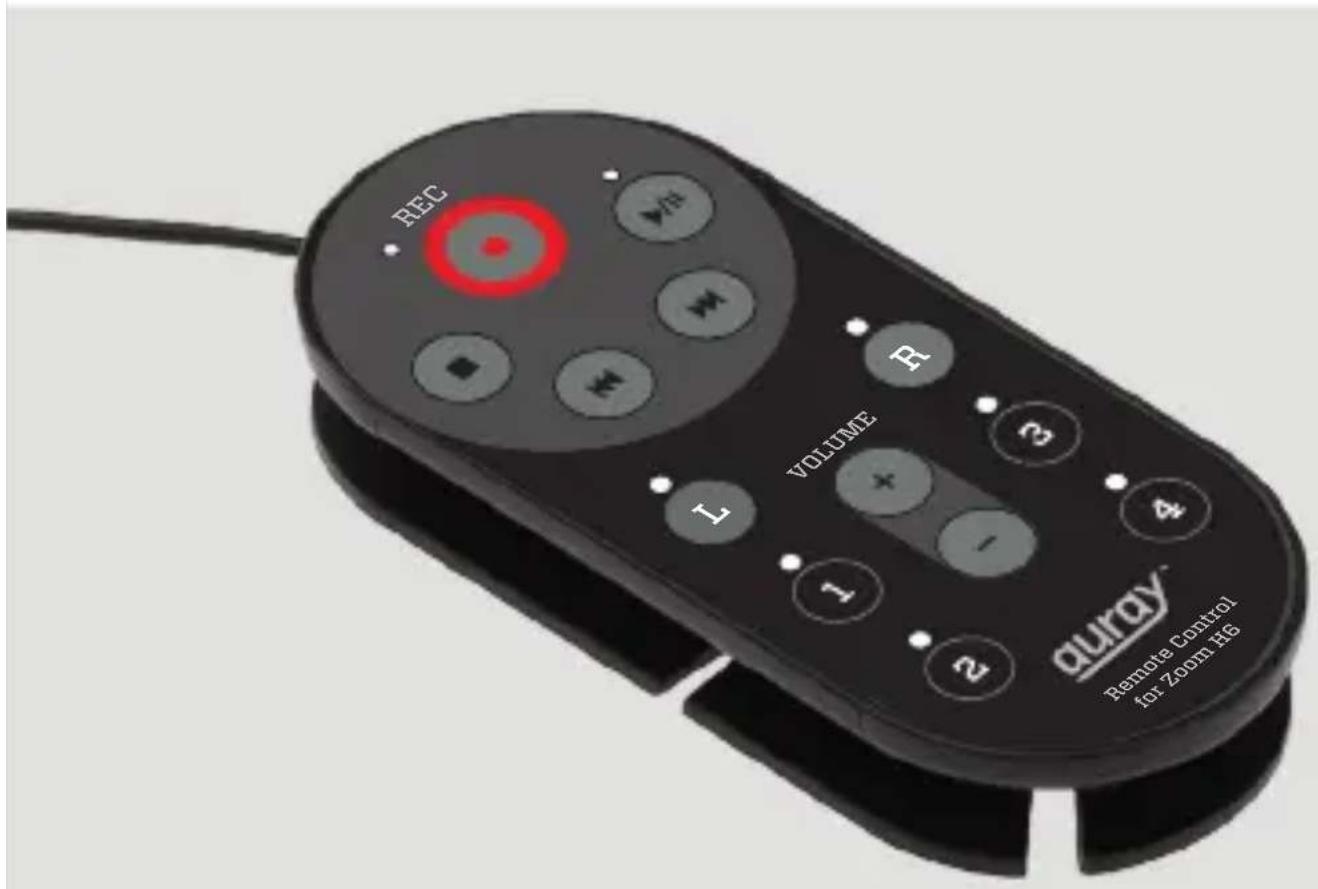
The Auray RC-ZH6 is a wired remote control for the Zoom H6 Handy Recorder. Ideal for preventing handling noise during recording, it allows the operation of your Zoom H6 from up to four-feet away. In addition to record, playback, fast forward, rewind and volume control functions, tracks can be enabled for input, and marks can be added to tracks during recording.
The RC-ZH6 features indicator lights that assist remote recording and playback by showing the status of record-enabled tracks and by blinking to indicate signal overload. No batteries are required for operation, and it is easily connected to the Zoom H6. When you're done, the cable neatly wraps around the remote unit for easy transport and storage.
Specifications
Dimensions (H × W × L):
$$ 3. 5 ^ {\prime \prime} \times 0. 5 ^ {\prime \prime} \times 1. 5 ^ {\prime \prime} $$
$$ (8. 9 \times 1. 3 \times 3. 8 \mathrm{cm}) $$
Weight: 1.6 oz. (45 g)
Cable length: 4' (1.2 m)
Recommended Accessory
RCZH6-BC Belt clip:
The RCZH6-BC belt clip fits the RC-ZH6 remote and provides a hands-free solution for recording in the field.
Overview
Remote cable 1
Connects the RC-ZH6 remote control to the remote control input jack on the Zoom H6.
Stop button 2
Stops recording or playback.
When scrolling through menus on the Zoom H6, the Stop button returns you to the home screen.
Record button and indicator 3
Press the record button to begin recording.
A new file is created on the Zoom H6 for every new recording. Consult the Zoom H6 manual to assign file names and select the folder where files will be saved.
During recording, press the Play/Pause button to create a mark in the project.
Press the Stop button to end recording.
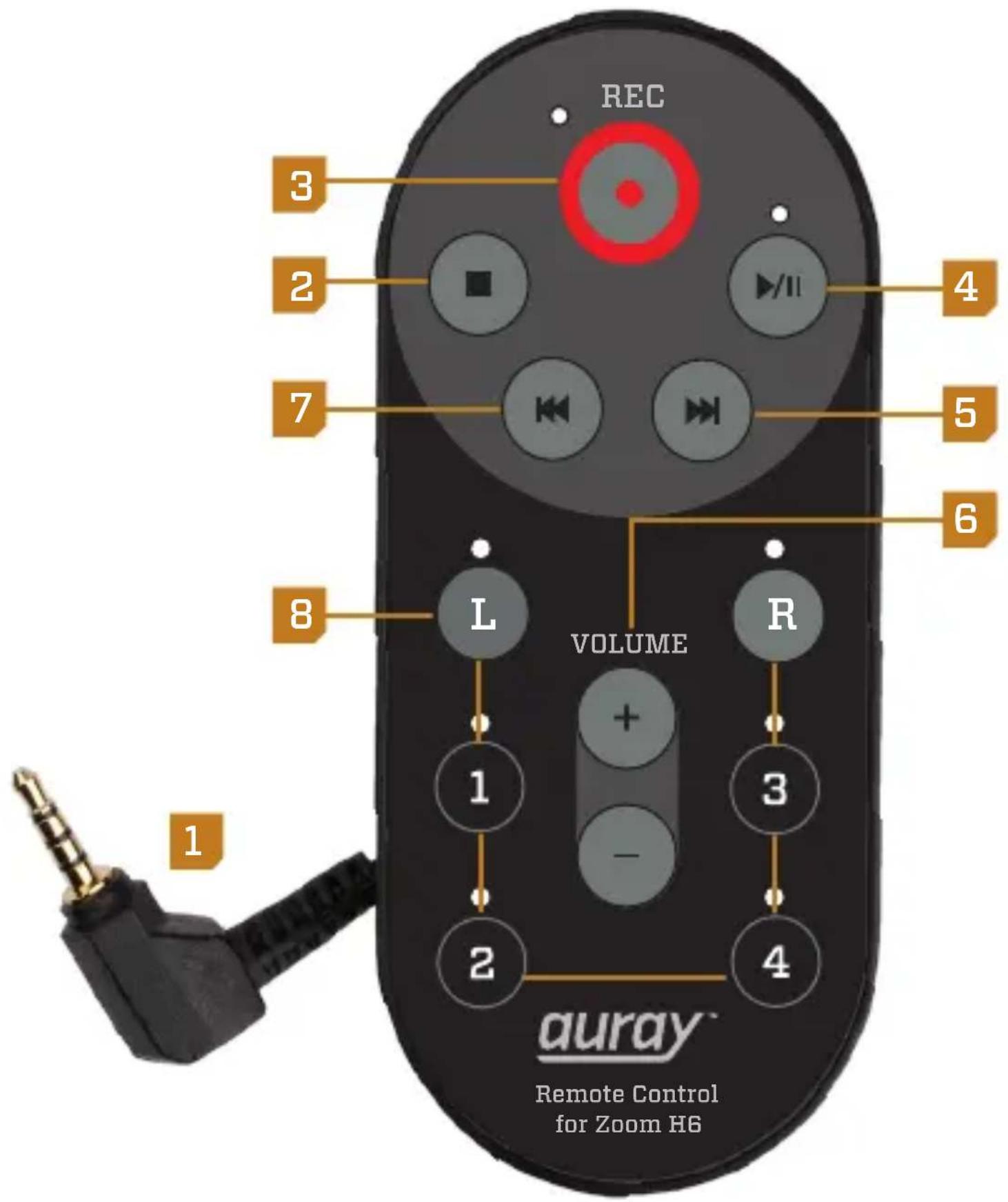
Play/Pause button and indicator 4
Press the Play/Pause button to start playback.
Press to pause playback. Press again to resume playback.
In record mode, press the Play/Pause button to pause your recording and create a mark in the project. Press again to resume recording.
Forward button 5
Press the Forward button to select an audio file or move to a mark.
Press and hold to search. Continuing to hold down the button increases the speed of the forward search.
Volume +/- buttons 6
The Volume buttons adjust the loudness during playback.
Note: the volume buttons do not adjust the recording level. To adjust the input level, use the input level knobs on the Zoom H6.
Back button 7
Press the Back button to select an audio file or move to a mark.
Press and hold to search. Continuing to hold down the button increases the speed of the backward search.
Track buttons and indicators (L,R, 1-4) 8
Pressing the track selection button enables the track for recording. The indicator of the selected track glows a constant red.
When recording, the track indicator lights blink to indicate signal overload.
The L/R tracks are linked as a stereo pair. Both tracks will be record-enabled when one of the track selectors is pressed. This stereo link cannot be deactivated on these two tracks.
Pressing the Track 2 button while pressing and holding the Track 1 button creates a stereo pair. Tracks 3/4 can be made into a stereo pair the same way. Stereo pairs can be deactivated by holding down one of the track buttons and pressing the other.
Precautions

Please read and follow these instructions, and keep this manual in a safe place.
- Keep this unit away from water and any flammable gases or liquids.
- Do not use or store this item at extreme high or low temperatures.
- Do not pull forcefully on the cable.
- Do not attempt to disassemble or repair the equipment—doing so will void the warranty, and Auray will not be responsible for any damage.
• All photos are for illustrative purposes only.
One-Year Limited Warranty
This AURAY product is warranted to the original purchaser to be free from defects in materials and workmanship under normal consumer use for a period of one (1) year from the original purchase date or thirty (30) days after replacement, whichever occurs later. The warranty provider's responsibility with respect to this limited warranty shall be limited solely to repair or replacement, at the provider's discretion, of any product that fails during normal use of this product in its intended manner and in its intended environment. Inoperability of the product or part(s) shall be determined by the warranty provider. If the
product has been discontinued, the warranty provider reserves the right to replace it with a model of equivalent quality and function.
This warranty does not cover damage or defect caused by misuse, neglect, accident, alteration, abuse, improper installation or maintenance. EXCEPT AS PROVIDED HEREIN, THE WARRANTY PROVIDER MAKES NEITHER ANY EXPRESS WARRANTIES NOR ANY IMPLIED WARRANTIES, INCLUDING BUT NOT LIMITED TO ANY IMPLIED WARRANTY OF MERCHANTABILITY OR FITNESS FOR A PARTICULAR PURPOSE. This warranty provides you with specific legal rights, and you may also have additional rights that vary from state to state.
To obtain warranty coverage, contact the Auray Customer Service Department to obtain a return merchandise authorization (“RMA”) number, and return the defective product to Auray along with the RMA number and proof of purchase. Shipment of the defective product is at the purchaser’s own risk and expense.
For more information or to arrange service, visit www.aurayaudio.com or call Customer Service at 212-594-2353.

natural_image
Abstract black logo resembling a stylized letter G (no text or symbols)AURAY™ A Gradus Group Brand
GG3
Product warranty provided by the Gradus Group. www.gradusgroup.com
AURAY is a registered trademark of the Gradus Group. © 2014 Gradus Group LLC. All Rights Reserved. All trademarks and registered trademarks are the property of their respective owners.
- Remote Control for Zoom H6
- Owner's Manual
- Introduction
- Specifications
- Recommended Accessory
- Overview
- Remote cable 1
- Stop button 2
- Record button and indicator 3
- Play/Pause button and indicator 4
- Forward button 5
- Volume +/- buttons 6
- Back button 7
- Track buttons and indicators (L,R, 1-4) 8
- Precautions
- One-Year Limited Warranty
Brand : Auray
Model : RC-ZH6
Category : Headphones