
CR-M10 - USB Drive Xcellon - Free user manual and instructions
Find the device manual for free CR-M10 Xcellon in PDF.


| Product Type | Multi-Card Reader |
| Brand | Xcellon |
| Model | CR-M10 |
| Interface | USB 3.1 Gen 1 (SuperSpeed) |
| Card Slots | CompactFlash (CF), SD, microSD |
| Supported Card Types | CF Type I (UDMA 7), SD/SDHC/SDXC (UHS-II), microSD/microSDHC/microSDXC (UHS-II) |
| Data Transfer | Simultaneous and inter-card transfer |
| Maximum Read Speed | Up to 5 Gbps (USB 3.1 Gen 1) |
| Plug and Play | Yes, no driver needed |
| LED Indicator | Status: on when powered, blinks on card insert and during read/write |
| Power Source | Bus-powered via USB |
| Cables Included | USB 3.1 Micro-B to USB Type-C, USB 3.1 Micro-B to USB Standard-A |
| Dimensions (W × H × D) | 3 × 0.7 × 2 in. (7.6 × 1.8 × 5.1 cm) |
| Weight | Approximately 1.8 oz (50 g) |
| System Requirements | Windows XP or later, Mac OS 9 or later, Linux 2.4.1 or later |
| Warranty | 5-Year Limited Warranty |
| Dust Cover | Yes, attached to reader |
| Card Insertion | Insert cards label side up; do not force |
| Maintenance | Keep slots clean; avoid moisture and extreme temperatures |
| Compliance | RoHS, CE, FCC (typical) |
| Package Contents | Reader, 2 cables, manual |
Frequently Asked Questions - CR-M10 Xcellon
User questions about CR-M10 Xcellon
0 question about this device. Answer the ones you know or ask your own.
Ask a new question about this device
Download the instructions for your USB Drive in PDF format for free! Find your manual CR-M10 - Xcellon and take your electronic device back in hand. On this page are published all the documents necessary for the use of your device. CR-M10 by Xcellon.
USER MANUAL CR-M10 Xcellon
Thank you for choosing Xcellon.
Transfer photos, videos, or other large files to a computer at blazing SuperSpeed USB 3.1 Gen 1 rates. Xcellon's CR-M10 card reader accepts SD, microSD, and CompactFlash (CF) cards, and it's ready to go to work without any additional software or setup. The CR-M10 supports simultaneous and inter-card transfer from all three card slots to maximize workflow and minimize downtime.
»Superspeed USB 3.1 Gen 1 interface
»CompactFlash, SD, and microSD
»Supports UDMA 7 and UHS-II
»Simultaneous and inter-card transfer
»Plug and play
»Status LED
»USB Type-C™ and USB Standard-A cables included
Precautions
Important! All cards must be inserted into the card reader label side up. Failure to do so could result in damage to the memory card or the card reader.
» Memory cards should easily slide into the card slot. Do not force a memory card into the card reader.
» Speeds may vary based on system configuration and card speed.
» Do not pull on or attempt to detach the dust cover from the card reader.
»Images are for illustrative purposes only.
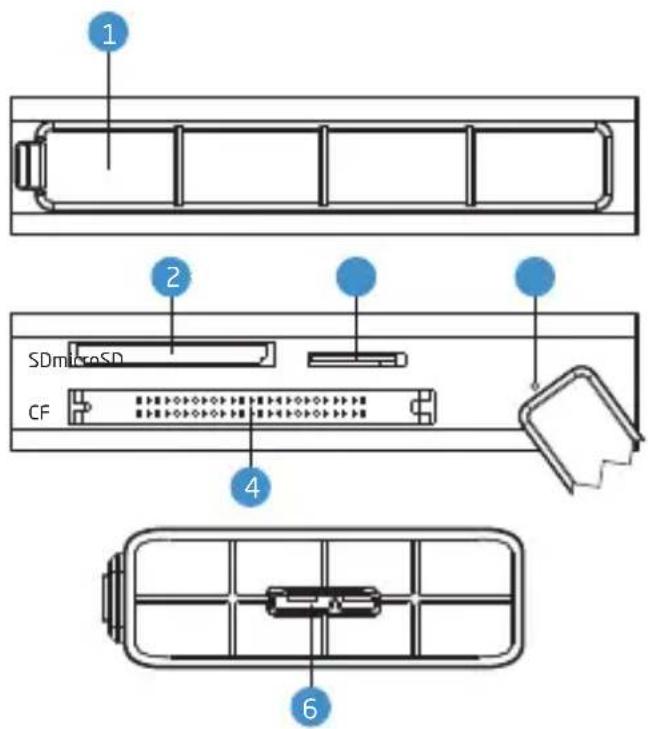
Overview
1 Dust cover
2 SD card slot
3 MicroSD card slot
4 CompactFlash (CF) card slot
5 LED indicator
6 USB 3.1 Micro-B port
Contents Include
»Reader
»USB 3.1 Gen 1 Cable (×2)
- USB 3.1 Micro-B to USB Type-C
- USB 3.1 Micro-B to USB Standard-A
LED Indicator Status
» When the LED is on, the card reader is connected to a powered port on the computer.
»The LED blinks once when a card has been inserted.
» The LED blinks constantly during all read and write activity.
Specifications
| Compatible Memory Cards | Compact Flash (CF) Type I (including support for UDMA 7), SD, SDHC, SDXC, UHS-II, MicroSD, microSDHC, microSDXC UHS-II |
| Max Read Speed | |
| Data Transfer Rate | USB 3.1 Gen 1 |
| Computer Interface | ard-A or USB Type-C |
| Cable Length | |
| System Requirements | XP or later / Mac OS 9 or later / Linux 2.4.1 or later |
| Dimensions (W × H × D) | × 2 in. (7.6 × 1.8 × 5.1 cm) |
| Weight |
Five-Year Limited Warranty
This Xcellon product is warranted to the original purchaser to be free from defects in materials and workmanship under normal consumer use for a period of five (5) years from the original purchase date or thirty (30) days after replacement, whichever occurs later. The warranty provider's responsibility with respect to this limited warranty shall be limited solely to repair or replacement, at the warranty provider's discretion, of any product that fails during normal use of this product in its intended manner and in its intended environment. Inoperability of the product or any part(s) shall be determined by the warranty provider. If the product has been discontinued, the warranty provider reserves the right to replace it with a model of equivalent quality and function.
The warranty provider does not warrant against loss of any images or data (including data stored on product returned to seller for service), and assumes no liability for such loss.
TO THE EXTENT NOT PROHIBITED BY LAW, IN NO EVENT WILL THE WARRANTY PROVIDER BE LIABLE FOR ANY LOST DATA, IMAGES, REVENUE OR PROFIT, OR FOR SPECIAL, INDIRECT, CONSEQUENTIAL, INCIDENTAL OR PUNITIVE DAMAGES, HOWEVER CAUSED REGARDLESS OF THE THEORY OF LIABILITY, ARISING OUT OF OR RELATED TO THE USE OF OR INABILITY TO USE THE PRODUCT, EVEN IF THE WARRANTY PROVIDER HAS BEEN ADVISED OF THE POSSIBILITY OF SUCH DAMAGES. IN NO EVENT WILL THE WARRANTY PROVIDER'S LIABILITY EXCEED THE AMOUNT PAID BY YOU FOR THE PRODUCT.
This warranty does not cover damage or defect caused by misuse, neglect, accident, alteration, abuse, improper installation or maintenance. EXCEPT AS PROVIDED HEREIN, THE WARRANTY PROVIDER MAKES NEITHER ANY EXPRESS WARRANTIES NOR ANY IMPLIED WARRANTIES, INCLUDING BUT NOT LIMITED TO ANY IMPLIED WARRANTY OF MERCHANTABILITY OR FITNESS FOR A PARTICULAR PURPOSE. This warranty provides you with specific legal rights, and you may also have additional rights that vary from state to state.
To obtain warranty coverage, contact the Gradus Group Customer Service Department to obtain a return merchandise authorization ("RMA") number, and return the defective product to Gradus along with the RMA number and proof of purchase. Shipment of the defective product is at the purchaser's own risk and expense.
For more information or to arrange service,
visit www.xcellongear.com or call Customer Service at 212-594-2353.
Product warranty provided by the Gradus Group.
www.gradusgroup.com
Xcellon is a registered trademark of the Gradus Group.
© 2018 Gradus Group LLC. All Rights Reserved.

XCELLON® A Gradus Group Brand

Brand : Xcellon
Model : CR-M10
Category : USB Drive