
RF-GN-10 - Fan Auray - Free user manual and instructions
Find the device manual for free RF-GN-10 Auray in PDF.


| Product Type | Reflection Filter with Gooseneck |
| Brand | Auray |
| Model | RF-GN-10 |
| Shield Dimensions (H x W x D) | 12" x 10.39" x 2.95" (30.5 x 26.4 x 7.5 cm) |
| Weight | 2.15 lb (0.97 kg) |
| Material | Perforated aluminum shield, high-density acoustic foam, metal alloy |
| Mounting Type | Clamp attaches to mic stand shaft or boom arm |
| Gooseneck Length | 1/2" diameter heavy-duty flexible gooseneck |
| Acoustic Function | Absorbs and diffuses external noise and acoustic reflections |
| Recommended Use | Studio recording, desktop recording, vocals, drums, pianos, acoustic instruments |
| Included Components | Reflection filter, gooseneck with clamp, tightening screw |
| Warranty | One-year limited warranty |
| Color | Black |
| Portability | Lightweight and portable design |
| Maintenance | Wipe with dry cloth; avoid moisture |
| Safety Precautions | Do not disassemble; handle with care; ensure secure attachment |
| Repairability | Do not attempt repair; contact Auray customer service |
Frequently Asked Questions - RF-GN-10 Auray
User questions about RF-GN-10 Auray
0 question about this device. Answer the ones you know or ask your own.
Ask a new question about this device
Download the instructions for your Fan in PDF format for free! Find your manual RF-GN-10 - Auray and take your electronic device back in hand. On this page are published all the documents necessary for the use of your device. RF-GN-10 by Auray.
USER MANUAL RF-GN-10 Auray
natural_image
Exterior view of a metallic audio workstation with a perforated panel and adjustable stand (no visible text or symbols)Introduction
Thank you for choosing Auray.
Congratulations on your purchase of the Auray RF-GN-10 Reflection Filter with Gooseneck.
Designed for use in studios, acoustically untreated rooms, and desktop recording, the RF-GN-10 absorbs and diffuses external noise and acoustic reflections to improve the quality of both vocal and instrumental tracks. It attaches directly onto a mic stand and, set behind the microphone, provides isolation when recording vocals, drums, pianos, or practically any acoustic instrument.
The RF-GN-10's ten-inch profile allows it to fit into tight spaces where large reflection filters are impractical. The filter features high-density acoustic foam for attenuating room ambience and a perforated aluminum shield that prevents sound from reflecting back into the microphone. The heavy-duty, 1/2" gooseneck provides precise positioning of the filter to achieve optimum results, further ensuring a dry and close sound that provides cleaner tracks. A high-quality metal alloy design makes the RF-GN-10 a sturdy, lightweight, and portable asset in any studio.
Overview
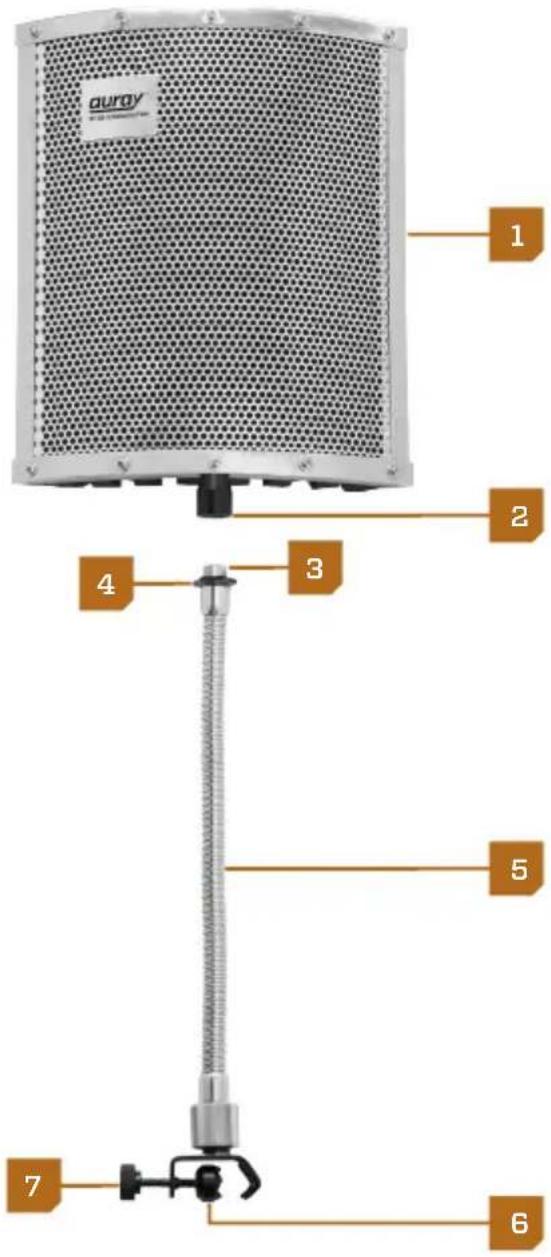
Filter 1
Threaded socket 2
Threaded mount 3
Lock nut 4
Gooseneck 5
Clamp 6
Tightening screw 7
Specifications
Shield Dimensions (H × W × D): 12" × 10.39" × 2.95" (30.5 × 26.4 × 7.5 cm)
Weight: 2.15 lb. (0.97 kg)
Instructions
Setting up the RF-GN-10
- First, set up your microphone by placing it into the shock mount or mic clip and adjusting the mic stand to the desired height.
- Attach the gooseneck to the filter by screwing the gooseneck's threaded post into the threaded socket of the filter until it is tight. 2
- Loosen the tightening screw on the gooseneck, and fit the clamp onto the shaft of the mic stand, or the boom arm of the mic stand. Tighten the screw until the RF-GN-10 is securely in place. 3
- Position the shield so that it is directly behind the microphone. Adjust the distance between the filter and microphone for optimum results. 4

natural_image
Silhouette of a microphone with adjustable arm and stand against a plain background (no text or symbols)
natural_image
Close-up of hands using a tool to adjust or install a mesh filter component (no text or symbols visible)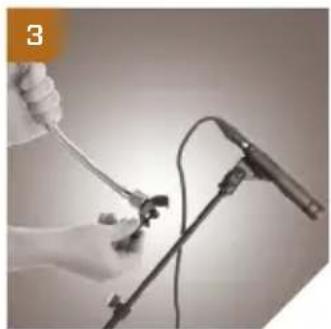
natural_image
Close-up of a gloved hand holding a medical or laboratory instrument, next to a microphone (no visible text or symbols)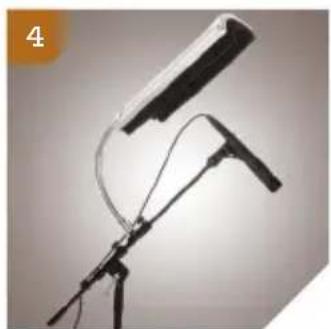
natural_image
Black-and-white photo of a tripod-mounted camera with a mounted lens and cable, no visible text or symbols- Please read and follow these instructions, and keep this manual in a safe place.
• Make sure that this product is intact and that there are no missing parts. - Do not attempt to disassemble or repair the equipment—doing so will void the warranty, and Auray will not be responsible for any damage.
- Handle the unit with care.
• Make sure everything is secure before proceeding.
• All photos are for illustrative purposes only.
One-Year Limited Warranty
This AURAY product is warranted to the original purchaser to be free from defects in materials and workmanship under normal consumer use for a period of one (1) year from the original purchase date or thirty (30) days after replacement, whichever occurs later. The warranty provider's responsibility with respect to this limited warranty shall be limited solely to repair or replacement, at the provider's discretion, of any product that fails during normal use of this product in its intended manner and in its intended environment. Inoperability of the product or part(s) shall be determined by the warranty provider. If the product has been discontinued, the warranty provider reserves the right to replace it with a model of equivalent quality and function.
This warranty does not cover damage or defect caused by misuse, neglect, accident, alteration, abuse, improper installation or maintenance. EXCEPT AS PROVIDED HEREIN, THE WARRANTY PROVIDER MAKES NEITHER ANY EXPRESS WARRANTIES NOR ANY IMPLIED WARRANTIES, INCLUDING BUT NOT LIMITED TO ANY IMPLIED WARRANTY OF MERCHANTABILITY OR FITNESS FOR A PARTICULAR PURPOSE. This warranty provides you with specific legal rights, and you may also have additional rights that vary from state to state.
To obtain warranty coverage, contact the Auray Customer Service Department to obtain a return merchandise authorization (“RMA”) number, and return the defective product to Auray along with the RMA number and proof of purchase. Shipment of the defective product is at the purchaser’s own risk and expense.
For more information or to arrange service, visit www.aurayaudio.com or call Customer Service at 212-594-2353.
Product warranty provided by the Gradus Group. www.gradusgroup.com

AURAY™
A Gradus Group Brand
AURAY is a registered trademark of the Gradus Group. © 2014 Gradus Group LLC. All Rights Reserved.

Brand : Auray
Model : RF-GN-10
Category : Fan