
MO-IPL2 - Fan Polsen - Free user manual and instructions
Find the device manual for free MO-IPL2 Polsen in PDF.


| Product Type | Lavalier Microphone |
| Brand | Polsen |
| Model | MO-IPL2 |
| Transducer Type | Electret Condenser |
| Polar Pattern | Omnidirectional |
| Frequency Response | 20 Hz - 20 kHz |
| Sensitivity | -30 dB ±3 dB at 1 kHz (0 dB=1 V/Pa) |
| Sample Rate | 16 bit, 44.1 kHz |
| Connectors | Apple MFi-certified Lightning connector; 1/8 in. (3.5 mm) stereo headphone jack |
| Power Consumption | 40 mA |
| Cable Length | 5.25 ft (1.6 m) |
| Weight | 1.3 oz (36.8 g) |
| Microphone Capsule Dimensions | Length: 0.65 in (16.5 mm), Diameter: 0.3 in (8 mm) |
| Included Accessories | Foam windscreen, carry pouch, tie clip |
| Compatibility | iPhone X/8/7/7 Plus/6/6s/5/5s, iPad, iPod with Lightning connector |
| Warranty | 1-year limited warranty |
| Key Features | In-line A/D converter, LED recording indicator, headphone playback output, omnidirectional pickup |
Frequently Asked Questions - MO-IPL2 Polsen
User questions about MO-IPL2 Polsen
0 question about this device. Answer the ones you know or ask your own.
Ask a new question about this device
Download the instructions for your Fan in PDF format for free! Find your manual MO-IPL2 - Polsen and take your electronic device back in hand. On this page are published all the documents necessary for the use of your device. MO-IPL2 by Polsen.
USER MANUAL MO-IPL2 Polsen
PRODUCT MANUAL

THANK YOU FOR CHOOSING POLSEN.
The MO-IPL2 lavalier microphone is compatible with iPhones, iPads, and iPods that have the Lightning connector. This microphone delivers rich and detailed audio that's much better than the built-in microphones on iOS devices, and it will enhance the production value of podcasts, interviews, and videos.
The microphone features an in-line A/D converter that's capable of recording audio with sample rates up to 16 bits and 44.1 kHz. The microphone's omnidirectional polar pattern provides excellent off-axis response, even if a subject turns their head while speaking. It also boasts a wide frequency response and high sensitivity for superb audio quality for all your projects.
PRECAUTIONS
- Please read and follow these instructions, and keep this manual in a safe place.
- Keep this product away from water and any flammable gases or liquids.
- Do not attempt to disassemble or repair this product.
• Make sure that this product is intact and that there are no missing parts. - All images are for illustrative purposes only.
OVERVIEW
- Tie clip
- Omnidirectional mic capsule
- LED indicator
- A/D converter
- Headphone jack
- Lightning connector
Also included:
- Foam windscreen
- Carry pouch

RECORDING INSTRUCTIONS
The MO-IPL2 is compatible with any authorized audio or video recording app from Apple's App Store.
Important! The MO-IPL2 is disabled when an incoming phone call is received. To ensure your recording is not interrupted by a phone call, enable Airplane Mode in your iPhone's settings.
- Plug the Lightning connector into your iOS device. The LED indicator on the A/D converter will blink to confirm that it's connected and receiving power.
- Plug your headphones into the headphone jack.
Note: The headphone jack is for playback only. You cannot monitor your recording through the headphones.
-
Place the windscreen over the mic capsule, attach the mic clip, and then attach the clip to your subject. The mic should be approximately 6 to 8 inches from the sound source.
-
Open a compatible audio or video recording app on your device. The LED indicator on the A/D converter lights up during recording.
-
When you've finished recording, press the stop button. The microphone will be disabled. Listen to the playback through the headphones.
Note: AirPods will be disabled during recording, and they will become active again once the recording has stopped.
RECORDING TIPS
- For the best recording quality, the MO-IPL2 microphone should be approximately 6 to 8 inches from the sound source.
- Always use the foam windscreen to diminish vocal plosives (e.g., the "pop" from P and B sounds) and wind noise.
- To prevent cable tension that can move the microphone and create handling noise during recording, create a loop in the cable, and tape it to the inside of a garment.
- If you experience excessive breath noises or inconsistent levels due to head movement, try attaching the mic upside down.
SPECIFICATIONS
Transducer Type Electret condenser
Pattern Omnidirectional
Frequency Response 20 Hz to 20 kHz
Sensitivity -30 dB ±3 dB at 1 kHz (0 dB=1 V/Pa)
Sample Rate 16 bit, 44.1 kHz
Connectors Apple MFi-certified Lightning connector 1/8 in. (3.5 mm) stereo
Power Consumption 40 mA
Cable Length 5.25 ft. (1.6 m)
Weight 1.3 oz. (36.8 g)
Capsule Dimensions Length: 0.65 in. (16.5 mm)
Diameter: 0.3 in. (8 mm)
iOS Device Compatibility:
iPhone X, iPhone 8, iPhone 7, iPhone 7 Plus, iPhone 6, iPhone 6s, iPhone 5, iPhone 5s, iPad, and iPod with Lightning connector
FREQUENCY RESPONSE

line
| Frequency in Hertz | Relative Response in dB | | ------------------ | ----------------------- | | 30 | -50 | | 50 | -48 | | 100 | -47 | | 200 | -46 | | 300 | -46 | | 500 | -46 | | 1K | -46 | | 2K | -46 | | 3K | -46 | | 5K | -46 | | 10K | -45 | | 20K | -44 |POLAR PATTERN
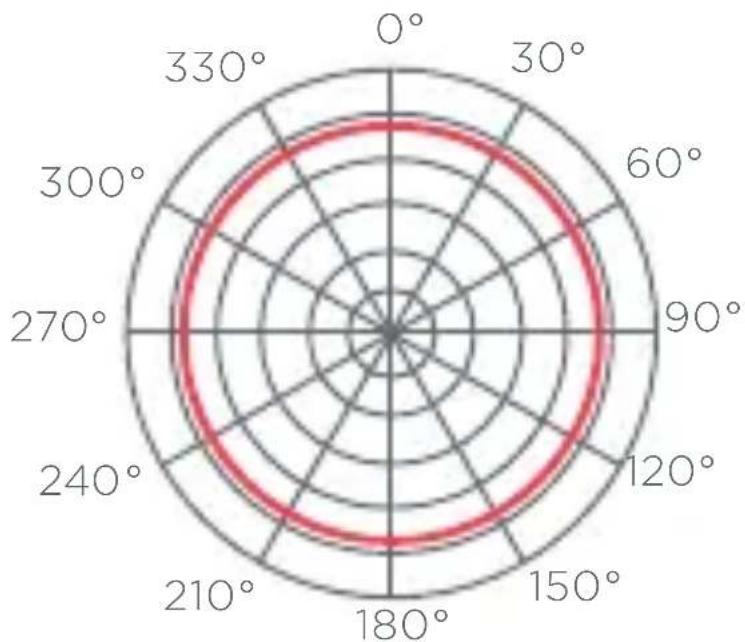
radar
| Angle (°) | Value | | --------- | ----- | | 0 | 180 | | 30 | 175 | | 60 | 170 | | 90 | 165 | | 120 | 160 | | 150 | 155 | | 180 | 150 | | 210 | 145 | | 240 | 140 | | 270 | 135 | | 300 | 130 | | 330 | 125 |ONE-YEAR LIMITED WARRANTY
This Polsen product is warranted to the original purchaser to be free from defects in materials and workmanship under normal consumer use for a period of one (1) year from the original purchase date or thirty (30) days after replacement, whichever occurs later. The warranty provider's responsibility with respect to this limited warranty shall be limited solely to repair or replacement, at the provider's discretion, of any product that fails during normal use of this product in its intended manner and in its intended environment. Inoperability of the product or part(s) shall be determined by the warranty provider. If the product has been discontinued, the warranty provider reserves the right to replace it with a model of equivalent quality and function.
This warranty does not cover damage or defect caused by misuse, neglect, accident, alteration, abuse, improper installation or maintenance. EXCEPT AS PROVIDED HEREIN, THE WARRANTY PROVIDER MAKES NEITHER ANY EXPRESS WARRANTIES NOR ANY IMPLIED WARRANTIES, INCLUDING BUT NOT LIMITED TO ANY IMPLIED WARRANTY OF MERCHANTABILITY OR FITNESS FOR A PARTICULAR PURPOSE. This warranty provides you with specific legal rights, and you may also have additional rights that vary from state to state.
To obtain warranty coverage, contact the Polsen Customer Service Department to obtain a return merchandise authorization ("RMA") number, and return the defective product to Polsen along with the RMA number and proof of purchase. Shipment of the defective product is at the purchaser's own risk and expense.
For more information or to arrange service, visit www.polsenaudio.com or call Customer Service at 212-594-2353.
Product warranty provided by the Gradus Group. www.gradusgroup.com
Polsen is a registered trademark of the Gradus Group. © 2018 Gradus Group LLC. All Rights Reserved. GG1

POLSEN ^+ A Group Group Fund


Brand : Polsen
Model : MO-IPL2
Category : Fan