
TBL1S - Unspecified Bogen - Free user manual and instructions
Find the device manual for free TBL1S Bogen in PDF.


| Product Type | Transformer Balanced Line Input Module |
| Brand | Bogen |
| Model | TBL1S |
| Input Type | Transformer-balanced line level |
| Input Impedance | Selectable 600 Ω or 10 kΩ |
| Gain Control | Adjustable |
| Bass Control | ±10 dB at 100 Hz |
| Treble Control | ±10 dB at 10 kHz |
| Gating | Yes, with adjustable threshold and duration |
| Ducking | Variable signal ducking when muted |
| Priority Levels | 4 (1 highest, 4 lowest) via jumper selection |
| Bus Assignment | A bus, B bus, or both |
| Connector Type | Pluggable screw terminal strip |
| Power Supply | Powered by main unit |
| Installation | Slide-in module bay, secured with included screws |
| Dimensions (approx.) | 1.5" H x 5.25" W x 8" D |
| Weight (approx.) | 0.5 lbs |
| Operating Temperature | 0°C to 40°C (typical) |
| Compatibility | Bogen amplifier systems with module bays |
| Safety | Turn off power before installation; handle with care |
| Maintenance | Clean with dry cloth; avoid moisture |
| Spare Parts / Repairability | Contact Bogen for service and replacement parts |
Frequently Asked Questions - TBL1S Bogen
User questions about TBL1S Bogen
0 question about this device. Answer the ones you know or ask your own.
Ask a new question about this device
Download the instructions for your Unspecified in PDF format for free! Find your manual TBL1S - Bogen and take your electronic device back in hand. On this page are published all the documents necessary for the use of your device. TBL1S by Bogen.
USER MANUAL TBL1S Bogen
TBL1S
Transformer Balanced Line Input Module
Features
• Transformer-isolated line level input
- Gain/Trim control
- Bass and treble
- Audio Gating
• Gating with threshold and duration adjustments
• Variable signal ducking when muted
- Fade back from mute
• 4 levels of available priority
- Can be muted from higher priority modules
- Can mute lower priority modules
- Pluggable screw terminal strip
Module Installation
- Turn off all power to the unit.
- Make all necessary jumper selections.
- Position module in front of any desired module bay opening, making sure that the module is right-side up.
- Slide module on to card guide rails. Make sure that both the top and bottom guides are engaged.
- Push the module in to the bay until the faceplate contacts the unit's chassis.
- Use the two screws included to secure the module to the unit.
WARNING:
Turn off power to unit and make all jumper selections before installing module in unit.
Jumper Selections
Priority Level*
This module can respond to 4 different levels of priority. Priority 1 is the highest priority. It mutes modules with lower priorities and is never muted. Priority 2 can be muted by Priority 1 modules and can mute modules set for Priority Level 3 or 4. Priority 3 can be muted by either Priority 1 or 2 modules and can mute Priority 4 modules. Priority 4 modules are muted by all higher priority modules. Remove all jumpers for "no mute" setting.
* The number of priority levels available is determined by the amplifier the modules are used in.
Gating
Gating (turning off) of the modules output when insufficient audio is present at the input can be disabled. Detection of audio for the purpose of muting lower priority modules is always active regardless of this jumper setting.
Bus Assignment
This module can be set to operate so that the mono signal can be sent to the main unit's A bus, B bus, or both buses.
![graph TD A["IMPEDANCE SELECTOR"] --> B["GATING"] B --> C["PRIORITY LEVEL"] C --> D["1 (Highest)"] C --> E["2"] C --> F["3"] C --> G["4 (Lowest)"]](/content/2026/06/1194690/images/ef993a69958d753b3f25542a070b9c1058687f36c0aad678f80e59a38eba1f85.jpg)
Impedance Selector
This module can be set for two different input impedances. When connecting to a 600-ohm source, it is desirable to have a 600-ohm matching input impedance. For typical source equipment, use the 10k-ohm setting.
Gate - Threshold (Thresh)
Controls the amount of input signal level necessary to turn the module's signal output on and mute lower priority modules. Clockwise rotation increases the necessary input signal level required to produce audio output and mute lower priority modules.
Ducking (Duck)
Controls the module's output level when the module is muted or gated. The range is adjustable from no reduction in level to full muting of the output signal.
Gain
Provides control over the level of input signal that can be applied to the internal signal buses of the main unit. Allows a way to balance the input levels of various devices so that the main unit controls can be set to relatively uniform or optimum levels.
Gate - Duration (Dur)
Controls the amount of time the signal output and priority muting of the module remains applied to the main unit's buses after the input signal falls below the required minimum signal level (set by the threshold control).
Treble (Treb)
The Treble control provides +/- 10 dB at 10 kHz. Clockwise rotation provides boost; counterclockwise rotation provides cut. Center position provides no effect.
Bass
The Bass control provides +/- 10 dB at 100 Hz. Clockwise rotation provides boost; counterclockwise rotation provides cut. Center position provides no effect.
Balanced Input
Transformer balanced, line-level input on pluggable screw terminal strip.
Block Diagram
![graph LR A["INPUT"] --> B["XFMR"] B --> C["GAIN"] C --> D["BASS/TREBLE"] D --> E["DUCKING"] E --> F["BUS ASSIGNMENT"] F --> G["BUS A"] F --> H["BUS B"] C --> I["GATE CONTROL"] I --> J["GATE ENABLE/DISABLE"] J --> K["PRIORITY LEVEL"] K --> L["MUTE HIGH"] K --> M["MUTE MED"] K --> N["MUTE LOW"] I -->…](/content/2026/06/1194690/images/71a0693504546ead52c9f46be7004b5faae28bd4c7a82e7121cbb3518a21d96d.jpg)
Input Wiring
Balanced Connection
Use this wiring when the source equipment supplies a balanced, 3-wire output signal.
Connect the shield wire of the source signal to the "G" terminal of the input. If the "+" signal lead of the source can be identified, connect it to the plus “+” terminal of the input. If the source lead polarity cannot be identified, connect either of the hot leads to the plus “+” terminal. Connect the remaining lead to the minus “-” terminal of the input.
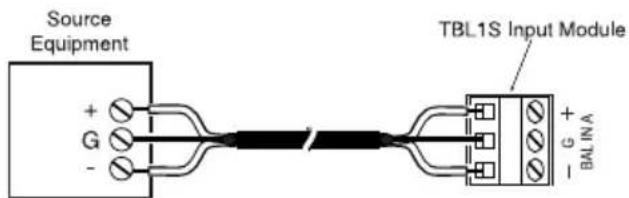
Note: If polarity of the output signal versus the input signal is important, it may be necessary to reverse input lead connections.
Unbalanced Connection
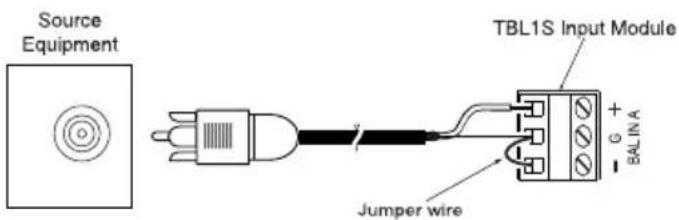
When the source device provides only an unbalanced output (signal and ground), the input module should be wired with the "-" input shorted to ground (G). The unbalanced signal's shield wire is connected to the input module's ground and the signal hot wire is connected to the "+" terminal. Since unbalanced connections do not provide the same amount of noise immunity that a balanced connection does, the connection distances should be made as short as possible.
BOGEN®
COMMUNICATIONS, INC.
50 Spring Street, Ramsey, NJ 07446, U.S.A.
201-934-8500; Fax: 201-934-9832
www.bogen.com

- TBL1S
- TRANSFORMER BALANCED LINE INPUT MODULE
- FEATURES
- MODULE INSTALLATION
- JUMPER SELECTIONS
- PRIORITY LEVEL
- GATING
- BUS ASSIGNMENT
- IMPEDANCE SELECTOR
- GATE - THRESHOLD (THRESH)
- DUCKING (DUCK)
- GAIN
- GATE - DURATION (DUR)
- TREBLE (TREB)
- BASS
- BALANCED INPUT
- BLOCK DIAGRAM
- INPUT WIRING
- BALANCED CONNECTION
- UNBALANCED CONNECTION
- BOGEN®
- COMMUNICATIONS, INC
Brand : Bogen
Model : TBL1S
Category : Unspecified