
SSL-RC - Projector Genaray - Free user manual and instructions
Find the device manual for free SSL-RC Genaray in PDF.


| Product Type | Wireless Remote Control |
| Brand | Genaray |
| Model | SSL-RC |
| Compatibility | Genaray Digital SSL Series LEDs |
| Channels | 4 (A–D) |
| Wireless Frequency | 2.4 GHz |
| Range | ≥100 ft (30.5 m) |
| Dimming Control | 0–100% in 1% increments |
| Color Temperature Adjustment | 3000–5600 K in 50 K increments (bi-color models) |
| Power Source | 1× AA battery (not included) |
| Dimensions | 4 × 2.6 × 1 in (10.2 × 6.5 × 2.5 cm) |
| Weight | 3 oz (85 g) |
| Display | LCD screen |
| Controls | Power button, adjustment dial |
| Operating Modes | Color temperature, dimming, channel selection |
| Safety | Keep away from water and flammable substances; do not disassemble; install battery correctly; remove battery when storing |
| Warranty | 1-year limited warranty |
| Maintenance | Clean with dry cloth; avoid moisture |
| Spare Parts / Repairability | Contact Genaray for service; no user-serviceable parts |
| Country of Origin | Not specified |
Frequently Asked Questions - SSL-RC Genaray
User questions about SSL-RC Genaray
0 question about this device. Answer the ones you know or ask your own.
Ask a new question about this device
Download the instructions for your Projector in PDF format for free! Find your manual SSL-RC - Genaray and take your electronic device back in hand. On this page are published all the documents necessary for the use of your device. SSL-RC by Genaray.
USER MANUAL SSL-RC Genaray
natural_image
Black handheld electronic device labeled '300MHz RF/125' with a display screen, set against a warm-toned abstract background (no readable text beyond branding)
genaray®
INTRODUCTION
THANK YOU FOR CHOOSING GENARAY
The Genaray SSL-RC 2.4 GHz Wireless Remote is a dedicated remote for Genaray's Digital SSL Series LEDs. The 4-channel remote controls dimming on all models, and it adjusts color temperature on bi-color models from over 100 feet away. The stepped dial controls the brightness in 1% increments, and the color temperature in 50 K increments.
PRECAUTIONS


- Please read and follow these instructions, and keep this manual in a safe place.
- Keep this unit away from water and any flammable gases or liquids.
- Do not attempt to disassemble or repair this product—doing so will void the warranty, and Genaray will not be responsible for any damage.
• Install the battery in the proper orientation. Installing batteries in the reverse orientation can cause them to leak, overheat, or explode.
- Remove the battery when storing the remote.
- Keep this product away from children.
- Images are for illustrative purposes only.
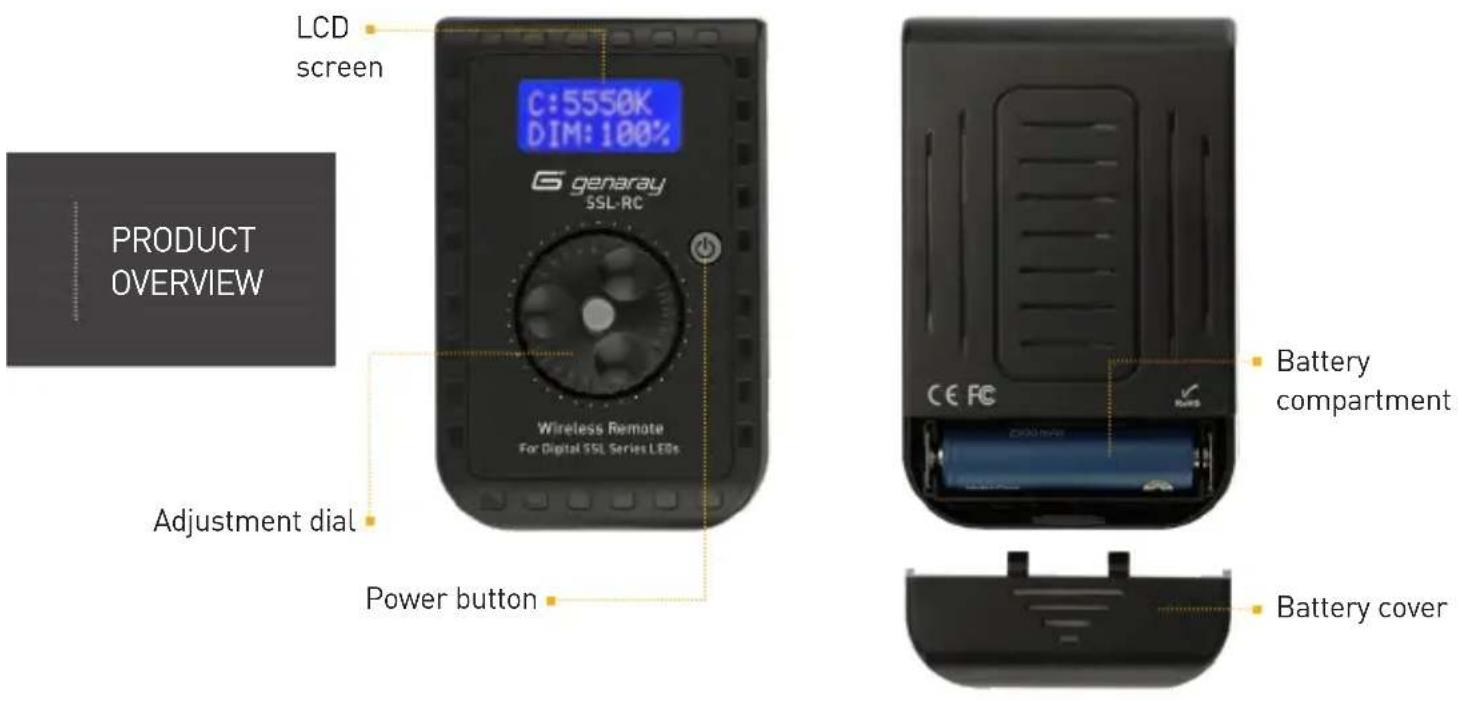
TURNING ON THE REMOTE
-
Remove the battery case cover, and install one AA battery. Make sure it's in the proper orientation. Then replace the battery case cover.
-
Before using the transmitter, make sure your Genaray Digital SSL LED lights are turned on.
-
To turn on the transmitter, press the transmitter's power button. The LCD screen will illuminate.
MODE SELECTION
Repeatedly pressing the adjustment dial selects the three operating modes.
- Color temperature adjustment mode: The color icon (C:) blinks.
- Power output adjustment mode: The dimming icon (DIM:) blinks.
- Channel selection mode: The channel icon (CH:) blinks.
SETTING THE CHANNEL
Turn the adjustment dial to select the channel (A–D). After five seconds, the screen will return to the function page.
The "OFF" selection prevents you from changing the settings inadvertently.
To set the light's channel, refer to the user manual that came with the light.
ADJUSTING THE COLOR TEMPERATURE
Use the transmitter to wirelessly adjust the color temperature of one
or more Bi-Color SSL LEDs from 3000–5600 K in 50 K increments.
Turn the dial to adjust the color temperature. The LED's color temperature will change as you turn the adjustment dial.
The transmitter wirelessly adjusts the brightness of one or more LED units from 0% (off) to 100% in 1% increments.
Turn the adjustment dial to fine-tune the power output. The LED's brightness will change as you turn the dial.
Press the power button to turn off the remote.
If the SSL LEDs are still on, they will remain at the last values that were set on the remote. Their color temperatures and brightness settings can still be adjusted via their control boxes.
SPECIFICATIONS
Channels: 4
Functions Supported: Dimming, color temperature (bi-color LEDs)
Frequency: 2.4 GHz
Frequency Range:≥100 ft. (30.5 m)
Power: AA Battery (×1)
Dimensions: 4 × 2.6 × 1 in. ( 10.2 × 6.5 × 2.5 cm)
Weight: 3 oz. (85 g)
ONE-YEAR LIMITED WARRANTY
This Genaray product is warranted to the original purchaser to be free from defects in materials and workmanship under normal consumer use for a period of one (1) year from the original purchase date or thirty (30) days after replacement, whichever occurs later. Genaray's responsibility with respect to this limited warranty shall be limited solely to repair or replacement, at Genaray's discretion, of any product that fails during normal use of this product in its intended manner and in its intended environment. Inoperability of the product or part(s) shall be determined by Genaray. If the product has been discontinued, Genaray reserves the right to replace it with a model of equivalent quality and function.
This warranty does not cover damage or defect caused by misuse, neglect, accident, alteration, abuse, improper installation or maintenance. EXCEPT AS PROVIDED HEREIN, GENARAY MAKES NEITHER ANY EXPRESS WARRANTIES NOR ANY IMPLIED WARRANTIES, INCLUDING BUT NOT LIMITED TO ANY IMPLIED WARRANTY OF MERCHANTABILITY OR FITNESS FOR A PARTICULAR PURPOSE. This warranty provides you with specific legal rights, and you may also have additional rights that vary from state to state.
To obtain warranty coverage, contact the Genaray Customer Service Department to obtain a return merchandise authorization ("RMA") number, and return the defective product to Genaray along with the RMA number and proof of purchase. Shipment of the defective product is at the purchaser's own risk and expense.
For more information, or to arrange service, visit www.genaray.com or contact us at info@genaray.com.
Brand : Genaray
Model : SSL-RC
Category : Projector