
MBQX-POD-1 - Loudspeaker MB QUART - Free user manual and instructions
Find the device manual for free MBQX-POD-1 MB QUART in PDF.


| Product Type | UTV-Tuned 2-Speaker Audio Package |
| Brand | MB Quart |
| Model | MBQX-POD-1 |
| Compatible Vehicles | Can-Am Maverick X3 (2017 and up) |
| Speaker Size | 6.5 inches (coaxial) |
| Amplifier Power | 400 Watts (2-channel, Class D) |
| Amplifier Model | NA2-400.2 |
| Installation Time | Approximately 2 hours |
| Included Components | 2 dash panel-mounted speakers, 1 amplifier, mounting hardware |
| Not Included | Source unit, power/ground wiring, fuse, speaker wiring, RCA cables |
| Amplifier Mounting Plate (Optional) | MBQX-SUB-ACC-1 (sold separately) |
| Recommended Source Unit | MBQX-RAD-1 (sold separately) |
| Warranty | 1 year from date of invoice |
| Input Voltage | 12V DC (vehicle battery) |
| Amplifier Fuse Rating | 30 amperes (recommended) |
| Power Wire Gauge | 10 AWG (minimum), 8 AWG (recommended) |
| Speaker Wire Gauge | 16 AWG (minimum) |
| Crossover Settings | High Pass (HP) at 80 Hz |
| Tools Required | Wire strippers, screwdrivers, drill, socket set, Torx drivers, pry tools |
| Installation Difficulty | Moderate (assumes basic mechanical skills) |
| Safety Precautions | Disconnect battery, wear safety glasses, secure wiring away from heat/moving parts |
| Maintenance | Periodically check connections and mounting; keep speakers dry |
Frequently Asked Questions - MBQX-POD-1 MB QUART
User questions about MBQX-POD-1 MB QUART
0 question about this device. Answer the ones you know or ask your own.
Ask a new question about this device
Download the instructions for your Loudspeaker in PDF format for free! Find your manual MBQX-POD-1 - MB QUART and take your electronic device back in hand. On this page are published all the documents necessary for the use of your device. MBQX-POD-1 by MB QUART.
USER MANUAL MBQX-POD-1 MB QUART
natural_image
Three black automotive fan components with visible blades and mounting brackets, one with a small electronic module (no text or symbols)MBQX-POD-1
CAN-AM MAVERICK X3
400 WATT / TWO SPEAKER UTV-TUNED AUDIO PACKAGE
Thanks for choosing MB QUART! The UTV-Tuned 2-speaker, 400 watt system for applicable Can-Am Maverick X3 vehicles (2017 and up) is engineered for your vehicle. The installation process is simple and straightforward. Installation following these detailed instructions can be completed in about 2 hours.
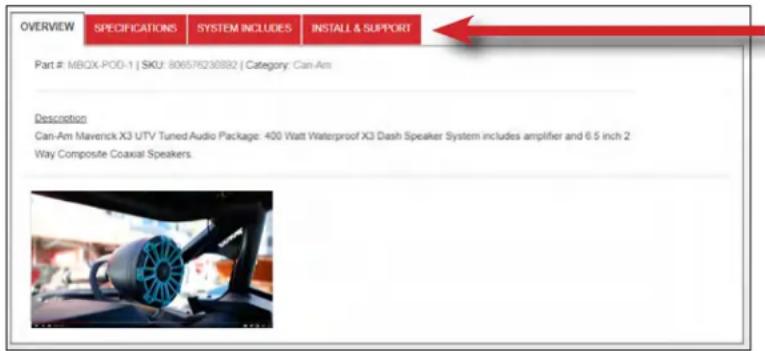
INSTALLATION OVERVIEW VIDEO
Many of our vehicle-specific products feature a "how to" install video with additional details on making your installation successful.
Where available, locate your specific video on the website. Type your model number (MBQX-POD-1) into the search box, then click on the INSTALL & SUPPORT tab.
WHAT'S INCLUDED
As you unpackage the MBQX-POD-1 system, account for all components before attempting installation.
Please note some components required to complete an audio system in your Can-Am X3 (such as a source unit, amplifier power/ground wiring, fuse/fuse holder, speaker wiring, RCA audio cable, etc.) are not included. See page 6 for details of what else you'll need.
What's In The Box?
- Compact 2 channel, Class D 400 Watt Amplifier*
- Two Dash Panel-Mounted 6.5 inch Coaxial Speakers in Vehicle-Specific Replacement Panels
*Optional Amplifier Mounting Plate (MBQX-SUB-ACC-1) is found at MBQuart.com
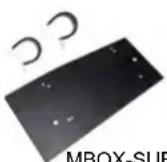
MBQX-SUB-ACC-1
*AMPLIFIER MOUNTING – An amplifier mounting plate (MBQX-SUB-ACC-1) to safely mount the NA2-400.2 amplifier to the Can-Am front cage behind the driver side dash is available at MBQuart.com. If not using this amplifier mounting plate, you need to determine and accomplish your own amplifier mounting strategy. Instructions on this accessory mounting plate and how to install this kit are included in this manual.
NOTE – Do not dispose of any packaging until you have completely installed your system and are certain you have accounted for every piece. If you feel something is missing, please contact Maxxsonics directly via email – support@maxxsonics.com.
OTHER CAN-AM X3 SPECIFIC PRODUCTS – MB Quart has thoughtfully created a range of vehicle-specific audio system products for your Can-Am X3. Everything from source units to subwoofers is available at www.MBQuart.com. See page 16 for details.
WARRANTY
Your audio system is covered by a 1 year warranty from the date of invoice. It is important to retain your sales receipt. Furthermore, it is crucial that you record and store a record of the serial numbers for each of the components that are included in your system. In the rare instance that a warranty claim is needed both proof of purchase and serial numbers are required. Additional information on the back page.
TECHNICAL SUPPORT
For additional technical information, go to the "SUPPORT" tab at MBQuart.com. There you will find helpful, FAQ, TEQ Tips and you can contact Technical Support via email.
INSTALLATION TIME
About 2 hours are required to complete this installation (assuming unmodified vehicle). Add installation time for your own source unit, choice in power wiring and any additional speakers, subwoofer(s) and amplifiers.
TOOLS AND SUPPLIES NEEDED
- Wire Strippers and Crimpers
- Phillips Screwdriver
- Flush Cut Wire Cutters (for trimming zip ties) - Small, Straight (Jeweler's) Screwdriver
- High-Quality Electrical Tape
- Heat Gun or Lighter
- Hand-Held Battery-Powered Drill, 9/64" & 1/8" Drill Bits
- Bojo Tools (Non-Marring Pry Tools)
- Ratchet, 8mm Socket
- 10mm Socket (Gauge Cluster/Battery)
- 13mm Socket and 13mm Box Wrench (Seat Removal) • 18mm Socket (Seat Removal)
- 1/2" Socket (Subwoofer Enclosure Front Brackets) - 7/16" Socket (Optional 3rd Amp Plate)
• T-25 and T-27 Torx Drivers (Dash & Housing Hardware) • T-30 Torx Driver (Dash/Console)
You may or may not need all of the tools listed above. You may also own more specialized tools to complete the installation. Share the pics of your installation on our social media channels to help others.
In addition to the tools listed, have music ready for INITIAL TESTING and FINE TUNING steps. The format of music will depend on your choice of source unit (USB stick, Bluetooth, AM/FM, etc.).
SAFETY PRECAUTIONS
Safely prepare your vehicle for the installation before proceeding.
- Turn the ignition off and remove the key
- Use a packing blanket other soft material to protect your machine
- Safety Glasses - always wear eye protection
- Once all of the seats are removed, disconnect the negative battery cable before proceeding
PREPARATION FOR INSTALLATION & DISASSEMBLY
Before fully dismantling your vehicle, we suggest you prepare all components, speaker panels and wiring. It increases efficiency to have everything ready when each component is installed. Seat removal is recommended as bus bar access in the center console for amplifier power & ground is important. Please note some models with seat belts will require seat belt attachment point removal to remove the whole seat.
REMOVE SEATS - DISCONNECT BATTERY
natural_image
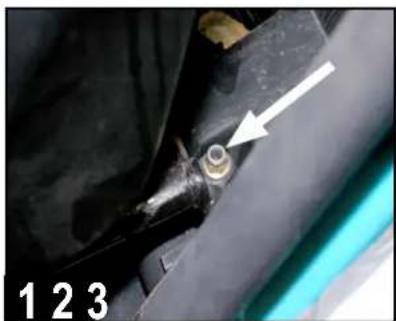
Close-up of a mechanical component with a white arrow pointing to a circular feature, labeled '123' at bottom left (no other text or symbols)Slide driver's seat forward and remove two 18mm bolts securing the rear of the seat frame. If the vehicle has factory-installed seats, you can also access these bolts by flipping up the seat cushion (a socket extension is required).
natural_image
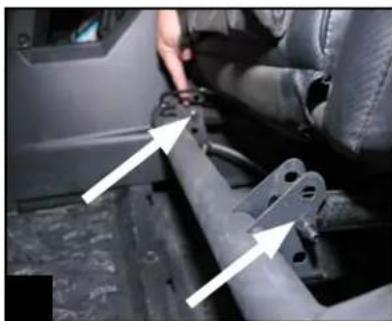
Interior view of a car showing a hand adjusting a vehicle seatbelt mechanism (no visible text or symbols)Slide driver's seat back to access front 13mm through-bolts and nuts. Using a socket and box wrench, remove inner and outer front seat hardware. Unplug seat belt sensor. Remove front driver's seat and set aside with all hardware.
natural_image
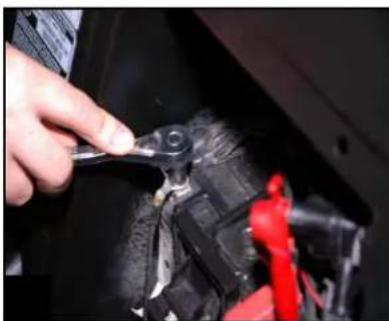
Close-up of a hand using a tool to adjust or install a mechanical component, with no visible text or symbols.Repeat seat removal on front passenger's side (and rear seats - if present). Once passenger seat near battery is removed, disconnect (black) negative battery cable by removing a 10mm bolt and set the negative cable aside.
VEHICLE DISASSEMBLY
This section covers console and dash component removal.
REMOVE CONSOLE SIDES
natural_image
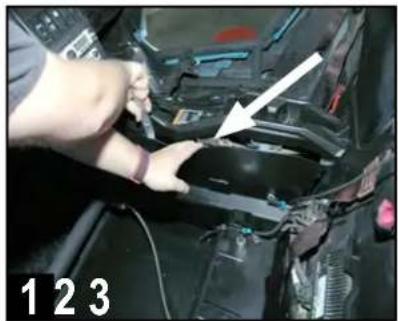
Close-up of hands installing or adjusting a component in a vehicle (no visible text or symbols)Remove driver's side console side panel using a pry tool from the top to gently release the pressure-fit clips.
natural_image
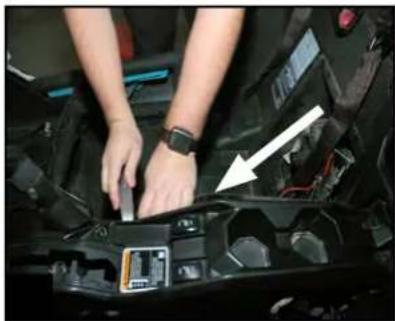
Person working on a car engine compartment with a white arrow pointing to a component (no visible text or symbols)Remove passenger's side console side panel using a pry tool from the top to gently release the pressure-fit clips.
natural_image
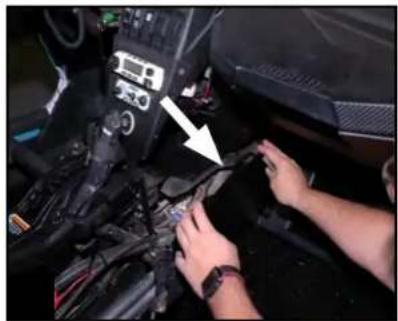
Close-up of hands installing or adjusting a black mechanical component with a white arrow pointing to a detail (no visible text or symbols)Remove front of center console side panel on passenger's side (footwell area) using a pry tool to gently release the pressure-fit clips.
REMOVE CENTER DASH HARDWARE & CLIPS
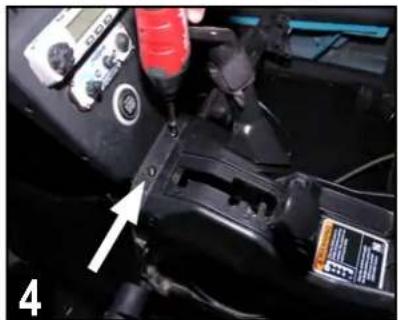
natural_image
Close-up of a mechanical device with a digital multimeter and labeled component (no readable text or symbols)Move gear selector all the way back (away from the dash). Remove two T-30 screws from the area just forward of the gear selector when in park.
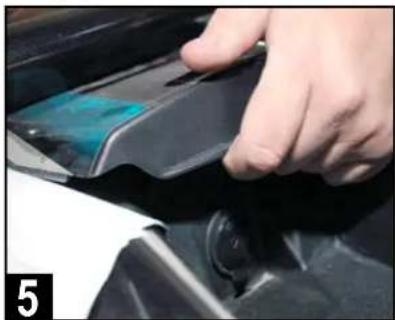
natural_image
Close-up of a hand pressing down on a black mechanical component (no visible text or symbols)Remove top center plastic cover above dash pocket by pushing up on the front pocket edge above the lighter socket, then pulling toward you.
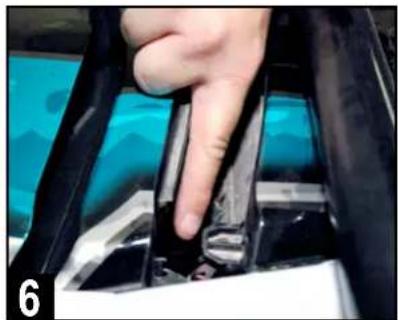
natural_image
Close-up of a hand pressing down on a mechanical component, no visible text or symbolsNext, remove two additional T-30 screws located beneath the forward edge of the top center plastic cover location, just forward of fuse box.
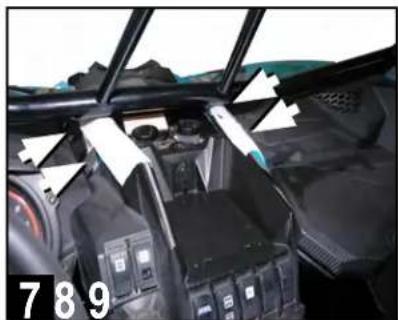
natural_image
Interior view of a car showing battery pack, intake manifold, and structural frame (no visible text or symbols)Identify four visible push pin clips on the outer edges of the center pocket. These secure the flanges of the left and right side dash speaker panels.
natural_image
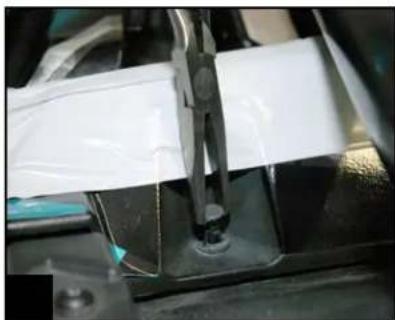
Close-up of a mechanical assembly with a white plastic sheet being handled by a metal clamp (no visible text or symbols)Gently remove the four visible push pin clips with a panel removal tool or special panel clip pliers (not needle nose) as shown.
natural_image
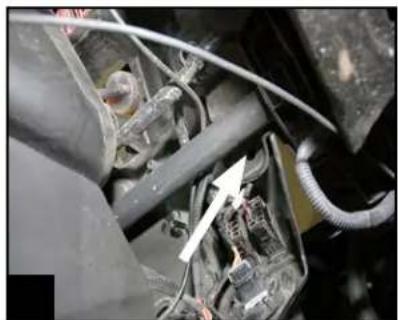
Close-up of mechanical components with wires and a white arrow pointing to a component (no visible text or symbols)Remove one additional hidden push pin under the driver's side dash, between the steering wheel and console, just forward of the tubular chassis support.
VEHICLE DISASSEMBLY
This section covers left and right side top dash speaker panels and gauge cluster removal.
REMOVE PASSENGER & DRIVER TOP DASH PANELS
natural_image
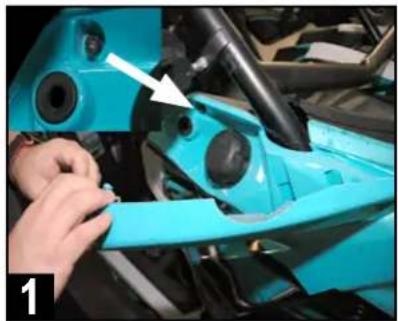
Close-up of a blue car dashboard with a white arrow pointing to the wheel (no visible text or symbols)Remove gas filler access door on passenger side. Note above the grommet for the retainer clip, there is a 10mm nut attaching a mounting screw.
natural_image
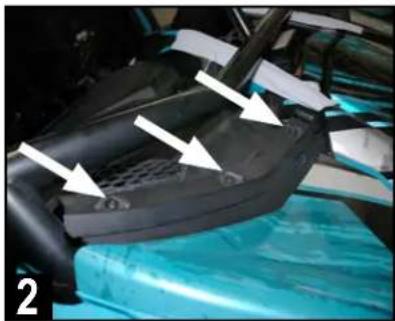
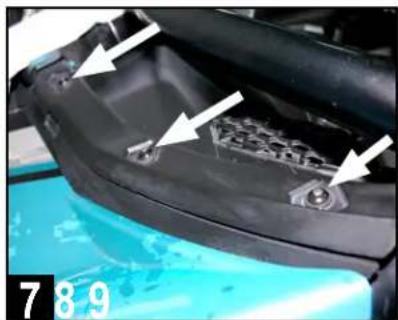
Close-up of a car interior showing a black plastic seat and blue hood, with white arrows pointing to specific components (no text or symbols visible)Remove three T-30 screws from the top edge of the passenger's side dash where the hood line meets the dash as indicated.
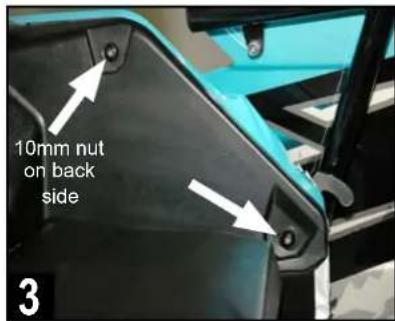
Remove the remaining two T-30 screws on the side edge of the panel. The top screw requires the 10mm nut loosened with a 10mm socket.
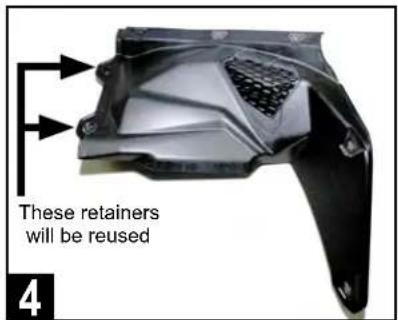
Gently remove passenger side speaker panel and set aside. The center push pin retainer clips will eventually need to be transferred to the new panel.
natural_image
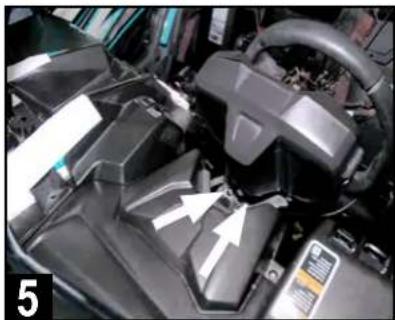
Close-up of a black automotive engine compartment with white arrows pointing to specific components (no visible text or symbols)Drop steering wheel position to access two T-30 gauge cluster screws. Cluster removal helps removal of the panel and access for amplifier installation.
natural_image
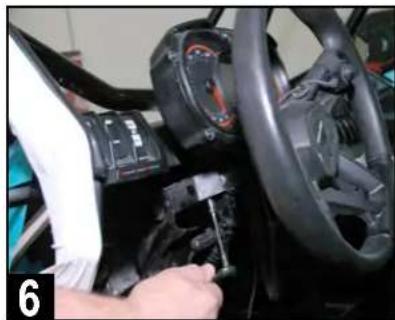
Close-up of a car's steering wheel and dashboard with a hand adjusting the gear (no visible text or symbols)Remove two T-30 screws holding the gauge cluster with a 10mm socket (below) and T-30 driver (above). Set gauge cluster aside when done.
natural_image
Close-up of a car's hood with visible mechanical components and mounting features (no text or symbols)Remove three T-30 screws from the top edge of the driver's side dash where the hood line meets the dash as indicated.

Remove two T-30 screws on the side edge of the panel. Next, remove two remaining T-30 screws behind gauge cluster area as indicated.
natural_image
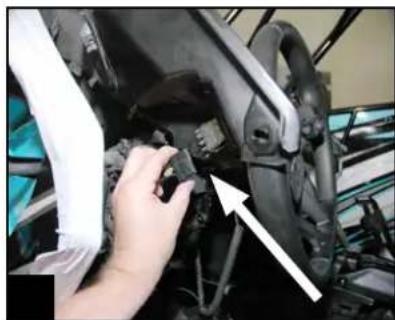
Close-up of a hand adjusting a mechanical component with an arrow pointing to it (no visible text or symbols)Pull panel* carefully to access switches and unplug them to fully remove driver's side panel. Set aside as with passenger dash panel for later reuse.
*Note: If equipped with Smart-Lok differential feature, remove the module with four 8mm screws from underside of driver's dash panel.
VEHICLE DISASSEMBLY
Removal of the center console inner cover facilitates routing wiring from the recommended bus bar location into the dash area where the amplifier and source unit are likely to be installed
INNER COVER OF CENTER CONSOLE
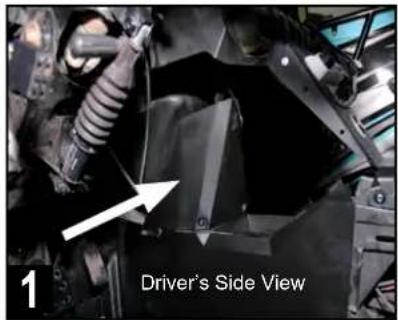
Prepare to remove forward inner cover of the center console. Note - some modified vehicles may have aftermarket console electronics present.
natural_image
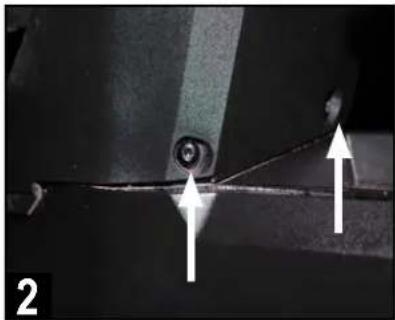
Close-up of a mechanical component with two white arrows pointing to features, no visible text or symbolsRemove two T-30 screws on the lower front of center console.
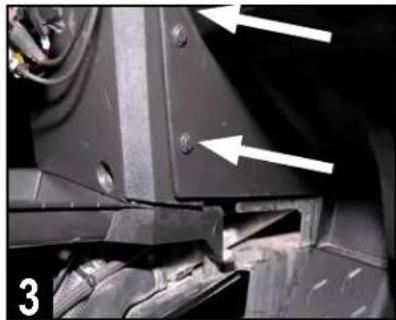
natural_image
Close-up of mechanical components with white arrows pointing to specific features (no text or symbols visible)Finally, remove two push pins on passenger's side of cover panel.
DISASSEMBLY IS COMPLETE!
BEFORE PROCEEDING - ITEMS YOU NEED:
To install a complete audio system, you need to have the following items not included in this kit. If you already have an audio system installed and are simply adding the MBQX-POD-1 kit, you may only need some of the items depending on whether or not you have existing amplifier(s) and other components.
1 SOURCE UNIT - MB Quart recommends using a source unit that is "mechless" with no moving internal parts like traditional CD/DVD players commonly have. In addition since this will be used in an off-road and outdoor environment, a source unit with IPX (water and dust intrusion) rating is highly recommended. Finally, the source unit should have a remote turn-on output to activate the amplifier when the source unit is on. Check out the MBQX-RAD-1 specifically for Can-Am X3 vehicles.
2 SOURCE UNIT POWER & GROUND WIRING - Whichever source unit is chosen, it will require +12 volt power, chassis ground and likely +12 volt accessory connections. You'll also need a remote turn-on wire and RCA audio cable to connect to the amplifier. The recommended power wiring size depends on the source unit, but #16 AWG copper wiring is common. MB Quart recommends connecting this power/ground/accessory wiring at the Can-Am X3's accessory bus bar located in the center console on the passenger side. This manual shows that connection point. Crimp or solder/tape connections at the source unit.
3 AMPLIFIER POWER & GROUND WIRING - The MB Quart NA2-400.2 amplifier included in this kit requires a minimum of #10 AWG copper wiring (#8 AWG copper wire is recommended) and a 30 ampere fuse at the point of connection for power. MB Quart recommends connecting this power wiring at the Can-Am X3's accessory bus bar located in the center console on the passenger side. This manual shows that connection point and recommended wire routing paths. Use of "CCA" (Copper-Clad Aluminum) power and ground wiring is strongly discouraged.
4 SPEAKER WIRING - Each speaker panel will require wiring long enough to reach the amplifier's location. MB Quart recommends a minimum of #16 AWG copper speaker wiring in this application. You'll also need crimp terminals to connect the wiring to the speakers.
5 ZIP TIES - The use of zip ties to safely and securely tie down wires routed throughout the vehicle is strongly encouraged. Zip tie your audio system wiring to existing vehicle wiring to help keep wiring from wire movement and wear during the life of the audio system. Avoid wiring paths near sources of heat or moving parts.
CONNECT AND ROUTE WIRING
This section covers the recommendation of connecting your power, ground and ignition/accessory wiring to the bus bar in the passenger side center console and routing that wiring to the dash area.
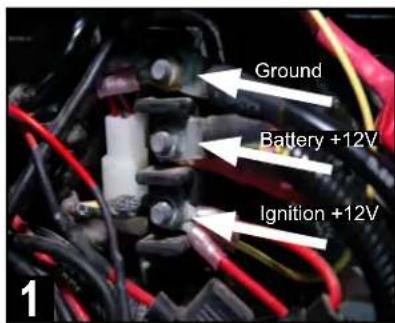
Identify bus bar in passengerside center console. Top ischassis ground, middle isconstant +12v power (battery)and bottom is +12v ignition.
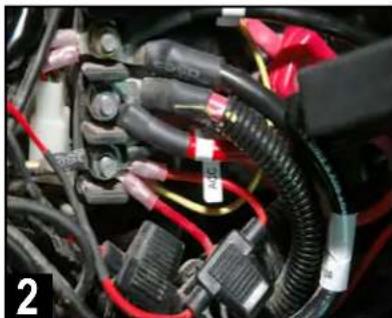
natural_image
Close-up of automotive electrical connectors and wiring (no visible text or symbols)Connect your Ground, Battery and Ignition wires to the bus bar locations. Ensure there is a fuse holder on the main +12 volt battery connection.
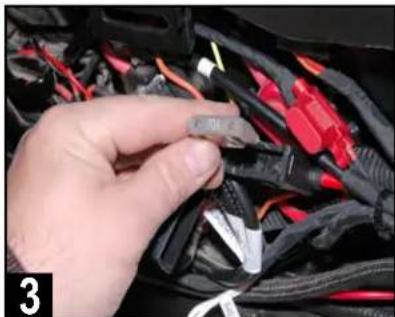
natural_image
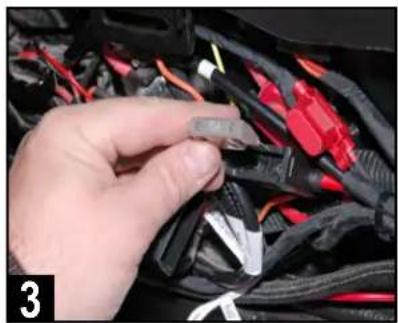
Close-up of a hand holding a small black connector with red and black wires, no visible text or symbolsRemove the fuse from the main fuse holder you've installed so the power wiring is not live while routing through the vehicle.
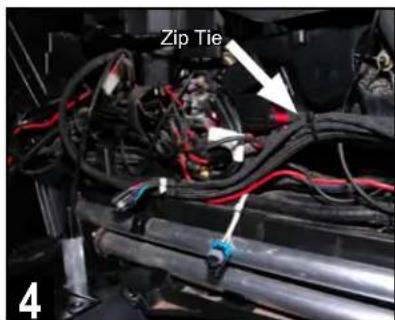
Next, begin to zip tie the wiring you've connected to existing factory wiring and begin routing everything forward. Stop every 8-10" to add another zip tie.
natural_image
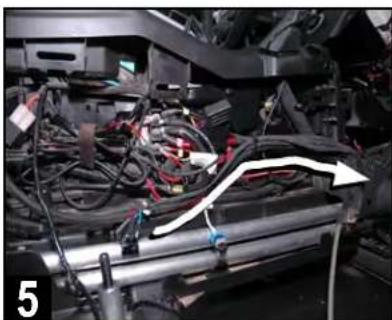
Close-up of a mechanical assembly with visible wiring and components (no text or symbols)Continue routing your wiring forward along the passenger side console as indicated by the arrow and zip tie to factory wiring.
natural_image
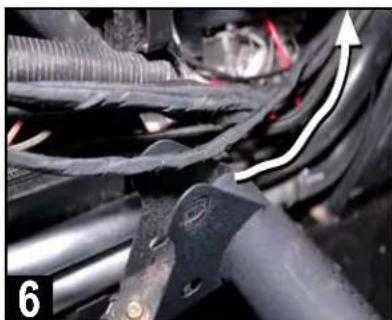
Close-up of automotive engine components with visible wiring and a white arrow indicating direction (no text or symbols)Route your wiring upward behind the center dash as indicated where the panel was removed. Secure with zip ties to factory wiring.
natural_image
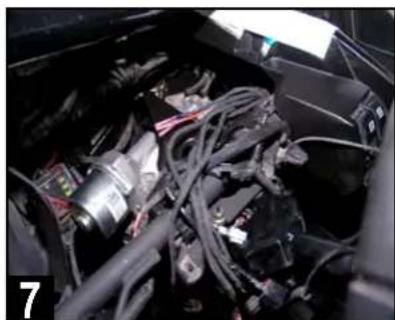
Interior view of a car showing internal components like battery, motors, and wiring (no visible text or symbols)Route your wiring up to steering column support bar area. This allows space to work for likely amplifier and source unit locations.
natural_image
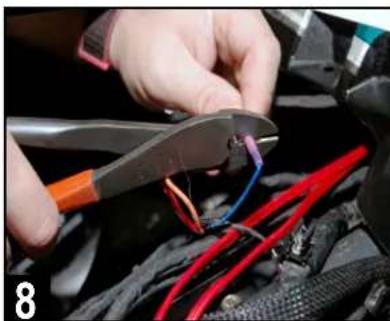
Close-up of hands using pliers to adjust cable colors on a car body (no visible text or symbols)Crimp or solder connections to the source unit's power wiring connector. Extend the source unit's remote turn-on wire to the amplifier mounting area.
natural_image
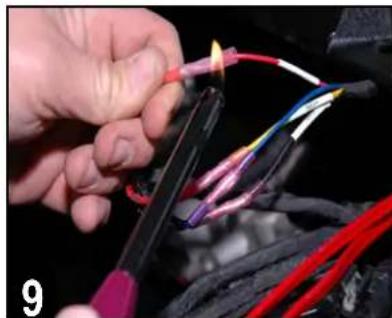
Close-up of hands using a power tool to connect wires with colored wires (no visible text or symbols)Use high quality electrical tape or a lighter/heat gun to heat shrink any connections. This ensures no moisture will penetrate the wiring
AMPLIFIER INSTALLATION
This section covers general wiring and the installation the NA2-400.2 amplifier using the optional MBQX-SUB-ACC-1 mounting plate. If not using this mounting plate, you'll need to determine your own mounting location.
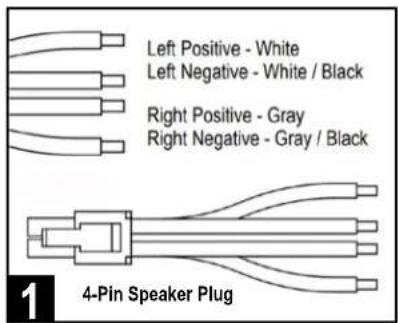
Route speaker wiring from each front speaker location to the amplifier's installation location. Connect wires to 4-pin speaker plug as shown.
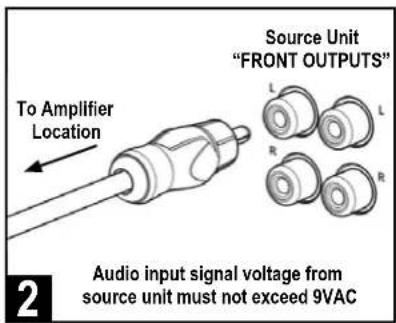
Route left/right preamp-level RCA audio cables and remote turn-on wire from source unit preamp outputs to the amplifier's installation location.
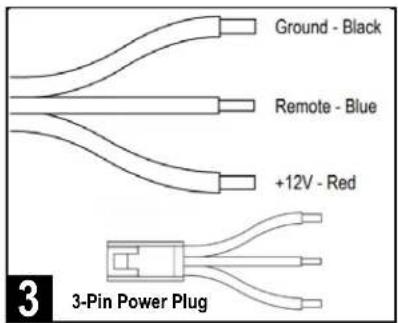
Route power+ground amplifier wiring to the amplifier's installation location. Including remote turn-on, connect wires to 3-pin power plug as shown.
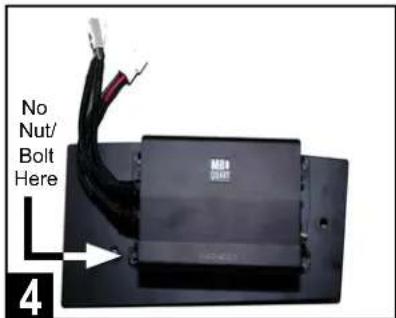
Attach the 400.2 amplifier to mounting plate with included hardware as indicated. Use only three nuts/bolts due to chassis tube frame clearance.
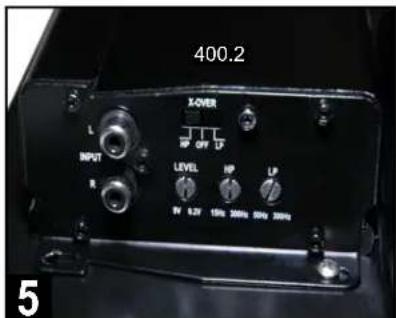
Make (or verify) recommended amplifier LEVEL and HP crossover settings as indicated. See page 11 for setting details.
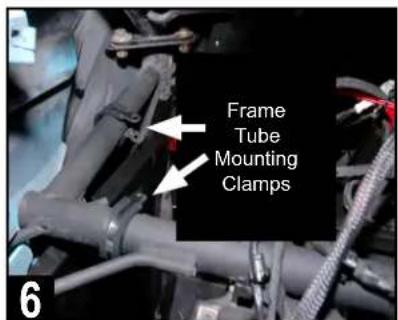
Route power, speaker wiring and RCA audio cables to amp mounting location (near frame tubes). Place mounting clamps in initial locations as shown.
natural_image
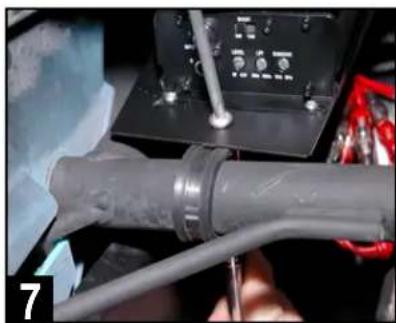
Close-up of a mechanical assembly with a coiled cable and wiring, no visible text or symbolsPlace amplifier & plate into its location. Attach the supplied Phillips screws and 7/16" nuts through the clamp holes and tighten until amplifier is secure.
natural_image
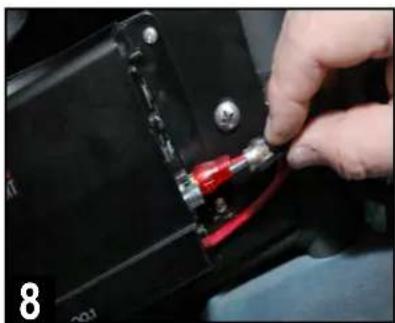
Close-up of a hand inserting a red and black component into a black electrical connector (no visible text or symbols)Connect the RCA audio cable from source unit to left and right channel amplifier inputs. Be sure to double check left is left and right is right (channel).
natural_image
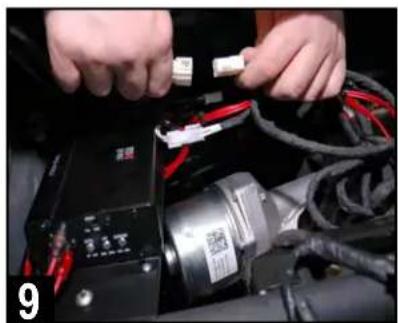
Close-up of hands connecting a black electronic device to red cables and cables with a white connector (no visible text or symbols)Connect the 4-pin speaker and 3-pin power wire harness connectors as shown. Zip tie wiring to void any moving parts, moisture or heat sources.
FRONT SPEAKER INSTALLATION
This section covers final installation of the passenger's side front speaker panel and temporary installation of the driver's side speaker panel. Final installation of the driver's side speaker panel occurs after the system is tested and gone through a thorough inspection prior to reassembly.
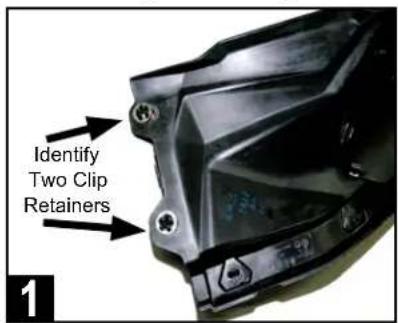
Locate the factory front left and right speaker panels and identify two mounting clip retainers and washers that need to be removed on each.
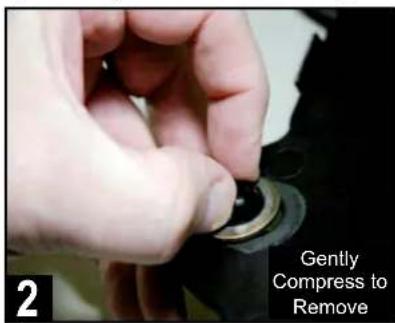
From bottom side, gently remove mounting clip retainers as indicated. This can be done with your fingers. Do this for both passenger and driver side.
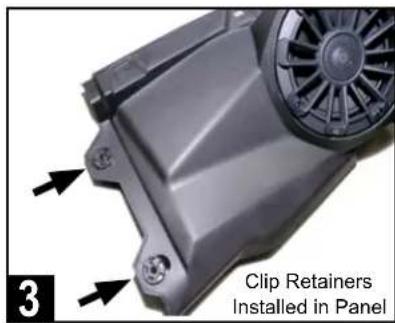
Replace these mounting clip retainers and washers in the same locations of both MB Quart speaker panels in your Can-Am X3 kit. It's a direct fit.
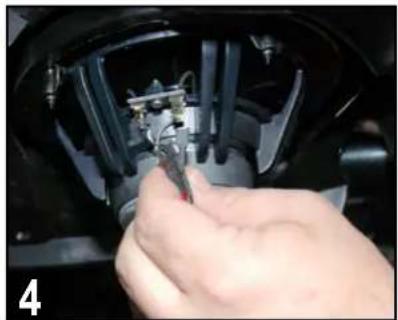
natural_image
Close-up of a hand using a tool to adjust or install electronic components on a mechanical component (no visible text or symbols)Connect passenger side speaker to your installed speaker wire. Crimp connectors are needed to mate with speaker terminals.
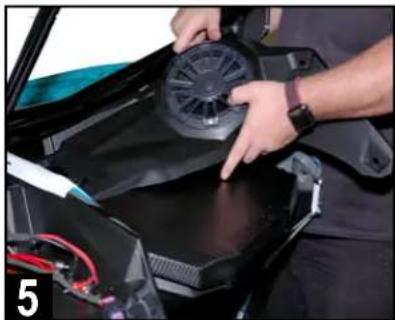
natural_image
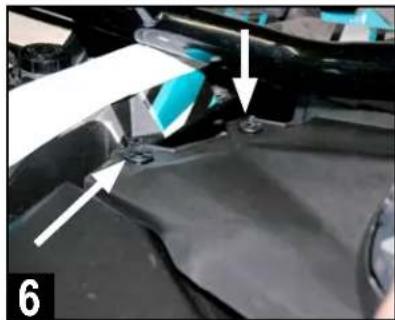
Person installing or adjusting a black plastic fan on a vehicle chassis (no visible text or symbols)Begin to set passenger side speaker panel in place by loading the edge nearest the center with the clip retainers into position as shown.
natural_image
Close-up of a car hood with blue plastic components and white arrows pointing to specific parts (no text or symbols visible)Pull center edge of panel up to align clips with the respective dash receiver holes. This is a crucial step to facilitate the correct overall panel fit.
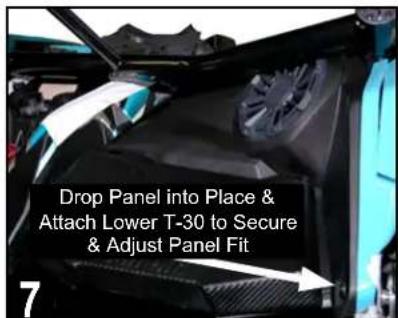
Next, drop the speaker edge of panel into place*. Attach lowest T-30 screw into place to allow check of final panel fit and to ensure all clip holes align.
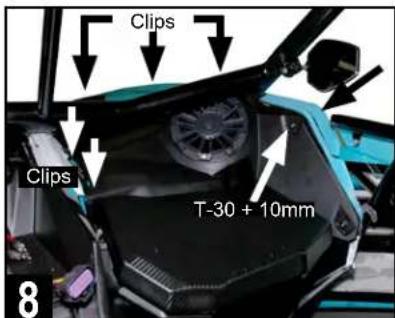
Secure the front speaker panel by reinstalling all the remaining clips and hardware in the same locations removed during the disassembly process.
\*AFTERMARKET ROLL CAGES
Although MB Quart front speakers come pre-installed in the Can-Am replacement panels, they may require removal from the panel to fit low-slung aftermarket roll cages that fit close to the hood area.
In these cases where fit is tight or would damage the speaker due to the roll cage position, remove the speaker from the panel first, install the panel in the vehicle, then connect and install the speaker into the panel.
FRONT SPEAKER INSTALLATION (Continued)
This section continues front speaker installation focusing on the driver's side. Final driver's side panel installation will occur AFTER the audio system initial testing is validated and complete.
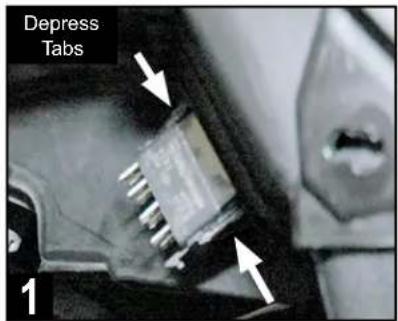
Remove switches on lower left of original driver's side dash panel by depressing the tabs on the top and bottom of the back of switch.
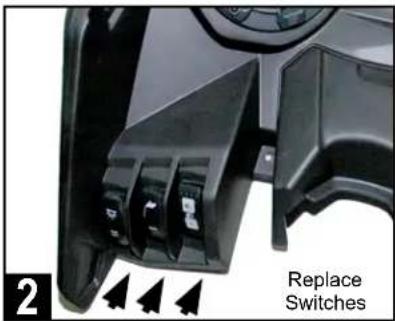
Replace switches in the same locations within the new MB Quart driver's side dash panel by simply pushing each into its mounting opening.
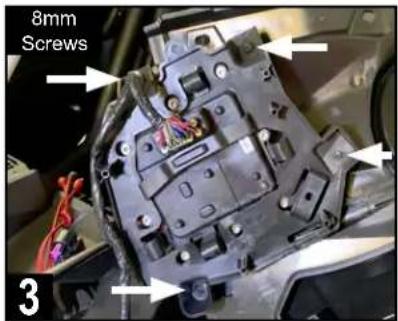
If the vehicle has the Smart-Lok differential control module, attach to the underside of the new dash panel with the original four 8mm screws.
natural_image
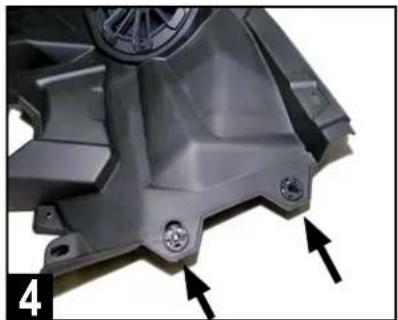
Close-up of a metallic mechanical component with mounting holes and a central hub, marked with arrows (no text or symbols visible)Ensure the clip retainers and washers from the original dash panel have been reinstalled correctly before proceeding.
natural_image
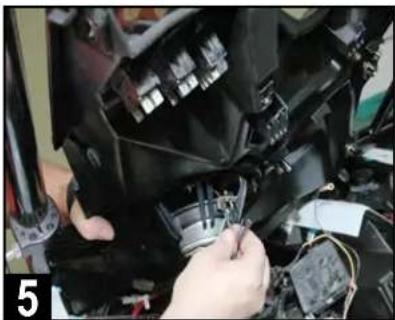
Close-up of hands installing or adjusting a mechanical component with visible wiring and components (no text or symbols)Connect driver side speaker to your installed speaker wire. Crimp connectors are needed to mate with speaker terminals.
natural_image
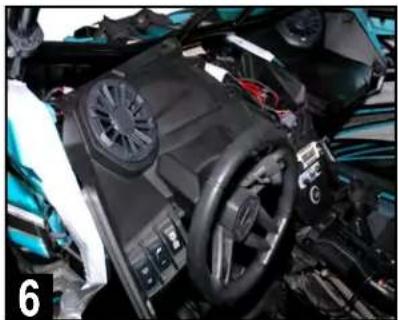
Close-up of a car's internal components including steering wheel, dashboard, and steering wheel (no visible text or symbols)Set panel temporarily in place without attaching any hardware or clips. Do not yet plug in switches in case amplifier adjustments are needed.
DOUBLE CHECK INSTALLATION STEPS TO THIS POINT
Take a few minutes to double check all of the installation steps to this point ensuring the amplifiers, speakers and wiring has all been connected as shown in these instructions.
PROCEED TO THE NEXT PAGES TO CONFIRM SETTINGS AND BEGIN TESTING THE SYSTEM.
AMPLIFIER SETTINGS
Before dash reassembly, make (or verify) the following settings of the amplifier. See the INITIAL TESTING and FINE TUNING sections for additional information on final system adjustments and personalized settings.
The chart below provides general crossover filter and bass boost switch settings depending on the Can-Am X3 UTV-Tuned Audio package you have.
| TUNED PACKAGE TWO-CHANNEL AMPLIFIER MONO AMPLIFIER | ||
| MBQX-POD-1 HP-OFF-LP/BPSwitch to – High Pass (80Hz) | P/BPSwitch to – High Pass (80Hz) | N/A |
ADJUST NA2-400.2 TWO-CHANNEL AMPLIFIER
Make the following initial adjustments to the NA2-400.2 shown at right:
- X-OVER - Switch to "HP" position. This designates the amplifier's crossover filter for "high pass" functionality. That helps protect the speakers!
- LEVEL - Rotate control to halfway starting at 9V (dial pointing up). This represents a starting point to evaluate if the amplifier's input level setting will closely match the source unit's output at full volume. The ideal setting allows the amplifier to achieve full power without notable distortion.
The setting recommended here was determined by using the Can-Am vehicle-specific MBQX-RAD-1 source unit available with other UTV-Tuned Can-Am "Stage" kits. The ideal setting may be different depending upon the source unit you've selected.
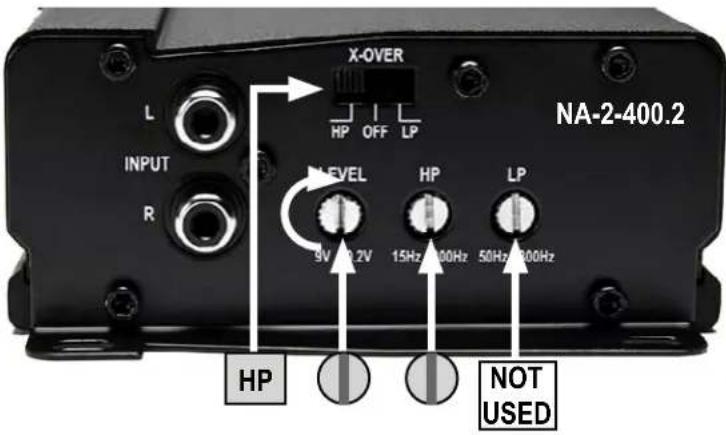
- HP - Rotate control to halfway from 15 Hz (pointing up). This is approximately 80Hz^* .
*Note: You can set this high pass crossover to a lower frequency to get slightly lower notes out of the speakers at lower volume levels, but doing so also creates a risk of damaging the speakers at higher volume levels due to over excursion. Instead, MB Quart system design experts recommend maintaining the 80Hz HP crossover point and adding a subwoofer such as the MBQX-SUB-2 engineered specifically for Can-Am X3 UTVs.
- LP - The low pass (LP) crossover filter is not used in this application (position of dial does not matter).
INITIAL TESTING
Confirm that everything is working as intended before final tuning, fitting and reassembly.
STEP 1 – RECONNECT THE BATTERY
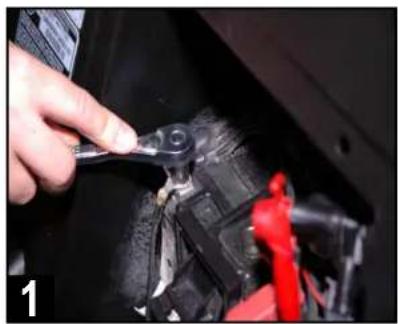
First, ensure the battery is fully charged. Using a 10mm socket, then reconnect the negative terminal of the negative battery cable as indicated.
STEP 2 - CONNECT SOURCE UNIT
Make any final connections to your chosen source unit so that it can power up and output a music source for testing. MBQX-RAD-1 is specifically designed for Can-Am X3 vehicles and is shown, but not included.
STEP 3 - INSERT MAIN FUSE AT BUS BAR
With the source unit connected, place the fuse in the fuse holder near the bus bar main harness connection for the amplifier (recommended 30a).
STEP 4 – TURN ON IGNITION
Turn the ignition key to the ACC position.
STEP 5 – INITIAL CHECKS
Push the PWR button on the source unit and check the system for all of the following:
- POWER ON - Source unit lights up and responds to button presses.
- USB INPUT (if available) responds when selected.
- AUX 3.5mm INPUT (if available) responds when selected.
- BT MUSIC - (if available) Follow the pairing instructions for source unit and test a Bluetooth® source.
- AM/FM RADIO - (if available) responds when selected. Unless you have installed an AM/FM antenna, you will only hear static.
- SATELLITE RADIO - (if available) responds when selected. Unless you have installed a satellite radio antenna, you will only hear static.
- SPEAKERS - Confirm left and right channel speakers are playing the correct range of frequencies.
- CORRECT LEFT/RIGHT BALANCE - Make sure you are using the controls on the source unit to confirm "LEFT" is the left-side channel and "RIGHT" is the right-side channel.
- AMPLIFIER - If the speakers are playing, the amplifier is on. Confirm settings are correct if something doesn't sound exactly right. CONFIRM ALL SPEAKERS ARE CONNECTED CORRECTLY TO THE AMPLIFIER before making any further adjustments. Refer to page 8 and 11 for initial amplifier settings during the amplifier installation.
If everything is working and producing sound, proceed to the next section - Fine Tuning.
natural_image
Close-up of a hand using a tool to adjust or install a mechanical component, no visible text or symbols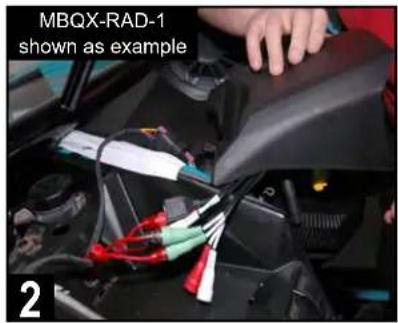
natural_image
Close-up of a hand holding a small black connector with wires, no visible text or symbolsFINE TUNING
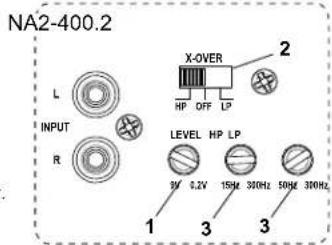
After you've confirmed and tested all components are working, you can fine tune the amplifier settings. Through hundreds of installations we have determined the following settings are ideal for the Can-Am X3 UTV-Tuned Audio Packages. Only "A" settings 1, 2 and 3 apply to the NA2-400.2 amplifier in this kit.
NOTE – Gain control, it is important to adjust each amplifier gain as described in the manual. Remember, these settings are NOT volume controls. Gain controls, properly adjusted help properly balance the system sound between lows, highs and minimize distortion that comes from the source unit. Listen for a clear, crisp audio sound. The ideal gain setting should allow full volume from the source unit without audible distortion.
A Settings
The illustrations below describe the various controls. Refer to the illustration that matches your amplifier.
① GAIN Adjustment
The gain control purpose is to match the output of your source signal to the amplifier. Refer to the section B below for detailed instructions.
② X-OVER Switch
This switch will set the amplifier to have a full frequency output or to filter out high or low frequencies. The NA2-400.2 offers either a low pass (LP) or high pass (HP) filter.
③ Frequencies Adjustment
The Low Pass Filter will cut off the frequencies above the setting. The High Pass Filter will cut off the frequencies below the setting.
④ SUBSONIC Adjustment
The Subsonic Filter will cut off the frequencies below the setting. If using with a subwoofer, the setting should be set between 15-25Hz. Not used in this application.
⑤ BOOST Switch

The Boost Switch will increase the signal 12dB at 45Hz. Be aware this setting can cause distortion if the gain is not set properly. Not available in this application.
Two Channel Amplifier
Mono (Subwoofer) Amplifier
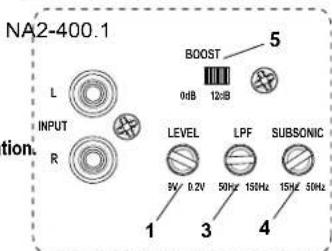
Optional Amplifier for Subwoofer Applications
B! Level Setting
This is a critical step to insure your amplifier is properly adjusted to match the signal output level of your source unit.
THIS IS NOT A VOLUME CONTROL!

- If possible, with the source unit off, confirm that the primary volume control is turned down (counter clockwise).
- Turn on the source unit (CD, or MP3 player). Re-confirm that the volume is turned down. Make sure the source unit controls; balance, fader, bass and treble are all set to center or "0" adjustment. Make sure that the green LED on the end of the amplifier is illuminated.
- Play a clean musical selection of which you are very familiar. CD is preferred. Do not use radio signals for level setting. Hit play and start turning the volume of the source unit up.
- Stop increasing the source unit volume when you reach 3/4 (about 75%) or until you hear speakers begin to slightly start producing distortion.
- Increase the amplifier gain (clockwise) until distortion is heard, then back the level down (counter clockwise) until the distortion is eliminated. Small adjustments may need to be made to balance the levels of multiple amplifiers.
VEHICLE REASSEMBLY
As you begin reassembly, take the time to ensure no fastener, screw or clip is excluded. Review any prior disassembly steps to ensure you don't miss any hardware during reassembly.
natural_image
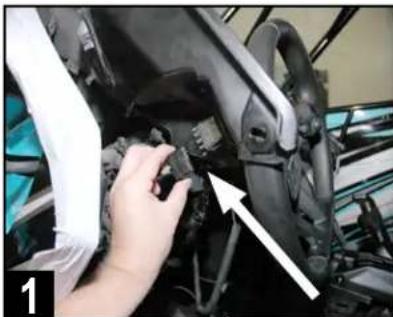
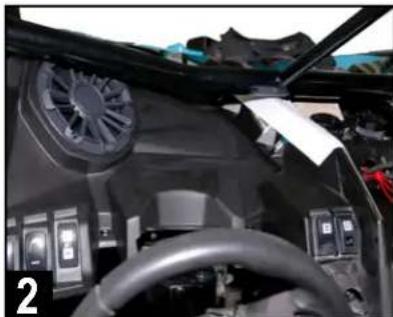
Close-up of a hand adjusting a mechanical component with an arrow pointing to a detail (no visible text or symbols)Plug in all switch wiring on back of the driver side front speaker panel. Test switch functions to ensure they are correctly connected.
natural_image
Interior view of a car cockpit with steering wheel, dashboard, and control panels (no visible text or symbols)Place driver side speaker panel into its final position*. Check fit so that all open hardware and clip holes are aligned properly.
\*AFTERMARKET ROLL CAGES
Although MB Quart front speakers come pre-installed in the Can-Am replacement panels, they may require removal from the panel to fit low-slung aftermarket roll cages that fit close to the hood area.
In these cases where fit is tight or would damage the speaker due to the roll cage position, remove the speaker from the panel first, install the panel in the vehicle, then connect and install the speaker into the panel.
3 Secure the front speaker panel by reinstalling all the remaining clips and T-30 hardware in the same locations removed during the disassembly process. Do not forget about reinstalling the additional hidden push pin under the driver's side dash, between the steering wheel and console, just forward of the tubular chassis support.
4 Reinstall the gauge panel with the two T-30 screws and two 10mm nuts. With this step completed, the driver side front speaker panel installation should be complete.
5 Double-check the wiring from the bus bar and ensure the nuts on the connections are tight. Ensure all of your wiring is secured to factory wiring with zip ties. Do not zip tie any part of the power/speaker wiring or the RCA audio cable to any heat or moisture sources, or to any moving parts.
6 Reinstall lower center console cover with two T-30 screws and two push pins. Refer to the top of page 6 for disassembly steps and simply do these in reverse.
7 Reinstall four T-30 screws in the center dash. Two forward of the gear selector and two additional in the upper center dash forward of the fuse panel. Once complete, reinstall the upper center dash access cover behind the upper dash pocket area housing. Refer to page 4 for disassembly steps and simply do these in reverse.
8 Reinstall driver and passenger center console side panels by gently snapping back into place. Ensure no wiring is exposed or pinched. Refer to page 4 for disassembly steps and simply do these in reverse.
9 Reinstall driver and passenger seats with the original 18mm bolts in the rear and 13mm bolts/nuts in the front. Refer to page 3 for disassembly steps and simply do these in reverse.
FINAL INSPECTION
Here is a check list to make sure your vehicle is ready to hit the trails. You should pull & tighten everything so that you know your Can-Am X3 and your audio equipment are secure.
- BATTERY IS FULLY CHARGED, ESPECIALLY AFTER TESTING AND FINE TUNING
- NEGATIVE BATTERY TERMINAL IS TIGHT AND SECURE
• NUTS WERE TIGHT ON WIRING CONNECTIONS AT THE BUS BAR IN CENTER CONSOLE - ALL POWER WIRING RUN IN CENTER CONSOLE ARE SECURED SO NOTHING IS LOOSE
- AMPLIFIER MOUNTED AND SECURED TO AMPLIFIER PLATE (ONLY 3 NUTS USED AS SHOWN)
- RIGHT FRONT SPEAKER PANEL FINAL MOUNTING FITS PROPERLY
- LEFT FRONT SPEAKER PANEL FINAL MOUNTING FITS PROPERLY
- SOURCE UNIT OF YOUR CHOICE IS SECURELY INSTALLED AND FUNCTIONING
- ALL CENTER DASH AND CENTER CONSOLE PANELS ARE SECURED AND FITTED PROPERLY
- ALL SEATS MOVE PROPERLY FORWARD AND BACKWARD
- ENSURE NO LEFTOVER ORIGINAL HARDWARE - EVERY CLIP, SCREW & FASTENER IS IN PLACE
- ACCOUNT FOR ALL YOUR TOOLS SO NOTHING IS MISSING
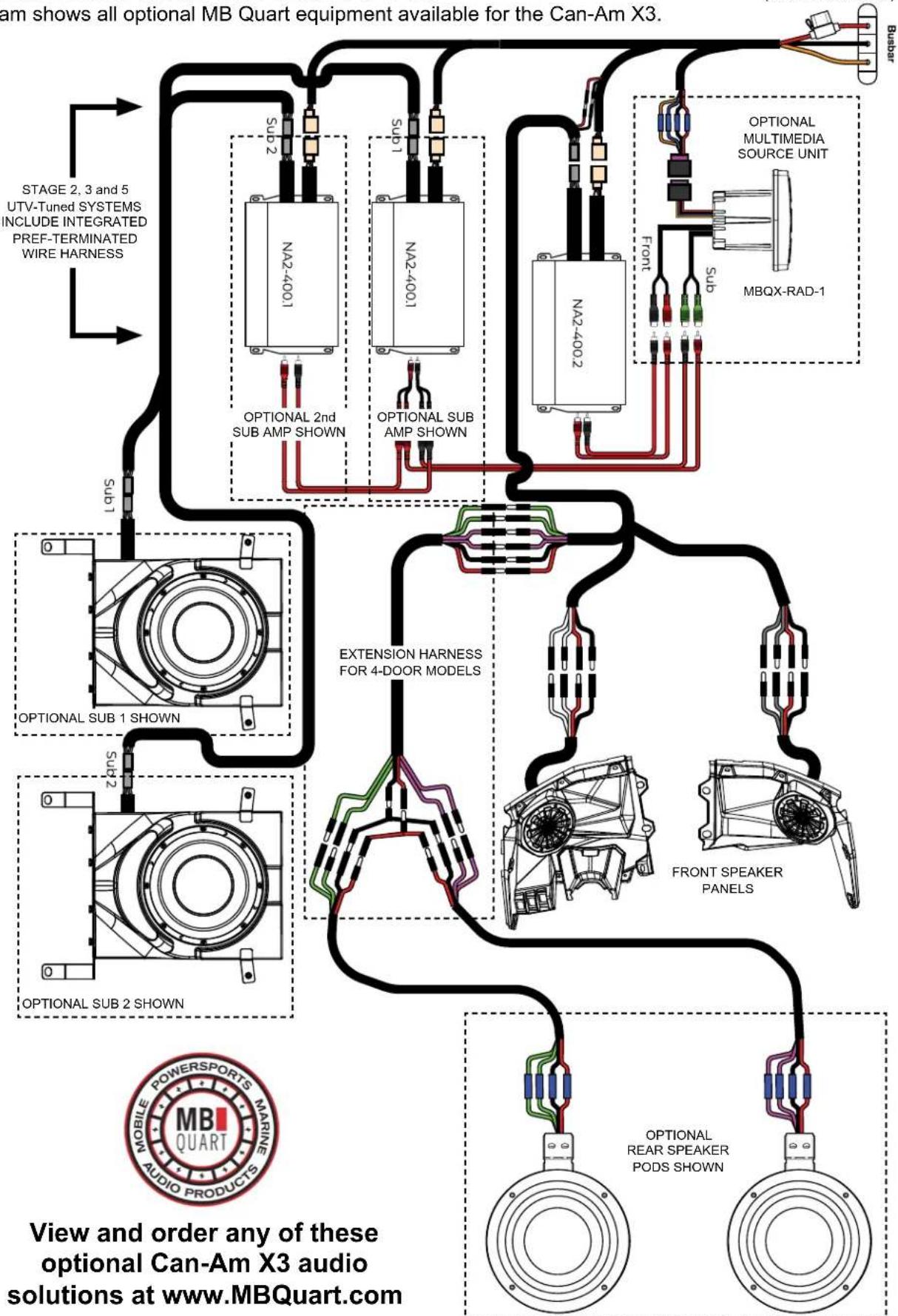
COMPLETE CAN-AM X3 SYSTEM LAYOUT
This diagram shows all optional MB Quart equipment available for the Can-Am X3.
BUS BAR
(CENTER CONSOLE)

NOTES
Use this section to record serial numbers of each product, final gain and crossover settings of amplifiers or any other wiring or installation-related details that will be helpful if you need to add on to the system or troubleshoot any unforeseen issues.



MBQuart.com #MUSIC DEFINED
FCC Notice
This equipment has been tested and found to comply with the limits for a Class B digital device, pursuant to part 15 of the FCC Rules. These limits are designed to provide reasonable protection against harmful interference in a mobile installation. This equipment generates, uses and can radiate radio frequency energy and, if not installed and used in accordance with the instructions, may cause harmful interference to radio communications. However, there is no guarantee that interference will not occur in a particular installation.
WARNING: Changes or modifications not expressly approved by the party responsible for compliance could void the user's authority to operate the equipment.
This equipment complied with FCC radiation exposure limits set forth for an uncontrolled environment. This equipment should be installed and operated with minimum distance 20cm between the radiator & your body.
WARRANTY
Maxxsonics USA Inc. warrants this product, to the original consumer purchaser, to be free from defects in material and workmanship for a period of one (1) year from the date of purchase. Maxxsonics USA Inc. will, at its discretion, repair or replace defective products during the warranty period. Components that prove to be defective in materials and workmanship under proper installation and use must be returned to the original authorized Maxxsonics USA Inc. retailer from where it was purchased. A photocopy of the original receipt must accompany the product being returned. The costs associated with removal, re-installation and freight are not the responsibility of Maxxsonics USA Inc. This warranty is limited to defective parts and specifically excludes any incidental or consequential damages connected therewith. To view the full warranty, please visit the website.
The Bluetooth ^® word mark and logos are registered trademarks owned by the Bluetooth SIG, Inc. and any use such marks by MB Quart is under license.
All product names, logos, and brands are property of their respective owners. All company, product and service names used in this literature are for identification purposes only. Use of these names, logos, and brands does not imply endorsement.
MBQuart products are designed and engineered in the USA by

MAXXSONICS®
www.maxxsonics.com
- MBQX-POD-1
- CAN-AM MAVERICK X3
- WATT / TWO SPEAKER UTV-TUNED AUDIO PACKAGE
- INSTALLATION OVERVIEW VIDEO
- WHAT'S INCLUDED
- WARRANTY
- TECHNICAL SUPPORT
- INSTALLATION TIME
- TOOLS AND SUPPLIES NEEDED
- SAFETY PRECAUTIONS
- PREPARATION FOR INSTALLATION & DISASSEMBLY
- REMOVE SEATS - DISCONNECT BATTERY
- VEHICLE DISASSEMBLY
- INNER COVER OF CENTER CONSOLE
- DISASSEMBLY IS COMPLETE!
- BEFORE PROCEEDING - ITEMS YOU NEED:
- CONNECT AND ROUTE WIRING
- AMPLIFIER INSTALLATION
- FRONT SPEAKER INSTALLATION
- \*AFTERMARKET ROLL CAGES
- FRONT SPEAKER INSTALLATION (Continued)
- DOUBLE CHECK INSTALLATION STEPS TO THIS POINT
- AMPLIFIER SETTINGS
- ADJUST NA2-400.2 TWO-CHANNEL AMPLIFIER
- INITIAL TESTING
- STEP 1 – RECONNECT THE BATTERY
- STEP 2 - CONNECT SOURCE UNIT
- STEP 3 - INSERT MAIN FUSE AT BUS BAR
- STEP 4 – TURN ON IGNITION
- STEP 5 – INITIAL CHECKS
- FINE TUNING
- A Settings
- ① GAIN Adjustment
- ② X-OVER Switch
- ③ Frequencies Adjustment
- ④ SUBSONIC Adjustment
- ⑤ BOOST Switch
- B! Level Setting
- THIS IS NOT A VOLUME CONTROL!
- VEHICLE REASSEMBLY
- FINAL INSPECTION
- COMPLETE CAN-AM X3 SYSTEM LAYOUT
- NOTES
- MBQuart.com #MUSIC DEFINED
- FCC Notice
Brand : MB QUART
Model : MBQX-POD-1
Category : Loudspeaker