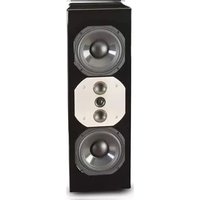
LCR80 - Loudspeaker MCINTOSH - Free user manual and instructions
Find the device manual for free LCR80 MCINTOSH in PDF.


| Product Type | Loudspeaker System |
| Driver Complement | Two 6-inch Woofers, Two 2-inch Titanium Inverted Dome Midranges, One 3/4-inch Titanium Dome Tweeter |
| Impedance | 8 ohms (nominal) |
| Frequency Response | 80 Hz – 45,000 Hz |
| Sensitivity | 81 dB (2.83V/1m) |
| Recommended Power Range | 75 Watts to 300 Watts |
| Maximum Power Handling | 300 Watts |
| Crossover Frequencies | 500 Hz and 4,500 Hz |
| Dimensions (H x W x D) | 8 in (20.3 cm) x 24 in (61 cm) x 8-3/8 in (21.3 cm) with angled brackets |
| Weight (Net) | 24 lb (10.9 kg) |
| Enclosure Finish | Real wood veneers with high gloss polyester finish |
| Grille Finish | Black Knit Cloth |
| Placement Options | Vertical or horizontal; wall-mountable with brackets |
| Rear Stabilizer Tilt | ±11 degrees |
| Wall Bracket Angle | ±30 degrees |
| Protection System | Self-resetting solid-state PTC fuses |
| Special Technologies | LD/HP® Magnetic Circuit, Rotatable Dispersion Pattern Baffle, Neodymium-Iron-Boron Magnets |
| Input Terminals | Gold-plated binding posts (accept banana plugs, spade lugs, bare wire) |
| Recommended Cleaning | Non-abrasive dry soft cloth |
| Safety Compliance | Do not expose to rain or moisture; no user-serviceable parts |
Frequently Asked Questions - LCR80 MCINTOSH
User questions about LCR80 MCINTOSH
0 question about this device. Answer the ones you know or ask your own.
Ask a new question about this device
Download the instructions for your Loudspeaker in PDF format for free! Find your manual LCR80 - MCINTOSH and take your electronic device back in hand. On this page are published all the documents necessary for the use of your device. LCR80 by MCINTOSH.
USER MANUAL LCR80 MCINTOSH
McIntosh Laboratory, Inc. 2 Chambers Street Binghamton, New York 13903-2699 Phone: 607-723-3512 www.mcintoshlabs.com
LCR80
Loudspeaker System
Owner's Manual

natural_image
Black rectangular electronic device with 'i-Linksh' branding on front panel (no other text or symbols visible)WARNING - TO REDUCE RISK OF FIRE OR ELECTRICAL SHOCK, DO NOT EXPOSE THIS EQUIPMENT TO RAIN OR MOISTURE.
NO USER-SERVICEABLE PARTS INSIDE. REFER SERVICING TO QUALIFIED PERSONNEL.
To prevent the risk of electric shock, do not remove cover or back. No user-serviceable parts inside.
IMPORTANT SAFETY INSTRUCTIONS!
PLEASE READ THEM BEFORE OPERATING THIS EQUIPMENT.
- Read these instructions.
- Keep these instructions.
- Heed all warnings.
- Follow all instructions.
- Do not use this apparatus near water.
- Clean only with a non-abrasive dry soft cloth.
- Install in accordance with the manufacturer's instructions.
-
This Loudspeaker is capable of producing extremely high sound pressure levels, even when connected to amplifiers of moderate power output. User caution is advised. Ear protection is recommended when playing at high volumes as continued exposure to high sound pressure levels can cause permanent hearing impairment or loss. The use of a Sound Level Pressure Meter will greatly aid in determining when high volume levels are occurring.
-
Do not install near any heat sources such as radiators, heat registers, stoves, or other apparatus (including amplifiers) that produce heat.
- Only use attachments/accessories specified by the manufacturer.
- Use only with the cart, stand, tripod, bracket,
or table specified by the manufacturer, or sold with the apparatus. When a cart is used, use caution when moving the cart/apparatus combination to avoid injury from tip-over. - Refer all servicing to qualified service personnel. Servicing is required when the apparatus has been damaged in any way, liquid has been spilled or objects have fallen into the apparatus, the apparatus has been exposed to rain or moisture, does not operate normally, or has been dropped.

- Do not expose this equipment to dripping or splashing and ensure that no objects filled with liquids, such as vases, are placed on the equipment.
- WARNING: When this Loudspeaker is connected to an amplifier that is Powered On, the connection terminals may have hazardous live voltages present with a risk of electric shock.
Thank You
Your decision to own this McIntosh LCR80 Loudspeaker System ranks you at the very top among discriminating music listeners.. You now have “The Best.” The McIntosh dedication to “Quality,” is assurance that you will receive many years of listening enjoyment from this unit. Please take a short time to read the information in this manual. We want you to be as familiar as possible with all the features and functions of your new McIntosh.
Please Take A Moment
The serial number, purchase date and McIntosh Dealer name are important to you for possible insurance claim or future service. The spaces below have been provided for you to record that information:
Serial Number:
Purchase Date: ____
Dealer Name: ____
Technical Assistance
If at any time you have questions about your McIntosh product, contact your McIntosh Dealer who is familiar with your McIntosh equipment and any other brands that may be part of your system. If you or your Dealer wish additional help concerning a suspected problem, you can receive technical assistance for all McIntosh products at:
McIntosh Laboratory, Inc.
2 Chambers Street
Binghamton, New York 13903
Phone: 607-723-3512
Fax: 607-724-0549
Copyright 2012 © by McIntosh Laboratory, Inc.
Customer Service
If it is determined that your McIntosh product is in need of repair, you can return it to your Dealer. You can also return it to the McIntosh Laboratory Service Department. For assistance on factory repair return procedure, contact the McIntosh Service Department at:
McIntosh Laboratory, Inc.
2 Chambers Street
Binghamton, New York 13903
Phone: 607-723-3515
Fax: 607-723-1917
Table of Contents
Safety Instructions....2
Thank You and Please Take a Moment....3
Technical Assistance and Customer Service .... 3
Table of Contents and General Information .... 3
Introduction....4
Performance Features .... 5
Dimensions 6
Unpacking the Loudspeaker and
Installing the LCR80 with Rear Stabilizers....7
Installing the LCR80 on the Wall 8-9
Room Acoustics and Loudspeaker Placement.....10
How to Connect 12-13
Specifications.... 14
Packing Instruction.... 15
General Information
-
For additional connection information, refer to the owner's manual(s) for any component(s) connected to the LCR80 Loudspeaker.
-
The design of LCR80 Loudspeaker took into account the acoustic characteristics of the Front Panel Grille and it should be attached to the Loudspeaker for the best sonic performance.
-
If there is an obvious lack of high, mid or low frequencies after extended periods of overdrive, the Protection Device(s) may have activated. These devices will automatically reset when the volume level is greatly reduced until the output of the affected Loudspeaker Driver(s) returns to normal.
-
When discarding the unit, comply with local rules or regulations. Batteries should never be thrown away or incinerated but disposed of in accordance with the local regulations concerning battery disposal.
-
For additional information on the LCR80 and other McIntosh Products please visit the McIntosh Web Site at www.mcintosh

Introduction
McIntosh Acoustic Engineers have achieved in the design of the LCR80 Loudspeaker System, a level of high performance. The LCR80 provides superior spaciousness sound reproduction with unusual sound stage depth.
The LCR80 utilizes a three-quarter inch Titanium Dome Tweeter and a pair of two inch Midrange Inverted Titanium Dome Drivers. Refer to figures A and B. Since the audio power is distributed among all the drivers, each driver does not have to work as hard, resulting in greater power handling capability, dramatic reduction in distortion and greater dynamic range.
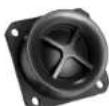
Figure A
The Low Frequency Section of the System consists of a newly designed six inch Woofer. Refer to figure C.

Figure B

natural_image
Close-up of a black speaker cone with sound waves (no text or symbols visible)Figure C
The two Woofers incorporate McIntosh's Patented LD/HP ^® Magnetic Circuit Design. Finite Element
^1 LD/HP Pat. No 5,151,943
Analysis and testing resulted in a design concept which utilizes a pair of aluminum shorting sleeves
in the magnetic circuit. Refer to figure D. The sleeves greatly reduce the negative influence of the fluctuating voice coil field on the permanent magnet field. This results in lower distortion due to more linear magnetic flux in the voice coil gap.
Refer to figure E. Additional benefits are less volume compression due to improved heat transfer through the sleeves and a cooler
operating voice coil. Both measurements, as well as critical listening, reveal ten times less distortion than previous designs. A good example of this low distortion is incredible smoothness and clarity in the reproduction of the human voice.
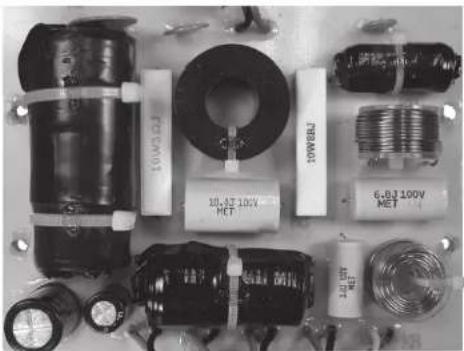
The Crossover Network used in the LCR80 Loudspeaker System is designed to ensure an even frequency response over the entire audible range. The Second Order Designed Network utilizes Capacitors and Inductors with high current capacity. Refer to figure F. The LCR80 uses low loss (DCR) Inductors in the

Figure D
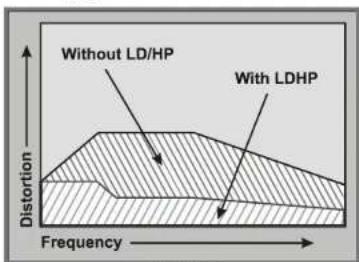
Figure E
natural_image
Collection of electronic components including capacitors, coils, and connectors (no visible text or symbols)Figure F
crossover network. The type of Inductor used in each section of the crossover network has been chosen for high linearity, even at high power levels. This prevents distortion of the music at any frequency. The Capacitors used are the low loss (ESR) types. The Network also utilizes self resetting high current PTC Fuses to provide an extra measure of protection.
The enclosure is an important part of the LCR80 Loudspeaker System. The Loudspeaker's small footprint allows for a variety of different placements in a room.
Performance Features
• Patented LD/HP® Technology
The McIntosh Low Frequency Loudspeaker Elements feature the patented LD/HP Magnetic Circuit Design. This design, when compared to conventional Loudspeaker Drivers, reduces distortion significantly. It also increases power handling and efficiency.
The rear vent through the magnetic assembly offers improved heat dissipation. The die cast basket has an open air area under the voice coil/spider assembly to prevent displacement noise. The polypropylene cone with a rubber surround has a four layer copper voice coil and is rigid to perform as a near perfect air piston.
Altogether these advances in woofer design construction and materials produce the very important first several octaves of music, with a high degree of accuracy and superb transient response. This performance level rivals woofers twice the size of the LCR80 woofer.
• Neodymium-Iron-Boron Alloy Magnets
The two inch Midrange Drivers and the three-quarter inch Dome Super Tweeter all use this Alloy. The Neodymium-Iron-Boron Alloy has the highest flux density per unit of volume. This allows for a smaller physical size driver and thus closer driver to driver placement for improved dispersion.
- Low Harmonic and Intermodulation Distortion
The LCR80 Loudspeaker System is capable of reproducing the full dynamic range of a symphony orchestra with very low audible distortion of any kind.
• High Power Handling
The Loudspeaker Elements and Crossover Components of the LCR80 are all chosen for use with amplifiers up to 300 watts, yet can be driven with a 75 watt amplifier.
- Superior Imaging
Locating the Super Tweeter between the multiple Mid-range drivers generates a symmetrical polar response for superior imaging.
- Versatile Operation and Placement
The LCR80 Loudspeaker System is designed for use in a multichannel system including the Front Channels (Left, Center and Right) or Surround Channels (Side and Back).
- Rotatable Dispersion Pattern
The patented Rotatable Dispersion Pattern Baffle Board ^2 assures the same wide dispersion and excellent sonic imaging whether the LCR80 is positioned Vertically or Horizontally.
- Loudspeaker Protection
The LCR80's built-in speaker protection incorporates three automatic resetting solid-state devices in the crossover network. One protects the tweeter, one for the midrange drivers and one for the woofers.
- Rear Stabilizer and Wall Mounting Brackets
The two Rear Stabilizers allow changing the vertical angle of ±11 degrees. The On-Wall Mounting Brackets supplied with the LCR80 are for vertical or horizontal mounting. They allow for angled mounting of ±30 degrees.
• McIntosh Custom Binding Posts
McIntosh patented gold plated output terminals ^3 deliver high current output. They accept large diameter wire and spade lugs. Banana plugs may also be used.
^2 Rotatable Dispersion Pattern Baffle Board Pat. No 5,751,821
- Loudspeaker Enclosure
The LCR80 Loudspeaker enclosure is constructed with non-parallel internal sides to reduce internal standing waves. The LCR80 is available in various real wood veneers with a high gloss polyester finish.
^3 Gold Plated Output Terminal Pat. No D649,121
Dimensions
The following dimensions can assist in determining the best location for your LCR80.

Unpacking the Loudspeaker
To protect the fine finish of the LCR80 Loudspeaker System during the installation process, it is advisable to prepare a suitable area. A freshly vacuumed carpeted area covered with a soft, clean fabric, such as a large bed linen or blanket would be suitable.
It is recommended that the Professionals at your McIntosh Dealer, who are skilled in all aspects of installation and operation, install the LCR80 Loudspeaker System and any associated audio equipment.
Note: Refer to illustration on page 15 for unpacking the loudspeaker.
- Orient the LCR80 shipping carton with the lettering on the outside of the carton oriented upward.
- Carefully cut open the shipping carton sealing tape and open the carton flaps.
- Remove the Loudspeaker System with end foam pads by lifting up on the rear of the Loudspeaker and place it along side the shipping carton on the prepared flat surface.
- Remove the accessory pack.
- Release the Loudspeaker and the box containing the Grille from the foam pads and set them aside.
- Close the top flaps of the shipping carton and place the top and bottom foam pads on top of the carton. Refer to figure 1. A for the next several steps.
- Carefully remove the protective fiber cover from the Loudspeaker System so as not to mar the finish. Then remove the protective plastic film wrap from the Loudspeaker Cabinet.
- Place the just removed protective fiber cover on top of the shipping carton/foam end pads.
- Place the Loudspeaker System, with the front facing down, on top of the protective fiber cover.
Notes: 1. When the LCR80 is to be used with the supplied Rear Stabilizers and Hardware,
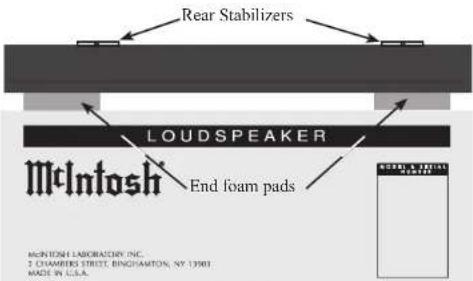
Figure 1
proceed to "Installing the LCR80 using Rear Stabilizers".
- The LCR80 Loudspeaker is also supplied with On Wall Mounting Brackets and Hardware. If the LCR80 is to be mounted on the wall at this time, proceed to "Installing the LCR80 On the Wall" on page 8.
Installing the LCR80 using Rear Stabilizers
- Attach the two rubber bumpers into bottom side of the LCR80 and two onto the bottom side of the Rear Stabilizers.
- The LCR80 is shipped with the Rear Stabilizers set for placing the Loudspeaker in a perpendicular position. If this is the desired position proceed to step 14.
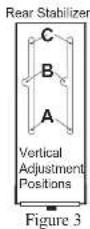
- To change the position, loosen but do not remove the two screws securing the position of the Rear Stabilizers to the back of the LCR80. Refer to figure 2.
- Move the Rear Stabilizers up or down for the desired angle (±11 Degrees from perpendicular). This allows the sound to be directed upwards or downwards to accommodate the seating arrange-

flowchart
graph TD
    A["Door 1"] --> B["Rear Stabilizers"]
    C["Door 2"] --> B
    B --> D["Terminal Device"]
    style A fill:#f9f,stroke:#333
    style C fill:#f9f,stroke:#333
    style D fill:#ccf,stroke:#333
Figure 2
ment in the room. When the desired angle is achieved, tighten the screws. Refer to figures 3 and 4.
- The LCR80 Loudspeaker Grille is secured to the Loudspeaker Cabinet with magnetic fasteners. Locate the Loudspeaker Grille and align it with the edges of the cabinet.
Rear Stabilizer Vertical Adjustment Positions

natural_image
Three abstract geometric shapes labeled A, B, and C with no text or symbolsFigure 4
Note: Retain the shipping carton, foam packing material and fiber cover for possible future use.
- Optionally, attach the supplied McIntosh Logo to the Front of the LCR80 Loudspeaker Grille in the desired location, along either enge of the grille.
- Proceed to "Room Acoustics and Loudspeaker Placement" on page 10.

Installing the LCR80 on the Wall
The supplied On Wall Mounting Brackets allow for different mounting positions of the LCR80 Loudspeaker relative to the wall, both vertical and horizontal. Two positions are flush mount, with the Loudspeaker close to and parallel with the wall. The other position is angle mount, which places the Loudspeaker further away from the wall and allows for rotation of ±30 degrees. Refer to figure 5.
Horizontal Wall Mounting
Angled Hardware
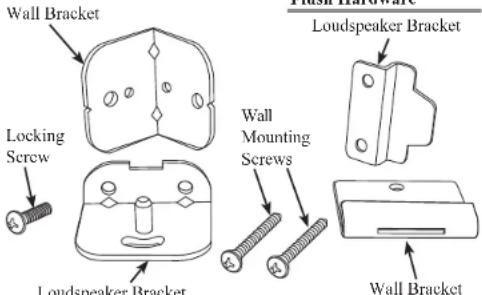
Figure 5
- Using an appropriate tool, remove the screws securing the Rear Stabilizers to the back of the LCR80. Refer to figure 6A.
Note: Retain the removed screws and Rear Stabilizer for possible future use.
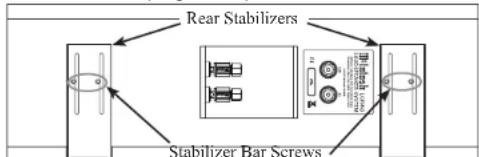
flowchart
graph TD
    A["Stabilizer Bar Screws"] --> B["Rear Stabilizers"]
    B --> C["Server Unit 1"]
    B --> D["Server Unit 2"]
Figure 6A
- If the LCR80 is to be mounted in a horizontal position proceed to step 3. When the LCR80 is to be mounted in a vertical position, it is important to rotate the Midrange/Tweeter Mounting Plate to provide the optimum sound image. This is accomplished by the following steps:
A. Place the LCR80 on a flat surface with the Loudspeaker Drivers facing up.
B. Temporarily remove the four screws securing the Midrange/Tweeter Metal Mounting Plate. Refer to figure 6B.

C. Carefully lift up the metal mounting plate to clear the cabinet opening. Rotate it 90 degrees from the current orientation and then reinsert it back into the cabinet. Refer to figure 6C.
D. Secure the metal mounting plate to the cabinet using the four previous removed mounting screws.
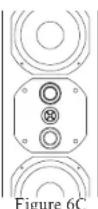
- Attach either the flush mount or angle mount brackets to the rear of the Loudspeaker. Refer to the chart below, along with figures 5 and 7 for the
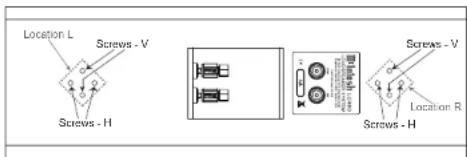
Figure 7
screw location. Also, be sure to orient the bracket as illustrated in figures 8 and 9.
Note: The Angled Bracket is only for vertical mounting of the LCR80 Loudspeaker.
- Determine the Loudspeaker Mounting Location on the wall, making sure the Mounting Bracket will be anchored to a stud located inside the wall.
Note: Use extreme caution to avoid any existing electrical wiring, plumbing, etc., located inside the wall.
- Refer to figures 10 thru 15 to install the appropriate Wall Bracket on the wall (orient the bracket as illustrated) using the supplied Mounting Screws. If the Flush Mount Bracket is used, attach the two rubber bumpers to the rear of the Loudspeaker, near the bottom.
Note: If the wall covering material and/or thickness is different from the illustration, the two supplied Mounting Screws need to be replaced with screws of the appropriate type and length.
-
Orient the Loudspeaker to line up with the Wall Brackets and attach them together. If the angle mount is used, install the Locking Screw to secure the Loudspeaker at the desired angle.
-
The LCR80 Loudspeaker Grille is secured to the Loudspeaker Cabinet with magnetic fasteners. Locate the Loudspeaker Grille and align it with the edges of the cabinet.
Note: Retain the shipping carton, foam packing material and fiber cover for possible future use.
-
Optionally, attach the supplied McIntosh Logo to the Front of the LCR80 Loudspeaker Grille in the desired location.
-
Proceed to "Room Acoustics and Loudspeaker Placement" on page 10.

natural_image
Pure technical line drawing of a mechanical assembly or mounting bracket without any text, numbers, or symbolsFigure 8
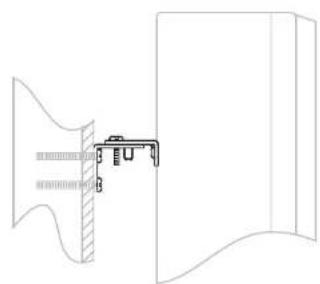
natural_image
Pure architectural line drawing of a window and door frame structure without any text or symbolsFigure 9
Horizontal Mounting with Flush Hardware

flowchart
graph TD
    A["Flush Wall Mounting Brackets"] --> B["Wall Mounting Screws"]
    B --> C["STUDS"]
    C --> D["SHEETROCK"]
    style A fill:#f9f,stroke:#333
    style B fill:#ccf,stroke:#333
    style C fill:#cfc,stroke:#333
    style D fill:#fcc,stroke:#333
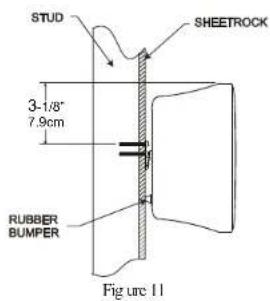
Vertical Mounting with Flush Hardware

Figure 12
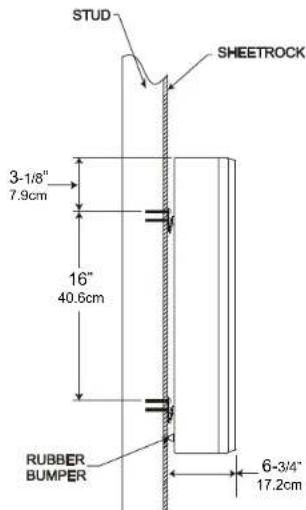
Figure 13
Vertical Mounting with Angled Hardware
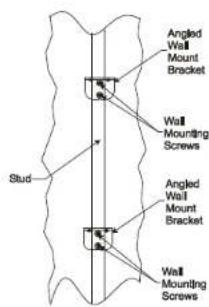
Figure 14
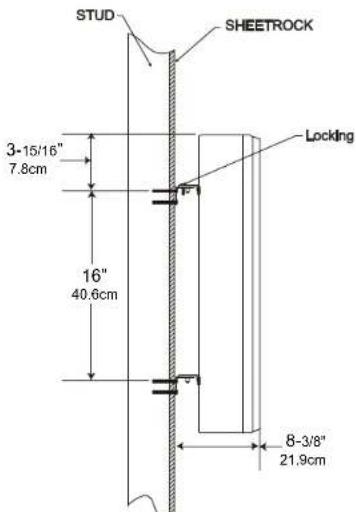
Figure 15
Room Acoustics and Loudspeaker Placement
Loudspeaker Placement
Loudspeaker placement in a room can greatly affect performance. The LCR80 Loudspeaker System is designed for Music and Home Theater Systems. The optimal method for selecting speaker locations includes the use of a real time spectrum analyzer operated by an experienced system installer. An uncompromising installation would take into consideration the floor, wall and ceiling coverings, the type and placement of furniture and can even include the architectural design of the room and its construction materials.
Sometimes Loudspeaker placement in a room is limited to locations with unacceptable performance. McIntosh now offers a solution with several Electronic Products offering the ability to precisely measure and correct for room induced acoustical problems, thus restoring proper musical balance. Contact your McIntosh Dealer for more information about this new exciting advance in sound reproduction technology.
If a McIntosh product with room correction is not part of your system nor professional measurement of your system performance been performed, listen to the Loudspeaker. Try various locations by listening to music containing continuous bass and find a location where there is an over all musical balance in the sound and the bass content does not dominate. Placement near a wall, corner, floor, ceiling or any intersecting surfaces will reinforce or diminish some bass frequencies. The bass frequencies that are altered by placement in a particular location is dependent on the dimensions of the room.
The LCR80's Smooth Frequency Response may be altered by a large object(s) located in the sound waves path or by locating the Loudspeaker too close to a side wall. There should be an unobstructed area in front of the Loudspeaker of at least 30 degrees either side from the center axis for the best performance. Refer to figure 20.
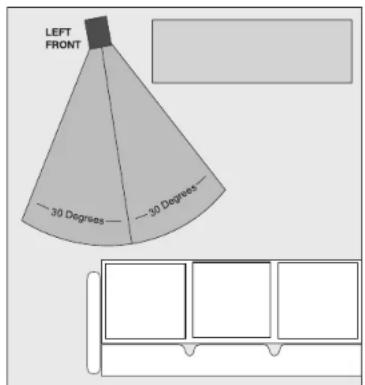
Figure 20
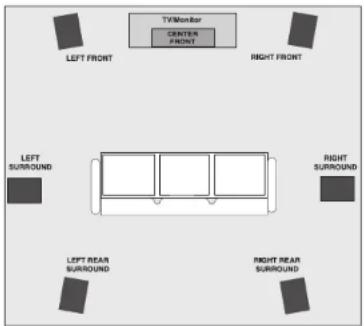
Locating Loudspeakers for use in Home Theater In a Home Theater application, the placement of Left, Center and Right Front Loudspeakers can be limited by such considerations as the size and location of the video monitor. The locating suggestions in the “for use in a Music System” section below can still be helpful as a starting place. Refer to figure 21.
Locating Loudspeakers for use in a Music System When used in a Music System the distance between the Loudspeakers and the listener to the Loudspeakers should form an equilateral or an acute isosceles triangle. If the speakers are too far apart relative to the listener, some imaging can be lost. Refer to figure 22.
flowchart
graph TD
    A["Left Front"] --> B["Between Speaker Distance"]
    C["Right Front"] --> B
    B --> D["Listener to Speaker Distance"]
    D --> E["Speaker 1"]
    D --> F["Speaker 2"]
Figure 22

Input Terminals
When connecting the Loudspeaker Hookup Cables to the LCR80 Loudspeaker Input Terminals please follow the steps below:
- Rotate the end of the Input Terminal Post counterclockwise until an opening appears. Refer to figures A and B.
- Insert the Loudspeaker hookup cable into the Input Terminal Post opening or the cable spade lug around the center post of the Input Terminal. Refer to figure C.
- Rotate the end of the Input Terminal Post clockwise until it is finger tight. Refer to figure D.
- Place the supplied McIntosh Wrench over the end of the Input Terminal and rotate it one quarter of a turn (90°) to secure the Loudspeaker Cable Connection. Do not over tighten. Refer to figure E.
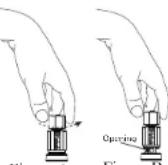
Figure A
Figure B

Figure C Figure D

Figure E
How to Connect the Loudspeaker
Caution: The AC Power Cord should not be connected to the Amplifier until after the Loudspeaker Connections have been made. Failure to observe this could result in Electric Shock.
When connecting a LCR80 Loudspeaker to an amplifier it is very important to use cables of adequate size, so there is little to no power loss in the cables. The size is specified in Gauge Numbers or AWG (American Wire Gauge). The smaller the Gauge number, the larger the wire size:
| Loudspeaker Cable Distance vs Wire Gauge Guide | |||
| Loudspeaker Impedance | 25 feet(7.62 meters)or less | 50 feet(15.24 meters)or less | 100 feet(30.48 meters)or less |
| 2 Ohms | 12AWG 10AWG 8AWG | ||
| 4 Ohms | 14AWG 12AWG 10AWG | ||
| 8 Ohms | 16AWG 14AWG 12AWG | ||
- Prepare Loudspeaker cables by choosing one of the methods below:
Bare wire cable ends:
Carefully remove sufficient insulation from the cable ends, refer to figures 12, 13 & 14. If the cable is
stranded, carefully twist the strands together as tightly as possible.

Notes: 1. If desired, the twisted ends can be tinned with solder to keep the strands together.
-
The prepared bare wire cable ends may be inserted into spade lug connectors.
-
Banana plugs are for use in the United States and Canada only.
Banana Plugs are for use in the United States and Canada only:
- Attach the previously prepared bare wire cable ends into the banana plugs and secure the connections. Refer to Figure F.
- Rotate the top of the Output Terminal Post clockwise until it is finger tight. Refer to figure G. Then using the McIntosh Wrench, rotate the top of the Output Terminal one quarter of a
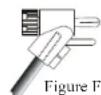

turn (90°). Do not over tighten. Refer to figure E.
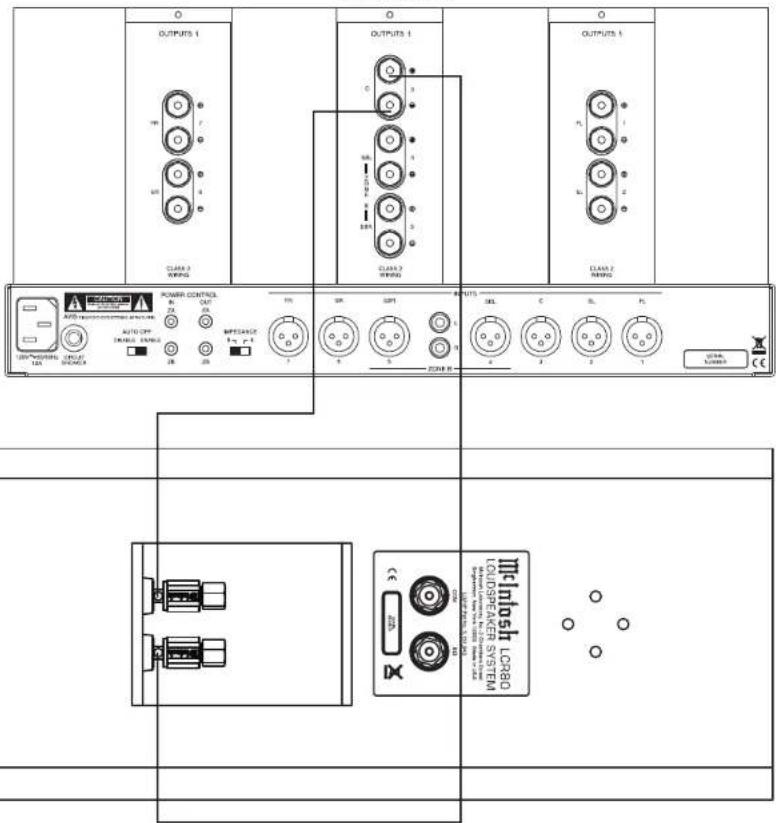
- Referring to figure H and the illustration on the next page, connect the
Loudspeaker hookup cables with banana plugs into the hole at the end of the terminal to the

LCR80 COM (Negative [-]) Input Terminal and 8 Ω (Positive [+] ) Input Terminal.
Note: It is important to maintain the correct polarity at both ends of the Loudspeaker cables.
- Connect the other end of the Loudspeaker cables coming from the LCR80 COM (Negative [-]) and 8 Ω (Positive [+] ) Input Terminals to the Negative (-) and Positive (+) 8 Ω Output Terminal on the Power Amplifier.
- Refer to steps 2 thru 5 to connect the additional LCR80 Loudspeakers in a similar manner to the Amplifier.
Spade Lug or Wire Connections:
- Referring to the illustration on the next page, connect the Loudspeaker hookup cables to the LCR80 COM (Negative [-]) Input Terminal and 8 Ω (Positive [+]) Input Terminal. Insert the spade lug connector or prepared section of the cable end into the terminal side access hole, and tighten the terminal cap until the cable is firmly clamped into the terminals so the lugs or wire cannot slip out. Refer to figures 15 and 16.

Note: It is important to maintain the correct polarity at both ends of the Loudspeaker cables.
- Connect the other end of the Loudspeaker cables coming from the LCR80 COM (Negative [-]) and 8 Ω (Positive [+] ) Input Terminals to the Negative (-) and Positive (+) 8 Ω Output Terminal on the Power Amplifier.
- Refer to steps 7 and 8 connect any additional LCR80 Loudspeakers in a similar manner to the Amplifier.
Power Amplifier

Specifications
Specifications General Specifications
System Driver Complement
Two 6 inch Woofers (incorporating LD/HP ^1 )
Two 2 inch Titanium Inverted Dome Midranges
One 3/4 inch Titanium Dome Tweeter
Impedance
8 ohms Nominal
Frequency Response
80Hz - 45,000Hz
Sensitivity
81 dB (2.83V/1m)
Crossover Frequencies
500Hz
4,500Hz
Recommended Power Range
75 Watts to 300 Watts
Maximum Power Handling
300 Watts
Enclosure Finish
Available in various real wood veneers with a high gloss polyester finish
Grille Finish
Black Knit Cloth
Overall Dimensions
Height is 8 inches (20.3cm)
Width is 24 inches (61cm)
Depth is 8-3/8 inches (21.3cm) including angled wall mounting brackets
Weight
24 pounds (10.9 kg) net
30 pounds (13.6 kg) in shipping carton
Shipping Carton Dimensions
Height is 12 inches (30.5cm)
Width is 28-1/4 inches (71.8cm)
Depth is 12-3/8 inches (31.4cm)
^1 LD/HP Pat. No 5,151,943
Packing Instructions
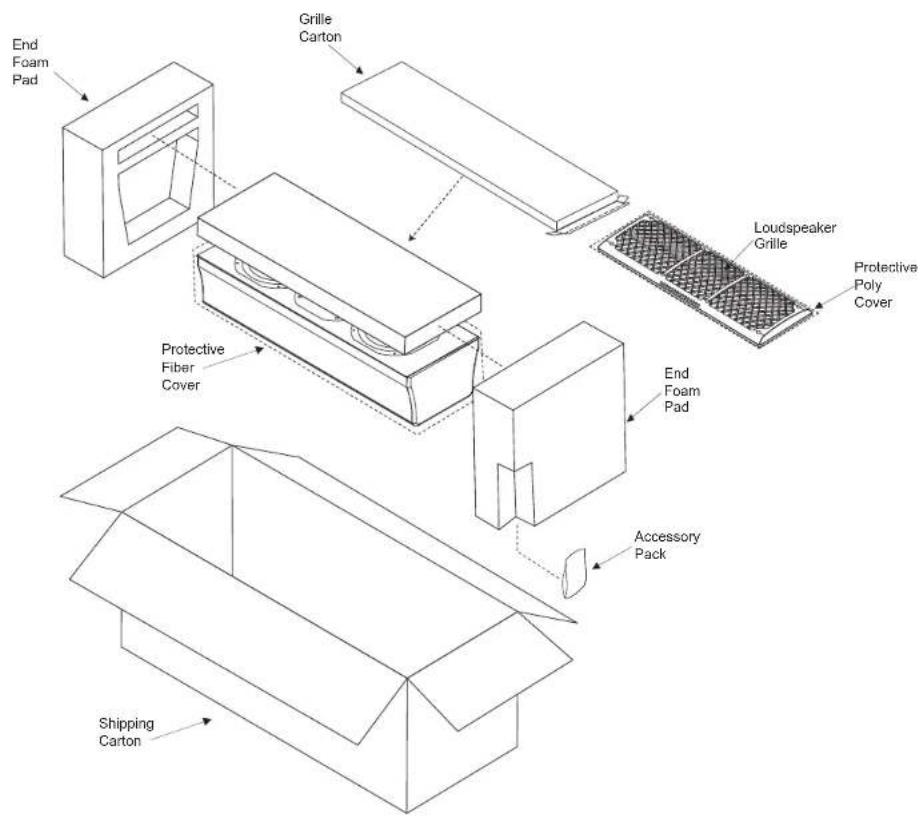
In the event it is necessary to repack the equipment for shipment, the equipment must be packed exactly as shown below. To protect the finish of the Loudspeaker it is advisable to wrap the Loudspeaker Cabinet with a durable plastic film. Then place wrapped Loudspeaker into the protective fiber cover, before inserting it into the shipping carton.
Use the original shipping carton and interior parts only if they are all in good serviceable condition. If a shipping carton or any of the interior part(s) are needed, please call or write Customer Service Department of McIntosh Laboratory. Please see the Part List for the correct part numbers.
Quantity Part Number Description
1 03451400 Shipping carton
2 034522SP End foam pad
1 034523SP Protective fiber cover

McIntosh Laboratory, Inc.
2 Chambers Street
Binghamton, NY 13903
www.mcintoshlabs.com
The continuous improvement of its products is the policy of McIntosh Laboratory Incorporated who reserve the right to improve design without notice. Printed in the U.S.A.
- IMPORTANT SAFETY INSTRUCTIONS!
- PLEASE READ THEM BEFORE OPERATING THIS EQUIPMENT.
- Thank You
- Please Take A Moment
- Technical Assistance
- Customer Service
- Table of Contents
- General Information
- Introduction
- Performance Features
- • Patented LD/HP® Technology
- • Neodymium-Iron-Boron Alloy Magnets
- - Low Harmonic and Intermodulation Distortion
- • High Power Handling
- - Superior Imaging
- - Versatile Operation and Placement
- - Rotatable Dispersion Pattern
- - Loudspeaker Protection
- - Rear Stabilizer and Wall Mounting Brackets
- • McIntosh Custom Binding Posts
- - Loudspeaker Enclosure
- Dimensions
- Unpacking the Loudspeaker
- Installing the LCR80 using Rear Stabilizers
- Installing the LCR80 on the Wall
- Room Acoustics and Loudspeaker Placement
- Loudspeaker Placement
- Input Terminals
- How to Connect the Loudspeaker
- Banana Plugs are for use in the United States and Canada only:
- Spade Lug or Wire Connections:
- Specifications General Specifications
- System Driver Complement
- Impedance
- Frequency Response
- Sensitivity
- Crossover Frequencies
- Recommended Power Range
- Maximum Power Handling
- Enclosure Finish
- Grille Finish
- Overall Dimensions
- Weight
- Shipping Carton Dimensions
- Packing Instructions
Brand : MCINTOSH
Model : LCR80
Category : Loudspeaker