
ADCR200AVO - Unspecified AUDIOVOX - Free user manual and instructions
Find the device manual for free ADCR200AVO AUDIOVOX in PDF.


| Product Type | G2 Cradle for iPod/iPhone |
| Brand | Audiovox |
| Model | A-DCR-200-AVO |
| Compatible Devices | iPod classic (80GB, 120GB, 160GB), iPod touch (1st/2nd gen), iPhone (3G, 3GS, 4, 4S) |
| Connection Type | 30-pin dock connector (via video cable) and USB |
| Video Output | Composite video to rear seat entertainment system |
| Power Supply | 12V to 5V via USB cigarette lighter charger |
| Remote Control | Wireless remote included |
| iPod Out Support | Yes (iOS5+ for iPod touch and iPhone) |
| Adjustable Angle | Yes, via set screw |
| Mounting Options | AMPS standard mount (holes) and vehicle-specific mounts (iGrip, Kuda sold separately) |
| Included Holders | 7 (1 pre-installed iPhone 4 holder + 6 additional holders for various models) |
| Included Accessories | Long base, 4 mounting screws, USB charger, wireless remote, video cable |
| Warranty | 12 months limited |
| Material | Plastic (estimated) |
| Color | Black (estimated) |
| Country of Origin | Printed in USA |
| Manual Language | English |
| Product Registration | Required for support (online at audiovoxproducts.com) |
Frequently Asked Questions - ADCR200AVO AUDIOVOX
User questions about ADCR200AVO AUDIOVOX
0 question about this device. Answer the ones you know or ask your own.
Ask a new question about this device
Download the instructions for your Unspecified in PDF format for free! Find your manual ADCR200AVO - AUDIOVOX and take your electronic device back in hand. On this page are published all the documents necessary for the use of your device. ADCR200AVO by AUDIOVOX.
USER MANUAL ADCR200AVO AUDIOVOX
Installation Guide/User manual
Made for
iPod iPhone
AUDIOVOX®
DRIVEN BY DICE ELECTRONICS
Copyrights and Trademarks
Copyright 2012 Audiovox Electronics Corporation
The Audiovox and Audiovox Driven by DICE Electronics logos are trademarks of Audiovox Electronics Corporation
iPod and iPhone are trademarks of Apple, Inc.
All Trademarks and Logos are the property of their respective owners.
All rights reserved.
Printed in the U.S.A.
AUDIOVOX®
DRIVEN BY DICE ELECTRONICS
Table of Contents
Warning and safety 4
Product registration 6
Comparing G2 cradles 7
Compatible iPod/iPhone models 8
Mounting option 9
Choose the correct holder....10
Installation 11
Long base installation 12
Adjusting the angle 13
A-DCR-50-PTH/A-DCR-300-CHG cradles
Contents 15
Connecting the cradle 16
A-DCR-150-USB cradle
Contents 18
Connecting the cradle 19
A-DCR-200-AVO cradles
Contents 21
Connecting the cradle 22
Connecting to the rear seat entertainment system .....23
What is iPod Out? 24
Wireless remote functions 25
Optional mounting base 26
Warranty 27
AUDIOVOX®
DRIVEN BY DICE ELECTRONICS
Warning and safety!
Please read these instructions carefully before proceeding. Failure to follow instructions may result in improper operation or injury. Neither Audiovox Electronics Corporation nor Apple Inc., its regional offices, distributors or resellers take any responsibility for any damage or injury as a result of using the integration kit.
- Do not open, disassemble or alter the product in any way.
- Do not insert anything into the casing.
- Do not cut or try to alter cables in any way and always use the correct connections.
- Only operate unit when stationary or ask passengers to operate it for you.
- Do not allow the Apple iPod/iPhone to distract you from driving.
- Exercise good judgement and keep your eyes on the road at all times.
- Do not expose unit to extreme temperatures, humidity or shock.
- Keep the unit and iPod/iPhone away from fluids.
- Keep away from children! - Interface components may contain small parts, can be broken or disassembled and components may become loose from vibration and heat. Small components and packaging materials may be a choking hazard when handled by children.
AUDIOVOX®
DRIVEN BY DICE ELECTRONICS
Installation warning
You, the installer / the end user, agree not to install or connect the G2 cradle in a manner that would enable the driver of the vehicle to watch any video, movie or any kind of motion picture. Such installation and use is illegal and against the law!
Be a responsible driver, and never be distracted from driving!
The G2 cradle does not have any mechanism to prevent driver distraction, you hereby agree to be responsible when using a device attached to the G2 cradle, and use it at your own risk. The use of this product constitutes your understanding and agreement that you are solely responsible for any damage, or liability that may arise from use of this product, and you hereby indemnify the manufacturer of this product from any liability.
AUDIOVOX®
DRIVEN BY DICE ELECTRONICS
Congratulations on your purchase!
Thank you for purchasing the G2 cradle. Please review our user manual and installation guide before operating the unit.
Product registration
In order to validate your warranty period and to receive telephone or online support, you MUST register your Audiovox product.
To register your Audiovox product, please complete the following steps:
- Visit http://www.audiovoxproducts.com
- Look up and save the serial number of the product.
- Complete the product registration form.
- Submit the form.
- Save the registration sheet in a safe place for future reference.
If you are unable to complete the registration via internet, please call Audiovox at 1-800-645-4994.
AUDIOVOX®
DRIVEN BY DICE ELECTRONICS
Comparing G2 cradles
A-DCR-50-PTH is a mounting solution compatible with the Silverline DUO and the Universal 150 kits sold by Audiovox, as well as with many 3rd party connectivity kits that have a 30 pin dock connector.
A-DCR-150-USB is a mounting solution compatible with the MediaBridge and the Universal 200 kits sold by Audiovox, as well as with many 3rd party connectivity kits that have a USB port connector.
A-DCR-200-AVO is a standalone mounting solution designed to enable iPod Out feature for rear seat entertainment applications. This cannot be used in conjunction with any connectivity kit.
A-DCR-300-CHG is a 12V to 5V charge converter and mounting solution compatible with legacy 3rd party connectivity kits that have a 30 pin dock connector and supplied 12V charge power.
G2 cradles are designed to securely hold your device without the use of protective cases or skins. You may be able to use a larger holder to accommodate certain cases, however the majority of the cases prevent proper seating of the dock connector thereby leading to unreliable operation.
AUDIOVOX®
DRIVEN BY DICE ELECTRONICS
Compatible iPod and iPhone models

iPod classic 80GB
iPhone 4GB 8GB 16GB

iPod classic 120GB 160GB (2009)
iPhone 3G 8GB 16GB
iPod touch 1st generation 8GB 16GB 32GB
iPhone 3GS 16GB 32GB
iPod touch 2nd generation 8GB 16GB 32GB 64GB

iPhone 4/4S 16GB 32GB
AUDIOVOX®
DRIVEN BY DICE ELECTRONICS
Mounting option
These holes are designed to allow you to screw the cradle base to AMPS standard mounts (ProClip™, Kuda™, etc).

These holes are designed to fit vehicle mounts from iGrip TM .
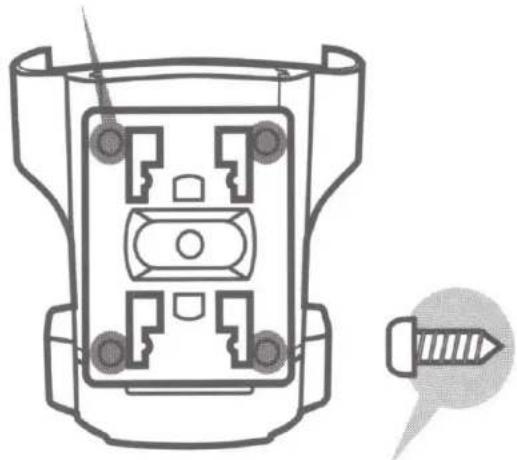
Use the screws (x4) in the package to screw the cradle to AMPS standard mounts.
AUDIOVOX®
DRIVEN BY DICE ELECTRONICS
Choose the correct holder
Compatible iPhone/iPod model can be found here.
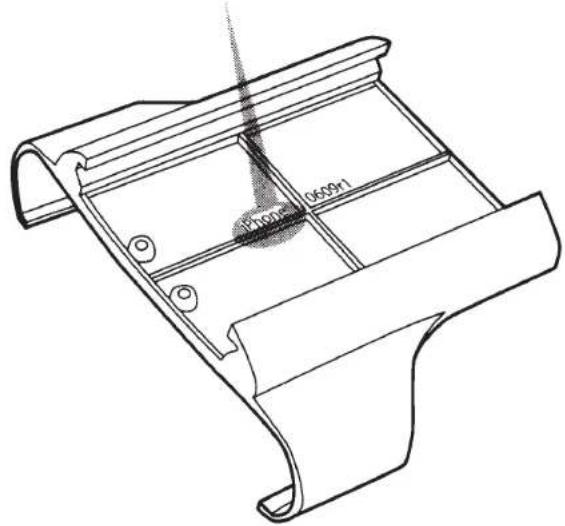
Each holder is designed for a different iPhone/iPod model. Identify the holder by the printed text on the back of the holder and choose the correct holder for your iPhone/iPod.
AUDIOVOX®
DRIVEN BY DICE ELECTRONICS
Installation
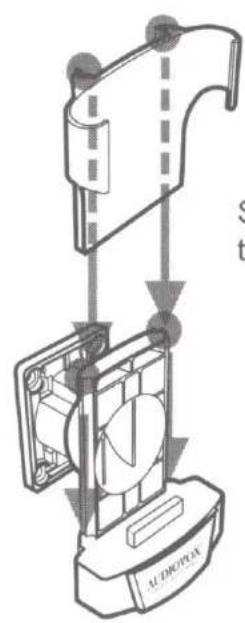
Slide the correct holder onto the cradle until it clicks.

Slide the iPhone/iPod into the holder
AUDIOVOX®
DRIVEN BY DICE ELECTRONICS
Long base installation
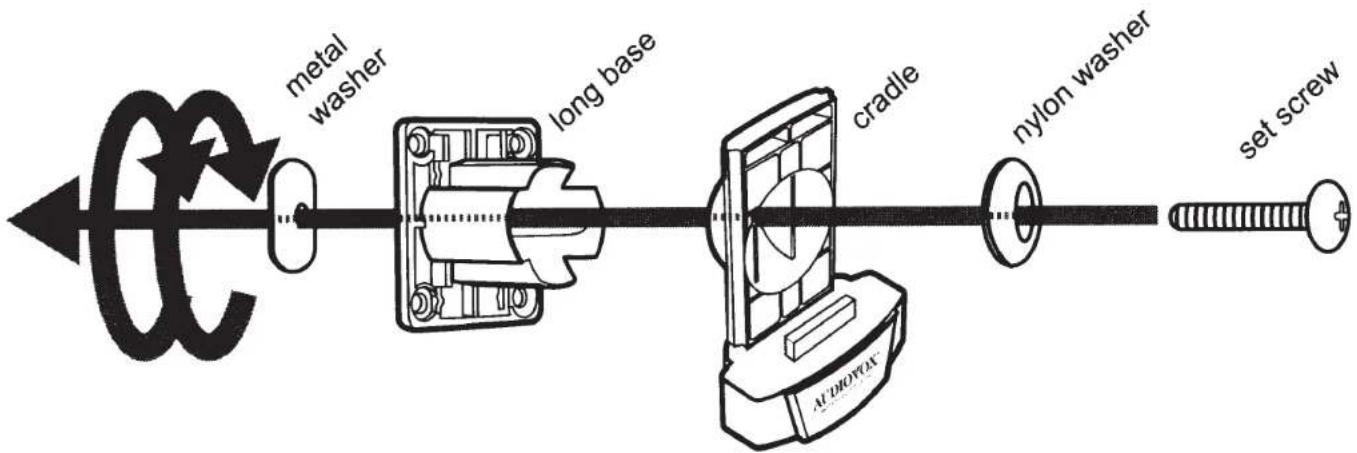
If the long base will fit your car interior more appropriately than the short one, then please follow the illustration to attach the long base to the cradle. Turn the base clockwise to tighten the base to the cradle.
AUDIOVOX®
DRIVEN BY DICE ELECTRONICS
Adjusting the angle
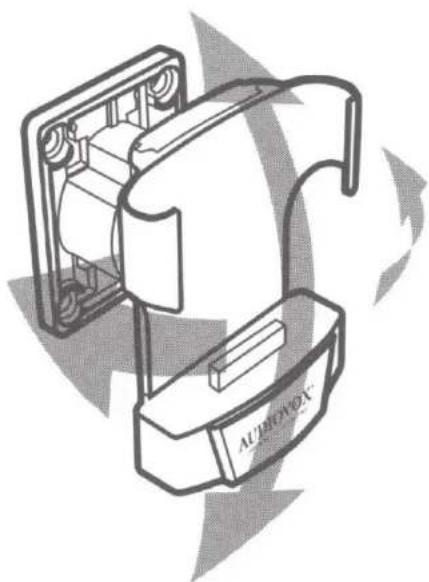
To adjust the angle of the cradle, first slide off the holder, then loosen the set screw enough for the cradle to move freely. When you are done adjusting the angle, hold the base and tighten the set screw, and slide the holder back to its place. DO NOT OVER TIGHTEN!
AUDIOVOX®
DRIVEN BY DICE ELECTRONICS
A-DCR-50-PTH / A-DCR-300-CHG cradles
AUDIOVOX®
DRIVEN BY DICE ELECTRONICS
G2 Cradle A-DCR-50-PTH/A-DCR-300-CHG contents

A-DCR-50-PTH/A-DCR-300-CHG cradle with regular base and iPhone 4 holder
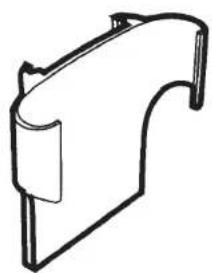
6 additional holders

long base

4 mounting screws
AUDIOVOX®
DRIVEN BY DICE ELECTRONICS
Connecting the cradle
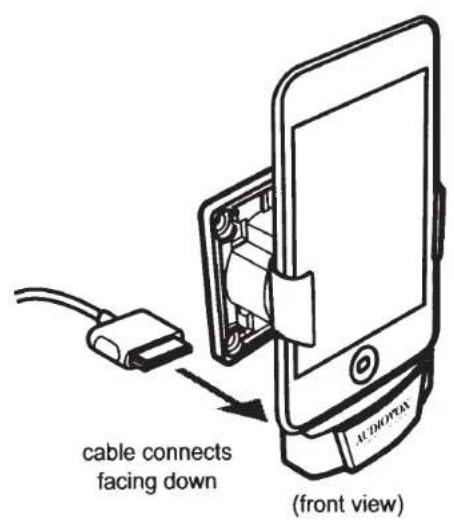

Attach the iPod dock cable from the kit or headunit into the connector on the back of the cradle.
AUDIOVOX®
DRIVEN BY DICE ELECTRONICS
A-DCR-150-USB cradle
AUDIOVOX®
DRIVEN BY DICE ELECTRONICS
G2 Cradle A-DCR-150-USB contents

A-DCR-150-USB cradle with regular base and iPhone 4 holder
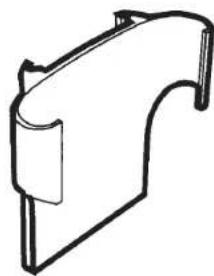
6 additional holders
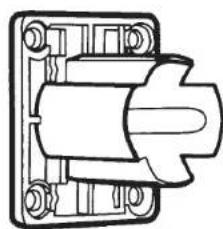
long base

4 mounting screws
Connecting the cradle
IMPORTANT!
Pinout on 1/8" jack connector:


USB type B connection

factory or aftermarket radio with USB iPod port
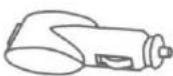
USB cigarette
lighter charger

MediaBridge or Universal RDS USB module
*Video output only works when connected to an iPod video accessory, and should only be connected to and viewed on rear seat entertainment displays.
AUDIOVOX®
DRIVEN BY DICE ELECTRONICS
A-DCR-200-AVO cradle
AUDIOVOX®
DRIVEN BY DICE ELECTRONICS
G2 Cradle A-DCR-200-AVO contents
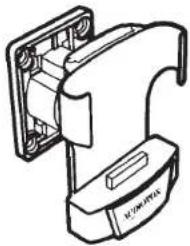
A-DCR-200-AVO cradle with regular base and iPhone 4 holder

4x additional holders
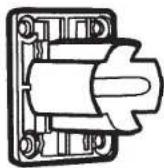
long base

4 mounting screws

USB cigarette
lighter charger
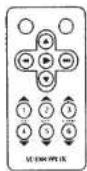
wireless remote
AUDIOVOX®
DRIVEN BY DICE ELECTRONICS
Connecting the cradle

AUDIOVOX®
DRIVEN BY DICE ELECTRONICS
Connecting to the rear seat entertainment system
A/V OUT cradle allows you to play your videos, TV shows and movies from iPod/iPhone on your rear seat entertainment. Just follow the illustration to connect the cradle to the rear seat entertainment with the supplied video cable, you can then view your video contents on the screen of the rear seat entertainment system.
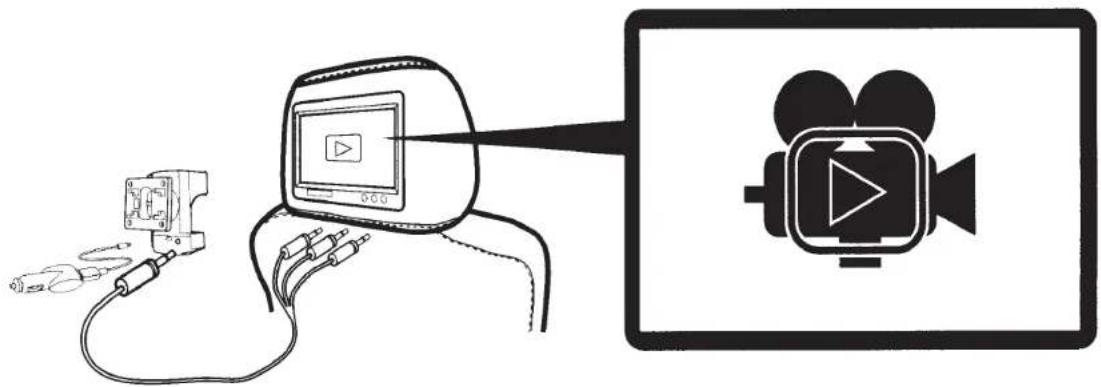
Do NOT operate iPod while driving. Watching the screen and making selection while driving can lead to serious accident.
AUDIOVOX®
DRIVEN BY DICE ELECTRONICS
What is iPod Out?
iPod Out is a new feature from Apple in iOS5, which allows an iPod / iPhone* to display an iPod interface on a connected external screen, and the G2 cradle (A-DCR-200-AVO) lets you do just that. It outputs the iPod music interface screen to your rear seat entertainment system for an easy access operation.
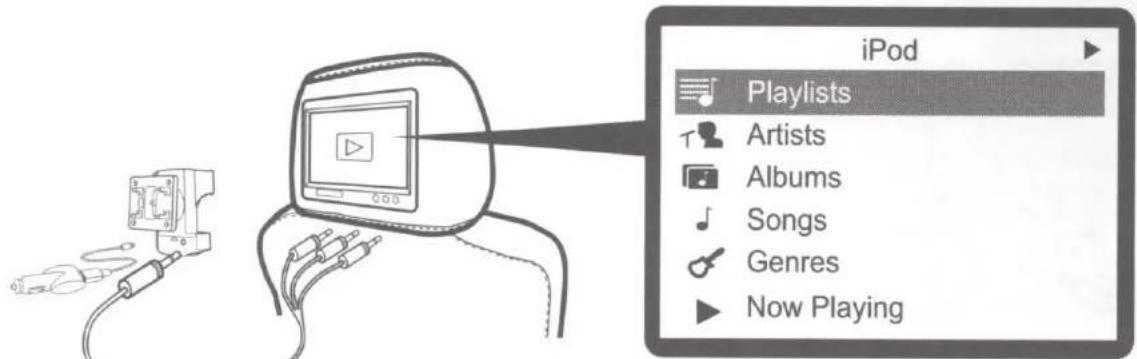
*Only iPod touch and iPhone support iPod Out.

Do NOT operate iPod while driving. Watching the screen and making selection while driving can lead to serious accident.
AUDIOVOX®
DRIVEN BY DICE ELECTRONICS
Wireless remote functions
![graph TD A["Go back to main menu"] --> B["Selecting between shuffle ON / OFF"] C["Moving selection UP / DOWN"] --> B D["Browsing selection ALPHABETICALLY*"] --> B E["NEXT / PREVIOUS track Move selection RIGHT / LEFT*"] --> F["Fast Forward / Fast Rewind"] G["NEXT / PREVIOUS Playlist"] --> H["Addition…](/content/2026/06/1193685/images/989456bb5011e9dee468e91265d58856aa13d6e4ef15017d296b118ed9009703.jpg)
AUDIOVOX®
DRIVEN BY DICE ELECTRONICS
Optional mounting base
The G2 cradle is best to be mounted on the vehicle specific mounting base, sold separately. Mounting base solution available from many suppliers, for example iGrip™ or KUDA™. Please visit www.audiovoxproducts.com for more details.
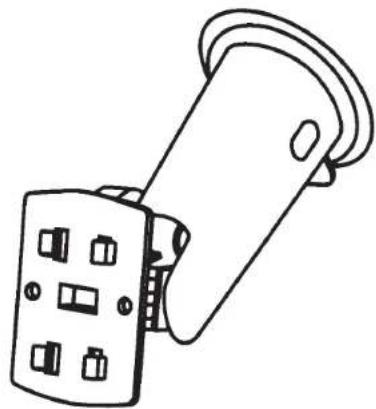
iGrip TM mounting base
KUDA™ mounting base
AUDIOVOX®
DRIVEN BY DICE ELECTRONICS

AUDIOVOX
12 MONTH LIMITED WARRANTY
AUDIOVOX ELECTRONICS CORP. (the Company) warrants to the original retail purchaser of this product that should this product or any part thereof, under normal use and conditions, be proven defective in material or workmanship within 12 months from the date of original purchase, such defect(s) will be repaired or replaced with reconditioned product (at the Company's option) without charge for parts and repair labor. A game controller, if supplied, is similarly warranted for ninety (90) days.
To obtain repair or replacement within the terms of this Warranty, the product is to be delivered with proof of warranty coverage (e.g. dated bill of sale), specification of defect(s), transportation prepaid, to the Company at the address shown below.
This Warranty does not extend to the elimination of externally generated static or noise, to correction of antenna problems, to costs incurred for installation, removal or reinstallation of the product, or to damage to digital memory/media devices, gaming devices, discs, speakers, accessories, or vehicle electrical systems.
This Warranty does not apply to any product or part thereof which, in the opinion of the Company, has suffered or been damaged through alteration, improper installation, mishandling, misuse, neglect, accident, or by removal or defacement of the factory serial number/bar code label(s). THE EXTENT OF THE COMPANY'S LIABILITY UNDER THIS WARRANTY IS LIMITED TO THE REPAIR OR REPLACEMENT PROVIDED ABOVE AND, IN NO EVENT, SHALL THE COMPANY'S LIABILITY EXCEED THE PURCHASE PRICE PAID BY PURCHASER FOR THE PRODUCT.
This Warranty is in lieu of all other express warranties or liabilities. ANY IMPLIED WARRANTIES, INCLUDING ANY IMPLIED WARRANTY OF MERCHANTABILITY, SHALL BE LIMITED TO THE DURATION OF THIS WRITTEN WARRANTY. ANY ACTION FOR BREACH OF ANY WARRANTY HEREUNDER INCLUDING ANY IMPLIED WARRANTY OF MERCHANTABILITY MUST BE BROUGHT WITHIN A PERIOD OF 24 MONTHS FROM DATE OF ORIGINAL PURCHASE. IN NO CASE SHALL THE COMPANY BE LIABLE FOR ANY CONSEQUENTIAL OR INCIDENTAL DAMAGES FOR BREACH OF THIS OR ANY OTHER WARRANTY. No person or representative is authorized to assume for the Company any liability other than expressed herein in connection with the sale of this product.
Some states do not allow limitations on how long an implied warranty lasts or the exclusion or limitation of incidental or consequential damage so the above limitations or exclusions may not apply to you. This Warranty gives you specific legal rights and you may also have other rights which vary from state to state.
Audiovox Electronics Corporation, 150 Marcus Blvd., Hauppauge, New York 11788 • 1-800-645-4994
128-9032
G2 Cradle
www.audiovoxproducts.com
OMA-DCR-012012

For Customer Service
Visit Our Website At
www.audiovoxproducts.com
Product Information, Photos,
FAQ's, Owner's Manuals

AUDIOVOX
ELECTRONICS CORP.
150 Marcus Blvd., Hauppauge, New York 11788
ECTCLES STE VOOS PLAP
EXCEPTO EL AMBIENTE RECKLE POR FAVOR

- INSTALLATION GUIDE/USER MANUAL
- AUDIOVOX®
- TABLE OF CONTENTS
- A-DCR-50-PTH/A-DCR-300-CHG CRADLES
- A-DCR-150-USB CRADLE
- A-DCR-200-AVO CRADLES
- WARNING AND SAFETY
- INSTALLATION WARNING
- CONGRATULATIONS ON YOUR PURCHASE
- PRODUCT REGISTRATION
- TO REGISTER YOUR AUDIOVOX PRODUCT, PLEASE COMPLETE THE FOLLOWING STEPS
- COMPARING G2 CRADLES
- COMPATIBLE IPOD AND IPHONE MODELS
- MOUNTING OPTION
- CHOOSE THE CORRECT HOLDER
- INSTALLATION
- ADJUSTING THE ANGLE
- A-DCR-50-PTH / A-DCR-300-CHG CRADLES
- G2 CRADLE A-DCR-50-PTH/A-DCR-300-CHG CONTENTS
- G2 CRADLE A-DCR-150-USB CONTENTS
- CONNECTING THE CRADLE
- IMPORTANT
- A-DCR-200-AVO CRADLE
- G2 CRADLE A-DCR-200-AVO CONTENTS
- CONNECTING TO THE REAR SEAT ENTERTAINMENT SYSTEM
- WHAT IS IPOD OUT
- WIRELESS REMOTE FUNCTIONS
- OPTIONAL MOUNTING BASE
- AUDIOVOX
- 12 MONTH LIMITED WARRANTY
- G2 CRADLE
- WWW.AUDIOVOXPRODUCTS.COM
- ELECTRONICS CORP
Brand : AUDIOVOX
Model : ADCR200AVO
Category : Unspecified