
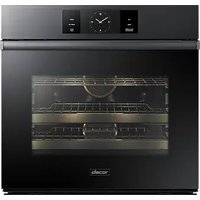
Modernist DWR30M977WIP - Oven Dacor - Free user manual and instructions
Find the device manual for free Modernist DWR30M977WIP Dacor in PDF.


| Product Type | Warming Drawer |
| Model | Modernist DWR30M977WIP |
| Brand | Dacor |
| Width | 30 inches (standard built-in) |
| Power Supply | 120 Vac, 15 Amp, dedicated grounded outlet |
| Temperature Range | 85°F – 220°F (30°C – 105°C) |
| Preset Functions | Bread Proof (100°F), Low (150°F), Med (175°F), High (200°F) |
| Manual Temperature Control | Adjustable in 5°F increments |
| Timer | 1 min – 12 hrs 59 min |
| Continuous Operation Mode | Yes (Sabbath mode) |
| Preheat Time | Approximately 20 minutes |
| Maximum Load | 50 lbs (22.7 kg) |
| Drawer Removal | Removable for cleaning; includes slide rails |
| Control Panel Type | Touch-sensitive buttons with protective film |
| Temperature Scale Switch | °F to °C (press Med+High for 3 sec) |
| Interior Finish | Stainless steel or black stainless steel |
| Included Accessories | Half rack, screws, product literature |
| Warranty | 1 year full (parts & labor), limited after |
| Certifications | ETL, CUL (North America) |
| Installation | Built-in; must be installed by qualified technician |
| Cleaning | Mild detergent, soft cloth; no abrasives |
Frequently Asked Questions - Modernist DWR30M977WIP Dacor
User questions about Modernist DWR30M977WIP Dacor
0 question about this device. Answer the ones you know or ask your own.
Ask a new question about this device
Download the instructions for your Oven in PDF format for free! Find your manual Modernist DWR30M977WIP - Dacor and take your electronic device back in hand. On this page are published all the documents necessary for the use of your device. Modernist DWR30M977WIP by Dacor.
USER MANUAL Modernist DWR30M977WIP Dacor
Modernist Warming Drawer
DWR30M977WS, DWR30M977WM
Contents
Important information 4
Safety information 5
What you need to know about safety instructions 5 State of California Proposition 65 warning (US only) 6 For your safety 6 General safety 8
Introducing your new warming drawer 10
Overview 10 What's included with your warming drawer 11
Operations 12
Control panel 12 To turn the unit on 13 Continuous operation 14 Preheating 15 Temperature scale °F >°C 15 Temperature and humidity control setting guidelines 16 Warming serving containers 17 Sabbath option 17
Care and maintenance 18 Care and cleaning of the warming drawer 18 Removing the drawer from the appliance 20 Re-installing the drawer 21
Troubleshooting 23
Warranty and Service 24 Getting Help 24 Warranty 24

To Our Valued Customer:
Congratulations on your purchase of the very latest in Dacor® products! Our unique combination of features, style and performance make us The Life of the Kitchen™, and a great addition to your home.
In order to familiarize yourself with the controls, functions and full potential of your new Dacor Appliance, read this use and care manual thoroughly, beginning with the Important Safety Instructions section.
All Dacor appliances are designed and manufactured with quality and pride, while working within the framework of our company value. Should you ever experience a problem with your product, please first check the Troubleshooting section of this manual for guidance. It provides useful suggestions and remedies prior to calling for service.
Valuable customer input helps us to continuously improve our products and services, so please feel free to contact our Customer Service Team for assistance with any of your product support needs.
Dacor Customer Service Team
14425 Clark Avenue
City of Industry, CA 91745
Telephone: (800) 793-0093
Fax: (626) 403-3130
Hours of Operation: Monday through Friday 6:00 A.M. to 5:00 P.M. Pacific Time
Website: www.Dacor.com
Thank you for choosing Dacor for your home. We are a company built by families for families, and we are dedicated to serving yours. We are confident that your new Dacor product will deliver a high level of performance and enjoyment for many years to come.
Sincerely,
The Dacon Customer Service Team
Important information
Installer: Leave these instructions with the appliance.
Customer: Read this use and care manual completely before using your warming drawer.
Save it for future reference. It contains important use and care information.
For service and warranty information see page 24.
If you have any questions (other than warranty questions), call:
Dacor Customer Service
(800) 793-0093 (U.S.A. and Canada)
Monday – Friday 6:00 a.m. to 5:00 p.m. Pacific Time
Web site: www.dacor.com
When you call, have the complete model and serial number for your appliance available. The numbers are found on the product data label located on back of the drawer front. See page 3 for label location. Write these numbers below for future reference.
Model number
Serial number
Date of purchase
Since Dacor continuously improves the quality and performance of our products, we may need to make changes to the appliance without updating this manual. Visit www.dacor.com to download the latest version of this manual.
Safety information
Read and follow all instructions before using your Warming Drawer to prevent the risk of fire, electric shock, personal injury, or damage when using the drawer. This guide does not cover all possible conditions that may occur. Always contact your service agent or the manufacturer about problems that you do not understand.
What you need to know about safety instructions
Warnings and important safety instructions in this manual do not cover all possible conditions and situations that may occur. It is your responsibility to use common sense, caution, and care when installing, maintaining, and operating your oven.
Important safety symbols and precautions
What the icons and signs in this user manual mean:
WARNING
Hazards or unsafe practices that may result in severe personal injury or death.
CAUTION
Hazards or unsafe practices that may result in minor personal injury or property damage.
CAUTION
To reduce the risk of fire, explosion, electric shock, or personal injury when using your drawer, follow these basic safety precautions.
Do NOT attempt.
Do NOT disassemble.
Do NOT touch.
★ Follow directions explicitly.
Unplug the power plug from the wall socket.
Make sure the machine is grounded to prevent electric shock.
☐ Call a Dacor Customer Service for help.
Note
These warning signs are here to prevent injury to you and others. Please follow them explicitly.
After reading this section, keep it in a safe place for future reference.
Safety information
State of California Proposition 65 warning (US only)
WARNING: This product contains one or more chemicals known to the State of California to cause cancer.
WARNING: This product contains one or more chemicals known to the State of California to cause birth defects or other reproductive harm.
For your safety
When using electrical appliances, you should follow basic safety precautions, including the following:

CAUTION
- Use this appliance only for its intended purpose as described in this Owner's Manual.
- Potentially hot surfaces include the Drawer vent opening, surfaces near the opening, and crevices around the drawer.

Proper Installation - Be sure your appliance is properly installed and grounded by a qualified technician.

User servicing - Do not repair or replace any part of the appliance unless specifically recommended in this manual. All other servicing should be referred to a qualified technician.

Always disconnect the power to the appliance before servicing by removing the fuse or switching off the circuit breaker.

WARNING
- IMPORTANT- To avoid the possibility of explosion or fire, do not store or use flammable or explosive vapors and liquids (such as gasoline) inside or in the vicinity of this or any other appliance. Keep items that could explode, such as aerosol cans away from the appliance. Do not store flammable or explosive materials in adjacent cabinets or areas.
WARNING
- NEVER use this appliance as a space heater to heat or warm the room.
WARNING
- Do not use water on grease fires – smother fire or flame or use dry chemical or foam-type extinguisher.
WARNING

- IMPORTANT: This appliance is equipped with a three prong grounding electric plug for protection against possible electric shock hazards. It must be plugged into a dedicated, grounded, electrical outlet. If only a two prong electrical outlet is available, it is the responsibility of the customer to have it replaced with a dedicated, properly grounded three prong electrical outlet. To avoid an electric shock hazard, do not under any circumstances:
- Cut or remove the third (ground) prong from the power cord.
- Use an adapter plug.
- Use a power cord that is frayed or damaged.
- Immerse the power cord or plug in water or other liquid.
- Connect the appliance to an extension cord.

natural_image
Illustration of a gray electrical plug and a wall-mounted power socket (no text or symbols)NOTE
Use of a ground fault interrupter (GFI) is not recommended.
General safety
WARNING
- To reduce risk of fire, electric shock, serious injury or death when using this appliance, follow basic precautions, including the following
- Read this manual completely before operating this appliance.
- Use this appliance only for its intended use as described in this manual.
- Use it only to warm food and heat plates and utensils. It is not designed for commercial, industrial or laboratory use.
- Do not install or operate a product that is damaged, has a damaged power cord or plug, or is malfunctioning in any manner. Return the appliance to the nearest authorized service facility for examination, repair or adjustment.
- Make sure that this appliance has been properly installed and grounded by a qualified installer according to the accompanying installation instructions. Have the installer show you the location of the electrical outlet so that you know where to disconnect power to the appliance.
- Do not repair or replace any part of the warming drawer unless specifically recommended in the literature accompanying it. All other service should be done by a qualified technician.
- Use of accessory attachments not recommended by the appliance manufacturer may cause injuries.
- Before cleaning or performing any type of service, make sure that the power plug is disconnected from the electrical outlet and that the unit is cool.
- Keep the electrical cord away from heated surfaces.
- DO NOT TOUCH ANY HOT SURFA CES IN OR ON THE WARMING DRAWER DURING OR IMMEDIATE LY AFTER USE. After use, make sure these surfaces have had sufficient time to cool before touching them. Heating elements may be hot, even though they are dark in color.
- To reduce the risk of fire in the warming drawer, do not overcook food. Do not leave it unattended with paper, plastic or other combustible materials inside.
WARNING
- To avoid the possibility of fire or burns, do not allow clothing, pot holders, towels or rags to come into contact with any part of the warming drawer during and immediately after use. Do not wear loose or hanging apparel while using this appliance.
- If materials inside the warming drawer should ignite, keep the drawer closed and shut off the power at the circuit breaker panel or fuse box.
- Exercise caution when opening the drawer. Let hot air or steam escape before looking or reaching into the warming drawer.
- Use only dry pot holders when removing food and cookware from the warming drawer. Wet pot holders can cause steam burns.
- Do not put items like whole eggs, sealed containers or closed glass jars in the warming drawer. They may explode when heated, causing injury.
- Do not place more than 50 pounds in the drawer.
- Properly clean and maintain the unit regularly as instructed in this manual. Clean only those parts listed in this manual, in the manner specified.
- Do not use abrasive scrubbers or abrasive/caustic cleaners or detergents on this appliance. They may permanently damage the finishes. Do not use aerosol cleaners, because they may be flammable or cause corrosion of metal parts.
- Clean the appliance thoroughly before operating it for the first time.
- Make sure the warming drawer is used only by those individuals who are able to operate it properly.
- Do not tamper with the controls.
- Preheat the warming drawer before use. • Never allow anyone, including children to sit, stand or climb on any part of the appliance, including the drawer. Doing so may cause tipping, damage, serious injury or death.
- Do not leave children alone or unattended in the area around the appliance. Do not allow children to operate it, play with the controls, pull on the handle or touch other parts.
- Do not store items of interest to children above the warming drawer. Children could be burned or injured while climbing on the appliance.
Introducing your new warming drawer
Overview

01 Control panel
02 Drawer front
03 Drawer cavity
04 Slider rail
05 Gasket
What's included with your warming drawer

natural_image
Simple line drawing of a rectangular tray with a dotted pattern on the side (no text or symbols)Half rack (1)
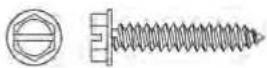
Screws (7)
Product Literature (Installation and User Guides, Planning Guide
Operations
Control panel

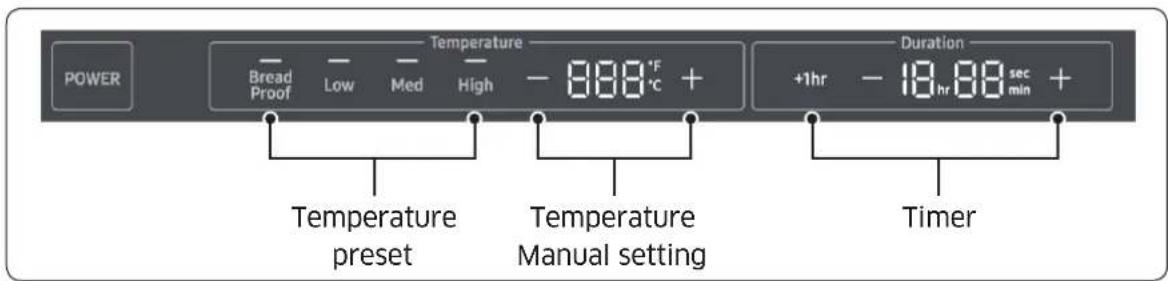
01 POWER : Turn on/off the Warming Drawer
02 Bread Proof : Activate the Bread Proof function.
03 Low : Activate the warming drawer with Low temperature preset.
04 Med : Activate the warming drawer with Medium temperature preset.
05 High : Activate the warming drawer with High temperature preset.
06 - (Temp) : Decrease the temperature.
07 + (Temp) : Increase the temperature.
08 +1hr : Increase the timer setting by 1 hour.
09 - (Dur) : Decrease the timer setting.
10 + (Dur) : Increase the timer setting.
NOTE
Before using the drawer, remove the protective film from the control panel by grasping the tab in the upper-right corner and peeling away the film.
To turn the unit on
The warming drawer is equipped with four temperature settings and a timer. The warming drawer can also be set for continuous operation. See Table on page 16 for suggested settings for different foods.

- Press the POWER button to turn on/off the Warming Drawer
- Manually set the desired temperature or press a preset button.

NOTE
Press on +/- next to the temperature display to increase or decrease the temperature at the predetermined setting.
3. Select the amount of time you want the warming drawer to be on: Press the -, + and +1hr button until the desired number of hours is displayed on the control pane.
| Setting Preset Buttons Temperature | ||
| Bread Proof |  | 100°F (85 °F-120 °F)40°C (30 °C-50 °C) |
| Low |  | 150 °F (121 °F-160 °F)65 °C (51 °C-70 °C) |
| Med |  | MED 175 °F (161 °F-190 °F)80 °C (71 °C-90 °C) |
| High |  | HIGH 200 °F (191 °F-220 °F)95 °C (91 °C-105 °C) |
| Manual | -888°F + | 85 °F (30 °C) ~ 220 °F (105 °C) |
* Temperatures are approximate
Continuous operation
- Every setting has a preset time of 1 hr., the time can be changed to a maximum of 12 hrs. 59 min. by pressing the +/- symbol next to the time display.
- To bypass the predetermined time limit and operate continuously, press on the power pad for 5 seconds, the word SAB will show in the display. Do not press on +/- on the time display, this will revert to a time function.
NOTE
In continuous mode, the temperature display shows the default temperature setting, the heat level can be adjusted on each mode, by pressing on + or -, each pressing is equivalent to 5 degree increment. The display will not reflect the change of setting. In Infinite mode the unit has to be turned off manually.
WARNING
- When the warming drawer is on in continuous mode () , it will remain on until turned off manually. To avoid a fire hazard or burns, exercise caution when operating the unit in continuous mode.
- Food safety is an important consideration when using a warming drawer. In the Proof and Low temperature settings, bacteria growth may occur. Use the Med and High settings if holding certain foods for more than two to three hours.
Preheating
For best results, preheat your warming drawer for about 20 minutes before use. If you put hot food into a cool, confined area, any steam that is present will condense. If you preheat your warming drawer, there will be less chance of water due to condensation.
Preheat times vary depending on the temperature setting.
Temperature scale °F→°C
The warming drawer is preset to Fahrenheit. To Change the temperature scale from Fahrenheit to Centigrade, Follow below steps.
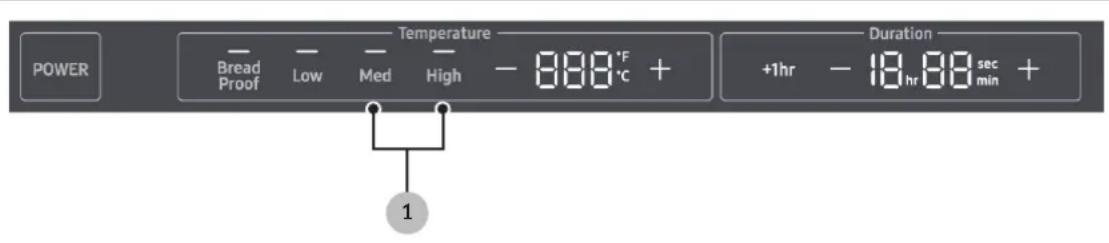
- Press on Med and High for three seconds, the temperature scale changes automatically.
- To revert to Fahrenheit, press on Med and High for three seconds.
Temperature and humidity control setting guidelines
| Food Items | Temperature Settings | Moist-Crisp Selection | Covered/Uncovered |
| Bacon HIGH Crisp Uncovered | |||
| Beef - rare LOW Moist Covered | |||
| Bread - hard rolls LOW Crisp Uncovered | |||
| Bread - proofing PROOF Moist Damp towel | |||
| Casseroles LOW Moist Uncovered | |||
| Coffee cake LOW Moist Uncovered | |||
| Cooked cereals LOW Moist Uncovered | |||
| Dinner MED Moist Uncovered | |||
| Eggs | LOW Moist Covered | ||
| Enchiladas | LOW-MED Moist Uncovered | ||
| Fish/seafood | LOW Moist Covered | ||
| Fried food HIGH Crisp Uncovered | |||
| Gravy, cream sauces | LOW Moist Covered | ||
| Ham | LOW Moist Covered | ||
| Hors D'oeuvres | LOW-MED | Crisp | Uncovered |
| Lamb | LOW Moist Uncovered | ||
| Pancakes | LOW-MED Moist Covered | ||
| Pies - single crust | LOW Moist Uncovered | ||
| Pizza | LOW-MED Moist Covered | ||
| Potatoes - baked | HIGH Crisp Uncovered | ||
| Poultry | HIGH | Moist Uncovered | |
| Vegetables | LOW Moist Covered | ||
| Waffles - crisp | HIGH | Moist Uncovered | |
Warming serving containers
To warm plates, and other serving containers
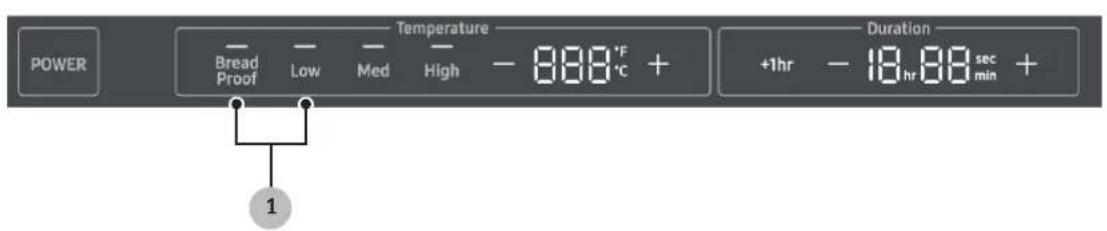
- Place them carefully into the warming drawer and set the temperature to Proof or Low, depending upon your personal preference.
NOTE
- Do not drag plates across the drawer. They may scratch the drawer surface.
- Before using any delicate dinnerware in the warming drawer, determine its maximum recommended usage temperature from the plate manufacturer. It is not necessary to preheat the warming drawer when warming serving dishes.
- You can also use plastic wrapping on plates to keep foods hot and moist.
Sabbath option
This warming drawer is designed to allow for operation on the Jewish Sabbath and Jewish Holidays.
Visit www.star-k.org for instructions.
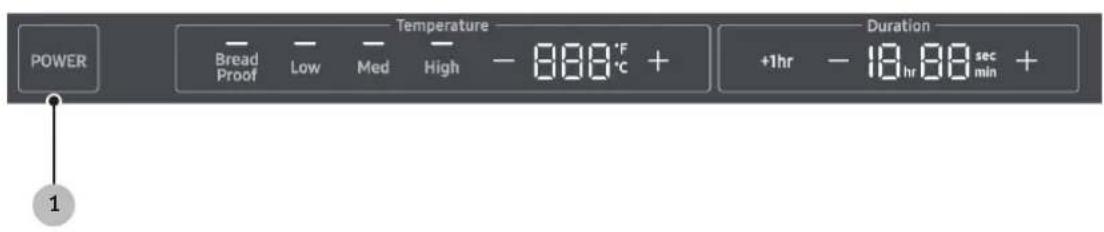
- Press and hold the POWER button for 5 second to activate Sabbath mode.
- Choose heat Level by pressing, Low, Med or High. Heat level can be adjusted on each mode, by pressing on + or -, each pressing is equivalent to 5 degree increment.
NOTE
The display will not reflect the change of setting. During Sabbath mode, the warming drawer is ON continuously and the unit has to be turned off manually.
Care and cleaning of the warming drawer

CAUTION
- To prevent permanent surface damage to the unit, do not use abrasive cleaners or scrubbers.
- Do not leave acids (citrus juices, tomato sauces, etc.) on the unit's surfaces. The finish may stain.
- Do not remove spills with a sharp object (e.g., knife, metal spatula), which may scratch the surfaces.
• Always wipe stainless steel surfaces in the direction of the grain. - Do not clean with benzene, thinner, bleach, or other harsh cleaners. They may cause surface damage and possibly a fire.
- Do not spray water on the warming drawer. This may cause the electric shock.
- Regularly use a dry cloth to remove such things as dust or water from the power plug and contact points.
Control Panel
Clean the control panel with a soft cloth dampened with a solution of mild detergent and hot water. Rinse and dry with a soft cloth. Do not let liquid pass behind the control panel. Do not use abrasive cleaners or scrubbers. They may permanently mar the finish.
Gasket
The gasket runs around the drawer opening. Gently clean the gasket with a mild detergent-hot water solution. Rinse and dry with a soft cloth. Damaging the soft gasket material compromises the heat seal and thus, the unit's ability to perform efficiently.
Stainless steel/ Black Stainless steel Surfaces
- Do not use abrasive cleaners or scrubbers. They may permanently damage the finish.
- Do not clean with benzene, thinner, bleach, or other harsh substances, which may mar surfaces and possibly cause a fire.
- Do not spray water on the warming drawer. This may cause an electric shock.
• Regularly remove dust, dirt, and water from the power plug and contact points. -
Follow these steps before cleaning any drawer surfaces.
-
Unplug the warming drawer.
- With a moistened, soft, lint-free cloth or paper towel, wipe surfaces inside and out.
- With a dry cloth or paper towel, dry all surfaces well.
- Plug in the warming drawer.
Drawer Slides
- The warming drawer has push-to-open sliders on each side of the drawer that let the drawer slide in and out smoothly.
- Do not pull to open the drawer.
• The drawer slides do not need maintenance.
Care and maintenance
Removing the drawer from the appliance

natural_image
Pure mechanical diagram showing a shaft and housing with an arrow indicating direction (no text or symbols)
-
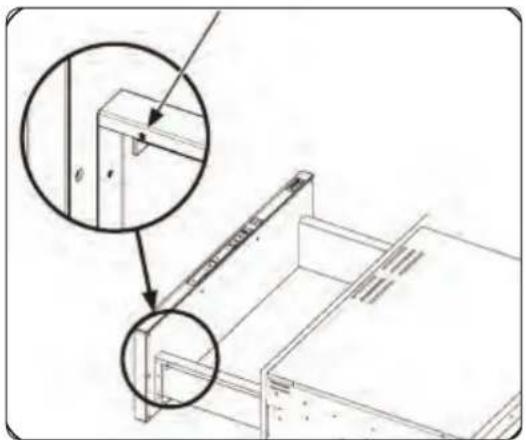
Open the drawer fully, and remove the clamp screw.
-
Pull out the clamp, and detach the connector.
-
Remove the screw on drawer (both sides, near the front).
natural_image
Technical line drawing of a mechanical assembly with two magnified views (no text or symbols)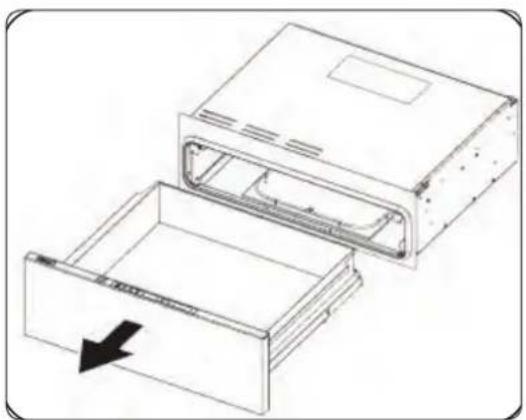
natural_image
Technical line drawing of an open electronic device with a downward arrow indicating a component (no text or symbols present)- Remove the drawer.
Re-installing the drawer
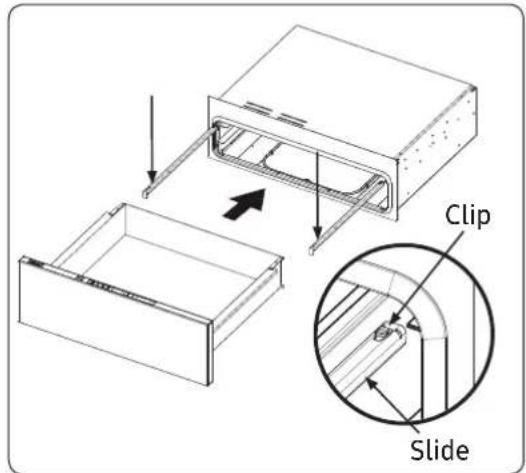
- Extend both rails, and pull out the cable (right side) so the connector hangs outside the frame. Put the drawer on both rails, and slide it in until it engages under the rails' rear clips.
natural_image
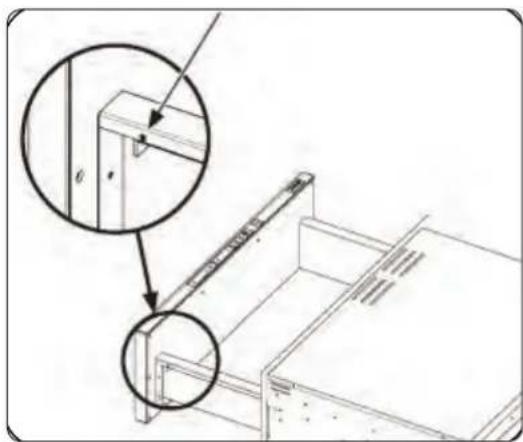
Technical line drawing of a mechanical assembly with two magnified views (no text or symbols)- Fasten the screws both sides.
Care and maintenance
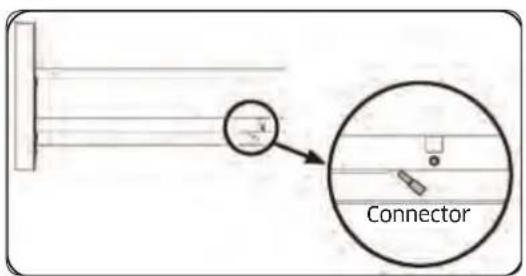
- Re-attach the connector.

natural_image
Pure mechanical diagram showing a shaft and housing with an arrow indicating direction (no text or symbols)- With the cable under the cable cover, insert the clamp through the square hole, and fasten the screw.
Troubleshooting
Dacor strives to ensure that the appliance works as it should. If issues occur, look for a solution below. If the issue persists, call Dacor Customer Service (800) 793-0093.
| Problem May Be | Caused By What To Do | |
| Nothing works. Power | plug disconnected. Plug the w | warming drawer into a 120 Vac, 15 Amp., dedicated electrical outlet. |
| Timer is not set. Select time d | duration according to the Operating Instructions section. | |
| Tripped circuit breaker or blown fuse. | Check the circuit breaker panel or fuse box tripped breaker or blown fuse. | |
| Ambient temperature below 32 °F (0 °C). | Temperature around warming drawer must be above freezing. | |
| Drawer does not slide smoothly. | Drawer is incorrectly mounted into slide mechanism. | Remount drawer into slide, per instructions above. |
| Drawer is over-loaded or the load is unbalanced. | Reduce the weight to less than 50 pounds.Redistribute drawer contents. | |
| Excess condensation. | Warming drawer not preheated. | Preheat the warming drawer before each use. |
Warranty and Service
Getting Help
Before you request service:
- Review the Troubleshooting section of this manual, above.
- Use the helpful tips found in our Troubleshooting.
- Become familiar with the warranty terms and conditions of your product.
- If none of these tips or suggestions resolves your problem, call our
Customer Service center at the number below.
Dacor's Customer Service center is available 6:00 a.m. - 5:00 p.m. Pacific Time
For warranty repairs or questions and for Dacor Distinctive Service (DDS) in the US and Canada
Phone: (800) 793-0093, extension 2822
For non-warranty repairs or questions in the US and Canada
Phone: (800) 793-0093, extension 2813
Contact us through our web site at:
www.dacor.com/contact-us
Warranty
Review this section to learn the warranty and non-warranty terms and conditions concerning this product. For details/clarifications, contact Dacor.
What Is Covered
CERTIFICATE OF WARRANTIES: DACOR OVENS
WITHIN THE FIFTY STATES OF THE U.S.A., THE DISTRICT OF COLUMBIA, AND CANADA:
FULL ONE-YEAR WARRANTY
The warranty applies only to the Dacor appliance sold to the first use purchaser, starting from the date of original retail purchase or closing date for new construction, whichever period is longer. Warranty is valid on products purchased brand new from a Dacor Authorized Dealer, or other seller authorized by Dacor.
If your Dacor product fails to function within one year of the original date of purchase, due to a defect in material or workmanship, Dacor will remedy it without charge to you. All cosmetic damage (such as scratches on stainless steel, paint/porcelain blemishes, etc.) to the product or included accessories must be reported to Dacor within 60 days of the original purchase date to qualify for warranty coverage. Consumable parts such as filters and light bulbs are not covered and are the responsibility of the purchaser.
LIMITATIONS OF COVERAGE
Service will be provided by a Dacor designated service company during regular business hours. Please note service providers are independent entities and are not agents of Dacor.
Dealer display and model home display products with a production date greater than 5 years, products sold “As Is,” and products installed for non-residential use, which include but are not limited to religious organizations, fire stations, bed and breakfast, and spas carry a one year parts warranty only. All delivery, installation, labor costs, and other service fees are the responsibility of the purchaser.
Warranty will be null and void on product that has altered, defaced, or missing serial numbers and tags.
The owner must provide proof of purchase or closing statement for new construction upon request. All Dacor products must be accessible for service.
Warranty is null and void if non-ETL or non-CUL approved product is transported from the U.S.A.
OUTSIDE THE FIFTY STATES OF THE U.S.A, THE DISTRICT OF COLUMBIA, AND CANADA:
LIMITED FIRST YEAR WARRANTY
If your Dacor product fails to function within one year of the original date of purchase due to a defect in material or workmanship, Dacor will furnish a new part, F.O.B. factory to replace the defective part.
All delivery, installation, labor costs and other service fees are the responsibility of the purchaser.
What Is Not Covered
- Slight color variations may be noticed because of differences in painted parts, kitchen lighting, product placement, and other factors; this warranty does not apply to color variation.
- Service calls to educate the customer on proper use and care of the product.
- Service fees for travel to islands and remote areas, which include but are not limited to, ferries, toll roads or other travel expenses.
- Consequential or incidental damage, including but not limited to food or medicine loss, time away from work or restaurant meals.
- Failure of the product when used for commercial, business, rental or any application other than for residential consumer use.
- Failure of the product caused by improper product installation.
- Replacement of house fuses, fuse boxes or resetting of circuit breakers.
-
Damage to the product caused by accident, fire, flood, power interruption, power surges or other acts of God.
-
Liability or responsibility for damage to surrounding property including cabinetry, floors, ceilings and other structures or objects around the product.
- Breakage, discoloration, or damage to glass, metal surfaces, plastic components, trim, paint or other cosmetic finish caused by improper usage, care, abuse or neglect.
Out of Warranty
Should you experience a service issue beyond the standard warranty period, please contact us. Dacor reviews each issue and customer concern to provide the best possible solution based on the circumstances.
THE REMEDIES PROVIDED IN THE ABOVE EXPRESS WARRANTIES ARE THE SOLE AND EXCLUSIVE REMEDIES. THEREFORE, NO OTHER EXPRESS WARRANTIES ARE MADE, AND OUTSIDE THE FIFTY STATES OF THE UNITED STATES, THE DISTRICT OF COLUMBIA AND CANADA, ALL IMPLIED WARRANTIES, INCLUDING BUT NOT LIMITED TO, ANY IMPLIED WARRANTY OF MERCHANTABILITY OR FITNESS FOR A PARTICULAR USE OR PURPOSE, ARE LIMITED IN DURATION TO ONE YEAR FROM THE DATE OF ORIGINAL PURCHASE. IN NO EVENT SHALL DACOR BE LIABLE FOR INCIDENTAL EXPENSE OR CONSEQUENTIAL DAMAGES. IN THE EVENT DACOR PREVAILS IN ANY LAWSUIT, DACOR SHALL BE ENTITLED TO REIMBURSEMENT OF ALL COSTS AND EXPENSES, INCLUDING ATTORNEY'S FEES, FROM THE DACOR CUSTOMER. NO WARRANTIES, EXPRESS OR IMPLIED, ARE MADE TO ANY BUYER FOR RESALE.
Some states do not allow limitations on how long an implied warranty lasts, or do not allow the exclusion or limitation of inconsequential damages, therefore the above limitations or exclusions may not apply to you. This warranty gives you specific legal rights, and you may also have other rights that vary from state to state.

IMPORTANT:
Your warranty will not begin until you activate it online or return this form to Dacor. If you have purchased more than one Dacor product, please return all forms in one envelope, or activate the warranty for each product online.
Please rest assured that under no conditions will Dacor sell your name or any of the information on this form for mailing list purposes. We are very grateful that you have chosen Dacor products for your home and we do not consider the sale of such information to be a proper way of expressing our gratitude!
Owner's Name:
Last (Please Print or Type) First Middle
Street:
City: State: Zip:
Purchase Date: Email: Telephone:
Dealer:
City: State: Zip:
Your willingness to take a few seconds to fill in the section below will be sincerely appreciated. Thank you.
- How were you first exposed to Dacor products? (Please check one only.)
A. T.V. Cooking Show
B. Magazine
☐ C. Appliance Dealer Showroom
D. Kitchen Dealer Showroom
E. Home Show
F. Builder
□ G. Architect/Designer
H. Another Dacor Owner
□ I. Model Home
□ J. Other
- Where did you buy your Dacor appliances?
A. Appliance Dealer
B. Kitchen Dealer
C. Builder Supplier
D. Builder
E. Other
- For what purpose was the product purchased?
A. Replacement only
B. Part of a Remodel
C. New Home
E. Other
- What is your household income?
A. Under \$75,000
B. \75,000 - \100,000
C. \100,000 - \150,000
D. \150,000 - \200,000
E. \200,000 - \250,000
F. Over \$250,000
- What are the brands of appliances that you have in your kitchen?
A. Cooktop
B. Oven
C. Dishwasher
D. Refrigerator
- Would you buy or recommend another Dacor product?
□ Yes
Comments:
Thank you very much for your assistance. The information you have provided will be extremely valuable in helping us plan for the future and giving you the support you deserve.
Place Serial Number Label Here
NO POSTAGE NECESSARY
IF MAILED IN THE
UNITED STATES
BUSINESS REPLY MAIL
FIRST-CLASS MAIL PERMIT NO 1600 CITY OF INDUSTRY CA
POSTAGE WILL BE PAID BY ADDRESSEE
DACOR
ATTN: WARRANTY PROCESSING DEPT
PO BOX 90070
CITY OF INDUSTRY, CA 91715-9907
-
-
-
-
-
-
-
-
-
-
-
-
-
-
-
-
-
-
-
-
-
-
-
-
-
-
-
-
-
-
-
-
-
-
-
-
-
-
-
-
-
-
-
-
-
-
-
-
-
-
-
-
-
-
-
-
-
-
-
-
-
-
-
-
-
-
-
-
-
-
-
-
-
-
-
-
-
-
-
-
-
-
-
-
-
-
-
-
-
-
-
-
-
-
-
-
-
- 99.
-
-
-
-
-
-
-
-
-
-
-
-
-
-
-
-
-
-
-
-
-
-
-
-
-
-
-
-
-
-
-
-
-
-
-
-
-
-
-
-
-
-
-
-
-
-
-
-
-
-
-
-
-
-
-
-
-
-
-
-
-
-
-
-
-
-
-
-
-
-
-
-
-
-
-
-
-
-
-
-
-
-
-
-
-
-
-
-
-
-
-
-
-
-
-
-
fold here



- Modernist Warming Drawer
- Contents
- Important information 4
- Safety information 5
- Introducing your new warming drawer 10
- Operations 12
- Important information
- Safety information
- What you need to know about safety instructions
- Important safety symbols and precautions
- WARNING
- CAUTION
- State of California Proposition 65 warning (US only)
- For your safety
- NOTE
- General safety
- Introducing your new warming drawer
- What's included with your warming drawer
- Operations
- To turn the unit on
- Continuous operation
- Preheating
- Temperature scale °F→°C
- Warming serving containers
- Sabbath option
- Care and cleaning of the warming drawer
- Control Panel
- Gasket
- Stainless steel/ Black Stainless steel Surfaces
- Drawer Slides
- Care and maintenance
- Removing the drawer from the appliance
- Re-installing the drawer
- Troubleshooting
- Warranty and Service
- Getting Help
- Before you request service:
- Warranty
- What Is Covered
- FULL ONE-YEAR WARRANTY
- LIMITATIONS OF COVERAGE
- LIMITED FIRST YEAR WARRANTY
- What Is Not Covered
- Out of Warranty
- IMPORTANT:
- Owner's Name:
- Purchase Date: Email: Telephone:
- Your willingness to take a few seconds to fill in the section below will be sincerely appreciated. Thank you.
- BUSINESS REPLY MAIL
Brand : Dacor
Model : Modernist DWR30M977WIP
Category : Oven