
Vector CD896 - Loudspeaker Crestron - Free user manual and instructions
Find the device manual for free Vector CD896 Crestron in PDF.


| Product Type | Performance Loudspeaker |
| Model | Vector CD896 |
| Brand | Crestron |
| Driver Configuration | Dual 8" 2-Way Coaxial + Low Frequency Drivers |
| Impedance | Selectable Low Impedance (Lo-Z) or High Impedance (Hi-Z) |
| Connector Type | Neutrik speakON NL4 (dual for pass-through) |
| System Configurations | Single amplification, bi-amplification, 3-way, 4-way |
| Amplifier Compatibility | Powersoft CA-PWRSFT-1604 (2-ch) and CA-PWRSFT-2404 (4-ch) |
| Gain Settings (Amplifier) | 26, 29, 32, 35 dB |
| Recommended Gain (with Crestron Avia DSP) | 26 dB |
| High-Pass Filter | Configurable via DIP switch on amplifier |
| DSP Integration | Crestron Avia Audio Tool with dedicated channel strips |
| Application | Auditoriums, meeting places, large gathering spaces |
| Max Speakers per CA-PWRSFT-1604 | 2 (non-bridged) |
| Max Speakers per CA-PWRSFT-2404 | 4 (non-bridged) |
| Bridging Capability | Supported for subwoofer use via bridged amplifier output |
| Series | Vector Performance Loudspeakers |
| User Manual | Available for free download at notice-facile.com |
Frequently Asked Questions - Vector CD896 Crestron
User questions about Vector CD896 Crestron
0 question about this device. Answer the ones you know or ask your own.
Ask a new question about this device
Download the instructions for your Loudspeaker in PDF format for free! Find your manual Vector CD896 - Crestron and take your electronic device back in hand. On this page are published all the documents necessary for the use of your device. Vector CD896 by Crestron.
USER MANUAL Vector CD896 Crestron
Crestron Performance Audio Systems: Powersoft Amplifiers
Powersoft Duecanali and Quattrocanali power amplifiers—CA-PWRSFT-1604 and CA-PWRSFT-2404, respectively—are designed to meet the high-power requirements of large audio systems. Both amplifiers offer a range of applications from basic background music and paging, to larger sound reinforcement systems in auditoriums, meeting places and other large gathering spaces.
These amplifiers are extremely versatile and may be used in low impedance performance systems. The compact, 1 RU housing and supplied mounting rails for 19" racks simplify installation while addressing space concerns. For high-impedance distributed systems, refer to Application Note (Doc. 8371) at www.crestron.com/manuals.
For additional amplifier wiring and operational details, refer to the CA-PWRSFT-1604 and CA-PWRSFT-2404 product manual at www.crestron.com/manuals.
Connections
To accommodate a variety of applications each amplifier includes several terminal block connectors. Depending on the attached loudspeaker, additional connectors may be required for terminations at the loudspeaker end.
Configurations
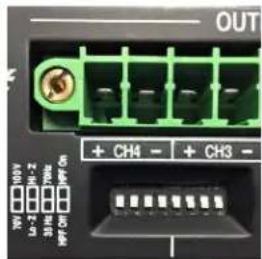
Each channel on a Powersoft amplifier can be independently configured for high-impedance (Hi-Z) distributed systems or low-impedance (Lo-Z) operation.
The amplifiers are configured for operations using DIP switches on the rear panel. Additional DIP switches configure High-Pass Filters (HPF) on each channel.
WARNING: To prevent damage to system components, ensure that the amplifier is powered off prior to changing any DIP switch setting.
NOTE: Refer to the product manual for details on wiring and additional DIP switch configurations.
Select Low Impedance Operation
All amplifier channels are factory-configured for Lo-Z operation. Additionally, the high-pass filter is disabled (HPF Off) and the gain is set to 32 dB. To set a channel for low-impedance operation, the channel mode switch must be set to Lo-Z.
Set Gain
The CA-PWRSFT-1604 and CA-PWRSFT-2404 have four amplifier gain settings. The gain level is set from the GAIN section of the CONFIG DIP switches.
Depending on the capabilities of the
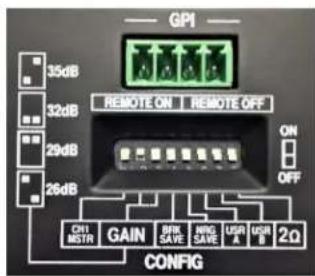
headend equipment driving the amplifier, you may choose to modify the amplifier's input sensitivity.
Most contemporary audio systems include a DSP upstream of the amplifier input. The DSP's analog output gain settings are configured to achieve operational levels aligned with amplifier gain to prevent the DSP or amplifier from distorting the signal.
The amplifier should have sufficient Maximum Power per channel to meet or exceed the loudspeaker's power rating.
Using an amplifier that is too underpowered relative to the loudspeaker's power handling capacity may result in a clipped signal. A clipped signal creates harmonics, or DC voltages, that may cause damage to connected loudspeakers or other equipment.
To avoid clipping, set the DSP's Maximum Output Level to a level that is greater than the amplifier's Maximum Input Level. In this case, the amplifier would distort before the DSP's digital-to-analog converter is overdriven.
A good system design requires system components configured for optimum gain when feeding the next component downstream (also known as gain staging). When configured correctly, this ensures that the complete signal path from acoustic input at the microphone-to-loudspeaker output (also known as the system gain structure) is optimized.
To optimize gain staging with the amplifier, the Crestron Avia™ Audio tool includes an Output Gain object with level control that configures the digital level feed to the D/A converter. An analog gain control is provided after the D/A converter for Full Scale (FS) output to drive the amplifier input.
Crestron recommends a gain setting of 26 dB when using Crestron Avia DSPs. Additional amplifier gain settings are shown below for use with other DSPs.
| Gain | INPUT SENSITIVITY @ 8 Ω | |||
| Vpeak | VRMS | dBu | ||
| CA-PWRSFT-1604 | 26 | 5.7 | 4.0 | 14.2 |
| 29 | 4.0 | 2.9 | 11.2 | |
| 32 | 2.9 | 2.0 | 8.2 | |
| 35 | 2.0 | 1.4 | 5.2 | |
| CA-PWRSFT-2404 | 26 | 4.9 | 3.5 | 13.0 |
| 29 | 3.5 | 2.5 | 10.0 | |
| 32 | 2.5 | 1.7 | 7.0 | |
| 35 | 1.7 | 1.2 | 4.0 | |
3-Way System Configuration,
Single Amplification
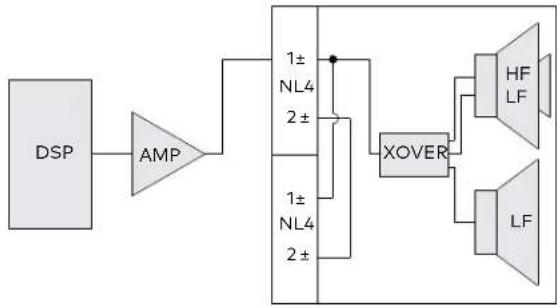
The following example shows a DSP-1280 and CA-PWRSFT-1604 2-channel amplifier driving two 3-way loudspeakers.
Equipment List:
(1) Crestron Avia DSP-1280 12x8 Digital Signal Processor
(1) CA-PWRSFT-1604 Powersoft Duecanali 1604, 2-Channel Power Amplifier
(2) Vector™ CD896 Performance Loudspeakers, Dual 8" 2-Way Coaxial + Low Frequency Drivers
(2) Two-conductor speaker wires
(2) Neutrik® NL4 loudspeaker connectors
The two balanced outputs of the DSP-1280 feed the two inputs of the CA-PWRSFT-1604 amplifier. The amplifier's outputs terminate to Neutrik speakON® NL4 connectors at the loudspeakers. The NL4's pair #1 ± terminals deliver power to the loudspeaker. Each loudspeaker features a second NL4 connector (wired in parallel) to provide a signal pass-through to an additional loudspeaker.
Connection Diagram
3-way Loudspeaker Driven by One Amp Channel
flowchart
graph LR
    DSP --> AMP
    AMP --> XOVER
    XOVER --> HF
    XOVER --> LF
    XOVER --> NL4
    NL4 --> 1±
    NL4 --> 2±
    1± --> XOVER
    2± --> XOVER

3-Way System Configuration,
Bi Amplification
The following example shows a DSP-1280 and CA-PWRSFT-2404 4-channel amplifier driving two bi-amplified 3-way loudspeakers.
Equipment List:
(1) Crestron Avia DSP-1280 12x8 Digital Signal Processor
(1) CA-PWRSFT-2404 Powersoft Quatrocanali 2404, 4-Channel Power Amplifier
(2) Vector™ CD1295 Performance Loudspeakers, Dual 12" Bi-Amplified 3-Way Coaxial
(2) Four-conductor speaker wires
(2) Neutrik® NL4 loudspeaker connectors
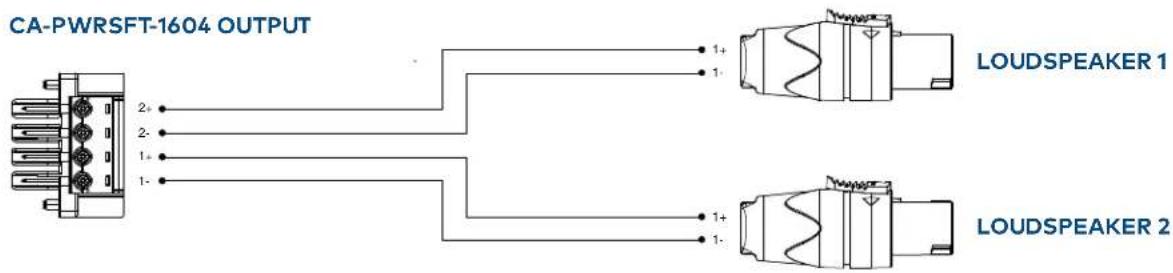
The four balanced outputs of the DSP-1280 feed the four inputs of the CA-PWRSFT-2404 amplifier. The amplifier's outputs terminate to Neutrik speakON NL4 connectors at the loudspeakers. The NL4's pair #1 ± terminals deliver power to the loudspeaker's low frequency transducer, while the #2 ± terminals deliver power to the loudspeaker's coaxial transducer. Each loudspeaker features a second NL4 connector (wired in parallel) to provide a signal pass-through to an additional loudspeaker.
Connection Diagram
3-way Loudspeaker Driven by Two Amp Channels
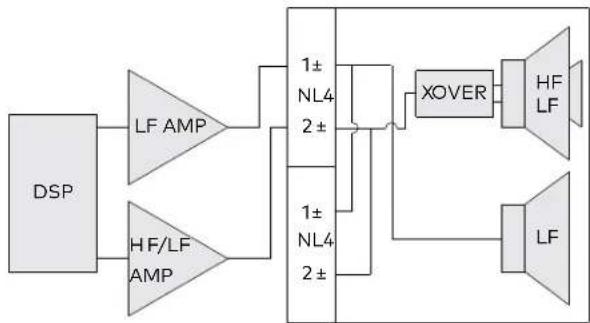
flowchart
graph LR
    DSP --> LF_AMP1["LF AMP"]
    DSP --> HF/LF_AMP["HF/LF AMP"]
    LF_AMP1 --> NL41["1± NL4 2±"]
    HF/LF_AMP --> NL42["1± NL4 2±"]
    NL41 --> XOVER["XOVER"]
    NL42 --> XOVER
    XOVER --> HF_LF1["HF LF"]
    XOVER --> LF["LF"]
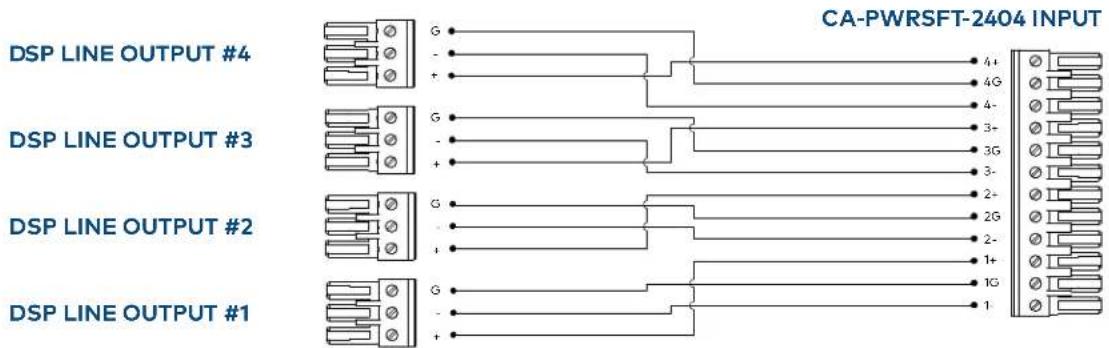
CA-PWRSFT-2404 OUTPUT
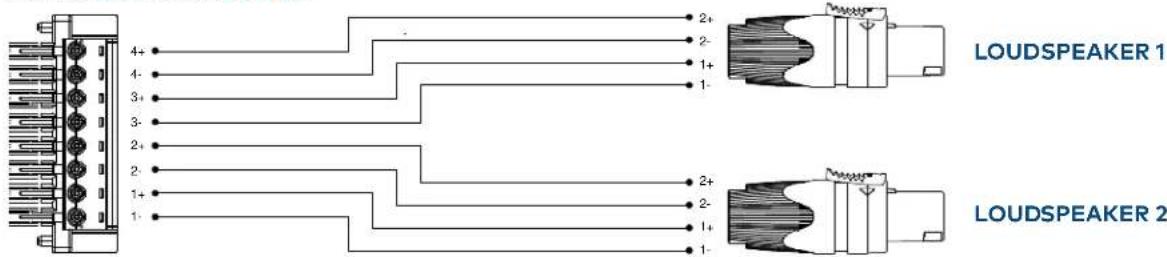
4-Way System Example
The following example shows a DSP-1280 with a CA-PWRSFT-2404 amplifier and a CA-PWRSFT-1604 amplifier driving two bi-amplified 3-way speakers and one subwoofer (respectively).
Equipment List:
(1) Crestron Avia DSP-1280 12x8 Digital Signal Processor
(1) CA-PWRSFT-1604 Powersoft Duecanali 1604, 2-Channel Power Amplifier
(1) CA-PWRSFT-2404 Powersoft Quatrocanali 2404, 4-Channel Power Amplifier
(2) Vector™ CD1295 Performance Loudspeakers, Dual 12" Bi-Amplified 3-Way Coaxial
(1) Vector SUBS15 Performance Subwoofer, 15"
(2) Four-conductor speaker wires
(1) Two-conductor speaker wire
(3) Neutrik® NL4 loudspeaker connectors
Connection Diagram
3-way Loudspeaker Driven by Two Amp Channels
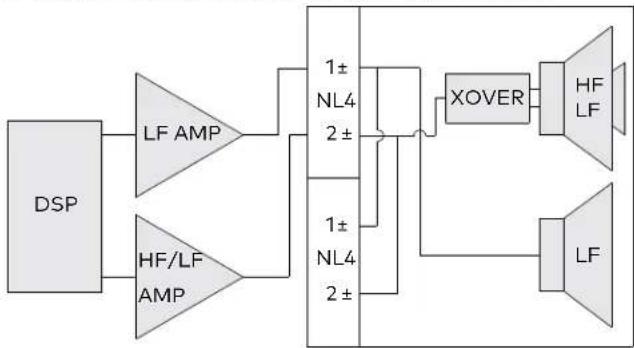
flowchart
graph LR
    DSP --> LF_AMP1["LF AMP"]
    DSP --> HF/LF_AMP["HF/LF AMP"]
    LF_AMP1 --> A1["1± NL4 2±"]
    HF/LF_AMP --> A2["1± NL4 2±"]
    A1 --> XOVER["XOVER"]
    A2 --> XOVER
    XOVER --> HF_LF_HF["HF LF"]
    XOVER --> LF_LF_LF["LF"]
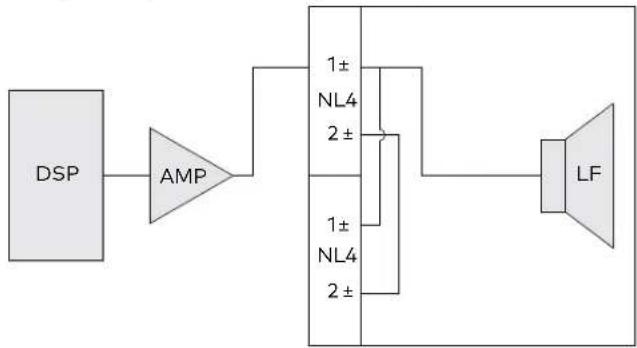
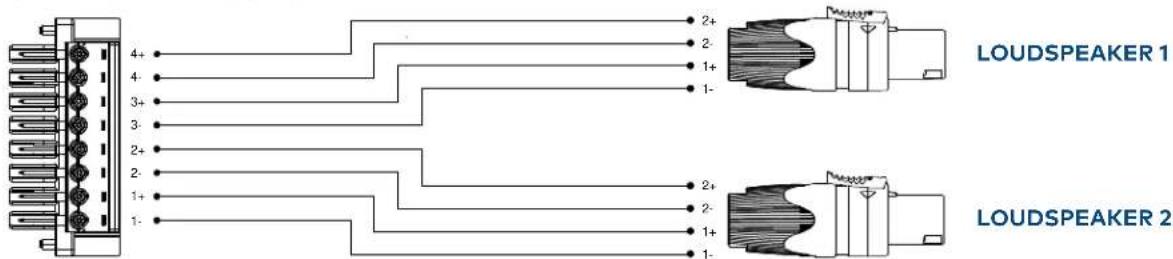
The balanced outputs of the DSP-1280 feed the inputs of the amplifiers; four outputs to the CA-PWRSFT-2404, and one output to the CA-PWRSFT-1604. The amplifier's outputs terminate to Neutrik speakON NL4 connectors at the loudspeakers.
• CA-PWRSFT-2404 to Vector CD1295:
The NL4's pair #1 ± terminals deliver power to the loudspeaker's low frequency transducer, while the #2 ± terminals deliver power to the loudspeaker's coaxial transducer.
- CA-PWRSFT-1604 to Vector SUBS15 (Bridged):
The NL4's pair #1 ± terminals deliver power to the subwoofer.
Each loudspeaker features a second NL4 connector (wired in parallel) to provide a signal pass-through to an additional loudspeaker.
Connection Diagram
1-way Loudspeaker Driven by One Amp Channel
flowchart
graph LR
    DSP --> AMP
    AMP --> A["1± NL4 2±"]
    A --> B["1± NL4 2±"]
    B --> C["LF"]
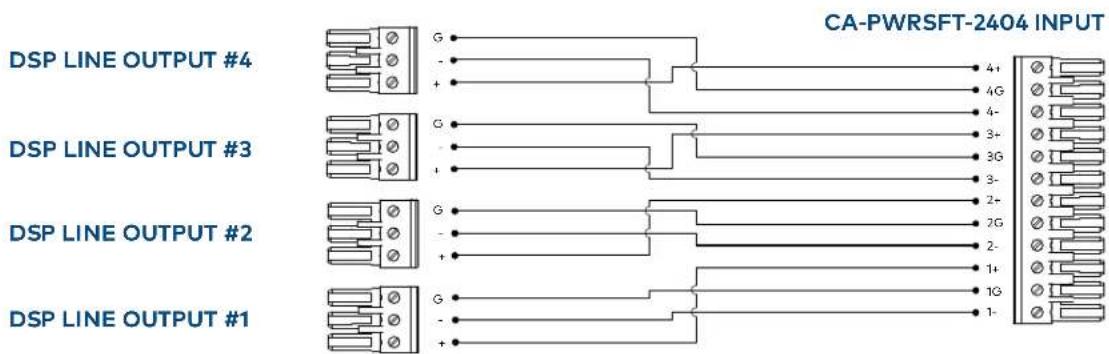

CA-PWRSFT-1604 BRIDGED OUTPUT

CA-PWRSFT-2404 OUTPUT
Powering Vector Performance
Loudspeakers
There are many systems configurations available using the Crestron Avia Audio tool, Powersoft amplifiers and Vector Loudspeakers. Depending on requirements for channel assignments and amplifier loading, more complex systems are possible. As a general starting point in determining amplifier sizing and quantity for use with Vector loudspeakers, refer to the chart below with the loudspeaker use per amplifier.
All subwoofer references require the amp to operate with a bridged output; all other loudspeakers operate in a non-bridged configuration.
| 2 x 800 WPC | 4 x 600 WPC | |
| Vector Model | CA-PWRSFT-1604 Vector Loudspeakers Per AMP | CA-PWRSFT-2404 Vector Loudspeakers Per AMP |
| CS699 | 4 | 8 |
| CS1295 | 2 | 4 |
| CS1265 | 2 | 4 |
| CS1595 | 2 | 4 |
| CS1565 | 2 | 4 |
| CD896 | 2 | 4 |
| CD1295 | 1 | 2 |
| CD1265 | 1 | 2 |
| CD1595 | 1 | 2 |
| CD1565 | 1 | 2 |
| SUBS15 | 1 Bridged | 2 Bridged |
| SUBS18 | 1 Bridged | 2 Bridged |
| SUBD18 | 1/2 Bridged | 1 Bridged |
Crestron Avia Channel Strips
Vector loudspeaker channel strips for all models are posted on the Crestron website. These strips are intended for use with the Crestron Avia Audio tool and take advantage of the processing power in the Crestron Avia DSP to provide an optimized system response.
Download channel strips from https://www.crestron.com/en-US/Software-Firmware/Software/Crestron-Toolbox/Vector_Output_Strips_Avia_DSP/1.
Shown below is a library of Vector channel strips to choose from for application to the DSP's analog outputs.
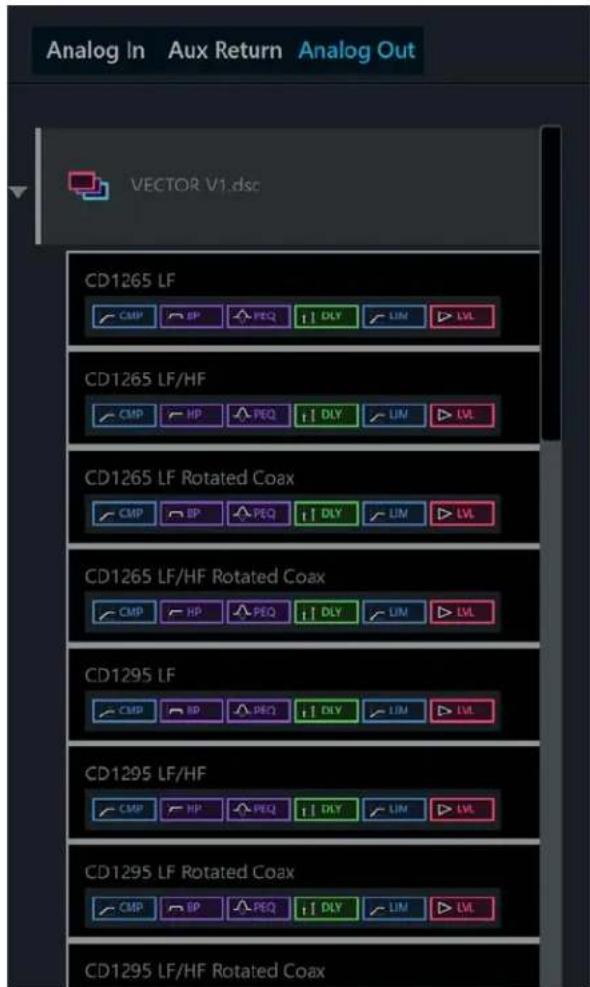
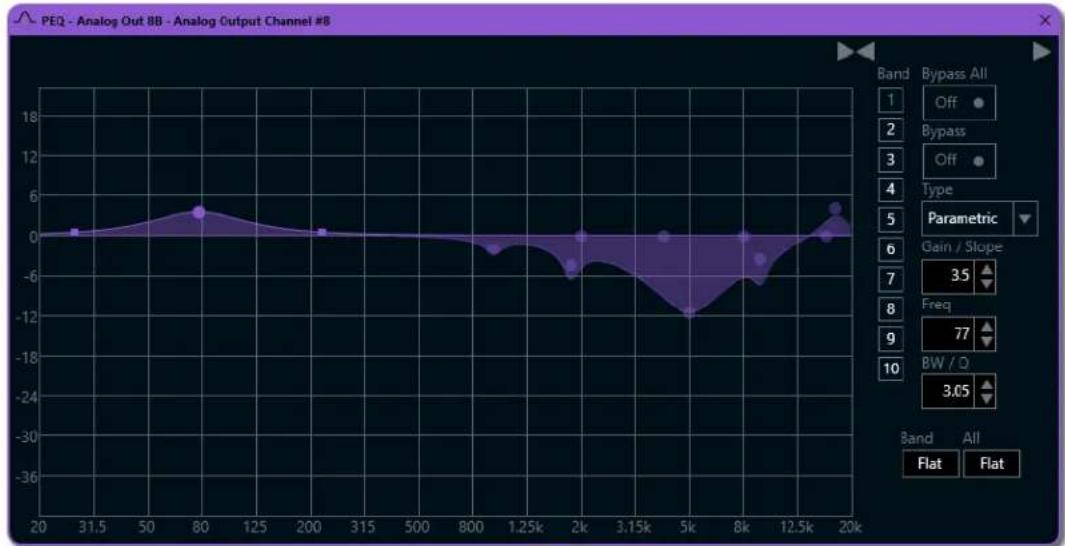
Shown below is the Parametric Equalizer in the Analog Output Strip for the Vector CD896. The application of channel strips to the target DSP output is a simple drag-and-drop operation.
line
| x | y | |-------|-------| | 20 | 0 | | 31.5 | 0 | | 50 | 0 | | 80 | 4 | | 125 | 2 | | 200 | 0 | | 315 | 0 | | 500 | 0 | | 800 | -2 | | 1.25k | -4 | | 2k | -6 | | 3.15k | -8 | | 5k | -12 | | 8k | -6 | | 12.5k | -2 | | 20k | 4 |Refer to the Crestron Avia Audio tool help file for details on creating new channel strips or applying strips from the library.
Crestron Database
Modules for the Duecanali 1604 and Quattrocanani 2404 amplifiers are available from the Crestron Application Market at http://applicationmarket.crestron.com/powersoft-ca-1604-2404/
They can also be found in the Crestron database.
CA-PWRSFT-1604 v1.0 (cm)
CA-PWRSFT-2404 v1.0 (cm)
- Crestron Performance Audio Systems: Powersoft Amplifiers
- Connections
- Configurations
- Select Low Impedance Operation
- Set Gain
- 3-Way System Configuration,
- Single Amplification
- Bi Amplification
- Equipment List:
- Connection Diagram
- 4-Way System Example
- Powering Vector Performance
- Loudspeakers
- Crestron Avia Channel Strips
- Crestron Database
Brand : Crestron
Model : Vector CD896
Category : Loudspeaker