
NAS-3097 - NAS Naxa - Free user manual and instructions
Find the device manual for free NAS-3097 Naxa in PDF.


| Product Type | Portable Bluetooth Speaker with LED Flashing Lights |
| Model | NAS-3097 |
| Brand | Naxa |
| Bluetooth Version | 4.1 |
| Speaker Output | 5W x 2 (stereo) |
| Frequency Response | 100Hz - 20kHz |
| Playtime | 1-2 hours |
| Battery Type | 1500 mAh Li-Polymer rechargeable |
| Charging Voltage | DC 5V (USB) |
| Bluetooth Range | 26-33 feet (8-10 meters) |
| Audio Sources | Bluetooth, USB, MicroSD, AUX, FM Radio |
| LED Light Modes | Multiple flashing patterns, controllable via button |
| Controls | Power, Mode, Play/Pause, Volume +/- (hold), Skip Forward/Backward, LED light button |
| Ports | Micro USB (charge), USB-A, MicroSD slot, 3.5mm AUX input |
| FM Radio | Frequency 87.5-108 MHz, auto-scan and preset storage |
| Hands-Free Calling | Supported (audio routed from connected device) |
| Accessories Included | Speaker, USB charging cable, 3.5mm AUX cable, FM cable, Owner's manual |
| Safety Warnings | Do not expose to rain/moisture; contains lead; FCC compliant |
| Cleaning | Use only a dry cloth |
| Servicing | Refer to qualified personnel; no user-serviceable parts |
| Power Cord Protection | Protect from being walked on or pinched |
Frequently Asked Questions - NAS-3097 Naxa
User questions about NAS-3097 Naxa
0 question about this device. Answer the ones you know or ask your own.
Ask a new question about this device
Download the instructions for your NAS in PDF format for free! Find your manual NAS-3097 - Naxa and take your electronic device back in hand. On this page are published all the documents necessary for the use of your device. NAS-3097 by Naxa.
USER MANUAL NAS-3097 Naxa
THE NEW GENERATION IN TECHNOLOGY
Portable Bluetooth® Speaker
with LED Flashing Lights
NAS-3097
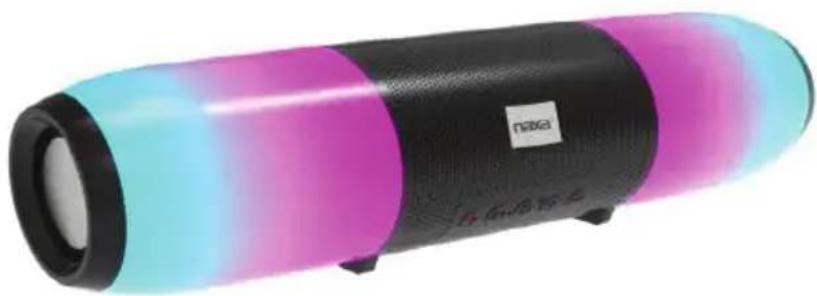
natural_image
Colorful portable speaker with black body, magenta and cyan shades, no visible text or symbolsInstruction Manual
Please read carefully before use and keep for future reference.
Important Safety Information


The lightning flash with arrowhead symbol, within an equilateral triangle, is intended to alert the user to the presence of uninsulated "dangerous voltage" within the product's enclosure that maybe of sufficient magnitude to constitute a risk of electric shock to persons.

The exclamation point within an equilateral triangle is intended to alert the user to the presence of important operating and maintenance (servicing) instructions in the literature accompanying the appliance.
WARNING: TO REDUCE THE RISK OF FIRE OR ELECTRIC SHOCK, DO NOT EXPOSE THIS APPARATUS TO RAIN OR MOISTURE.
WARNING: This product contains lead, a chemical known to the State of California to cause cancer and birth defects or other reproductive harm. Wash hands after handling.
- Read these instructions.
- Keep these instructions.
- Heed all warnings.
- Follow all instructions.
- Do not use this apparatus near water.
- Clean only with dry cloth.
- Do not block any ventilation openings. Install in accordance with the manufacturer's instructions.
- Do not install near any heat sources such as radiators, heat registers, stoves, or other apparatus (including amplifiers) that produce heat.
- Do not defeat the safety purpose of the polarized or grounding-type plug. A polarized plug has two blades with one wider than the other. A grounding type plug has two blades and a third grounding prong. The wide blade or the third prong are provided for your safety. If the provided plug does not fit into your outlet, consult an electrician for replacement of the obsolete outlet.
-
Protect the power cord from being walked on or pinched particularly at plugs, convenience receptacles, and the point where they exit from the apparatus.
-
-Only use attachments/accessories specified by the manufacturer.
- Use only with the cart, stand, tripod, bracket, or table specified by the manufacturer, or sold with the apparatus. When a cart is used, use caution when moving the cart/apparatus combination to avoid injury from tip-over.
- Unplug this apparatus during lightning storms or when unused for long periods of time.
- Refer all servicing to qualified service personnel. Servicing is required when the apparatus has been damaged in any way, such as power-supply cord or plug is damaged, liquid has been spilled or objects have fallen into the apparatus, the apparatus has been exposed to rain or moisture, does not operate normally, or has been dropped.
FCC NOTICE
This device complies with Part 15 of the FCC Rules. Operation is subject to the following two conditions: (1) this device may not cause harmful interference, and (2) this device must accept any interference received, including interference that may cause undesired operation.
Note: This equipment has been tested and found to comply with the limits for a Class B digital device, pursuant to Part 15 of the FCC Rules. These limits are designed to provide reasonable protection against harmful interference in a residential installation. This equipment generates, uses and can radiate radio frequency energy and, if not installed and used in accordance with the instructions, may cause harmful interference to radio communications. However, there is no guarantee that interference will not occur in a particular installation. If this equipment does cause harmful interference to radio or television reception, which can be determined by turning the equipment off and on, the user is encouraged to try to correct the interference by one or more of the following measures:
- Reorient or relocate the receiving antenna.
- Increase the separation between the equipment and receiver.
- Connect the equipment into an outlet on a circuit different from that to which the receiver isconnected.
- Consult the dealer or an experienced radio/TV technician for help.
CAUTION ON MODIFICATIONS
Any changes or modifications not expressly approved by the grantee of this device may void the authority granted by the FCC to operate the equipment.
At a Glance

- Mode Button
Press to switch between inputs. (Bluetooth®/USB-MicroSD/FM/AUX)
-
Play/Pause Press to play or pause playback.
-
Skip Backward Volume -
Hold to decrease the volume. Press to skip back a track.
- Power Button LED Light
Hold to turn the speaker on or off. Press to change the LED light.
- Skip Forward Volume +
Hold to increase the volume. Press to skip forward a track.
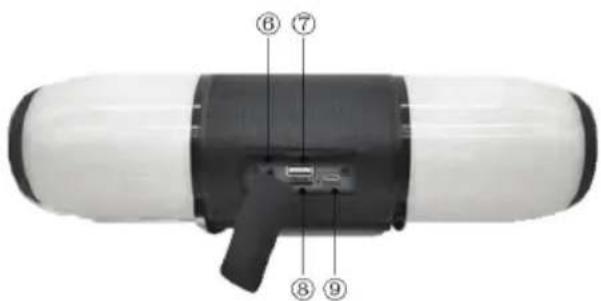
- AUX-In Jack
3.5mm auxiliary input for connecting external devices.
- USB Port
USB port to stream music from a flash drive.
- SD Card Slot
Micro SD Card slot for audio files.
- USB Charge Port
DC 5V USB charge port
Connecting to Power
Your speaker has an integrated rechargeable battery. Upon initial use, the battery should be fully charged to ensure optimal performance and battery life.
Use the included USB charging cable to connect the speaker to a USB power source to charge the battery.
- Plug the included Micro USB cable into the Micro USB port on the back of the speaker (under the detachable casing). Connect the other end of the cable with any compatible charger or wall outlier.
- When charging, the LED indicator on the front of the speaker will illuminate and turn red. When the speaker is fully charged, the LED indicator light will turn off.

In order to extend the life of the battery, please do not charge more than 6 hours. Over charging the speaker can adversely impact the battery life.
Bluetooth® Mode
Your Bluetooth ^® speaker can wirelessly stream audio from any Bluetooth ^® enabled device within the distance of 26–33 ft. Please follow the steps below to setup connection.
- Ensure that the speaker is turned on.
- Ensure that your external device is set to Bluetooth mode.
- Turn the speaker on by pressing the power button. After a few seconds, the LED indicator will begin flashing as the speaker enters pairing mode.
- On your Bluetooth-enabled external device, navigate to the Bluetooth settings menu and initiate a device search.
- After a few seconds, "NAXA NAS-3097" will appear on the devices list. Select it to connect and pair.
- If a password prompt appears, please enter "0000" to continue pairing.
NOTE: If your external device's Bluetooth version is below 2.1, you may be asked for a password.
- You will hear a tone once you have paired successfully.
- If pairing was unsuccessful, please repeat the steps above.
Listening to Music Wirelessly
Once you've successfully paired your external device with the speaker, you can stream all of your favorite music through the speaker in high-quality audio. Simply open your desired music app and press play.
You can control the music, track, and volume of what you listen to from either your external device or via the controls on the speaker itself.
All audio, including music, games, videos, notifications, and calls will be routed through the speaker.
NOTE: Volume levels on your device and on the speaker are controlled separately.
| Function | Operation | Button |
| Increase Volume | Playing Music | Press and hold the + button to increase the volume. |
| Decrease Volume | Playing Music | Press and hold the - button to decrease the volume. |
| Pause | Playing Music | Press the|| button to pause playback. |
| Play | Pause | Press the|| button to play or resume playback. |
| Previous Track | Playing Music | Press the - button to go back to the previous track. |
| Next Track | Playing Music | Press the + button to skip to the next track. |

A tone indication will alert you once volume has reached maximum level.
AUX-IN Mode
Connect devices without Bluetooth® by using the AUX connection. The included 3.5mm auxiliary cable is required to make this connection.
- Turn the unit on.
- Press the MODE button to select the AUX input.
-
Take one end of the 3.5mm aux cable and insert it into the speaker.
-
Take the other end of the included auxiliary cable and insert it into the aux-in port on the desired external device.
- Select the song you wish to play on your external device and press play.
Using USB & Card Mode
Insert a USB drive or Micro SD card and music will automatically begin playback.
- Turn the unit on.
- Insert a USB flash drive or a Micro SD card into the respective port or slot on the speaker and the audio files will automatically play.
- Press + or - to skip forward or skip back through the tracks.
- Briefly press the Play/Pause button to pause or resume playback.

If you insert a USB drive or MicroSD card while in Bluetooth® Mode, the unit will disconnect from Bluetooth® and begin playback in USB or MicroSD mode. Press the Mode button to return back to BT.
Listening to FM Radio
- Turn the unit on.
- Press the MODE button until you hear the FM Radio input.
- Press the ▶ button for searching and storing preset radio stations within the frequency range of 87.5–108Mhz.
- Press the + or - buttons to listen to the next and previous preset radio stations.
- Hold the + or - buttons to adjust the volume up or down.

While playing the FM Radio, plug in the FM cable (included) into the Micro USB port or the 3.5mm auxiliary cable (included) into the Aux-in port in order to establish a better reception. Both cables can serve as an antenna, while the auxiliary cable can search for more stations than the Micro USB.
NOTES

Press and hold the MODE button to switch between different inputs on the unit. The inputs are as
follows: Bluetooth® / USB - MicroSD / FM / AUX.
When the unit is not in use, please turn off the unit to save battery life.
Do not overcharge the unit. Every charge should not exceed 4 hours.
Troubleshooting Guide
This guide lists common problems and their solutions. solutions. Please refer to this guide before requesting service. If you need further assistance, please contact Naxa Technical Support @ www.naxa.com/naxa_support/
| Symptom | Possible Cause | Solution |
| Low sound level | Source (Tablet, Mobile Phone, laptop, etc) volume too low.Battery dead | Adjust source volumeCharge battery |
| Audio distorted | Battery nearly drained/ dead | Charge battery |
| No Sound at all | Source (Tablet, Mobile Phone, laptop, etc) turned off.Speaker turned off.Source Volumed turned down Media paused on source. | Turn the source on.Turn on Speaker.Adjust volume source.Play media from source |
Specifications
| Bluetooth Version | 4.1 |
| Speaker Output | 5W x 2 |
| FM Frequency | 100Hz~20KHz |
| Playtime | Between 1–2 Hours |
| Charge Voltage DC 5V (USB) | |
| Built-in Rechargeable battery | 1500 mAh Li-Polymer |
| Bluetooth Range | 26–33 Feet |
Accessories
1 x Bluetooth Portable Speaker
1 x Owner's Manual
1 x USB Charging Cable
1 x 3.5 mm AUX cable
1 x FM Cable
Specifications are subject to change without prior notice.
Support
If you have problems with your device, please review the instructions in this manual. Please also visit us on the web at www.naxa.com to get the latest news, alerts, and documentation for your device. For additional assistance, please contact Naxa Technical Support.
NAXA Technical Support
2320 East 49th St.
Vernon, CA 90058
866-411-6292
http://www.naxa.com/naxa_support/

- Portable Bluetooth® Speaker
- Instruction Manual
- Important Safety Information
- FCC NOTICE
- CAUTION ON MODIFICATIONS
- At a Glance
- Connecting to Power
- Bluetooth® Mode
- Listening to Music Wirelessly
- AUX-IN Mode
- Using USB & Card Mode
- Listening to FM Radio
- NOTES
- Troubleshooting Guide
- Accessories
- Support
- NAXA Technical Support
Brand : Naxa
Model : NAS-3097
Category : NAS