
SpeechAir Smart Voice PSP1200 - Dictaphone PHILIPS - Free user manual and instructions
Find the device manual for free SpeechAir Smart Voice PSP1200 PHILIPS in PDF.


| Product Type | Digital Voice Recorder |
| Model | SpeechAir Smart Voice PSP1200 |
| Brand | Philips |
| Dimensions (approx.) | 120 × 40 × 15 mm |
| Weight (approx.) | 80 g |
| Power Supply | Built-in Li-ion battery (rechargeable via USB) |
| Recording Format | MP3, WAV (PCM) |
| Recording Modes | Voice Activation, Smart Record, Noise Reduction |
| Recording Time (built-in memory) | Up to 240 hours (stereo quality may differ) |
| Memory Capacity | 8 GB internal (expandable via microSD up to 32 GB) |
| Microphone | Built-in stereo microphone with noise cancellation |
| Speaker | Built-in mono speaker |
| Connectivity | USB 2.0 (Micro-USB), MicroSD slot, 3.5 mm headphone jack |
| Battery Life | Up to 20 hours continuous recording (PCM mode) |
| Charging Time | Approximately 2.5 hours via USB |
| Care & Cleaning | Wipe with a soft, dry cloth. Do not use liquids or abrasive cleaners. |
| Safety Precautions | Keep away from moisture, extreme temperatures, and magnetic fields. |
| Spare Parts and Repairability | Battery and accessories available from Philips service centers. Repairs by authorized personnel only. |
| General Information | 2-year warranty. For detailed specifications, refer to the user manual. |
Frequently Asked Questions - SpeechAir Smart Voice PSP1200 PHILIPS
User questions about SpeechAir Smart Voice PSP1200 PHILIPS
0 question about this device. Answer the ones you know or ask your own.
Ask a new question about this device
Download the instructions for your Dictaphone in PDF format for free! Find your manual SpeechAir Smart Voice PSP1200 - PHILIPS and take your electronic device back in hand. On this page are published all the documents necessary for the use of your device. SpeechAir Smart Voice PSP1200 by PHILIPS.
USER MANUAL SpeechAir Smart Voice PSP1200 PHILIPS
Smart voice recorder
PSP1000 series

User
manual
1 Important information 4
Safety instructions 4
Rechargeable built-in battery 4
Data reset 4
Hearing protection 4
Medical device interference 4
Use in aircraft 4
Cleaning and disinfection 4
Recycling 4
About this user manual 5
Model-specific features 5
Symbols used 5
2 Your smart voice recorder 6
Product highlights 6
What's in the box 6
Overview of the recorder 7
Overview of the docking station 8
3 Getting started 9
Charging the battery 9
Charge via USB power supply 9
Charge via docking station 9
Charge via computer 10
Turn the device on and off 10
4 Using your voice recorder 11
Using the touch screen 11
Home screen 11
Customize your Home screen 12
Add and remove items and widgets 12
Manage Home screen panels 13
Organize folders 13
Status bar and notification panel 13
Status bar 13
Notification panel 14
Lock screen 14
Set screen lock 14
Set the date and time 15
Set the device and input language 15
Change the device language 15
Change the input language 15
Switch between input languages 15
Using apps 15
Preinstalled apps 15
Install apps 15
Uninstall apps 16
Change the screen orientation 16
Typing text 16
Enter text 16
Copy and paste text 17
Using Wi-Fi 17
Using Bluetooth 18
Capture screenshots 19
Change sound settings and sound mode 19
Power saving mode 19
Using email app 20
Set up an email account 20
Add further email accounts 21
Remove email accounts 21
Send an email 21
Email account settings 21
Device settings 22
5 Philips dictation recorder app 23
Open the app 23
One-touch start 23
Recording screen 24
Record dictations 25
Define settings prior to recording 25
Record a dictation 26
Voice-activated recording 27
Playback 27
Delete a dictation 28
Edit a dictation 28
Insert, overwrite or append recording 28
Add index marks 28
Add keywords 29
Add pictures 30
Change dictation name 30
Lock dictations/EOL 30
Mark priority dictations 31
Add barcodes 31
Send a dictation 31
Send a dictation via email 31
Send a dictation to Philips SpeechLive 32
Send a dictation to Philips SpeechLive
transcription service 33
Send a dictation to Philips SpeechLive
speech recognition service 33
Send a dictation to Philips SpeechExec
mobile server 34
Send a dictation to Philips dictation hub 35
Send a dictation via Philips SpeechExec
software 35
Send a dictation to a network folder 36
Using data lists 37
Data list options 37
Dictation app settings 38
6 Device and data management 41
Transfer data to and from the computer 41
Reset your device and data 41
Device reset 41
Factory data reset 42
Updating your device 42
7 Philips SpeechAir management software 44
Install SpeechAir management software 44
Configure SpeechAir with SpeechAir
management software 44
Device configuration screen 44
Configure SpeechAir and Philips dictation
recorder app settings 45
8 Philips remote device management software 46
Manage configurations with the Philips remote
device management software 46
Connect to the remote device management
server 46
Set a refresh interval for synchronizing
configuration updates 46
Receive configuration updates 47
9 Using SpeechAir with Philips SpeechExec software 48
Install SpeechExec on your computer 48 Configure SpeechAir in SpeechExec 48 Configure SpeechAir with the SpeechAir wizard 48
Configure delivery methods for SpeechAir 48 Download dictations to SpeechExec 49
10 Service and support 50
Display device information 50 Display information about Philips dictation recorder app 50 Open Quick start guide 50 Send email to technical support 50 Contact our supporting Philips partners 50 Open source software 50 Troubleshooting 51
11 Technical data 54
1 Important information
Don't make any adjustments and modifications that aren't described in this manual. Follow all safety instructions to ensure proper operation of the device. The manufacturer assumes no liability for damages resulting from non-compliance with the safety instructions.
Safety instructions
- Protect the device from rain and liquids to prevent damage to the device or a short circuit.
- Don't expose the device to excessive heat caused by placing it on a heating device or in direct sunlight.
- Protect the cables from damage by being trapped, particularly at the plugs and where cables exit the housing.
- Back up your data and recordings. The manufacturer's warranty doesn't cover loss of data resulting from user actions.
- Don't perform any maintenance operations that aren't described in this user manual. Don't disassemble the device into its component parts to carry out repairs. The device may only be repaired in authorized service centers.
Rechargeable built-in battery
- Don't attempt to replace the battery yourself. The battery may only be replaced in authorized service centers.
- Before your battery is replaced by an authorized service center, back up your data and recordings.
- Batteries contain substances that may pollute the environment. Used batteries should be disposed of at an official collection point.
Data reset
Philips SpeechAir has an internal memory with 1 GB RAM and 16 GB built-in storage. If you want to perform a factory data reset, observe the following cautions:
- Back up your data and recordings. Performing a factory data reset will delete all data on your device.
- Formatting the memory on a computer may cause incompatibilities with your device. Format the memory only on the device.
Hearing protection
Observe the following guidelines when you use headphones:
- Set the volume to a moderate level and don't use headphones to listen for excessively long periods of time.
-
Be particularly careful to avoid adjusting the volume to a level that your hearing can't deal with.
-
Don't turn the volume up so high that you can't hear what is going on around you.
- In potentially dangerous situations, be particularly careful or temporarily discontinue use.
- Don't use headphones while you are operating a motorized vehicle, cycling, skateboarding, and so on. You could be a hazard to yourself and other road users, and possibly be breaking the law.
Medical device interference
SpeechAir contains components that emit electromagnetic waves. Electromagnetic waves might interfere with the operation of a pacemaker. Keep a safe distance of separation between SpeechAir and your pacemaker.
Use in aircraft
Wireless transmitters can negatively affect the operation of other electronic equipment, causing them to malfunction. Turn off SpeechAir or use Airplane mode when you travel in aircraft. In Airplane mode, SpeechAir's signal transmitting functions are turned off.
Legal restrictions on recording
- The use of the device's recording function is subject to the legal restrictions that may apply in your country. You should also respect the privacy and personal rights of third parties if you record talks or lectures.
- If you want to record telephone calls, check if this is legal in your country. In certain countries, you may be legally required to inform the person you are conversing with on the telephone that you are recording the conversation.
Cleaning and disinfection
- Before cleaning, disconnect all cables from the device.
• To clean the device, use a soft dry cloth. - To disinfect the device, use products for disinfection of surfaces in clinical areas and patient care equipment, such as surface disinfectant wipes.
- Don't use harsh chemicals or strong detergents.
- Avoid getting moisture in openings.
- Don't rub or strike the surface with anything hard or sharp as this may scratch or damage the surface permanently.
Recycling
A crossed-out wheeled bin symbol attached to a product indicates that the product is covered by the European Directive 2011/65/EU. Please get informed about the local separate collection system for electrical and electronic products. Please act according to your local rules and don't dispose of your old products with your normal household waste. Correct disposal of your old product helps to prevent potential negative consequences for the environment and human health.

About this user manual
Find a quick overview of your device on the next pages. For detailed description, see the following chapters of this user manual. Read the instructions carefully.
Model-specific features
This user manual describes different models of the device product range. Please note that some features are only available on certain models.
Symbols used

Tip
- This symbol identifies information that helps you to use your device more efficiently and simply.

Note
- This symbol indicates notices which you should observe when handling or operating the device.

Caution
- This symbol warns of damage to the device and possible data loss. Damage can be caused by improper handling.
2 Your smart voice recorder
We are delighted that you have chosen a Philips device. Visit our website for comprehensive support, such as user manuals, software downloads, warranty information and more: www.philips.com/dictation.
Product highlights
- Three dedicated microphones for optimized voice recording
• Large speaker for crystal clear audio playback - Gorilla glass touch screen and shockproof, antimicrobial housing for durability
- Wear-free and ergonomic slide switch and function button for efficient single-handed operation
- Wi-Fi, LAN, Bluetooth, USB and VoIP for staying connected anywhere you go
- Barcode scanner and camera for quick file association and proof documentation
- File encryption for maximum data security
- Android OS for intuitive use
• Philips dictation recorder app for professional dictation features (optional) - Docking station for fast battery charging and data transfer
- Dictation workflow software for an even more efficient workflow (optional)
What's in the box
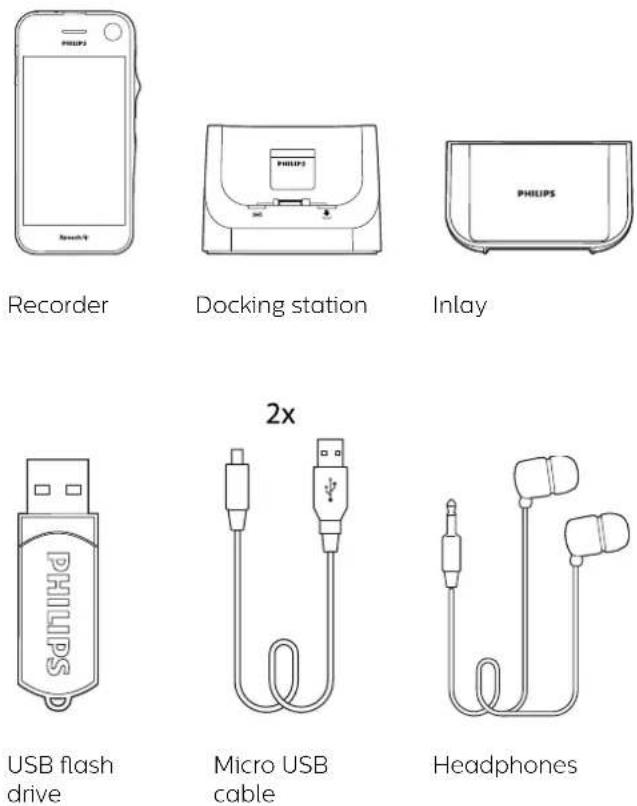

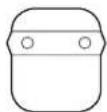

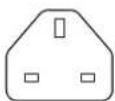
Power supply and outlet adapters
Quick start guide
Overview of the recorder


① Touch screen
② Telephony speaker
③ Headphones jack
④ External microphone jack
⑤ Recording LED light
⑥ Dictation microphone (directional microphone)
⑦ Dictation microphone (directional microphone)
⑧ Function button
⑨ Slide switch
⑩ Power button
⑪ Reset hole
⑫ Speaker
⑬ Camera flash
⑭ Dictation microphone (directional microphone)
15 Camera
⑯ 360° meeting microphone (omnidirectional microphone)
⑰ Volume up button
⑱ Volume down button
⑲ Telephony microphone (VoIP)
20 Docking station connector
⑳ Micro USB port
Overview of the docking station


① Charging LED light
② Docking station connector
③ Data transfer LED light
④ Data transfer micro USB port
⑤ LAN port
⑥ Charging micro USB port
⑦ Kensington Security Slot
3 Getting started

Caution
- Before you connect and install your recorder, first read the safety instructions (see Safety instructions).
Charging the battery
Charge the built-in battery before you use the device for the first time or if you haven't used it for an extended time period. If the battery is completely discharged and your device turns off, allow the battery to charge for a while before you turn on the device.

Note
- The length of the USB cable might impact the charging speed. Longer cables usually extend the charging time.
Charge via USB power supply

Note
• The included USB power supply is a US standard power supply. Depending on your region, you might need to use the supplied outlet adapters to fit regional power outlets.

The battery icon 📁 appears on the touch screen after a few seconds if the device is turned off. This indication disappears after some seconds. To reactivate the indication, press the Power button once.
→ The charging battery icon 📋 on the status bar of the Home screen shows the charging status if the device is turned on.
Charge via docking station
If you charge your device via docking station, make sure that the micro USB connector is connected to the charging micro USB port marked with 5V DC.
Charge without case
![graph TD A["Philips Device"] --> B["Philips"] B --> C["Port 1"] B --> D["Port 2"] C --> E["Internal Connection"] D --> E E --> F["USB Portugal"] style E fill:#f9f,stroke:#333](/content/2026/06/1191218/images/0e7a2bdc12a1b9f20a61ceb6d6fb924d108cadb786bd109e7b528c1d36728a8c.jpg)
→The red charging LED on the docking station illuminates.
→ The charging battery icon □ appears on the touch screen after a few seconds if the device is turned off. This indication disappears after some seconds. To reactivate the indication, press the Power button once. →The charging battery icon on the status bar of the Home screen shows the charging status if the device is turned on.
Charge with case (optional)
To charge your SpeechAir with the shock-proof case via docking station, first remove the inlay from the docking station. Afterwards, proceed as described in Charge without case
Charge via computer
Before you charge the battery via computer, make sure that your computer is turned on.

Note
- If you charge your device via computer instead of using the power supply, the charging speed might slow down due to a lower charging current.

The battery icon ☐ appears on the touch screen after a few seconds if the device is turned off. This indication disappears when after some seconds. To reactivate the indication, press the Power button once.
→ The USB icon ⚪ appears on the touch screen if the device is turned on.
Turn the device on and off
To turn the device on:
- Press and hold the Power button for six seconds until the device gently vibrates.
To turn the device off:
1 Press and hold the Power button for one second. → The Power off pop-up window appears.
2 Tap Power off.
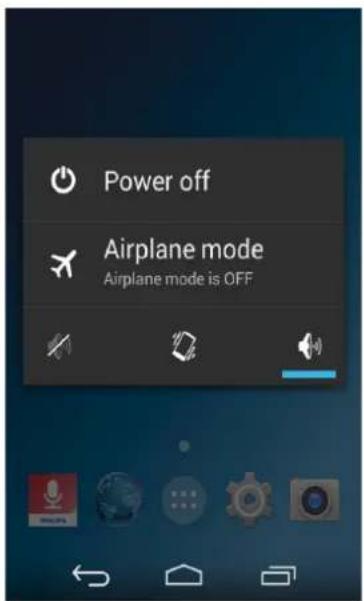
→A second pop-up window appears.

3 Tap OK.
4 Using your voice recorder
Using the touch screen
The interface of your SpeechAir is operated by touching the screen. To operate the interface, use the following basic gestures:
Tapping

To open an application and to select or unselect an item or menu option:
• Gently tap the item with your fingertip.
To zoom in an image or a web page:
- Double-tap the screen.
To return to the original display size:
• Double-tap the screen again.
To access available options for a selected item:
- Tap and hold the item.
Swiping

To scroll through or switch lists and screens:
- Swipe up, down, left, or right.
Spreading and pinching


To gradually zoom in a part of an image or web page:
- Place your fingers on the screen and spread them apart.
To gradually zoom out again: - Place your fingers on the screen and pinch them together.
Dragging
To move an item:
- Tap and hold an item and drag it to a new position.
Home screen
From the Home screen, you can access the main features on your recorder and view the status of your device.
Customize your Home screen by adding your favorite apps, widgets and folders, so they're always just a tap away.
You can open the Home screen from anywhere on your device by tapping the Home key
Keys
At the bottom of your display, no matter which app or feature you are just using, you will always find the navigation bar with the following keys:
Back key

- Opens the previous screen you were working in, even if it was in a different app. Once you back up to the Home screen, you can't go back any further.
Home key

- Opens the central Home screen.
Recent Apps key

- Opens a list of thumbnail images of apps you've worked with recently. This way you can easily and quickly switch between apps or close running apps. To open an app, tap it. To remove a thumbnail from the list, swipe it left or right.
Close Keyboard key

- Closes the on-screen keypad and replaces the Back key. This key is only available when the keyboard is open. When you tap the Close Keyboard key, the Back key appears on the display again.
Favorites tray
You will find the Favorites tray at the bottom of the Home screen. The Favorites tray is a quick way to access your favorite apps. It is always available when your Home screen is open.
To change the apps on the Favorites tray, see Add items to Favorites tray.
Customize your Home screen
Create your Home screen according to your own preferences. Add apps, widgets, or folders to your Home screen, add Home screen panels, or customize the Favorites tray.

Note
- Depending on the configuration of your device, the starting panel might look different than the starting panel described here.

Add and remove items and widgets
On the All Apps screen, you can find all apps, preinstalled as well as newly installed apps.
To open the All Apps screen, tap the shortcut on the Home screen.
The All Apps screen has multiple panels. Depending on the number of apps, the device automatically adds new panels. To scroll through the panels, swipe left or right. For more information, see Manage Home screen panels.
Add items to Home screen
To move an app or a folder from the All Apps screen to the Home screen:
1 Open the All Apps screen.
2 Tap and hold an app or a folder on the All Apps screen, and then drag it to the Home screen.
To move an app or a folder from the All Apps screen to a particular panel of the Home screen:
1 Open the All Apps screen.
2 Tap and hold an item on the All Apps screen and then drag it left or right to the desired panel.
Add widgets to Home screen
Widgets are small apps that provide specific information and convenient access on your Home screen, such as the bookmarks widget. There are two preinstalled widget panels.
1 Tap and hold an empty area on the Home screen.
2 Tap Widgets.
3 Tap and hold a widget, and then drag it to the Home screen.
→ The Create widget and allow access pop-up window appears.
4 Tap Create, or mark the checkbox Always allow to create widgets and then tap Create.
To add widgets to a particular panel of the Home screen:
1 Tap and hold an empty area on the Home screen.
2 Tap Widgets.
3 Tap and hold a widget, and then drag it left or right to the desired panel.
4 Tap Create, or mark the checkbox Always allow to create widgets and then tap Create.
To swipe through widget panels:
1 Tap and hold an empty area on the Home screen.
2 Tap Widgets.
3 Swipe right to switch to the next widget panel.
Add items to Favorites tray

Note
- Before you can add items to the Favorites tray, first remove existing items.
You will find the Favorites tray at the bottom of all Home screen panels. With the Favorites tray, you can easily and quickly access frequently used apps and folders. Apart from the non-movable All Apps screen shortcut, you can arrange your Favorites tray as you like.
To move an item to the Favorites tray:
- Tap and hold the item and drag it to the Favorites tray.
To remove an item from the Favorites tray:
- Tap and hold the item and drag it either to Remove at the top of the screen or to a Home screen panel.
Remove items and widgets

Note
- By removing items and widgets from the Home screen or Favorites tray, you don't uninstall them. To uninstall items and widgets, see Uninstall apps.
To remove an item or a widget:
- Tap and hold the item on the Home screen, and then drag it to Remove at the top of the screen.
Manage Home screen panels
The Home screen has multiple panels. When you use your device for the first time or have reset your data, you will see only the starting panel.
Add a panel
- Tap and hold an item and drag it to the right. →The device automatically adds a new panel.
Remove a panel
- Tap and hold an item on the desired panel and drag it either to Remove at the top of the screen or to a different panel.
When you have moved or removed all icons on a panel, the panel is empty and the device automatically removes it.
Move a panel
1 Tap and hold an empty area on the Home screen. →A panel preview appears.
2 Tap and hold a desired panel and then drag it to a new location.
To scroll through the panels:
- Swipe left or right.
Organize folders
Create a folder
You can create folders on any Home screen panel and also drag them to the Favorites tray.
To create a folder:
- Tap and hold an item and drag it onto another item.
Repeat this step with multiple items which you would like to have in the same folder.
To name or rename a folder:
1 Tap the folder. → All apps in the folder are displayed.
2 Tap Unnamed Folder or the existing name of the folder.
3 Name the folder.
Remove a folder
To remove a folder including all its apps:
- Tap and hold the folder and then drag it to Remove at the top of the screen.
To only delete a folder, but keep its apps:
- Tap the folder. Tap and hold each app and drag it out. →The folder is deleted automatically.
Status bar and notification panel
Status bar

Note
- In some apps, the status bar might not appear. To view the status bar from these apps, swipe down from the top of the screen.
The status bar at the top of the screen shows indicator icons. On the left side of the status bar, you will find new notifications, such as email notifications. On the right side of the status bar, status information is displayed, such as the time, battery status, or Wi-Fi connection.
Find the most common status bar icons in the following table:
| Icon Meaning | |
| Wi-Fi connected | |
| Bluetooth activated | |
| Battery power level | |
| Charging battery | |
| Airplane mode activated | |
| Mute mode activated | |
| Vibration mode activated | |
| New email | |
| Recording dictation (when outside the recording screen of Philips dictation recorder app) | |
Notification panel
The notification panel allows you to see a preview of your notifications on the status bar, which you can either acknowledge or clear. You can also access Quick Settings from the notification panel and quickly adjust basic settings.
Open the notification panel
- Swipe down from the top of the screen.
Close the notification panel
- Swipe up on the screen.

Note
- Indicator icons remain on the status bar until you either acknowledge or clear them.
Acknowledge a notification
- Tap the notification.
Clear all notifications
- Tap

Quick Settings
The notification panel also allows you access to Quick Settings, where you can quickly adjust basic settings, such as Wi-Fi or Bluetooth, and access the Settings menu.
To access Quick Settings:
1 Swipe down from the top of the screen.
2 Tap
Lock screen
When you use your SpeechAir for the first time or have reset your data, no screen lock is set.
You can lock the touch screen when it's active to prevent any unwanted device operations or access as well as to save battery power. When your device is on and not used for a set time period, the screen turns off and locks automatically.

Tip
• The status bar is also displayed in lock screen mode.
Lock and unlock the screen
To turn off and lock the screen:
- Briefly press the Power button.
To turn on and unlock the screen:
- Briefly press the Power button again.
Set screen lock
You can change the screen lock method by using one of the following options: None, Slide, PIN, Password.
1 Tap Settings on the Home screen or on the All Apps screen.
2 Swipe down and tap Security.
3 Tap Screen lock.
4 Select a screen lock method.
None
Choose this option to deactivate the screen lock.
Slide
Choose the slide lock method to unlock the screen.
PIN
Enter a personal PIN code consisting of 4-16 digits to unlock the screen.
Password
Enter your personal password consisting of 4-16 characters to unlock the screen.

Note
- If you have set a PIN code or password and want to change your screen lock method, first confirm the old PIN or password.
- Longer PIN codes and passwords are safer than short ones.
- It is very important that you remember your PIN or password. If you forget this information, it might not be possible to restore important data.
Set the date and time
You can always change the date and time on your device and how they are displayed. Choose if you want SpeechAir to set the date and time automatically or change the settings manually.
To set the date and time automatically,
1 Tap Settings on the Home screen or on the All Apps screen.
2 Swipe down and tap Date & time.
3 Mark the checkbox next to Automatic date & time.
To set the date and time manually:
1 Tap Settings on the Home screen or on the All Apps screen.
2 Swipe down and tap Date & time.
3 Unmark the checkbox next to Automatic date & time.
4 Tap Set date or Set time.
5 Swipe up or down to set the desired date or time.
In the Date & time menu, you can also select a time zone and the date and time format.
Set the device and input language
You can always change the device and input language.
If you choose a device language, the device sets the relevant input language automatically.
Change the device language
1 Tap Settings on the Home screen or on the All Apps screen.
2 Swipe down and tap Language & input.
3 Tap Language, and then select the language to use.
Change the input language
1 Tap Settings on the Home screen or on the All Apps screen.
2 Swipe down and tap Language & input.
3 In the Keyboard & Input methods sub-menu, tap → The Android Keyboard Settings window opens.
4 Tap Input languages.
→ The Input languages window opens.
5 Make sure that the checkbox next to Use system language is unmarked.
6 Change the language or select multiple languages to use from the list by marking the relevant checkboxes.
Switch between input languages
If you have selected two or more input languages, you can switch between the languages on your keyboard.
1 Tap and hold the space key on your keyboard.
→ The Choose input method pop-up window appears.
2 Select the desired language from the list.
Alternatively, tap next to the space key to switch between the input languages. For more information about using the keyboard, see Typing text.
Using apps
Preinstalled apps
You can find multiple preinstalled apps on your SpeechAir. This allows you to perform basic tasks with your SpeechAir, such as sending an email, browsing the Internet, or taking photos. Four apps are already set on the Favorites tray. More apps are available on the All Apps screen.
To open the All Apps screen, tap the All Apps screen shortcut on the Home screen. See more information about organizing apps in Customize your Home screen.
Install apps
SpeechAir doesn't support Google Play Store due to security reasons. However, you can install apps by copying and downloading an installation file (.apk file, for example, Filename_xy.apk) for the relevant app to your SpeechAir. This installation file is necessary to install an app on your SpeechAir. We highly recommend using a source you trust for downloading installation files.

Note
- Only the preinstalled apps have been tested for SpeechAir. Download and install apps from external sources only at your own risk. Philips assumes no liability for the functioning of any external apps.
- If you use apps from external sources, make sure that they are compatible with Android 4.4.2.
- Before you download apps from external sources, make sure that the checkbox in Settings > Security > Unknown sources is marked.
To install apps via installation file:

Note
• Make sure that your SpeechAir is turned on when you connect it to the computer. Your computer can only detect SpeechAir when it is turned on.
1 Connect your device to the computer.
2 Open Windows Explorer on a Windows computer, or open Finder on a Mac computer.
→SpeechAir is recognized as an external drive.
3 Double-click the SpeechAir drive.
→The content of your SpeechAir is displayed in a new window.
4 Drag the downloaded installation file (.apk file, for example, Filename_xy.apk) to the SpeechAir window.
→The .apk file is now available on your SpeechAir.
5 Disconnect your device from the computer.
6 Tap on SpeechAir, and then tap Explorer.
7 Tap SA-HARDDISK.
8 Swipe to the .apk file, for example, Filename_XY, and tap the .apk file.
9 Tap Next twice, and then tap Install.
→The app is installed.
10 Tap Done to go back to the SA-HARDDISK screen, or tap Open to open the app.
Uninstall apps

Caution
- It is not possible to uninstall preinstalled apps, you can only disable them.
- Disabling preinstalled apps might cause other apps to misbehave and will delete associated data for the relevant app.
- Disable: Disable preinstalled apps that can't be uninstalled from the device.
- Uninstall: Uninstall newly installed apps
To uninstall or disable an app:
1 Tap Settings on the Home screen or on the All Apps screen.
2 Tap Apps.
3 To uninstall a downloaded app, select it from the Downloaded tab.
To disable a preinstalled app, swipe right to the All tab and select the desired app.
→The App info window opens.
4 Tap Uninstall or Disable.
Alternatively, uninstall an app following the next steps:
1 Open the All Apps screen.
2 Tap and hold the app you would like to uninstall.
3 Drag it to Uninstall in the upper left corner of the screen.
→A pop-up window appears asking you to cancel or confirm uninstalling the app.
4 Tap OK.
Change the screen orientation

Tip
- If your screen doesn't automatically change the view when you turn your device sideways, go to Settings > Display and mark the checkbox next to Auto-rotate screen.
In many apps, you can change the view of your screen when you rotate your device. The screen automatically changes the orientation from portrait to landscape when you turn the device sideways. When entering text, you can turn the device sideways to bring up a bigger keyboard.
Typing text

Tip
- If the on-screen keyboard doesn't open automatically, tap the text field to open the keyboard.
You can enter text with the on-screen Android keyboard (AOSP). The on-screen keyboard opens automatically when you use apps and options where entering text is needed. Set and use multiple keyboard languages, and switch between them while typing (see Change the input language).
You can also rotate your device to change the keyboard view from portrait to landscape and bring up a bigger keyboard.
Enter text
- Tap each letter on the keyboard individually.
• To uppercase, tap shift.
• To use caps lock, double-tap Shift.
• To release caps lock, tap Shift again.
Delete text
- Tap on the keyboard.
Enter additional characters
- Tap the additional character key ?123 on the keyboard.
→The additional character key automatically changes to a letter key.
Return to the text keyboard
- Tap the letter key ABC on the keyboard.
Switch between the input languages

Note
- Before you can switch between the input languages on your keyboard, first set your desired input languages (see Change the input language).
1 Tap and hold the space key on your keyboard.
→ The Choose input method pop-up window appears.
2 Select the desired language from the list.
Alternatively, tap next to the space key to switch between the input languages.
Enter language-specific characters
1 Select the desired input language on your keyboard as described in Switch between the input languages.
2 Tap and hold the desired key.
→A pop-up window appears above the key showing available characters.
3 Select a character by dragging your finger left or right to the desired character, and then release your finger.
Hide the keyboard
- Tap 📋 the Home screen when the on-screen keyboard is open.
Copy and paste text
1 Tap and hold or double-click part of the entered text.
→The selected part of the text is marked.
2 Tap and drag or left or right to select the text you would like to copy or cut.
→An action bar appears at the top of the screen showing available options.
3 Tap to copy or to cut the text.
4 Place the cursor by tapping and holding where you would like to insert the text.
5 Tap Paste above the marked text.
Using Wi-Fi
Use Wi-Fi to connect your SpeechAir to the Internet or other network devices wirelessly anywhere a Wi-Fi access point or hotspot is available.

Note
- Using Wi-Fi might consume additional battery power. Turn off Wi-Fi when not in use to save battery power.
- The Wi-Fi signal strength might vary depending on obstacles and the distance between the device and Wi-Fi access point.
Turn on Wi-Fi
1 Tap Settings on the Home screen.
2 Tap the Wi-Fi switch or drag it to the right to turn on Wi-Fi.
→Your device searches for available Wi-Fi networks.
Alternatively, turn on Wi-Fi by using Quick Settings:
1 Swipe down from the top of the screen.
2 Tap open Quick Settings.
3 Tap Wi-Fi Off.
4 Tap the Wi-Fi switch or drag it to the right to turn on Wi-Fi.
→Your device searches for available Wi-Fi networks.
Connect to a Wi-Fi network

Note
- If you select a secured network, you will be prompted to enter the relevant password or network key.
• If you select an open network, you will be automatically connected to the network.
1 Tap Settings on the Home screen.
2 Tap Wi-Fi.
→All available Wi-Fi networks are displayed.
3 Select a Wi-Fi network to connect to.
4 Tap Connect.
→ is displayed on the status bar once you are connected.
Alternatively, connect to a Wi-Fi network by using Quick Settings:
1 Swipe down from the top of the screen.
2 Tap to open Quick Settings.
3 Tap Wi-Fi.
→All available Wi-Fi networks are displayed.
4 Select a Wi-Fi network to connect to.
5 Tap Connect.
→ is displayed on the status bar once you are connected.
Change the Wi-Fi network
1 Tap Settings on the Home screen.
2 Tap Wi-Fi.
→All available Wi-Fi networks are displayed.
3 Select a different Wi-Fi network to connect to.
Alternatively, change the Wi-Fi network by using Quick Settings:
1 Swipe down from the top of the screen.
2 Tap to open Quick Settings.
3 Tap the active Wi-Fi network.
→All available Wi-Fi networks are displayed.
4 Select a different Wi-Fi network to connect to.
If you have turned on Wi-Fi, but haven't connected to a network yet, a Wi-Fi symbol with a question mark is displayed on the status bar. This notification informs you that there are Wi-Fi networks available.
To open the Wi-Fi network notification:
1 Swipe down from the top of the screen.
2 Tap the Wi-Fi notification.
→All available Wi-Fi networks are displayed.
Using Bluetooth
Use Bluetooth to connect your SpeechAir to other Bluetooth-compatible devices for exchanging files.

Note
- Using Bluetooth might consume additional battery power. Turn off Bluetooth when not in use to save battery power.
- The Bluetooth signal strength might vary depending on obstacles and the distance between the paired devices.
- iPhone devices don't support file transfer via Bluetooth from an Android device.
Turn on Bluetooth
1 Tap Settings on the Home screen or on the All Apps screen.
2 Tap Bluetooth.
3 Tap the Bluetooth switch or drag it to the right to turn on Bluetooth.
→The Bluetooth symbol is displayed on the status bar when Bluetooth is turned on.
Alternatively, turn on Bluetooth by using Quick Settings:
1 Swipe down from the top of the screen.
2 Tap to open Quick Settings.
3 Tap Bluetooth Off.
4 Tap the Bluetooth switch or drag it to the right to turn on Bluetooth.
is displayed on the status bar when Bluetooth is turned on.
Pair with other devices

Note
- If the device you want to pair with is not displayed in the list of available Bluetooth devices, make sure that it turns on its visibility.
- Some devices might have a generic Bluetooth PIN, such as 0000.
1 Turn on Bluetooth.
2 Go to the Bluetooth settings in Settings > Bluetooth, and turn on your device's visibility by tapping your device name.
3 Tap Search for devices.
→All available Bluetooth devices are displayed.
4 Select a device to pair with.
5 Enter the passkey or PIN code, if needed, and tap Pair. The external device also has to accept the connection and, if needed, enter the passkey or your device's PIN code.
Unpair devices
1 Tap Settings on the Home screen or on the All Apps screen.
2 Tap Bluetooth.
3 Tap next to the device you want to unpair.
→ The Paired Bluetooth device window opens.
4 Tap Unpair.
Capture screenshots
Capture images of your screen while you are using your device.

Note
• Taking screenhots might not be possible in some apps and features.
To capture a screenshot:
- Press and hold the Power button and the Volume down button simultaneously. → Captured images are saved to Gallery → A notification symbol is displayed on the status bar.
Change sound settings and sound mode
Change the settings for various sounds on your device. You can also switch between the sound modes loud, mute and silent.
To change the settings for system sounds:
1 Tap Settings on the Home screen or on the All Apps screen.
2 Tap Sound, and change the desired settings.
To change the sound mode:
1 Press the Volume down button all the way down until the sound mode switches to mute.
→ The mute mode icon 🔒 is displayed on the status bar.
→The sound is turned off and your device only vibrates now.
2 In mute mode, press the Volume key once more to switch the sound mode to silent.
→The silent mode icon is displayed on the status bar.
→The sound and the vibration are turned off.
3 To turn the vibration on again when in silent mode, press the Volume up button once.
4 To turn the sound on again, press the Volume up button until the desired volume is reached.
Power saving mode
To save your SpeechAir's battery power, you can set the display brightness to be automatically controlled, reduce the brightness of the display and the backlight time, or turn on Airplane mode.
Set automatic display brightness or reduce the brightness
1 Swipe down from the top of the screen.
2 Tap to open Quick Settings.
3 Tap Brightness.
4 To set automatic display brightness, tap the blue Auto bar.
To reduce the display brightness, tap and hold the blue control, and drag it left.
Alternatively, adjust the display brightness following the nest steps:
1 Tap Settings on the Home screen or on the All Apps screen.
2 Tap Display.
3 Tap Brightness.
4 To set automatic display brightness, tap the blue Auto bar.
To reduce the display brightness, tap and hold the blue control, and drag it left.
Reduce the backlight time
1 Tap Settings on the Home screen or on the All Apps screen.
2 Tap Display.
3 Tap Sleep.
→The Sleep pop-up window appears.
4 Select the length of time for your screen to turn off the backlight when the device is not used.
Turn on Airplane mode
In Airplane mode, SpeechAir's signal transmitting functions are turned off. This way you can save battery power.
To turn on Airplane mode:
1 Swipe down from the top of the screen.
2 Tap to open Quick Settings.
3 Tap Airplane Mode.
Alternatively, turn on Airplane mode by following the next steps:
1 Tap Settings on the Home screen or on the All Apps screen.
2 Tap More...
3 Tap Airplane Mode.
Using email app
On the All Apps screen, you will find a preinstalled Android email app. Alternatively, you can also use the browser on your device to check your emails.
To open the email app:
- Tap 📄 on the Home screen, and then tap Email
Set up an email account
Set up an email account to send and receive emails with the email app.

Note
- Before you set up an account, make sure that Wi-Fi is turned on and that you are connected to a Wi-Fi network.
Initial email account setup
1 Open the email app on the All Apps screen.
→ The Account setup window opens.
2 Enter a valid email address into the Email address text field.
3 Enter the relevant password you use for your email address into the Password text field.
4 Tap Next.
5 Select the desired options for your account.

Note
- Setting short inbox checking frequency intervals might consume additional battery power.
- If you want to change the inbox checking frequency, tap the relevant field. →A drop-down list opens.
- Select the desired frequency for email synchronization.
6 Tap Next.
7 If necessary, enter a name which is displayed on outgoing messages. Optionally, change the account name, then tap Done.
Manual email account setup
If you want to set up an email account manually, make sure that you have the correct server settings.
IMAP or POP is an email protocol used to download emails to your device. If you're not sure whether to use IMAP or POP, contact your email provider or check the Internet for more information.
- IMAP: Emails are stored on remote email servers until you delete them.
- POP: Emails are downloaded for offline reading and might be removed from the remote server.
- Exchange: A company email address that uses Microsoft Exchange servers.

Note
- If you set up an IMAP or POP account, only your emails will be synchronized to your device. Any other information associated with that account, for example, calendar details, remain stored on your local computer.
To set up an email account manually:
1 Open the email app on the All Apps screen.
→ The Account setup window opens.
2 Enter a valid email address into the Email address text field.
3 Enter the relevant password you use for your email address into the Password text field.
4 Tap Manual setup
5 Depending on the type of account you're setting up, select IMAP, POP3 or Exchange.
6 If necessary, check all server settings for incoming emails, and tap Next.
7 If necessary, check all server settings for outgoing emails, and tap Next.
8 Select the desired options for your account.

Note
- Setting short inbox checking frequency intervals might consume additional battery power.
- If you want to change the inbox checking frequency, tap the relevant field.
A drop-down list opens. - Select the desired frequency for email synchronization.
9 Tap Next.
10 If necessary, enter a name which is displayed on outgoing messages. Optionally, change the account name, and then tap Done.
If you have problems setting up your account, check that you have entered your email address and password correctly, and then try again.
If you still can't set up your account, there might be a problem with the server settings. In this case, contact your email provider or visit their website.
Add further email accounts
1 Tap Settings on the Home screen or on the All Apps screen.
2 Swipe down, and tap Add account.
3 Tap IMAP or Corporate.
4 Proceed as described in Set up an email account.
Switch email accounts
If you have added more than one email account, you can switch between the accounts when you want to send an email.
To switch email accounts:
1 Open the email app on the All Apps screen.
2 In the Email window, tap in the upper left corner.
→A sliding sidebar opens.
→All available email accounts are displayed on the sliding sidebar.
3 Select your desired account.
Remove email accounts
1 Tap Settings on the Home screen or on the All Apps screen.
2 Swipe down, and tap IMAP or Exchange
3 Tap the account you want to remove.
4 Tap the options icon
→Tap Remove account.
5 The Remove account pop-up window appears.
6 Tap Remove account.
Send an email
1 Open the email app on the All Apps screen.
2 Tap the options icon in the upper right corner.
3 Select Compose.
→The Compose email window opens.
4 Enter a recipient and a subject, and then enter your email text by tapping the relevant text field.
5 Tap the Send icon
Email account settings
You can always change the general email settings as well as account-specific settings.
To change email account settings:
1 Tap Settings on the Home screen or on the All Apps screen.
2 Swipe down, and tap IMAP or Exchange.
→All IMAP or Exchange accounts are displayed.
3 Tap Account settings
4 To change general email settings, tap General settings. To change account-specific settings for a particular account, select the account.
5 Select the options for your accounts.
Device settings
In the preinstalled Settings app, you can select various options related to networks, your device, privacy settings, accounts and the system.
To open the Settings app:
- Tap Settings on the Home screen or on the All Apps screen.
Setting Function
Wi-Fi · Turn Wi-Fi on or off.
- Select and connect to Wi-Fi networks.
- Change Wi-Fi settings.
Bluetooth · Turn Bluetooth on or off.
- Select and connect to available Bluetooth devices.
- Change Bluetooth settings.
• View received Bluetooth files.
Data usage · Track your data usage for
communication via the network.
More... · Select Wireless & networks
options, for example, Airplane mode or VPN.
Sound · Set sound volumes and
system sounds.
Display · Change display settings,
for example, wallpaper or sleep mode.
Storage · Track the available and
used storage of your device.
Battery · Track the battery usage
and status.
Apps · Check information about
all installed apps.
Location · Change the location mode.
• View recent location requests by apps.
Security
- Select various security options.
Language & input
- Select various language and input options, for example, device or input languages.
Backup & reset
- Reset your device to its original system state and delete all data.
Setting Function
| Add account | • Add a new email account. |
| Date & time | • Set the date and time for your device. |
| Accessibility | • Select various options for a personalized access to your device. |
| About SpeechAir | • View information about your device. |
5 Philips dictation recorder app
The Philips dictation recorder app is designed to fit perfectly with your SpeechAir. Recording, editing, and sending dictation files from your SpeechAir offers mobile flexibility and reduces document turnaround times.

Note
- Depending on the configuration of your device, a different dictation app than the Philips dictation recorder app might be preinstalled on your SpeechAir. For information about other preinstalled dictation apps, contact the supporting Philips partner you purchased your device from.
- Only the default configuration of the slide switch is described in the following section. Your device's slide switch assignment might vary depending on your device's configuration. For more information, contact the supporting Philips partner you purchased the device from. Change the slide switch assignment in
Settings > User interface > Slider assignment.
Open the app
The Philips dictation recorder app is preinstalled on your device. You will find the app on the Favorites tray of your Home screen. This way you can start dictating from any Home screen panel.
To open the app:
1 Open the app on the Home screen or on the All Apps screen.
→A quick walkthrough appears when you open the app for the first time.
2 Swipe right to navigate through the walkthrough. To close the walkthrough, tap the Back key on your device
→The recording screen is displayed, and you can start dictating straight away.
One-touch start
Start the Philips dictation recorder app with only one touch. Press the function button once to start the app from anywhere on your device.


Note
- To use the one-touch start feature, your device needs to be unlocked. The function button can't be used in lock screen mode.
The recorder app has three tabs: Dictate, Recordings and Settings.
| Dictate | Recordings | Settings |
In the Dictate tab, you can record dictations and select all main options related to your current recording, for example, mark a priority dictation, lock the dictation, or edit the recording.
In the Recordings tab, all your recordings are listed. Open, edit or delete dictations from the list.
In the Settings tab, general settings related to your recordings, such as forwarding settings or security settings, are available. To switch between the screens, select the desired tab.
Recording screen
The recording screen is the main interface for recording dictations and editing existing recordings. Mark a recording as a priority dictation, edit the dictation name, add an index, insert, overwrite or append recordings, and more.

Tip
- Change the name of your recording by tapping it either on the recording screen or in the Properties window (see table below).
Find the description of the icons on the recording screen in the following table:

Key Function
① Start new recording · Start a new dictation right from the recording screen. The current audio file is automatically saved to your recordings list in the Recordings tab when you start a new dictation.
② Properties · Add a picture to your dictation. · Add various keywords to your dictation, for example, worktype, author, or attributes. Before you add keywords, first set them up in Settings > Forwarding > Workflow.
③ Sending options · Select an option how you want to send your dictation.
④ Barcode scanner · Scan a barcode. The barcode is automatically added to your dictation.
⑤ Dictation name · Shows the title of the dictation. If you want to change the dictation name, tap the title and enter the new dictation name.
⑥ Audio time · Shows the passed and the total time of the recording.
⑦ Microphone mode - Shows the microphone mode. The microphone mode can be controlled by the built-in motion sensor which senses when the device is placed on the desk or held in the hand. The microphone mode is set accordingly then.
Record key • Shows that a dictation is being recorded when the slide switch is in the recording position.
⑨ Stop key • Shows that the recording is stopped when the slide switch is in the stop position. • Shows that the playback of a recording is stopped when the slide switch is in the stop position.
Key Function

Play key · Shows that a recording is
being played back when the slide switch is in the playback position.

Rewind key · Shows that the recording
is being rewinded as long as the slide switch is pressed in the rewind position.

Audio progress bar · Shows your current
position in the recording.

Author name · Shows the author name.
If you want to change the author name, select a different name in the Properties window.

Worktype · Shows the worktype,
for example, email, fax, or letter. If you want to change the worktype, select a different type in the Properties window.

Category · Shows a particular
category, for example Standard or Confidential. If you want to change the category, select a different one in the Properties window.

Barcode number · Shows the barcode
number. When you scan a barcode, the barcode number is added automatically to your current dictation. You can also change the barcode number manually in the Properties window.

End of letter key (EOL) · Lock your dictation to prevent it from being accidentally modified
- The Send options window automatically pops up when you tap the EOL key. This setting must be enabled in Settings > Forwarding > Send EOL dictations automatically. If you don't want to send the dictation straight away, you can see the status of your dictation in the recordings list. The dictation is marked as

Key Function

Priority key · Mark your dictation as a priority dictation.

Index key · Set an index to mark certain points in a dictation as points of reference.

Edit mode
- Edit an existing dictation by overwriting a part of it, inserting or appending additional recording parts.
Record dictations
Define settings prior to recording
Before you start a recording session, set the desired preferences for your recordings, such as audio settings, forwarding settings, security and user interface settings. The most important settings for your recordings are described below. For information about further settings, see Dictation app settings.
Microphone sensitivity
Adjust the microphone sensitivity of your SpeechAir. Select the sensitivity according to the background noise, number of speakers and distance between speaker and microphone.
Low:
5-10 cm (2-4 inches) speaking distance
Medium:
10-20 cm (4-8 inches) speaking distance
High:
Large speaking distance as in meetings, interviews, or conferences
To set the microphone sensitivity:
1 Tap Settings in the dictation app.
2 Tap Audio Settings.
3 In the Microphone sensitivity sub-menu, tap Sensitivity, and select the appropriate sensitivity level Low, Medium, or High.
Microphone directivity
Directional:
• The focus is on the right microphone.
• Background sounds are filtered.
- Recommended for dictations with much background noise and low microphone sensitivity.
360°:
• The focus is on the left microphone.
• Sounds from all directions are recorded.
- Recommended for dictations with little background noise and high microphone sensitivity.
SpeechAir allows you to record high-quality single-speaker dictations as well as multi-speaker dictations. By default, the microphone directivity is set to 360° in order to allow the best recording quality for single-speaker as well as multi-speaker dictations.
We recommend using the directional microphone for single-speaker dictations in noisy environments and when you send dictations to speech recognition software. For all other situations, we recommend using the 360° microphone.
You can always change the microphone directivity according to your own preferences.
To change the microphone settings:
1 Tap the Settings tab in the app.
2 Tap Audio settings.
3 Tap Mic in hand or Mic on desk, and select the desired setting.
Audio format
Set the recording quality for your dictations and choose between the audio formats WAV (PCM) and DS2 (DSS Pro). DS2 is preset as the standard audio format, but you can always change the audio format in Settings > Audio settings > Audio format.
Function button assignment
Change the functionality of the right function button on your device. Choose between End of letter, New dictation, or Fast forward, or disable this feature. The default assignment of the function button is set to End of letter.

Note
- You can only change the function button assignment if your slide switch is set to International. For more information, see User interface.
To change the function button assignment:
1 Go to Settings > User interface > Button assignment.
→ The Button assignment pop-up window appears.
2 Select the desired function button functionality.
Record a dictation

Note
- If your device has only 8% or less battery power left while you are recording, you will see a notification message on your screen and hear a notification sound. Your current dictation will be saved automatically. To avoid unintended data loss, you will neither be able to continue recording nor to start a new recording unless you charge your device.
- While you are in recording mode, all options within the dictation recorder app, except for setting index marks, are disabled for security reasons.
- Be careful not to cover the 360° microphone with your hand or fingers while recording. This might result in a lower recording quality.

Tip
- Your recording continues even if you leave the recording screen. If you leave the recording screen, the recording LED will still be lighted and you will see a microphone symbol on the status bar.
- If you want to stop the recording, you have to go back to the recording screen. Moving the slide switch to the stop position doesn't work outside the recording screen.
- To change the slide switch assignment, go to Settings > User interface > Slider assignment. For more information, see Dictation app settings.
To record a dictation:
- Make sure that you see the recording screen, and move the slide switch to the recording position
→If you have enabled the record notification beep in Audio settings, you will hear a beep sound when you start recording. For more information, see Dictation app settings.
→The recording LED light illuminates green in insert mode and red in overwrite or append mode while recording.
Stop recording
- Move the slide switch to the stop position

Start a new recording
1 In stop mode, tap the new dictation icon

2 Move the slide switch to the recording position

Voice-activated recording
Use voice activation to start recording when you begin speaking. When you stop speaking, the device will automatically pause recording after two seconds of silence. It will resume only when you begin speaking again.
Before you start using voice-activated recording, make sure that this feature is enabled.
To enable voice-activated recording:
1 Tap the Settings tab in the app.
2 Tap Audio settings.
3 In the Voice activation sub-menu, tap the switch next to Voice activation to enable this feature.
Use the voice activation threshold to set the volume at which the device should begin recording.
To set the voice activation level:
1 Tap the Settings tab in the app.
2 Tap Audio settings.
3 In the Voice activation sub-menu, tap Level.
4 Tap and hold the blue control, and drag it left or right.
5 Tap OK.
To start voice-activated recording:
- Point the microphone toward the sound source and move the slide switch to the recording position.
→The recording starts when you begin speaking (or the sound level is above the voice activation level).
When you stop speaking (or the sound level drops below the voice activation level), the device will automatically pause recording.
To stop recording:
- Move the slide switch to the stop position

Playback
Select a recording
1 Tap the Recordings tab.
2 If necessary, swipe up to scroll through the recordings list.
3 Select the desired recording by tapping it.
Play back a recording
1 Move the slide switch to the playback position.
2 Press the Volume up or Volume down button on the device to adjust the volume.
To play back a dictation from a certain point of the recording:
1 In Stop mode, tap the green marker on the Audio progress bar and drag it left or right to the desired position of the recording.
2 Move the slide switch to the playback position.
3 Press the Volume up or Volume down button on the device to adjust the volume.
Rewind a recording
1 Move the slide switch to the rewind position and hold it.
2 Rewind to the desired part of the recording.
3 Release the Rewind button to play back the dictation.
Alternatively, rewind a dictation following the next steps:
1 In stop mode, tap the green marker on the Audio progress bar and drag it left to the desired part of the recording.
2 Move the slide switch to the playback position.
3 Press the Volume up or Volume down button on the device to adjust the volume.
Fast forward a recording
1 In stop mode, tap the green marker on the Audio progress bar and drag it right to the desired part of the recording.
2 Move the slide switch to the playback position.
3 Press the Volume up or Volume down button on the device to adjust the volume.
Quick search
Scan backward or forward in the current dictation quickly and precisely. This allows you to find a specific part of the recording.
In stop mode or in playback mode, tap the green marker on the Audio progress bar and drag it left or right to the desired part of the recording.
Delete a dictation
Delete individual dictations or all recordings simultaneously. In addition, use the automatic purge function to automatically delete all your dictations after a set interval.
To delete individual dictations:
1 Go to your recordings list in the Recordings tab.
2 Swipe right.
→Checkboxes appear on the left next to each dictation.


Dictation 6 Jan 22, 2016 9:50:00 AM
00:06
3 Mark the checkboxes next to the dictations you want to delete.
4 Tap the options icon in the bottom right corner, and then tap Delete.
→ The Delete recording(s) pop-up window appears.
5 Tap Yes.
To delete all dictations simultaneously:
1 Go to your recordings list in the Recordings tab.
2 Swipe right.
→Checkboxes appear on the left next to each dictation.
3 Tap the options icon in the bottom right corner, and then tap Select all.
4 Tap the options icon in the bottom right corner again, and then tap Delete.
→ The Delete recording(s) pop-up window appears.
5 Tap Yes.
To automatically delete dictations:
1 Tap Settings in the dictation app.
2 Tap Audio settings.
3 In the Purge dictations sub-menu, tap Purge intervals.
4 Select an interval for your dictations to be purged.
Edit a dictation
Insert, overwrite or append recording
Insert mode: Insert additional recording parts without overwriting existing dictation.
Overwrite mode: Overwrite a previous recording part starting from any point within the dictation.
Append mode: Add additional recording parts after an existing dictation.
1 Tap the green marker on the Audio progress bar and drag it left or right to the desired position of the recording.
2 Tap

3 Select Insert, Overwrite or Append.
Add index marks
Use one or more index marks to mark certain points in a recording as points of reference.

Note
- Up to 32 index marks can be set per dictation.
To add an index mark:
1 Rewind or fast forward to the part of your recording where you want to insert an index mark.
2 In playback mode or stop mode, tap the index mark icon
→The index number is displayed for one second. Wait for one second before you add further index marks.
To select an index mark:
Before you select an index mark, make sure you are in stop mode.
You have different options to select an index mark:
- Tap an index mark on the Audio progress bar.
- Tap and hold the green marker on the Audio progress bar and drag it left or right to the desired index mark.
- Press the Volume up or Volume down button to jump between the next index marks.
To delete an index mark:
1 Select an index mark.
→The index mark icon turns red
2 Tap the red index mark icon
→ The Delete index mark pop-up window appears.
3 Tap Yes.
Add keywords
Add various keywords to each recording, for example, the author's name, a worktype, or attributes. These keywords can help you identify and assign recordings in your workflow solution, for example, Philips SpeechExec software or SpeechLive.

Note
- Before you add keywords to a recording, first set them up.
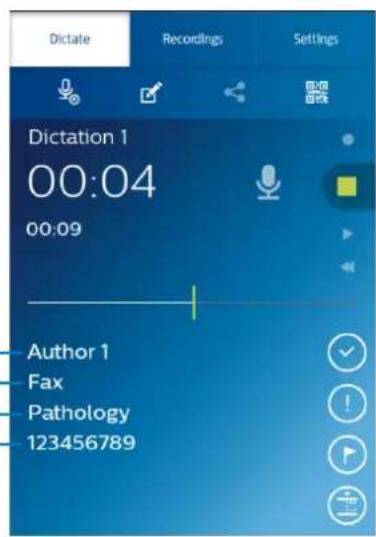
① Author name
② Worktype
③ Category
④ Barcode
Set up keywords
Set up keywords in order to be able to add them to your dictations.
To set up a keyword:
1 Go to Settings > Forwarding > Workflow in the dictation recorder app.
2 Select the label you want to add keywords to.
3 Enter a keyword.
4 Tap OK.
To add further keywords:
1 Go to Settings > Forwarding > Workflow in the dictation recorder app.
2 Select the label you want to add further keywords to.
3 Tap the options icon
4 Tap Add.
5 Enter a keyword.
6 Tap OK.
To set a default keyword:
1 After you have set up a keyword, go to Settings > Forwarding > Workflow.
2 Select a label that you have added keywords to.
3 Select a keyword from your keywords list.
→A pop-up window opens.
4 Tap Set as Default.
Add keywords to a dictation

Note
- Only the labels Category, Worktype, Author, and Delivery have drop-down lists available. All other labels are free-text fields.
- If you have scanned a barcode, the barcode number will automatically be displayed in the Properties window and on the recording screen.
1 Select a recording from your recordings list, and then tap the Properties icon 📋 on the recording screen.
Alternatively, go to your recordings list in the Recordings tab.
- Tap the options button • next to the relevant recording.
- Select Properties from the drop-down list. →The Properties window opens.
- To edit the properties, tap the options icon 1, and then tap Edit.
2 Tap the text field next to the labels Category, Worktype, Author, or Delivery.
→A drop-down list with your predefined keywords opens.
3 Select a keyword from the drop-down list.
4 Tap the free-text field next to the labels Barcode, Attribute, or Comment, and enter the desired text.
5 Tap the Back key when you're finished.
→ The Save recording details pop-up window appears.
6 Tap Save.
→Your selected keywords are displayed on the recording screen.
Add pictures
1 Select a recording from your recordings list, and then tap the Properties icon 📋 on the recording screen.
Alternatively, go to your recordings list in the Recordings tab.
- Tap the options button • next to the relevant recording.
- Select Properties from the drop-down list. →The Properties window opens.
- To edit the properties, tap the options icon 1 , and then tap Edit.
2 Tap the Add picture icon . → The Options pop-up window appears.
3 Tap Take a picture to take a photo straight away:
- Tap to take a photo.
- Tap√to confirm and add the picture to your recording.
Alternatively, tap Show Gallery to select a photo from your Gallery app:
- Tap the options icon
- Tap Device Gallery.
- Select a picture.
- Tap the Back key.
→The picture is displayed in the Properties window.
An icon is displayed next to the details of the relevant dictation in the recordings list.

Dictation 6
Jan 22, 2016 9:50:00 AM

To change an existing picture:
1 Select a recording from your recordings list, and then tap the Properties icon 📋 on the recording screen.
Alternatively, go to your recordings list in the Recordings tab.
- Tap the options button • next to the relevant recording.
- Select Properties from the drop-down list. →The Properties window opens.
- To edit the properties, tap the options icon 1 , and then tap Edit.
2 Tap the current picture. → The Options pop-up window appears.
3 Tap Take a picture to take a photo straight away.
- Tap to take a photo.
- Tap√o confirm and add the picture to your recording.
Tap Show Gallery to select a photo from your Gallery app.
- Tap the options icon
- Tap Device Gallery
- Select a picture.
- Tap the Back key. →The picture is displayed in the Properties window.
An icon is displayed next to the details of the relevant dictation in the recordings list.
Change dictation name
Change the name of your recordings in order to make it easier to identify and assign your dictations in your workflow solution, for example, SpeechExec software or SpeechLive.
To change the dictation name:
1 Select a recording from your recordings list in the Recordings tab.
2 Tap the dictation name on the recording screen, and edit the existing name. For more information about entering text, see Typing text.
Lock dictations/EOL
Use the End of letter function to lock important recordings and prevent them from being accidentally modified. By default, you can also finish your dictation and send it straight away when you tap the End of letter key.
To lock a dictation:
1 Tap the End of letter key while the recorder is in stop mode. Alternatively, press the function button on the right side of the recorder.
The dictation is now marked as locked on the recording screen and cannot be modified. It is also marked as locked in the recordings list:

Dictation 4
Jan 27, 2016 2:05:57 PM
→ The Send options pop-window appears if this setting is enabled in Settings > Forwarding > Send EOL dictations automatically.
2 To unlock a dictation and make changes to the recording, tap the End of letter key or press the function button again while the recorder is in Stop mode.
Mark priority dictations
Mark your recording as a priority dictation. With the priority option, it is easier to identify and prioritize urgent recordings during transcription.
To assign priority status to a dictation:
1 Tap the Priority key while the recorder is in stop mode. →The recording is marked as a priority dictation in your recordings list in the Recordings tab.

Dictation 4 Jan 22, 2016 9:43:49 AM
2 To change the priority status of a dictation, tap the priority key again while the recorder is in stop mode.
Add barcodes
With the dictation app's built-in barcode scanning function you can scan QR codes as well as one-dimensional (linear) barcodes. Your device detects barcodes on paper and on screens.

Note
- The maximum scanning distance depends on various factors, such as print quality and size of the barcode, distance between camera and barcode, or lighting conditions.
To add a barcode to a dictation or change a barcode:
- Tap the barcode icon while the recorder is in stop mode, and scan the barcode. →When the device recognizes the barcode, you will hear a notification sound. →The barcode is automatically displayed on the recording screen.
To add or change a barcode manually:
1 Tap the properties icon 📋 on the recording screen.
Alternatively, go to your recordings list in the Recordings tab.
- Tap the options button • next to the relevant recording.
- Select Properties from the drop-down list.
→The Properties window opens. - To edit the properties, tap the options icon 1 , and then tap Edit.
2 Tap the free-text field next to Barcode and enter the a barcode.
Send a dictation
Send an individual dictation or multiple dictations simultaneously, and choose between various forwarding options. Before you send your dictations, set up the relevant sending options in Settings > Forwarding. For more information, see Dictation app settings.
Send an individual dictation
1 Make sure that you are connected to a Wi-Fi network.
2 Tap on the recording screen.
→ The Send options pop-up window appears.
3 Select your desired sending option from the displayed list.
→The dictation is marked as sent in the recordings list.
Send multiple dictations simultaneously
1 Make sure that you are connected to a Wi-Fi network.
2 Open your recordings list from the Recordings tab.
3 Swipe right.
→Checkboxes appear on the left next to each
dictation.
4 Mark the checkboxes next to the dictations you want to send.
5 Tap the options icon in the bottom right corner, and then tap Send.
→The Send options pop-window appears.
6 Select your desired sending option from the displayed list.
→The dictation is marked as sent in the recordings list.
Send a dictation via email
Before you send a dictation via email:
- Set up an email account first. Alternatively, set up an email account when you send the recording via email for the first time. If you haven't set up an account yet, you will be prompted to create an account when you send the dictation. For more information about how to set up an email account, see Using email app.
- Make sure that the email option is enabled in Settings > Forwarding.
To send a dictation via email:
1 Make sure that you are connected to a Wi-Fi network.
2 Tap on the recording screen. → The Send options pop-up window appears.
3 Tap Send mail. →The Compose email window opens.
4 Enter the recipient's email address, and then tap to send the dictation.
→The dictation is marked as sent in the recordings list.
If you haven't set up an email account yet:
1 Make sure that you are connected to a Wi-Fi network.
2 Tap on the recording screen. → The Send options pop-up window appears.
3 Tap Send mail. → The Account setup window opens. Follow the instructions on the screen. For more information about how to set up an email account, see Using email app.
4 Tap the Back key twice. →The Compose email window opens.
5 Enter the recipient's email address, and then tap to send the dictation. →The dictation is marked as sent in the recordings list.
Send a dictation to Philips SpeechLive
Philips SpeechLive is a cloud dictation solution that allows you to store, access and share dictation files from anywhere in the world and around the clock while guaranteeing maximum file security.
For more information about how to use SpeechLive and SpeechLive services, see the SpeechLive Quick start guide for authors or the Quick start guide for administrators. Download the quicks starts guides at www.speechlive.com/us/support.
Before you send a dictation to SpeechLive:
- You need to have a valid SpeechLive account. If you are not using SpeechLive yet, create a new user account at www.speechlive.com.
- Set up your SpeechLive user account in the dictation app.
- Make sure that you have enabled SpeechLive in Settings > Forwarding > SpeechLive.
- You need to have a valid SpeechLive account. If you are not using SpeechLive yet, create a new user account at www.speechlive.com. - Set up your SpeechLive user account in the dictation app. - Make sure that you have enabled SpeechLive in Settings > Forwarding > SpeechLive.
Set up SpeechLive
Before you set up SpeechLive in the Philips dictation recorder app, you need to have a valid SpeechLive user account. If you are not using SpeechLive yet, create a new SpeechLive user account at www.speechlive.com.
To set up your SpeechLive account:
1 Make sure that you are connected to a Wi-Fi network.
2 Go to Settings > Forwarding > SpeechLive.
3 Tap the Email address field. → The SpeechLive login window opens.
4 Enter your SpeechLive email address and your password.
5 Tap Sign in. →Your SpeechLive account name is automatically assigned to your email address. →If you have more than one SpeechLive user account with the same email address and password, you will be prompted to select an account. Tap the desired account. →After you have set up your SpeechLive account, you will see a Syncing successful notification in your recordings list.
Send a dictation to SpeechLive
1 Make sure that you are connected to a Wi-Fi network.
2 Tap on the recording screen. → The Send options pop-up window appears.
3 Tap SpeechLive. →The dictation is marked as sent in the recordings list. →You can now access your dictations in the SpeechLive portal at login.speechlive.com.
Send a dictation to Philips SpeechLive transcription service
The Philips SpeechLive transcription service offers you a complete speech-to-text workflow solution. If you have assigned your dictation a priority status, you will receive important dictations even faster.
The SpeechLive transcription service also supports dictations with multiple speakers, such as interviews, telephone conversations, or meetings. As soon as a dictation is transcribed, the finished document is attached to your dictation in the SpeechLive portal. Depending on your SpeechLive notification settings, the document can additionally be sent to you via email.
For more information about the Philips SpeechLive transcription service, visit www.speechlive.com.
For information about how to manage dictations and notifications in your SpeechLive account, see the SpeechLive Quick start guide for authors and the Quick start guide for administrators. Download the quick start guides at www.speechlive.com/support.

Note
- You can only send dictations to the transcription service after you have purchased transcription minutes for the SpeechLive transcription service through your account administrator.
Before you send a dictation to the SpeechLive transcription service:
- You need to have a valid SpeechLive user account. If you are not using SpeechLive yet, create a new user account at www.speechlive.com.
- Set up your SpeechLive account in the dictation app.
- Make sure that you have enabled the transcription service in Settings > Forwarding > SpeechLive > Use transcription service.
Send a single-speaker dictation to transcription service
1 Make sure that you are connected to a Wi-Fi network.
2 Enable Single-speaker in Settings > Forwarding > SpeechLive > Use transcription service.
3 Open a recording from the Recordings tab.
4 Tap on the recording screen.
→ The Send options pop-up window appears.
5 Tap Transcription service.
→The sent dictation is marked in the recordings list
Send a multi-speaker dictation to transcription service

Note
- The multi-speaker option is only available in the Philips dictation recorder app if this feature is enabled in your SpeechLive account. For further information, contact your account administrator.
1 Make sure that you are connected to a Wi-Fi network.
2 Enable Multi-speaker in Settings > Forwarding > SpeechLive > Use transcription service.
3 Open a recording from the Recordings tab.
4 Tap on the recording screen.
→ The Send options pop-up window appears.
5 Tap Transcription service.
→The dictation is marked as sent in the recordings list.
Send a dictation to Philips SpeechLive speech recognition service
The Philips SpeechLive speech recognition service is a fast and efficient speech-to-text solution. Choose between multiple languages that you want your dictation to be transcribed in.

Note
- The SpeechLive speech recognition service languages are intended for native speakers. If you are a non-native speaker, the accuracy of the transcription might be affected.
As soon as a dictation is transcribed, the finished document is attached to your dictation in the SpeechLive portal. Depending on your SpeechLive notification settings, the document can additionally be sent to you via email.
For information about how to manage dictations and notifications in your SpeechLive account, see the SpeechLive Quick start guide for authors or the Quick start guide for administrators. Download the quick start guides at www.speechlive.com/support.

Note
- You can only send dictations to the speech recognition service after you have purchased transcription minutes for the SpeechLive speech recognition service through your account administrator.
Before you send a dictation to the SpeechLive speech recognition service:
- You need to have a valid SpeechLive user account. If you are not using SpeechLive yet, create a new user account at www.speechlive.com.
- Set up your SpeechLive account in the dictation app.
Send a dictation to speech recognition service
1 Make sure that you are connected to a Wi-Fi network.
2 Enable speech recognition in Settings > Forwarding > SpeechLive > Use speech recognition service.
3 Open a recording from the Recordings tab.
4 Tap on the recording screen.
→ The Send options pop-up window appears.
5 Tap Speech recognition.
→ The Select the language of your dictation pop-up window appears.
6 Select the language of your dictation by scrolling to the desired language.
7 Optionally, mark the Remember setting checkbox if you don't want the pop-up window to appear again. The dictation app saves this setting.
8 Tap Send.
→The dictation is marked as sent in the recordings list.
Set a default speech recognition language
Set a default language for the speech recognition service if you mainly record dictations in the same languages.
To set a default language:
1 Enable speech recognition in Settings > Forwarding > SpeechLive > Use speech recognition service.
2 Select your favorite language by scrolling to the desired language.
3 Mark the Remember language checkbox.
→The app will remember this setting for further dictations and you will not be prompted to select a language anymore.
Send a dictation to Philips SpeechExec mobile server
Philips SpeechExec mobile server is an on-premise workflow solution that offers you maximum file security due to real-time encryption.
Before you send a dictation to Philips SpeechExec mobile server:
- Your system administrator needs to set up and activate the server. Contact your system administrator for access data.
- Set up your mobile server account in the dictation app.
Set up mobile server
Before you set up Philips SpeechExec mobile server:
- Send your device ID to your system administrator via email as described below. Make sure that you have set up an email account first.
- Your system administrator needs to set up and activate the server. Contact your system administrator for access data.
To set up mobile server:
1 Make sure that you are connected to a Wi-Fi network.
2 Go to Settings > Forwarding > Mobile server.
3 Tap the options icon and then tap Send device ID.
→ The Compose email window opens.
4 Enter your system administrator's email address.
5 Tap to send the email.
→Your device ID is sent to your system administrator.
6 Enter the username, password and URL (Internet address) provided by your system administrator.
7 Optionally, change the server name.
Send a dictation to mobile server
1 Make sure that you are connected to a Wi-Fi network.
2 Tap on the recording screen.
→ The Send options pop-up window appears.
3 Tap Mobile server.
→The dictation is marked as sent in the recordings list.
Send a dictation to Philips dictation hub
Philips dictation hub is a mobile server hosted by Philips. With the dictation hub, you can send your dictation files to a predefined email address or to Philips SpeechExec workflow software. If you have special requirements, for example, keyword-based data transfer or sending dictations to an FTP location, contact your supporting Philips partner you purchased the device from.

Note
- To have your dictation files transcribed, your transcriptionist needs to have SpeechExec software installed.
Before you send a dictation to Philips dictation hub:
- You need to have a valid dictation hub account.
- Set up your dictation hub account in the dictation app.
Set up dictation hub

Note
- If you are not using the dictation hub yet and are creating a new dictation hub user account, you will first sign up for a 30-day trial. To purchase an account after the trial period, contact your supporting Philips partner you purchased the device from.
To create a new dictation hub user account or log in to an existing account:
1 Go to Settings > Forwarding > Dictation hub.
→If you are setting up your dictation hub account for the first time, a welcome screen opens.
2 On the welcome screen, tap Yes.
3 On the End user license agreement screen, tap Accept.
4 Enter the recipient's email address.
5 Enter your own email address and your initials.
6 Tap Next.
7 Select an audio format, and then tap Next.
8 Select a language for your dictation hub workflow emails, and then tap Connect.
Send a dictation to dictation hub
1 Make sure that you are connected to a Wi-Fi network.
2 Tap on the recording screen.
→ The Send options pop-up window appears.
3 Tap Dictation hub.
→The dictation is marked as sent in the recordings list.
Send a dictation via Philips SpeechExec software
With Philips SpeechExec workflow software, you can download all new dictations from your connected SpeechAir to the local Finished folder in SpeechExec.
For more information about how to download dictations from SpeechAir to SpeechExec, see Download dictations to SpeechExec.
For information about how to install SpeechExec, see Install SpeechExec on your computer.
Additionally, configure delivery options for SpeechAir with the SpeechAir wizard in SpeechExec. SpeechExec uploads the preconfigured delivery options to the dictation recorder app on SpeechAir. Choose between the delivery options SpeechLive speech recognition, SpeechLive transcription service, email, or Dragon speech recognition. If you select a delivery method in the dictation recorder app and connect your device to SpeechExec, the software will automatically send your new dictations via the delivery method preselected in the dictation recorder app.
Configure delivery methods for SpeechAir
1 Start SpeechExec.
2 Make sure that SpeechAir is turned on and connect the device to your computer.
3 Select your desired delivery methods in the SpeechAir wizard in SpeechExec. For more information, see Configure SpeechAir in SpeechExec.
→After you have finished the SpeechAir wizard configuration, SpeechExec uploads the selected delivery methods, author name and worktypes to the dictation recorder app on SpeechAir.
4 Disconnect SpeechAir from SpeechExec.
Set a default delivery method
1 Configure delivery options for SpeechAir as described in Configure delivery methods for SpeechAir.
2 Select the desired delivery method in the dictation recorder app in Settings > Forwarding > Workflow > Delivery before you send your dictation.
→ The Delivery pop-up window appears.
3 Tap Set as Default.
→SpeechAir will save this setting and remember the selected default delivery method each time you download dictations from SpeechAir to SpeechExec.
Change the delivery method for individual dictations

Note
- If you change the delivery method for your current dictation, you don't change the default delivery option. SpeechAir won't remember this setting for your next dictation. If you want to change the default delivery method, proceed as described in Set a default delivery method in the dictation app.
1 Configure delivery methods in SpeechExec as described in Configure delivery methods for SpeechAir.
2 Tap the Properties icon 📋 on the recording screen of the dictation recorder app.
3 Tap the text field next to Delivery.
4 Select a delivery option from the drop-down menu.
Send a dictation via SpeechExec
1 Configure delivery options for SpeechAir as described in Configure delivery methods for SpeechAir.
2 Optionally, tap the Properties icon on the recording screen of the dictation recorder app if you want to change the delivery method.
- Tap the text field next to Delivery.
- Select a delivery option from the drop-down menu.
3 Connect your SpeechAir to your computer.
4 Start SpeechExec on your computer.
→SpeechExec downloads all new dictations from SpeechAir and sends them via the delivery method selected in the dictation recorder app.
→By default, your dictations are deleted from your recorder after the download is finished.
Send a dictation to a network folder
Share your dictations in folders and subfolders over the network. Everyone who uses the same network can access your dictations in the selected folders.

Note
- To be able to use this feature, make your destination folder accessible over the network.
- Make sure that your device is connected to the right network.
For more information, contact your system administrator.
Before you send a dictation to a network folder:
- Contact your system administrator for access data.
- Set up your network folder settings in the dictation app.
Set up your network folder settings
1 Tap Settings.
2 Tap Forwarding.
3 Tap Network folder.
4 Enter the username and password provided by your system administrator.
5 Enter the folder path provided by your system administrator. This is an IP address starting with smb://, such as smb://111.111.111.11/Data/XY.
6 Optionally, select a subfolder type. Your destination folder will be named according to the selected subfolder type Author or Serial number.
7 Tap the Back key.
→ The Save network folder pop-up window appears.
8 Tap Save.
Send a dictation to a network folder
1 Make sure that you are connected to a Wi-Fi network.
2 Tap on
→ The Send options pop-up window appears.
3 Tap Network folder.
→The dictation is marked as sent in the recordings list.
Using data lists
Import a .csv file with data, such as patient data, from a web server into your SpeechAir and use it in the dictation recorder app. You also have the option to select a data list refresh interval. After your data list has been imported, it will be updated at the defined interval.

Note
- The data list must contain at least three rows and one property, such as author, patient name, or department. A property may contain a maximum of 30 characters. You can add a maximum of 2000 rows and up to 10 properties to each data list.
- Don't use blank spaces, neither in the data list name nor in the data list items.
- Pay attention to upper and lower case spelling.
- If your data list can't be downloaded, check the Internet address and your Wi-Fi connection.
Import a .csv data list
1 Make sure that you are connected to a Wi-Fi network.
2 Tap Settings in the dictation app.
3 Tap Connectivity.
4 Tap URL and enter the Internet address where your .csv file is stored.
→The data list is downloaded from the web server and can be used now.
Set a data list refresh interval
1 Tap Settings in the dictation app.
2 Tap Connectivity.
3 Tap Refresh interval and select the desired interval for your data list to be updated.
Use a data list in the dictation app
1 Open a dictation from the recordings list or start a new dictation.
2 Tap the Properties icon on the recording screen.
3 The Options pop-up window appears.
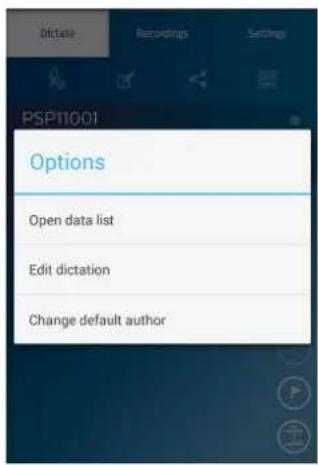
4 Tap Open data list.
5 Select an item from your data list.
→ The Details pop-up window with all details related to that item appears.
6 Tap OK.
→The recording screen opens. The details related to the selected data item are added to your dictation.
→The item is marked as used in your data list.
Data list options
When you open the data list as described in Use a data list in the dictation app, you can choose between various options for your data list. Scan a barcode, change the default author, select how you want your data to be filtered, or search for data list items.
To open the data list options:
- Tap the options icon on the Data list window.
Scan a barcode
Use the barcode feature to find a data list item that matches the scanned barcode.
1 Tap the options icon on the Data list window to open the data list options.
2 Swipe down and tap Barcode.
Alternatively, press the function button on the right side of the device.
3 Scan the barcode or the QR code.
→The scanned barcode is compared to your data list.
→If no item was found that matches the barcode, you will hear a notification beep.
→ If a match is found, the Details pop-up window with all details related to that item appears. The barcode matching an entry in the data list item is highlighted in blue color.
→If more than one item was found that matches the barcode, black arrows appear next to the OK button.

4 Tap OK on the Details pop-up window, or tap the arrow next to the OK button to scroll to the desired data list item.
→The recording screen opens.
Change default author
If you want to change the default author, first set up different authors in Settings > Forwarding > Workflow > Author. For more information, see Set up keywords.
To change the author:
1 Tap the options icon on the Data list window to open the data list options.
2 Swipe down and tap Change author.
→ The Author window opens.
3 Select another author from the list.
→The Author pop-up window appears.
4 Tap Set as Default.
→The selected author is now set as the default author for all further dictations until you change the default author again.
Filter data items
To filter data list items, either use the search function or the data list options.
To filter data list items:
1 Tap and enter text into the search bar to search for an item.
2 Tap the options icon to select additional filters, such as done items or alphabetical sorting.
If no items are found, the reason might be too strong filtering. In this case, tap the options icon on the Data list window to open the data list options. Then swipe down and tap All items unfiltered.
Dictation app settings
Change various settings in your dictation app according to your own preferences. Adjust settings related to audio control, forwarding, security, and user interface for the most efficient and comfortable recording with your SpeechAir and the Philips dictation recorder app.
You can see all settings in the Settings tab of the dictation recorder app. Find these options described in the following table.

Note
- Depending on the configuration of your device, some of the settings might be locked.
Audio settings
Setting Function
Purge dictations · Tap Purge dictation
intervals to set an interval for your dictations to be automatically deleted from your device. For more information, see Delete a dictation.
Audio format · Select the recording
quality for your dictations by choosing between the audio formats WAV (PCM) and DS2. DS2 is preset as the standard audio format.
Microphone sensitivity · Adjust the microphone sensitivity to avoid recording background noises and to adapt to the recording environment. For more information, see Microphone sensitivity.
Microphone directivity
- Adjust the settings for directivity in hand and directivity on desk. Choose if you want to use the directional or the 360° microphone when you are dictating with your device in the hand or on the desk. For more information, see Microphone directivity.
Setting Function
Voice activation · Enable voice activation
to automatically start recording when you begin speaking, and pause recording when you stop speaking. For more information, see Voice-activated recording.
Record notification beep · Enable the record notification beep to hear a beep sound when you start recording.
Auto backspace · Tap Jump back to select
the number of seconds you want to jump back in your recordings when you rewind them.
Forwarding
Setting Function
Email · Enable this feature to be
able to send dictations via email.
SpeechLive · Enable this feature to be
able to send dictations to SpeechLive. For more information, see Send a dictation to SpeechLive.
- Set up your SpeechLive account. For more information, see Set up SpeechLive.
- Enable the SpeechLive transcription service and speech recognition service to be able to send dictations to the transcription service and speech recognition service. For more information, see Send a dictation to Philips SpeechLive transcription service and Send a dictation to Philips SpeechLive speech recognition service.
Mobile server · Set up your mobile server
account to be able to send dictations via the Philips Speechexec mobile server. For more information, see Send a dictation to Philips SpeechExec mobile server and Set up mobile server.
Setting Function
Dictation hub · Enter a predefined
recipient's address and set up your dictation hub account to be able to send dictations to Philips dictation hub. For more information, see Send a dictation to Philips dictation hub and Set up dictation hub.
Network folder · The network folder
option is a comfortable way to share dictations via defined folders and its subfolders over the network. Everyone who uses the same network can access your dictation files in the selected folders. For more information, see Send a dictation to a network folder.
Workflow
- Define one or more keywords that you can assign to each recording. Use keywords for automatic file routing and to identify recordings more easily. For more information, see Add keywords to a dictation.
Send EOL dictations automatically
- Enable this function to automatically be prompted to select a sending option when you mark a dictation as locked.
Security
Setting
Function
Encryption
- Tap Encryption to define a 16-character encryption key. If you have selected DS2 as the standard audio format, the encryption key provides real-time encryption of your dictations while you are recording.
- The encryption key also provides additional encryption of dictations that are sent to Philips dictation hub or Philips SpeechExec mobile server.
Setting Function
Use encryption · Enable encryption to use
the defined encryption key and to protect your dictations from unauthorized use or file playback.
User interface
Setting Function
Display · Enable the setting
Keep display on during recording if you don't want the display to turn off while you are recording. The predefined length of time before your screen turns off when the device is not used (see Power-saving mode) is disabled then.
Slide switch · Customize the
functionality of the slide switch. By default, the slide switch is set to International. To change the slide switch assignment, go to Settings
User interface > Slider assignment and select Philips, International, or German.
Philips


①/■ (function button)

International


German

■/∅ (function button)


Function button · Customize the
functionality of the right function button on your device. Tap Button assignment and select the desired function you want to assign to the function button.
Connectivity
Setting Function
Remote management · Connect to your remote
device management server. Configurations managed via the Philips remote device management software will then be automatically uploaded to your dictation recorder app. For more information, see Connect to the remote device management server.
- Select your desired refresh interval for retrieving new configurations. Configuration updates will then be uploaded to your dictation recorder app at the defined interval.
Data list · Import .csv files with data,
such as patient data, from an Internet address into your SpeechAir by entering your data list URL (Internet address).
- Select your desired data list refresh interval. After your data list has been imported, it will be updated at the defined interval. For more information, see Using data lists.
Help
Setting Function
Technical support · Send an email to our
technical support if you have technical issues with your dictation recorder app or if you want to send us feedback on the app.
Quick start guide
- Open the quick start guide to get a quick overview of the main dictation app functions.
About
• See information about your dictation app version.
- Follow the links to our Terms and conditions and to our Privacy policy.
6 Device and data management
Transfer data to and from the computer
Move your files from the device to the computer, or vice versa.

Caution
- Don't disconnect the USB cable from the device while you are transferring files. This might cause data loss.
- Don't delete any preinstalled folders from SpeechAir. Deleting them might cause malfunctioning of the device software.

Note
- For reasons of data security, the operation of the device is disabled while the device is connected to the computer.
To transfer data from SpeechAir to the computer:
1 Connect the device to the computer via micro USB cable.
Alternatively, connect the device to the computer by using the docking station. Make sure that you use the data transfer micro USB port marked with ⚪ on the docking station.
→The green transfer LED on the docking station illuminates.
2 Open Windows Explorer on a Windows computer, or open Finder on a Mac computer.
→SpeechAir is recognized as an external drive.
3 Double-click the SpeechAir drive.
→The content of your SpeechAir is displayed in a new window.
4 Select the desired files in the SpeechAir window and copy, cut or drag them to the desired location on your computer.
To transfer data from the computer to SpeechAir:
1 Connect the device to the computer via micro USB cable.
Alternatively, connect the device to the computer by using the docking station. Make sure that you use the data transfer micro USB port marked with 📋 on the docking station.
→The green transfer LED on the docking station illuminates.
2 Open Windows Explorer on a Windows computer, or open Finder on a Mac computer.
→SpeechAir is recognized as an external drive.
3 Double-click the SpeechAir drive.
→The content of your SpeechAir is displayed in a new window.
4 Select the desired files on your computer and copy, cut or drag them to the desired location on your SpeechAir.
Reset your device and data
Device reset
If you should encounter problems with your device software, for example, the software freezes, the device works slowly or apps don't respond, you can reset your device and restart it.
When you reset your SpeechAir, you won't lose any saved data. However, if you reset the device while using a software program or app, the device shuts down all active programs and unsaved data might get lost.
To reset your device:
1 Press and hold the reset button on the right side of your device by using a small, pointed object, for example, a paper clip.

2 Restart your device by pressing and holding the Power button until the device gently vibrates.
Factory data reset
You can reset your device to its original system state and delete all data. After a factory data reset, the device is restored to its default settings—the way it was when you first purchased it and turned it on. Any apps you installed, data you added and settings you customized on your device will be lost. Also the firmware will be set to its factory state and needs to be updated again.

Caution
- Performing a factory data reset will delete all data on your device. Before you perform a factory data reset, back up any important data saved on your device.
To perform a factory data reset:
1 Tap Settings on the Home screen or on the All Apps screen.
2 Swipe down and tap Backup & reset.
3 Tap Factory data reset.
→The Factory data reset window opens.
4 Tap Reset SpeechAir.
→The Reset window opens.
5 Tap Erase everything.
→SpeechAir turns off and restarts automatically.
Updating your device
Your device is controlled by an internal program called firmware. As a part of ongoing product maintenance, the firmware is upgraded and errors are corrected.
It is possible that a newer version (an 'update') of the firmware has been released since you purchased the device. In this case, you can easily update your device to the latest version.
Update your device manually by copying the update file from our website to your device. Alternatively, update the firmware with the supplied Philips SpeechAir management software. You can find the software on the supplied USB flash drive or implemented in Philips SpeechExec software. For more information, see Philips SpeechAir management software.

Caution
- Before you update the firmware, make sure that your device has at least 30% battery power left. This helps to prevent the power supply being interrupted during the update.
- Before you use other device functions, wait until the firmware update is complete. Failures in the firmware update might result in the device's malfunctioning.

Note
• To find out about new firmware versions, regularly check our website at www.philips.com/dictation.
- Before you can use Philips SpeechAir management software, first install the software. For more information, see Install SpeechAir management software.
Update the firmware manually
1 Download the firmware update file update.img from the website www.philips.com/dictation to your computer.
2 Make sure that SpeechAir is turned on and connect the device to your computer.
3 Copy the firmware update file to the SpeechAir folder on your computer. You can find the SpeechAir folder in Windows Explorer on Windows computers, and in Finder on Mac computers.
4 Disconnect the device from the computer.
→The Update pop-up window appears on your SpeechAir.
5 Tap Update now. If you want to update the firmware at a later time, tap Postpone for 2 hours. You can postpone the update three times. Afterwards, the device will inform you that the firmware will automatically be updated.
→SpeechAir turns off and starts the installation of the update file.
→You can see the progress of the installation on the screen.
When the firmware update has finished, SpeechAir restarts automatically.
Update the firmware with SpeechAir management software

Note
- On Mac computers, it is only possible to update the firmware manually with the update.img file as described in Update the firmware manually.
1 Download the firmware update file update.safw from the website www.philips.com/dictation to your computer.
2 Start Philips SpeechAir management software.
3 Make sure that SpeechAir is turned on and connect the device to your computer.
4 On the device configuration window of the software, go to SpeechAir > Firmware, and select the firmware file on your computer.

5 Click Send to SpeechAir on the tool bar.
→A pop-up window confirming the successful configuration transfer appears.
6 To apply the configuration to SpeechAir, disconnect the device from the computer.
→The Update pop-up window appears on your SpeechAir.
7 Tap Update now. If you want to update the firmware at a later time, tap Postpone for 2 hours. You can postpone the update three times. Afterwards, the device will inform you that the firmware will automatically be updated.
→SpeechAir turns off and starts the installation of the update file.
→You can see the progress of the installation on the screen.
When the firmware update has finished, SpeechAir restarts automatically.
7 Philips SpeechAir management software
Philips SpeechAir management software allows advanced configurations of your SpeechAir that can't be performed directly on the device. You can update your device's firmware, define an NTP server address, or disable the camera function. All other settings related to your SpeechAir can be changed directly on the device.
Additionally, the software enables you to configure, change and control all settings for the Philips dictation recorder app. Some of these settings are also accessible directly in the app. Advanced options which are only available in the management software include configuring data list settings or defining text fields to be displayed on the recording screen, for example the author or worktype.
For more information about settings in the dictation recorder app, see Dictation app settings.
Install SpeechAir management software
If you have purchased SpeechAir without SpeechExec software, you will find SpeechAir management software on the supplied USB flash drive.
If you have purchased SpeechAir with SpeechExec software, you will find SpeechAir management software implemented in SpeechExec. For more information about how to install SpeechExec, see Install SpeechAir management software.
Install SpeechAir management software on your computer
1 Connect the supplied USB flash drive to your computer.
2 Open Windows Explorer on your computer.
3 Double-click the USB flash drive in Windows Explorer.
→The content of the USB flash drive is displayed in a new window.
4 Double-click the file PhilipsSpeechAirManagementSoftwareSetup.exe → The InstallShield Wizard window opens.
5 Follow the on-screen instructions.
6 Click Finish when the installation process has finished.
→The management software is now installed on your computer.
Start SpeechAir management software from SpeechExec
1 Install SpeechExec software as described in Install SpeechExec on your computer.
2 Make sure that SpeechAir is turned on and connect the device to your computer.


3 Click or on the tool bar in SpeechExec. → The General Settings window opens.
4 In the General Settings window, click SpeechAir configuration > Device configuration > Start SpeechAir management software.
Configure SpeechAir with SpeechAir management software
The management software allows you to configure various settings for your SpeechAir and Philips dictation recorder app. The configuration can be immediately transferred to your connected SpeechAir.

Note
- Before you start Philips SpeechAir management software, connect SpeechAir to your computer. The management software can only be used with a connected device.
- Depending on your device's preset configurations, some settings might be locked. In this case, you can't configure any settings with SpeechAir management software.
Device configuration screen
When you start the management software, you will see a welcome screen. Once you connect SpeechAir to your computer, you will see the device configuration screen.
The tool bar contains the following options:

Load default

Open file

Save file

Save file as

Send to SpeechAir

Load from SpeechAir
- Click Load default to discard all your changes and revert back to the factory settings.
- Click Open file to open a configuration previously saved on your computer.
- Click Save file to save the current configuration to your computer.
- Click Save file as to save the current configuration to your computer with a different name.
- Click Send to SpeechAir to transfer the current configuration to your SpeechAir.
- Click Load from SpeechAir to download the current SpeechAir configuration to the management software.
Below the tool bar, you will see two sections: a configuration section for SpeechAir and a configuration section for the Philips dictation recorder app. You can set your desired configurations for SpeechAir or the Philips dictation recorder app in the relevant section.
Philips SpeechAir operating system settings
Philips dictation recorder app settings
Configure SpeechAir and Philips dictation recorder app settings
1 Start the management software and connect your SpeechAir to the computer.
→The device configuration screen opens.
2 To configure settings for SpeechAir, click the arrow in the SpeechAir section. To configure settings for the dictation recorder app, click the arrow in the Philips dictation recorder app section.
Philips SpeechAir operating system settings

SpeechAir
Philips dictation recorder app settings
General
Audio settings
Network folder
Forwarding - Email
Forwarding - Mobile server
Forwarding - Dictation hub
Forwarding - SpeechLive
Workflow
Security
3 Configure your desired settings.
→Whenever you change a setting, the relevant setting is highlighted in green and a pencil icon appears next to it.
Author 2
Andrea M.
4 After you have finished your configuration, click Save file, Save file as or Send to SpeechAir on the tool bar.
8 Philips remote device management software
Manage configurations with the Philips remote device management software
With the Philips remote device management software, your IT administrator can remotely configure your SpeechAir operating system and your Philips dictation recorder app. Individual user settings can be centrally managed, updated and maintained. Additionally, the firmware for the operating system can also be remotely updated. All changes can then be automatically uploaded to your SpeechAir or your dictation recorder app.
You also have the option to select a refresh interval for retrieving new configurations. Configuration updates will then be uploaded to your device or your dictation recorder app at the defined interval.

Note
- To retrieve configuration updates, you must be connected to the remote device management server either via Internet or your company's local network.
Connect to the remote device management server
To retrieve remotely managed configurations for your SpeechAir operating system or the dictation recorder app, you have to connect to the remote device management server. You only need to enter the Internet address (URL) of the server and optionally a domain, username and password provided by your IT administrator. Once you have connected to the server, all future configurations will automatically be uploaded to your SpeechAir operating system or the dictation recorder app.
For configurations related to the SpeechAir operating system:
1 Make sure that you are connected to a Wi-Fi network or your company's local network.
2 Tap Settings on the Home screen or on the All Apps screen.
3 Tap More... > Remote management.
4 Tap URL and enter the correct Internet address of the server provided by your IT administrator.
5 If your IT administrator has set a domain, username and password for you to access the server, activate the checkbox next to User authentication. Then enter the correct domain, username and password provided by your IT administrator.
6 Tap Test connection... to connect to the server.
For configurations related to the dictation recorder app:
1 Make sure that you are connected to a Wi-Fi network or your company's local network.
2 Open the dictation recorder app.
3 Tap Settings > Connectivity.
4 In the Remote management section, tap URL and enter the correct Internet address of the server provided by your IT administrator.
5 If your IT administrator has set a domain, username and password for you to access the server, activate the checkbox next to User authentication. Then enter the correct domain, username and password provided by your IT administrator.
6 Tap Test connection... to connect to the server.
Set a refresh interval for synchronizing configuration updates
For configurations related to the SpeechAir operating system:
1 Tap Settings on the Home screen or on the All Apps screen.
2 Tap More... > Remote management.
3 Tap Refresh interval and select the desired interval for operating system configurations to be updated.
For configurations related to the dictation recorder app:
1 Open the dictation recorder app.
2 Tap Settings > Connectivity.
3 In the Remote management section, tap Refresh interval and select the desired interval for dictation app configurations to be updated.
Receive configuration updates
For configurations related to the SpeechAir operating system:
1 Make sure that you are connected to a Wi-Fi network or your company's local network.
2 When a configuration update is available, the Update pop-up window appears on your SpeechAir. Tap Update now.
If you want to update the configurations at a later time, tap Postpone for 2 hours. You can postpone the update three times. Afterwards, the device will inform you that the configuration will automatically be updated.
→SpeechAir turns off and starts the update process.
When the update has finished, SpeechAir restarts automatically.
For configurations related to the dictation recorder app:
The configurations for the dictation recorder app are updated in the background without further user interaction.
9 Using SpeechAir with Philips SpeechExec software
If you use Philips SpeechExec workflow software, you can connect your SpeechAir to your computer and download your dictations from your device to SpeechExec software. Your secretary can access your dictations in SpeechExec transcription software. This way you can forward your dictations to transcription without having to use an Internet connection.
Additionally, you can configure delivery options for SpeechAir with the SpeechAir wizard in SpeechExec. SpeechExec uploads the preconfigured delivery options to the dictation recorder app on SpeechAir. The author name and worktypes defined in SpeechExec are also uploaded to the dictation recorder app.
Choose between the delivery options SpeechLive speech recognition, SpeechLive transcription service, email, or Dragon speech recognition. If you select a delivery method in the dictation recorder app and connect your device to SpeechExec, the software will automatically send your new dictations via the delivery method preselected in the dictation recorder app.
For more information about SpeechExec, refer to the SpeechExec user manual or the online help in SpeechExec. Download the SpeechExec user manual at www.dictation.philips.com/support.
Install SpeechExec on your computer
Before you connect your SpeechAir to SpeechExec software, you first need to install the software on your computer.
If you have purchased SpeechAir including SpeechExec software (SpeechAir PSP1200), you will find the software on the supplied USB flash drive. The necessary license key is printed on a sticker on the USB flash drive.
To install SpeechExec on your computer:
1 Connect the supplied USB flash drive to your computer.
2 Open Windows Explorer on your computer.
3 Double-click the USB flash drive in Windows Explorer.
→The content of the USB flash drive is displayed in a new window.
4 Double-click the Autorun.exe file.
5 Follow the on-screen instructions.
6 Click Finish when the installation process has finished.
→SpeechExec is now installed on your computer.
Configure SpeechAir in SpeechExec
Generally, you don't need to perform any configurations for using SpeechAir with SpeechExec. After installation, the software is immediately ready for use with SpeechAir. However, you can change basic settings of your SpeechAir device in SpeechExec using the SpeechAir wizard.
With the SpeechAir wizard, you can also configure the delivery methods you want to use in the dictation recorder app.
Configure SpeechAir with the SpeechAir wizard
1 Start SpeechExec.
2 Make sure that SpeechAir is turned on and connect the device to your computer.
3 Click or on the tool bar in SpeechExec. → The General Settings window opens.
4 In the General Settings window, click SpeechAir configuration > Device configuration, and then click Open SpeechAir wizard.
→The SpeechAir wizard opens.
5 Follow the on-screen instructions.
6 Click Finish in the Summary section.
→Your settings have been applied and the configuration is finished.
7 Disconnect SpeechAir from your computer.
Configure delivery methods for SpeechAir
If you connect SpeechAir to SpeechExec, the preconfigured delivery methods will be uploaded from the software to SpeechAir. Each time you connect SpeechAir to SpeechExec, the software will automatically download all new dictations from your device and send them via the preconfigured delivery methods SpeechLive speech recognition, SpeechLive transcription service, email, or Dragon speech recognition.

Note
- If you want to use SpeechLive speech recognition or SpeechLive transcription service as delivery methods, you first need to allow SpeechExec to download your dictations to your SpeechLive folder.
Click Settings > SpeechAir Configuration > SpeechAir and SpeechLive. In the Location for download window, select In SpeechLive folders from the dropdown menu. - Before you can send dictations to SpeechLive services, you need to have a valid SpeechLive account. If you are not using SpeechLive yet, create a new user account at www.speechlive.com.
To configure delivery methods:
1 Start SpeechExec.
2 Make sure that SpeechAir is turned on and connect the device to your computer.
3 Click or on the tool bar in SpeechExec. → The General Settings window opens.
4 In the General Settings window, click SpeechAir configuration > Device configuration, and then click Open SpeechAir wizard.
→The SpeechAir wizard opens.
5 Follow the on-screen instructions until you reach the USB download section.
6 Make sure that the checkbox 'Yes, I would like to use...' is marked, and select your desired delivery methods.
7 Click Finish in the Summary section.
→Your settings have been applied and the configuration is finished.
8 Disconnect SpeechAir from your computer.
Set a default delivery method in the dictation app
1 Configure delivery options for SpeechAir as described in Configure delivery methods for SpeechAir.
2 Select the desired delivery method in the dictation recorder app in Settings > Forwarding > Workflow > Delivery before you send your dictation.
→ The Delivery pop-up window appears.
3 Tap Set as Default.
→SpeechAir will save this setting and remember the selected default delivery method each time you download dictations from SpeechAir to SpeechExec.
Change the delivery method for individual dictations

Note
- If you change the delivery method for your current dictation, you don't change the default delivery option. SpeechAir won't remember this setting for your next dictation. If you want to change the default delivery method, proceed as described in Set a default delivery method.
1 Configure delivery methods in SpeechExec as described in Configure delivery methods for SpeechAir.
2 Tap the Properties icon 📋 on the recording screen of the dictation recorder app.
3 Tap the text field next to Delivery.
4 Select a delivery option from the drop-down menu.
Send a dictation via SpeechExec
1 Configure delivery methods in SpeechExec as described in Configure delivery methods for SpeechAir.
2 Connect your SpeechAir to your computer.
3 Start SpeechExec on your computer.
→SpeechExec downloads all new dictations from SpeechAir and sends them via the delivery method selected in the dictation recorder app.
→By default, your dictations are deleted from your recorder after the download is finished.
Download dictations to SpeechExec
If you don't want to use Wi-Fi to send your dictations, connect SpeechAir to your computer and download your dictations from the recorder to SpeechExec workflow software. The downloaded dictations are saved to a local SpeechExec folder. Your secretary can access your dictations via SpeechExec Pro Transcribe software. This way you can exchange your dictations with your transcriptionist without having to use an Internet connection.

Note
• To exchange dictation files with your transcriptionist within SpeechExec software, your secretary needs to have SpeechExec Pro Transcribe software installed.
Select your desired download settings
1 Start SpeechExec.
2 Click Settings on the tool bar in SpeechExec. → The General Settings window opens.
3 In the General Settings window, click SpeechAir configuration > Download.
4 Select your desired settings.
Download dictations from SpeechAir to SpeechExec
- Make sure that SpeechAir is turned on and connect the device to your computer.
→By default, SpeechExec automatically downloads all new dictations from SpeechAir. To change this setting, proceed as described in Select your desired download settings.
→A pop-up window in SpeechExec appears and confirms that your dictations have been downloaded to SpeechExec.
→By default, your dictations are deleted from your recorder after the download is finished.
10 Service and support
Don't perform any maintenance operations that aren't described in this user manual. Don't disassemble the device into its component parts to carry out repairs. The device may only be repaired in authorized service centers.
Display device information
See various information about your device, such as the serial number or model number.
1 Tap Settings on the Home screen or on the All Apps screen.
2 Scroll down to the very bottom and tap About SpeechAir.
Display information about Philips dictation recorder app
See information about your dictation app version, our Terms and conditions, and our Privacy policy.
1 Open the app on the Home screen or on the All Apps screen.
2 Tap the Settings tab.
3 Tap About.
Open Quick start guide
Open the quick start guide to get a quick overview of the main dictation app functions.
1 Open the app on the Home screen or on the All Apps screen.
2 Tap the Settings tab.
3 Tap Help.
4 Tap Quick start guide > Start now.
Send email to technical support
Send an email to our technical support if you have technical issues with your dictation recorder app or if you want to send us feedback on the app.
1 Open the app on the Home screen or on the All Apps screen.
2 Tap the Settings tab.
3 Tap Help.
4 Tap Technical support > Submit issue.
→ The Compose email window opens.
→Our technical support's email address is automatically inserted.
5 Compose an email and send it to us.
Contact our supporting Philips partners
If you have any questions on your SpeechAir or experience technical issues, contact one of our supporting Philips partners. The local partner you purchased your SpeechAir from will strive to answer your questions and to solve your problem as soon as possible.
Open source software
This product may contain open source software. Speech Processing Solutions GmbH hereby offers to deliver, upon request, a copy of the complete corresponding source code for the copyrighted open source software packages used in this product for which such offer is requested by the respective licenses. This offer is valid up to three years after product purchase. To obtain the source code, please write in English to: info@speech.com.
Troubleshooting
Find the most common problems you could encounter with SpeechAir in the following table. If you are unable to solve the problem with the information below, contact the supporting Philips partner you purchased the device from.
| Problem Possible cause Solution | ||
| The device doesn't turn on. · The battery has run out of power. | · Charge the device for a while and then turn it on again. | |
| The device doesn't respond. · There is a problem with the operating system. | · Try to turn the device off and then restart it.· If you can't turn the device off or if turning the device off doesn't solve the problem, perform a device reset. For more information, seeDevice reset. | |
| The device doesn't play back recordings. · The volume is off or too low. | · Turn on or turn up the volume. | |
| · The playback marker on the recording screen is placed at the end of the recording (dictation recorder app). | · Rewind the recording and play back the dictation again, or drag the playback marker on the recording screen to the left (dictation recorder app). For more information, seeRewind a recording. | |
| · You are outside the recording screen (dictation recorder app). | · Go back to the recording screen and restart the playback (dictation recorder app). | |
| I can't hear anything from the speakers. · The headphones are connected to the device. | · Unplug the headphones. | |
| · The volume is off or too low. | · Turn on or turn up the volume. | |
| The recording doesn't start. · The battery has only 8% or less power left (dictation recorder app). | · Charge the device before you start recording or connect the device to the power supply while recording. | |
| · You are outside the recording screen (dictation recorder app). | · Go back to the recording screen and start the recording (dictation recorder app). | |
| I can't download a data list. · Wi-Fi isn't turned on or you aren't connected to a Wi-Fi network. | · Make sure that Wi-Fi is turned on and that you are connected to a Wi-Fi network. | |
| · The Internet address (URL) where your data list is stored is incorrect or invalid. | · Make sure that the Internet address you entered is correct and valid (dictation recorder app). For more information, seeImport a .csv data list. | |
| The recording quality is poor. · The microphone sensitivity is too high. | · Change the microphone sensitivity to medium or low (dictation recorder app). For more information, see Microphone sensitivity. | |
| · You recorded the dictation with the built-in 360° meeting microphone. | · Change the microphone directivity and use the built-in directional microphone (dictation recorder app). For more information, see Microphone directivity. | |
| · The distance between your mouth and the built-in microphone was too short. | · Try to keep a distance of approx. 10 cm (4") between your mouth and the microphone while recording. | |
| · You recorded a dictation with an external microphone and connected it to the wrong jack (i.e. headphones jack). | · Disconnect the external microphone and connect it to the microphone jack on SpeechAir. | |
| There's too much background noise in my recording. | · The microphone sensitivity is too high. | · Change the microphone sensitivity to medium or low (dictation recorder app). For more information, see Microphone sensitivity. |
| · You recorded the dictation with the built-in 360° meeting microphone. | · Change the microphone directivity and use the built-in directional microphone (dictation recorder app). For more information, see Microphone directivity. | |
| I can't hear anything from the headphones. | · The volume is off or too low. | · Turn on or turn up the volume. |
| · The headphones aren't connected properly. | · Disconnect the headphones and connect them to the headphones jack again. | |
| · The headphones are connected to the wrong jack (i.e. external microphone jack). | · Disconnect the headphones and connect them to the headphones jack. | |
| An external microphone connected to SpeechAir doesn't work. | · The external microphone is connected to the wrong jack (headphones jack). | · Disconnect the external microphone and connect it to the microphone jack on SpeechAir. |
| I can't scan barcodes. · The camera lensse is dirty. · Clean the camera lensse with a soft, dry cloth. | ||
| The picture quality is poor. · The camera lensse is dirty. · Clean the camera lensse with a soft, dry cloth. | ||
| The battery charges slowly. · The device is connected to the computer. | · Disconnect the device from the computer and connect it to the power supply. | |
| · The device is connected to the wrong micro USB port (i.e. data transfer micro USB port) on the docking station. | · Disconnect the device from the docking station and connect it to the charging micro USB port marked with 5V DC on the docking station. | |
| · You are using a different micro USB cable than the cable originally supplied with the device. | · Use the original micro USB cable that was supplied with the device. | |
Problem Possible cause Solution
I can't connect to a Wi-Fi network. • The Wi-Fi function is turned off.
- The connection settings for the Wi-Fi network are incorrect.
- Turn on Wi-Fi. For more information, see Turn on Wi-Fi.
• The distance between the device and the Wi-Fi access point is too long.
- Check the Wi-Fi settings.
- An obstacle is blocking the signal between the device and the Wi-Fi access point.
- Try to move the device closer to the Wi-Fi access point.
- Check if there are any obstacles between the device and the Wi-Fi access point.
I can't transfer data from my SpeechAir to my computer.
• The micro USB cable is connected to the wrong micro USB port (i.e. charging micro USB port) on the docking station.
- Disconnect the micro USB cable from the docking station and connect it to the data transfer micro USB port marked with 📋 on the docking station.
11 Technical data
Device
- Model color: dark grey pearl metallic and chrome frame
- Slide switch type: International slide switch: Record/Stop/Play/Rewind
- OS: Android 4.4.2
• CPU: Dual Core Cortex-A9 1.6 GHz
• RAM: 1GB DDR3
• Wi-Fi: IEEE 802.11. a/b/g/n - Bluetooth: 4.0
- Vibration module
- Anti-microbial housing parts
- Customizable function button
Docking station
- LAN connection
• Kensington Security Slot - Removable magnetic inlay for use with case
Specifications
- Product dimensions (W×D×H):
SpeechAir: 62×127×15 mm / 2.4×5×0.6"
Docking station: 82×77×56 mm / 3.2×3×2.2"
• Weight: SpeechAir: 116 g / 4.1 oz Docking station: 264 g / 9.3 oz
Sensors:
- Light sensor
- Motion sensor
• Optical proximity sensor
Connectivity
• Headphones: 3.5 mm / 1.4"
- Microphone: 3.5 mm / 1.4"
- USB: micro USB 2.0
- Docking connector
Display
• Type: IPS with 16 million colors
- Touch screen
- Scratch-resistant Gorilla glass
• Diagonal screen size: 10.16 cm / 4"
• Resolution: 800×480 px
Memory
- 1 GB RAM
- Total internal memory: 16 GB (available user memory approx. 12 GB)
Audio
- Recording format supported by OS: AMR, ACC
- Playback format supported by OS: MPEG (MP1, MP2, MP3), WMA, WAV, APE, OGG (OGG, OGA), FLAC, AAC (AAC, M4A)
• Built-in microphones: one dictation microphone (directional), one 360° meeting microphone (omnidirectional), one telephony microphone (VoIP)
Philips dictation recorder app
• Recording time: 1073 hrs (DS2), 117 hrs (WAV)
- Recording modes: DSS Pro (DS2/mono), PCM Voice (WAV/mono)
- Bit rate: 28 kbit/s (DS2), 256 kbit/s (WAV)
- Sample rate: 16 kHz/16 bit (WAV), 16 kHz/16 bit (DS2)
Sound
Front speaker:
- Speaker type: built-in rectangular dynamic speaker
- Speaker dimensions: 6×12 mm / 0.2×0.5"
Rear speaker:
- Speaker type: built-in rectangular dynamic speaker
- Speaker dimensions: 11×15 mm / 0.4×0.6"
Camera
• 5 Mpx
• Image formats supported by OS: JPG, JPEG, BMP, GIF, PNG
- Autofocus
- Flash
Video
- Recording formats supported by OS: H.264/AVC (MOV, 3GP) 30 fps up to 1920×1088 px
- Playback formats supported by OS: MPEG-1/2 (DAT, MPG, VOB, TS) 30 fps up to 1920×1088 px, MPEG4 (AVI, MKV, MP4, MOV, 3GP) 30 fps up to 1920×1088 px, DIVX (AVI, MKV, MP4, MOV, 3GP) 30 fps up to 1920×1088 px, REAL MEDIA (RM, RMVB) 30 fps up to 1920×1088 px, H.264 (AVI, MKV, MP4, MOV, 3GP, TS, FLV) 30 fps up to 1920×1088 px, H.264 MVC (AVI, MOV) 60 fps up to 1920×1088 px, VP8 (WEBM) 30 fps up to 1920×1088 px, VC-1 (WMV, ASF, TS, MKV, AVI) 30 fps up to 1920×1088 px), H.263 (3GP, MOV, MP4) 30 fps up to 704×576 px, Sorenson Spark (FLV) 30 fps up to 1920×1088 px, ON2 VP6 (AVI, FLV) 30 fps up to 1920×1088 px, Motion JPEG (AVI, MOV) 30 fps up to 1920×1088 px
- Autofocus
- Flash
Barcode scanning
• 1D barcodes: Code 39, Code 93, Codabar, Code128, Code 25, Code 11, MSI/Plessey, EAN, UPC
• 2D barcodes: QR code, Data Matrix code
Power
- Battery type: built-in rechargeable Li-ion battery
• Battery capacity: 2700mAh - Battery lifetime: up to 12 hours of recording (DSS Pro mode)
• Standby time: 97 hours - Charging time (full charge): 3 hours
Security
• Real-time file encryption
- Encryption standard (Philips dictation recorder app): Advanced Encryption Standard (AES) 256 bits
- Configurable security settings (with Software Development Kit (SDK) or configuration software)
• Device lock with PIN code or password
- Lockable settings
Green specifications
• Compliant to 2011/65/EU (RoHS)
Operation conditions
• Temperature: 5° – 45° C/41° – 113° F
• Humidity: 10% – 90%, non-condensing
System requirements for SpeechExec workflow software
- Processor: 1 GHz Intel® dual core or equivalent AMD processor
- RAM: 1 GHz Intel dual core or equivalent AMD processor
- Free hard disk space: 100 MB for SpeechExec installation, 1 GB (32 bit) or 2 GB (64 bit) for Microsoft .NET 4.0 Framework Client Profile
- Operating systems: Windows 10/8/7 (32/64 bit)
- Free USB port
- Screen resolution: minimum 1024×768 px, maximum 3200×1800 px with a maximum display size of 150%
- Windows Media Player must be installed on a Windows operating system
Accessories (optional)
• Philips SpeechAir shock-proof case ACC1120
• Philips telephone pickup microphone LFH9162
• Philips meeting microphone LFH9172
• Philips SDK for dictation hardware LFH7475
FCC Warning Statement

Changes or modifications not expressly approved by the party responsible for compliance could void the user's authority to operate the equipment.
This equipment has been tested and found to comply with the limits for a Class B digital device, pursuant to Part 15 of the FCC Rules. These limits are designed to provide reasonable protection against harmful interference in a residential installation. This equipment generates uses and can radiate radio frequency energy and, if not installed and used in accordance with the instructions, may cause harmful interference to radio communications. However, there is no guarantee that interference will not occur in a particular installation. If this equipment does cause harmful interference to radio or television reception, which can be determined by turning the equipment off and on, the user is encouraged to try to correct the interference by one or more of the following measures:
- Reorient or relocate the receiving antenna.
- Increase the separation between the equipment and receiver.
- Connect the equipment into an outlet on a circuit different from that to which the receiver is connected
- Consult the dealer or an experienced radio/TV technician for help.
CE Declaration of Conformity

The conformity with the relevant EU directives is confirmed by the CE mark.
Declaration of conformity
Speech Processing Solutions GmbH hereby declares that the devices SpeechAir PSP1000 series fully comply with the basic requirements and other relevant provisions of directives 2006/95/EC, 2004/108/EC and 2009/125/EC. A complete declaration of conformity for this product is available at www.philips.com/dictation.
Neither Speech Processing Solutions GmbH nor its affiliates shall be liable to the purchaser of this product or third parties with respect to claims for damages, losses, costs or expenses incurred by purchaser or third parties as a result of an accident, misuse or abuse of this product or unauthorized modifications, repair, modification of the product or failure to meet the operating and maintenance instructions provided by the manufacturer.
MPEG Layer-3 audio coding technology licensed from Fraunhofer IIS and Thomson Licensing.
This user manual is a document with no contractual nature. We accept no liability for changes, mistakes or printing errors.

Issue date 2016-09-20
Version 1.0
© 2016 Speech Processing Solutions GmbH. All rights reserved.
Specifications are subject to change without notice. Philips and the Philips shield emblem are registered trademarks of Koninklijke Philips N.V. and are used by Speech Processing Solutions GmbH under license from Koninklijke Philips N.V. All trademarks are the property of their respective owners.
www.philips.com/dictation

- USER
- MANUAL
- 1 IMPORTANT INFORMATION 4
- 2 YOUR SMART VOICE RECORDER 6
- 3 GETTING STARTED 9
- 4 USING YOUR VOICE RECORDER 11
- 5 PHILIPS DICTATION RECORDER APP 23
- 6 DEVICE AND DATA MANAGEMENT 41
- 7 PHILIPS SPEECHAIR MANAGEMENT SOFTWARE 44
- 8 PHILIPS REMOTE DEVICE MANAGEMENT SOFTWARE 46
- 9 USING SPEECHAIR WITH PHILIPS SPEECHEXEC SOFTWARE 48
- 10 SERVICE AND SUPPORT 50
- 11 TECHNICAL DATA 54
- 1 IMPORTANT INFORMATION
- SAFETY INSTRUCTIONS
- RECHARGEABLE BUILT-IN BATTERY
- DATA RESET
- HEARING PROTECTION
- MEDICAL DEVICE INTERFERENCE
- USE IN AIRCRAFT
- LEGAL RESTRICTIONS ON RECORDING
- CLEANING AND DISINFECTION
- RECYCLING
- ABOUT THIS USER MANUAL
- MODEL-SPECIFIC FEATURES
- SYMBOLS USED
- TIP
- NOTE
- CAUTION
- 2 YOUR SMART VOICE RECORDER
- PRODUCT HIGHLIGHTS
- OVERVIEW OF THE RECORDER
- OVERVIEW OF THE DOCKING STATION
- 3 GETTING STARTED
- CHARGING THE BATTERY
- CHARGE VIA USB POWER SUPPLY
- CHARGE VIA DOCKING STATION
- CHARGE WITH CASE (OPTIONAL)
- CHARGE VIA COMPUTER
- TURN THE DEVICE ON AND OFF
- 4 USING YOUR VOICE RECORDER
- USING THE TOUCH SCREEN
- TAPPING
- SWIPING
- SPREADING AND PINCHING
- DRAGGING
- HOME SCREEN
- KEYS
- BACK KEY
- HOME KEY
- RECENT APPS KEY
- CLOSE KEYBOARD KEY
- FAVORITES TRAY
- CUSTOMIZE YOUR HOME SCREEN
- ADD AND REMOVE ITEMS AND WIDGETS
- ADD ITEMS TO HOME SCREEN
- ADD WIDGETS TO HOME SCREEN
- ADD ITEMS TO FAVORITES TRAY
- REMOVE ITEMS AND WIDGETS
- MANAGE HOME SCREEN PANELS
- ADD A PANEL
- REMOVE A PANEL
- MOVE A PANEL
- ORGANIZE FOLDERS
- CREATE A FOLDER
- REMOVE A FOLDER
- STATUS BAR AND NOTIFICATION PANEL
- STATUS BAR
- NOTIFICATION PANEL
- OPEN THE NOTIFICATION PANEL
- CLOSE THE NOTIFICATION PANEL
- ACKNOWLEDGE A NOTIFICATION
- CLEAR ALL NOTIFICATIONS
- QUICK SETTINGS
- LOCK SCREEN
- LOCK AND UNLOCK THE SCREEN
- SET SCREEN LOCK
- NONE
- SLIDE
- PIN
- PASSWORD
- SET THE DATE AND TIME
- SET THE DEVICE AND INPUT LANGUAGE
- CHANGE THE DEVICE LANGUAGE
- CHANGE THE INPUT LANGUAGE
- SWITCH BETWEEN INPUT LANGUAGES
- USING APPS
- PREINSTALLED APPS
- INSTALL APPS
- UNINSTALL APPS
- CHANGE THE SCREEN ORIENTATION
- TYPING TEXT
- ENTER TEXT
- DELETE TEXT
- ENTER ADDITIONAL CHARACTERS
- RETURN TO THE TEXT KEYBOARD
- SWITCH BETWEEN THE INPUT LANGUAGES
- ENTER LANGUAGE-SPECIFIC CHARACTERS
- HIDE THE KEYBOARD
- COPY AND PASTE TEXT
- USING WI-FI
- TURN ON WI-FI
- CONNECT TO A WI-FI NETWORK
- CHANGE THE WI-FI NETWORK
- TO OPEN THE WI-FI NETWORK NOTIFICATION
- USING BLUETOOTH
- TURN ON BLUETOOTH
- PAIR WITH OTHER DEVICES
- UNPAIR DEVICES
- CAPTURE SCREENSHOTS
- TO CAPTURE A SCREENSHOT
- CHANGE SOUND SETTINGS AND SOUND MODE
- TO CHANGE THE SETTINGS FOR SYSTEM SOUNDS
- TO CHANGE THE SOUND MODE
- POWER SAVING MODE
- SET AUTOMATIC DISPLAY BRIGHTNESS OR REDUCE THE BRIGHTNESS
- REDUCE THE BACKLIGHT TIME
- TURN ON AIRPLANE MODE
- TO TURN ON AIRPLANE MODE
- USING EMAIL APP
- SET UP AN EMAIL ACCOUNT
- INITIAL EMAIL ACCOUNT SETUP
- MANUAL EMAIL ACCOUNT SETUP
- ADD FURTHER EMAIL ACCOUNTS
- SWITCH EMAIL ACCOUNTS
- REMOVE EMAIL ACCOUNTS
- SEND AN EMAIL
- EMAIL ACCOUNT SETTINGS
- DEVICE SETTINGS
- SETTING FUNCTION
- 5 PHILIPS DICTATION RECORDER APP
- OPEN THE APP
- TO OPEN THE APP
- ONE-TOUCH START
- RECORDING SCREEN
- KEY FUNCTION
- RECORD DICTATIONS
- DEFINE SETTINGS PRIOR TO RECORDING
- MICROPHONE SENSITIVITY
- LOW
- MEDIUM
- HIGH
- TO SET THE MICROPHONE SENSITIVITY
- MICROPHONE DIRECTIVITY
- DIRECTIONAL
- 360°
- AUDIO FORMAT
- FUNCTION BUTTON ASSIGNMENT
- RECORD A DICTATION
- TO RECORD A DICTATION
- STOP RECORDING
- START A NEW RECORDING
- VOICE-ACTIVATED RECORDING
- PLAYBACK
- SELECT A RECORDING
- PLAY BACK A RECORDING
- REWIND A RECORDING
- FAST FORWARD A RECORDING
- QUICK SEARCH
- DELETE A DICTATION
- EDIT A DICTATION
- INSERT, OVERWRITE OR APPEND RECORDING
- ADD INDEX MARKS
- ADD KEYWORDS
- SET UP KEYWORDS
- ADD KEYWORDS TO A DICTATION
- ADD PICTURES
- CHANGE DICTATION NAME
- LOCK DICTATIONS/EOL
- MARK PRIORITY DICTATIONS
- ADD BARCODES
- SEND A DICTATION
- SEND AN INDIVIDUAL DICTATION
- SEND MULTIPLE DICTATIONS SIMULTANEOUSLY
- SEND A DICTATION VIA EMAIL
- TO SEND A DICTATION VIA EMAIL
- IF YOU HAVEN'T SET UP AN EMAIL ACCOUNT YET
- SEND A DICTATION TO PHILIPS SPEECHLIVE
- BEFORE YOU SEND A DICTATION TO SPEECHLIVE
- SET UP SPEECHLIVE
- TO SET UP YOUR SPEECHLIVE ACCOUNT
- SEND A DICTATION TO SPEECHLIVE
- SEND A DICTATION TO PHILIPS SPEECHLIVE TRANSCRIPTION SERVICE
- SEND A SINGLE-SPEAKER DICTATION TO TRANSCRIPTION SERVICE
- SEND A MULTI-SPEAKER DICTATION TO TRANSCRIPTION SERVICE
- SEND A DICTATION TO PHILIPS SPEECHLIVE SPEECH RECOGNITION SERVICE
- SEND A DICTATION TO SPEECH RECOGNITION SERVICE
- SET A DEFAULT SPEECH RECOGNITION LANGUAGE
- TO SET A DEFAULT LANGUAGE
- SEND A DICTATION TO PHILIPS SPEECHEXEC MOBILE SERVER
- SET UP MOBILE SERVER
- TO SET UP MOBILE SERVER
- SEND A DICTATION TO MOBILE SERVER
- SEND A DICTATION TO PHILIPS DICTATION HUB
- SET UP DICTATION HUB
- SEND A DICTATION TO DICTATION HUB
- SEND A DICTATION VIA PHILIPS SPEECHEXEC SOFTWARE
- CONFIGURE DELIVERY METHODS FOR SPEECHAIR
- SET A DEFAULT DELIVERY METHOD
- CHANGE THE DELIVERY METHOD FOR INDIVIDUAL DICTATIONS
- SEND A DICTATION VIA SPEECHEXEC
- SEND A DICTATION TO A NETWORK FOLDER
- SET UP YOUR NETWORK FOLDER SETTINGS
- USING DATA LISTS
- IMPORT A .CSV DATA LIST
- SET A DATA LIST REFRESH INTERVAL
- USE A DATA LIST IN THE DICTATION APP
- DATA LIST OPTIONS
- SCAN A BARCODE
- CHANGE DEFAULT AUTHOR
- FILTER DATA ITEMS
- DICTATION APP SETTINGS
- AUDIO SETTINGS
- FORWARDING
- WORKFLOW
- SEND EOL DICTATIONS AUTOMATICALLY
- SECURITY
- SETTING
- FUNCTION
- ENCRYPTION
- USER INTERFACE
- CONNECTIVITY
- HELP
- QUICK START GUIDE
- ABOUT
- 6 DEVICE AND DATA MANAGEMENT
- TRANSFER DATA TO AND FROM THE COMPUTER
- RESET YOUR DEVICE AND DATA
- DEVICE RESET
- FACTORY DATA RESET
- UPDATING YOUR DEVICE
- UPDATE THE FIRMWARE MANUALLY
- UPDATE THE FIRMWARE WITH SPEECHAIR MANAGEMENT SOFTWARE
- 7 PHILIPS SPEECHAIR MANAGEMENT SOFTWARE
- INSTALL SPEECHAIR MANAGEMENT SOFTWARE
- INSTALL SPEECHAIR MANAGEMENT SOFTWARE ON YOUR COMPUTER
- START SPEECHAIR MANAGEMENT SOFTWARE FROM SPEECHEXEC
- CONFIGURE SPEECHAIR WITH SPEECHAIR MANAGEMENT SOFTWARE
- DEVICE CONFIGURATION SCREEN
- CONFIGURE SPEECHAIR AND PHILIPS DICTATION RECORDER APP SETTINGS
- 8 PHILIPS REMOTE DEVICE MANAGEMENT SOFTWARE
- MANAGE CONFIGURATIONS WITH THE PHILIPS REMOTE DEVICE MANAGEMENT SOFTWARE
- CONNECT TO THE REMOTE DEVICE MANAGEMENT SERVER
- FOR CONFIGURATIONS RELATED TO THE SPEECHAIR OPERATING SYSTEM
- FOR CONFIGURATIONS RELATED TO THE DICTATION RECORDER APP
- SET A REFRESH INTERVAL FOR SYNCHRONIZING CONFIGURATION UPDATES
- RECEIVE CONFIGURATION UPDATES
- 9 USING SPEECHAIR WITH PHILIPS SPEECHEXEC SOFTWARE
- INSTALL SPEECHEXEC ON YOUR COMPUTER
- CONFIGURE SPEECHAIR IN SPEECHEXEC
- CONFIGURE SPEECHAIR WITH THE SPEECHAIR WIZARD
- TO CONFIGURE DELIVERY METHODS
- SET A DEFAULT DELIVERY METHOD IN THE DICTATION APP
- DOWNLOAD DICTATIONS TO SPEECHEXEC
- SELECT YOUR DESIRED DOWNLOAD SETTINGS
- DOWNLOAD DICTATIONS FROM SPEECHAIR TO SPEECHEXEC
- 10 SERVICE AND SUPPORT
- DISPLAY DEVICE INFORMATION
- DISPLAY INFORMATION ABOUT PHILIPS DICTATION RECORDER APP
- OPEN QUICK START GUIDE
- SEND EMAIL TO TECHNICAL SUPPORT
- CONTACT OUR SUPPORTING PHILIPS PARTNERS
- OPEN SOURCE SOFTWARE
- TROUBLESHOOTING
- PROBLEM POSSIBLE CAUSE SOLUTION
- 11 TECHNICAL DATA
- DEVICE
- DOCKING STATION
- SPECIFICATIONS
- SENSORS
- DISPLAY
- MEMORY
- AUDIO
- PHILIPS DICTATION RECORDER APP
- SOUND
- CAMERA
- VIDEO
- BARCODE SCANNING
- POWER
- GREEN SPECIFICATIONS
- OPERATION CONDITIONS
- SYSTEM REQUIREMENTS FOR SPEECHEXEC WORKFLOW SOFTWARE
- ACCESSORIES (OPTIONAL)
- FCC WARNING STATEMENT
- CE DECLARATION OF CONFORMITY
- DECLARATION OF CONFORMITY
Brand : PHILIPS
Model : SpeechAir Smart Voice PSP1200
Category : Dictaphone