
CQ-RG133WA - Car Radio PANASONIC - Free user manual and instructions
Find the device manual for free CQ-RG133WA PANASONIC in PDF.


| Product Type | Car Radio / Receiver |
| Brand | Panasonic |
| Model | CQ-RG133WA |
| Dimensions (W x H x D) | 178 x 50 x 160 mm (1 DIN) |
| Weight | Approx. 1.0 kg |
| Power Supply | 12V DC (negative ground) |
| Maximum Power Output | 4 x 20W RMS |
| Tuner Bands | AM / FM |
| Preset Stations | 30 (18 FM + 12 AM) |
| Playback Formats | CD, CD-R, CD-RW |
| Audio Controls | Bass, Treble, Balance, Fader |
| Display | LCD with adjustable illumination |
| Auxiliary Input | Front 3.5mm stereo input |
| Detachable Faceplate | Yes, for theft prevention |
| Remote Control | Included (wired or IR) |
| Installation Type | DIN standard, requires mounting sleeve |
| Security Code | Anti-theft code (refer to manual) |
| Fuse Rating | 10A (blade type) |
| Cleaning | Use soft dry cloth; avoid chemicals |
| Spare Parts Availability | Contact Panasonic service centers |
Frequently Asked Questions - CQ-RG133WA PANASONIC
User questions about CQ-RG133WA PANASONIC
0 question about this device. Answer the ones you know or ask your own.
Ask a new question about this device
Download the instructions for your Car Radio in PDF format for free! Find your manual CQ-RG133WA - PANASONIC and take your electronic device back in hand. On this page are published all the documents necessary for the use of your device. CQ-RG133WA by PANASONIC.
USER MANUAL CQ-RG133WA PANASONIC
TO REDUCE THE RISK OF FIRE OR ELECTRIC SHOCK, DO NOT EXPOSE THIS PRODUCT TO RAIN OR MOISTURE.
TO REDUCE THE RISK OF FIRE OR ELECTRIC SHHOCK, AND ANNOYING INTERFERENCE, USE ONLY THE INCLUDED COMPONENTS.
Предупреждение:
Cassette Tape Player 10
CD Changer Control 12
Installation 14
Anti-Theft System 17
Electrical Connections 18
Speaker Connections 19
Fuse 19
Maintenance....19
Troubleshooting....20
Specifications....22

Содержание
Страница
Panasonic welcomes you to their constantly growing family of electronic products owners. We endeavor to give you the advantages of precise electronic and mechanical engineering, manufactured with carefully selected components, and assembled by people who are proud of the reputation their work has built for our company. We know this product will bring you many hours of enjoyment, and after you discover the quality, value and reliability we have built into it, you too will be proud to be a member of our family.
Precautions
Volume Level
For your driving safety, keep the volume level low enough to be aware of road and traffic conditions.
Car Washing
To avoid electrical shorts which may cause fire, or other damage, do not expose this Product (including the speakers and tape) to water or excessive moisture.
Car Ventilation
If your car is parked for several hours in direct sunlight, the temperature inside the car may become very high. It is advisable to drive the car and give the interior a chance to cool down before switching the unit on.
Power Supply
This Product is designed to be used in a car having a 12-Volt negative ground battery system.
Tape Mechanism
Keep magnets, screwdrivers and other metallic objects away from the tape mechanism and tape head.
Note: The preset memory is cleared to return to the original factory setting when the power connector or battery is disconnected.
Accessories
- Operating Instructions .... 1
- Supplied Hardware 1set (page 14)
- Removable face plate 1
- Warranty Card 1
CQ-RG133WA
CQ-RG133WA
General
![Power Turn the key in the ignition until the accessory Indicator lights. Power on: Press [PWR]. Power off: Press [PWR] again. [DISP] (display) Volume Turn the knob clockwise to increase volume, and counterclockwise to decrease volume. UOL 15 Volume level (0 to 39) Down Up Mute Press [MUTE] to mute t…](/content/2026/06/1191027/images/ec47e00599ba534c729d2bffa8d8632fbfe08a59ebdd492e8bef00bb99170fa4.jpg)
CQ-RG133WA
Note: If no operation takes place for more than 5 seconds in audio mode (2 seconds in volume mode), the display returns to the regular mode.
Clock Setting
Audio Modes
(Bass/Treble/Balance/Fader)


Turn [VOL] clockwise or counterclockwise to change each level.
Bass:

Adjustable range: -12 to +12 dB (by 2 dB step)
Treble:

Adjustable range: -12 to +12 dB (by 2 dB step)
Balance:
R (right speaker) or L (left speaker)

Adjustable range: 1 to 15 (by 1 step)
Balance center (default)
Fader:
F (front speaker) or R (rear speaker)

Adjustable range: 1 to 15 (by 1 step)
Fader center (default)
The 24-hour system is used for the clock.
Initial Time
① Press [DISP] (display).

"AdJ" is displayed when the clock is not adjusted.
TUNE. [> TUNE] (Hours, minutes)
Hours
② Press and hold [DISP] (display) for more than 2 seconds.

③Press [

Minutes
④ Press [DISP] (display).

⑤Press [
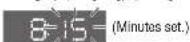
⑥ Press [DISP] (display).
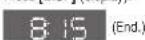
Note: Press and hold [
Time Reset
Press and hold [DISP] (display) for more than 2 seconds to activate the time setting mode to reset the time.
Then, repeat steps ③ to ⑥
CQ-RG133WA
Radio
![① Change to the Radio mode • Press [BAND] when in CD changer mode. • Please press [▲] (eject) to eject the tape when cassette tape play mode starts. FM stereo indicator 879 PM 1 ② Band Press [BAND] to change the band. PM1 → PM2 PM ← PM3 ③ Manual Tuning [> TUNE]: Higher frequency [< TUNE]: Lower freq…](/content/2026/06/1191027/images/3fd362e6fe335abec9cf916f3537e8a557727e3737fc7eccb9e9a4ba8363c7cf.jpg)
④ Mono Selection
Press [MONO] for monaural reception in case a lot of interference is present in an FM stereo signal or to improve the listening quality of weak FM broadcasts.
Press [MONO] again to cancel.

MONO Indicator
CQ-RG133WA
Preset Station Setting
Up to 6 stations can be saved in each of the FM1, FM2, FM3 and AM preset station memories.
Note: Existing saved stations are overwritten with new stations after following this procedure.
Display Change
Press [DISP] (display) to switch to the clock display.

Frequency
Clock display

Band
Press [BAND] to select a desired band.
(→ page 8)
![0:39.44 Preset buttons from [1] to [6]](/content/2026/06/1191027/images/7c3412aeb89db54d2c117c9d32f154bdf5397ffa5beb5de50bf71fbdb4e51f87.jpg)

Auto Preset Memory (APM)
Press and hold [BAND] (APM: auto preset memory) for more than 2 seconds.
- The 6 stations with good reception will be automatically saved in the memory under preset buttons.
- Once set, the preset stations are sequentially scanned for 5 seconds each.
Manual Preset Memory
① Use manual or seek tuning to find a station. (→ page 8) ② Press and hold one of the preset buttons from [1] to [6] until the display blinks once.

blinks once
Preset Station Calling
Press the corresponding preset button from [1] to [6] to tune in a preset station.
Caution: To ensure safety, never attempt to preset stations while you are driving.
CQ-RG133WA
Cassette Tape Player
①Tape Insert (Loading a Cassette)
Gently insert a cassette with the exposed tape side facing to the right until the mechanism captures it, and playback starts.
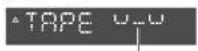
Program Indicator
(This indication "_" rotates.)
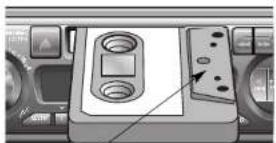
Exposed Tape side
② Play Side Change
Press [◀◀] and [▶▶] at the same time to switch to the program on the other side of the tape. The display changes to indicate which program is playing.

Top Side Playing Bottom Side Playing

Stop and Eject
Once inserted into the unit, your tape will play continuously until you eject it. If you press [▲] (EJECT), the unit ejects the tape and returns to radio operation. When you stop the car engine, the tape will stop but not be ejected.
Notes:
- You can not change to CD Changer mode or Radio mode while tape playing. If you want to change to CD Changer mode or Radio mode, eject the tape. - Always remove the cassette when you stop using the cassette player. This will prolong the life of your tape.
Display Change
Press [DISP] (display) to switch to the clock display.

Tape display
Clock display
③ Rewind and Fast Forward
When the program indicator ▲ lights, press [◀◀] to rewind or press [▶▶] to fast forward the tape. When the program indicator ▼ lights, press [◀◀] to fast forward or press [▶▶] to rewind the tape.
blinks
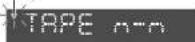
To stop rewind or fast forward, gently press the button that is not in use. The tape will resume playing from that position.
Note: To maintain your cassette player in top condition, avoid using tapes that are longer than 90 minutes (C-90).
Notes on Cassette Tapes
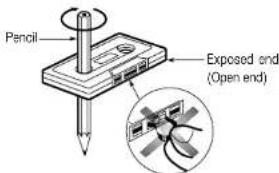
Tape Slack:
Use a pencil or similar object to take up the slack as shown. If a loose tape is used, this may result in the tape becoming tangled in the rotating parts of the unit.
CQ-RG133WA
CQ-RG133WA
CD Changer Control
①CD Changer mode
While a disc magazine is inserted in the CD changer, press [CD-C].
Play starts from the first track.
Note: The cassette, if loaded, should be removed. Otherwise, the CD play will not start.

②Disc Selection
[1] (√ DISC): Previous disc.
[2] (∧DISC): Next disc.
③Track Selection
Press [TRACK ▶▶] once to go to the next track. Press repeatedly to step forward through all the tracks.
Press [TRACK ◀◀] once to play from the beginning of the current track. Press twice to play the previous track. Press repeatedly to step backward through all the tracks.
Track Search
Press and hold [TRACK▶▶] or [TRACK▶◀] for more than 0.5 second to activate fast forward or reverse through a track. Release [TRACK▶▶] or [TRACK▶◀] to resume the normal CD play from that position.
Display Change
Press [DISP] (display) to switch to the clock display.

CD Changer display
Clock display
CQ-RG133WA
Note:
CD changer functions are applicable to units with optional CD changer unit.
(sold separately)
Scan Play Tracks
- Press [3] (SCAN). The track number blinks and the first 10 seconds of each track on the discs play in sequence.
- To stop scanning and continue with the current track, press [3] (SCAN) again.

blinks
Scan Play Discs
Press and hold [3] (SCAN) for more than 2 seconds. The first track of all the discs in the magazine is played for 10 seconds each. Also, Disc Number blinks at the same time. To stop the current play of the disc scanning, press and hold [3] (SCAN) for more than 2 seconds again.
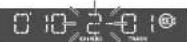
- Press [4] (REPEAT) to repeat the current selection. "REP" Indicator lights.
- The current selection continues to repeat until you press [4] (REPEAT) again.
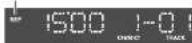
- Press [4] (REPEAT) to repeat the current selection. "REP" Indicator lights.
- The current selection continues to repeat until you press [4] (REPEAT) again.
blinks
Repeat Play
lights
Random Play
- Press [5] (RANDOM) to random selection of music is played from all available CDs. "R▶" indicator lights.
• To turn it off, press[5] (RANDOM) again.
lights

Error Display Messages

Disc is dirty, or is upside down.
→ Select the next available compact disc. Check the disc.

Disc has scratches.
→ Select the next available compact disc. Check the disc.

No operation by some cause.
Eject the magazine. If failure persists, press the reset switch on the CD changer. If normal operation is not restored yet, call the store where you purchased the unit or the nearest Panasonic Service center to ask for repairs.

No disc in the changer (magazine)
→ Insert discs into the changer (magazine).
CQ-RG133WA
Installation
Preparation
- Before installation, check the radio operation with antenna and speakers.
- Disconnect the cable from the negative (−) battery terminal (see caution below).
- Unit should be installed in a horizontal position with the front end up at a convenient angle, but not more than 30° .
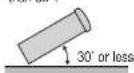

Caution: Do not disconnect the battery terminals of a car with trip or navigational computer since all user settings stored in memory will be lost. Instead take extra care with installing the unit to prevent shorts.
Dashboard Installation
Installation Opening
The unit can be installed
in any dashboard having
an opening as shown at
right. The dashboard
should be 4.5 mm - 6 mm thick in order to be able to support the unit.
Installation Precautions
This product should be installed by a professional installer, if possible.
In case of difficulty, please consult your nearest authorized Panasonic Service Center.
- This system is to be used only in a 12-volt, DC battery system (car) with negative ground.
- Follow the electrical connections carefully (→page 18). Failure to do so may result in damage to the unit.
- Connect the power lead (red) after all other connections are made.
- Be sure to connect the battery lead (yellow) to the positive terminal (+) of the battery or fuse block (BAT) terminal.
- Insulate all exposed wires to prevent short circuiting.
- Secure all loose wires after installing the unit.
- Please carefully read the operating and installation instructions of the respective equipment before connecting it to this unit.
CQ-RG133WA
Installation Hardware
| No. | Item | Diagram | Q'ty |
| 1 | Mounting collar | 1 | |
| 2 | Hex. nut (5 mme) | 1 | |
| 3 | Rear support strap | 1 | |
| 4 | Tapping screw(5 mme · 16 mm) | 1 | |
| 5 | Mounting bolt (5 mme) | 1 | |
| 6 | Power connector | 1 | |
| 7 | Dismounting plate | 2 | |
| 8 | Trim plate | 1 |
(a) Using the Rear Support Strap

(b) Using the Rubber Cushion (option)

Cautions:
- We strongly recommend that you wear gloves for installation work to protect yourself from injuries.
- When bending the mounting tab of the mounting collar with a screwdriver, be careful not to injure your hands and fingers.
First complete the electrical connections, and then check them for correctness.(→page 18)
The included Mounting Collar
(1) is designed specially for this
unit. Do not use it to attach any other model.


4 After installation reconnect the negative (−) battery terminal.

CQ-RG133WA
Installation (Continued)
To Remove the Unit
Switch off the power of the unit.
1 Remove the removable face plate. Press [↑] . (release button). The removable face plate will be released.

release button

2 Remove the Trim Plate ⑧ with a screwdriver.

3 Insert the Dismounting Plates ② along the grooves on both sides of the main unit until "click" is heard. 2 Pull out the unit while pushing the plates further inside.
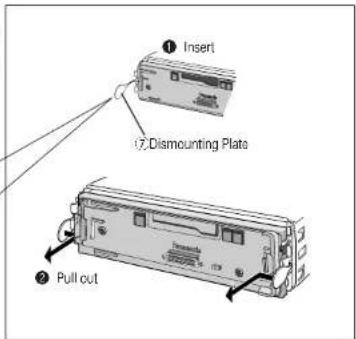

4 Remove the unit pulling with both hands.
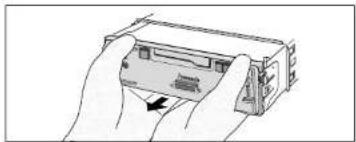
CQ-RG133WA
Anti-Theft System
This unit is equipped with a removable face plate. Removing this face plate makes the radio totally inoperable.
Place the Removable Face
Plate into Case
① Switch off the power of the unit.
② Remove the removable face plate. (→ page 16)
Gently press the bottom of the case and open the cover. Place the face plate into the case and take it with you when you leave the car.

Install Removable Face Plate
① Slide the left side of the removable face plate in place.
② Press the right end of the removable face plate until "click" is heard.

Cautions:
- This face plate is not waterproof. Do not expose it to water or excessive moisture.
- Do not remove the face plate while driving your car.
- Do not place the face plate on the dashboard or nearby areas where the temperature rises to high level.
- Do not touch the contacts on the face plate or the main unit, since this may result in poor electrical contacts.
- If dirt or other foreign substances get on the contacts, wipe them off with a clean and dry cloth.
- Do not apply a strong downward force onto the face plate and do not put anything on it while it is open, or it might be damaged.
CQ-RG133WA
Electrical Connections
Preparation:
• This unit can be connected to an optional CD changer (CX-DP88).
- For connection to a CD changer, refer to the operating instructions of the CD Changer (CX-DP88).
Caution:
- This product is designed to operate with a 12 V DC, negative ground battery system.
• To prevent damage to the unit, be sure to follow the connection diagram below.
- Strip about 5mm of the lead ends for connection (only non-ISO connector cords).
- Do not insert the power connector into the unit until the wiring is completed.
- Be sure to insulate any exposed wires from a possible short-circuit from the car chassis. Bundle all cables and keep cable terminals free from touching any metal parts.
- Remember, if your car has a drive computer or a navigation computer, the data of its memory may be erased when the battery terminals are disconnected.
□ Wiring Diagram
![graph TD A["CD Changer CX-RP68 (polar)"] --> B["Ground Lead To a clean, bare metallic part of your car"] C["Extension Cord"] --> D["Fuse (A)"] D --> E["Battery Lead To the car battery, continuous +12V DC"] F["RCA Cord"] --> G["DIN Cord"] G --> H["Antenna"] I["CD Changer Control Connector"] --> J["CQ…](/content/2026/06/1191027/images/4dc7581f5a8218508c51c4ab5ddfb787b6f7307844083efa2139f8301e90a88d.jpg)
CQ-RG133WA
Speaker Connections
Caution: Please follow the instructions given below. Failure to do so will cause damage to the unit and speakers.

• Use ungrounded speaker only.
- The maximum speaker input should be 45 W or more. (If used with the optional power amplifier, the speaker input should be higher than the maximum amplifier output.)
• The speaker impedance should be 4 - 8 Ω.
- This unit uses the BTCL circuit, so each speaker should be connected separately using parallel vinyl insulated cords.
- The speaker cords and the power amplifier unit should be kept away (about 30 cm apart) from the antenna and antenna extension cord.
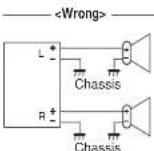
- Never connect the speaker cord to the body of the car.
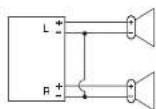
- Do not use a 3-wire type speaker system having a common earth lead.

- Do not connect more than one speaker to one set of speaker leads.
Fuse
Use fuses of the same specified rating (15 A). Using different substitutes or fuses with higher ratings, or connecting the unit directly without a fuse, could cause fire or damage to the unit. If the fuse replacement fails, contact your nearest authorized Panasonic Service Center.
Maintenance
Your product is designed and manufactured to ensure the minimum of maintenance. Use a soft cloth for routine exterior cleaning. Never use benzine, thinner, or other solvents.
CQ-RG133WA
Troubleshooting
Preliminary Steps
Check and take steps as described in the tables below.
If You Suspect Something Wrong
Immediately switch the power off.
Disconnect the power connector and check that there is neither smoke nor heat from the unit before asking for repairs. Never try to repair the unit by yourself because it is dangerous to do so.
Caution:
- Do not use the unit if it malfunctions or if there is something wrong.
- Do not use the unit in irregular condition, for example, without sound, or with smoke or foul smell, which can cause ignition or electric shock. Immediately stop using it and call the store where you purchased it.
Troubleshooting Tips
Common

Radio
Trouble
Much noise in FM stereo and monaural broadcasts.
Preset station is reset.
Cause/Step

Station is too far, or signals are too weak. →Select other stations of higher signal level.
The radio antenna is not extended enough. → Extend fully the radio antenna.
Battery cable is not correctly connected. →Connect the battery cable to the terminal that is always active.
□ Cassette Tape
Trouble
No sound.
Tape sound quality is poor.
Reproduction of high tones is poor.
Wow and flutter level is very high.
Cause/Step

Blank tape is inserted in the unit. →Insert recorded tape into the unit.
Heads are dirty. →Clean heads. (Ask a service representative for advice.)
Poor quality tape. →Use better quality tape.

Heads are magnetized. →Demagnetize heads. (Ask a service representative for advice.)
Tape running mechanism is dirty or out of order. →Clean tape running mechanism, or repair it. (Ask a service representative for advice.)
Sound Setting
Trouble
No sound from left, right, front, or rear speaker.
Left and right sounds are reversed in stereo listening.
Cause/Step

Left and right balance, or front and rear balance is off on one side. →Adjust BAL/FAD as appropriate.
Cables are not correctly connected. →Connect the cables correctly.
The right speaker wire is connected to the left speaker and the speaker left wire to the right speaker. —Connect the speaker wires to the correct one.
Specifications
□GENERAL
Power Supply : 12 V DC (11 V-16V), Test Voltage 14.4 V, Negative ground
Current Consumption: Less than 2.5 A (Tape mode, 0.5 W 4-Speaker)
Maximum Power Output : 45 W · 4 (at 4 Ω)
Tone Controls : Bass; ± 12 dB at 100 Hz
Treble: ± 12 dB at 10 kHz
Speaker Impedance
:4 Ω (4-8 Ω acceptable)
Dimensions : 178(w)
50(H) · 155(D) mm
Weight (Main unit) : 1.4 k
g
FM STEREO RADIO
Frequency Range : 87.5–108 MHz
Useable Sensitivity : 12 dB/μV (S/N 30 dB)
Stereo Separation : 35 dB (at 1 kHz)
□ AM RADIO
Frequency Range: : 531–1 602 kHz
Usable Sensitivity: : 28 dB/μV (S/N 20 dB)
Reproduction System : 4-track, 2-program stereo
Tape Speed : 4.76 cm/sec
: Less than 200 sec (C-60)
Frequency Response
: 35-14 000 Hz ±3 dB
Wow and Flutter
: 0.12% (WRMS)
Signal to Noise Ratio
:52dB
Note: specifications and design are subject to modification without notice due to improvements in technology.
- ПРЕДУПРЕЖДЕНИЕ
- СОДЕРЖАНИЕ
- PRECAUTIONS
- VOLUME LEVEL
- CAR WASHING
- CAR VENTILATION
- POWER SUPPLY
- TAPE MECHANISM
- ACCESSORIES
- GENERAL
- CLOCK SETTING
- AUDIO MODES
- (BASS/TREBLE/BALANCE/FADER)
- INITIAL TIME
- TIME RESET
- RADIO
- ④ MONO SELECTION
- PRESET STATION SETTING
- DISPLAY CHANGE
- BAND
- AUTO PRESET MEMORY (APM)
- MANUAL PRESET MEMORY
- PRESET STATION CALLING
- CASSETTE TAPE PLAYER
- ①TAPE INSERT (LOADING A CASSETTE)
- ② PLAY SIDE CHANGE
- STOP AND EJECT
- NOTES
- ③ REWIND AND FAST FORWARD
- NOTES ON CASSETTE TAPES
- TAPE SLACK
- CD CHANGER CONTROL
- ①CD CHANGER MODE
- ②DISC SELECTION
- ③TRACK SELECTION
- TRACK SEARCH
- SCAN PLAY TRACKS
- SCAN PLAY DISCS
- REPEAT PLAY
- RANDOM PLAY
- ERROR DISPLAY MESSAGES
- INSTALLATION
- PREPARATION
- DASHBOARD INSTALLATION
- INSTALLATION OPENING
- INSTALLATION PRECAUTIONS
- INSTALLATION (CONTINUED)
- TO REMOVE THE UNIT
- ANTI-THEFT SYSTEM
- PLACE THE REMOVABLE FACE
- PLATE INTO CASE
- INSTALL REMOVABLE FACE PLATE
- CAUTIONS
- ELECTRICAL CONNECTIONS
- CAUTION
- SPEAKER CONNECTIONS
- FUSE
- MAINTENANCE
- TROUBLESHOOTING
- PRELIMINARY STEPS
- IF YOU SUSPECT SOMETHING WRONG
- TROUBLESHOOTING TIPS
- COMMON
- TROUBLE
- CAUSE/STEP
- CASSETTE TAPE
- SOUND SETTING
- SPECIFICATIONS
- FM STEREO RADIO
- AM RADIO
Brand : PANASONIC
Model : CQ-RG133WA
Category : Car Radio