
HZC-PSF20M - Software Development Equipment SONY - Free user manual and instructions
Find the device manual for free HZC-PSF20M SONY in PDF.


| Product Type | Software License (Camera Operating Software) |
| Model | HZC-PSF20M |
| Brand | Sony |
| Compatible Cameras | HDC2000 Series, HDC2500 (pre-installed) |
| Supported Output Formats | 1080/29.97PsF, 1080/25PsF, 1080/23.98PsF, 1080/24PsF |
| Trial Period | 30 days |
| License Key File | hdc2000.key (text file, one key per line) |
| Installation Method | Copy key file to USB drive \MSSONY\PRO\CAMERA\HDC2000, install via camera MAINTENANCE menu |
| Required Camera Software Version | V2.00 or higher |
| Format Selection | Via MSU (Master Setup Unit) or camera menu (stand-alone) |
| Manual Pages | 6 pages (English) |
| Manual Format | PDF (free download) |
| Key File Comments | Lines starting with '#' or ';' are comments; invalid keys ignored |
| Multiple Keys | Supported; usage period cumulative based on key count |
| Uninstall Restriction | Cannot uninstall or reinstall the same key for trial versions |
| Slow-Motion Feature | 2x speed recording, normal speed playback |
| HDC2570 Limitation | Only 1080/29.97PsF and 1080/25PsF supported |
| Period Tracking | Usage starts day after installation; remaining period on DIAGNOSIS menu |
Frequently Asked Questions - HZC-PSF20M SONY
User questions about HZC-PSF20M SONY
0 question about this device. Answer the ones you know or ask your own.
Ask a new question about this device
Download the instructions for your Software Development Equipment in PDF format for free! Find your manual HZC-PSF20M - SONY and take your electronic device back in hand. On this page are published all the documents necessary for the use of your device. HZC-PSF20M by SONY.
USER MANUAL HZC-PSF20M SONY
The HZC-PSF20/PSF20M/PSF20W, HZC-PRV20/PRV20M/PRV20W, HZC-DFR20/DFR20M/DFR20W Camera Operating Software is optional software that enables the Sony HD Color Camera HDC2000 series to support additional output formats. These formats can also be output from a compatible CCU.
The HZC-PSF20/PSF20M/PSF20W Camera Operating Software supports 1080/29.97PsF, 1080/25PsF, 1080/23.98PsF, and 1080/24PsF formats.
The HZC-PRV20/PRV20M/PRV20W Camera Operating Software supports 1080/59.94P and 1080/50P formats.
The HZC-DFR20/DFR20M/DFR20W Camera Operating Software supports 1080/119.88i (1080/59.94i×2), 1080/100i (1080/50i×2), 720/119.88P (720/59.94P×2), and 720/100P (720/50P×2) formats.
Slow-motion playback is achieved by recording at 2× speed to a recording device, and then performing playback at normal speed.
The HZC-PSF20M/PRV20M/DFR20M can be used for 30 days.
The HZC-PSF20W/PRV20W/DFR20W can be used for 7 days.
Note
Counting of the period of use starts from the day after the software is installed. You can check the remaining usage period on the
Correspondence list for eCSite
All the software is pre-installed to the HDC2500 and HDC2000.
* Available only for 1080/29.97PsF and 1080/25PsF.
**The camera software version V2.00 or greater is required.
Installation
1 Create a key file.
Create a text file that includes the software installation key and change the filename to "hdc2000.key."
Note that the extension is “.key.”
Key file format
- You can describe multiple installation keys in a single key file (hdc2000.key). Invalid keys are ignored in the installation process.
- Describe only one installation key on a single line.
- Any description between “#” or “;” and the line break is read as a comment.
Example of hdc2000.key
| # A Studio |
| # CAM1 |
| c51caee92a3d1d77 |
| # CAM2 |
| 2897f1db294d70ae |
| ; Studio B |
| bd9dc931db917f25 ; CAM1 |
| 6fe3ebd3f4ba3635 ; CAM2 |
Note
All the keys are installed by describing multiple keys for which the period of use is limited, and the period of use for the software is set according to the number of installed keys.
2 Copy the key file.
Create a \MSSONY\PRO\CAMERA\HDC2000 folder on a USB drive and copy "hdc2000.key" to that folder.
For information on usable types of USB drives, refer to the OPERATION MANUAL of the camera.
3 Install the key file.
Connect the USB drive to the USB connector, and install the key file on the camera using the
For details on menu operations, refer to the OPERATION MANUAL of the camera.

When the key file is installed on the camera, the name of the installed key file appears in the
| Model Indication | |
| HZC-PSF20/PSF20M/PSF20W | PsF FORMAT |
| HZC-PRV20/PRV20M/PRV20W | 1080P FORMAT |
| HZC-DFR20/DFR20M/DFR20W | ×2 FORMAT |
Example of HZC-PSF20

Example of HZC-PSF20M/PSF20W
![M17→TOP READ (USB→CAM) EFFECTIVE FUNCTION PsF FORMAT [10/17-10/24]](/content/2026/06/1190861/images/1f6395167cdceb273834c1d52b457d423486a057066ab4d8cb889ef701ee69c5.jpg)
The period of use is displayed for software which has a limited period of use.
Note
For software whose period of use is limited to 7 days or 30 days, you cannot install the same key as a key that is already installed, and you cannot uninstall a key that is already installed.
4 Confirm the result of installation.
Restart the camera and check the OPTION display on the

HZC-PSF20/PSF20M/PSF20W
By installing HZC-PSF20/PSF20M/PSF20W, in addition to 1080/59.94i, 1080/50i, 720/59.94P, and 720/50P formats, you can use 1080/29.97PsF, 1080/25PsF, 1080/23.98PsF, and 1080/24PsF formats.
To select a format, use the menu of the MSU (Master Setup Unit) when the camera is connected to the system, or use the menu of the camera when the camera is used on a stand-alone basis.
Note
Only 1080/29.97PsF and 1080/25PsF formats can be used for the HDC2570.
As an example, the following describes how to select 1080/29.97PsF format.
When the camera is connected to the system
Select “Camera Transmit” on the Multi Format Menu page of the MSU, then select “1080/29.97PsF.”
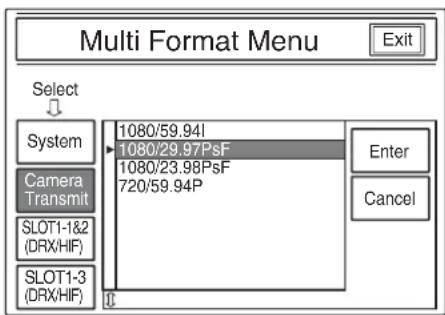
For details on menu operations, refer to the OPERATION MANUAL of the MSU.
When the camera is used on a stand-alone basis
Select "29.97PsF" on the
![M09→TOP CURRENT 1080-59.94i [1080] 59.94i 50i →29.97PsF 25PsF 23.98PsF 24PsF [720] 59.94P 50P](/content/2026/06/1190861/images/57459dd5eca38f9ec0e1336033aacc4397b632f83e4dd811d596a0fdfdfa2340.jpg)
For details on menu operations, refer to the OPERATION MANUAL of the camera.
HZC-PRV20/PRV20M/ PRV20W
By installing HZC-PRV20/PRV20M/PRV20W, in addition to 1080/59.94i, 1080/50i, 720/59.94P, and 720/50P formats, you can use 1080/59.94P and 1080/50P formats.
To select a format, use the menu of the MSU (Master Setup Unit) when the camera is connected to the system, or use the menu of the camera when the camera is used on a stand-alone basis.
As an example, the following describes how to select 1080/59.94P format.
When the camera is connected to the system
Select “Camera Transmit” on the Multi Format Menu page of the MSU, then select “1080/59.94P.”

For details on menu operations, refer to the OPERATION MANUAL of the MSU.
When the camera is used on a stand-alone basis
Select "59.94P" on the
![M09→TOP CURRENT 1080-59.94i [1080] 59.94i 50i →59.94P 50P [720] 59.94P 50P](/content/2026/06/1190861/images/a3f78c9b3e2cdc8cae24cf4342aab9ac27cca4e75f999bfba14d28af8daca614.jpg)
For details on menu operations, refer to the OPERATION MANUAL of the camera.
HZC-DFR20/DFR20M/ DFR20W
By installing HZC-DFR20/DFR20M/DFR20W, in addition to 1080/59.94i, 1080/50i, 720/59.94P, and 720/50P formats, you can use 1080/59.94i×2, 1080/50i×2, 720/59.94P×2, and 720/50P×2 formats.
To select a format, use the menu of the MSU (Master Setup Unit) when the camera is connected to the system, or use the menu of the camera when the camera is used on a stand-alone basis.
As an example, the following describes how to select 1080/59.94i×2 format.
When the camera is connected to the system
Select “Camera Transmit” on the Multi Format Menu page of the MSU, then select “1080/59.94i×2.”

For details on menu operations, refer to the OPERATION MANUAL of the MSU.
When the camera is used on a stand-alone basis
Select “59.94i×2” on the
![M09→TOP CURRENT 1080-59.94i [1080] 59.94i 50i →59.94i×2 50i×2 [720] 59.94P 50P 59.94P×2 50P×2](/content/2026/06/1190861/images/e3669567cf5e166e1de83abbaf5be13de27b7d31d65738fa1abe494a9a8fa72f.jpg)
For details on menu operations, refer to the OPERATION MANUAL of the camera.
HZC-PSF20 (WW)
HZC-PSF20M (WW)
HZC-PSF20W (WW)
HZC-PRV20 (WW)
HZC-PRV20M (WW)
HZC-PRV20W (WW)
HZC-DFR20 (WW)
HZC-DFR20M (WW)
HZC-DFR20W (WW)
4-424-310-02(1)
Sony Corporation
http://www.sony.net/
© 2012
- Note
- Installation
- Create a key file.
- Key file format
- Copy the key file.
- Install the key file.
- Example of HZC-PSF20
- Example of HZC-PSF20M/PSF20W
- Confirm the result of installation.
- HZC-PSF20/PSF20M/PSF20W
- When the camera is connected to the system
- When the camera is used on a stand-alone basis
- HZC-PRV20/PRV20M/ PRV20W
- HZC-DFR20/DFR20M/ DFR20W
- Sony Corporation
Brand : SONY
Model : HZC-PSF20M
Category : Software Development Equipment