
BMP40 - Bluetooth Receiver Audac - Free user manual and instructions
Find the device manual for free BMP40 Audac in PDF.


| Product Type | Bluetooth Receiver Module with SourceCon™ technology |
| Brand | Audac |
| Model | BMP40 |
| Bluetooth Standard | Bluetooth V4.1, Class 2 |
| Wireless Range | Up to 30 meters (depending on environment) |
| Audio Output | Balanced stereo line output via two 3-pin Euro terminal blocks (3.81 mm pitch) |
| Output Level Adjustment | +8 dB to -82 dB (software configurable) |
| Antenna Connection | SMA-type male (50 Ω) |
| Compatible Devices | XMP44 Modular audio system and other SourceCon™ compatible units |
| Paired Device Memory | Up to 8 authorized devices |
| Media Information Support | AVRCP V1.3 or higher (track, artist, album info) |
| Power Consumption | 0.5 Watt |
| Dimensions (W x H x D) | 87 x 34.5 x 114 mm |
| Weight | 0.075 kg |
| Included Accessories | 2.4 GHz antenna (2 dBi), screws for mounting |
| Optional Accessories | BAE100 Antenna extender kit |
| Installation | Plug & play into SourceCon™ slot, no internal wiring required |
| Safety Precautions | Do not expose to rain or moisture; no user-serviceable parts; disconnect during storms |
| Operating Environment | Indoor use only, avoid dust, heat, moisture, vibration |
| Certification | CE (EMC 2014/30/EU, LVD 2014/35/EU) |
Frequently Asked Questions - BMP40 Audac
User questions about BMP40 Audac
0 question about this device. Answer the ones you know or ask your own.
Ask a new question about this device
Download the instructions for your Bluetooth Receiver in PDF format for free! Find your manual BMP40 - Audac and take your electronic device back in hand. On this page are published all the documents necessary for the use of your device. BMP40 by Audac.
USER MANUAL BMP40 Audac
This manual is put together with much care, and is as complete as could be on the publication date. However, updates on the specifications, functionality or software may have occurred since publication. To obtain the latest version of both manual and software, please visit the Audac website @ www.audac.eu.
Index
Introduction 5
Precautions 6
Safety requirements 6
Caution servicing 7
EC Declaration of Conformity 7
Waste of Electrical and Electronic Equipment (WEEE) 7
Chapter 1: Connections and connectors 8
Connection standards 8
Chapter 2: Overview BMP40
Chapter 3: Using the BMP40 10
Module screen 10
Player mode 11
Settings screen 12
Chapter 4: Installing the BMP40 14
Chapter 5: Additional information 16
Technical specifications 16
Notes 17
4 AUDAC
Introduction
SourceCon™ Bluetooth receiver module
The BMP40 is a professional Bluetooth receiver module featuring SourceCon™ modular technology. This unique technology guarantees true plug & play implementation to any compatible device. When inserted to a supporting slot, the module is instantly installed, discovered and ready for operation without requiring any additional internal wiring or complex configuration.
The BMP40 receiver offers wireless connection possibilities for audio playback from any Bluetooth compatible portable device including laptops, smartphones, tablets or any other. A long range transmission distance (up to 30 meters) is possible depending on the installed environment. Device discovery and pairing protection with a storage up to 8 authorized devices shall prevent playback from unauthorized users in public area's.
All media information such as track and artist information can be retrieved from the BMP40 (if supported by the connected device, more info on P15: technical specifications), while playback control is possible from the connected device or remote control.
The antenna input is implemented by an SMA-type (50 Ω) connector on its panel, allowing connection of the included (2 dBi) antenna while extension is possible in situations where its installed in a closed / shielded cabinet. The balanced stereo line output is connected through two 3-pin terminal block connections.
Precautions
READ FOLLOWING INSTRUCTIONS FOR YOUR OWN SAFETY
- ALWAYS KEEP THESE INSTRUCTIONS FOR FUTURE REFERENCE. NEVER THROW THEM AWAY
• ALWAYS HANDLE THIS UNIT WITH CARE
• HEED ALL WARNINGS AND FOLLOW ALL INSTRUCTIONS - AVOID ELECTROSTATIC DISCHARGE BY TOUCHING GROUNDED POINT BEFORE REMOVING THE MODULES FROM THEIR PROTECTIVE BAG
- AVOID TOUCHING OF THE COMPONENTS ON THE CIRCUIT BOARD DIRECTLY
- NEVER EXPOSE THIS EQUIPMENT TO RAIN, MOISTURE, ANY DRIPPING OR SPLASHING LIQUID. NEVER PLACE AN OBJECT FILLED WITH LIQUID ON TOP OF THIS DEVICE
- DO NOT INSTALL THIS UNIT NEAR ANY HEAT SOURCES SUCH AS RADIATORS OR OTHER APPARATUS THAT PRODUCE HEAT
- DO NOT PLACE THIS UNIT IN ENVIRONMENTS WITH A HIGH LEVEL OF DUST, HEAT, MOISTURE OR VIBRATION
- THIS UNIT IS DEVELOPED FOR INDOOR USE ONLY. DO NOT USE IT OUTDOORS
- ONLY USE ATTACHMENTS & ACCESSORIES SPECIFIED BY THE MANUFACTURER.
- UNPLUG THIS APPARATUS DURING LIGHTNING STORMS OR WHEN UNUSED FOR LONG PERIODS OF TIME
- CAREFULLY CHECK THE UNIT'S CONDITION AFTER UNPACKING. IF THERE IS ANY DAMAGE TO THE CARTON BOX OR THE UNIT ITSELF, INFORM YOUR VENDOR IMMEDIATELY.
- ONLY CONNECT THIS UNIT TO A MAINS SOCKET OUTLET WITH PROTECTIVE EARTHING CONNECTION
- THE INSTALLATION, CONNECTION AND CONFIGURATION OF THE DEVICE SHOULD BE DONE BY QUALIFIED TECHNICIANS

natural_image
White hand icon with index finger pointing upward (no text or symbols)CAUTION – SERVICING
This product contains no user serviceable parts. Refer all servicing to qualified service personnel. Do not perform any servicing (unless you are qualified to do so.)

EC DECLARATION OF CONFORMITY
This product conforms to all the essential requirements and further relevant specifications described in following directives: 2014/30/EU (EMC) and 2014/35/EU (LVD)
natural_image
Simple line drawing of a mechanical device with cross-shaped components and a rectangular base (no text or symbols)WASTE ELECTRICAL AND ELECTRONIC EQUIPMENT (WEEE)
The WEEE marking indicates that this product should not be disposed with regular household waste at the end of its product life. This regulation is created to protect both the environment and human health.
This product is developed and manufactured with high quality materials and components which can be recycled and/or reused. Please dispose of this product at your local collection point or recycling centre for electrical and electronic waste. Do this to make sure that the product is recycled in an environmental friendly way, and help to protect the environment in which we all live.
CAUTION
The symbols shown are internationally recognized symbols that warn about potential hazards of electrical products. The lightning flash with arrowpoint in an equilateral triangle means that the unit contains dangerous voltages. The exclamation point in an equilateral triangle indicates that it is necessary for the user to refer to the users manual.

CAUTION RISK OF ELECTRIC SHOCK DO NOT OPEN

These symbols warn that there are no user serviceable parts inside the unit. Do not open the unit. Do not attempt to service the unit yourself. Refer all servicing to qualified personnel. Opening the chassis for any reason will void the manufacturer's warranty. Do not get the unit wet. If liquid is spilled on the unit, shut it off immediately and take it to a dealer for service. Disconnect the unit during storms to prevent damage.
Chapter 1
Connections and connectors
CONNECTION STANDARDS
The in- and output connections for AUDAC audio equipment are performed corresponding to international wiring standards for professional audio equipment.
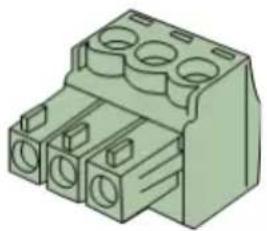
3-Pin terminal block:
For balanced in & output connections
natural_image
Illustration of a green electrical connector with multiple slots and mounting holes (no text or symbols)Left: Signal – (XLR Pin 3)
Center: Signal + (XLR Pin 2)
Right: Ground (XLR Pin 1)
For balanced line output connections:

For unbalanced line output connections:

Chapter 2
Overview BMP40
natural_image
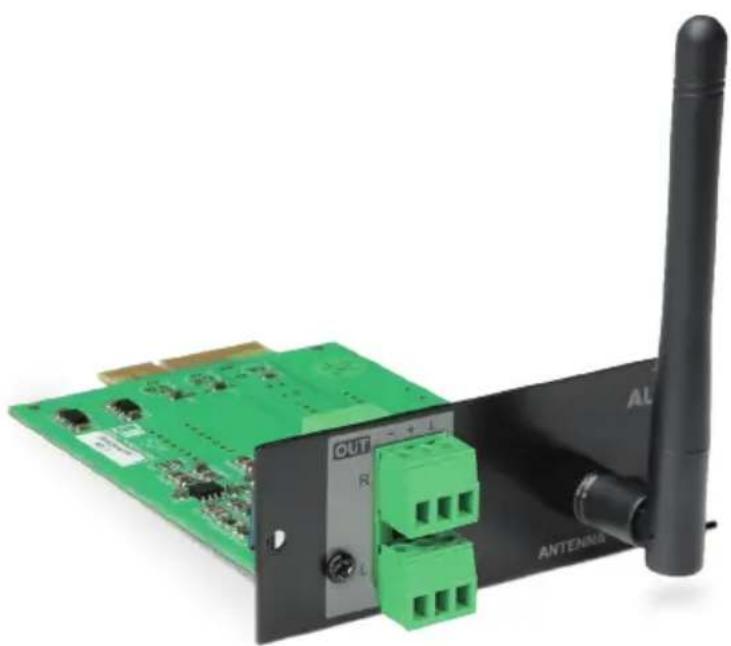
Green electronic circuit board with green connectors and a black wireless antenna (no visible text or symbols)The BMP40 is a SourceCon™ compatible module featuring an (internal) board-edge connector which carries all signals for getting it connected to any supporting main unit.
All external in & output connections shall be made using the available connectors on the panel.
1) Balanced stereo line output:
The balanced stereo line output is implemented using two 3-pin terminal block connectors. The audio output available on this connector allows it to be fed to any amplifier or pre-amplifier.
2) SMA-type antenna connection:
The antenna (input) connection is implemented using an SMA-type (male) connector where to the supplied antenna should get connected. Depending of the installation conditions (e.g. when installed in a closed / shielded cabinet), it can be extended using optional available accessories for optimal reception conditions.
Chapter 3 Using the BMP40
Since the BMP40 is a SourceCon™ module, it can be combined with a variation of supporting main units. The operation and configuration interface might be different of the unit where installed, however the offered functionality is identical. Some devices will support control and configuration through a front panel graphical control interface on a display, while others are also supporting web-control.
This manual describes the control configuration possibilities using front panel control. For applications where more control possibilities are offered, check the instruction manual of the used main device for more instructions.
Module screen
Connecting:
The main module screen of the BMP40 indicates the connection status of the receiver. To avoid audio playback by unauthorized users in public installations, transmitter and receiver pairing is required when connecting for the first time.

When transmitter and receiver haven't been paired before, the receiver won't be discoverable from the transmitting device. For making it discoverable, press the *button. Subsequently, the receiver is discoverable and allows connection for about 60 seconds from any transmitting device.
Once connected, the main module screen displays the name for the connected device and it will become undiscoverable for other devices.
Once both transmitter and receiver have been paired, the receiver will remain connectable for that particular transmitter, even when the connection button hasn't been pressed. The BMP40 memory stores up to 8 authorized device ID's.

Player:
The ♪ (player) button gets you to the player mode screen where track information is displayed (if supported by the connected transmitter) and previous and next audio track selection can be done.
Home:
The home) button gets you back to the main screen of the device where the BMP40 is installed to.
Settings:
The ⚙️ (settings) button is selected through pressing the rotary selection dial. This button gets you to the settings menu of the BMP40 where all configurations can be made.
Player mode
In this screen, all available media information about the currently playing files is shown including track, artist or any other information, while previous and next audio track selection can be done.
Note that the displayed information in this screen depends on the supported functions of the connected transmitter.
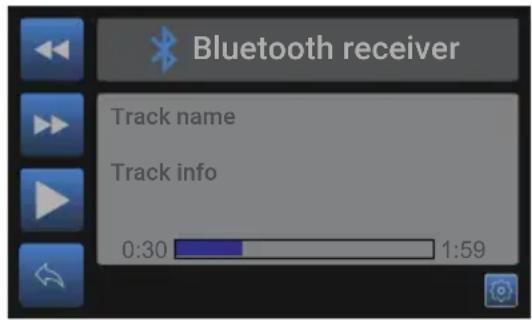
Track selection:
The playing track can be selected by pressing the (previous track) and (next track) buttons. When selected, the first next supported track will be selected and start playing.
Play / pause:
Toggling between play and pause is done by pressing the play/pause button with ▶ (play) or ▪ (pause) symbols. Depending of the current mode, the displayed symbol on the icon will toggle.
Return:
The ◆(return) button gets you back to the main module screen of the BMP40.
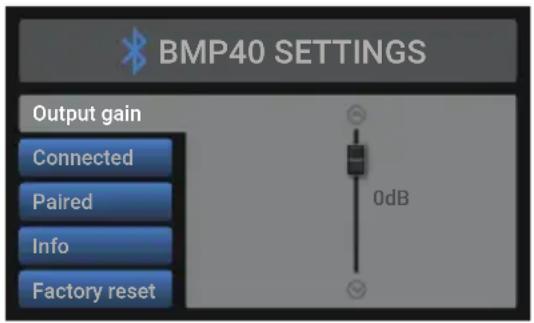
Settings screen
The settings menu for BMP40 can be loaded by pressing the rotary selection dial.
Output gain:
The gain can be adjusted within a range of +8 dB and -82 dB, allowing optimization of the output level according to the input sensitivity of the connected amplifier or pre-amplifier. For adjusting the output gain, rotate the function dial until 'Gain' is highlighted and press it for proceeding to the gain settings. The level can be adjusted by rotating clockwise (tuning up) or counter-clockwise (tuning down). Press the rotary dial for confirming the currently set output level.
Connected:
Information about the connected transmitting device is shown when highlighted 'Connected'. This menu includes the device name and mac address. Press the rotary selection dial twice for disconnecting the currently connected device.
Paired:
8 device ID's of recently paired transmitters are stored as authorized devices and shown in this list. These authorized devices are allowed for direct pairing with the BMP40 without making it discoverable. (without pressing the *button in the main module screen)
Devices can be removed from this list by pressing the rotary dial when highlighted 'Paired', allowing browsing through the list. Select the device and press the rotary dial again to remove it from the pairing list. (select OK to remove, or cancel to keep it)
Info:
Gives an overview of the BMP40 mac address and running software versions.
Factory reset:
Factory reset will recall all settings to factory defaults and all previously made settings and configurations will be lost. After selecting factory reset, a confirmation will be asked whether all settings definitely need to be reset to factory defaults. When confirmed, all settings will be lost.
Back:
Returning to the player mode screen is done by selecting 'Back'.
Chapter 4
Installing the BMP40
CAUTION

Before installing the BMP40 to any SourceCon™ compatible device, make sure the power is switched off. Malfunctions or electrical shocks may occur otherwise.
Step 1:
Make sure that the slot where to the module should be installed is open and ready for installation. Depending of the main unit, some module slots will be covered by blind panels when delivered. The corresponding blind panels should be removed by releasing the screws on both ends.
Step 2:
Before removing the modules from their protective bag, we recommend touching a grounded metal chassis (or any other grounded point) to prevent electrostatic discharges affecting the sensitive electronic components. It is recommended to always hold the module card by the metal connection panel and avoid touching of the components on the circuit board directly.
Step 3:
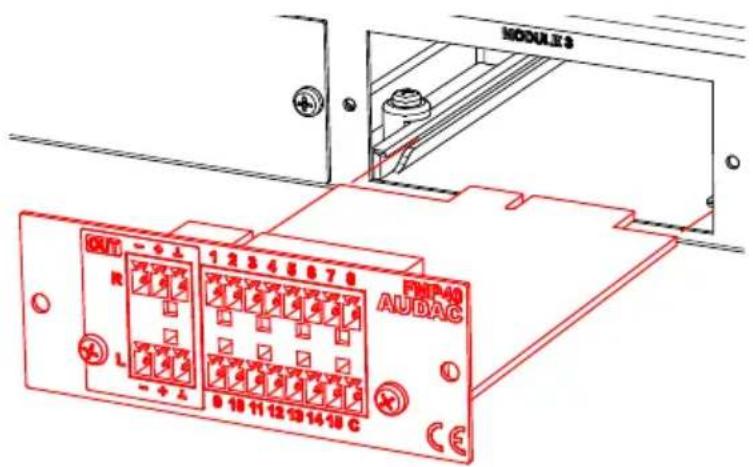
Align both edges of the module with the guide rails inside the slot and carefully insert the module into the slot. It should slide into the slot without any considerable resistance when well positioned into the guide rail.
Step 4:
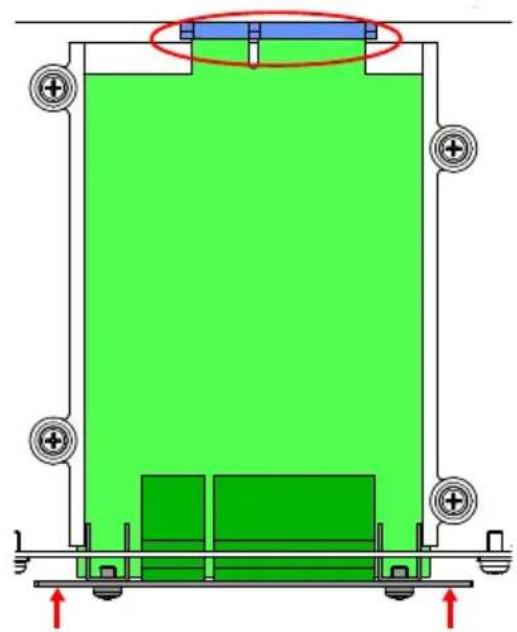
Some resistance might occur when the module's board edge connector reaches the connection counterpart on the main board. Gently push the module all the way into the slot to ensure that the contacts are correctly inserted. The module is well inserted when its connection panel touches the metal chassis of the main device where inserted to.
natural_image
Diagram of a mechanical or electrical assembly with green and red components, no visible text or symbolsStep 5:
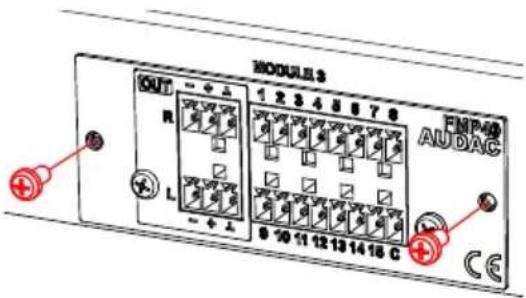
Fasten the module into the slot using the included screws. Be aware that damage or malfunctions may occur if the module is not correctly fastened.
Step 6:
Once the module correctly installed, the system can be powered-on and the module functionality will be automatically discovered.
Chapter 5
Technical specifications
Connection SourceCon ^TM interface card slot
Input SMA-type male antenna connection (50 Ω)
Output
Balanced
stereo
line
(2 x 3-pin Euro Terminal Block \~ 3.81 mm)
Output level +8 dB \~ -82 dB
(Software configurable)
Bluetooth receiver Bluetooth spec V4.1
Class
2
output
power
Power consumption 0.5 Watt
Dimensions (W x H x D) 87 x 34.5 x 114 mm
Weight
0.075
Kg
Packaging
Carton
box
Shipping weight & Volume 1.08 Kg - 0.028 Cbm
Accessoried included 2.4 Ghz antenna (2 dBi)
Compatible devices XMP44 Modular audio system
Optional Accessories BAE100 Antenna extender kit
NOTE
The BMP40 supports media information retrieval (track, artist, album, ... information) from the transmitter. This function is only supported with AVRCP V1.3 (or higher) compatible transmitters.
Notes
- Index
- Introduction 5
- Precautions 6
- Chapter 1: Connections and connectors 8
- Chapter 2: Overview BMP40
- Chapter 3: Using the BMP40 10
- Chapter 4: Installing the BMP40 14
- Chapter 5: Additional information 16
- AUDAC
- Introduction
- SourceCon™ Bluetooth receiver module
- Precautions
- READ FOLLOWING INSTRUCTIONS FOR YOUR OWN SAFETY
- CAUTION – SERVICING
- EC DECLARATION OF CONFORMITY
- WASTE ELECTRICAL AND ELECTRONIC EQUIPMENT (WEEE)
- CAUTION
- CAUTION RISK OF ELECTRIC SHOCK DO NOT OPEN
- Chapter 1
- Connections and connectors
- CONNECTION STANDARDS
- 3-Pin terminal block:
- Chapter 2
- Overview BMP40
- 1) Balanced stereo line output:
- 2) SMA-type antenna connection:
- Chapter 3 Using the BMP40
- Module screen
- Connecting:
- Player:
- Home:
- Settings:
- Player mode
- Track selection:
- Play / pause:
- Return:
- Settings screen
- Output gain:
- Connected:
- Paired:
- Info:
- Factory reset:
- Back:
- Chapter 4
- Installing the BMP40
- Step 1:
- Step 2:
- Step 3:
- Step 4:
- Step 5:
- Step 6:
- Chapter 5
- Technical specifications
- NOTE
- Notes
Brand : Audac
Model : BMP40
Category : Bluetooth Receiver