
DRX 332 - Cordless phone UNIDEN - Free user manual and instructions
Find the device manual for free DRX 332 UNIDEN in PDF.


| Product Type | Cordless Phone Accessory Handset with MULTIRANGE Charger |
| Brand | Uniden |
| Model | DRX 332 |
| AC Adapter | Input: 120V AC, 60 Hz; Output: 6.5V AC @ 350mA (PS-0033) |
| Battery Pack | Rechargeable Ni-MH, 2.4V DC, 500mAh (BT-1018) |
| Talk Time | Up to 10 hours |
| Standby Time | Up to 7 days |
| Charging Time | Approximately 15 hours |
| Range Extension | Via MULTIRANGE charger (up to 2 chargers per base) |
| Compatible Base | Uniden DECT3380 (and other DECT6.0 bases on website) |
| Registration | Handset and charger register separately; press FIND on base, then # on handset |
| Signal Strength Indicator | 4-bar icon on handset display |
| Link Light | On MULTIRANGE charger: steady = good connection, flashing = poor signal |
| Safety Instructions | Do not use near water; avoid electrical storms; use only specified adapters and batteries |
| Battery Warning | Risk of explosion if replaced incorrectly; recycle properly |
| Warranty | One-year limited warranty from Uniden |
| Included Accessories | Handset, battery pack, battery cover, AC adapter, MULTIRANGE charger |
| Maintenance | Clean with a soft, dry cloth; do not use liquid cleaners |
| Spare Parts | Battery pack (BT-1018) and AC adapter (PS-0033) available from Uniden Parts Department |
Frequently Asked Questions - DRX 332 UNIDEN
User questions about DRX 332 UNIDEN
0 question about this device. Answer the ones you know or ask your own.
Ask a new question about this device
Download the instructions for your Cordless phone in PDF format for free! Find your manual DRX 332 - UNIDEN and take your electronic device back in hand. On this page are published all the documents necessary for the use of your device. DRX 332 by UNIDEN.
USER MANUAL DRX 332 UNIDEN
DRX332 Accessory Handset and MULTIRANGE™ Charger User's Guide
What's in the box?
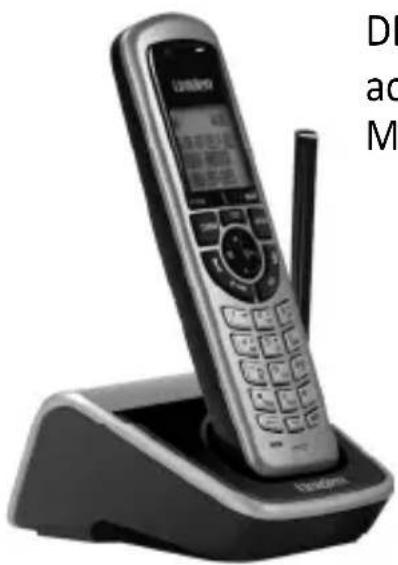
DRX332 accessory handset with MULTIRANGE™ charger
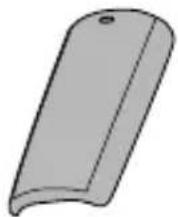
Battery cover
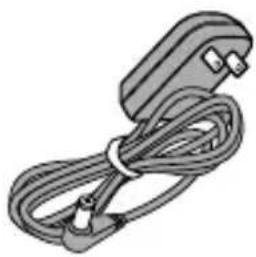
natural_image
Illustration of a cable with connectors and a terminal block (no text or symbols)AC adapter (PS-0033)
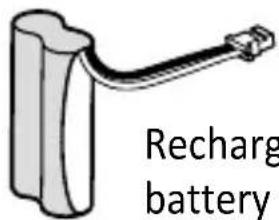
Rechargeable battery pack (BT-1018)
- If any items are missing or damaged, contact our Customer Care Line immediately. Never use damaged products!
- Need Help? Get answers 24/7 at our website: www.uniden.com.
| If You... Contact Uniden's... | Phone Number | |
| have a question or problem | Customer Care Line* | 817-858-2929 or 800-297-1023 |
| need a part or accessory Parts Department* | 800-554-3988 | |
| need special assistance due to a disability | Accessibility Help Line | 800-874-9314 (voice or TTY) |
* During regular business hours, Central Standard Time. Visit our website for detailed business hours.
What's in the manual?
Important Safety Instructions! ..2
Setti ng Up Your Handset ......3
Install the Battery ....3
Connect the Charger ....3
Registering the Handset ......4
Using the Handset ....5
Using the MULTIRANGE ^TM
Charger 6
How It Works ......6
Registering the MULTIRANGE charger....7
Placing the MULTIRANGE charger....8
Important Information 10
Specifications....10
Battery Information ......10
Compliance Information .....12
One-year Limited Warranty ..14
Important Safety Instructions!
When using your telephone equipment, basic safety precautions should always be followed to reduce the risk of fire, electric shock and injury to persons, including the following:
- Do not use this product near water, for example, near a bath tub, wash bowl, kitchen sink or laundry tub, in a wet basement or near a swimming pool.
- Avoid using a telephone (other than a cordless type) during an electrical storm. There may be a remote risk of electric shock from lightning.
- Do not use the telephone to report a gas leak in the vicinity of the leak.
- Use only the power cord and batteries indicated in this manual. Do not dispose of batteries in a fire. They may explode. Check with local codes for possible special disposal instructions.
- Do not place the handset in any charging cradle without the battery installed and the battery cover securely in place.
SAVE THESE INSTRUCTIONS!
Install the Batt ery
-
Unpack the handset, battery pack, and battery cover. If the battery cover is already on the handset, press in on the notch and slide the cover down and off.
-
Line up the battery pack connector with the jack inside the handset. (The battery connector only fits one way.)
-
Push the battery pack connector in until it clicks into place. Tug gently on the wires to make sure the battery pack is securely connected.
-
Place the cover over the battery compartment and slide it up into place.
Connect the Charger
-
Connect the AC adapter to the charger's AC IN 6.5V jack and route the cord as shown. (This adapter might already be connected.)
-
Plug the other end of the adapter into a standard 120V AC power outlet.
-
Place the handset in the charger with the display facing forward. The display on the handset should light up; if it doesn't, reseat the handset or try plugging the AC adapter into a different outlet.
Charge the handset completely (about 15 hours) before using it.
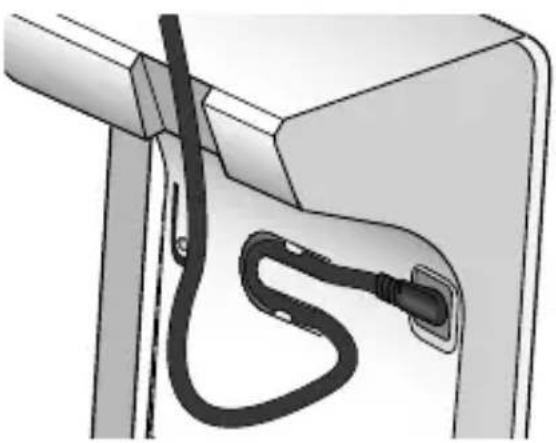
natural_image
Diagram of a car charging plug with cable (no text or symbols)Registering the Handset
Registering the handset is a separate process from registering the MULTIRANGE ^TM charger. You can use the handset normally even if the charger is not registered.
The accessory handset will not work until you register it to a base!
Compati ble Bases
This handset is designed for use with Uniden's DECT3380 base. Other Uniden DECT6.0 bases might be compatible with this handset. For up-to-date list of compatible bases for this handset, see our website.
Register the handset
In most cases, all you need to do is place the handset in the base. The display should say Handset Registering.
If the handset doesn't fit in the base cradle or if the base has a corded handset, follow the steps below:
- On the base, press and hold FIND when the phone is in standby (about 5 seconds).
- On the handset, press and hold POUND (#) until the display says Handset Registering (about 2 seconds).
After about 30 seconds, the handset display should say
Registration Complete.
Test the connecti on
Pick up the handset and press TALK. Make sure you get a dial tone. (Press END to hang up.)
| If... Try... | |
| - you don't hear a dial tone- the display says Registration Failed | Making sure the handset is fully charged, then trying again. |
Using the Handset
- When the handset registers to a base, it adapts its software to match that specific base. This means that the exact features and operation of the handset will vary slightly depending on which base you register the handset to. Refer to the user guide for the base you're registering the handset to for feature descriptions.
- All features and operation for the handset are described in the user's guide for one of the bases listed under the Compatible Bases section.
- User guides for all Uniden phones are available on our website for free downloading.
Using the MULTIRANGE™ Charger
How It Works
The DRX332 MULTIRANGE ^TM charger extends the range of your base in all directions, including up and down. Each handset will automatically connect to the charger or the base, depending on which signal is stronger. (The handset operates exactly the same way whether it's connected to the base or to the MULTIRANGE charger.)
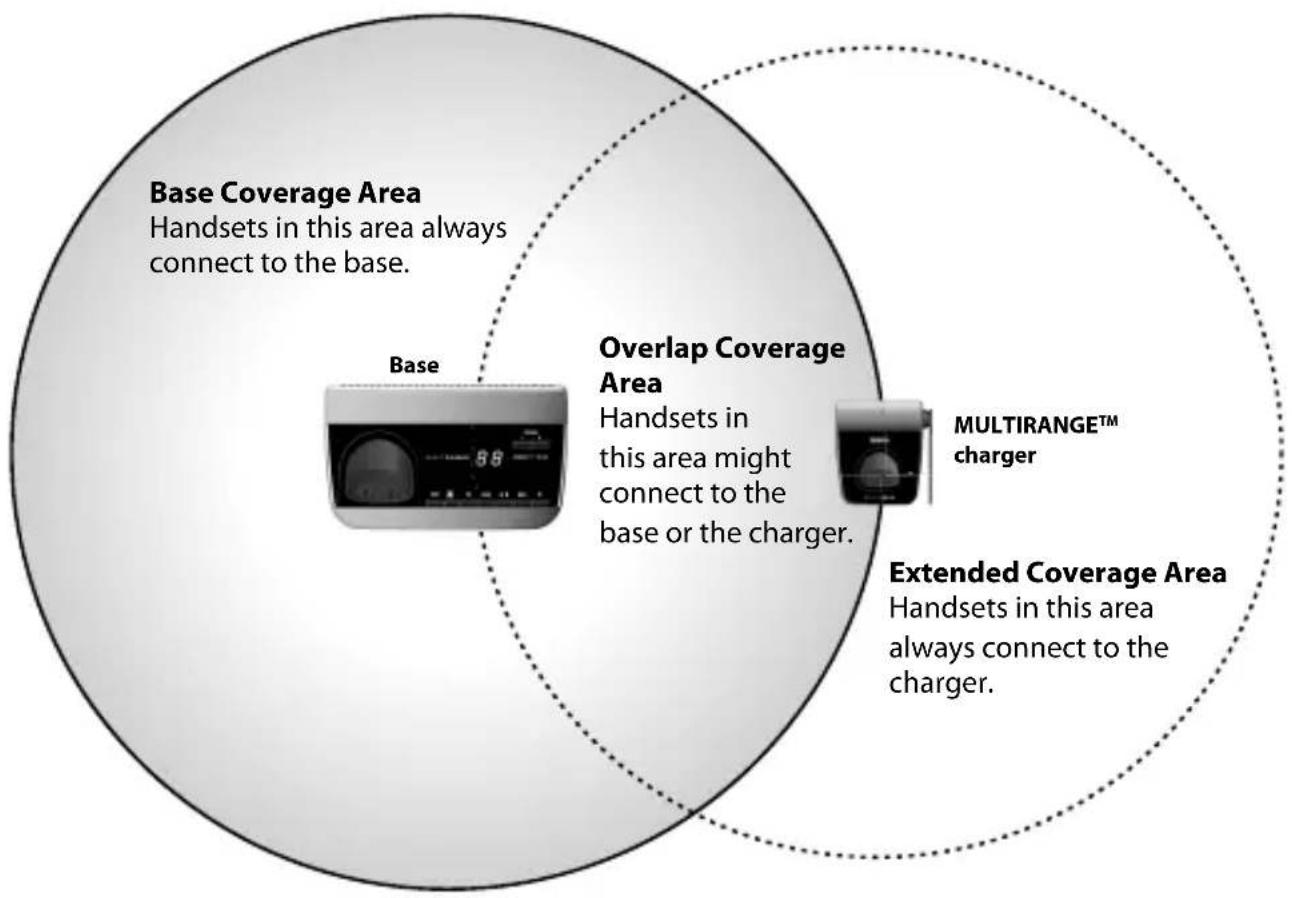
- To use the charger's MULTIRANGE function, you must register the charger to a DECT3380 base. (Any MULTIRANGE chargers that came packaged with the base are already registered to that base for you.)
• Each of these bases can support up to two DRX332 MULTIRANGE chargers, including any that were supplied with your phone.
- Usually, you can't tell when a handset switches between the base and the charger in the middle of a call, but sometimes, you might notice a brief pause in your conversation.
Registering the MULTIRANGE charger

Registering the MULTIRANGE charger is a separate process from registering the handset. You can use the charger even if the handset is not registered.
-
On the base, press and hold FIND when the phone is in standby.
-
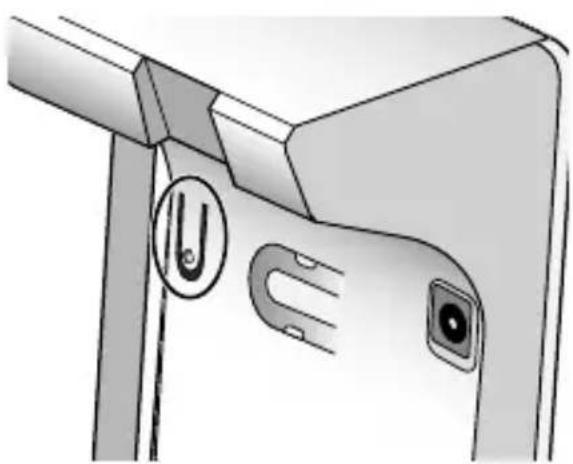
On the bottom of the MULTIRANGE charger, press and hold the registration button until the LINK light starts to blink (about 2 seconds).
-
Release the button and wait for the LINK light to turn on and steady (this can take about 90 seconds).
natural_image
Close-up of a device's front panel showing a U-shaped button and two close-up views (no text or symbols visible)If the LINK light doesn't turn on, disconnect the charger's AC adapter. Wait about 20 seconds, then try these steps again.
Some important things to remember:
- Only register one charger at a time. If more than one charger is in registration mode at the same time, they can interfere with each other.
- If you want to use the MULTIRANGE charger with a different base, just register the charger to the new base. The charger automatically erases the link to the old base when it registers to the new one.
- Only register the charger to one base at a time. If more than one base is in registration mode at the same time, you can't control which base the charger registers to.
Placing the MULTIRANGE charger
Here are a few tips for placing your MULTIRANGE charger so that you get the clearest signal and the maximum range:
• Make sure you have good reception from the base.
- Put the charger at least 35 feet away from the base or any other charger. (If you put the charger on a different floor from the base, don't forget to allow 35 feet vertically, also.)
Picking the best spot
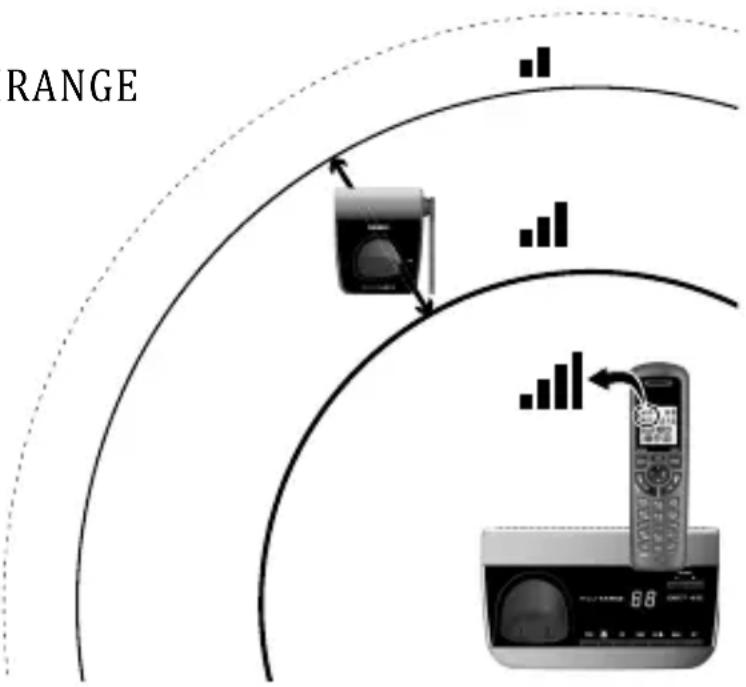
The best spot for the MULTIRANGE charger is as far from the base as possible while still maintaining a good signal, or near the edge of the base's coverage area. To find the edge of the coverage area:
- Stand near the base and make a call on the handset.
flowchart
graph TD
    A["RANGE"] --> B["Device"]
    B --> C["Mobile Phone"]
    style A fill:#f9f,stroke:#333
    style B fill:#ccf,stroke:#333
    style C fill:#cfc,stroke:#333
-
While on the call, carry the handset away from the base towards the general area where you want to put the charger.
-
Watch the signal strength icon on the handset. Make a note where the icon drops from 4 bars to 3 bars.
-
Continue walking away from the base. Make a note where the signal strength icon drops from 3 bars to 2 or if you start to hear noise on the line (which indicates the signal is getting weaker).
-
Place the charger anywhere inside the range where the signal strength icon showed 3 bars and the handset had a clear signal with no noise.
Testing the location
Connect the charger's AC adapter and make sure the LINK light comes on steadily. If the light flashes, the MULTIRANGE charger is not getting a good signal from the base. The charger may be too far away from the base, there may be interference from electronic devices, or the signal might be blocked by thick walls or metal objects. Try moving the charger to another location.
Important Information
Specifications
| AC Adapter | Part number PS-0033 | |
| Input voltage 120V AC, | 60 Hz | |
| Output voltage 6.5V AC @ 350mA | ||
| Battery pack | Part number BT-1018 | |
| Capacity 500mAh, 2.4V DC | ||
- Use only the supplied AC adapter.
- Be sure to use the proper adapter for the base and any chargers.
- Do not place the power cord where it creates a trip hazard or where it could become chafed and create a fire or electrical hazard.
- Do not place the unit in direct sunlight or subject it to high temperatures.
Battery Information
- Fully charged, the battery should provide about 10 hours of talk time and about 7 days of standby time. For best results, return the handset to the cradle after each call to keep it fully charged.
- Keep an eye on the battery status icon. When the battery gets too low, the handset shows a low battery alert. If you hear a strange beep during a call, check the display: if you see the low battery alert, finish your conversation as quickly as possible and return the handset to the cradle. If the handset is in standby, none of the keys will operate.
- With normal use, the battery should last about one year. Replace the battery when the talk time becomes short even when the battery is charged. To buy a replacement battery, call the Parts Department listed on the front cover.
Rechargeable Nickel-Metal-Hydride Battery Warning
CAUTION! Risk of explosion if battery is replaced by an incorrect type! Dispose of used batteries according to the instructions. Do not open or mutilate the battery. Disconnect the battery before shipping this product.
- This equipment contains a rechargeable Nickel-Metal-Hydride battery.
- Nickel is a chemical known to state of California to cause cancer.
- Do not short-circuit the battery.
- The rechargeable batteries contained in this equipment may explode if disposed of in a fire.
- Do not charge the battery used in this equipment in any charger other than the one designed to charge this battery as specified in the owner's manual. Using another charger may damage the battery or cause it to explode.
Rechargeable batteries must be recycled or disposed of properly.
Uniden works to reduce lead content in PVC coated cords in our products and accessories.
Warning! The cords on this product and/or accessories contain lead, a chemical known to the State of California to cause birth defects or other reproductive harm. Wash hands after handling.
Compliance Information
Any changes or modifications to this product not expressly approved by the manufacturer or other party responsible for compliance could void your authority to operate this product.
FCC Part 15 information
This device complies with part 15 of the FCC rules. Operation is subject to the following two conditions: (1) This device may not cause harmful interference, and (2) This device must accept any interference received, including interference that may cause undesired operation. Privacy of communications may not be ensured when using this phone.
FCC PART 15.105(b): Note: This equipment has been tested and found to comply with the limits for a Class B digital device, pursuant to part 15 of the FCC Rules. These limits are designed to provide reasonable protection on against harmful interference in a residential installation. This equipment generates, uses and can radiate radio frequency energy and, if not installed and used in accordance with the instructions, may cause harmful interference to radio communications. However, there is no guarantee that interference will not occur in a particular installation. If this equipment does cause harmful interference to radio or television reception, which can be determined by turning the equipment off and on, the user is encouraged to try to correct the interference by one or more of the following measures:
- Reorient or relocate the receiving antenna.
- Increase the separati on between the equipment and receiver.
- Connect the equipment into an outlet on a circuit different from that to which the receiver is connected.
- Consult the dealer or an experienced radio/TV technician for help.
RF exposure information
This product complies with FCC radiati on exposure limits under the following conditions:
- The base must be placed to allow a minimum of 20 cm (8 inches) between the antenna and all persons during normal operation.
- The base must not be collocated or operated in conjunction with any other antenna or transmitter.
The handset is designed for body-worn operation and meets FCC RF exposure guidelines when used with any belt clip, carrying case, or other accessory supplied with this product. (All necessary accessories are included in the package; any additional or optional accessories are not required for compliance with the guidelines.) Third party accessories (unless approved by the manufacturer) should be avoided as these might not comply with FCC RF exposure guidelines.
Industry Canada (I.C.) Notice
Terminalequipment
NOTICE: This equipment meets the applicable Industry Canada Terminal Equipment Technical Specifications. This is confirmed by the registration number. The abbreviation IC before the registration number signifies that registration was performed based on a Declaration of Conformity indicating that Industry Canada technical specifications were met. It does not imply that Industry Canada approved the equipment.
NOTICE: The Ringer Equivalence Number (REN) for this terminal equipment is marked on the equipment itself. The REN assigned to each terminal equipment provides an indication of the maximum number of terminals allowed to be connected to a telephone interface. The terminati on on an interface may consist of any combinati on of devices subject only to the requirement that the sum of the Ringer Equivalence Numbers of all the devices does not exceed 5.
Radioequipment
The term IC before the radio certification number only signifies that Industry Canada technical specifications were met. Operation is subject to the following two conditions: (1) this device may not cause interference, and (2) this device must accept any interference, including interference that may cause undesired operation of the device. "Privacy of communications may not be ensured when using this telephone".
One-year Limited Warranty
Important: Evidence of original purchase is required for warranty service.
WARRANTOR: UNIDEN AMERICA CORPORATION ("Uniden")
ELEMENTS OF WARRANTY: Uniden warrants, for one year, to the original retail owner, this Uniden Product to be free from defects in materials and craftsmanship with only the limitations or exclusions set out below.
WARRANTY DURATION: This warranty to the original user shall terminate and be of no further effect 12 months after the date of original retail sale. The warranty is invalid if the Product is (A) damaged or not maintained as reasonable or necessary, (B) modified, altered, or used as part of any conversion kits, subassemblies, or any configurations not sold by Uniden, (C) improperly installed, (D) serviced or repaired by someone other than an authorized Uniden service center for a defect or malfunction on covered by this warranty, (E) used in any conjuncti on with equipment or parts or as part of any system not manufactured by Uniden, or (F) installed or programmed by anyone other than as detailed by the owner's manual for this product.
STATEMENT OF REMEDY: In the event that the product does not conform to this warranty at any time while this warranty is in effect, warrantor will either, at its option, repair or replace the defective unit and return it to you without charge for
parts, service, or any other cost (except shipping and handling) incurred by warrantor or its representatives in connection with the performance of this warranty. Warrantor, at its option, may replace the unit with a new or refurbished unit. THE LIMITED WARRANTY SET FORTH ABOVE IS THE SOLE AND ENTIRE WARRANTY PERTAINING TO THE PRODUCT AND IS IN LIEU OF AND EXCLUDES ALL OTHER WARRANTIES OF ANY NATURE WHATSOEVER, WHETHER EXPRESS, IMPLIED OR ARISING BY OPERATION OF LAW, INCLUDING, BUT NOT LIMITED TO ANY IMPLIED WARRANTIES OF MERCHANTABILITY OR FITNESS FOR A PARTICULAR PURPOSE. THIS WARRANTY DOES NOT COVER OR PROVIDE FOR THE REIMBURSEMENT OR PAYMENT OF INCIDENTAL OR CONSEQUENTIAL DAMAGES. Some states do not allow this exclusion or limitation of incidental or consequential damages so the above limitati on or exclusion may not apply to you.
LEGAL REMEDIES: This warranty gives you specific legal rights, and you may also have other rights which vary from state to state. This warranty is void outside the United States of America and Canada.
PROCEDURE FOR OBTAINING PERFORMANCE OF WARRANTY: If, after following the instructions in the owner's manual you are certain that the Product is defective, pack the Product carefully (preferably in its original packaging). Disconnect the battery from the Product and separately secure the battery in its own separate packaging within the shipping carton. The Product should include all parts and accessories originally packaged with the Product. Include evidence of original purchase and a note describing the defect that has caused you to return it. The Product should be shipped freight prepaid, by traceable means, to warrantor at:
Uniden America Service 4700 Amon Carter Blvd. Fort Worth, TX 76155
- Uniden® is a registered trademark of Uniden America Corporation.
- Call waiting, CID, CIDCW, and Voice Mail are telephone line services. Your phone supports these services, but you have to arrange for them through your telephone provi
Contact your provider for details.
As an Energy Star® Partner, Uniden has determined that this product meets the Energy Star® guidelines for energy effi ciency. Energy Star® is a U.S. registered mark.

- The pictures in this manual are for example only. Your phone may not look exactly like the pictures.
May be covered under one or more of the following U.S. patents: 5,663,9815,671,2485,717,3125,732,3555,754,4075,758,2895,768,345,5,787,3565,794,1525,801,4665,825,1615,864,6195,893,0345,912,968,5,915,2275,929,5985,930,7205,960,3585,987,3306,044,2816,070,082,6,076,0526,125,2776,253,0886,314,2786,321,0686,418,2096,618,015,6,714,6306,782,0986,788,9206,788,9536,839,5506,889,1846,901,271,6,907,0946,914,9406,940,8676,953,1187,023,1767,030,8197,146,1607,203,3077,206,4037,310,3987,460,663 Other patents pending.
- DRX332 Accessory Handset and MULTIRANGE™ Charger User's Guide
- What's in the box?
- What's in the manual?
- Setti ng Up Your Handset ......3
- Using the MULTIRANGE TM
- Charger 6
- Important Information 10
- Important Safety Instructions!
- SAVE THESE INSTRUCTIONS!
- Install the Batt ery
- Connect the Charger
- Registering the Handset
- Compati ble Bases
- Register the handset
- Test the connecti on
- Using the Handset
- Using the MULTIRANGE™ Charger
- How It Works
- Registering the MULTIRANGE charger
- Placing the MULTIRANGE charger
- Picking the best spot
- Testing the location
- Important Information
- Battery Information
- Rechargeable Nickel-Metal-Hydride Battery Warning
- Compliance Information
- FCC Part 15 information
- RF exposure information
- Industry Canada (I.C.) Notice
- Terminalequipment
- Radioequipment
- One-year Limited Warranty
Brand : UNIDEN
Model : DRX 332
Category : Cordless phone