BDC644X-F - Oven Bellini - Free user manual and instructions
Find the device manual for free BDC644X-F Bellini in PDF.


| Product Type | Built-in Combination Microwave Oven |
| Brand | Bellini |
| Model | BDC644X-F |
| Dimensions (W x H x D) | 594 x 454.5 x 568 mm |
| Net Weight | 37 kg |
| Oven Capacity | 44 liters |
| Electrical Connection | 230-240 V / 50 Hz |
| Rated Input Power (Grill/Convection) | 1750 W |
| Rated Input Power (Microwave) | 1650 W |
| Rated Output Power (Microwave) | 900 W |
| Functions | Microwave, Grill, Convection, Grill Fan, Combination (Microwave + Hot Air, Microwave + Grill, etc.), Bottom Heat, Auto Programs (13 programs), Defrost (2 programs) |
| Control Type | Knobs and buttons with LED display |
| Child Lock | Yes |
| Preheat Function | Yes, for convection and combination modes |
| Accessories Included | Enamel tray, Turntable ring assembly, Short grill rack, Tall grill rack, Grill pan, User manual |
| Turntable | Yes, must always be used during cooking |
| Interior Light | Yes, lights when door open or oven paused |
| Noise Level | Typical microwave oven noise |
| Cleaning | Wipe with damp cloth; do not use steam cleaner or abrasive cleaners |
| Safety Features | Automatic shut-off after 5 min inactivity in setting/pause, door interlock, overheat protection |
| Installation Requirements | Built-in, minimum 10 cm clearance around, must be earthed, use qualified installer |
| Warranty | 2 years (Australia/New Zealand), subject to conditions |
| Country of Origin | Made in China for GSM Sales Pty Ltd |
Frequently Asked Questions - BDC644X-F Bellini
User questions about BDC644X-F Bellini
0 question about this device. Answer the ones you know or ask your own.
Ask a new question about this device
Download the instructions for your Oven in PDF format for free! Find your manual BDC644X-F - Bellini and take your electronic device back in hand. On this page are published all the documents necessary for the use of your device. BDC644X-F by Bellini.
USER MANUAL BDC644X-F Bellini
44L Built In Combi Oven

Installation and User manual
Content
Important Safety instructions---- 2
Product description---- 5
Installation----6
Start using your oven---- 8
Maintenance and cleaning---- 16
Warranty---- 18
For warranty service call 1300 373 199(Australia) or 0508 123108(New Zealand) to connect you to the nearest authorised service centre
Important Safety Instructions
This manual explains the proper installation and use of your oven, please read it carefully before using even if you are familiar with the product. The manual should be kept in a safe place for future reference.
Warnings
If the supply cord is damaged, the cord must be replaced by the manufacturer, its service agent or similarly qualified persons in order to avoid a hazard.
If the door or door seals are damaged, the oven must not be operated until it has been repaired by an authorised person.
Do not place any object between the oven front face and the door or allow soil or cleaner residue to accumulate on sealing surfaces.
If the apparatus is not maintained in a good state of cleanliness, its surface could be degraded and affect the lifespan of the apparatus and lead to a dangerous situation.
◆ Liquids and other foods must not be heated in sealed containers since they are liable to explode.
It is hazardous for anyone other than a authorised person to carry out any service or repair operation that involves the removal of a cover which gives protection against exposure to microwave energy.
◆ Do not run the unit without any food inside.
- Only use utensils suitable for use in microwave ovens.
When heating food in plastic or paper containers, keep an eye on the oven due to the possibility of ignition.
If smoke is observed, disconnect the appliance and keep the door closed in order to stifle any flames.
◆ Do not overcook food.
◆ Do not use the oven cavity for storage purposes. Do not store items, such as bread, cookies, etc. inside the oven.
◆ Remove wire twist-ties and metal handles from paper or plastic containers/bags before placing them in the oven.
◆ Install or locate this oven only in accordance with the installation instructions provided.
◆ Eggs in the shell and whole hard-boiled eggs
should not be heated in microwave ovens since they may explode, even after microwave heating has ended.
◆ Use this appliance only for its intended uses as described in manual. Do not use corrosive chemicals or vapors in this appliance. This oven is especially designed to heat. It is not designed for industrial or laboratory use.
◆ Do not store or use this appliance outdoors.
◆ Do not use this oven near water, in a wet basement or near a swimming pool.
The temperature of accessible surfaces may be high when the appliance is operating. The surfaces are liable to get hot during use. Keep cord away from heated surface, and do not cover any events on the oven.
◆ Do not let cord hang over edge of table or counter.
◆ The contents of feeding bottles and baby food jars shall be stirred or shaken and the temperature checked before consumption, in order to avoid burns.
◆ Microwave heating of beverages can result in delayed eruptive boiling; therefore care must be taken when handling the container.
◆ The appliances are not intended to be operated by means of an external timer or separate remote-control system.
During use the appliance becomes hot. Care should be taken to avoid touching heating elements inside the oven.
◆ Always use gloves when handling hot items inside the oven.
◆ Always turn the grill off immediately after use as fat left behind may catch fire.
Do not leave the appliance unattended when cooking. Oils and fats may catch fire due to overheating or boiling over.
Do not attempt to operate this oven with the door open since this can result in harmful exposure to microwave energy. It is important not to break or
tamper with the safety interlocks.
Do not place any object between the oven front face and the door or allow soil or cleaner residue to accumulate on sealing surfaces.
Do not use the appliance in the event of a technical fault. Any faults must be fixed by an appropriately qualified and authorised person.
◆ In the event of any incident caused by a technical fault, disconnect the power and report the fault to the service centre to be repaired.
◆ The rules and provisions contained in this instruction manual should be strictly observed.
Do not allow anybody who is not familiar with the contents of this instruction manual to operate the appliance.
Child Safety
This appliance is not intended for use by persons (including children) with reduced physical, sensory or mental capabilities, or lack of experience and knowledge, unless they've been given supervision or instruction concerning use of the appliance by a person responsible for their safety.
◆ Children should be supervised to ensure that they do not play with the appliance.
During use this appliance becomes hot. Care should be taken to avoid touching hot surfaces, e.g. oven door, heating elements.
◆ Accessible parts will also become hot when in use. To avoid burns and scalds children should be kept away.
Installation, Cleaning & Servicing
The appliance must be installed only by an authorised person in compliance with the instructions provided. Incorrect installation may cause harm to persons, animals or may damage property.
Before using the appliance, ensure that all packing materials are removed from the appliance.
In order to avoid any potential hazard, the enclosed installation instructions must be followed.
◆ Ensure that all specified vents, openings and air spaces are not blocked.
◆ The panels adjacent to the oven must be made of heat-resistant material.
The oven should be cleaned regularly and any food deposits should be removed. Failure to maintain the oven in a clean condition could lead to deterioration of the surface that could adversely affect the life of the appliance and possibly result in a hazardous situation. Steam cleaner is not to be used.
Do not use harsh abrasive cleaners or sharp metal scrapers to clean the oven door glass since they can scratch the surface, which may result in shattering of the glass.
◆ The rear surface of appliance shall be placed against a wall.
◆ Ensure that the appliance is switched off before replacing the lamp to avoid the possibility of electric shock.
◆ To reduce the risk of fire, do not place or install this unit in areas where the ventilation or circulation ducts may become blocked. Make sure there are at least 45mm of space between the back of your oven and the wall. Keep some distance on each side of your oven that you can use that distance flowing installing instructions.
The unit's power cord must be connected to a properly grounded and protected, 230-240V electrical outlet. Always use ground fault protection where required by the electrical code. Do not let cord hang over edge of table or counter.
When transporting or storing the unit, keep it in a dry location, free from dust, excessive vibration or other factors, which may damage the unit.
Do not operate oven with a damaged cord, if the oven has malfunctioned or has been dropped or damaged in any manner. Return oven to authorised service facility for repair.
Only authorised personnel should carry out servicing. (Certificate of Compliance to be retained)
◆ Always ensure the appliance is switched off before cleaning or replacing parts.
◆ Do not use steam cleaners, as this may cause moisture build-up.
◆ Always clean the appliance immediately after any food spills.
◆ THIS APPLIANCE MUST BE EARTHED.
To maintain safe operation, it is recommended that the product be inspected every five years by an authorised service person.
Microwave Oven
During use the appliance becomes hot. Care should be taken to avoid touching the hot surfaces inside the oven.
◆ To avoid an accident, ensure that oven shelves and fittings are always inserted into the appliance in accordance with the instructions.
◆ Do not use the door as a shelf.
◆ Do not push down when the oven door is open.
Grill
◆ Do not cover the grill insert with foil, as fat built up may catch on fire.
◆ Always keep the grill dish clean as any build up may catch on fire.
◆ Do not leave the grill on unattended.
◆ To avoid fire, ensure that grill trays and fittings are always inserted into the appliance in accordance with the instructions.
Do not place thick portions of food under the grill. Foods may curl, catch and ignite.
◆ Accessible parts may become hot when grill is in use. Children should be kept away.
Environmental Hints
This product must not be disposed together with domestic waste. This product has to be disposed at an authorised place for recycling of electrical and electronic appliances.
By collecting and recycling waste, you help save natural resources, and make sure the product is disposed in an environmental friendly and healthy way.
Product Description
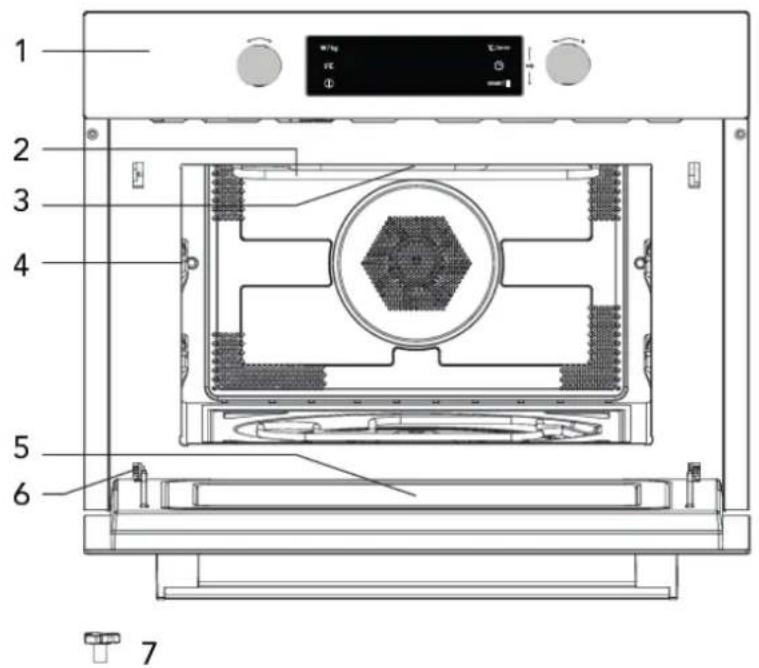
- Control Panel
- Grill element
- Light
- Level
- Door glass
8
9
10
- Hinge
- Turntable shaft
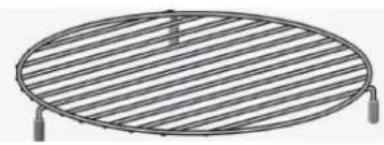
- Short grill rack
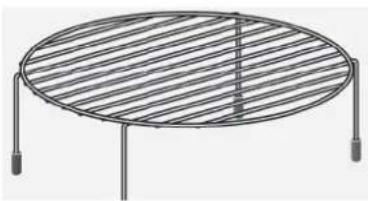
- Tall grill rock
- Grill pan
| Accessory Name Picture | (for reference only, physical unit maybe different) | Quantity |
| User Manual 1 | ||
| Enamel tray 1 | ||
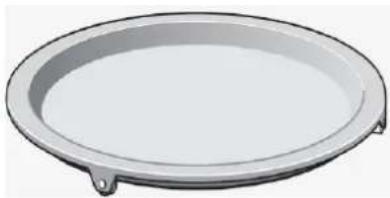
| Turntable Ring Assembly | 1 |
Technical Specifications
| Model | product dimensions (w x h x d) mm | Approx. net weight | Oven capacity | Electrical connection | Rated input power(Grill or Convection) | Rated input power (Microwave) | Rated Output power (Microwave) |
| BDC644X(-F) | 594x454.5x568 37Kg | 44 litres | 230-240V /50Hz | 1750W 1650W 900W | |||
| BDC644G(-F) | 594x454.5x568 41Kg |
Use An Authorized Person
◆ As stated in the local municipal building codes and other relevant statutory regulations:
◆ Wiring connections must be in accordance with AS/NZS 3000 Wiring Rules and any particular conditions of the local authority.
◆ Refer to data plate for rating information. The data plate is positioned at the side of cavity.
◆ A functional switch should be provided near the appliance in an accessible position. Refer to AS/NZS 3000 clause 4.7.1.
◆ Wiring should be protected against mechanical failure. Refer to AS/NZS 3000 clause 1.5.
◆ A means of disconnection with a contact separation of at least 3mm must be supplied in the fixed wiring.
◆ Disconnect the appliance from the supply when conducting maintenance or repairs to the unit
This Appliance Must Be Properly Earthed
◆ Do not lift the appliance by the door handles.
◆ Prepare the cupboard opening to match your appliance measurements. (See diagrams).
◆ Slide appliance in to cabinet cavity, ensuring supply cable is not obstructed (kinked, jammed or twisted).
◆ To prevent tipping or dislodging of the appliance, secure appliance to the cabinet with 4 screws (provided), through the dedicated holes in the appliance frame.
- Where the appliance is built into a cabinet, the cabinet material must be capable of withstanding 70°C. Installation into low temperature tolerant cabinetry (E.g. vinyl coated) may result in deterioration of the low temperature coating by discoloring or bubbling.
◆ If the appliance is to be installed adjacent to vinyl wrapped surfaces, use an installation kit available from the vinyl-wrap supplier.
◆ GSM cannot accept responsibility for damage caused by installation into low temperature tolerant cabinets.
◆ After installation, test and ensure the appliance operates correctly before handing it over to the customer.
CAUTION!
Where the appliance is connected via power supply cable to a power point, the installed power point must remain accessible after appliance installation
A dedicated power circuit is recommended for the unit but not required. Additional electrical appliances on the same circuit may exceed the current (amperage) rating for that circuit. If after the installation of your unit the circuit breaker trips or the fuse fails on a repeated basis, then a dedicated circuit will likely be required.
WARNING!
To avoid any potential hazard, you must follow our instructions when you install your appliance. Failure to install the appliance correctly could invalidate any warranty or liability claims and lead to prosecution.
Turntable installation
◆ Never place the enamel tray upside down. The enamel tray should never be restricted.
◆ The enamel tray must always be used during cooking.
◆ All food and containers of food are always placed on the enamel tray for cooking.
◆ If enamel tray c racks or breaks, contact your nearest authorized service center.

Installation dimensions
WARNING!
◆ Danger! Do not disassemble this appliance. Touching internal components of this appliance can cause serious personal injury or death.
◆ Place the microwave oven on a firm, flat surface.
Make sure that there is sufficient ventilation around the microwave oven. At the rear and sides keep at least 10 cm free.
◆ Do not cover the air vents.
◆ The adjustable feet should not be removed.
Do not place the microwave oven near a heat source.
◆ Transmitting and receiving equipment such as radios and televisions can affect the operation of the microwave oven.
Do not hold or carry the appliance by the door handle. The door handle cannot hold the weight of the appliance and may break off
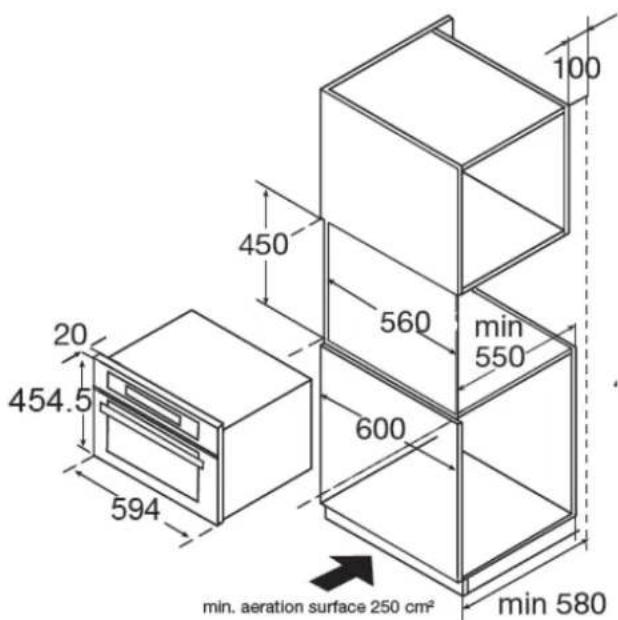
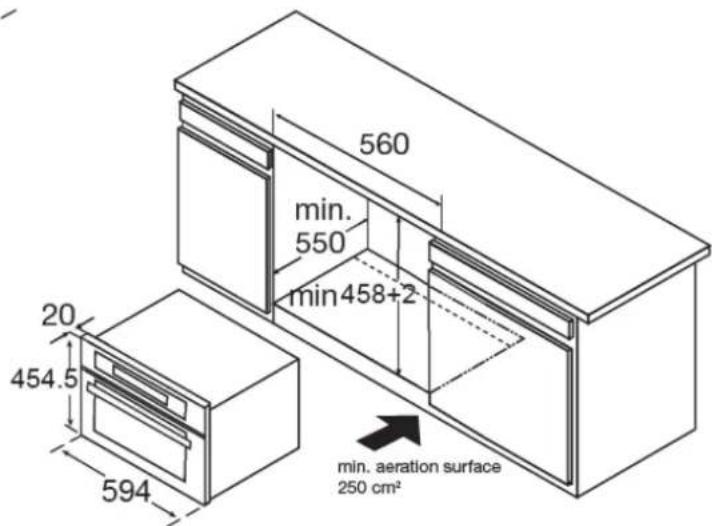
Steps:
- Carefully push the microwave into the box, making sure that it is in the centre.
- Open the door and fasten the microwave with the screws that were supplied.
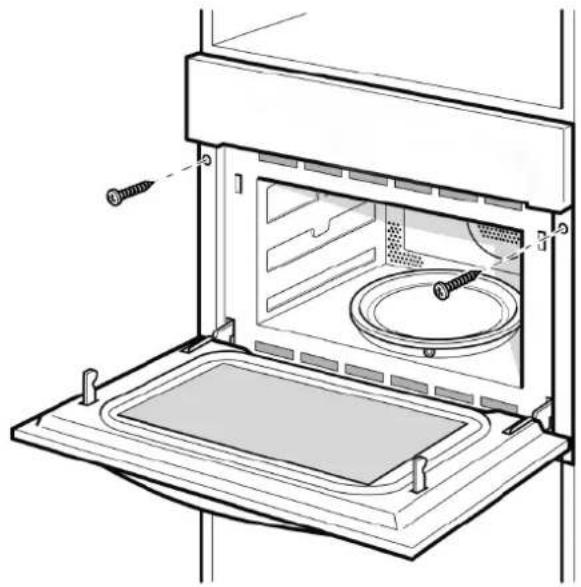
CAUTION!
◆ Fully insert the appliance and centre it.
◆ Do not kink the connecting cable.
◆ Screw the appliance into place.
◆ The gap between the worktop and the appliance must not be closed by additional battens.
Start Using Your Microwave Over
WARNING!
DO NOT RUN THE UNIT WITHOUT ANY FOOD INSIDE. THE ACCESSIBLE SURFACE MAY BE HOT DURING OPERATION.
Material to be avoided use in microwave oven
| Utensils Why | |
| Aluminium tray | May cause arcing. Transfer food into microwave-safe dish. |
| Food carton with metal handle | May cause arcing. Transfer food into microwave-safe dish. |
| Metal or metal trimmed utensils | Metal shields the food from microwave energy. Metal trim may cause arcing. |
| Metal twist ties | May cause arcing and could cause a fire in the oven. |
| Paper bags | May cause a fire in the oven. |
| Plastic foam | Plastic foam may melt or contaminate the liquid inside when exposed to high temperature. |
| Wood | Wood will dry out when used in the microwave oven and may split or crack. |
Material could be used in microwave oven
| Utensils Suggestion | |
| Aluminum foil | Shielding only. Small smooth pieces can be used to cover thin parts of meat or poultry to prevent overcooking. Arcing can occur if foil is too close to oven walls. The foil should be at least 1 inch (2.5cm) away from oven walls. |
| Browning dish | Follow manufacturer's instructions. The bottom of browning dish must be at least 3/16 inch (5mm) above the turntable. |
| Dinnerware | Microwave-safe only. Do not use cracked or chipped dishes. |
| Glass jars | Always remove lid. Use only to heat food until just warm. Most glass jars are not heat resistant and may break. |
| Glassware | Heat-resistant oven glassware only. Make sure there is no metallic trim. Do not use cracked or chipped dishes. |
| Oven cooking bags | Follow manufacturer's instructions. Do not close with metal tie. Make slits to allow steam to escape. |
| Paper plates and cups | Short-term using only. Do not leave oven unattended while cooking. |
| Paper towels | Use to cover food for reheating and absorbing fat. Use with supervision for a short-term cooking only. |
| Parchment paper | Use as a cover to prevent splattering or a wrap for steaming. |
| Plastic | Labeled "Microwave Safe" only. Some plastic containers soften, as the food inside gets hot. "Boiling bags" and tightly closed plastic bags should be slit, pierced or vented as directed by package. |
| Plastic wrap | Microwave-safe only. Use to cover food during cooking to retain moisture. Do not allow plastic wrap to touch food. |
| Thermometers | Microwave-safe only (meat and candy thermometers). |
| Wax paper | Use as a cover to prevent splattering and retain moisture. |
Operation Instruction

- Function knob
- Power/Weight button
- Quick preheating button
-
On/Off Button
-
Temperature/auto-menu button
- Clock button
- Start/Pause button
- Selection knob
| Function Mode | ||||
 | Microwave |  | Microwave | To cook and reheat vegetables, potatoes, rice, fish and meat |
 | Heating |  | Hot air With hot air you can prepare meals in the same way as you do with a conventional oven. The microwave is not activated. You are advised to preheat the oven before putting the meal in the oven. | |
| + | Grill with fan Use this function to roast meals evenly and at the same time give the meal a brown crust. | |||
| - | Grill The grill is very suitable to prepare thin pieces of meat and fish. | |||
| + | Hot air+ bottom heat | Use this function to roast big pieces of meat, pizza, etc | ||
 + + | Combination |  | Hot air | Microwave + Hot airUse this function to roast meals quickly. |
 | Grill with fan | Microwave + Grill with fan | ||
 | Grill | Microwave + GrillUse this function to cook meals quickly and at the same time give the meal a brown crust (also augratin). Microwave and grill are activated at the same time. Microwave is cooking and grill is roasting. | ||
| + | Hot air+ bottom heat | Use this function to roast big pieces of meat, pizza, etc | ||
| Auto-programs | P0 – P13 | Automatic cooking programs | ||
 | Defrost d01 + | d02 Defrost | ||

O' Clock Setting
When the microwave oven is electrified, the LED will display "00:00", buzzer will ring once.
-
Turn “” to knob to set the right time(between 00:00 and 23:59.)
-
Press Ⓛ to confirm.
NOTE:
-
To change O'clock time already set, press and hold L for 3 seconds and repeat above procedure.
-
Press Ⓛ shortly can shift the display on or off.

Microwave Cooking
- Press the "①" once to activate the microwave function. "01:00" flashing and the microwave symbol appears. If no operation in 10 seconds, the current power will be confirmed automatically.
- Turn "○+” to knob to set cooking duration (Refer to table 1)
- Press " and then turn - knob to set the microwave power (100W to 900W, refer to table 2)
- Press ▶ II " button to start cooking.
NOTE:
When the power is 900W, the Max. cooking duration can be set is 30 minutes and 90 minutes for others.
Table 1 Table 2
| Setting duration range | Time increasing by each turn |
| 0 -1 min | 1 seconds |
| 1 – 5 min | 10 seconds |
| 5 – 10 min | 30 seconds |
| 10 – 30 min | 1 minute |
| 30 – 90 min | 5 minutes |
| Display | Microwave Power | Food |
| 900W | 100% | - Boiling water, reheating- Cooking chicken, fish, vegetables |
| 700W | 80% | - Reheating- Cooking mushrooms, shell fish- Cooking dishes containing eggs& cheese |
| 450W | 50% | - Cooking rice, soup |
| 300W | 30% | - Defrosting- Melting chocolate and butter |
| 100W | 10% | - Defrosting sensitive/delicate foods- Defrosting irregularly-shaped foods- Softening ice cream- Allowing dough to rise |

Grill Cooking
-
Press the " " to activate the microwave function.
-
Turn "○" until indicator light on.
-
Turn " " until indicator light on to select grill mode.
-
Press the " 🔊/ 🔒" and then turn "-" to select grill power level(from 1 to 3)
-
Press Ⓛ and then turn " " to knob to set cooking duration.
-
Press ▶ II " button to start cooking.

Convection Cooking
-
Press the " " to activate the microwave function.
-
Turn "O" until indicator light on.
-
Turn "→" until indicator light on.
-
Press / and then turn " " to select temperature (50 to 230 degrees)
-
Press 📊 and then turn " " to knob to set cooking duration.(Max duration is 5 hours)
- Press ▶ "button to start cooking.

Grill Fan Cooking
-
Press " Ⓘ " button to activate the microwave function.
-
Turn "O" until indicator light on.
-
Turn "○+ " until indicator light on to select grill fan mode.
-
Press " and then turn " to select temperature(100 to 230 degrees). Each turning step will cause 5 degrees temperature increase or decrease.
-
Press 📁 and then turn " " to knob to set cooking duration.(Max duration is 5 hours)
-
Press ▶ "button to start cooking."

Convection+ Bottom heat Cooking
-
Press "①" button to activate the microwave function.
-
Turn "O" until indicator light on.
-
Turn "○+ " until indicator light on.
-
Press " and then turn " to select temperature(100 to 230 degrees). Each turning step will cause 5 degrees temperature increase or decrease.
-
Press 📁 and then turn " " to knob to set cooking duration.(Max duration is 5 hours)
-
Press ▶ " button to start cooking.

-
Press "①" button to activate the microwave function.
-
Turn "○" until and indicator light on to select combination mode.
-
Turn "to until indicator light on to select convection + bottom heat."
-
Press " and turn " to select power.
-
Press ☐/☐ "button and turn " -○+ " to select power, you can choose 100W, 300W, 450W or 700W.
-
Press 📁 and then turn " " to knob to set cooking duration.(Max duration is 90min)
-
Press ▶ II " button to start cooking.

-
Press "①" button to activate the microwave function.
-
Turn "○" until and indicator light on to select combination mode.
-
Turn "○+ " to until indicator light on to select convection mode.
-
Press " and then turn to select temperature ( 50 to 230 degrees).
-
Press " / " button and turn " - " to select power, you can choose 100W, 300W, 450W or 700W.
-
Press Ⓛ and then turn " " to knob to set cooking duration.(Max duration is 90min)
-
Press ▶ II " button to start cooking.

+ Microwave + Grill Fan Cooking
-
Press " Ⓘ " button to activate the microwave function.
-
Turn "○" until and indicator light on to select combination mode.
-
Turn "○+ " to until indicator light on to select convection + bottom heat.
-
Press " and turn " to select temperature(100 to 230 degrees).
-
Press "button and turn" to select power, you can choose 100W, 300W, 450W or 700W.
-
Press 📁 and then turn " ” to knob to set cooking duration.(Max duration is 90min)
-
Press ▶|| " button to start cooking.

+ Microwave + Bottom + Convection Cooking
-
Press "①" button to activate the microwave function.
-
Turn "○" until and indicator light on.
-
Turn "○+ " to until indicator light on.
-
Press " and turn " to select temperature( 100 to 230 degrees).
-
Press "button and turn" to select power, you can choose 100W, 300W, 450W or 700W.
-
Press 📁 and then turn " " to knob to set cooking duration.(Max duration is 90min)
-
Press ▶ " button to start cooking.

Auto Cook
There are 15 automatic cooking programs. You only need to choose the program and set the weight. The power, the time and the temperature are already set.
-
Press ⏻ "button to activate the microwave function.
-
Turn "to select the cooking mode." "or "will light when defrost auto menu selected. Time, weight, the first number of the automatic programs are shown in the display.
Turn "−○−" to select auto menu. "d01","d02" or "P01","P02"...."P13" will display
-
Press "button and turn" to select weight of the menu
-
Press ▶ " button to start cooking.
| Program Category Item | ||
| d01 (defrost)** | Meat, poultry or fish | If you hear a beep and the oven stops, it is alerting you turn over the food, do it and press the start/pause button to continue |
| d02 (defrost)** | Bread, cake or fruit | |
| P01** Vegetables Fresh vegetables | ||
| P02** Side dishes Potatoes - peeled/cooked | ||
| P03* | Side dishes | Potatoes – roasted. If you hear a beep and the oven stops, it is alerting you turn over the food, do it and press the start/pause button to continue the next phase automatically. |
| P04 | Poultry/Fish | Chicken pieces/ Fish pieces. If you hear a beep and the oven stops, it is alerting you turn over the food, do it and press the start/pause button to continue the next phase automatically. |
| P05* | Bakery | Cake |
| P06* | Bakery | Apple pie |
| P07* | Bakery | Quiche |
| P08** Reheat | Drink/soup | |
| P09** Reheat | Plated meal | |
| P10** Reheat | Sauce/stew/dish | |
| P11* | Convenience | Frozen - pizza |
| P12* | Convenience | If you hear a beep and the oven stops, it is alerting you turn over the food, do it and press the start/pause button to continue the next phase automatically. |
| P13* | Convenience | Frozen - lasagne |
NOTE:
The program with a * are preheated. During preheating, the cooking time pauses and the preheating symbol is on. After preheating, you will hear an alarm and the preheating symbol will blink.
◆ The program with ** only use the microwave function.

Preheating Function
The preheating function can be activated after you have chosen the functions:
Convection, Grill fan, bottom -convection, MW-convection, MW-Grill fan and Microwave -Bottom-convection.

-
Press "button. The preheat icon appears in the display.
-
Press ▶II "button to start preheating. 3 beeps will sound when right temperature is reached. You can
stop the preheating by opening the oven door or by pressing the "①" button.
NOTE:
The preheating function only works if you have already chosen one of the modes above. During preheating, the microwave function is switched off.

Child Lock
-
Lock: In waiting state, press "▶" and "/" at the same time, there will be a long "beep" denoting entering into the children-lock state and "○" indicator will light.
-
Unlock: In locked state, press " ▶II " and " 🔊/103 seconds, there will be a long "beep" denoting that the lock is released, and " " indicator will disappear.
Display Specification
-
When setting, if no other operation, it will confirm automatically after 10 seconds. Except clock setting for the first time.
-
During setting program, after adjusted for 3 seconds, it will confirm after 3 seconds.
-
When the oven is in setting state or pause state, including auto menu and defrost program, if no operation in 5 minutes, it will enter into the off state.
-
The oven lamp will light all the time if the door is open.
-
The oven lamp will light all the time if the oven is paused.
-
" ▶ II " button must be pressed to continue cooking if the oven door is open during cooking process.
Trouble Shooting
| Trouble Possible causes To do | ||
| Microwave oven interfering with TV | Radio or TV reception may be interfered when microwave oven running. It is similar with interfere of small appliances | It is normal |
| Dim oven light | In lower power microwave cooking, oven light may become dim. | It is normal |
| Steam accumulating on door, hot air out of vent | In cooking, most steam come out from vent but some of them may accumulate on cool place like door but it is normal | It is normal |
| Can not start | Power cord not connected in tighten | Reconnect after 10s, make sure connection is secure. |
| Fuse blowing or circuit breaker works | Call service center | |
| Trouble with power supply | Check to ensure proper power supplied | |
| Oven does not heat food up | Door not closed well. | Close door well |
| Magnetron out of work | Call service center | |
| Glass turntable noisy when microwave oven running | Dirty roller | Clean dirty part, refer to "Maintenance and cleaning" |
Maintenance and Cleaning
WARNING!
Before cleaning your oven, or performing maintenance, disconnect it from the power supply.
◆ Do not use steam cleaners.
Do not line the oven bottom with aluminium foil, as the consequent accumulation of heat could compromise the cooking and even damage the enamel.
◆ To protect against the risk of electrical shock, do not immerse the unit, cord in water or other liquid or sprinkle water to clean the appliance!
Do not clean the appliance when it is still hot! The inside and external surface of the oven should preferably be cleaned with a damp cloth when it has cooled down.
◆ Wash all accessories in hot sudsy water or in a dishwasher, wipe dry with a paper or cloth towel.
If you use your oven for an extended period of time, condensation may form. Dry it using a soft cloth.
Stainless steel
All grades of stainless steel can stain, discolour or become greasy. You must clean these areas regularly by following the procedures below, if you want your appliance to look its best, perform well and have a long life.
◆ Care must be taken when wiping exposed stainless steel edges, they can be sharp!
◆ The front frame around the oven can be cleaned with stainless steel cleaners if it becomes soiled or discoloured.
◆ The stainless steel should only be cleaned with warm water and a mild detergent as normal cleaning.
◆ DO NOT use abrasive cleaners or harsh solvents.
NOTE: Make sure you follow the polish or brushing lines in the stainless steel
Glass
◆ Glass surfaces on doors and control panels are best cleaned immediately after soiling.
◆ A damp cloth may help remove baked on food deposits.
◆ Oven cleaners can be used to remove stubborn marks and stains.
The glass door on this appliance is made from a tough, durable material that withstands heating and cooling without breaking.
◆ However, it must be remembered that it is GLASS, it may break. Treat it accordingly!
Do not use harsh abrasive cleaners or sharp metal scrapers to clean the oven door since they can scratch the surface, which may result in shattering of the glass.
Oven
◆ Always keep your appliance clean. Ensure fats and oils do not accumulate around elements, burners or fans.
◆ Always keep the oven dish, baking trays and grill dish inserts clean, as any fat deposits may catch fire.
◆ Always wrap your meats in foil or an oven roasting bag to minimise cleaning. Any polyunsaturated fats can leave a varnish-like residue which is very difficult to remove.
Grill
◆ Always keep the grill dish and grill insert clean, as any fat deposits may catch fire.
WARRANTY
1.1 In this warranty:
1.1.1 Australian Consumer Law means the law as set out in Schedule 2 of the Competition and Consumer Act 2010;
1.1.2 Company means GSM Sales Pty Ltd ABN 53 007 682 475 of 142-144 Fullarton Road, Rose Park SA 5067. Telephone 08 8122 2390. Email admin@gsmsales.com.au
1.1.3 Consumer means a “consumer” as that term is defined in Section 3 of the Australian Consumer Law as the original purchaser of a Bellini product;
1.1.4 Consumer Guarantees means the guarantees under the Australian Consumer Law;
1.1.5 You means the Consumer.
1.2 Nothing in this warranty affects any person's rights under the Australian Consumer Law. The benefits to any Consumer under this warranty are in addition to the rights and remedies available under any Consumer Guarantees.
1.3 Subject to the other clauses of this warranty, the Company warrants to the Consumer that the Bellini product will be free of manufacturing defects and will perform to the Company's specifications.
1.4 The benefit of this warranty extends only to the Consumer as original purchaser of a Bellini product which is installed in a residential property.
1.5 This warranty commences on the date of purchase of the Bellini product by the Consumer and continues for the benefit only of the Consumer until the expiry of two (2) year (Warranty Period).
1.6 If within the Warranty Period a manufacturing defect is discovered in the Bellini product or it fails to perform to the Company's specifications as a result of some defect in materials, components or workmanship (Defect) then the Company will, at its option, repair the Bellini product or supply a replacement Bellini product free of charge. A replacement Bellini product may differ from the original product purchased by the Consumer.
1.7 This warranty will not apply to any Bellini product:
1.7.1 Installed by any person other than a qualified tradesperson; or
1.7.2 Subjected to misuse, neglect, negligence or accidental damage; or
1.7.3 Operated in any way contrary to any operating or maintenance instructions; or
1.7.4 Improperly handled, installed or maintained; or
1.7.5 Altered or modified prior to or after installation; or
1.7.6 Damaged directly or indirectly by power surges, electrical storm damage or connection to incorrect power supply
The Australian Consumer Law requires the inclusion of the following statement
with this warranty:
Our goods come with guaranteed that cannot be excluded under the Australian Consumer Law. You are entitled to a replacement or refund for a major failure and for compensation for any other reasonably foreseeable loss or damage. You are also entitled to have the goods repaired or replaced if the goods fail to be of acceptable quality and the failure does not amount to a major failure.
IN ORDER TO MAKE A CLAIM UNDER THIS WARRANTY THE CONSUMER MUST CALL 1300 373 199 (AUSTRALIA) OR 0508 123 108 (NEW ZEALAND) TO CONNECT TO THE NEAREST AUTHORISED CENTRE
1.8 You must provide proof of your purchase of the Bellini product and the date of purchase in order to obtain the benefit of this warranty.
1.9 If you live outside the service area of the Company or one of its service agents, this warranty does not cover the cost of transport of the Bellini product for service nor the service agent's traveling costs to and from your home.
1.10 If you are required to transport the Bellini product to the Company or its service agent, you must ensure it is safely disconnected by a qualified tradesman and securely packed and insured. The Company does not accept any responsibility for loss or damage of the Bellini product prior to it being received by the Company or its service agent.
1.11 You will be responsible for all costs of returning a Bellini product to the Company and for redelivery of the Bellini product by the Company (whether it is the original or a repaired and/or a replacement Bellini product) and for any other expenses you incur in claiming under this warranty.
1.12 The Company or its service agent will examine any Bellini product and if the Company determines that it is defective through no fault of the Owner and is otherwise undamaged, the Company will repair or replace the Bellini product in accordance with this warranty.
DO NOT SEND IN THIS WARRANTY
Fill out the following details and file with your purchase invoice.
RETAIN & FILE WITH YOUR RECEIPT
Your Purchase Receipt/Invoice is proof of date of purchase. If you are unable to establish the date of purchase, or if the fault is not covered by this warranty, or if the product is found to be in working order, you will be required to bear all service call charges.
GSM Sales Pty Ltd reserves the right to discontinue items, modify designs and change specifications without incurring obligation.
Whilst every effort is made to ensure that descriptions, specifications and other information in this publication is correct, no warranty is given in respect thereof and the company shall not be liable for any errors therein.
Purchased from:
Co. Name:
Address:
Date of Purchase:
Serial number:
NOTE: Consistent with our continuing product development policy, improvements may have been made which render the contents of this packaging slightly different to that shown.
FOR WARRANTY SERVICE CALL 1300 373 199 (AUSTRALIA) OR 0508 123 108 (NEW ZEALAND) TO CONNECT YOU TO THE NEAREST AUTHORISED SERVICE CENTRE

Gerard Sourcing & Manufacturing
GSM Sales Pty Ltd.
The GSM Sales Pty Ltd. Group of Companies has a policy of continual improvement throughout the product range. As such the unit contained within may differ slightly from the unit illustrated on the pack.
MADE IN CHINA for the GSM Sales Pty Ltd. Group of Companies

N1028
- 44L BUILT IN COMBI OVEN
- INSTALLATION AND USER MANUAL
- CONTENT
- IMPORTANT SAFETY INSTRUCTIONS
- WARNINGS
- CHILD SAFETY
- INSTALLATION, CLEANING & SERVICING
- MICROWAVE OVEN
- GRILL
- ENVIRONMENTAL HINTS
- PRODUCT DESCRIPTION
- USE AN AUTHORIZED PERSON
- THIS APPLIANCE MUST BE PROPERLY EARTHED
- CAUTION
- WARNING
- TURNTABLE INSTALLATION
- STEPS
- START USING YOUR MICROWAVE OVER
- O' CLOCK SETTING
- NOTE
- MICROWAVE COOKING
- GRILL COOKING
- CONVECTION COOKING
- GRILL FAN COOKING
- CONVECTION+ BOTTOM HEAT COOKING
- MICROWAVE + GRILL FAN COOKING
- MICROWAVE + BOTTOM + CONVECTION COOKING
- AUTO COOK
- PREHEATING FUNCTION
- CHILD LOCK
- DISPLAY SPECIFICATION
- TROUBLE SHOOTING
- MAINTENANCE AND CLEANING
- STAINLESS STEEL
- GLASS
- OVEN
- WARRANTY
- 1.1 IN THIS WARRANTY
- DO NOT SEND IN THIS WARRANTY
- RETAIN & FILE WITH YOUR RECEIPT
- FOR WARRANTY SERVICE CALL 1300 373 199 (AUSTRALIA) OR 0508 123 108 (NEW ZEALAND) TO CONNECT YOU TO THE NEAREST AUTHORISED SERVICE CENTRE
Brand : Bellini
Model : BDC644X-F
Category : Oven