
TM150F7U - Television CHANGHONG - Free user manual and instructions
Find the device manual for free TM150F7U CHANGHONG in PDF.


| Product Type | LCD Color Television |
| Screen Size (diagonal) | 15.0 inches |
| Recommended Resolution | 1024 x 768 pixels |
| Brightness | 250 cd/m² |
| Contrast Ratio | 400:1 |
| Viewing Angle | 120° (horizontal) / 100° (vertical) |
| Response Time | 16 ms |
| Display Colors | 16.7 million |
| Color System | NTSC |
| Sound System | M |
| Audio Output Power | 2 x 2.0 W |
| Inputs | RF, AV (composite), S-Video, YPbPr (component), VGA (PC), PC Audio (3.5 mm) |
| Outputs | Headphone (3.5 mm) |
| Power Supply | DC 12 V via included power adapter |
| Standby Power Consumption | ≤ 1.5 W |
| Unit Dimensions (W x H x D) | 454 mm x 343 mm x 166 mm |
| Net Weight | 4.5 kg (approx.) |
| Child Lock | Yes, locks front panel buttons |
| Sleep Timer | Up to 240 minutes |
| Picture Modes | Personal, Soft, Normal, Rich |
| Sound Modes | Personal, News, Theater, Music |
Frequently Asked Questions - TM150F7U CHANGHONG
User questions about TM150F7U CHANGHONG
0 question about this device. Answer the ones you know or ask your own.
Ask a new question about this device
Download the instructions for your Television in PDF format for free! Find your manual TM150F7U - CHANGHONG and take your electronic device back in hand. On this page are published all the documents necessary for the use of your device. TM150F7U by CHANGHONG.
USER MANUAL TM150F7U CHANGHONG
LCD COLOR TELEVISION
TM150F7U
TM201F7U
OPERATION MANUAL
Please read this manual carefully before operation.
CONTENTS
IMPORTANT SAFETY INSTRUCTIONS....1
USING THE REMOTE CONTROL ....3
BATTERIES FOR REMOTE CONTROL ....3
PACKING LIST 4
GENERAL INFORMATION......4
BRIEF INTRODUCTION......6
REMOTE CONTROL....8
INSTALLATION 9
GENERAL OPERATION....9
FUNCTION INTRODUCTION 10
MENU OPERATION 10
PICTURE....10
SOUND 10
SETUP 11
TUNE....12
CLOCK....13
PC SETUP 14
OTHER FUNCTIONS....14
VOLUME CONTROL.... 14
PICTURE MODE SELECTION.... 15
CCD....16
FAVORITES....16
RECALL 16
SIGNAL SWITCH 16
CHANNEL SWITCH 16
SLEEP FUNCTION 17
INDICATOR LIGHT 17
TROUBLESHOOTING....18
SPECIFICATIONS 19
Note:
The OSD and illustration in this manual may be somewhat different from the actual situation.
Please take the LCD TV as standard.
Important Safety Instructions
Electrical energy can perform many useful functions, but it can also cause personal injuries and property damage if improperly handled. This product has been engineered and manufactured with the highest priority on safety. But IMPROPER USE CAN RESULT IN POTENTIAL ELECTRICAL SHOCK OR FIRE HAZARD. In order to prevent potential danger, please observe the following instructions when installing, operating and cleaning the product. To ensure your safety and prolong the service life of your LCDTV product, please read the following precautions carefully before using the product.
- Read these instructions---All operating instructions must be read and understood before the product is operated.
- Keep these instructions---These safety and operating instructions must be kept in a safe place for future reference.
-
Heed all warnings--- All warnings on the product and in the instructions must be observed closely.
-
Follow all instructions---All operating instructions must be followed.
-
Attachments---Only use attachments/accessories specified by the manufacturer. Do not use attachments not recommended by the manufacturer. Use of improper attachments can result in accidents.
-
Power source---This product is intended to be supplied by a listed power supply indicated on the marking label. If you are not sure of the type of power supply to your home, consult your product dealer or local power company. For added protection for this product during a lightning storm, or when it is left unattended and unused for long periods of time, unplug it from the wall outlet and disconnect the cable system.
-
Power cord protection ---Protect the power cord from being walked on or pinched particularly at plugs, convenience receptacles, and the point where they exit from the apparatus.
-
Overloading---Do not overload wall outlets, extension cords, or convenience receptacles on other equipment as this can result in a risk of fire or electric shock.
-
Entering of objects and liquids---Never insert an object into the product through vents or openings. High voltage flows in the product, and inserting an object can cause electric shock and/or short internal parts. For the same reason, do not spill water or liquid on the product.
-
Servicing---Refer all servicing to qualified service personnel. Servicing is required when the apparatus has been damaged in any way, such as power-supply cord or plug is damaged, liquid has been spilled or objects have fallen into the apparatus, the apparatus has been exposed to rain or moisture, does not operate normally, or has been dropped.
-
Damage requiring service---If any of the following conditions occurs, unplug the power cord from the AC outlet, and request a qualified service person to perform repairs.
a. When the power cord or plug is damaged.
b. When a liquid is spilled on the product or when objects have fallen into the product.
c. When the product has been exposed to rain or water.
d. When the product does not operate properly as described in the operating instructions.
Do not touch the controls other than those described in the operating instructions. Improper adjustment of controls not described in the instructions can cause damage, which often requires extensive adjustment work by a qualified technician.

e. If the product has been dropped or the cabinet has been damaged in any way.
f. When the product displays an abnormal condition or exhibits a distinct change in performance. Any noticeable abnormality in the product indicates that the product needs servicing.
-
Replacement parts---In case the product needs replacement parts, make sure that the service person uses replacement parts specified by the manufacturer, or those with the same characteristics and performance as the original parts. Use of unauthorized parts can result in fire, electric shock and/or other danger.
-
Safety checks---Upon completion of service or repair work, request the service technician to perform safety checks to ensure that the product is in proper operating condition.
-
Wall or ceiling mounting---When mounting the product on a wall or ceiling, be sure to install the product according to the method recommended by the manufacturer. This is a safety feature.
-
Stand---Use only with the cart, stand, tripod, bracket, or table specified by the manufacturer, or sold with the apparatus. Do not place the product on an unstable trolley, stand, tripod or table. Placing the product on an unstable base can cause the product to fall, resulting in serious personal injuries as well as damage to the product. When mounting the product on a wall, be sure to follow the manufacturer's instructions. Use only the mounting hardware recommended by the manufacturer.
-
Careful move---When a cart is used, use caution when moving the cart/apparatus combination to avoid injury from tip-over. Sudden stops, excessive force and uneven floor surfaces can cause the product to fall from the trolley.
-
Lightning---Unplug this apparatus during lightning storms or when unused for long periods of time. For added protection for this television equipment during a lightning storm, or when it is left unattended and unused for long periods of time, unplug it from the wall outlet and disconnect the antenna. This will prevent damage to the equipment due to lightning and power-line surges.
-
Do not use this apparatus near water---for example, near a bathtub, washbowl, kitchen sink, or laundry tub, in a wet basement, or near a swimming pool, and the like. Do not use immediately after moving from a low temperature to high temperature environment, as this causes condensation, which may result in fire, electric shock, or other hazards.
-
Clean only with dry cloth---Unplug this product from the wall outlet before cleaning. Do not use liquid cleaners or aerosol cleaners. Use a damp cloth for cleaning.
-
Ventilation---Do not block any ventilation openings. Install in accordance with the manufacturer instructions. The vents and other openings in the cabinet are designed for ventilation. Do not cover or block these vents and openings since insufficient ventilation can cause overheating and/or shorten the life of the product. Do not place the product on a bed, sofa, rug or other similar surface, since they can block ventilation openings. This product is not designed for built-in installation; do not place the product in an enclosed place such as a bookcase or rack, unless proper ventilation is provided or the manufacturer's instructions are followed.
-
Heat sources---Do not install near any heat sources such as radiators, heat registers, stoves, or other apparatus (including amplifiers) that produce heat.
-
Panel protection---The LCD panel used in this product is made of glass.
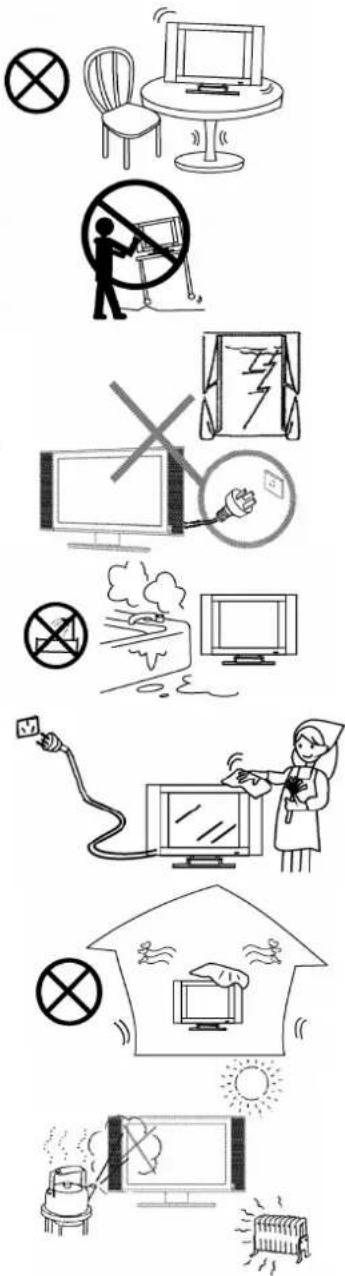
Therefore, it can break when the product is dropped or impacted upon by other objects. Be careful not to be injured by broken glass pieces in case the LCD panel breaks.
23.Pixel defect---The LCD panel is a very high technology product, giving you finely detailed pictures. Occasionally, a few non-active pixels may appear on the screen as a fixed point of blue, green or red. Please note that this does not affect the performance of your product.

natural_image
Simple line drawing of a megaphone emitting sound waves from a computer monitor (no text or symbols)Using the Remote Control
- Use the remote control by pointing it towards the remote sensor window of the set. Objects between the remote control and sensor window may prevent proper operation. Cautions regarding use of remote control
Note: the illustration is for your reference only, the remote sensor may locate differently with different model.
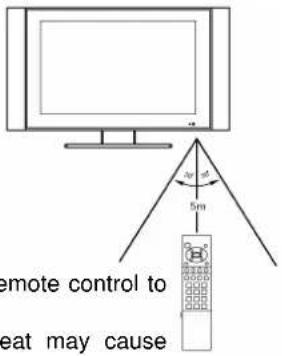
Cautions regarding use of remote control
- Do not expose the remote control to shock. In addition, do not expose the remote control to liquids, and do not place in an area with high humidity.
- Do not install or place the remote control under direct sunlight. The heat may cause deformation of the unit.
● The remote control may not work properly if the remote sensor window of the main unit is under direct sunlight or strong lighting. In such a case, change the angle of the lighting or LCD TV set, or operate the remote control closer to the remote sensor window.
Batteries for Remote Control
If the remote control fails to operate the LCDTV functions, replace the batteries in the remote control. 1 Open the battery cover. 2 Insert two size-AAA batteries. 3 Replace the cover and slide in reverse until the lock snaps.

natural_image
Illustration of a hand holding a coiled spring attached to a rectangular device (no text or symbols visible)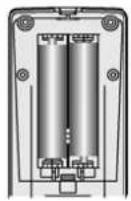
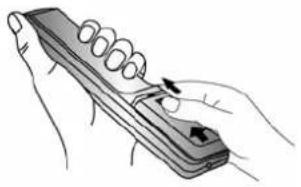
natural_image
Illustration of a hand holding a handheld device with a coiled spring and directional arrows (no text or symbols)- Slide the cover while pressing down.
● Place the batteries with their terminals corresponding to the (+) and (-) indications in the battery compartment.
Precaution on battery use
Improper use of batteries can result in a leakage of chemicals and/or explosion. Be sure to follow the instructions below.
- Place batteries with their terminals corresponding to the (+) and (-) indications.
● Different types of batteries have different characteristics. Do not mix batteries of different types.
- Do not mix old and new batteries. Mixing old and new batteries can shorten the life of new batteries and/or cause old batteries to leak chemicals.
- Remove batteries as soon as they are non-operable. Chemicals that leak from batteries can cause a rash. If chemical leakage is found, wipe with a cloth.
- The batteries supplied with the product may have a shorter life expectancy due to storage conditions. If the remote control is not used for an extended period of time, remove the batteries from the remote control.
PACKING LIST
LCD TV 1
Operation Manual 1
Power Adapter 1(only TM150F7U)
AC Power Cable 1
Infrared Remote Control 1
Note:
Please keep the wrapping box and the padding well for future convenient use when you convey them.
GENERAL INFORMATION
■ Radio Frequency input: it can store 181 TV channels
■ AV input: Convenient for watching a DVD player, VCE, video camera or other playback devices.
■ S-Video input: Convenient of receiving a high quality component signal from a DVD player
■ YPbPr input: Capable of receiving the high definition YPbPr signal in 480i, 480P, 576i, 576P, 720P (50/60Hz), 1080i (50/60Hz), and 1080P (50/60Hz) formats
■ MTS Stereo Decoding Function: Capable of identifying MTS automatically and reproducing high quality stereo sound.
■ VGA input:
a. Convenient to connect with the host computer
b. Use as the display terminal
c. Connect the 3.5mm(diameter) audio jack to your computer's soundcard to listen to stereo sound transmitted from your home computer
■ Program & Child Lock: Capable of locking any program of the TV and the function button of the front panel
■ Timer function
■ Blue background with noise reduction: In TV/AV S-VIDEO and YPbPr modes, screen displays soft blue background if there is no signal input
■ Multi Language On-Screen Display menu: Text and graphical user interface makes menu operation user-friendly
■ Power Energy Saving Mode (Power management mode): When used as PC display terminal without PC signal output, the LCD TV will automatically power off within 30 seconds and enter into the Power Energy Saving Mode. It will automatically work again when it received a signal from the PC. To start the TV manually with no signal press the number buttons or (I)/CH+/ CH- on the remote control.
- Plug and Play: No additional software is needed when the product is used as computer terminal display
■ Automatic picture quality automatically
■ Zoom mode: Full-screen, 16:9, film, subtitle
■ Low power consumption
■ Picture enhancement function
■ High definition display panel
■ Dynamic comb filter
■ Headphone output
■ CCD Function
■ MACROVISION auto identification function
BRIEF INTRODUCTION
Front Panel
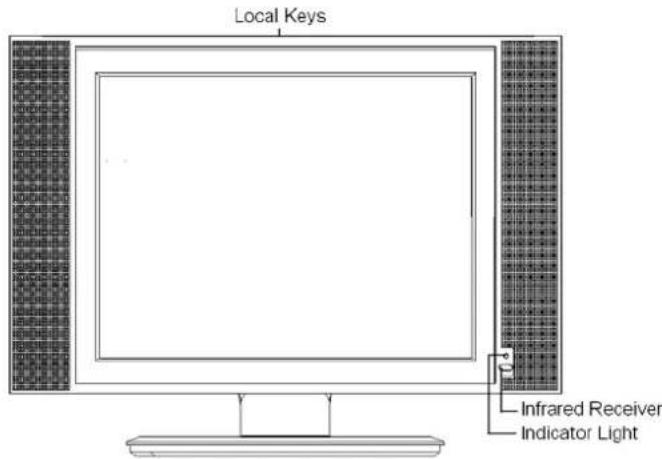
The button names and functions are as follows:

Panel buttons
| Button | Description |
| 【SOURCE】 | To switch between TV, AV, S-Video, YPbPr, and PC signal sources.The same function to【SOURCE】on R/C in menu operation. |
| 【MENU】 | To enter or quit from the OSD (On-Screen Display) menu.The same function to【MENU】on R/C |
| 【VOL-】 | To decrease the sound volume. Adjust functions in menu operation. The same function to【Vol-】on R/C |
| 【VOL+】 | To increase the sound volume. Adjust functions in menu operation. The same function to【Vol+】on R/C |
| 【CH-】 | 1. In TV mode, decrease the channel number2. To select functions in menu operation.3. The same function to【CH-】on R/C |
| 【CH+】 | 1. In TV mode, increase the channel number2. To select functions in menu operation.3. The same function to【CH+】on R/C |
| 【↓】 | To power on or put the LCD TV to STANDBYThe same function to【↓】on R/C |
Note:
In this operation manual, 【】symbol means Button.
Rear Panel

Amplificatory Illustration of Signal Input Ports
TM150F7U
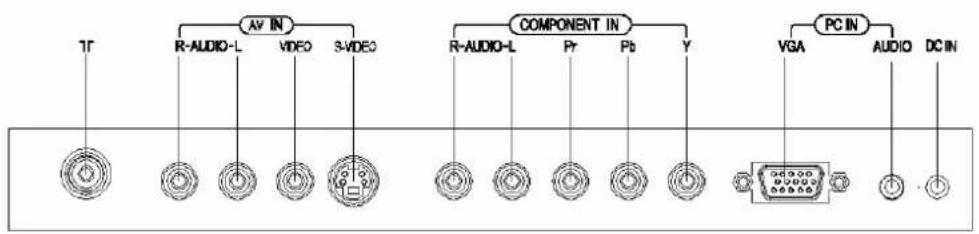
flowchart
graph TD
    A["AV IN"] --> B["R-AUDIO-L"]
    A --> C["VIDEO"]
    A --> D["S-VIDEO"]
    E["COMPONENT IN"] --> F["R-AUDIO-L"]
    E --> G["Pr"]
    E --> H["Pb"]
    E --> I["Y"]
    J["PC IN"] --> K["VGA"]
    J --> L["AUDIO"]
    J --> M["DC-IN"]
W170F7U,TM201F7U

REMOTE CONTROL

INSTALLATION
- Remove the LCD TV from the box and place it on a flat surface in a well-ventilated location.
- Connect the output terminal of RF cable to the corresponding TV RF signal input terminal. The LCD TV is a high-tech digital product, Do use quality RF cable to obtain optimal results.
- Connect the output terminal of the AV devices such as YPbPr, DVD to the corresponding terminal of your LCD TV.
- Connect one end of the VGA terminal to the corresponding terminal of the host computer, and connect the other end to the corresponding LCD TV terminal. Screw down the screws on both sides in clockwise to secure it.
Caution:
When connecting, plug directly and lightly to the interface, otherwise you will damage the stitches.
-
Ensure that every AV signal cord is correctly connected to the corresponding jack.
-
Put the DC power plug in the DC input outlet of the TV, then put the AC power plug of the power adapter in the AC power outlet.
-
The panel can be tilted upwards by no more than 10^0 to achieve better visual angle. When doing so, so rotate the TV with two hands, one to fix the pedestal while the other to tilt the panel. Take great care and do this in a moderate pressure in case any accidents happen.
GENERAL OPERATION
To Turn the TV On
After the power is on, this TV will enter into Standby mode. Then press【 ⏻】on the remote control or the front panel to enter into the TV mode
To Turn the TV Off
- Press 【⏻】 on the remote control or the front panel to turn the TV transitorily off.
- Simply unplugged the DC power pin of power adapter, then unplug the AC power pin of that from the AC power supply to turn the TV off completely.
Caution: The TV will be shut off automatically when the power trips. Do unplug the power adapter from the AC outlet if so. The last TV mode will appear when power resumes
Please do not turn on/off the TV too often!
Please unplug the power adapter from the AC outlet in time when the power is suddenly off!
FUNCTION INTRODUCTION
MENU OPERATION
- Use the On Screen Display menu to set and adjust functions
- Use 【CH+】/【CH-】 to select the desired menu after pressing 【MENU】, then press
【Vol+】/【OK】to enter the next submenu; Use 【Vol +】/【Vol -】to select the menu options and return to the precious menu by pressing 【MENU】 again. The menu will auto disappear without any operation within 10 seconds.
In TV、AV、S-VIDEO、YPbPr and PC modes
I Picture
- Brightness
To adjust the picture's brightness - Contrast
To adjust the picture's contrast. - Sharpness
To adjust the picture's definition. - Colour
To adjust the picture's color.
Tint
To adjust the picture's tint.
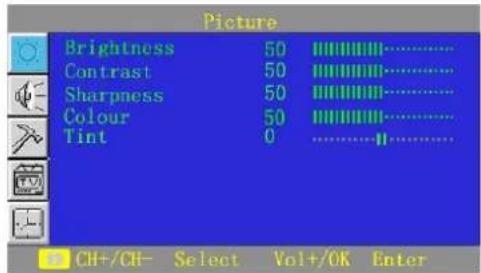
Note: Picture menu options in other signal sources:
AV/S-VIDEO: the same as in TV mode
YPbPr/PC: only two options of Brightness and Contrast
II Sound
Volume
To increase or decrease the volume.
Balance
To balance the volume between the left and right speakers.
- Woofer
To turn on/off the woofer.
- Spatial
To turn on/off the surround

Use 【OK】/【Vol+】 to enter the Equalizer (submenu), you can increase or decrease the value of the sound output in every frequency band which are preferred
Note: The Sound menu options are the same in TV

signal as well as in other signal sources
III Setup
- Language
To select the different language displayed
- Parent
In the submenu of Parent, firstly the Access Code menu appears, you will see this menu when you switch to a channel after it was locked once :

When Enter the Parent menu only two options of TV Rating and MPAA Rating appear on display, see it below.


TV Rating Used to block some programs (eroticism, violence), select different Rating with 【CH+】/【CH-】, and select the desired option among FV,D,L,S,V with 【Vol+】/【Vol-】, U indicates Unblocked, and B indicates Blocked. To amend the value with 【OK】, and return to the previous menu with 【MENU】, see it right:

MPAA Rating Used to block some programs (eroticism, violence), select the desired option among G,PG,PG-13,R,NC-17,X with 【CH+】/【CH-】, U indicates Unblocked, and B indicates Blocked. To amend the value with 【Vol+】/【Vol-】,to return to the previous menu with 【MENU】, see it right:

Note: After a program has been set to B Rating in TV RATING and MPAA RATING, this TV would filtrate that contents if TV programs belong to the rating or superior to that.
●Program Lock
Input the default password of 1235, the submenu of Parent will be on display if the password is correct.
(a) When changing the password, the changed password will be updated after four digits are input. The word “ok” will appear after you make sure inputting the same number for twice, otherwise, the word "Failed" will appear if two passwords are different.
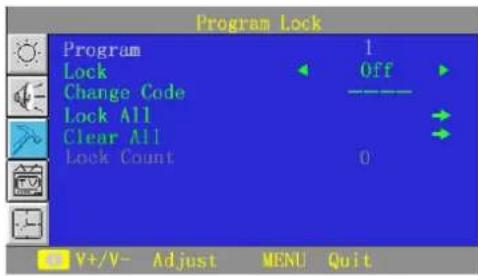
(b) Unlock all the locked programs when Clear All is operated.
(c) When switch to some locked channels after you exit from the Program Lock menu, the picture and sound will be locked unless you input the correct password. The unlocked status will remain until the TV is turned off. Password must be re-keyed after switching on the TV to the locked channels again.
(d) if any program was locked before, Input the correct password to enter the Auto Search submenu. Operating Auto Search will cancel the current locked status.
(e) The default password is always effectual.
(f) Entering the default password allows you to go to the Program Lock menu, then change the password while the default password is still effective. The branch menu cannot be entered if a wrong password was keyed in, therefore the previous menu needs to be reverted by pressing 【MENU】
(g) There will be some delays when you are processing functions of Lock All and Clear All.
- Child Lock
In Child Lock On mode, local keys on TV do not work. A prompt "Keyboard Locked" will be displayed. However, the remote control buttons will still function. When pressing 【 ⏻】 on the front panel to enter into the TV mode and the Child Lock is on, a prompt "Locked, power off after 6s" will appear, using the remote control can solve this. Otherwise, It will automatically enter into Standby mode.
IV Tune
Press 【CH+】/【CH-】to enter the Tune menu after the main menu is on screen, There are altogether 5 items for you to adjust such as Program、Add/Erase、Antenna、Auto Search and Name.
- Program
To Present the current program number.
- Add/Erase
To erase or add the channel..

- Antenna
. To display the RF antenna mode, when this mode is Air, Auto Search begins searching from channel 2 to channel 69; When this mode is Cable, Auto Search begins from channel 1 to channel 125. Then what have searched before would be stored in the corresponding EEPROM, meanwhile, the channels which have not been searched will be set to Erase mode automatically.
- Auto search
Three situations for Auto Search to stop:
- The TV does auto search and stores programs.
- 68-program or 125-program positions are all occupied
- you want to stop it by pressing 【MENU】/【Vol-】 during the search process.
After the situation 3 happened, the search will automatically stop and back to the first channel, furthermore, the TV would return to the Tune menu.
- Name
Rename the program with four colored buttons on the remote control
【Red】for Capitalized English letters
【Green】for Alphanumeric numbers from 0 to 9
【Yellow】for special characters as “#”
【Blue】Resuming “*” in unnamed mode
Use 【V+】/【V-】 to input and select the characters
Note: There is a PC Setup menu for the Tune menu in PC signal source; There is no Tune menu in AV、S—Video、YPbPr signal source.
V Clock
- Clock
The current actual time can be input by pressing the number buttons(0-9) and 【Vol+】/【Vol-】.
- Antenna
To display RF antenna mode.
● Time/ Off Time
The function of can be effectual only when Time/Off Time is not off. Press the number buttons and
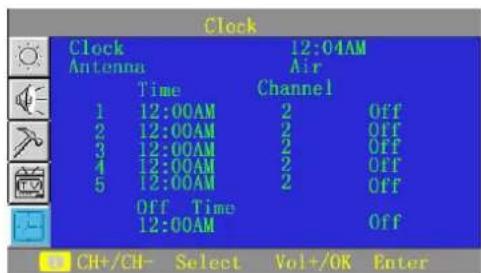
【Vol+】/【Vol-】to adjust the time.
Press【CH+】/【CH-】to select these options in Clock such as Time、Channel、Off Time in cycle, Press【Vol+】/【Vol-】to set the corresponding value.
1 Whenever the main power is on, the clock item always displays "12:00AM", only use 【Vol+】/【Vol-】to switch between AM and PM and use numeric buttons to modify the time.
2. To set Time/Off Time among Off/Once/Always with 【Vol+】/【Vol-】in cycle. Off indicates this function is not available. Once indicates one time for On Mode, after then it would be adjusted to Off automatically.
3. This function can only be available when the main power supply is proper, otherwise, it can not be done and automatically adjusted to Off.
4. Of Clock, Time and Off Time, "Minute" ranges from 00 to 59, "Hour" is 1\~12 (AM),
1\~12(PM). When “Hour” turns to “--” “Minute” also turns to “--” accordingly, the function of Clock stops.
- Channel
Select the Channel in Air from 2 to 69 or Cable from 1 to 125 by pressing 【Vol+】/【Vol-】 circularly or numeric buttons directly; Select the items circularly by pressing 【CH+】/【CH-】.
- When TV is on, it turns directly to the preset channel if the preset Time is on; When TV is in standby mode, it firstly turns on and then goes to the preset channel If the preset Time is on.
- When the TV is on, if the value of On Time and Off Time are the same, only Off Time is valid; When the TV is off, if the value of On Time and Off Time are the same, only On Time is valid,
- Restart the TV after shutting off the main power, all settings are to be initialized; Turn off the TV using the remote control, all settings are to be saved.
Note: Only in standby mode can this TV be turned on automatically. The Clock menu in other signal sources is the same to that in TV mode.
VI PC Setup
● H Position
To adjust picture's start horizontally.
● V Position
To adjust picture's start vertically.
- Clock
To adjust pictures' sampling clock.
- Phase
To adjust pictures' sampling phase
- Colour Temp

Four modes of Warm、Normal、Cool And User to choose with 【Vol+】/【Vol-】in cycle. Only in User mode can adjustments be made to the three options: User Red、User Green and User Blue.
● Auto Adjust
To adjust the picture's start, clock, phase and color temper to the appropriate value (invalid in DOS mode).
Note: The PC Setup menu is only available in the PC signal source.
OTHER FUNCTIONS
● Volume Control
- Press【Vol+】/【Vol-】to increase or decrease the volume when there is no menu on the screen. The Volume menu will be auto off if there is no operation about 6 seconds.
- Press 【MUTE】 on the remote control to turn On/Off the MUTE mode. In Mute mode, a sign of “MUTE” in red will appear on the upper-right corner of the screen. This sign is hidden when the menu operation is entered, but the feature is still valid. It appears again
when the menu operation is exited. When there is no valid signal input, the TV will be mute (but no mute sign)
3. MTS
① Capable of identifying MTS automatically with the control status: the TV would memorize SAP after it is auto identified: the TV would memorize Stereo after it is auto identified;
② There is an OSD hint to show the changes in broadcasting signals:
③ Press 【MTS】 to switch between Stereo /SAP

flowchart
graph TD
    A["Mono"] --> B["Stereo"]
    B --> C["SAP"]
    C --> A
4. Sound Mode Selection
Press 【SOUND】to select Personal、News、Theater and Music modes and activate the Sound Mode. TV will enter into the Personal mode as you want to alter the concerned options of the Sound Menu in any mode.
| Sound Mode Sound Quality | |
| Personal For the user's preference | |
| News For general programs of conversations and news report | |
| Theater | For better audience effect as soft、 magnificent and vivid |
| Music For general music programs | |
Note: The operation and setting of the Volume Control are applicable to all the signal sources.
a) Picture Mode Selection
Press【PIC】to Switch among Personal, Soft, Normal and Rich modes.
| Picture Mode Picture Quality |
| Personal For the user's preference |
| Soft For more mellow pictures |
| Normal For general programs |
| Rich For better visual effect such as magnificent and vivid |
Note: The setting of this selection is applicable to all the signal sources.
- CCD
Press 【CC】 to see this menu, you can select the desired option among CC1\~CC4、T1\~T4 and OFF with 【CH+】/【CH-】, and confirm that by pressing 【OK】

.● Favorites
Press 【FAVOR】to see this menu on the right, these are the details:
- Mode: including Auto and Manual. They are respectively stored in Air or Cable way;
- In Auto mode, the TV would store the available channel name input with the numeric buttons to Favorite Channels every time orderly, what is more, it only save the latest five channel names of availability (without repeat);
- In Manual mode, select different Sort with【CH+】/【CH-】, then you can channel of each sort by 【CH+】/【CH-】or number buttons( in Air way, 2-69 are available; in Cable way, 1-125 are available).
In Auto mode, 【Vol+】/【Vol-】are invalid while 【CH+】/【CH-】and【OK】can still work.
- Recall
In TV mode, press【RECALL】on the remote control to view the previous channel.
In other signal sources, press【RECALL】on the remote control to view the previous signal source.
- Signal Switch
Press 【SOURCE】 on the remote control to display the source menu and select the signal source. They are TV、AV、S-VIDEO、YPbPr and PC. Press 【CH+】/【CH-】 to select the different signal source; Press 【Vol+】/【OK】 to enter into the selected signal source; Press 【SOURCE】 again to remove the source menu.
- Channel Switch
Use the number buttons to choose the desired channel directly or press [CH+] / [CH-] on the panel or the remote control to increase/decrease the channel number. If a channel number is in Skip On mode, the next channel will display orderly.
A maximum of 3 digits can be keyed in at one time with the number button on the remote control. The symbol of “- -” on the upper-right corner represents tens and one respectively.. ,two digits are only admitted if a number input is beyond the range and the number for hundred digit is bigger than “2”.The first input number is for hundreds, if it is “1”, “1--” appears on. The TV will switch to channel 1 if no number is input in 3 seconds. The second is for tens if it is “2”, “12 -” appears on. The TV will switch to channel 12 if no number is input in 3 seconds and the third is for ones., Press 【OK】 to turn to the desired channel quickly after the corresponding number is input.
Note: This function is only available in TV mode
- Sleep Function
Press 【SLEEP】 on the remote control once to activate the function and subsequent keying in to select the sleep time of 0, 15, 30, 45, 60,90, 120, 150,180, 240 and 0 minutes. This will be reflected in the top right corner of the screen. After this step is done, press 【SLEEP】 to view the set sleep. See the illustration in the right.
SLEEP 30
- Indicator Light
| Status | Light | Colour | D |
| On/Off Off The TV works normally/is power off | |||
| Standby Red In Standby Mode | |||
| Timer On/Off Or Sleep Green Timer On/Off is valid or Sleep is on | |||
| Sleep (PC) Yellow Sleep for power-saving; | |||
| Receives signal from the remote control | Flickering | The indicator will flicker when the TV receives signal from the remote control | |
escription
TROUBLESHOOTING
Before calling a technician, please check the following table to see if the below mentioned symptoms can be diagnosed and fixed.
| Symptoms | Possible | Reasons |
| No picture, no sound, and no indicator light on | 1.The power adapter is not plugged in2.The power is off | 1.Plug the power adapter in2.Turn the power on |
| No picture, no sound, but the yellow light indicator | Functions of On Time have been set | Press【💡】to turn on the TV |
| Picture and sound with abnormality | 1.Contrast, sharpness, and color are set improperly2.Color system is set improperly3.Sound system is set improperly | 1.Adjust ⏻ the value of Contrast, sharpness, and color2.Set the Color system to the country broadcasting standard3.Set the Sound system to the country broadcasting standard |
| Picture is spotted or with snow | Signal source is low-grade; The signal is in a lower quality; No signal input | Use the qualified signal cord Input the signal |
| Blue background in AV mode | No Video signal or the signal cord is improperly/not connected | Connect the signal cord properly |
| Picture is unclear, or moves or have black stripes on horizontal position in PC mode | Picture is not well adjusted | Adjust automatically by selecting Auto Adjust or adjust Clock、Phase、H Position and V Position manually after enter into the PC Setup menu to solve this problem |
| PC Picture is not in the middle of the screen | Picture is not well adjusted | Adjust pictures automatically by resetting H Position、V Position、Phase and Clock |
| No sound | No Audio signal or the signal cord is improperly/not connected | 1.Connect the audio signal cord properly2.Set the sound system properly |
| The remote control does not work | Batteries are improperly installed or exhausted | 1.Make sure the positive and the negative polarities are correct.2.Check if there is loose contact between the springs and the batteries.3.Replace the batteries |
Correction
SPECIFICATIONS
TM150F7U
| Items | Specifications | |
| LCD panel items | Size (diagonal) 15.0 inch | |
| Brightness:250cd/m2 | ||
| Contrast:400:1 | ||
| Angle of View:120°(H)/100°(V) | ||
| Speed Response:16ms | ||
| Lamp Life:50,000 Hours | ||
| Recommended Resolution 1024X768 | ||
| Pixel Pitch 0.297mm(H) X0.297mm (V) | ||
| Number of Dots 1024XRGBX768 | ||
| Viewable Area 304.1mm(H) x228.1mm (V) | ||
| Color Display 16.7million | ||
| Color System NTSC | ||
| Sound System M | ||
| PC Qualified Input Format | VGA/SVGA/XGA | |
| YPbPr Input Format | 480i, 480P, 576i, 576P, 720P, 1080i,1080P (50/60Hz) | |
| Audio Output Consumption 2x2.0 W | ||
| AV-Audio Input One way(S-Video is using in community) | ||
| AV-Video Input One way | ||
| Headphone Output | One way | |
| Comb Filter | YES | |
| S-Video Input | One way | |
| YPbPr Input | One way (with audio input) | |
| VGA Video Input | One way | |
| VGA Audio Input | One way | |
| DC Voltage Input | DC 12V | |
| Power Adaptor Voltage Input | Please refer to the back panel of the unit | |
| Rated Power Consumption | ||
| Standby Power Consumption | ≤1.5W(with power adapter) | |
| Unit Dimension | 454mm (W) ×343mm(H) ×166mm(D) | |
| Net Weight | 4.5kg(Approx.) | |
SPECIFICATIONS
W170F7U
| Items | Specifications | |
| LCD Panel | Size (diagonal) 17.1 inch | |
| High Brightness | ||
| High Contrast | ||
| Wide Angle of View | ||
| High Speed Response | ||
| Long Lamp Life | ||
| Recommended Resolution 1280X768 | ||
| Pixel Pitch 0.291mm(H) X0.291mm (V) | ||
| Number of Dots 1280XRGBX768 | ||
| Viewable Area 372.48mm(H) x223.488mm (V) | ||
| Colour Display 16.7million | ||
| Colour System NTSC | ||
| Sound System M | ||
| PC Qualified Input Format | VGA/SVGA/XGA/WXGA | |
| YPbPr Input Format | 480i, 480P, 576i, 576P, 720P, 1080i, 1080P(50HZ、60HZ) | |
| Audio Output Consumption 2x2.0W | ||
| AV-Audio Input | One way(S-Video is using in community) | |
| AV-Video Input | One way | |
| Headphone Output | One way | |
| PAL/NTSC Digital Comb Filter | YES | |
| S-Video Input | One way | |
| YPbPr Input | One way(with audio input) | |
| VGA Video Input | One way | |
| VGA Audio Input | One way | |
| Voltage Input | Please refer to the back label | |
| Rated Power Consumption | ||
| Standby Power Consumption | ≤1.5W | |
| Unit Dimension | 525mm (W) ×350mm(H)×230mm(D)(including the pedestal) | |
| Unit Weight | 7.5kg(Approx.) | |
SPECIFICATIONS
TM201F7U
| Items | Specifications | |
| LCD Panel | Size (diagonal) 20.1 inch | |
| High Brightness | ||
| High Contrast | ||
| Wide Angle of View | ||
| High Speed Response | ||
| Long Lamp Life | ||
| Recommended Resolution 640X480 | ||
| Pixel Pitch 0.6375mm(H) X0.6375mm (V) | ||
| Number of Dots 640XRGBX480 | ||
| Viewable Area 408mm(H) x306mm (V) | ||
| Colour Display 16.7million | ||
| Colour System NTSC | ||
| Sound System M | ||
| PC Qualified Input Format VGA/SVGA | ||
| YPbPr Input Format | 480i, 480P, 576i, 576P, 720P, 1080i, 1080P(50Hz、60Hz) | |
| Audio Output Consumption | 2x2.0w | |
| AV-Audio Input | One way(S-Video is using in community) | |
| AV-Video Input | One way | |
| Earphone Output | One way | |
| PAL/NTSC Digital Comb Filter | YES | |
| S-Video Input | One way | |
| YPbPr Input | One way(with audio input) | |
| VGA Video Input | One way | |
| VGA Audio Input | One way | |
| Voltage Input | Please refer to the back label | |
| Rated Power Consumption | ||
| Standby Power Consumption | ≤slant 1.5W | |
| Unit Dimension | 590mm (W) × 435mm(H) × 230mm(D)(including the pedestal) | |
| Unit Weight | 10kg(Approx.) | |
All the features and specifications are subject to change without notice for improvement.
TM150F7U /TM201F7U
JUJ6.491.1114

- LCD COLOR TELEVISION
- OPERATION MANUAL
- CONTENTS
- Note:
- Important Safety Instructions
- Using the Remote Control
- Cautions regarding use of remote control
- Batteries for Remote Control
- Precaution on battery use
- PACKING LIST
- GENERAL INFORMATION
- BRIEF INTRODUCTION
- Front Panel
- Panel buttons
- Amplificatory Illustration of Signal Input Ports
- REMOTE CONTROL
- INSTALLATION
- Caution:
- GENERAL OPERATION
- To Turn the TV On
- To Turn the TV Off
- FUNCTION INTRODUCTION
- MENU OPERATION
- In TV、AV、S-VIDEO、YPbPr and PC modes
- I Picture
- II Sound
- III Setup
- - Language
- - Parent
- ●Program Lock
- - Child Lock
- IV Tune
- V Clock
- - Channel
- VI PC Setup
- OTHER FUNCTIONS
- ● Volume Control
- MTS
- Sound Mode Selection
- a) Picture Mode Selection
- - CCD
- .● Favorites
- - Recall
- - Signal Switch
- - Channel Switch
- Note: This function is only available in TV mode
- - Sleep Function
- - Indicator Light
- TROUBLESHOOTING
- SPECIFICATIONS
Brand : CHANGHONG
Model : TM150F7U
Category : Television