
Firebox T50-W MSSP (WW) - Firewall WatchGuard - Free user manual and instructions
Find the device manual for free Firebox T50-W MSSP (WW) WatchGuard in PDF.


| Product Type | Next-generation firewall with wireless access point |
| Model | Firebox T50-W MSSP (WW) |
| Processor | Freescale P1020 |
| Memory (DDR3) | 2 GB |
| Storage (SD) | 8 GB |
| Network Interfaces | 7x 1000Base-TX RJ45 (1 PoE compliant with IEEE 802.3at) |
| Wireless Radio | 2.4 GHz 802.11 b/g/n, 5 GHz 802.11 a/n/ac |
| USB Interfaces | 2x USB 2.0 |
| Serial Port | 1x RJ45 console port |
| Dimensions (D x W x H) | 176.1 mm x 235.9 mm x 29.5 mm |
| Weight | 0.55 kg (1.2 lbs) |
| Power Supply Input | 90-264 VAC, 1.4 A max, 60-50 Hz |
| Power Supply Output | 48 V, 60 W max |
| Operating Temperature | 0 to 40°C (32 to 104°F) |
| Operating Humidity | 5% to 90% non-condensing |
| Safety Certifications | UL 60950-1, CAN/CSA C22.2 No.60950-1, IEC 60950-1, EN 60950-1 |
| EMC Standards | FCC Class A, ICES-003 Class A, CE, VCCI Class A |
| Wireless Certifications | FCC, IC, CE (R&TTE Directive) |
| Warranty | 1 year limited hardware warranty |
| Package Contents | Firebox T50-W appliance, Quick Start Guide, Ethernet cable, power adapter, 4 power cords (US, AU, EU, UK) |
| Mounting | Wall-mountable with optional plate (sold separately) |
| Environmental Compliance | RoHS, WEEE, REACH |
Frequently Asked Questions - Firebox T50-W MSSP (WW) WatchGuard
User questions about Firebox T50-W MSSP (WW) WatchGuard
0 question about this device. Answer the ones you know or ask your own.
Ask a new question about this device
Download the instructions for your Firewall in PDF format for free! Find your manual Firebox T50-W MSSP (WW) - WatchGuard and take your electronic device back in hand. On this page are published all the documents necessary for the use of your device. Firebox T50-W MSSP (WW) by WatchGuard.
USER MANUAL Firebox T50-W MSSP (WW) WatchGuard
WatchGuard Firebox T30 / T50
Hardware Guide
Firebox T30, T30-W, T50, T50-W
Copyright and Patent Information
Copyright© 1998–2015 WatchGuard Technologies, Inc. All rights reserved.
WatchGuard, the WatchGuard logo, Firebox, LiveSecurity, and any other mark listed as a trademark in the "Terms of Use" portion of the WatchGuard Web site that is used herein are either registered trademarks or trademarks of WatchGuard Technologies, Inc. and/or its subsidiaries in the United States and/or other countries. All other trademarks are the property of their respective owners.
The Power Architecture and Power.org wordmarks and the Power and Power.org logos and related marks are trademarks and service marks licensed by Power.org.
Printed in the United States of America.
Part Number: Rev C
Revised: August 9, 2016
U.S. Patent Nos. 6,493,752; 6,597,661; D473,879. Other Patents Pending.
Complete copyright, trademark, patent, and licensing information can be found in the Copyright and Licensing Guide. You can find this document online at: http://www.watchguard.com/help/documentation/
Notice to Users
Information in this guide is subject to change without notice. Updates to this guide are posted at:
http://www.watchguard.com/help/documentation/hardware.asp
Companies, names, and data used in examples herein are fictitious unless otherwise noted. No part of this guide may be reproduced or transmitted in any form or by any means, electronic or mechanical, for any purpose, without the express written permission of WatchGuard Technologies, Inc.
ABOUT WATCHGUARD
WatchGuard offers affordable, all-in-one network and content security solutions that provide defense-in-depth and help meet regulatory compliance requirements. The WatchGuard Firebox line combines firewall, VPN, GAV, IPS, spam blocking and URL filtering to protect your network from spam, viruses, malware, and intrusions. The new XCS line offers email and web content security combined with data loss prevention. WatchGuard extensible solutions scale to offer right-sized security ranging from small businesses to enterprises with 10,000+ employees. WatchGuard builds simple, reliable, and robust security appliances featuring fast implementation and comprehensive management and reporting tools. Enterprises throughout the world rely on our signature red boxes to maximize security without sacrificing efficiency and productivity.
For more information, please call 206.613.6600 or visit www.watchguard.com
ADDRESS
505 Fifth Avenue South
Suite 500
Seattle, WA 98104
SUPPORT
www.watchguard.com/support
U.S. and Canada +877.232.3531
All Other Countries +1.206.521.3575
SALES
U.S. and Canada +1.800.734.9905
All Other Countries +1.206.613.0895
Hardware Specifications
WatchGuard® Firebox security appliances deliver unparalleled unified threat management, superior performance, ease of use, and value for your small organization or branch office. Our security subscriptions give you fully integrated protection from spyware, spam, viruses, worms, trojans, web-based exploits, and blended threats. From firewall and VPN protection to secure remote access, WatchGuard Firebox appliances support a broad range of network environments.
This guide introduces the Firebox T30 and T50, RoHS-compliant (lead-free) hardware products offered by WatchGuard.
The Firebox T30 and T50 network security appliances are designed for small organizations and branch offices.
Fireware OS
The Firebox T30 and T50 appliances support WatchGuard's next generation UTM OS—Fireware® OS. Each Firebox appliance includes Fireware OS and delivers exceptional protection against today's sophisticated threats to make sure that your business stays connected. For more information on the features of Fireware OS, see the current Fireware Help.
Package Contents
■ Firebox T30 or T50 appliance
■ Quick Start Guide
■ 1 straight-through Ethernet cable
Power supply
■ 1 power cord (US) or 4 power cords (US, AU, EU, UK)
Hardware Description
Hardware Specifications
Firebox T30 / T30-W Firebox T50 / T50-W
Processor Freescale P1011 Freescale P1020
Memory: DDR3 1 GB 2 GB
Storage: SD 8 GB 8 GB
| Power supply Input Ratings: 90-264VAC, MAX1.4A@100VAC, 60-50HzOutput Ratings : 48V, Max 60W | Input Ratings: 90-264VAC, MAX1.4A@100VAC, 60-50HzOutput Ratings: 48V, Max 60W |
| Dimensions D = 176.1mm (6.93") | D = 176.1mm (6.93") |
| W =235.9mm (9.29") | W =235.9mm (9.29") |
| H = 29.5mm (1.16") | H = 29.5mm (1.16") |
| Weight T30 0.5 kg (1.1 U.S. pounds) | T50 0.5 kg (1.1 U.S. pounds) |
| T30-W 0.54 kg (1.19 U.S. pounds) | T50-W 0.55 kg (1.2 U.S. pounds) |
Interface Specifications
| Network interfaces | • 5x 1000Base-TX, RJ45 | • 7x 1000Base-TX, RJ45 |
| • Interface 4 supports (Power over Ethernet), compliant with the IEEE 802.3at standard | • Interface 6 supports PoE (Power over Ethernet), compliant with the IEEE 802.3at standard | |
| Radio Type and Frequency Band (T30-W and T50-W) | • 2.4 GHz 802.11 b/g/n | • 2.4 GHz 802.11 b/g/n |
| • 5 GHz 802.11 a/n/ac | • 5 GHz 802.11 a/n/ac | |
| I/O interfaces | • 2 USB 2 . 0 | • 2 USB 2 . 0 |
| • 1 RJ45 Serial Port | • 1 RJ45 Serial Port |
Front View
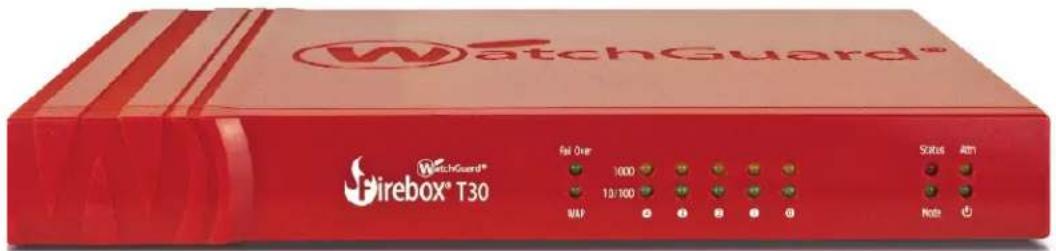
The front panel of the Firebox T30-W.
The front panel of the Firebox T50-W.
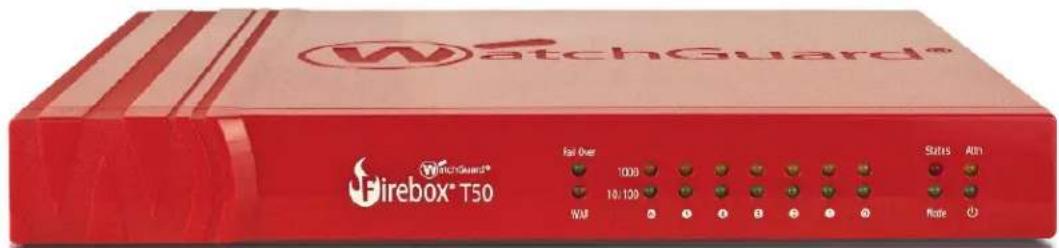
Fail Over
The Fail Over indicator is lit when there is a WAN failover from the primary external interface to the backup interface. After the external interface connection fails back to the primary external interface, the indicator is not lit.
WAP
On Firebox T30-W and T50-W models, the WAP indicator is lit when the appliance is activated as a wireless access point or a wireless client. The color indicates the active wireless radio band.
| Indicator Indicator color Wireless Status |
| WAP Yellow 2.4 GHz radio band |
| Green 5 GHz radio band |
Network interface status indicators
On the Firebox T30, the five network interfaces are labeled 4, 3, 2, 1, 0. On the Firebox T50, the seven network interfaces are labeled 6, 5, 4, 3, 2, 1, 0. There are two status indicators for each interface.
| Indicator Indicator color Interface Status | ||
| 1000 Yellow Link speed: 1000 Mbps | ||
| Blinks (speed of blink increases as the data flow increases) | Data sent and received | |
| 10/100 Green Link speed: 10 Mbps or 100 Mbps | ||
| Blinks (speed of blink increases as the data flow increases) | Data sent and received | |
Status
The Status indicator is red when there is a management connection to the device. The Status indicator is lit for 30 seconds after you connect to the device with the Fireware Web UI or the command line interface. It is also lit when the device is polled by WatchGuard System Manager.
Mode
The Mode indicator shows the status of the external network connection. If the device can connect to the external network and send traffic, the indicator is green. The indicator flashes if the device cannot send traffic to the external network.
Attn
The Attn indicator is yellow when you start the device with the Reset button pressed. For more information, see "Restore Factory Default Settings" on page 9
Power (⏻)
The power indicator is green when the device is on.
Rear View
Rear panel of the Firebox T30.

Rear panel of the Firebox T50.

Network interfaces
The Ethernet interfaces have standard RJ45 connectors and support link speeds of 10, 100, or 1000 Mbps. On each model, the highest numbered interface is a PoE (Power over Ethernet) interface, compliant with the IEEE 802.3at standard.
On the Firebox T30 and T30-W, these interfaces are labeled 0/WAN, 1/LAN, 2, 3, 4-PoE.
On the Firebox T50 and T50-W, these interfaces are labeled 0/WAN,1/LAN, 2, 3, 4, 5, 6-PoE.
USB interfaces
The device includes two USB interfaces. Connect a USB storage device to use for USB backup and restore, or to store a support snapshot. For more information, see the current Fireware Help.
Serial port (Console)
An RJ45 connector for the serial interface. An RJ45 serial cable is not included with the device.
Power switch
Controls the power supplied to the device. Move the switch to position 1 to power on the device, or position 0 to power it off.
Power input
An AC power adapter is included with your device. Connect the AC adapter to the device and to a power source. The power supply tip is plus (+) polarity. Use only the supplied AC power adapter.
Reset button
To reset the device, use the procedure in "Restore Factory Default Settings" on page 9.
AC Power Adapter
The AC power adapter supplies power for the Firebox. A Firebox shipped outside the U.S. includes four power cables to connect to the AC power adapter. Use the correct power cable for the power source used in your country.

Caution
Do not connect this power adapter to any other WatchGuard product.
Wall Mounting Plate
The wall mounting plate (available separately) enables you to mount the Firebox on a wall in a good location to increase the wireless range.
To install the wall mounting plate:
- Place the wall mounting plate horizontally against the wall where you want to install the Firebox.
- Securely screw the wall mounting plate to the wall with four screws 1/8" (3 mm) wide and at least 3/4" (18 mm) long.
- Align the two holes on the bottom of the Firebox with the two connection points on the mounting plate.
- Push the Firebox toward the mounting plate, until the two connection points on the mounting plate are inside the holes on the bottom of the Firebox. Then press firmly down to seat the device on the plate.
To remove the Firebox from the mounting plate, push the Firebox up slightly, and then pull out, to separate the connection points on the mounting plate from the holes on the bottom of the Firebox.
Environmental Requirements
To safely install your Firebox, we recommend that you:
- Install it indoors.
- Put it in a secure area, such as a locked room, to block the device from people who do not have permission to use it
- Connect it to a conditioned power supply to prevent damage from sudden power changes
Other environmental requirements:
Operating temperature 0 – 40°C (32 – 104°F)
Operating relative humidity 5% - 90% Non-condensing
Non-operating temperature -40 - 70°C (-40 - 158°F)
Non-operating relative humidity 5% – 90% Non-condensing
Safety Notices
All WatchGuard products are designed and tested to meet strict safety requirements. These requirements include product safety approvals and other global compliance standards. Read these instructions carefully before you operate the product, and refer to them as needed for continued safe operation of your product.
Product Safety Certification
The WatchGuard product is safety certified for these standards:
■ CAN/CSA C22.2 No.60950-1-07, Second Edition 2014-10
■ UL 60950-1, Second Edition 2014-10-14
■ IEC 60950-1, 2005+A1:2009+A2:2013
■ EN 60950-1:2006+A11:2009+A1:2010+A12:2011+A2:2013
Safety Warning
- Do not place objects on the power cord.
- Do not obstruct the ventilation openings. These openings prevent overheating of the Firebox.
- Never push objects of any kind into slots or openings on this equipment. If you make contact with a voltage point or short out a part, it can result in fire or electrical shock.
- When you remove or install an appliance, follow the general installation safety instructions provided in this Hardware Guide to avoid injury or damage to the device.
- You must disconnect the AC power cord from the Firebox before you remove the cover of the Firebox for any reason.
- There is risk of explosion if the battery is replaced by an incorrect type. Dispose of used batteries according to the manufacturer's instructions.
Disclaimer
WatchGuard shall not be held liable if the end user alters, modifies, or repairs any WatchGuard hardware appliance.
If you have a problem in your configuration file that you cannot correct, you can restore the factory default settings and start from a new configuration file. For example, if you do not know the administrator account passphrase, or if a power interruption causes damage to the Fireware OS, you can restore the Firebox to the factory default settings and build your configuration again.
To reset the Firebox to factory default settings:
- Power off the Firebox.
- Press and hold the Reset button on the back of the device.
- While you continue to hold the Reset button, power on the Firebox.
- Continue to hold the button until the Attn indicator begins to flash. Then release the button. Do not power off the Firebox yet.
- Wait until the Attn indicator stays lit and does not flash. This process can take 75 seconds or more.
- Power off the Firebox.
- Power on the Firebox again. The Firebox restarts with factory-default settings.
Legal and Regulatory Information
Limited Hardware Warranty
This Limited Hardware Warranty (the "Warranty") applies to the enclosed hardware product, not including any associated software, which is licensed pursuant to a separate end-user license agreement and warranty (the "Product"). BY USING THE PRODUCT, YOU (either an individual or a single entity) AGREE TO THE TERMS HEREOF. If you do not agree to these terms, please return this package, along with proof of purchase, to the authorized dealer from which you purchased it for a full refund. WatchGuard Technologies, Inc. ("WatchGuard") and you agree as set forth below or on the reverse side of this card, as applicable:
- LIMITED WARRANTY. WatchGuard warrants that upon delivery and for one (1) year thereafter (the "Warranty Period"): (a) the Product will be free from material defects in materials and workmanship, and (b) the Product, when properly installed and used for its intended purpose and in its intended operating environment, will perform substantially in accordance with WatchGuard applicable specifications.
This warranty does not apply to any Product that has been: (i) altered, repaired or modified by any party other than WatchGuard except for the replacement or inclusion of specified components authorized in, and performed in strict accordance with, documentation provided by WatchGuard; or (ii) damaged or destroyed by force majeure events, accidents, power spikes or similar events, or by any intentional, reckless or negligent acts or omissions of any party. You may have additional warranties with respect to the Product from the manufacturers of Product components. However, you agree not to look to WatchGuard for, and hereby release WatchGuard from any liability for, performance of, enforcement of, or damages or other relief on account of, any such warranties or any breach thereof.
-
REMEDIES. If any Product does not comply with the WatchGuard warranties set forth in Section 1 above, WatchGuard will, following the receipt of the product you claim is defective and at its option, either (a) repair the Product, or (b) replace the Product with a like or similar product; provided, that you will be responsible for returning the Product and for all costs of shipping and handling. Repair or replacement of the Product shall not extend the Warranty Period. Any Product, component, part or other item replaced by WatchGuard becomes the property of WatchGuard. WatchGuard shall not be responsible for return of or damage to any software, firmware, information or data contained in, stored on, or integrated with any returned Products.
-
DISCLAIMER AND RELEASE. THE WARRANTIES, OBLIGATIONS AND LIABILITIES OF WATCHGUARD, AND YOUR REMEDIES, SET FORTH IN PARAGRAPHS 1 AND 2 ABOVE ARE EXCLUSIVE AND IN SUBSTITUTION FOR, AND YOU HEREBY WAIVE, DISCLAIM AND RELEASE ANY AND ALL OTHER WARRANTIES, OBLIGATIONS AND LIABILITIES OF WATCHGUARD AND ALL OTHER RIGHTS, CLAIMS AND REMEDIES YOU MAY HAVE AGAINST WATCHGUARD, EXPRESS OR IMPLIED, ARISING BY LAW OR OTHERWISE, WITH RESPECT TO ANY NONCONFORMANCE OR DEFECT IN THE PRODUCT (INCLUDING, BUT NOT LIMITED TO, ANY IMPLIED WARRANTY OF MERCHANTABILITY OR FITNESS FOR A PARTICULAR PURPOSE, ANY IMPLIED WARRANTY ARISING FROM COURSE OF PERFORMANCE, COURSE OF DEALING, OR USAGE OF TRADE, ANY WARRANTY OF NONINFRINGEMENT, ANY WARRANTY OF UNINTERRUPTED OR ERROR-FREE OPERATION, ANY OBLIGATION, LIABILITY, RIGHT, CLAIM OR REMEDY IN TORT, WHETHER OR NOT ARISING FROM THE NEGLIGENCE (WHETHER ACTIVE, PASSIVE OR IMPUTED) OR FAULT OF WATCHGUARD OR FROM PRODUCT LIABILITY, STRICT LIABILITY OR OTHER THEORY, AND ANY
OBLIGATION, LIABILITY, RIGHT, CLAIM OR REMEDY FOR LOSS OR DAMAGE TO, OR CAUSED BY OR CONTRIBUTED TO BY, THE PRODUCT).
-
LIMITATION AND LIABILITY. WATCHGUARD'S LIABILITY (WHETHER ARISING IN CONTRACT (INCLUDING WARRANTY), TORT (INCLUDING ACTIVE, PASSIVE OR IMPUTED NEGLIGENCE AND STRICT LIABILITY AND FAULT) OR OTHER THEORY) WITH REGARD TO ANY PRODUCT WILL IN NO EVENT EXCEED THE PURCHASE PRICE PAID BY YOU FOR SUCH PRODUCT. THIS SHALL BE TRUE EVEN IN THE EVENT OF THE FAILURE OF ANY AGREED REMEDY. IN NO EVENT WILL WATCHGUARD BE LIABLE TO YOU OR ANY THIRD PARTY (WHETHER ARISING IN CONTRACT (INCLUDING WARRANTY), TORT (INCLUDING ACTIVE, PASSIVE OR IMPUTED NEGLIGENCE AND STRICT LIABILITY AND FAULT) OR OTHER THEORY) FOR COST OF COVER OR FOR ANY INDIRECT, SPECIAL, INCIDENTAL, OR CONSEQUENTIAL DAMAGES (INCLUDING WITHOUT LIMITATION LOSS OF PROFITS, BUSINESS, OR DATA) ARISING OUT OF OR IN CONNECTION WITH THIS WARRANTY OR THE USE OF OR INABILITY TO USE THE PRODUCT, EVEN IF WATCHGUARD HAS BEEN ADVISED OF THE POSSIBILITY OF SUCH DAMAGES. THIS SHALL BE TRUE EVEN IN THE EVENT OF THE FAILURE OF ANY AGREED REMEDY.
-
MISCELLANEOUS PROVISIONS. This Warranty will be governed by the laws of the state of Washington, U.S.A., without reference to its choice of law rules. The provisions of the 1980 United Nations Convention on Contracts for the International Sales of Goods, as amended, shall not apply. You agree not to directly or indirectly transfer the Product or use of the product or associated documentation to any country to which such transfer would be prohibited by the U.S. Export laws and regulations. If any provision of this Warranty is found to be invalid or unenforceable, then the remainder shall have full force and effect and the invalid provision shall be modified or partially enforced to the maximum extent permitted by law to effectuate the purpose of this Warranty. This is the entire agreement between WatchGuard and you relating to the Product, and supersedes any prior purchase order, communications, advertising or representations concerning the Product AND BY USING THE PRODUCT YOU AGREE TO THESE TERMS. IF THE PRODUCT IS BEING USED BY AN ENTITY, THE INDIVIDUAL INDICATING AGREEMENT TO THESE TERMS BY USING THE PRODUCT REPRESENTS AND WARRANTS THAT (A) SUCH INDIVIDUAL IS DULY AUTHORIZED TO ACCEPT THE WARRANTY ON BEHALF OF THE ENTITY AND TO BIND THE ENTITY TO THE TERMS OF THIS WARRANTY; (B) THE ENTITY HAS THE FULL POWER, CORPORATE OR OTHERWISE, TO ENTER INTO THE WARRANTY AND PERFORM ITS OBLIGATIONS UNDER THE WARRANTY AND; (C) THE WARRANTY AND THE PERFORMANCE OF THE ENTITY'S OBLIGATIONS UNDER THE WARRANTY DO NOT VIOLATE ANY THIRD-PARTY AGREEMENT TO WHICH THE ENTITY IS A PARTY. No change or modification of the Warranty will be valid unless it is in writing and is signed by WatchGuard.
Declaration of Conformity
DECLARATION OF CONFORMITY
WatchGuard Technologies, Inc.
505 Fifth Ave. S., Suite 500
Seattle, WA 98104-3892 USA
WatchGuard Technologies Inc. hereby declares that the product(s) listed below conform to the European Union directives and standards identified in this declaration.
Product(s):
WatchGuard Models: Firebox T30, T30-W, T50, and T50-W.
Hardware Model: BS3AE5, BS3AE5W, BS5AE7, BS5AE7W
EU Directive(s):
Radio & Télécommunications Terminal Equipment
(1999/5/EC)
Low Voltage (2006/95/EC)
Electromagnetic Compatibility (2004/108/EC)
Energy-related Products (2009/125/EC)
RoHS(2011/65/EC)
WEEE Directive 2002/96/EC
REACH EC 1907/2006
Standard(s):
Safety: EN60950-1:2006+A11:2009+A1+A12:2011+A2:2013
Emission: EN 55022:2010/AC: 2011 ClassA
FCC Part 15 Subpart B: 2013 ClassA
ICES-003: Issue 5 2012
CISPR 22: 2008 ClassA
VCCI V-3/2014.04 ClassA ITE
AS/NZS CISPR 22.2009+A1:2010 ClassA
EN 61000-3-2:2006+A1:2009+A2:2009
EN 61000-3-3:2013
Immunity: EN 55024: 2010
EN 61000-4-2:2008
EN 61000-4-3:2006+A1:2007+A2:2010
EN 61000-4-4:2012
EN 61000-4-5:2005
EN 61000-4-6:2008
EN 61000-4-8:2009
EN 61000-4-11:2004
Wireless: EN 301 489-01 v1.9.2
In accordance with the Radio and Telecommunications Terminal Equipment Act (FTEG) and Directive 1999/5/EC (R&TTE Directive).
Manufacturer / Hersteller: WatchGuard Technologies, Inc. 505 5 th Ave S. Suite 500, Seattle, WA 98104 USA Radio Equipment / Funkanlage: Wireless Access Point Type Designation / Typenbezeichnung: Firebox T30-W and T50-W.(BS3AE5W and FS2E5W) Specifications / Technische Daten: 802.11a,b,g,n,ac (2.4GHz and 5GHz)
Intended Purpose / Verwendungszweck: Indoor Access Point Equipment Class / Betriebsmittel der Klasse: Class II The above device complies with the essential requirements and other relevant provisions to Directive 1999/5/EC when used for its intended purpose. This equipment may be operated in AUSTRIA, BELGIUM, BULGARIA, CROATIA, CYPRUS, CZECH REPUBLIC, DENMARK, ESTONIA, FINLAND, FRANCE, GERMANY, GREECE, HUNGARY, IRELAND, ITALY, LATVIA, LITHUANIA, LUXEMBOURG, MALTA, THE NETHERLANDS, POLAND, PORTUGAL, ROMANIA, SLOVAKIA, SLOVENIA, SPAIN, SWEDEN, and UNITED KINGDOM. Warning! This is a Class A product. In a domestic environment this product may cause radio interference in which case the user may be required to take adequate measures.
Restrictions: France - The outdoor use is limited to 10 mW e.i.r.p. within the band of 2454-2483.5 Mhz.
Italy – For private use, a general authorization is required if this device is used outside own premises. For public use, a general authorization is required. Norway – This device does not apply for the geographical area within a radius of 20 km from the center of Ny-Alesund. Die oben genannten Gerät entspricht den grundlegenden Anforderungen und anderen relevanten Bestimmungen der Richtlinie 1999/5/EG, wenn für den vorgesehenen Zweck verwendet werden. Dieses Gerät ist für die Verwendung in AUSTRIA, BELGIUM, BULGARIA, CROATIA, CYPRUS, CZECH REPUBLIC, DENMARK, ESTONIA, FINLAND, FRANCE, GERMANY, GREECE, HUNGARY, IRELAND, ITALY, LATVIA, LITHUANIA, LUXEMBOURG, MALTA, THE NETHERLANDS, POLAND, PORTUGAL, ROMANIA, SLOVAKIA, SLOVENIA, SPAIN, SWEDEN, and UNITED KINGDOM.
Manufacturing Program Manager
2015/Aug/19th
Federal Communication Commission Interference Statement

This equipment has been tested and found to comply with the limits for a Class A digital device, pursuant to part 15 of the FCC Rules. These limits are designed to provide reasonable protection against harmful interference when the equipment is operated in a commercial environment. This equipment generates, uses, and can radiate radio frequency energy and, if not installed and used in accordance with the instruction manual, may cause harmful
interference to radio communications. Operation of this equipment in a residential area is likely to cause harmful interference in which case the user will be required to correct the interference at his own expense.) This equipment complies with Part 15 of the FCC Rules. Operation is subject to the following two conditions: (1) This device may not cause harmful interference, and (2) This device must accept any interference received, including interference that may cause undesired operation
IMPORTANT NOTE
FCC Radiation Exposure Statement: (Wireless)
This equipment complies with FCC radiation exposure limits set forth for an uncontrolled environment. This equipment should be installed and operated with minimum distance 20cm between the radiator & your body. This transmitter must not be co-located or operating in conjunction with any other antenna or transmitter.
CE Notice

The CE symbol on your WatchGuard Technologies equipment indicates that it is in compliance with the Electromagnetic Compatibility (EMC) directive and the Low Voltage Directive (LVD) of the European Union (EU).
Europe – EU Declaration of Conformity (Wireless)
This device complies with the essential requirements of the R&TTE Directive 1999/5/EC. The following test methods have been applied in order to prove presumption of conformity with the essential requirements of the R&TTE Directive 1999/5/EC:
EN 60950-1 - Safety of Information Technology Equipment
EN 50385 - Generic standard to demonstrate the compliance of electronic and electrical apparatus with the basic restrictions related to human exposure to electromagnetic fields (0 Hz - 300 GHz)
EN 300 328 - Electromagnetic compatibility and Radio spectrum Matters (ERM); Wideband Transmission systems; Data transmission equipment operating in the 2,4 GHz ISM band and using spread spectrum modulation techniques; Harmonized EN covering essential requirements under article 3.2 of the R&TTE Directive
EN 301 893 - Broadband Radio Access Networks (BRAN); 5 GHz high performance RLAN; Harmonized
EN covering essential requirements of article 3.2 of the R&TTE Directive
EN 301 489-1 - Electromagnetic compatibility and Radio Spectrum Matters (ERM); ElectroMagnetic Compatibility (EMC) standard for radio equipment and services; Part 1: Common technical requirements
EN 301 489-17 - Electromagnetic compatibility and Radio spectrum Matters (ERM); ElectroMagnetic Compatibility (EMC) standard for radio equipment and services; Part 17: Specific conditions for 2.4 GHz wideband transmission systems and 5 GHz high performance RLAN equipment
This device is a 5GHz wideband transmission system (transceiver), intended for use in all EU member states and EFTA countries, except in France and Italy where restrictive use applies.
In Italy the end-user should apply for a license at the national spectrum authorities in order to obtain authorization to use the device for setting up outdoor radio links and/or for supplying public access to telecommunications and/or network services.
This device may not be used for setting up outdoor radio links in France and in some areas the RF output power may be limited to 10 mW EIRP in the frequency range of 2454 – 2483.5 MHz. For detailed information the end-user should contact the national spectrum authority in France.
RoHS Statement
The member states of the European Union approved directive 2002/95/EC, Restrictions of Hazardous Substances ("RoHS directive") that became valid on July 1, 2006. It states that all new electrical and electronic equipment put on the market within the member states must not contain certain hazardous materials. The WatchGuard Firebox complies with the European Union's R0HS directive 2002/95/EC and similar regulations that may be adopted by other countries for European Sales.
WEEE Statement
WEEE is a general set of requirements dictated in the EU Directive 2002/96/EC. This Directive mandated that member EU countries enact regulations governing the Waste of Electrical and Electronic Equipment (WEEE). The Directive, and its individual transpositions into specific country laws and legislation, is aimed at the reduction of WEEE through reuse, recovery, and recycling of WEEE.
WatchGuard is working in partnership with our European Union (EU) distribution partners to ensure that our products are in compliance with the WEEE statutes, and that the recovery of our product per the specific EU country legislative requirements is seamless for our product's end users. If you have a WatchGuard product that is at its end of life and needs to be disposed of, please contact WatchGuard Customer Care Department at:
U.S. Customers: 877.232.3531
International Customers: +1.206.613.0456
WatchGuard is reasonably confident that our products do not contain any substances or hazardous materials presently banned by any legislation, and do not present a risk due to hazardous materials. WEEE recovery professionals should also note that these products do not have any materials that are of particular high value in their individual form.
REACH
The new EU chemicals policy REACH (Registration, Evaluation, Authorization and restriction of Chemicals) came into effect on June 1, 2007. REACH is Europe's new chemicals legislation, which is applicable in all 27 EU Member States as well as the EFTA European Economic Area (EEA). REACH creates a new system for gathering information, assessing risks to human health and the environment, and authorizing or restricting the marketing and use of chemicals produced or supplied in the EEA. REACH has an impact on EEA producers and importers of finished products and users of chemicals in the course of industrial or professional activities.
WatchGuard supports the overall REACH objective of improving the protection of human health and the environment and will meet all applicable REACH requirements. WatchGuard is strongly committed to working with our customers and supply chain to define and implement the REACH requirements and ensure a smooth transition to compliance.
One of the REACH requirements is that manufacturers and importers have the duty to register substances they are producing or importing. In accordance with the regulations, the products of WatchGuard do not need to be registered for the following reasons:
- WatchGuard does not import more than 1 metric ton per year of a substance as defined by REACH.
- WatchGuard products are non-chemical products that are not designed to release any substance under normal and reasonably predictable application.
- Our products do not contain the listed substances at more than 0.1% by weight of the whole product/part.
Industry Canada statement
This device complies with RSS-210 of the Industry Canada Rules. Operation is subject to the following two conditions: (1) This device may not cause harmful interference, and (2) this device must accept any interference received, including interference that may cause undesired operation. CAN ICES-3(B)/NMB-3(B)
(i) the device for operation in the band 5150-5250 MHz is only for indoor use to reduce the potential for harmful interference to co-channel mobile satellite systems;
(ii) high-power radars are allocated as primary users (i.e. priority users) of the bands 5250-5350 MHz and 5650-5850 MHz and that these radars could cause interference and/or damage to LE-LAN devices.
Avertissement:
For Mobile Device Usage (Wireless)
Radiation Exposure Statement:
This equipment complies with IC radiation exposure limits set forth for an uncontrolled environment. This equipment should be installed and operated with minimum distance 20cm between the radiator & your body.
Taiwan Class A Notice:
Taiwan Class A Notice
Some components of the WatchGuard System Manager software and Fireware OS are distributed with source code covered under one or more third party or open source licenses.
You can find full licensing information in the product documentation on the WatchGuard public web site at www.watchguard.com/help/documentation.
To get the source code covered by this license, contact WatchGuard Technical Support at:
United States or Canada: 877.232.3531
All other countries: +1.360.482.1083
You can download the source code at no charge. If you request the material be sent to you on CD-ROM, there is a \$35 charge for administration and shipping.



- WATCHGUARD FIREBOX T30 / T50
- HARDWARE GUIDE
- COPYRIGHT AND PATENT INFORMATION
- NOTICE TO USERS
- ABOUT WATCHGUARD
- ADDRESS
- SUPPORT
- SALES
- HARDWARE SPECIFICATIONS
- FIREWARE OS
- PACKAGE CONTENTS
- HARDWARE DESCRIPTION
- FIREBOX T30 / T30-W FIREBOX T50 / T50-W
- INTERFACE SPECIFICATIONS
- FRONT VIEW
- FAIL OVER
- WAP
- NETWORK INTERFACE STATUS INDICATORS
- STATUS
- MODE
- ATTN
- POWER (⏻)
- REAR VIEW
- NETWORK INTERFACES
- USB INTERFACES
- SERIAL PORT (CONSOLE)
- POWER SWITCH
- POWER INPUT
- RESET BUTTON
- AC POWER ADAPTER
- CAUTION
- WALL MOUNTING PLATE
- ENVIRONMENTAL REQUIREMENTS
- SAFETY NOTICES
- PRODUCT SAFETY CERTIFICATION
- SAFETY WARNING
- DISCLAIMER
- LEGAL AND REGULATORY INFORMATION
- LIMITED HARDWARE WARRANTY
- DECLARATION OF CONFORMITY
- PRODUCT(S)
- EU DIRECTIVE(S)
- STANDARD(S)
- IN ACCORDANCE WITH THE RADIO AND TELECOMMUNICATIONS TERMINAL EQUIPMENT ACT (FTEG) AND DIRECTIVE 1999/5/EC (R&TTE DIRECTIVE)
- FEDERAL COMMUNICATION COMMISSION INTERFERENCE STATEMENT
- IMPORTANT NOTE
- FCC RADIATION EXPOSURE STATEMENT: (WIRELESS)
- CE NOTICE
- EUROPE – EU DECLARATION OF CONFORMITY (WIRELESS)
- ROHS STATEMENT
- WEEE STATEMENT
- REACH
- INDUSTRY CANADA STATEMENT
- AVERTISSEMENT
- FOR MOBILE DEVICE USAGE (WIRELESS)
- RADIATION EXPOSURE STATEMENT
- TAIWAN CLASS A NOTICE
Brand : WatchGuard
Model : Firebox T50-W MSSP (WW)
Category : Firewall