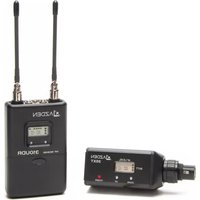
310XT - Microphone Azden - Free user manual and instructions
Find the device manual for free 310XT Azden in PDF.


| Product Type | Wireless Microphone System (UHF Diversity) |
| Model | Azden 310XT |
| Kit Contents | 310UDR Diversity Receiver, 35XT XLR Plug-in Transmitter, Stereo Mini-to-Dual XLR Cable, Stereo Mini-to-Stereo Mini Cable |
| Frequency Range | UHF 188 selectable frequencies (566.125-589.875 MHz) |
| Number of Channels | 47 transmit channels across 4 TV channels (30-33) |
| Receiver Dimensions (310UDR) | 2.5 x 3.94 x 1.19 inches (64 x 100 x 27 mm) |
| Receiver Weight (with batteries) | Approx. 6 oz (170 g) |
| Transmitter Dimensions (35XT) | 1.56 x 1.56 x 4.5 inches (40 x 40 x 114 mm) |
| Transmitter Weight (with batteries) | Approx. 6.4 oz (180 g) |
| Power Supply | 2 AA alkaline batteries (receiver and transmitter), 6-8 hours runtime; also compatible with Ni-MH rechargeable |
| Audio Output | MIC level, unbalanced, 3.5mm mini jack; -58 dBm + -22 dBm (600 ohms) |
| Frequency Response | 50 Hz - 15 kHz |
| S/N Ratio | >57 dB (A-weighted) |
| RF Power (Transmitter) | 25 mW |
| Max Deviation | ±40 kHz |
| Antenna | Receiver: two external antennas (point upward); Transmitter: internal |
| Channel Selection | Via UP/DOWN buttons on receiver and transmitter, use a pen tip |
| Microphone Input (35XT) | 3-pin XLR connector for low-impedance microphones, with locking ring |
| Adjustable Mic Level | Yes, via orange dial inside battery compartment (TX) |
| Audio Mute | Yes, AUDIO switch on transmitter acts as mute (RF stays on) |
| Battery Indicator | 3-bar LCD on receiver and transmitter |
| Reception Indicator | 4-bar LCD on receiver |
| Operating Range | Typical up to 300 feet (line of sight) |
| Intended Use | Video camera, DSLR, or sound system |
| Mounting | Receiver: shoe mount or hook-and-loop fastener included |
Frequently Asked Questions - 310XT Azden
User questions about 310XT Azden
0 question about this device. Answer the ones you know or ask your own.
Ask a new question about this device
Download the instructions for your Microphone in PDF format for free! Find your manual 310XT - Azden and take your electronic device back in hand. On this page are published all the documents necessary for the use of your device. 310XT by Azden.
USER MANUAL 310XT Azden
natural_image
Four black A2D DEN wireless transmitters (35BT, 310UDR, 35XT) with visible signal and control buttons, no text or symbols on devices themselves.INSTRUCTION MANUAL
Thank you for purchasing the Azden 310 Diversity Wireless Microphone system. The following table will show you the contents of the system you ordered:
310LT
1 x 310UDR Diversity Receiver
1 x Stereo Mini-to-Dual XLR Cable
1 x Stereo Mini-to-Stereo Mini Cable
1 x 35BT Body-Pack Transmitter
1 x EX-503L Lavalier Microphone
310HT
1 x 310UDR Diversity Receiver
1 x Stereo Mini-to-Dual XLR Cable
1 x Stereo Mini-to-Stereo Mini Cable
1 x 35HT Handheld Microphone/Transmitter
310XT
1 x 310UDR Diversity Receiver
1 x Stereo Mini-to-Dual XLR Cable
1 x Stereo Mini-to-Stereo Mini Cable
1 x 35XT XLR Plug-in Transmitter
310ULH
1 x 310UDR Diversity Receiver
1 x Stereo Mini-to-Dual XLR Cable
1 x Stereo Mini-to-Stereo Mini Cable
1 x 35BT Body-Pack Transmitter
1 x EX-503L Lavalier Microphone
1 x 35HT Handheld Microphone/Transmitter
310ULX
1 x 310UDR Diversity Receiver
1 x Stereo Mini-to-Dual XLR Cable
1 x Stereo Mini-to-Stereo Mini Cable
1 x 35BT Body-Pack Transmitter
1 x EX-503L Lavalier Microphone
1 x 35XT XLR Plug-in Transmitter
Operating the System
WARNING
- Do not use other batteries than the ones specified in this manual. Do not mix a fresh battery with a used battery.
- When installing batteries, make sure battery polarity is correct as marked inside the battery compartment.
- Remove the batteries if the products are not used for a long period of time.
- Do not submerge the products.
Because this is a frequency agile system, the receiver and transmitter must be on the same channel number. To change the channel selection, use a small , sharp object such as the tip of a pen, and press the "UP" or "DOWN" button to the desired channel. Make sure both the receiver and transmitter are on the same channel.
310UDR Diversity Receiver
After installing new batteries, mount the receiver to your video camera with supplied shoe mount or hook & loop fastener. Select one of the supplied cables and connect the output on the receiver and input on the video camera. Turn the power switch to "ON" and the battery level indicator on the LCD display should come on. If not, check the batteries. When the 310UDR receives a signal from the transmitter, the reception level indicator will come on. If it does not, make sure both the receiver and the transmitter are on matching channels.
35BT Body-Pack Transmitter
Plug in the supplied EX-503L Lavalier Microphone and clip it to your subject. The microphones should be placed 4"-12" from the subject's mouth. Clip the transmitter to a belt by using the supplied belt clip or place it in a pocket. Turn the power switch to "ON" and the battery level indicator on the LCD display should come on. If not, check the battery. Have someone speak into the microphone as you monitor the sound through the 310UDR Receiver's phone output. If the sound is distorted, lower the MIC input level on the 35BT Transmitter. If there is not enough volume, raise the MIC input level on the Transmitter.
35XT Plug-in Transmitter
Attach the 35XT Transmitter to any low impedance microphone with a corresponding 3-pin XLR connector. Turn the power switch on the 35XT Transmitter to "ON" position and the battery level indicator on the LCD display should come on. Have someone speak into the microphone as you monitor the sound through the camera's monitor output. If the sound is distorted, lower the MIC input level control on the 35XT Transmitter. If there is not enough volume, raise the level control on the Transmitter.
35HT Handheld Microphone/Transmitter
Turn the power switch on the 35HT Transmitter to “ON” position and the battery level indicator on the LCD display should come on. Have someone speak into the microphone as you monitor the sound through the camera’s monitor output. Adjust the MIC input level control accordingly.
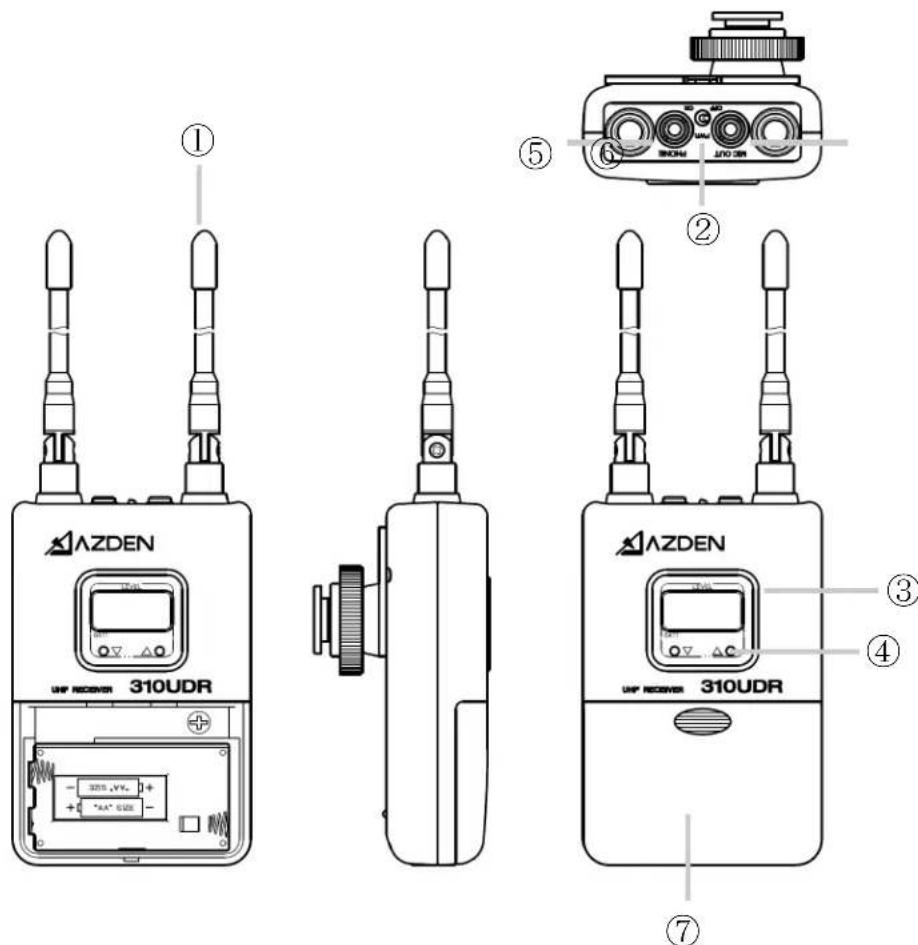
310UPR Diversity Receiver
① Antennas
For the best reception, the antennas should be pointed in an upward position. Use caution and do not force them into this position.
② Power Switch
To turn ON/OFF the receiver
③ LCD Display
The LCD Display shows multifunctional readout. Refer to "LCD Display Readouts" in this manual for further details.
④ CHANNEL UP and DOWN Button
To change the channel number, use a small, sharp object, such as the tip of a pen, and press the UP or DOWN button until the desired channel number is shown on the LCD Display. Keep the button pressed down to fast forward the channel numbers. Once the desired channel number is selected on the receiver, set the transmitter to the same number.
⑤ PHONE Jack
This jack allows you to monitor the sound.
⑥ MIC OUT Jack
The 310UDR is supplied with both mini-to-mini and mini-to-dual XLR cables.
For mini jack microphone inputs: Use the supplied mini-to-mini cable. Plug one end of the cable into the 310UDR Receiver and the other end into the microphone input of the video camera.
For 3-pin XLR microphone inputs: Use the supplied mini-to-dual XLR cable. Plug the mini-plug end of the cable into the 310UDR Receiver (use the screw-down sleeve to secure it to the receiver) and plug the XLR ends into the microphone inputs on the video camera.
⑦ Battery Compartment
Remove the battery compartment lid by sliding it down. Install two fresh alkaline “AA” batteries. Make sure the battery polarity is correct as marked inside the battery compartment. Alkaline batteries are preferred, but Azden’s 1HR-3U rechargeable Ni-MH batteries may be used.
LCD Display Readouts
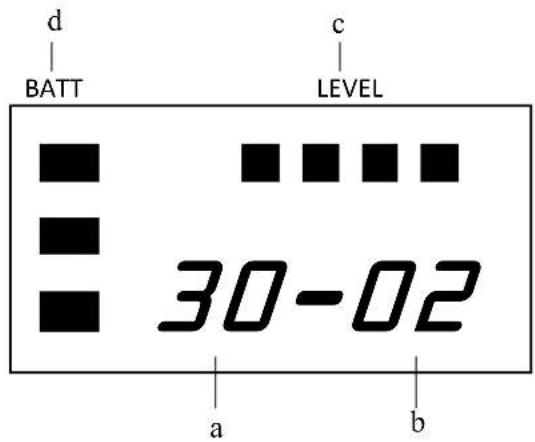
a. TV channel number (30 - 33)
b. Transmit channel number (01 -47)
c. Reception level indicator: 4 bars = High, 1 bar = Low
d. Battery level indicator: 3 bars = High, 1 bar = Low
35BT Body-Pack Transmitter

⑧ Battery Compartment
Remove the battery compartment lid by sliding it down. Install two fresh alkaline “AA” batteries. Make sure the battery polarity is correct as marked inside the battery compartment.
⑨ Install two fresh alkaline “AA” batteries. Make sure the battery polarity is correct as marked inside the battery compartment.
Inside the battery compartment, you will also find:
⑩ MIC Input Level Control
This control enables you to adjust the input level of the microphone. Using the supplied tool, also found inside the battery compartment, turn the orange dial clockwise to increase, or counterclockwise to decrease the input level.
⑪ POWER Switch
Switches the 35BT Transmitter "ON" or "OFF".
⑫ MIC Input Jack
Plug the supplied EX-503L Lavalier Microphone into the MIC input jack. In addition to the EX-503L, other lapel and/or headset microphones with 3.5mm mini plug may also be used with the 35BT.
⑬ LCD Display
The display shows the following information:
TV Ch – Transmit Channel Number (i.e. 30 – 01, 31 – 12, 33 – 47)
The TV – Transmit channel display is made of two parts. The first two digit number is the actual TV channel (30-33) and the second two digit is the transmit channel number (01-47).
Battery level by 3-bar indicator (3 bars = High, 1 bar = Low)
⑭ AUDIO Switch
It is best to set the AUDIO switch to “OFF” prior to first turning the POWER switch “ON”. When you are ready to begin transmitting, turn the AUDIO “ON”. The “OFF” position acts as “mute” that maintains the RF signal but turns off the audio.
35XT Plug-in Transmitter

⑮ Battery Compartment
Open the battery compartment lid by pushing down on the tab and lifting it up. Install two fresh alkaline “AA” batteries. Make sure the battery polarity is correct as marked inside the battery compartment.
⑯ POWER Switch
Turns the 35XT Transmitter "ON" or "OFF".
⑰ AUDIO Switch
It is best to set the AUDIO switch to "OFF" prior to first turning the POWER switch "ON". When you are ready to begin transmitting, turn the AUDIO "ON". The "OFF" position acts as "mute" that maintains the RF signal but turns off the audio.
⑱ MIC Connector/Locking Ring
This 3-pin XLR connector is the microphone input. Any low impedance microphone with a corresponding connector may be plugged here. Once the microphone is plugged into the 35XT, the locking ring should be rotated clockwise until snug. To remove the microphone, first rotate the locking ring counterclockwise and then pull the microphone away while pressing the XLR release.
⑲ MIC Input LEVEL Control
This enables you to adjust the input level of the connected microphone. Using the supplied tool, turn the orange dial clockwise to increase, or counterclockwise to decrease the input level.
⑳ LCD Display
The LCD display shows the following information:
TV Ch – Transmit Channel Number (i.e. 30 – 01, 31 – 12, 33 – 47)
The TV – Transmit channel display is made of two parts. The first two digit number is the actual TV channel (30-33) and the second two digit is the transmit channel number (01-47).
Battery level by 3-bar indicator (3 bars = High, 1 bar = Low)
AF (Audio Frequency) level by 4-bar indicator (4 bars = High, 1 bar = Low)
To change the channel number, use the tip of the tool provided and press the UP or DOWN button until the desired channel number is shown on the LCD Display. Keep the button pressed to fast forward the channel numbers.
35HT Handheld Microphone/Transmitter

②1 Battery Compartment Cover
Remove the battery compartment cover by rotating it counterclockwise and sliding it down.
②2 Battery Compartment
Install two fresh alkaline "AA" batteries. Make sure the battery polarity is correct as marked inside the battery compartment.
②3 MIC LEVEL Control
This enables you to adjust the audio level of the microphone. Using the supplied tool, turn the orange dial clockwise to increase, or counterclockwise to decrease the audio level.
②4 Channel UP and DOWN Button
To change the channel number, use the tip of the tool provided and press the UP or DOWN button until the desired channel number is shown on the LCD Display. Keep the button pressed to fast forward the channel numbers.
②5 POWER Switch
Turns the 35HT Transmitter/Microphone "ON" or "OFF".
②6 LCD Display
The LCD display shows the following information:
TV Ch – Transmit Channel Number (i.e. 30 – 01, 31 – 12, 33 – 47)
The TV – Transmit channel display is made of two parts. The first two digit number is the actual TV channel (30-33) and the second two digit is the transmit channel number (01-47).
Battery level by 3-bar indicator (3 bars = High, 1 bar = Low)
AF (Audio Frequency) level by 4-bar indicator (4 bars = High, 1 bar = Low)
Specifications
310UDR Receiver
Frequency Range: UHF 188 Selectable Frequencies (566.125-589.875MHz)
Type of Reception: FM
Oscillator: PLL Synthesized
RF Squelch Level: -95 dBm
Frequency Response: 50Hz – 15kHz
S/N Ratio: >57dB (± 5kHz) "A" Weighted
Audio Out: MIC Level – Unbalanced – 3.5mm Mini Jack
-58 dBm - 600 ohms @ ± 5kHz deviation
-22 dBm - 600 ohms @ ± 40kHz deviation
Batteries: 2 "AA" Alkaline (2 x 1.5V), 6-8 hours runtime
2 "AA" Rechargeable Ni-MH (2 x 1.2V)
Dimensions: 2 1/2" x 3 15/16" x 1 3/16" (64 x 100 x 27mm)
Weight: Approx. 6oz (170g) w/ batteries
35BT Body-Pack Transmitter
Frequency Range: UHF 188 Selectable Frequencies (566.125-589.875MHz)
Oscillator: PLL Synthesized
RF Power: 25mW
Frequency Response: 50Hz – 15kHz
Max Deviation: ±40kHz @ 1kHz Modulation, MIC input - 11dBm
Batteries: 2 "AA" Alkaline (2 x 1.5V), 6-8 hours runtime
2 "AA" Rechargeable Ni-MH (2 x 1.2V)
Dimensions: 2 1/2" x 3 15/16" x 1 1/16" (64 x 100 x 27mm)
Weight: Approx. 6oz (170g) w/ batteries
35XT Plug-in Transmitter
Frequency Range: UHF 188 Selectable Frequencies (566.125-589.875MHz)
Antenna: Internal
Max Input Level: -16dBm
RF Power: 25mW
Input Impedance: 25k ohms
Audio Adjust Range: -65dBm to 46dBm
Batteries: 2 "AA" Alkaline (2 x 1.5V), 6-8 hours runtime
2 "AA" Rechargeable Ni-MH (2 x 1.2V)
Dimensions: 1 9/16" x 1 9/16" x 4 1/2" (40 x 40 x 114mm)
Weight: Approx. 6.4oz (180g) w/ batteries
35HT Handheld Microphone/Transmitter
Frequency Range: UHF 188 Selectable Frequencies (566.125-589.875MHz)
Oscillator: PLL Synthesized
RF Power: 25mW
Frequency Response: 50Hz - 15kHz
Max Deviation: ± 40kHz @ 1kHz Modulation, MIC input - 65dBm (dev ± 5kHz)
Batteries: 2 "AA" Alkaline (2 x 1.5V), 6-8 hours runtime
2 "AA" Rechargeable Ni-MH (2 x 1.2V)
Dimensions: 1 7/8" x 9 9/16"L (48 x 234.5mm)
Weight: Approx. 9.6oz (270g) w/ batteries
Due to constant improvements, specifications are subject to change without notice.
- 310LT
- 310HT
- 310XT
- 310ULH
- 310ULX
- Operating the System
- WARNING
- 310UDR Diversity Receiver
- 35BT Body-Pack Transmitter
- 35XT Plug-in Transmitter
- 35HT Handheld Microphone/Transmitter
- 310UPR Diversity Receiver
- ① Antennas
- ② Power Switch
- ③ LCD Display
- ④ CHANNEL UP and DOWN Button
- ⑤ PHONE Jack
- ⑥ MIC OUT Jack
- ⑦ Battery Compartment
- LCD Display Readouts
- ⑧ Battery Compartment
- ⑩ MIC Input Level Control
- ⑪ POWER Switch
- ⑫ MIC Input Jack
- ⑬ LCD Display
- ⑭ AUDIO Switch
- ⑮ Battery Compartment
- ⑯ POWER Switch
- ⑰ AUDIO Switch
- ⑱ MIC Connector/Locking Ring
- ⑲ MIC Input LEVEL Control
- ⑳ LCD Display
- ②1 Battery Compartment Cover
- ②2 Battery Compartment
- ②3 MIC LEVEL Control
- ②4 Channel UP and DOWN Button
- ②5 POWER Switch
- ②6 LCD Display
- Specifications
- 310UDR Receiver
Brand : Azden
Model : 310XT
Category : Microphone