
15AH25B - Surveillance Camera TRENDNET - Free user manual and instructions
Find the device manual for free 15AH25B TRENDNET in PDF.


| Product Type | Outdoor Internet Camera Server Housing |
| Brand | TRENDnet |
| Model | 15AH25B |
| Package Contents | Camera enclosure, metal bracket, cable gaskets (black, white, gray), screwdriver |
| Compatibility | Compatible with most IP cameras; supports power and network cable routing |
| Power Adapter | AC/DC power adapter (included); 1-year warranty |
| Installation Method | Wall or ceiling mount via metal bracket; cable routing through enclosure openings |
| LED Indicators | Camera LEDs turn on when power is connected and lid is closed |
| Certifications | FCC, CE |
| Warranty | 3 years for wireless products; 1 year for AC/DC adapter, cooling fan, power supply |
| Technical Support | US/Canada: 1(310) 626-6252; Europe: +49 (0) 6331 / 268-460 |
| Operating Environment | Outdoor use |
Frequently Asked Questions - 15AH25B TRENDNET
User questions about 15AH25B TRENDNET
0 question about this device. Answer the ones you know or ask your own.
Ask a new question about this device
Download the instructions for your Surveillance Camera in PDF format for free! Find your manual 15AH25B - TRENDNET and take your electronic device back in hand. On this page are published all the documents necessary for the use of your device. 15AH25B by TRENDNET.
USER MANUAL 15AH25B TRENDNET
Table of Contents
English 1
- Prepare for Installation 1
- Install Hardware 2
Troubleshooting 5
English UG
1. Prepare for Installation
Thank you for purchasing the TRENDnet 15AH25B Outdoor Internet Camera Server Housing.
This guide will help you set-up your Outdoor Internet Camera Server Housing. Following the installations should be quick and easy. If you run into problems, please refer to the Troubleshooting section. If you need further technical support, please visit www.TRENDNET.com or call technical support by phone.
Verify Package Contents
Please make sure you have everything in the box:


2. Install Hardware
- Depress the levers to unlatch the roof of the camera enclosure, and pull the roof upward.

- Unscrew the metal bracket from the camera enclosure.
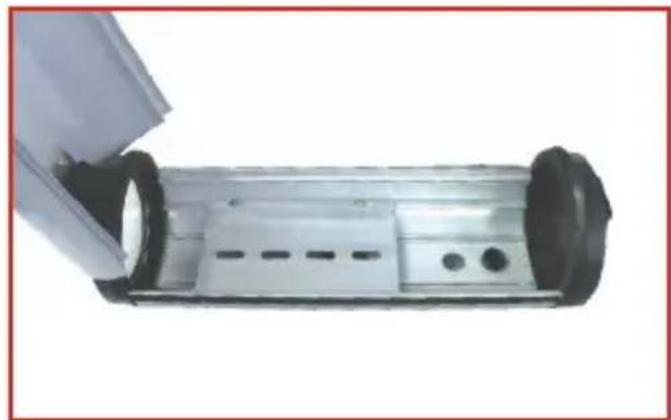
- Use the following screw to mount the metal bracket onto the base of the IP Camera.
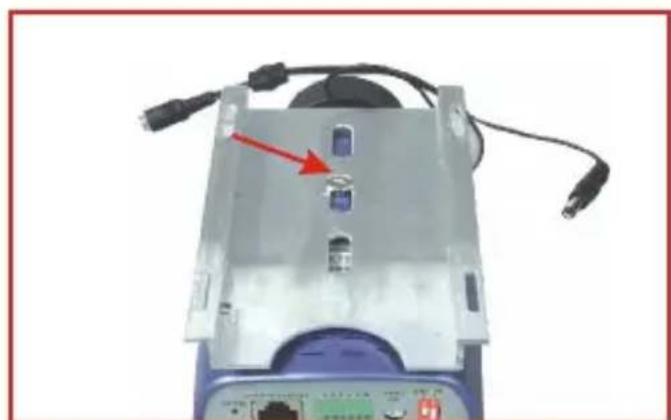
- Take the assembly in step 3, and mount the assembly inside the camera enclosure.
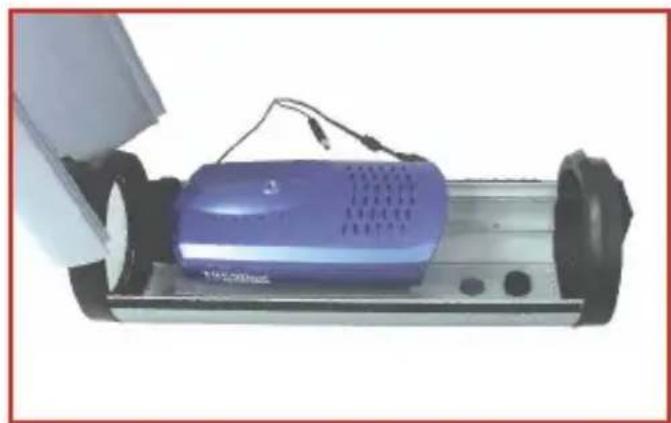
- Turn the camera enclosure upside down to remove one of the rubber stoppers. This will give you an opening for your power cord, antenna cable, or network patch cable.
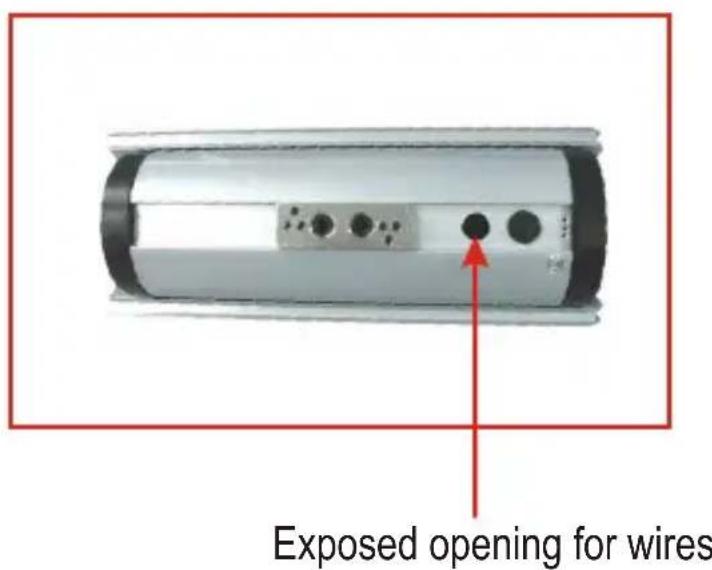
- Run your power cord, network patch cable or antenna cable through the opening of the camera enclosure.

Note: For security purposes, attach the metal arm assembly to the camera enclosure and run the wires through the metal arm assembly. Please refer to the camera enclosure's attachment for setup details.
- Connect the DC plug with the IP Camera's power connector.
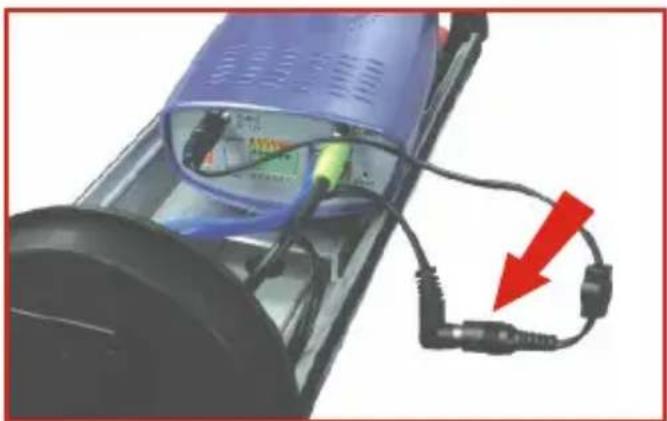
- Make sure all internal wires are inside the camera enclosure, and carefully close the lid. The camera's LEDs should immediately turn on.
Your hardware installation is now complete.
Q1. What do I do if the LEDs on my camera remain off?
A1. Make sure that the power adapter is connected to a power outlet and that your power outlet is receiving power.
Q2. My power outlet is receiving power, but my camera will not turn on. What do I do next?
A2. Unplug the power adapter from your power outlet, and open the camera enclosure. Make sure that the power adapter's connector is plugged into the camera.
Q3. My camera is receiving power, but I cannot access my camera's web configuration utility. What should I do?
A3. If you are using a wired IP camera, double check your hardware settings. Make sure that your network patch cable is connected to your camera and switch. Make sure that the network patch cable is not faulty, and that your switch is operating properly. If you are using a wireless camera, make sure that your antenna connection is properly connected to your camera's antenna connector. Double-check your antenna's position, and make sure that your antenna is getting direct line of site with your wireless access point.
If you have any questions regarding the 15AH25B, please contact Trendware Technical Support Department.
Certifications
This equipment has been tested and found to comply with FCC and CE Rules. Operation is subject to the following two conditions:
(1) This device may not cause harmful interference.
(2) This device must accept any interference received. Including interference that may cause undesired operation.

NOTE: THE MANUFACTURER IS NOT RESPONSIBLE FOR ANY RADIO OR TV INTERFERENCE CAUSED BY UNAUTHORIZED MODIFICATIONS TO THIS EQUIPMENT. SUCH MODIFICATIONS COULD VOID THE USER'S AUTHORITY TO OPERATE THE EQUIPMENT.
Limited Warranty
TRENDware warrants its products against defects in material and workmanship, under normal use and service, for the following lengths of time from the date of purchase.
Wireless Products 3 Years Warranty
If a product does not operate as warranted above during the applicable warranty period, TRENDware shall, at its option and expense, repair the defective product or part, deliver to customer an equivalent product or part to replace the defective item, or refund to customer the purchase price paid for the defective product. All products that are replaced will become the property of TRENDware. Replacement products may be new or reconditioned.
TRENDware shall not be responsible for any software, firmware, information, or memory data of customer contained in, stored on, or integrated with any products returned to TRENDware pursuant to any warranty.
There are no user serviceable parts inside the product. Do not remove or attempt to service the product by any unauthorized service center. This warranty is voided if (i) the product has been modified or repaired by any unauthorized service center, (ii) the product was subject to accident, abuse, or improper use (iii) the product was subject to conditions more severe than those specified in the manual.
Warranty service may be obtained by contacting TRENDware office within the applicable warranty period for a Return Material Authorization (RMA) number, accompanied by a copy of the dated proof of the purchase. Products returned to TRENDware must be pre-authorized by TRENDware with RMA number marked on the outside of the package, and sent prepaid, insured and packaged appropriately for safe shipment.
WARRANTIES EXCLUSIVE: IF THE TRENDWARE PRODUCT DOES NOT OPERATE AS WARRANTED ABOVE, THE CUSTOMER'S SOLE REMEDY SHALL BE, AT TRENDWARE'S OPTION, REPAIR OR REPLACEMENT. THE FOREGOING WARRANTIES AND REMEDIES ARE EXCLUSIVE AND ARE IN LIEU OF ALL OTHER WARRANTIES, EXPRESSED OR IMPLIED, EITHER IN FACT OR BY OPERATION OF LAW, STATUTORY OR OTHERWISE, INCLUDING WARRANTIES OF MERCHANTABILITY AND FITNESS FOR A PARTICULAR PURPOSE. TRENDWARE NEITHER ASSUMES NOR AUTHORIZES ANY OTHER PERSON TO ASSUME FOR IT ANY OTHER LIABILITY IN CONNECTION WITH THE SALE, INSTALLATION MAINTENANCE OR USE OF TRENDWARE'S PRODUCTS.
TRENDWARE SHALL NOT BE LIABLE UNDER THIS WARRANTY IF ITS TESTING AND EXAMINATION DISCLOSE THAT THE ALLEGED DEFECT IN THE PRODUCT DOES NOT EXIST OR WAS CAUSED BY CUSTOMER'S OR ANY THIRD PERSON'S MISUSE, NEGLECT, IMPROPER INSTALLATION OR TESTING, UNAUTHORIZED ATTEMPTS TO REPAIR OR MODIFY, OR ANY OTHER CAUSE BEYOND THE RANGE OF THE INTENDED USE, OR BY ACCIDENT, FIRE, LIGHTNING, OR OTHER HAZARD.
LIMITATION OF LIABILITY: TO THE FULL EXTENT ALLOWED BY LAW TRENDWARE ALSO EXCLUDES FOR ITSELF AND ITS SUPPLIERS ANY LIABILITY, WHETHER BASED IN CONTRACT OR TORT (INCLUDING NEGLIGENCE), FOR INCIDENTAL, CONSEQUENTIAL, INDIRECT, SPECIAL, OR PUNITIVE DAMAGES OF ANY KIND, OR FOR LOSS OF REVENUE OR PROFITS, LOSS OF BUSINESS, LOSS OF INFORMATION OR DATE, OR OTHER FINANCIAL LOSS ARISING OUT OF OR IN CONNECTION WITH THE SALE, INSTALLATION, MAINTENANCE, USE, PERFORMANCE, FAILURE, OR INTERRUPTION OF THE POSSIBILITY OF SUCH DAMAGES, AND LIMITS ITS LIABILITY TO REPAIR, REPLACEMENT, OR REFUND OF THE PURCHASE PRICE PAID, AT TRENDWARE'S OPTION. THIS DISCLAIMER OF LIABILITY FOR DAMAGES WILL NOT BE AFFECTED IF ANY REMEDY PROVIDED HEREIN SHALL FAIL OF ITS ESSENTIAL PURPOSE.
Governing Law: This Limited Warranty shall be governed by the laws of the state of California.
AC/DC Power Adapter, Cooling Fan, and Power Supply carry a 1 Year Warranty
TRENDnet TRENDware, USA What's Next in Networking
Product Warranty Registration
Please take a moment to register your product online. Go to TRENDware's website at http://www.TRENDNET.com
TRENDnet Technical Support
| US/Canada Support Center | European Support Center |
| ContactTelephone: 1(310) 626-6252Fax: 1(310) 626-6267Email: support@trendnet.comTech Support Hours7:30am - 6:00pm Pacific Standard TimeMonday - Friday | ContactTelephoneDeutsch : +49 (0) 6331 / 268-460Français : +49 (0) 6331 / 268-4610800-907-161 (numéro vert)Español : +49 (0) 6331 / 268-462English : +49 (0) 6331 / 268-463Italiano : +49 (0) 6331 / 268-464Dutch : +49 (0) 6331 / 268-465Fax: +49 (0) 6331 / 268-466Tech Support Hours8:00am - 6:00pm Middle European TimeMonday - Friday |
TRENDware International, Inc.
3135 Kashiwa Street. Torrance, CA 90505
http://www.TRENDNET.com
Brand : TRENDNET
Model : 15AH25B
Category : Surveillance Camera