
Premier PVC 10 mil (500) - PVC Labels ZEBRA - Free user manual and instructions
Find the device manual for free Premier PVC 10 mil (500) ZEBRA in PDF.


| Product Type | PVC Card Stock |
| Brand | Zebra |
| Model | Premier PVC 10 mil (500) |
| Category | Étiquettes PVC (PVC Label Cards) |
| Card Thickness | 10 mil (0.010 in / 0.254 mm) |
| Card Dimensions | CR-80 standard: 3.375 x 2.125 in (85.5 x 54 mm) |
| Quantity per Pack | 500 cards |
| Material | PVC (Polyvinyl Chloride) |
| Color | White (typical) |
| Compatible Print Technology | Dye sublimation, thermal transfer, direct-to-card, retransfer |
| Security Features | Can incorporate holograms, UV printing, micro-text, serial numbers |
| Durability | High flex life, tear-resistant design |
| Recommended Storage | Cool, dry place away from direct sunlight |
| Cleaning Instructions | Wipe with lint-free cloth, avoid solvents |
| Recyclability | PVC recyclable in specialized facilities |
| Country of Origin | Manufactured by Zebra (USA or global) |
| Warranty | Refer to Zebra warranty policy |
Frequently Asked Questions - Premier PVC 10 mil (500) ZEBRA
User questions about Premier PVC 10 mil (500) ZEBRA
0 question about this device. Answer the ones you know or ask your own.
Ask a new question about this device
Download the instructions for your PVC Labels in PDF format for free! Find your manual Premier PVC 10 mil (500) - ZEBRA and take your electronic device back in hand. On this page are published all the documents necessary for the use of your device. Premier PVC 10 mil (500) by ZEBRA.
USER MANUAL Premier PVC 10 mil (500) ZEBRA
Understanding Technologies for Creating High-Security ID Cards
Before you purchase a card printer, there are a few things you should know about ID cards and printers. The type of printer you choose will depend on:
- The type of card you plan to use
• How many cards you plan to print
• How often you need to print cards - What printing elements you need to incorporate into your card
• The quality of card images - Type of encoding required on the card
There are five major factors to consider:
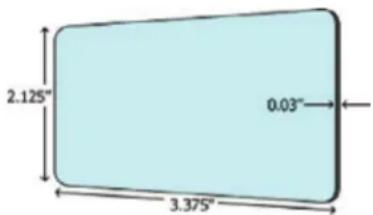
- Card size. Most plastic cards found in wallets and purses have the same physical dimensions. This is the standard CR-80 card, measuring about 3.375 x 2.125 inches (85.5 mm x 54 mm). The standard thickness is 30 mil (0.75 mm), but can range from 10 to 60 mil.
- Printing speeds. Card printers come with a variety of card printing speeds depending on whether you need to print both sides of the card or just one
side of the card. In general, the faster the cards are printed, the more expensive the printer. The needs of the printer speed will be determined on the application. For example, with on-premise/on-demand printing, mass/duplication printing (same card printed multiple times), or one-offs.
- The physical properties of the printer. If you are limited on work space, you'll want a printer with a small footprint. If other work must be accomplished while the printer is printing, you will also want to make sure you purchase a printer that's on the quiet side. While the size and loudness of a printer may not be a concern in a factory, it might be important in an application such as a small office, retail store, or cruise ship.
- Ease of use. A card printer should be easy to use, right out of the box, especially if the user is not familiar with card printers.
- The type of printing you want—thermal, dye sublimation, mass transfer printing, or direct-to-card or retransfer printing. These are discussed in detail below.
Thermal Printing
Like all other computer-based printers in the office, today's photo ID printers are digital. Resolutions of 300 dots per inch (dpi) or more are common in office printers, so the problem of jagged edges is largely a thing of the past. Most photo IDs are printed by digital thermal transfer, a process by which color is transferred from a single-use ribbon to various kinds of receptor materials.
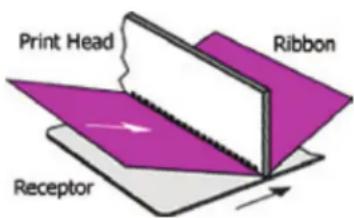
There are two distinctly different thermal transfer technologies: dye sublimation, using the three process colors yellow/magenta/cyan (YMC) for photo-realistic images, and mass transfer, for machine readable text and bar codes (usually in black). Both technologies use a stationary printhead comprising a row of closely spaced resistive elements—tiny heaters, 200 or 300 to the inch, independently energized by the printer controller. Sandwiched by spring pressure between the printhead and the receptor is the inking ribbon, which may be either a resin-coated film for mass transfer, or a series of process-color dye panels for dye sublimation. The receptor card is driven through the print station, with the ribbon metered out at the same speed from the supply roll.
Dye Sublimation Printing
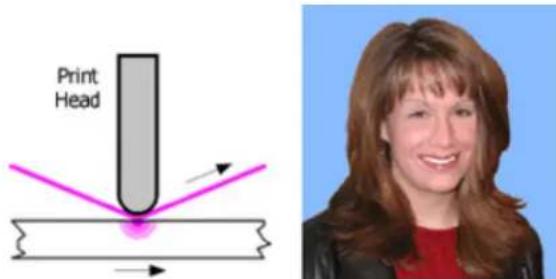
The variable size and density of each color dot is the secret to the photo-quality printing possible with dye sublimation—bright colors and no jagged edges. YMC dyes penetrate the receptor. Color migrates from the dye ribbon into the surface. The spread of the dye dot (its amount of diffusion) depends on the amount of heat applied by the printhead element. On reaching a dye panel boundary, the printhead is lifted to allow the card to back up. The head then lowers to print the next color.
Yellow, magenta, and cyan are combined in varying proportions to print photo quality images. When "fully saturated," the three colors together print "process black" text and graphics, similar in appearance to black resin printing, discussed in the next section, but not infrared readable.
Mass Transfer Printing
With a mass transfer panel, the printer cannot control either the ink dot's size or density. It's either there or it isn't, which is not good for continuous tone images such as photographs. To create the illusion of continuous tone from discrete dots of ink, printers use a process called dithering, exactly the same behind-the-scenes operation your computer performs anytime it sends a picture to the office laser printer.
A mass transfer ribbon is a layer of monochrome resin, usually black, on a thin backing film (also called black resin printing). When heated, the resin is stripped from the backing and deposited as a physical layer on the receptor. Mass transfer delivers sharp text and graphics plus infrared readable bar codes. Photo reproduction is adequate for many applications calling for high printing speed and low cost.
Direct-To-Card Print Technology
Using dye sublimination and/or thermal transfer printing methods, heat is used to transfer a digitized image from the ribbon directly to the flat surface of a plastic card. The relatively small number of affordable, durable card materials that accept dyes limits the types of cards used, and limits the intensity of colors that DTC can reproduce. The DTC process depends on uniform, intimate contact between the printhead, the dye ribbon, and the card surface; therefore, uneven card surfaces cannot achieve high color density and uniformity when dye is transferred directly to a card.
Retransfer Print Technology
Retransfer printing uses a process called reverse thermal transfer. Unlike traditional dye sublimation card printers, which use a printhead to transfer the image through a dye ribbon directly onto the card surface, retransfer printers use a two-step process:
-
In the first step, the retransfer process prints a high-resolution image in reverse directly onto a clear receiving layer carried by a flexible, intermediate film. The dye sublimation process prints the image to the film, just like DTC printing.
-
Next, the printer uses heat and pressure to thermally transfer the image and the entire image-receiving intermediate film onto the card surface. During this process, the layer thermally bonds to the card surface, and the printed image resides underneath the clear image-receiving layer, inside the card.
The benefits of retransfer printing include:
- Superior image quality
- Prints on more types of card
- Improved security and tamper resistance
- Lower printhead costs
How Printing Can Make ID Cards More Secure
Security comes from a combination of media features, printer capability, database verification, and special security—unusual, covert and forensic features. Media features include surface quality, durability, and built-in security elements. Printer capability encompasses high-resolution graphics and reliable bar codes plus covert features printed at the time of issue. Database verification consists of a central archive of cardholder data, including a photo, personal statistics, employee number, date, time and place of issue. Special security features are only shared with customers, in order to protect their covert qualities.
Start With Strong Cards
First and most important, the card itself has to be tough. In this security-conscious age, government and other large organizations insist on custom-designed card media of ever-increasing sophistication. This is for two main reasons. First, multiple security features create greater counterfeiting difficulties. Second, guards can quickly and easily validate unique features, known only to the organization's security force.
Your card media should offer an array of security features, any or all of which may be incorporated into custom designs. Today's cards must be extremely durable. For example, your card stock should be ten times (10x) the flex life of regular PVC cards. It should meet or exceed all international standards for resistance to cracking, permanent adhesion of over-laminate, and durability of image. Choose cards that do not tear easily. Look for unique tear-resistant designs. The lanyard slot in a regular PVC card is often fragile. If it tears out, an unauthorized user needs only to change the photo to go past a careless inspector.
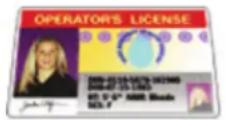

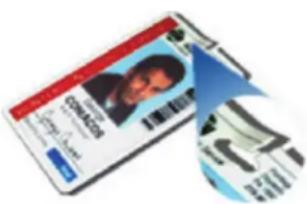
To increase durability, higher capability printers feature fully integrated hot roll laminating stations that apply 0.6 or 1.0 mil laminate patch materials, with or without holograms. Cards with laminates will provide up to seven years of wear. Such lamination is especially recommended for abrasion intensive applications such as frequent bar code or magnetic stripe reading. Depending on volume and how quickly one needs to print cards, there are printers that laminate one side at a time or both sides at once.
Modern Print Features Are Hard to Copy
To prevent counterfeiting, alteration or duplication, there are many techniques that companies can use with digital printers. First of all, they can position multiple security images or holograms. One security image alone increases the difficulty of counterfeiting; two makes it at least twice as hard. The holographic image lamina-
tion process also provides a very rich-looking card. Multiple screenings of the same photograph increase integrity. This is the standard for most driver's licenses. Unique graphic identifiers, such as allowing only the red-bordered cardholders to access an area, help differentiate security levels.
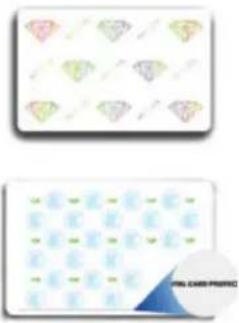
You can also purchase card stock with pre-printed security features, including ultraviolet-visible text and graphics that are available in two colors, green and blue. With micro-printing, text can be added to a user's specifications, with deliberate random font changes and misspellings if desired. Character height is 5 thousandths of an inch (0.125 mm).
Pre-printed serial numbers can also be incorporated into card stock. Laser etching is another option. Fine-line Guilloche patterns with hidden micro-text are aimed at foiling counterfeiters, and micro-printing of text and miniature graphic elements are also difficult to duplicate.

An over-laminate film adds security to the printed ID card. The inner surface of the laminate can be preprinted with OVI ink (Image 1) or UV-visible ink in one, two or three colors (Image 2). In addition, today's high-tech printers can also laminate with holographic metallization, including embossed micro-text (Image 3).
Image 1 Image 2 Image 3

Applications for such security-enhanced cards include driver's licenses; national health, social security and voter registration programs; badging for the armed forces, law enforcement and government agency personnel; and access and identification for educational institutions, industry and transportation.
Keeping Track of Critical Information
It's important to keep track of card transactions in the printer's host computer. For example, Zebra's ID/Log records the applicant's personal data, together with other point-of-issue data. This data set can provide a means for security officers to validate the card by comparing a photo ID card with this centrally located data.

Card serialization adds security. Printers with the magnetic stripe encoder, proximity encoder and smart card contact options can be set up to function only with serial numbered card stock, and also to add serial numbers to the data recorded by ID/Log.
Here's how card serialization works. All cards supplied to an organization using this system are pre-printed on the front or back with a serial number, which is also recorded on the card's credential medium, such as magnetic stripe, proximity chip or smart card integrated circuit (IC). The ID card printer is configured to accept only serial numbered cards, and will eject, without printing, any card without the appropriate encoding. If a valid serial number is detected, the card is printed.
The serial number read from the credential medium is recorded in the printer's host computer, where it is linked with the license or employee number and other data such as date, time, and location. This data set is available for uploading at any time to the organization's central database. As a result, the security officer can read, on-the-spot, an ID card that is linked in the database to a serial number without any special equipment. When transmitted to the central database, the serial number can, in turn, trigger a download to a local terminal. Now, in addition to the usual comparison of photo and subject, it is easy to check, instantly, the correlation of serial number and credentials.
Now, You're Ready for Card Printing
Now that you know the basic elements of a high-quality ID card and the fundamentals of the printing process, you are well on your way to choosing the right printer for your application. Picking the right commonplace printer to do the job should be easy. Which elements above are important for your cards?
Thermal Printing Ribbons
The illustrations show is the usual pattern for dye sublimation ("dyesub") printer ribbons. The K panel is not a dye. It is instead a "mass transfer" black resin used for infrared readable bar codes and other data. A second K panel (YMCKK) is sometimes provided to allow black resin printing on both sides of the card. A full roll contains 500 (sometimes 600) YMCK sets.
Photo ID Printing Terms
The technologies used in printing photo ID cards differ according to the application. Here are some of the data elements commonly in use. Some ID applications use only one or two elements. Credential-quality cards, such as driver's licenses, use them all.

-
Backside printing: Machine readable bar codes and other data, black resin (K)
-
Personal portrait: Full color, YMC dye-sub
-
Non-varying elements: Graphics and text, including micro-printing, commercially pre-printed
-
UV visible elements: Commercially preprinted
-
Gray-on-gray printing: YMC dye-sub process gray
-
Variable data: YMC dye-sub process black or resin (K)
-
Variable UV-visible data: Signature over-print or other data, printed at time of issuance (UV panel, clear resin)
-
Over-laminate film: With optional holograms and/or optically variable ink
-
Signature: YMC dye-sub process black or resin (K)
-
Narrow over-laminate: Film on reverse side of card

For more card printing related definitions, go to the "Resource Library" on www.zebra.com and visit the "Glossaries" section.

CORPORATE HEADQUARTERS
Zebra Technologies
Corporation
475 Half Day Road,
Suite 500
Lincolnshire, IL 60069 USA
T: +1 847 634 6700
+1 800 268 1736
F: +1 847 913 8766
www.zebra.com
USA
Zebra Technologies
Corporation
333 Corporate Woods Parkway
Vernon Hills, IL 60061-3109
U.S.A.
T: +1 847 793 2600 or
+1 800 423 0442
F: +1 847 913 8766
LATIN AMERICA
Zebra Technologies
International, LLC
9800 NW 41st Street,
Suite 200
Doral, FL 33178 USA
T: +1 305 558 8470
F: +1 305 558 8485
EMEA
Zebra Technologies Europe
Limited
Dukes Meadow
Millboard Road
Bourne End
Buckinghamshire SL8 5XF, UK
T: +44 (0)1628 556000
F: +44 (0)1628 556001
ASIA-PACIFIC
Zebra Technologies
Asia Pacific, LLC
120 Robinson Road
06-01 Parakou Building
Singapore 068913
T: +65 6858 0722
F: +65 6885 0838
OTHER LOCATIONS
USA
California, Georgia, Rhode Island,
Texas, Wisconsin
EUROPE
France, Germany, Italy,
Netherlands, Poland, Spain, Sweden
ASIA-PACIFIC
Australia, China, India, Japan,
South Korea
LATIN AMERICA
Argentina, Brazil, Florida (USA),
Mexico
AFRICA/MIDDLE EAST
Russia, South Africa, United Arab
Emirates
Copyrights
©2010 ZIH Corp. Zebra and the Zebra head graphic are registered trademarks of ZIH Corp. All rights reserved. All other trademarks are the property
of their respective owners.
P1032636 (10/10)
- UNDERSTANDING TECHNOLOGIES FOR CREATING HIGH-SECURITY ID CARDS
- THERMAL PRINTING
- DYE SUBLIMATION PRINTING
- MASS TRANSFER PRINTING
- DIRECT-TO-CARD PRINT TECHNOLOGY
- RETRANSFER PRINT TECHNOLOGY
- HOW PRINTING CAN MAKE ID CARDS MORE SECURE
- START WITH STRONG CARDS
- MODERN PRINT FEATURES ARE HARD TO COPY
- KEEPING TRACK OF CRITICAL INFORMATION
- NOW, YOU'RE READY FOR CARD PRINTING
- THERMAL PRINTING RIBBONS
- PHOTO ID PRINTING TERMS
- CORPORATE HEADQUARTERS
- USA
- LATIN AMERICA
- EMEA
- ASIA-PACIFIC
- PARAKOU BUILDING
- OTHER LOCATIONS
- EUROPE
- AFRICA/MIDDLE EAST
Brand : ZEBRA
Model : Premier PVC 10 mil (500)
Category : PVC Labels