
GCG1530 - Household Waste GE - Free user manual and instructions
Find the device manual for free GCG1530 GE in PDF.


| Product Type | Household Trash Compactor |
| Model Number | GCG1530 |
| Brand | GE |
| Compaction Ratio | Reduces trash to as little as 1/4 of original volume |
| Electrical Requirements | 120V, 60Hz, 15-20 amp dedicated circuit, grounded |
| Cabinet Opening Height Range | 34-1/4" to 34-5/8" (87 cm to 88 cm) |
| Drawer Removal Clearance | 23 inches (58.4 cm) in front of compactor |
| Right Side Clearance for Bag Removal | 6 inches (15.2 cm) |
| Key-Knob Start/Off Switch | Safety lock with removable key-knob |
| Drawer Monitor Switch | Prevents operation if drawer is not fully closed |
| Touch-Toe Bar Drawer Opener | Hands-free drawer opening |
| Bag Retainer Buttons | Four prepunched holes lock bag in place |
| Side-Lock Latch | Allows access to bag for removal |
| Trash Bag Replacement Part | Catalog number WC60X5017 |
| Stainless Steel Cleaner | Stainless Steel Magic (Cat. No. WX10X15) |
| Appliance Wax Polish | Appliance Polish and Wax Cleaner (Cat. No. WR97X216) |
| Custom Panel Trim Kits | Available in Black (GPF82B), Bisque (GPF82C), White (GPF82W), Stainless Steel (GPF82S) |
| Warranty | One year full warranty on parts and labor |
| Customer Service | GE Answer Center 800.626.2000 (US), 800-361-3400 (Canada) |
Frequently Asked Questions - GCG1530 GE
User questions about GCG1530 GE
0 question about this device. Answer the ones you know or ask your own.
Ask a new question about this device
Download the instructions for your Household Waste in PDF format for free! Find your manual GCG1530 - GE and take your electronic device back in hand. On this page are published all the documents necessary for the use of your device. GCG1530 by GE.
USER MANUAL GCG1530 GE
natural_image
Illustration of a vintage kitchen appliance with a door open, showing internal compartments and ventilation grilles (no text or symbols)Owner's Manual and Installation
GCG1520
GCG1530
GCG1540
GCG1550
GE Answer Center® 800.626.2000
Safety Information
Safety Precautions ..... 3, 4
Operating Instructions
Features 5
Using the Compactor .....6
Trash Bag Installation .....6
Loading .....7
Compacting 7
Removing a Full Trash Bag . . . .8
Cleaning the Outside and Inside ....9
Installation Instructions
Before You Start....10
Installing .....12–14
Custom Panels 15
Troubleshooting Tips
Before You Call for Service ..16
Customer Service
Warranty 19
Service Telephone Numbers ....Back Cover
Congratulations!
You Are Now Part of the GE Family
Welcome to the GE family. We're proud of our quality products and we are committed to providing dependable service. You'll see it in this easy-to-use Owner's Manual and you'll hear it in the friendly voices of our customer service department.
Best of all, you'll experience these values each time you use your trash compactor. That's important, because your new trash compactor will be part of your family for many years. And we hope you will be part of ours for a long time to come.
We thank you for buying GE. We appreciate your purchase, and hope you will continue to rely on us whenever you need quality appliances for your home.
GE & You, A Service Partnership.

For Your Records
Staple sales slip or cancelled check here.
Proof of the original purchase date is needed to obtain service under the warranty.
Write the model and serial numbers here:
| # |
| # |
You can find them on a label on the cabinet behind the drawer front.

Read this Manual
Inside you will find many helpful hints on how to use and maintain your trash compactor properly. Just a little preventive care on your part can save you a great deal of time and money over the life of your trash compactor.

If You Need Service
You'll find many answers to common problems in the Before You Call For Service section. If you review our chart of Troubleshooting Tips first, you may not need to call for service at all.
If you do need service, you can relax knowing help is only a phone call away. A list of toll-free customer service numbers is included in the back section. Or, in the U.S., you can always call the GE Answer Center ^® at 800.626.2000, 24 hours a day, 7 days a week. In Canada, call 800-361-3400.
⚠ WARNING!
For your safety, the information in this manual must be followed to minimize the risk of fire, electric shock or personal injury.

SAFETY PRECAUTIONS
- This compactor is for household use only. Use this appliance only for its intended purpose as described in this Owner's Manual. Do not use other than manufacturer's recommended attachments.
■ Close supervision is necessary when any appliance is operated near children. Do not allow the compactor to be used as a toy, or to run unattended at any time.
■ Turn the key-knob to OFF and remove it when not compacting trash. This will help prevent anyone from tampering with the compactor or children from operating it.
■ Do not push trash into the drawer with hands or feet. Trash might contain broken glass, sharp pieces of metal, or other sharp objects that might cause injury.
■ When removing or carrying the trash bag, keep the bag away from your body. Sharp objects may have pierced it.
■ Do not overload trash bag with heavy material such as glass.
■ Never lift the bag by the sides. Broken glass or other sharp objects in the bag can cause injury.
■ Be careful when cleaning the inside of the cabinet or trash drawer. Glass fragments may be stuck to the ram, imbedded in the drawer surface or lying in the bottom of the cabinet.
■ Do not install or store compactor where it will be exposed to the weather.
■ Make sure the compactor is properly installed and leveled on a floor that can support its weight.
■ Do not touch moving parts.
■ Do not compact food waste such as raw meat and fish, grapefruit rinds, personal hygiene items and disposable diapers. These items create very strong odors and should not go into the compactor.
■ Do not use the compactor as a counter for electrical cooking appliances nor as a cutting board.
■ Do not set hot pans, etc. on the compactor top. Do not spill any liquids on the compactor top.
PRECAUTIONS AGAINST UNREASONABLE USE OF YOUR COMPACTOR:
■ Never compact shotgun shells, cartridges for firearms, fireworks, etc., which are highly explosive.
■ Never compact flammable materials such as paint, oil- or gasoline-saturated rags, engine starting fluid cans, paint thinner cans, etc.—spontaneous combustion or explosive vapor concentrations could occur.
■ Never compact containers of toxic chemicals such as strong insecticides or other poisonous materials—compaction could release hazardous fumes.
■ Never compact aerosol cans containing explosive or highly toxic chemicals. (If you are sure the aerosol cans contain non-hazardous materials such as shaving cream, cheese spread and whipped cream, they may be compacted.)
■ Do not compact lighted cigarettes, cigars, or other hot or burning items.
■ Do not store or use gasoline or other flammable vapors and liquids in the vicinity of this or any other appliance.
IMPORTANT SAFETY INFORMATION. READ ALL INSTRUCTIONS BEFORE USING.

ELECTRICAL SAFETY
When using electrical appliances, basic safety precautions should be followed, including the following:
To prevent hazard of electrical shock, this compactor must be properly installed and grounded in accordance with the Installation Instructions before it is used.
Do not operate with a damaged cord set, plug, motor, or after damage in any manner. Have the appliance examined, repaired, or adjusted by an authorized service technician.
Do not take apart this appliance. Incorrect reassembly can cause electric shock when subsequently used.
Unplug the compactor before making any repairs. NOTE: We strongly recommend that any servicing be performed by a qualified person.
Do not use an adapter plug or an extension cord with this appliance.
Follow National Electric Codes or prevailing local codes and ordinances. This appliance must be supplied with 120V, 60Hz and connected to an individual, properly grounded branch circuit protected by a 15 or 20 amp circuit breaker or time delay fuse.
If the electric supply provided does not meet the above requirements, call a licensed electrician.
We recommend that a separate circuit serving only this appliance be provided.
Do not, under any circumstances, cut or remove the third grounding prong from the power cord.
This appliance must be grounded. In the event of a malfunction or breakdown, grounding will reduce the risk of electric shock by providing a path of least resistance for electric current.
This appliance is equipped with a cord having an equipment grounding conductor and a grounding plug. The plug must be plugged into an appropriate outlet that is properly installed and grounded in accordance with local codes and ordinances.
WARNING: Improper connection of the equipment grounding conductor can result in a risk of electric shock. Check with a qualified electrician if you are in doubt as to whether the appliance is properly grounded.
Do not modify the plug with this appliance. If it will not fit the outlet installed, have a proper outlet installed by a qualified electrician.

Read and follow this Safety Information carefully.
SAVE THESE INSTRUCTIONS
About the trash compactor.


Features
1 DRAWER HANDLE
2 DOOR PANEL
3 TOUCH-TOE BAR DRAWER OPENER
4 TOE PLATE
5 KEY-KNOB START/OFF SWITCH
6 DRAWER MONITOR SWITCH
7 MODEL AND SERIAL NUMBER LABEL
8 BAG RETAINER BUTTONS
9 SIDE-LOCK LATCH
About using the trash compactor.
What It Does and How It Works
Your compactor reduces household trash to as little as 1/4 of its original volume.
It compacts most refuse, including paper, cans, bottles, jars, plastic containers, wrappings, sweepings and some food wastes.
Drop trash into a disposable bag that lines the trash drawer and close the drawer. When you start the compactor, an electrically-operated ram moves down into the drawer, compacts trash, moves back up again—and the compactor shuts off automatically.
NOTE: The trash drawer must be 1/2 full before you will notice compaction because the ram does not travel all the way down into the drawer. By adding trash, compaction is transferred to the items below until all trash is compacted.
Key-Knob Start/Off Switch
A key-knob switch is provided for your protection as a safety measure. When the key-knob switch is in the OFF position, the compactor will not operate.
Lock the compactor when it is not in use, and remove the key-knob for safekeeping to keep children from operating the compactor or to prevent anyone from tampering with it.
Drawer Monitor Switch
The compactor has a position monitor switch to ensure that the drawer is in its fully closed position for operation. The compactor will not cycle without the drawer being closed.
natural_image
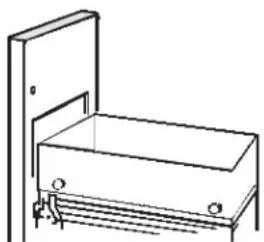
Line drawing of a simple bench with a vertical door and base, no text or symbols presentAfter installing a trash bag, the compactor is ready to use.
Trash Bag Installation
Before installing a new bag, be sure:
The drawer side is securely locked.
2 The container is clean and free of sharp debris that may puncture the bag.
Reinforced polyethylene bags came with your compactor and are ready to be installed.
You must use the specially designed heavy-duty trash bags included with your compactor. These bags are available from your dealer or Factory Service Center. Ask for catalog number WC60X5017. If you prefer, you can order by mail. A handy order form is provided with your compactor and is included in every replacement bag package.
To install a new bag:
1 Place the bag into the drawer. Open the bag and pull the top edges over the drawer top.
2 Lock the bag in place by pulling the four prepunched holes over the bag retainer buttons. Holes will expand over the buttons without harming the bag.
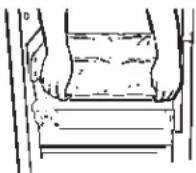
3 Press inside of bag against the drawer bottom, sides and corners for a smooth fit.

natural_image
Simple line drawing of a person's legs and feet in a rectangular frame (no text or symbols)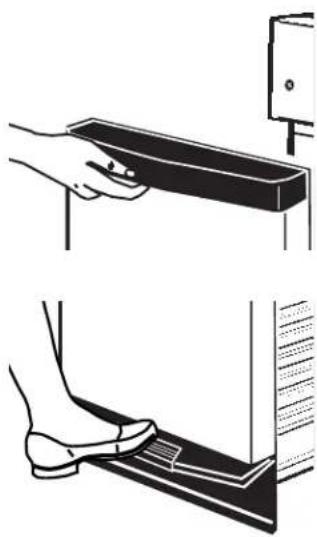
natural_image
Illustration showing a hand pressing down on a slide and a foot using a tool, both without any text or symbols.Lift the trash drawer handle or press the touch-toe bar and pull the drawer out.
Loading
Lift the trash drawer handle or press the touch-toe bar and pull the drawer out.
Remember:
■ Bottles and large cans compact best when laid flat near the center of the drawer.
■ To help keep the ram clean when compacting messy food waste, place a couple of folded sheets of newspaper or a large grocery bag on top of the load to be compacted.
■ Items too bulky to go into the drawer can be folded to fit. If it cannot be folded to fit into the drawer, do not attempt to force it in.
■ Folded newspaper will also help prevent glass fragments from flying out of the drawer when compacting a large glass bottle, or several bottles or jars, or any other items that might shatter.
■ Although it is not necessary to compact until the drawer is full or nearly full, we suggest that, for maximum compaction, you start the compactor each time a significant amount of trash is added.
Compacting
To start the compactor:
Make sure the drawer is fully closed.
2 Turn the key-knob to START. Let go of the key-knob. The motor will start and compacting will proceed.
The ram travels downward into the drawer, compacting the trash. At the bottom of the stroke, the ram automatically reverses direction, retracts out of the drawer, returns to its starting position, and the compactor shuts off automatically.
The cycle takes about one minute. As the trash drawer fills, cycle time gets progressively shorter.
NOTES:
■ Glass bottles can make a loud noise when they break during compaction. This is normal. Also, bottles in the trash drawer will not always break during the first cycle. Breaking glass and associated noise may occur several cycles later, depending on the type and volume of the trash.
■ When bottles and cans are compacted, small tears in the bag may occur. This is normal and in no way affects the performance of the compactor. Keep the bag away from your body to prevent injury from sharp objects that may have pierced the bag.
CAUTION:
■ Do not force the key-knob when turning. The key-knob should always rotate easily. Forcing may break the key-knob and damage the switch.
■ When emptying waste baskets into the trash drawer, some items may spill into the compactor behind the drawer. Items behind the drawer could prevent it from closing completely and prevent the compactor from operating. To remove such items from behind the drawer, open the drawer and, if necessary, remove it to clean them out. See the Care and Cleaning section.
To stop the compactor:
The compactor may be stopped at any time.
Turn the key-knob to LOCK/OFF.
2 Turn the key-knob to ON and the compacting ram moves back up to its starting position.
3 You can then open the drawer. To restart the compactor turn the key-knob to START.
About using the trash compactor.
Removing a Full Trash Bag
1 Pull the drawer completely open.
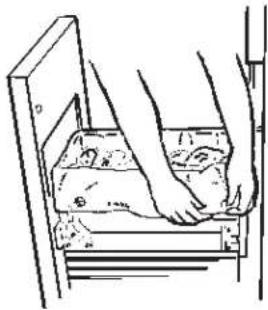
2 Remove the top of the bag from the bag retainer buttons. Pull up all four bag cuffs.
natural_image
Line drawing of a person's foot pressing down on a wooden plank (no text or symbols)3 Close the bag with the twist ties provided.
natural_image
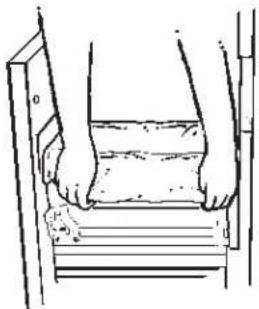
Line drawing of a person's legs and feet resting on stairs (no text or symbols)4 Push the side-lock latch down and tilt the drawer side open.
natural_image
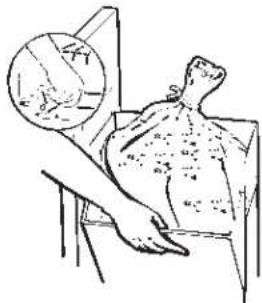
Medical illustration showing a patient undergoing breast surgery with an inset magnified view of the anatomical structure (no text or labels)5 Lift the bag out.

Care and cleaning of the compactor.
As is true of most appliances, proper care is needed to give you continued satisfaction. Before cleaning the compactor, turn the key-knob to the OFF position and remove. If you will be away for more than a couple of days, remove the compactor bag. Lock the compactor and remove the key-knob and store it in a safe place.
The outside and inside of your compactor are finished with durable baked-on enamel.
Cleaning the Outside and Inside
To clean the outside:
Do not wipe with a soiled dishwasher cloth—it may leave a residue that can damage the panel. Do not use harsh, gritty cleansers or scouring pads that may mar the finish.
Painted panels:
Apply a coat of kitchen/appliance wax when the compactor is new, and then several times a year.
Stainless steel panels:
Stainless steel panels can be cleaned with Stainless Steel Magic or a similar product using a clean, soft cloth.
Stainless Steel Magic (Cat. No. WX10X15) and Appliance Polish and Wax Cleaner (Cat. No. WR97X216) are available from GE Parts by calling 800-626-2002.
To clean the drawer interior:
1 Remove the bag. See About using the trash compactor section.
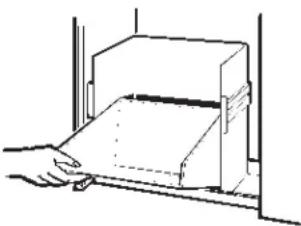
2 Wear protective gloves. There may be bits of glass in the drawer. Press the side-lock latch down.

natural_image
Illustration of a hand using a tool to adjust or install a mechanical component (no text or symbols visible)3 Hold the side-lock latch and tilt the side of the drawer until the latch clears the drawer front. The drawer side can be removed by tilting and sliding it out.
natural_image
Line drawing of a hand opening a rectangular box (no text or symbols)4 Wash with a damp cloth using warm, soapy water. Rinse and then dry with a soft cloth.
5 If the drawer side was removed, slide it back into the tilted position.
6 Press the side-lock latch down while pressing the side to the upright position. Lock the side-lock latch.
To clean the cabinet interior:
1 Pull the drawer out until it stops.
Note the tracks in which the drawer rollers move.
2 Lift the front to clear the drawer stops. Grab the drawer on both sides. Pull it out the rest of the way and set it aside.

natural_image
Simple line drawing of a 3D object with dashed lines and a small figure, no text or symbols present.3 Vacuum inside of the cabinet. Liquid spills or wet trash should be cleaned up by hand, or use a vacuum designed to pick up liquid.

natural_image
Hand using a tool to adjust or install a small component inside a frame (no text or symbols visible)4 Wash, rinse and dry the inside.
Installation Instructions.
Before you start...
Proper installation is your responsibility. Make sure you have everything necessary for correct installation. It is the personal responsibility and obligation of the customer to contact a qualified installer to assure that electrical installation meets national and all local codes and ordinances.
Grounded electrical outlet is required.
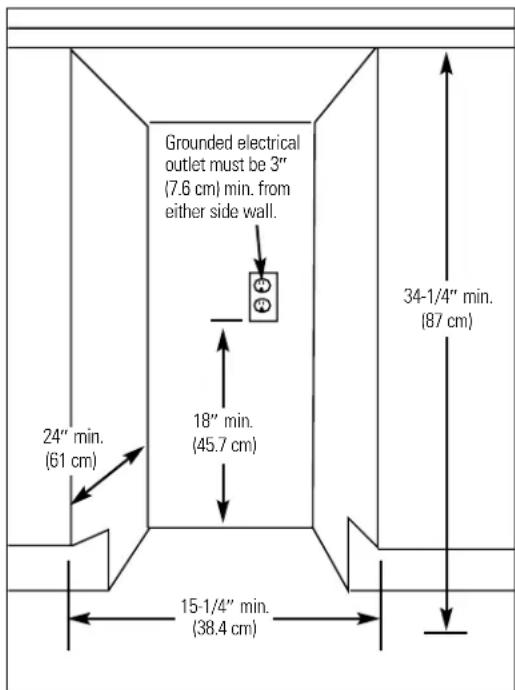
Check the location where your compactor will be installed. The cabinet opening should be square. You should be able to fully open the compactor drawer. Six inches (15.2cm) of clearance is needed on the right side of compactor drawer to be able to remove the compactor bag. Allow 23 inches (58.4 cm) in front of the compactor to remove drawer.
WARNING

Fire Hazard
Do not let any item fall or collect behind the compactor.
Failure to follow this instruction could result in a fire.
Cutout dimensions
Product dimensions—The overall look of your compactor may vary.
Clearance dimensions

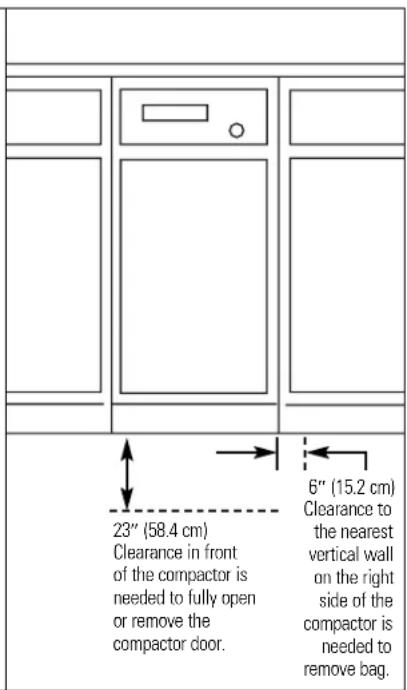
Tools and Materials Needed for Installation
■ Level
■ Phillips screwdriver
■ Flat-blade screwdriver
■ Pliers
■ Utility knife
■ Scissors
■ Measuring tape
■ 5/16" box-end wrench
■ Gloves
Parts Supplied for Undercounter Installation—Remove parts from literature package.
■ 2 mounting clips ■ 2 mounting screws
8-18x1/2"
WARNING

Electrical Shock Hazard
Electrical ground is required on this compactor.
DO NOT ground to a gas pipe.
DO NOT change the power supply cord plug. If it does not fit the outlet, have a proper outlet installed by a qualified electrician.
DO NOT have a fuse in the neutral or grounding circuit. A fuse in the neutral or grounding circuit could result in an electrical shock.
DO NOT use an extension cord with this compactor.
Check with a qualified electrician if you are not sure the compactor is properly grounded.
Failure to follow these instructions could result in death or serious injury.
If codes permit and a separate grounding wire is used, it is recommended that a qualified electrician determine that the grounding path is adequate.
IMPORTANT: Observe all governing codes and ordinances.
A 120-volt, 60-Hz, AC-only, 15- or 20-ampere, fused electrical supply is required. Time-delay fuse or circuit breaker is recommended. It is recommended that a separate circuit serving only this appliance be provided.
Recommended Grounding Method
For your personal safety, this appliance must be grounded. This appliance is equipped with a power supply cord having a 3-prong grounding plug. To minimize possible shock hazard, the cord must be plugged into a mating, 3-prong, grounding-type, wall receptacle, grounded in accordance with the national Electrical Code ANSI/NFPA70—latest edition* and all local codes and ordinances. If a mating wall receptacle is not available, it is the personal responsibility and obligation of the customer to have a properly grounded, 3-prong, wall receptacle installed by a qualified electrician.
3-prong grounding-type wall receptacle

Copies of the standards listed may be obtained from:
*National Fire Protection Association Batterymarch Park, Quincy, Massachusetts 02269
Installation Instructions (cont).
Starting to Install...with the compactor in the room where it will be installed.
DO NOT grasp console to move compactor.
Slide the compactor onto cardboard or hardboard before moving compactor across the floor to prevent damaging floor covering.
DO NOT allow the rear frame of the compactor to touch the floor covering when lifting or moving compactor.
1 Remove the compactor from the shipping carton. Remove all the protective packaging materials such as tape and shipping pads. Remove waxy residue caused by protective shipping material with a mild solution of liquid household cleaner and water.
2 Check that the power supply cord is attached to the cord clip on the rear of the compactor.

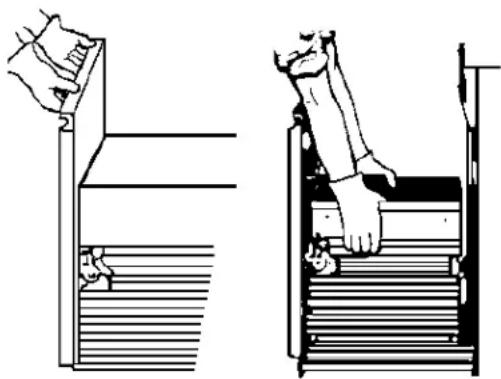
3 Place two corner posts from carton on floor near compactor. Open the compactor drawer and remove any shipping materials or other items shipped in the drawer. DO NOT remove the compactor bag (if installed). Grasp the handle and raise the front of the drawer until it clears stops. Grasp sides of the drawer and lift the drawer out of the compactor. Place the drawer on the two corner posts.
natural_image
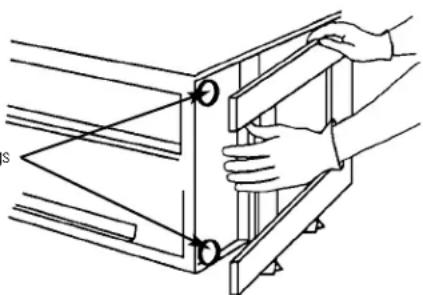
Two-step diagram showing hand positioning of a staircase with stairs, no text or symbols present4 Place the other two corner posts on the floor to the side of the compactor. Grasp the sides of the compactor cabinet and put the compactor on its side on top of the corner posts. Remove the shipping base from the bottom of the compactor. Lev
Leveling legs
natural_image
Technical line drawing of hands assembling or adjusting a mechanical component (no text or symbols present)5
Measure the height of your cabinet opening. The top of the compactor should be at least 1/8" (3 mm) from the top of the cabinet opening.
The rear wheels are preset for a cabinet opening height of 34-1/4" (87 cm) (Position "A").
To adjust for other cabinet opening heights, loosen screw just enough to clear stud from hole in position "A". Move the rear wheel and stud to position "B" or "C" as needed for your cabinet opening measurement:
Position B: 34-1/4" to 34-7/16" (87 to 87.5 cm)
Position C: 34-7/16" to 34-5/8" (87.5 to 88 cm)
Tighten screw. Repeat for other rear wheel.

6
Use pliers to lower leveling legs away from cabinet. Adjust legs so there will be a 1/8" (3 mm) to 1/4" (6.4 mm) space between the top of the compactor and the top of the cabinet opening. Stand the compactor upright.
7
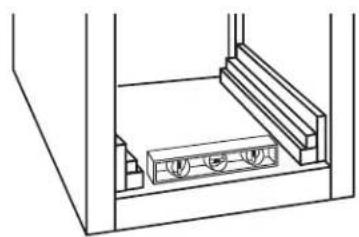
Use pliers to lower leveling legs away from cabinet. Place level inside on the floor of the cabinet. Check that the compactor is level from front to back and side to side. Adjust the leveling legs until the compactor is level.
natural_image
Technical line drawing of a mechanical assembly with no visible text or symbols8
Determine if you want the compactor frame or drawer front flush with the cabinet front.
Adjust the retaining brackets to the cabinet top as needed:
If the compactor frame is to be flush with the cabinet front, place retaining bracket screws through "A".
If the compactor drawer front is to be flush with the cabinet front, place retaining bracket screws through "C".
If the compactor is to be midway between "A" and "C", place retaining bracket screws through "B".

WARNING
Injury Hazard
When moving or lifting the compactor, use a glove to protect and cushion your hand.
More than one person is recommended to lift or move compactor because of its size and weight. Use proper lifting methods.
Failure to follow these instructions could result in injury.
Installation Instructions (cont).
9
Move the compactor close to its final position. Plug the power supply cord into a properly grounded receptacle.
Carefully lift the front slightly and roll compactor into the cabinet opening until the retaining brackets stop the unit.
Using the two #8-18 x 1/2" screws, fasten the retaining brackets to the underside of the countertop with the mounting screws. If the brackets cannot be attached to the underside of countertop, attach mounting clips to brackets. Fasten compactor to cabinet front with mounting screws through mounting clips.

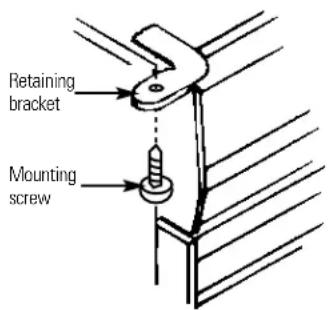
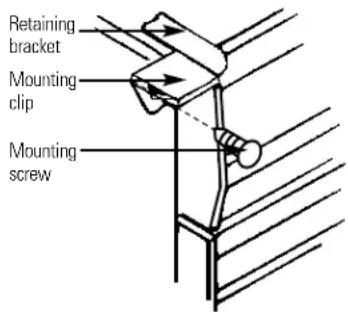
10
Grasp sides of compactor drawer and place bottom of drawer into tracks. Lift at the handle so the front of drawer will go over drawer stops. Close drawer. Check if drawer opens freely. If the toe plate rubs against floor, see section below.
Adjusting the Toe Plate
If the toe plate rubs the floor covering, the toe plate clearance may be changed as follows:
1 Mark on each side of the toe plate the amount of toe plate that rubs the floor covering.
2 Remove the drawer from the unit. See Step 3.
3 Use a ruler and a pencil or chalk to draw a line between the marks on each side of toe plate.
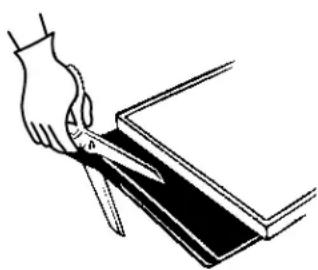
4 Use scissors or utility knife to cut toe plate along line.
5 Replace drawer. See Step 10. If toe plate still rubs floor covering, repeat these steps.
natural_image
Illustration of a hand using scissors to cut a rectangular object (no text or symbols)Installing a Custom Panel
To order a color-matched trim kit for the installation of a custom-made panel, contact your local authorized GE dealer.
To locate an authorized GE dealer in your area, call the GE Answer Center at 800-626-2000.
Available kits for custom-made panels are:
GPF82B (Black)
GPF82C (Bisque)
GPF82W (White)
GPF82S (Stainless Steel)
Custom-made panel dimensions

Flat panel: A 7/32" (5.6 mm) thick panel is required. This is the same thickness as a standard 1/4" plywood or pancling.

Raised panel: The outer section of the panel must be 7/32" (5.6 mm) thick to fit into trim. Raised panel dimensions as shown above.
Before you call for service...

Troubleshooting Tips
Save time and money! Review the charts on the following
pages first and you may not need to call for service.
Problem Possible Causes What To Do
| Compactor won't operate | Compactor is unplugged | Make sure cord is plugged securely into a working outlet. |
| Circuit breaker/fuse is tripped/blown fuses or reset breaker. | Check house circuit breakers /fuses. Replace | |
| Key-knob switch may not be in position | Make sure the switch is in the ON position.The switch may not have been held at START long enough to start the compaction cycle. | |
| Drawer may not be closed | Check to make sure the drawer is firmly closed. | |
| Compactor has an automatic thermal cutout may have opened | If you have just compacted repeatedly, this protector the motor circuit. Wait a few minutes and the cutout will reclose automatically. | |
| Drawer is hard to close | Trash may have fallen behind the drawer be blocked. | Remove any trash. There is a safety switch that could |
| Drawer will not open | The ram is not all the way up key-knob to | Make sure the ram is in the up position. Turn the START and release. |
| Little or no apparent compaction | Drawer is not full enough | The drawer must be at least 1/2 full of trash before you will see any amount of compacting. The ram does not travel all the way to the bottom. Trash in the bottom of the drawer will be crushed during later cycles. |
| Drawer is not loaded | If anything gets between the ram and the drawer, the ram will return to the up position without compacting. | |
| Too few items loaded | Compacting works best when only a few items are loaded. Use the compacting cycle frequently for best results. |
| Operating Instructions | Customer Service Trouble |
| Customer Service Troubleshooting Tips Safety Instructions | Operating Instructions | Safety InstructionsInstall |
Notes.
Trash Compactor Warranty.

All warranty service provided by our Factory Service Centers, or an authorized Customer Care® technician. For service, call 800-GE-CARES.
For The Period Of: GE Will Replace:
One Year Any part
From the date of the original purchase
of the compactor which fails due to a defect in materials or workmanship.
During this full one-year warranty, GE will also provide, free of charge, all labor and in-home service to replace the defective part.
What GE Will Not Cover:
■ Service trips to your home to teach you how to use the product.
■ Improper installation.
■ Failure of the product if it is abused, misused, or used for other than the intended purpose or used commercially.
■ Replacement of house fuses or resetting of circuit breakers.
■ Damage to the product caused by accident, fire, floods or acts of God.
■ Incidental or consequential damage to personal property caused by possible defects with this appliance.
This warranty is extended to the original purchaser and any succeeding owner for products purchased for home use within the USA. In Alaska, the warranty excludes the cost of shipping or service calls to your home.
Some states do not allow the exclusion or limitation of incidental or consequential damages. This warranty gives you specific legal rights, and you may also have other rights which vary from state to state. To know what your legal rights are, consult your local or state consumer affairs office or your state's Attorney General.
Warrantor: General Electric Company. Louisville, KY 40225
Service Telephone Numbers.

GE Answer Center ^® In the U.S.: 800.626.2000
The GE Answer Center ^® is open 24 hours a day, 7 days a week.
In Canada, contact: Manager, Consumer Relations, Camco Inc., 5800 Keaton Crescent, Mississauga, Ontario, Canada L5R 3K2.

In-Home Repair Service In the U.S.: 800-432-2737
Expert GE repair service is only a phone call away.
In Canada, call 1-800-361-3400.

Special Needs Service In the U.S.: 800.626.2000
GE offers, free of charge, a brochure to assist in planning a barrier-free kitchen for persons with limited mobility. In the U.S., call 800-TDD-GEAC (800-833-4322).
In Canada, contact: Manager, Consumer Relations, Camco Inc., 5800 Keaton Crescent, Mississauga, Ontario, Canada L5R 3K2.

Service Contracts In the U.S.: 800-626-2224
Purchase a GE service contract while your warranty is still in effect and you'll receive a substantial discount. GE Consumer Service will still be there after your warranty expires.
In Canada, call 1-800-461-3636.

Parts In the U.S.: 800-626-2002
Individuals qualified to service their own appliances can have parts or accessories sent directly to their homes (VISA, MasterCard, and Discover cards are accepted).
Instructions contained in this manual cover procedures to be performed by any user. Other servicing generally should be referred to qualified service personnel. Caution must be exercised, since improper servicing may cause unsafe operation.
Customers in Canada should consult the yellow pages for your local Camco number.

Service Satisfaction
If you are not satisfied with the service you receive from GE:
First, contact the people who serviced your appliance.
Next, if you are still not pleased, in the U.S., write all the details—including your phone number—to: Manager, Consumer Relations, GE Appliances, Appliance Park, Louisville, KY 40225; or, in Canada, to Director, Consumer Relations, Camco Inc., 5800 Keaton Crescent, Mississauga, Ontario, Canada L5R 3K2.
- Safety Information
- Operating Instructions
- Installation Instructions
- Troubleshooting Tips
- Customer Service
- Congratulations!
- You Are Now Part of the GE Family
- GE & You, A Service Partnership.
- For Your Records
- Staple sales slip or cancelled check here.
- Write the model and serial numbers here:
- Read this Manual
- If You Need Service
- ⚠ WARNING!
- SAFETY PRECAUTIONS
- PRECAUTIONS AGAINST UNREASONABLE USE OF YOUR COMPACTOR:
- IMPORTANT SAFETY INFORMATION. READ ALL INSTRUCTIONS BEFORE USING.
- ELECTRICAL SAFETY
- About the trash compactor.
- Features
- About using the trash compactor.
- What It Does and How It Works
- Key-Knob Start/Off Switch
- Drawer Monitor Switch
- Trash Bag Installation
- Before installing a new bag, be sure:
- To install a new bag:
- Loading
- Remember:
- Compacting
- To start the compactor:
- NOTES:
- CAUTION:
- To stop the compactor:
- Removing a Full Trash Bag
- Care and cleaning of the compactor.
- Cleaning the Outside and Inside
- To clean the outside:
- Painted panels:
- Stainless steel panels:
- To clean the drawer interior:
- To clean the cabinet interior:
- Installation Instructions.
- Before you start...
- Grounded electrical outlet is required.
- WARNING
- Tools and Materials Needed for Installation
- 8-18x1/2"
- Electrical Shock Hazard
- Recommended Grounding Method
- Installation Instructions (cont).
- Starting to Install...with the compactor in the room where it will be installed.
- 5
- 6
- 7
- 8
- Injury Hazard
- 9
- 10
- Adjusting the Toe Plate
- Installing a Custom Panel
- Before you call for service...
- Trash Compactor Warranty.
- For The Period Of: GE Will Replace:
- One Year Any part
- What GE Will Not Cover:
- Service Telephone Numbers.
- GE Answer Center ® In the U.S.: 800.626.2000
- In-Home Repair Service In the U.S.: 800-432-2737
- Special Needs Service In the U.S.: 800.626.2000
- Service Contracts In the U.S.: 800-626-2224
- Parts In the U.S.: 800-626-2002
- Service Satisfaction
Brand : GE
Model : GCG1530
Category : Household Waste