W590 - Wristwatch Lorus - Free user manual and instructions
Find the device manual for free W590 Lorus in PDF.


| Product Type | Quartz Analog Watch |
| Brand | Lorus |
| Model | W590 |
| Case Material | Stainless Steel |
| Case Diameter | Approx. 40 mm |
| Case Thickness | Approx. 10 mm |
| Weight | Approx. 80 g |
| Band Material | Stainless Steel Bracelet |
| Band Width | Approx. 20 mm |
| Dial Window Material | Mineral Crystal |
| Movement | Japanese Quartz |
| Battery Type | SR626SW or equivalent |
| Battery Life | Approx. 2-3 years |
| Water Resistance | 30 meters (3 ATM) |
| Functions | Time, Date, Day of Week |
| Crown | Pull to adjust time/date |
| Clasp Type | Deployment Clasp with Push-Button |
| Cleaning | Wipe with soft dry cloth |
| Storage | Keep in dry place away from magnets |
| Spare Parts | Battery replacement available |
| Repair | Authorized service centers recommended |
Frequently Asked Questions - W590 Lorus
User questions about W590 Lorus
0 question about this device. Answer the ones you know or ask your own.
Ask a new question about this device
Download the instructions for your Wristwatch in PDF format for free! Find your manual W590 - Lorus and take your electronic device back in hand. On this page are published all the documents necessary for the use of your device. W590 by Lorus.
USER MANUAL W590 Lorus
- Time/calendar display: Hour, minutes, seconds, month, date and day of the week. • Automatic calendar: Calendar adjusts automatically for odd and even months except February of leap years.
• Time indication: Changeover between 12- and 24-hour indications is possible.
- Demonstration function: Various faces (Cal. W590)/poses (Cal. W591) of Mickey Mouse are shown as a melody sounds.
-
Game function: A slot machine type game can be played.
-
Melody alarm: The alarm can be set on a 24-hour basis. At the designated time, a melody sounds.
- Hourly time signal: Can be set to ring every hour on the hour.
© Disney
■ BUTTONS AND DISPLAYS
![[Cal. W590] Alarm mark A "A" (AM)/ "P" (PM) mark Hour Minutes Hours C 10:58 59" Hourly time signal mark Seconds](/content/2026/06/1187839/images/67cec77cc247a51352cdf1ccc378193e77e54045dd8b6969bd7afa961743eeb8.jpg)
![[Cal. W591] Alarm mark A "A" (AM)/ "P" (PM) mark Hour Minutes Hours C B Hoursy time signal mark Seconds [0:08 59°]](/content/2026/06/1187839/images/2643016201e8aeac5968c08268b17add87dfb5fb242aeff51fa3047c8a207579.jpg)
The selection of the display can be made in the following order with each press of button "A".
Time display

Game display

Alarm display

With each press of button "B" in the time display, the display changes over between the time and demonstration alternately.
Time display Demonstration display
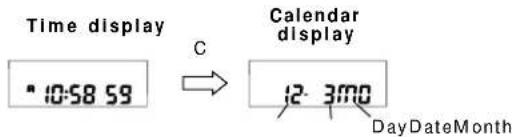
While button "C" is kept pressed in the time display, the calendar is displayed.
■ HOW TO SET THE TIME/CALENDAR

-
Press button "A" for 2 seconds in the time display to show the time/calendar setting display. The second digits start flashing.
-
Selection of the digits to be adjusted (flashing) is made in the following order by pressing button "B".
$$ \begin{array}{c c c}\text {Seconds}&\rightarrow&\rightarrow \text {HourMinMonth}\\uparrow&&\downarrow\1 2 - / 2 4 - \text {hour}&\leftarrow&\leftarrow \text {DateDay}\\text {indication}&\end{array} $$
-
Press button "C" to set the flashing digits. One digit is advanced with each press of button "C". Digits except seconds and 12/24-hour indication move quickly by keeping button "C" pressed.
-
After all the adjustments are completed, press button "A" to return to the time display.
Seconds setting
When the seconds digits are flashing, press button "C" in accordance with a time signal. The seconds are reset to "00" and start immediately. When the seconds count any number from "30" to "59" and button "C" is pressed, one minute is added and the seconds are immediately reset to "00".
Notes:
-
When setting the hour digits in the 12-hour indication, check that "A" (AM)/ "P" (PM) mark is properly set. In the 24-hour indication, there is no indication.
-
If the watch is left untouched in the time/calendar setting display with the digits flashing, it will automatically return to the time display in 1 to 2 minutes.
Demonstration function
With each press of button "B" in the time display, the display changes over between the time and demonstration alternately.
In the demonstration display:
- Various faces (Cal. W590)/ poses (Cal. W 591) of Mickey Mouse appear at one-second intervals; it takes 10 seconds to show all the faces/poses. Afterwards, the same sequence of faces/poses is shown repeatedly. They are shown 6 times in one minute.
- The melody of "Mickey Mouse March" is played for 26 seconds. To stop it manually, press button "A", "B" or "C".
• Mickey Mouse March © 1955 Walt Disney Music Company
■HOW TO USE THE GAME FUNCTION
- A slot machine type game can be played.
Rule of the Game
- To win, you should press the button to stop the sequential display of Mickey Mouse faces (Cal. W590)/poses (Cal. W591) to show on the display the face/pose that was indicated as the target before the game starts.
• After the game is over, one of the two different Mickey Mouse faces/poses appears depending on whether you have won or lost. - When you have won, the melody of "Mickey Mouse March" is played as the winning face/pose appears, lasting for 26 seconds.
Game Operation
- Press button "A" to show the game display. The target face/pose appears.
- Press button "B" to start the game. Several faces/ poses are shown sequentially.
- Press button "B" to stop the sequential display.
- Either the face/pose when you have won or that when you have lost is shown, and then, a new target face/pose will appear.
- Press button "B" to restart the game, or press button "A" to change the display to another as you require.
Notes:
- If you have won, the winning faces/poses appear alternately at one-second intervals and the melody sounds for 26 seconds. To stop them manually, press button "A", "B" or "C". A new target face will be displayed immediately.
- If the watch is left untouched in the sequential display, it will automatically return to the target face/pose in 1 to 2 minutes.
- To win more easily, check the number of target face/pose as a cue to press the button timely.

■ HOW TO SET THE ALARM

- Press button "A" to show the alarm display.
- Press button "A" for 2 seconds to show the alarm setting display. The hour digits (and "A"/"P" mark if the time is set in the 12-hour indication) start flashing.
- Press button "B" to select the digits to be adjusted (flashing).

-
Press button "C" to set the digits. One digit is advanced with each press of the button. The digits move quickly by keeping the button pressed.
-
After all the adjustments are completed, press button "A" to return to the alarm display.
Notes:
- When the time function is displayed in the 24-hour indication, the alarm is also displayed in the 24-hour indication.
- When setting the hour digits in the 12-hour indication, check that "A" (AM)/"P" (PM) mark is correctly set. In the 24-hour indication, there is no indication.
- If the watch is left untouched in the alarm setting display with the digits flashing, it will automatically return to the alarm display in 1 to 2 minutes.
Engagement/disengagement of the alarm and hourly time signal
- With each press of button "B" in the alarm display, the engagement and disengagement of the alarm and hourly time signal are made as follows.

| (●) | Hourly time signal engaged | |
| 2 | Both engaged | |
| Alarm engaged3 | ||
| 4 | Neither engaged |
- At the designated alarm time, the melody of "Mickey Mouse March" is played for 26 seconds and stops. To stop it manually, press button "A", "B" or "C".
- The alarm can be tested by keeping button "B" pressed in the alarm display.
■ NOTE ON UNUSUAL DISPLAY
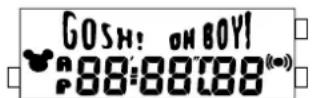
While in the time/calendar setting display, the display as shown below will appear if both buttons "B" and "C" are pressed at the same time. This is not a malfunction. Press button "A", "B" or "C" to return to the time display, and then set the time/calendar again.
[All the segments lighting up]
■ ViViDiGi
ViViDiGi is a new type of liquid crystal panel that makes possible various colors and high contrast.
• Excellent light reflection and transmission make the display bright and clear.
- Various color options are available.
* Features vary in different models.
ViViDiGi
■ BATTERY CHANGE
The miniature lithium battery PANASONIC CR2016, which powers your watch should last approximately 3 years. However, because it is inserted at the factory, the actual life of the battery once in your possession may be less than the specified period. Be sure to replace the battery to prevent any possible malfunction as soon as it runs down. To replace the battery, we recommend taking the watch to a local watch repair shop.
Note: If the alarm is used for more than 10 seconds a day and/or the alarm is tested for more than 10 seconds a day, the battery life may be less than the specified period.
■ CARE OF YOUR LORUS WATCH
- BATTERY

CAUTION
Do not expose the old battery to fire or recharge it. Keep it at a place beyond the reach of children. If a child swallows it, consult a doctor immediately.
• WATER RESISTANT
| Indication on the dial/ case back\Condition of use | Accidental contact with water, such as splashes and rain | Swimming and taking a shower | Skin diving | Scuba diving |
| No Indication | NO | NO NO NO | ||
| WATER RESISTANT | YES NO | NO NO | ||
| WATER RESISTANT (50 M/5 BAR)* | YES | YES NO NO | ||
| WATER RESISTANT ( 100M/ \ 10BARor\ )^* above | YES YES | YES NO |
* If your watch is 200 M/20 BAR, 100 M/10 BAR or 50 M/5 BAR water resistant, it is so indicated on the dial/case back.
- Do not operate the buttons when the watch is wet.
- If the watch is exposed to salt water, rinse it in fresh water and then wipe it thoroughly dry.
Caution:
Leather straps are not water resistant except so indicated, even if the watch head is water resistant.
• ALLERGIC REACTION
Because the case and band touch the skin directly, it is important to clean them regularly. If not, shirt sleeves may be stained and those with delicate skin may develop a rash. Please wear the watch with some play to avoid any possible allergic reaction. If you develop a rash on your wrist, stop wearing and consult a physician.
• MAGNETISM
Your watch will not be affected by magnetism generated by household electric appliances.
• SHOCKS AND VIBRATIONS
Your watch may be worn for normal sports activities, but be careful not to drop it or hit it on hard surfaces.
• TEMPERATURE
Your watch is preadjusted so that constant accuracy may be insured at normal temperature.
■ SERVICE
When your LORUS watch requires repair or servicing, please see the enclosed WARRANTY/GUARANTEE.
Printed in Hong Kong
- ■ BUTTONS AND DISPLAYS
- ■ HOW TO SET THE TIME/CALENDAR
- Seconds setting
- Notes:
- Demonstration function
- ■HOW TO USE THE GAME FUNCTION
- Rule of the Game
- Game Operation
- ■ HOW TO SET THE ALARM
- Engagement/disengagement of the alarm and hourly time signal
- ■ NOTE ON UNUSUAL DISPLAY
- ■ ViViDiGi
- ViViDiGi
- ■ BATTERY CHANGE
- ■ CARE OF YOUR LORUS WATCH
- CAUTION
- Caution:
- • ALLERGIC REACTION
- • MAGNETISM
- • SHOCKS AND VIBRATIONS
- • TEMPERATURE
- ■ SERVICE
Brand : Lorus
Model : W590
Category : Wristwatch