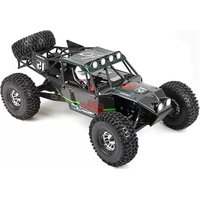
Rock Racer - Remote control toy Vaterra - Free user manual and instructions
Find the device manual for free Rock Racer Vaterra in PDF.


| Product Type | Remote Control Toy Car |
| Model | Rock Racer |
| Scale | 1/10 |
| Drive Type | 4-Wheel Drive (4WD) |
| Suspension | Oil-filled shock absorbers |
| Chassis Material | Aluminum |
| Motor Type | Brushed electric motor |
| Battery Type (Vehicle) | 7.2V NiMH or 2S LiPo |
| Battery Capacity (Vehicle) | 3000 mAh (typical) |
| Charging Time | Approx. 4-6 hours |
| Run Time | Approx. 15-20 minutes |
| Remote Control Type | 2.4 GHz pistol grip |
| Remote Control Range | Up to 100 meters |
| Power Supply (Remote) | 4 x AA batteries |
| Dimensions (Vehicle) | Approx. 500 x 300 x 250 mm |
| Weight (Vehicle) | Approx. 2.5 kg |
| Ground Clearance | 30 mm (approx) |
| Wheel Type | Off-road tires with foam inserts |
| Speed | Up to 30 km/h |
| Maintenance | Clean after use, check screws, lubricate moving parts |
| Safety Precautions | Use only specified batteries, do not operate in wet conditions |
| Spare Parts Availability | Available from Vaterra or hobby stores |
| Repairability | Modular design, easy to replace parts |
| Recommended Age | 14+ years |
Frequently Asked Questions - Rock Racer Vaterra
User questions about Rock Racer Vaterra
0 question about this device. Answer the ones you know or ask your own.
Ask a new question about this device
Download the instructions for your Remote control toy in PDF format for free! Find your manual Rock Racer - Vaterra and take your electronic device back in hand. On this page are published all the documents necessary for the use of your device. Rock Racer by Vaterra.
USER MANUAL Rock Racer Vaterra
NOTICE
All instructions, warranties and other collateral documents are subject to change at the sole discretion of Horizon Hobby, Inc. For up-to-date product literature, visit www.horizonhobby.com and click on the support tab for this product.
MEANING OF SPECIAL LANGUAGE
The following terms are used throughout the product literature to indicate various levels of potential harm when operating this product:
Notice: Procedures, which if not properly followed, create a possibility of physical property damage AND a little or no possibility of injury.
Caution: Procedures, which if not properly followed, create the probability of physical property damage AND a possibility of serious injury.
Warning: Procedures, which if not properly followed, create the probability of property damage, collateral damage, and serious injury OR create a high probability of superficial injury.

Warning: Read the ENTIRE instruction manual to become familiar with the features of the product before operating. Failure to operate the product correctly may result in damage to the product, personal property and cause serious injury.
This is a sophisticated hobby product and NOT a toy. It must be operated with caution and common sense and requires some basic mechanical ability. Failure to operate this Product in a safe and responsible manner could result in injury or damage to the product or other property. This product is not intended for use by children without direct adult supervision. Do not attempt disassembly, use with incompatible components or augment product in any way without the approval of Horizon Hobby, Inc. This manual contains instructions for safety, operation and maintenance. It is essential to read and follow all the instructions and warnings in the manual, prior to assembly, setup or use, in order to operate correctly and avoid damage or serious injury.
AGE RECOMMENDATION: Not for children under 14 years. This is not a toy.
REGISTER YOUR
VATERRA PRODUCT ONLINE
Register your vehicle now and be the first to find out about the latest option parts, product updates and more. Click on the Support tab at WWW.VATERRARC.COM and follow the product registration link to stay connected.
SAFETY PRECAUTIONS AND GUIDELINES
»Always keep a safe distance in all directions around your model to avoid collisions or injury. This model is controlled by a radio signal subject to interference from many sources outside your control. Interference can cause momentary loss of control.
Always operate your model in open spaces away from full-size vehicles, traffic and people.
Always carefully follow the directions and warnings for this and any optional support equipment (chargers, rechargeable battery packs, etc.).
Always keep all chemicals, small parts and anything electrical out of the reach of children.
Always avoid water exposure to all equipment not specifically designed and protected for this purpose. Moisture causes damage to electronics.
Never place any portion of the model in your mouth as it could cause serious injury or even death.
Never operate your model with low transmitter batteries.
Water-resistant vehicle with waterproof electronics

Your new Horizon Hobby vehicle has been designed and built with a combination of waterproof and water-resistant components to allow you to operate the product in many "wet conditions", including puddles, creeks, wet grass, snow and even rain.
While the entire vehicle is highly water-resistant, it is not completely waterproof and your vehicle should NOT be treated like a submarine. The various electronic components used in the vehicle, such as the Electronic Speed Control (ESC), servo(s) and receiver are waterproof, however, most of the mechanical components are water-resistant and should not be submerged.
Metal parts, including the bearings, hinge pins, screws and nuts, as well as the contacts in the electrical cables, will be susceptible to corrosion if additional maintenance is not performed after running in wet conditions. To maximize the long-term performance of your vehicle and to keep the warranty intact, the procedures described in the "Wet Conditions Maintenance" section to follow must be performed regularly if you choose to run in wet conditions. If you are not willing to perform the additional care and maintenance required, then you should not operate the vehicle in those conditions.
Caution: Failure to exercise caution while using this product and complying with the following precautions could result in product malfunction and/or void the warranty.
General Precautions
Read through the wet conditions maintenance procedures and make sure that you have all the tools you will need to properly maintain your vehicle.
Not all batteries can be used in wet conditions. Consult the battery manufacturer before use. Do not use Li-Po batteries in wet conditions.
Most transmitters are not water-resistant. Consult your transmitter's manual or the manufacturer before operation. Never operate your transmitter or vehicle where lightning may be present.
Do not operate your vehicle where it could come in contact with salt water (ocean water or water on salt-covered roads), contaminated or polluted water. Salt water is very conductive and highly corrosive, so use caution.
Even minimal water contact can reduce the life of your motor if it has not been certified as water-resistant or waterproof. If the motor becomes excessively wet, apply very light throttle until the water is mostly removed from the motor. Running a wet motor at high speeds may rapidly damage the motor.
Driving in wet conditions can reduce the life of the motor. The additional resistance of operating in water causes excess strain. Alter the gear ratio by using a smaller pinion or larger spur gear. This will increase torque (and motor life) when running in mud, deeper puddles, or any wet conditions that will increase the load on the motor for an extended period of time.
Wet Conditions Maintenance
Remove the battery pack(s) and dry the contacts. If you have an air compressor or a can of compressed air, blow out any water that may be inside the recessed connector housing.
Remove the tires/wheels from the vehicle and gently rinse the mud and dirt off with a garden hose. Avoid rinsing the bearings and transmission.
Notice: Never use a pressure washer to clean your vehicle.
Use an air compressor or a can of compressed air to dry the vehicle and help remove any water that may have gotten into small crevices or corners.
Spray the bearings, drive train, fasteners and other metal parts with WD-40® solvent or any other water-displacing light oil. Do not spray the motor.
Let the vehicle air dry before you store it. Water (and oil) may continue to drip for a few hours.
Increase the frequency of disassembly, inspection and lubrication of the following:
• Front and rear axle hub assembly bearings. • All transmission cases, gears and differentials. • Motor—clean with an aerosol motor cleaner and re-oil the bearings with lightweight motor oil.
Introduction
Thank you for purchasing the Vaterra 1/10-scale Twin Hammers rock racer. We are confident you will be satisfied with the performance of this durable and resilient vehicle. Please read through the entire manual before setting up and using your vehicle.
6 Introduction 6 Quick Start 7 Components 8 The Vehicle Battery 9 The Transmitter 11 Transmitter and Receiver Binding 11 Control Test 12 Run Time 12 Tuning, Adjusting & Maintaining Your Vehicle 13 Dynamite Li-Po Tazer 12T Waterproof Forward/Reverse ESC 14 Troubleshooting Guide 15 Limited Warranty 17 FCC Statement 17 Compliance Information for the European Union 60 Fasteners 62 Replacement Parts 77 Optional Parts
Quick Start
Please read the entire manual to gain a full understanding of the Twin Hammers vehicle, fine-tuning the setup, and performing maintenance.
- Read the safety precautions found in this manual.
- Charge the battery. Refer to the included charging warnings and instructions for battery charging information.
- Install the AA batteries in the transmitter. Only use alkaline or rechargeable batteries.
- Install the fully charged battery in the vehicle.
- Power ON the transmitter and then the vehicle. Always power the transmitter ON before the vehicle and power it OFF after the vehicle has been powered OFF.
- Check the steering and throttle control directions. Verify that the servos are moving in the correct direction.
- Drive your vehicle.
- Perform any necessary maintenance.
Components
»1/10-Scale Twin Hammers 4WD Rock Racer RTR »Spektrum DX3E 2.4GHz DSM® Radio System »Dynamite Li-Po Tazer™ 12T Waterproof Forward/Reverse ESC »Dynamite 15-Turn Brushed Motor »Servo »Dynamite 7.4V 2000mAh 2S 30C Li-Po Battery »Dynamite 10W Li-Po AC Balance Charger »4 AA Batteries (for transmitter)

Required Tools
»Soft bristle cleaning brush »#0 or #1 Phillips screwdriver
Optional Tools
»Hobby grade knife »Needle nose pliers »Side cutting pliers »Safety goggles »Soldering iron »Double-sided tape (VTR70000)
Use only Dynamite tools or other high-quality tools. Use of inexpensive tools can cause damage to the small screws and parts used on this type of model.
Supplied Tools
»“L” shaped hex wrench 1.5mm, 2mm, 2.5mm
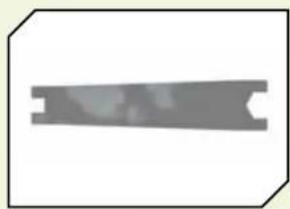
» 2-way wrench

» 4-way wrench
The Vehicle Battery

Warning: Failure to exercise caution while using this product and to comply with the following warnings can result in product malfunction, critical issues, excessive heat, and ultimately injury and property damage.

Warning: Never leave charger unattended, exceed maximum charge rate, charge with non-approved batteries, or charge batteries in the wrong mode. Failure to comply may result in excessive heat, fire, and injury.

Caution: Always ensure the battery you are charging meets the specifications of this charger and that charger settings are correct. Not doing so can result in excessive heat or other related product malfunction, which can lead to user injury or property damage. Please contact Horizon Hobby or an authorized dealer with compatibility questions.
For faster charge times, we recommend a computerized charger, such as DYN4066.
Charging Warnings
»Never leave the charger and battery unattended during use.
»Never attempt to charge dead, damaged or wet battery packs.
»Never attempt to charge a battery pack containing different types of batteries.
»Never allow minors to charge battery packs.
»Never charge batteries in extremely hot or cold places or place in direct sunlight.
»Never charge a battery if the cable has been pinched or shorted.
»Never connect more than one battery pack to this charger at a time.
»Never connect the charger if the power cable has been pinched or shorted.
»Never attempt to dismantle the charger or use a damaged charger.
»Never reverse the positive and negative terminals.
»Always use only rechargeable batteries designed for use with this type of charger.
»Always inspect the battery before charging.
»Always keep the battery away from any material that could be affected by heat.
»Always monitor the charging area and have a fire extinguisher available at all times.
»Always terminate the charging process if the battery becomes hot to the touch or starts to change form (swell) during the charge process.
»Always disconnect the battery after charging, and let the charger cool between charges.
»Always terminate all processes and contact Horizon Hobby if the product malfunctions.
Charging the Battery
a Cell 1 LED b Cell 2 LED c Cell 3 LED d AC Power Slot e 2S Charge Port f 3S Charge Port
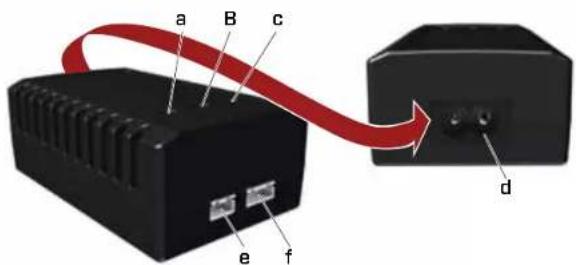
- Connect the AC power cord to the power slot on the charger, then connect the other end of the power cord to an AC power source. 2 The three LEDs will turn green when the charger is connected to the AC power source. 3 Connect the balance connector of the battery to the proper charge port
on the charger (the 3S charge port has 4 pins and the 2S charge port has 3 pins).
4 The three LEDs will turn red, indicating the battery is charging. 5 When the charging of one cell is complete, the corresponding LED turns green.
6 Once the battery pack is fully charged, all three LEDs will turn green. 7 Disconnect the battery from the charger. 8 Disconnect the AC power cord from the AC power source.
Installing the Vehicle Battery
1 Ensure the ESC is powered OFF. 2 Loosen the hook and loop straps.
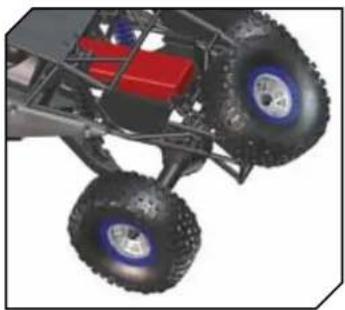
3 Install a fully charged battery. 4 Tighten the hook and loop straps.

5 Power ON the transmitter, then the vehicle.

Caution: NEVER remove
the transmitter batteries while the vehicle is powered ON, as loss of control, property damage or injury may result.
the transmitter
Installing the Transmitter Batteries
1. Push in the battery cover a small amount to release the retaining tab, then remove the cover. 2. Install 4 AA batteries, taking care to align the battery polarity to the diagram in the transmitter's battery case. 3. Carefully reinstall the battery cover by aligning the tabs with the slots on the transmitter.


Caution: If using rechargeable batteries, charge only rechargeable batteries. Charging non-rechargeable batteries may cause the batteries to get hot, resulting in injury to persons or damage to property.
The Twin Hammers rock racer comes with a Spektrum™ DX3E Transmitter with 2.4GHz DSM® technology. The system will not interfere with radio systems operating on legacy frequencies, such as 27MHz or 75MHz, neither will you experience any overlapping interference from other 2.4GHz systems. The transmitter and receiver are bound together at the factory to uniquely operate together.
For more information on the transmitter, go to www.horizonhobby.com and click on the support tab for the Spektrum DX3E to download the instruction manual.
FACTORY SETTINGS OF RADIO/ESC
The Electronic Speed Control was calibrated at the factory. When you turn on and run the vehicle for the first time, you may need to slightly adjust the Throttle Trim. If the vehicle creeps forward or backwards, make a fine adjustment to the Throttle Trim knob on the transmitter. Bumps during transportation can slightly alter the default settings.
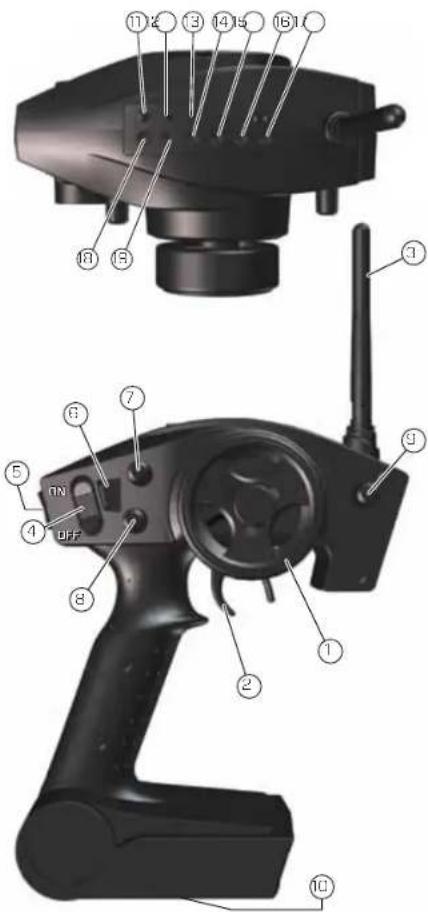
1. Steering Wheel controls direction (left/right) of the model
2. Throttle Trigger controls speed and direction (forward/brake/reverse) of the model
3. Antenna transmits the signal to the model
4. ON/OFF Switch turns the power ON/OFF for the transmitter
5. Ch 3 Switch
6. Indicator Lights
• Green (right) light indicates adequate battery power
- Red (left) light indicates good signal strength. When the red light fades, signal strength is weakening
7 ST. Trim adjusts the "hands off" direction of the model
8 TH. Trim adjusts the motor speed to stop at neutral
9 Steering Rate adjusts the amount the front wheels move when the steering wheel is turned left and right
10 Battery Cover covers and holds the batteries that power the transmitter
11 BIND Button puts the transmitter into Bind Mode
12 ST. REV reverses the function of the steering when the wheel is turned left or right
13 TH. REV reverses the function of the speed control when pulled back or pushed forward
14 TH-F - Forward Endpoint - Adjusts the amount of full throttle
15 TH-B - Brake Endpoint - Adjusts the amount of full brake
16 AUX-H - AUX High Endpoint - Adjusts the amount of high AUX travel
17 AUX-L - AUX Low Endpoint - Adjusts the amount of low AUX travel
18 ST-L - Steering Left Endpoint - Adjusts the amount of left steering travel
19 ST-R - Steering Right Endpoint - Adjusts the amount of right steering travel
RF MODE
The DX3E features an RF mode switch on the bottom side of the transmitter near the trigger. Std is the standard RF mode. FR is the France RF mode and should only be selected if the transmitter is used in France.
Transmitter and Receiver Binding

Binding Procedure
1. Ensure the transmitter and vehicle are both turned off. 2. Insert the Bind plug (included) into the receiver slot labeled BIND.
Important: You do not need to remove any other plugs to rebind.
3. Connect a fully charged battery to the EC3 connector on the ESC. 4. With the Bind plug installed, turn on the vehicle. The receiver LED will start to blink.
5. Turn on the transmitter. The transmitter LED will start to blink. 6. After a few seconds, the receiver and transmitter LEDs will turn solid, indicating they have been bound. 7. Turn off the vehicle, then the transmitter. 8. Remove the bind plug from the receiver. 9. Turn on the transmitter and then the vehicle to ensure operation. If the transmitter does not control the vehicle, repeat steps 1–8 above. If after several attempts you are unsuccessful, please contact Horizon product support.
Binding is the process of programming the receiver to recognize the GUID (Globally Unique Identifier) code of a single specific transmitter. You need to 'bind' your chosen Spektrum™ DSM technology equipped vehicle transmitter to the receiver for proper operation. The DX3E transmitter and SR300WP receiver are pre-bound at the factory. If you need to rebind, follow those instructions.
Receiver Antenna
Using your fingers, gently straighten the antenna wire to be close to vertical from the chassis for the best radio reception.
Notice: Do not cut or bend the receiver antenna or damage to the receiver may result.
Control Test

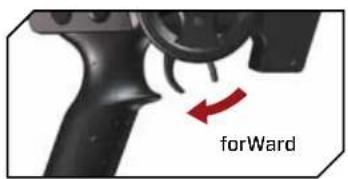


Perform a control test with the vehicle wheels off the ground. If the wheels rotate after the vehicle is powered ON, adjust the "TH. Trim" knob until they stop. To make the wheels move forward, pull the trigger. To reverse them, wait for the wheels to stop, then push the trigger. When moving forward, the wheels should maintain a straight line without any steering wheel input. If not, adjust the "ST. Trim" knob so the wheels maintain a straight line without having to turn the steering wheel.
Run Time
The single largest factor in run time is the mAh capacity of your battery pack. The larger the mAh rating, the more run time you will experience. For example: if you have a 4500mAh battery pack, you can expect close to twice the run time of a 2000mAh battery pack.
The condition of a battery pack is also an important factor in both run time and speed. The longer you run, the hotter the battery plugs can get. Check the standard plugs periodically. As batteries see more use, they will degrade in performance and capacity.
How you drive your Twin Hammers vehicle also affects your run times. If you are performing runs, going from a standstill to full speed repeatedly, you are taxing your batteries and electronics. Hard acceleration draws a lot of current from any battery and will lead to shortened run time.
If the bearings are dirty, they will cause significant drag, causing reduced run times and speed.
To improve run times, consider the following:
»Keep your vehicle clean and maintained.
»Allow more airflow to the heat sink of the ESC.
» Change the gearing to a lower ratio; this will make the electronics run cooler. To change gear ratio, use a smaller pinion gear or a larger spur gear than those originally supplied (the Twin Hammers vehicle comes with a 28-tooth pinion and a 78-tooth spur gear).
»Change to battery packs of higher mAh rating.
» Verify you are using the best charger for your batteries. See your local hobby dealer for a wide selection of compatible chargers.
2-Speed Transmission
Your Twin Hammers trail racer features a 2-speed transmission, giving you the option for fast driving or rock crawling all in one vehicle. To change between speeds:
- Press the top of the Channel 3 switch for low speed driving.
- Press the bottom of the Channel 3 switch for high speed driving.
Important: If you decide to use a transmitter other than the one included with the vehicle, limit the Channel 3 travel end points and gradually increase the travel until the vehicle shifts. Failure to limit the travel endpoints will damage the transmission servo.
Tuning, Adjusting & Maintaining Your Vehicle
After you become familiar with driving your vehicle, you may need to reset or make adjustments to the alignment. Make sure to work on a flat work space. This will enable you to easily and more quickly make both Toe-in and Camber adjustments. These adjustments should be set with the vehicle sitting at its normal ride height.
» Keep your vehicle clean by using a soft brush to remove dirt and dust.
» Look for cracks in the suspension arms and other molded parts.
» Check the beadlock wheel hardware.
» Check that all the wheel bearings are clean and lubricated.
» Using your tools, attempt to tighten all the screws and nuts.
» Verify that the Camber Links and Steering Linkage are not bent.
» Check that the Toe and Camber settings are as desired and equal.
» Remove the gear cover.
• Check the Spur gear for wear.
- Check the Pinion gear.
- Check the Slipper Pads for wear.
» Take the shocks off the vehicle and check them for leakage. It may be time to rebuild them.
» Look over all the wiring and connections for bare wire or any place that could lead to a short-circuit.
» Verify the ESC is securely mounted to the chassis.
» Verify the receiver is still securely mounted to the chassis.
» Turn on the radio. If the Green LED is off or dim, replace the 4 AA batteries in the transmitter.
Dynamite Li-Po Tazer 12T Waterproof Forward/Reverse ESC

SPECIFICATIONS
Operation: Forward/Reverse with Smart Brake, Forward Only with Brake, Crawler Mode
Input Voltage: 4-to-7-cell (4.8-8.4 volts) DC
Peak Current: 380A
Continuous Current: 3BA
Full-On Resistance: 0.0028 Ohms
Frequency: 1kHz
BEC Output: 5.6 V DC, 1 amp max.
Motor Limit: 12T
Overload Protection Thermal, Stall, Over-Voltage
Dimensions 1.57 in x 1.57 in x 1.06 in (46mm x 37mm x 28mm)
Weight 2.70 oz (76 g)
CONNECTING THE BATTERY
The Tazor 12T comes pre-wired with an EC3 connector and is compatible with most battery packs. Only use 4-cell (4.8 volt) to 7-cell (8.4 volt) sub-C size battery packs.
1. Ensure the on/off switch is in the OFF position.
2. Connect a fully charged battery pack to the ESC battery connector.
ADJUSTING THE TRANSMITTER
Refer to your transmitter's instructions for specific information on transmitter setup.
1. Set the Throttle Reversing switch to the NORMAL position. (This may need to be reversed on some brands of radios).
2. Set the Throttle Trim to the CENTER position. 3. Set the Throttle Exponential to MINIMUM or ZERO. 4. Set the ATV to 100%. 5. If your transmitter has an adjustable trigger (or stick) position, move it to the 70/30 position.
FACTORY DEFAULT SETTINGS
Battery Chemistry Type - Li-Po
ESC Running Mode - Forward/Reverse with Smart Brake
TRANSMITTER CONTROLLED PROGRAMMING
1. Power on the transmitter and set the transmitter's throttle endpoint travel to maximum and the throttle trim to the center position. 2. Hold the throttle trigger at the maximum forward position, then power on the ESC. 3. Continue holding the throttle trigger at the maximum forward position until a beep sounds and both red and green LEDs flash, then release the throttle to neutral position. 4. The ESC is now in programming mode. The ESC will cycle through its programmable features in this order: a. Green LED only: Change Battery Chemistry Type: Ni-MH or Li-Po. b. Red LED only: Transmitter/ESC Endpoint Calibration. c. Red + Green LED: Change ESC Running Mode: Forward/Reverse with Smart Brake or Forward Only with Brake or Crawler Mode.
5. Move the throttle trigger to maximum forward position and back to neutral position at A, B, or C in order to execute the setting task.
a. Change Battery Chemistry Type: Ni-MH or Li-Po
• The respective LED will indicate the current battery type for 4 seconds: - Solid Green LED: Ni-MH - Solid Red LED: Li-Po - Move the throttle trigger to full throttle and return to neutral within the 4 seconds. A beep will sound and the respective LED will indicate the updated battery type. • To change back to the previous battery type, repeat the step above within 4 seconds of the beep. • Both the red and green LEDs will flash 3 times with 3 beeps. • Power OFF the ESC and then power ON the ESC to return to normal operation.
b. Transmitter/ESC Endpoint Calibration
- After executing the setting task, the green LED will flash as you release the throttle trigger to neutral. Once neutral is reached, a beep will sound and the green LED will glow solid for 1 second. The red LED will begin to flash.
- Move the throttle trigger to full throttle and hold it until a beep sounds and the red LED glows solid for 1 second. Release the throttle trigger to neutral and the red LED will glow solid while the green LED will begin to flash.
- Move the throttle trigger to full brake/reverse and hold until a beep sounds and the green LED glows solid.
- Release the throttle trigger to neutral. Both red and green LEDs will flash 3 times with 3 beeps.

become extremely hot when in use, which could lead to burns.
FEATURES
» Li-Po, Ni-MH/Ni-Cd compatible » 3 user selectable modes—Forward/reverse, Forward-only race, and Crawler » High-power FET control with proportional forward and reverse » High frequency design delivers smooth speed transition » Thermal Overload Protection prevents damage due to over-current conditions » Pre-wired with ESC® battery plug and bullet-style motor connectors » Designed to operate with stock motors (12 turns or higher) » Waterproof
*Notice: Crawler mode is for use on rocky surfaces only. Do not use this mode with your 1/10-scale Twin Hammers vehicle on any other surface, especially pavement. Doing so may damage the vehicle.
SMART BRAKE
When the throttle is changed from Forward to Reverse or Reverse to Forward, the ESC will brake instead of reversing the motor immediately. The ESC will remain in brake mode unless the throttle is returned to the neutral/stop position for a short time.
Troubleshooting Guide
Many questions are the result of simple user errors or minor adjustments that are easily addressed. If after reading below you cannot resolve your problem, contact the appropriate Horizon product support center.
• Power OFF the ESC and then power ON the ESC to return to normal operation.
| OPERATION | LED STATUS | |
| WARNING THE THROTTLE POSITION | POSITION SET | |
| Neutral Flashing Green | Solid Green (1 second) | |
| Forward Flashing Red Solid Red (1 second) | ||
| Full Brake/Reverse Solid Red / Flashing Green Solid Green (1 second) followed by Red and Green flashing 3x | ||
| Change ESC Running Mode: Forward/Reverse with Smart Brake Forward Only with Brake or Crawler ModeThe green LED will indicate the currently selected ESC running mode for 4 seconds:- Green LED Solid Forward/Reverse with Smart Brake- Green LED Flashing Forward Only with Brake-Red + Green LED Solid Crawler Mode* | Move the throttle trigger to full throttle within the 4 seconds to select the next ESC mode. A beep will sound and the green LED will indicate the new ESC running mode.To select the next mode, repeat the step above within 4 seconds of the beep.Both red and green LEDs will flash 3 times with 3 beeps.Power OFF the ESC and then power on the ESC to return to normal operation | At any time that the ESC is powered and the transmitter is at neutral, the green LED will indicate the current running mode:- Green LED Solid Forward/Reverse with Smart Brake- Green LED Flashing Forward Only with Brake-Red + Green LED Solid Crawler Mode* |
PROBLEM POSSIBLE CAUSE SOLUTION
| Vehicle does not operate | »Battery not charged or connected»ESC switch not ON»Transmitter not ON or low battery | »Charge battery/connect»Turn ON ESC switch»Turn ON/replace batteries |
| Motor runs but rear wheels don't move | »Pinion not meshing with spur gear»Pinion spinning on motor shaft»Slipper too loose»Transmission gears stripped»Drive pin broken | »Adjust pinion/spur mesh»Replace pinion gear on motor»Check and adjust slipper»Replace transmission gears»Check and replace drive pin |
| Steering does not work | »Servo plug not in receiver properly»Servo gears or motor damaged | »Check if connected/all the way»Replace or repair servo |
| ProBleM PoSSiBle cauSe Solution | ||
| Won't turn in one direction | » Servo gears damaged | » Replace servo |
| Motor does not run | »Motor plugs loose»Motor wire broken»ESC damaged | »Plug in completely»Repair or replace as needed»Contact Horizon Hobby Product Support |
| ESC gets hot | »Motor over-geared»Driveline bound up | »Use smaller pinion or larger spur gear on motor»Check wheels, suspension and transmission for binding |
| Poor run time and/or sluggish acceleration | »Ni-MH pack not fully charged»Charger not allowing full charge»Slipper slipping too much»Motor worn out»Driveline bound up | »Recharge battery»Try another charger»Check/adjust slipper»Replace motor»Check wheels, transmission for binding |
| Poor range and/or glitching | »Transmitter batteries low»Vehicle battery low»Loose plugs or wires | »Check and replace»Recharge or replace»Check all wire connections and plugs |
| Slipper won't adjust | » Spur gear face worn out | » Replace spur gear and adjust slipper |
Limited Warranty
What this Warranty Covers
Horizon Hobby, Inc. ("Horizon") warrants to the original purchaser that the product purchased (the "Product") will be free from defects in materials and workmanship at the date of purchase.
What is Not Covered
This warranty is not transferable and does not cover (i) cosmetic damage, (ii) damage due to acts of God, accident, misuse, abuse, negligence, commercial use, or due to improper use, installation, operation or maintenance, (iii) modification of or to any part of the Product, (iv) attempted service by anyone other than a Horizon Hobby authorized service center, (v) Product not purchased
from an authorized Horizon dealer, or (vi) Product not compliant with applicable technical regulations.
OTHER THAN THE EXPRESS WARRANTY ABOVE, HORIZON MAKES NO OTHER WARRANTY OR REPRESENTATION, AND HEREBY DISCLAIMS ANY AND ALL IMPLIED WARRANTIES, INCLUDING, WITHOUT LIMITATION, THE IMPLIED WARRANTIES OF NON-INFRINGEMENT, MERCHANTABILITY AND FITNESS FOR A PARTICULAR PURPOSE. THE PURCHASER ACKNOWLEDGES THAT THEY ALONE HAVE DETERMINED THAT THE PRODUCT WILL SUITABLY MEET THE REQUIREMENTS OF THE PURCHASER'S INTENDED USE.
Purchaser's Remedy
Horizon's sole obligation and purchaser's sole and exclusive remedy shall be that Horizon will, at its option, either (i) service, or (ii) replace, any Product determined by Horizon to be defective. Horizon reserves the right to inspect any and all Product(s) involved in a warranty claim. Service or replacement decisions are at the sole discretion of Horizon. Proof of purchase is required for all warranty claims.
SERVICE OR REPLACEMENT AS PROVIDED UNDER THIS WARRANTY IS THE PURCHASER'S SOLE AND EXCLUSIVE REMEDY.
Limitation of Liability
HORIZON SHALL NOT BE LIABLE FOR SPECIAL, INDIRECT, INCIDENTAL OR CONSEQUENTIAL DAMAGES, LOSS OF PROFITS OR PRODUCTION OR COMMERCIAL LOSS IN ANY WAY, REGARDLESS OF WHETHER SUCH CLAIM IS BASED IN CONTRACT, WARRANTY, TORT, NEGLIGENCE, STRICT LIABILITY OR ANY OTHER THEORY OF LIABILITY, EVEN IF HORIZON HAS BEEN ADVISED OF THE POSSIBILITY OF SUCH DAMAGES. Further, in no event shall the liability of Horizon exceed the individual price of the Product on which liability is asserted. As Horizon has no control over use, setup, final assembly, modification or misuse, no liability shall be assumed nor accepted for any resulting damage or injury. By the act of use, setup or assembly, the user accepts all resulting liability. If you are the purchaser or user are not prepared to accept the liability associated with the use of the Product, purchaser is advised to return the Product immediately in now and unused condition to the place of purchase.
Law
These terms are governed by Illinois law (without regard to conflict of law principals). This warranty gives you specific legal rights, and you may also have other rights which vary from state to state. Horizon reserves the right to change or modify this warranty at any time without notice.
WARRANTY SERVICES
Questions, Assistance, and Repairs
Your local hobby store and/or place of purchase cannot provide warranty support or service. Once assembly, setup or use of the Product has been started, you must contact your local distributor or Horizon directly. This will enable Horizon to better answer your questions and service you in the event that you may need any assistance. For questions or assistance, please visit our website at www.horizonhobby.com, submit a Product Support Inquiry, or call 877.504.0233 toll free to speak to a Product Support representative.
Inspection or Services
If this Product needs to be inspected or serviced and is compliant in the country you live and use the Product in, please use the Horizon Online Service Request submission process found on our website or call Horizon to obtain a Return Merchandise Authorization (RMA) number. Pack the Product securely using a shipping carton. Please note that original boxes may be included, but are not designed to withstand the rigors of shipping without additional protection. Ship via a carrier that provides tracking and insurance for lost or damaged parcels, as Horizon is not responsible for merchandise until it arrives and is accepted at our facility. An Online Service Request is available at http://www.horizonhobby.com/content/_service-center_render-service-center. If you do not have Internet access, please contact Horizon Product Support to obtain a RMA number along with instructions for submitting your product for service. When calling Horizon, you will be asked to provide your complete name, street address, email address and phone number where you can be reached during business
hours. When sending product into Horizon, please include your RMA number, a list of the included items, and a brief summary of the problem. A copy of your original sales receipt must be included for warranty consideration. Be sure your name, address, and RMA number are clearly written on the outside of the shipping carton.
NOTICE: Do not ship Li-Po batteries to Horizon. If you have any issue with a Li-Po battery, please contact the appropriate Horizon Product Support office.
Warranty Requirements
For Warranty consideration, you must include your original sales receipt verifying the proof-of-purchase date. Provided warranty conditions have been met, your Product will be serviced or replaced free of charge. Service or replacement decisions are at the sole discretion of Horizon.
Contact Information
| country of purchase | horizon hoBBy addreSS Phone nuMBer / eMail addreSS | ||
| United States of America | Horizon Service Center (Electronics and engines) | 4105 Fieldstone RdChampaign, Illinois61822 USA | 877-504-0233productsupport@horizonhobby.com |
| Horizon Product Support | |||
| United Kingdom | Horizon Hobby Limited Units 1-4 Ployters RdStaple Tye, Harlow, EssexCM18 7NSUnited Kingdom | +44 (0) 1279 641 097sales@horizonhobby.co.uk | |
| Germany Horizon Technischer Service | Christian-Junge-Straße 125337 Elmshorn | +49 (0) 4121 2655 100service@horizonhobby.do | |
| France Horizon Hobby SAS 11 Rue Georges Charpak77127 Lieussaint | +33 (0) 1 60 18 34 90 | ||
| China Horizon Hobby - China Room 506 | No. 97 Changshou Rd.Shanghai, China 200060 | +86 (021) 5160 8868info@horizonhobby.com.cn | |
COMPLIANCE INFORMATION FOR THE EUROPEAN UNION
Non-Warranty Repairs
Should your service not be covered by warranty, service will be completed and payment will be required without notification or estimate of the expense unless the expense exceeds 50% of the retail purchase cost. By submitting the item for service you are agreeing to payment of the service without notification. Service estimates are available upon request. You must include this request with your item submitted for service. Non-warranty service estimates will be billed a minimum of 1/2 hour of labor. In addition you will be billed for return freight. Horizon accepts money orders and cashier's checks, as well as
Visa, MasterCard, American Express, and Discover cards. By submitting any item to Horizon for service, you are agreeing to Horizon's Terms and Conditions found on our website. http://www.horizonhobby.com/content/_service-center_render-service-center.
NOTICE: Horizon service is limited to Product compliant in the country of use and ownership. If non-compliant product is received by Horizon for service, it will be returned unserviced at the sole expense of the purchaser.
FCC STATEMENT
This device complies with part 15 of the FCC rules. Operation is subject to the following two conditions: (1) This device may not cause harmful interference, and (2) this device must accept any interference received, including interference that may cause undesired operation.

CAUTION: Changes or modifications not expressly approved by the party responsible for compliance could void the user's authority to operate the equipment.
This product contains a radio transmitter with wireless technology which has been tested and found to be compliant with the applicable regulations governing a radio transmitter in the 2.400GHz to 2.4835GHz frequency range.
Antenna Separation Distance
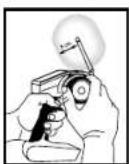
When operating your Spektrum transmitter, please be sure to maintain a separation distance of at least 5 cm between your body (excluding fingers, hands, wrists, ankles and feet) and the antenna to meet RF exposure safety requirements as determined by FCC regulations.
The following illustrations show the approximate 5 cm RF exposure area and typical hand placement when operating your Spektrum transmitter.

| AT | BE | BG | CZ | CY | DE | DK |
| ES | FI | FR | GR | HU | IE | IT |
| LT | LU | LV | MT | NL | PL | PT |
| RO | SE | SI | SK | UK |
Declaration of Conformity
(in accordance with ISO/IEC 17050-1)
No. HH2012101102
Product(s): VTR Twin Hammers 1.9 Rock Racer RTR 1/10th Scale
Item Number(s): VTR03000
Equipment class: 2
The object of declaration described above is in conformity with the requirements of the specifications listed below, following the provisions of the European R&TTE directive 1999/5/EC, EMC Directive 2004/108/EC and LVD Directive 2006/95/EC.
EN 300-328 V1.7.1:2006
EN 301 409-1 V1.7.1:2006
EN 301 489-17 V1.3.2:2008
EN 60950-1:2006+A12:2011
EN55022:2010
EN55024:2010
EN61000-3-2:2006 A1:2009 A2:2009
EN61000-3-3:2008
Signed for and on behalf of:
Horizon Hobby, Inc.
Champaign, IL USA
October 11, 2012

Steven A. Hall
Executive Vice President and Chief Operating Officer
International Operations and Risk Management
Horizon Hobby, Inc.

Instructions for disposal of
WEEE by users in the European Union
This product must not be disposed of with other waste. Instead, it is the user's responsibility to dispose of their waste equipment by handing it over to a designated collection point for the recycling of waste electrical and electronic equipment. The separate collection and recycling of your waste equipment at the time of disposal will help to conserve natural resources and ensure that it is recycled in a manner that protects human health and the environment. For more information about where you can drop off your waste equipment for recycling, please contact your local city office, your household waste disposal service or where you purchased the product.


- NOTICE
- MEANING OF SPECIAL LANGUAGE
- REGISTER YOUR
- VATERRA PRODUCT ONLINE
- SAFETY PRECAUTIONS AND GUIDELINES
- WATER-RESISTANT VEHICLE WITH WATERPROOF ELECTRONICS
- GENERAL PRECAUTIONS
- WET CONDITIONS MAINTENANCE
- INTRODUCTION
- QUICK START
- COMPONENTS
- REQUIRED TOOLS
- OPTIONAL TOOLS
- THE VEHICLE BATTERY
- CHARGING WARNINGS
- CHARGING THE BATTERY
- THE TRANSMITTER
- INSTALLING THE TRANSMITTER BATTERIES
- FACTORY SETTINGS OF RADIO/ESC
- CH 3 SWITCH
- INDICATOR LIGHTS
- RF MODE
- TRANSMITTER AND RECEIVER BINDING
- BINDING PROCEDURE
- RECEIVER ANTENNA
- CONTROL TEST
- RUN TIME
- TO IMPROVE RUN TIMES, CONSIDER THE FOLLOWING
- 2-SPEED TRANSMISSION
- TUNING, ADJUSTING & MAINTAINING YOUR VEHICLE
- DYNAMITE LI-PO TAZER 12T WATERPROOF FORWARD/REVERSE ESC
- SPECIFICATIONS
- CONNECTING THE BATTERY
- ADJUSTING THE TRANSMITTER
- FACTORY DEFAULT SETTINGS
- TRANSMITTER CONTROLLED PROGRAMMING
- CHANGE BATTERY CHEMISTRY TYPE: NI-MH OR LI-PO
- TRANSMITTER/ESC ENDPOINT CALIBRATION
- FEATURES
- SMART BRAKE
- TROUBLESHOOTING GUIDE
- LIMITED WARRANTY
- WHAT THIS WARRANTY COVERS
- WHAT IS NOT COVERED
- PURCHASER'S REMEDY
- LIMITATION OF LIABILITY
- LAW
- WARRANTY SERVICES
- QUESTIONS, ASSISTANCE, AND REPAIRS
- INSPECTION OR SERVICES
- WARRANTY REQUIREMENTS
- COMPLIANCE INFORMATION FOR THE EUROPEAN UNION
- NON-WARRANTY REPAIRS
- FCC STATEMENT
- ANTENNA SEPARATION DISTANCE
- DECLARATION OF CONFORMITY
- INSTRUCTIONS FOR DISPOSAL OF
- WEEE BY USERS IN THE EUROPEAN UNION
Brand : Vaterra
Model : Rock Racer
Category : Remote control toy